
README
 Mifasol
Mifasol is a self-hosted opinionated music server.
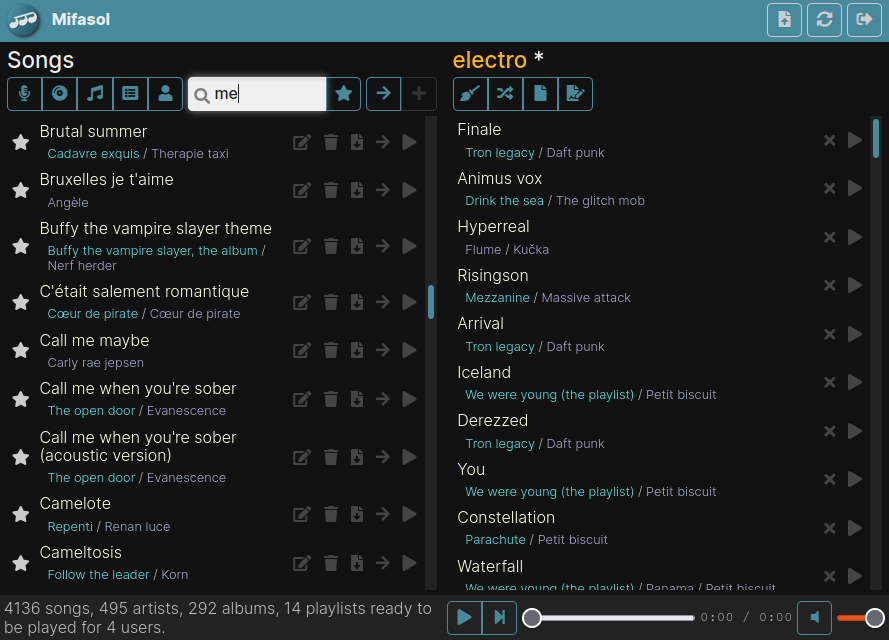
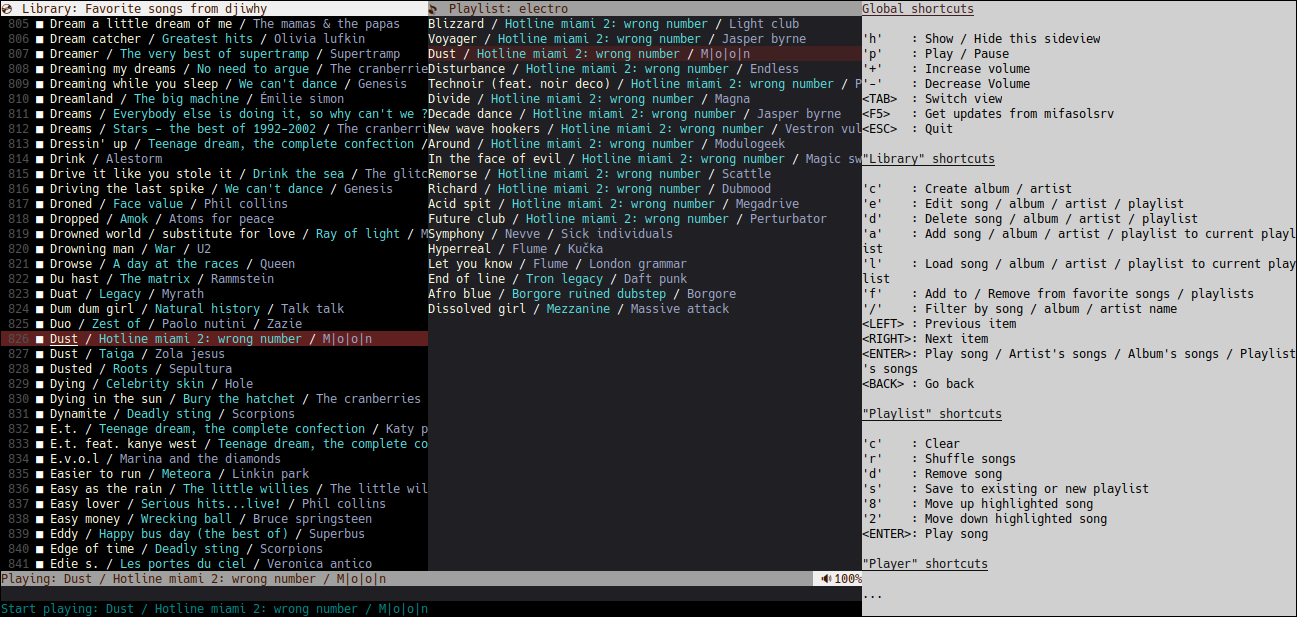
Key features
- Management of homonym artists and albums.
- Management of multi-artist songs.
- Avoiding playlists being broken updating songs, albums, or artists.
- Listening to songs
- in streaming (via web or console clients)
- or locally (via file synchronization and the music player of your choice).
- REST API for those who want to develop their own client.
- Easy to
- Install (one executable file to copy, and you are done)
- Backup (all data in one folder)
- Secure (https by default)
- Blazing fast navigation with console & web clients.
- Multiplatform.
- You can even build your own internet radio to listen to your playlists !
Mifasol is a free and open source project distributed under the permissive Apache 2.0 License.
Table of Contents
Opinionated
This software doesn’t try to satisfy the needs of everyone.
- The number of features is voluntarily limited to facilitate its maintenance.
- Only flac and mp3 formats are supported.
- When you import some music on mifasol server, song filenames are ignored, only song tags are used to link your song to an artist, an album or to know the song name.
- Once your music is imported, song tags are partially managed by mifasol server and are used to generate song filename during files sync.
- Only one-way sync is supported: song files and playlists are copied from mifasol server to client device.
Mifasol server
Installation
From prebuild binaries
Drop the dedicated mifasolsrv binary on your server and you are done.
From sources
You need:
- Linux
- Golang >= 1.25.2
- ANDROID_NDK_HOME set (to build android console client).
- GOROOT set
make release
Usage
Run
mifasolsrv run
Use Ctrl+C to gracefully stop it (and to avoid database corruption).
On first launch, mifasolsrv run will:
- Create default admin user with
mifasol/mifasolas username/password - Create a self-signed certificate valid for localhost only
- Listen requests on https://localhost:6620
Configuration
If you want to access your server with those external urls: https://mypersonaldomain.org:6630 and https://77.77.77.77:6630, you should configure mifasolsrv accordingly with:
mifasolsrv config -hostnames mypersonaldomain.org,77.77.77.77 -n 6630 -enable-ssl
More options
Run
mifasolsrv --help
mifasolsrv <COMMAND> --help
for more information.
Where is my data stored ?
Configuration file, embedded database, song and cover files are all saved into mifasolsrv config folder:
$HOME/.config/mifasolsrvon linux%LocalAppData%\mifasolsrvon windows$HOME/Library/Application Support/mifasolsrvon mac
Backup data
- Stop mifasol server
- Backup mifasolsrv config folder content
- Start mifasol server
Restore data
- Stop mifasol server
- Replace mifasolsrv config folder with content from your last backup
- Start mifasol server
Auto start and stop mifasol server with systemd on linux
-
Copy
mifasolsrvto/usr/bin -
Create systemd service file
sudo touch /etc/systemd/system/mifasolsrv.service sudo chmod 664 /etc/systemd/system/mifasolsrv.service -
Edit /etc/systemd/system/mifasolsrv.service
[Unit] Description=Mifasol server [Service] Type=simple Restart=on-failure ExecStart=/usr/bin/mifasolsrv run User=myuser Group=myuser [Install] WantedBy=multi-user.target -
Enable & start mifasol server
sudo systemctl daemon-reload
sudo systemctl enable mifasolsrv.service
sudo systemctl start mifasolsrv.service
Mifasol web client
You just have to connect to your mifasol server: https://localhost:6620
Mifasol console client
Installation
From prebuild binaries
Mifasol server embeds clients, so you just have to download the dedicated mifasolcli binary from your mifasol server: https://localhost:6620
From sources
You need golang >= 1.25.2 and
libasound2-devon linuxmingw-w64on windowsAudioToolbox.frameworkon mac
go install ./cmd/mifasolcli
Usage
Configuration
On first launch, mifasolcli try to connect to mifasol server using https://localhost:6620
(only accepting server self-signed certificate read on first connection) with mifasol/mifasol as username/password.
You can change default configuration with:
mifasolcli config -hostname <HOSTNAME> -n 6620 -u mifasol -p mifasol
NB: <HOSTNAME> should match with one of the hostnames configured on mifasol server.
Import music folder content to mifasol server
mifasolcli import [Location of music folder to import]
mifasolcli will recursively loop through specified folder to import every flac and mp3 files to mifasol server.
Sync local music folder with mifasol server's user favorite content
Prepare local music folder (one-time):
mifasolcli filesync init [Location of folder to synchronize]
Launch synchronization:
mifasolcli filesync sync [Location of folder to synchronize]
Console user interface
Run console user interface to manage and listen mifasol server content:
mifasolcli ui
Press h to display available shortcuts to navigate through the interface.
Tips:
- After a fresh server installation, use the console or web client to change the default username/password.
- Windows users should use new Windows Terminal to correctly display unicode emojis.
More options
Run
mifasolcli --help
mifasolcli <COMMAND> --help
mifasolcli <COMMAND> <SUBCOMMAND> --help
for more information.
Contributors

207 commits
Similar repos


Languages
Go
91.2%
HTML
5.8%
CSS
2.2%
README
Mifasol
Mifasol is a self-hosted opinionated music server.
Key features
- Management of homonym artists and albums.
- Management of multi-artist songs.
- Avoiding playlists being broken updating songs, albums, or artists.
- Listening to songs
- in streaming (via web or console clients)
- or locally (via file synchronization and the music player of your choice).
- REST API for those who want to develop their own client.
- Easy to
- Install (one executable file to copy, and you are done)
- Backup (all data in one folder)
- Secure (https by default)
- Blazing fast navigation with console & web clients.
- Multiplatform.
- You can even build your own internet radio to listen to your playlists !
Mifasol is a free and open source project distributed under the permissive Apache 2.0 License.
Table of Contents
Opinionated
This software doesn’t try to satisfy the needs of everyone.
- The number of features is voluntarily limited to facilitate its maintenance.
- Only flac and mp3 formats are supported.
- When you import some music on mifasol server, song filenames are ignored, only song tags are used to link your song to an artist, an album or to know the song name.
- Once your music is imported, song tags are partially managed by mifasol server and are used to generate song filename during files sync.
- Only one-way sync is supported: song files and playlists are copied from mifasol server to client device.
Mifasol server
Installation
From prebuild binaries
Drop the dedicated mifasolsrv binary on your server and you are done.
From sources
You need:
- Linux
- Golang >= 1.25.2
- ANDROID_NDK_HOME set (to build android console client).
- GOROOT set
make release
Usage
Run
mifasolsrv run
Use Ctrl+C to gracefully stop it (and to avoid database corruption).
On first launch, mifasolsrv run will:
- Create default admin user with
mifasol/mifasolas username/password - Create a self-signed certificate valid for localhost only
- Listen requests on https://localhost:6620
Configuration
If you want to access your server with those external urls: https://mypersonaldomain.org:6630 and https://77.77.77.77:6630, you should configure mifasolsrv accordingly with:
mifasolsrv config -hostnames mypersonaldomain.org,77.77.77.77 -n 6630 -enable-ssl
More options
Run
mifasolsrv --help
mifasolsrv <COMMAND> --help
for more information.
Where is my data stored ?
Configuration file, embedded database, song and cover files are all saved into mifasolsrv config folder:
$HOME/.config/mifasolsrvon linux%LocalAppData%\mifasolsrvon windows$HOME/Library/Application Support/mifasolsrvon mac
Backup data
- Stop mifasol server
- Backup mifasolsrv config folder content
- Start mifasol server
Restore data
- Stop mifasol server
- Replace mifasolsrv config folder with content from your last backup
- Start mifasol server
Auto start and stop mifasol server with systemd on linux
-
Copy
mifasolsrvto/usr/bin -
Create systemd service file
sudo touch /etc/systemd/system/mifasolsrv.service sudo chmod 664 /etc/systemd/system/mifasolsrv.service -
Edit /etc/systemd/system/mifasolsrv.service
[Unit] Description=Mifasol server [Service] Type=simple Restart=on-failure ExecStart=/usr/bin/mifasolsrv run User=myuser Group=myuser [Install] WantedBy=multi-user.target -
Enable & start mifasol server
sudo systemctl daemon-reload
sudo systemctl enable mifasolsrv.service
sudo systemctl start mifasolsrv.service
Mifasol web client
You just have to connect to your mifasol server: https://localhost:6620
Mifasol console client
Installation
From prebuild binaries
Mifasol server embeds clients, so you just have to download the dedicated mifasolcli binary from your mifasol server: https://localhost:6620
From sources
You need golang >= 1.25.2 and
libasound2-devon linuxmingw-w64on windowsAudioToolbox.frameworkon mac
go install ./cmd/mifasolcli
Usage
Configuration
On first launch, mifasolcli try to connect to mifasol server using https://localhost:6620
(only accepting server self-signed certificate read on first connection) with mifasol/mifasol as username/password.
You can change default configuration with:
mifasolcli config -hostname <HOSTNAME> -n 6620 -u mifasol -p mifasol
NB: <HOSTNAME> should match with one of the hostnames configured on mifasol server.
Import music folder content to mifasol server
mifasolcli import [Location of music folder to import]
mifasolcli will recursively loop through specified folder to import every flac and mp3 files to mifasol server.
Sync local music folder with mifasol server's user favorite content
Prepare local music folder (one-time):
mifasolcli filesync init [Location of folder to synchronize]
Launch synchronization:
mifasolcli filesync sync [Location of folder to synchronize]
Console user interface
Run console user interface to manage and listen mifasol server content:
mifasolcli ui
Press h to display available shortcuts to navigate through the interface.
Tips:
- After a fresh server installation, use the console or web client to change the default username/password.
- Windows users should use new Windows Terminal to correctly display unicode emojis.
More options
Run
mifasolcli --help
mifasolcli <COMMAND> --help
mifasolcli <COMMAND> <SUBCOMMAND> --help
for more information.
Similar repos
Contributors
207 commits
Languages
Go
91.2%
HTML
5.8%
CSS
2.2%