A hackable AI home assistant platform
Jupyter Notebook
1,730
27 commits
updated Apr 13, 2026
Deprecated - see updated version onju-v2
💫 DEMO's
A hackable AI home assistant platform using the Google Nest Mini (2nd gen) form factor, consisting of:
(This repo focuses on the experimental conversational LLM aspect to replicate some functionality shown in the demos, and not as a full fledged replacement to a home assistant. This is not being actively maintained, but I've released all source code and design files for anyone else to pick up from here.)
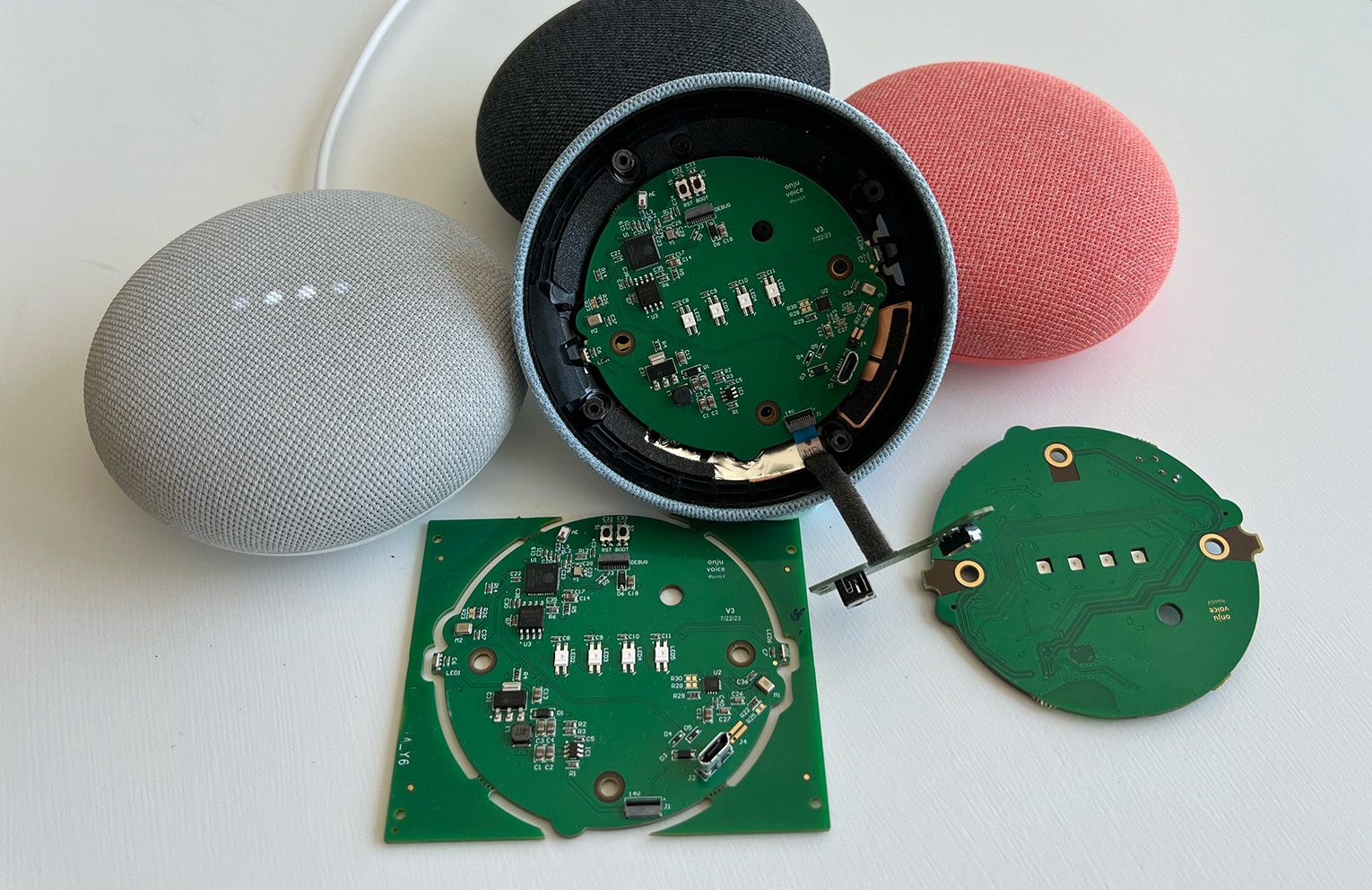
This repo contains firmware, server code and some example applications, intended to be as accessible as possible for getting up and running i.e.:
Not included:
richThese are things I didn't get time to implement but I believe would be invaluable and pretty achievable
Ensure you can install Whisper and run at least the base model, following any debugging steps they have if not. If you can get past that, it should be as simple as:
cd server
pip install -r requirements.txt
Adjust settings in the config.yaml, and tweak aspects such as how much silence is needed to start processing to trade-off snappiness vs avoiding cutting off the user.
Add your Elevenlabs token to credentials.json and ensure you have a cloned voice in your account that you set in the config.yaml under elevenlabs_default_voice
You'll also need a greeting WAV set in config.yaml under greeting_wav, that will be sent to devices on connecting to the WiFi. This is up to you to record or procure (e.g.)
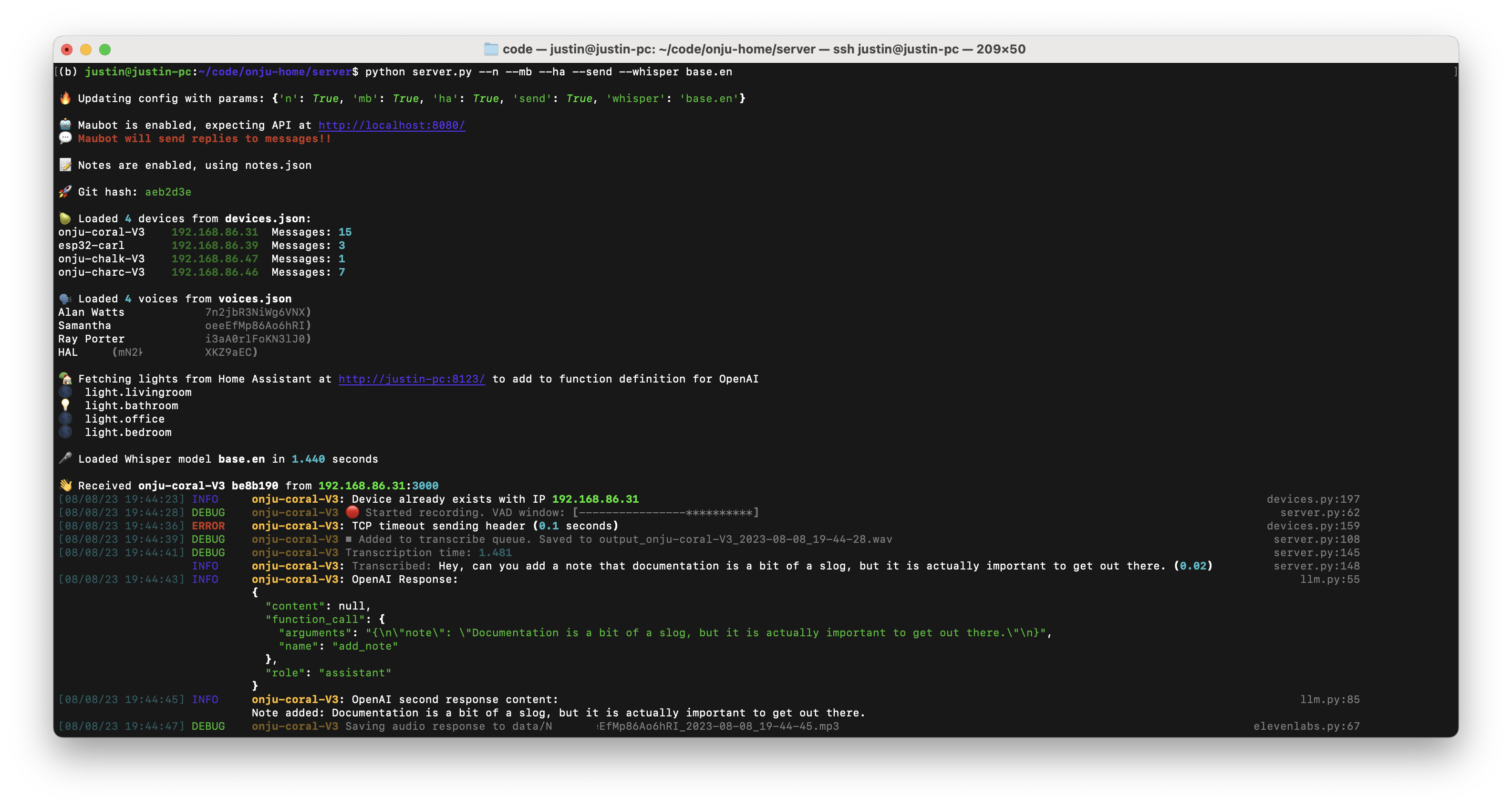
A small subset of the config parameters can be set as optional arguments when running the script. For e.g. the following will run the server with note-taking, Home Assistant, Maubot, real sending of messages enabled (a safe guard disabled by default), and a smaller English only Whisper model for transcription.
python server.py --n --ha --mb --send --whisper base.en
I recommend setting this up on the same server or one that is always plugged in on your network, following the Docker Compose instructions
Then go through the onboarding, setup a user, name your devices and get a Long Lived token to add to credentials.json together with the URL e.g. http://my-local-server:8123/
Follow instructions here to setup Maubot with your Beeper account. Ensure the correct URL is setup in config.yaml, set send_replies to True if your friends are forgiving of the odd mistakes, and set a footer.
Don’t have Beeper yet and can’t wait? Try setup a Matrix bridge yourself and a custom function definition for OpenAI function calling (and share how you did it!)
Following this example you can also integrate e-mail.
Irrespective of what you use for development, the quickest & least error prone setup for building & flashing firmware is probably installing the Arduino IDE Software, and then using this IDE or your preference i.e. VSCode for development (Copilot)
https://espressif.github.io/arduino-esp32/package_esp32_index.json to Preferences > Additional Boards Manager URL’s)Documents/Arduino for simplicity.credentials.hbash setup-git-hash.sh to add a header with the git-hash (optional). This will then automatically update after commits, and help track the firmware that your devices are running from the server side.r to reset the device (assuming it is already booted)
Preview schematics & PCB here
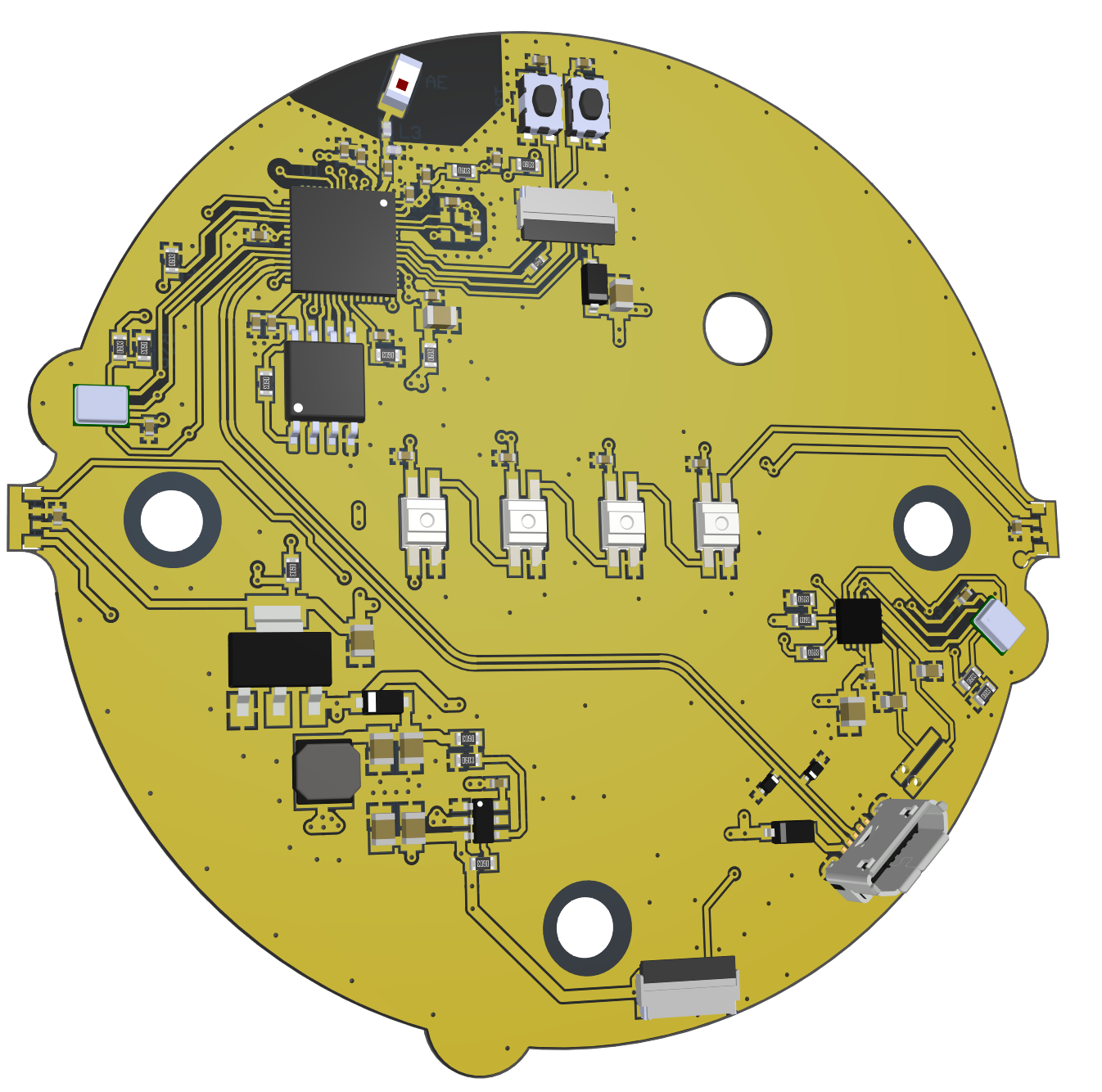
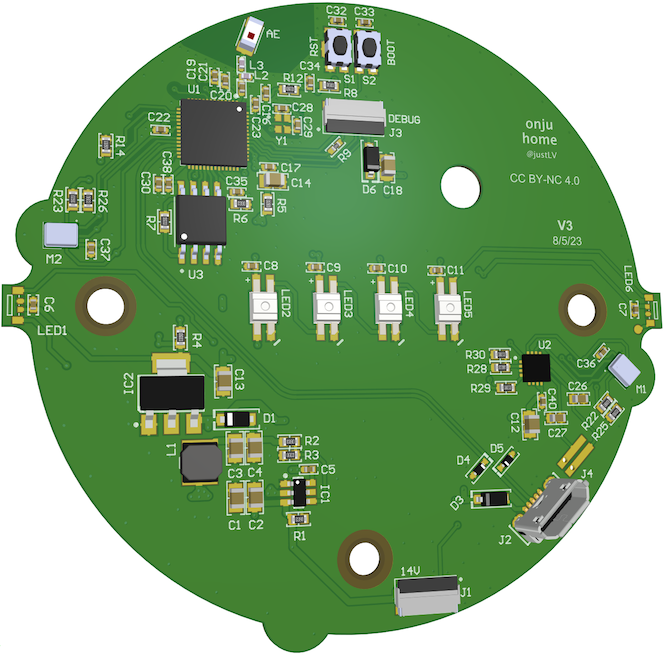
You should be able to download files, otherwise they are in the folder hardware in Altium format. Feel free to modify & improve this design and share your updates!
You can order PCBA's directly from PCBWay here. I've used a few suppliers and they are of the most reliable I've experienced for turnkey assembly at that pricepoint so I'm happy to point business their way. (Other options of selling single units, with margins, ended up forcing a pricepoint > Google Nest Mini itself, and wouldn't allow shipment into EU/UK without certification so I abandoned this)
I will be sharing more detailed instructions for replacement.
Replacement gaskets for the microphone & LED's can be made using adhesive foam and a punch set) for example
While this replicates the interfaces of the Google Nest Mini, don’t expect this to be a 1:1 replacement, for e.g. it is not intended to be a music playback device (although there is probably no reason it couldn’t be developed to be used as such). It’s also worth re-iterating that like the Google Nest Mini, this requires a separate server, although this can be in your home running local models instead of in a Google datacenter. The original is well tested, maintained, certified and works out the box, while this is essentially a dev board with some neat examples for you to build on top of
Fortunately they’re still being sold, you may find deals for <$40 which is pretty good for the quality of speaker and form factor. I picked up quite a few from eBay, just make sure you get the 2nd gen.
The adventurous can get try replacement shells from AliExpress for e.g., but you’ll still need a base, power input, mute switch, speaker & mount, capacitive touch panels, and replacement gaskets etc. A hero out there could design a custom enclosure that fits an off-the-shelf speaker.
a) if you can commit to making significant contributions to the codebase and/or major contributions to the board design or RF review, we may be able to make early samples available
b) if you don’t need the form factor, don’t mind rolling up my sleeves, and have some HW experience, you can breadboard it out with readily available components until you can get your hands on an order. Here are the components that should be able to get a demo running (🌸 Adafruit link for convenience but shop around wherever you’d like)
You'll need to update the custom_boards.h with your pin mapping
3,930 followers · starred Nov 2023
42 followers · starred Sep 2024
365 followers · starred Jan 2026
404 followers · starred Dec 2024
A hackable AI home assistant platform
Jupyter Notebook
1,730
27 commits
updated Apr 13, 2026
Deprecated - see updated version onju-v2
💫 DEMO's
A hackable AI home assistant platform using the Google Nest Mini (2nd gen) form factor, consisting of:
(This repo focuses on the experimental conversational LLM aspect to replicate some functionality shown in the demos, and not as a full fledged replacement to a home assistant. This is not being actively maintained, but I've released all source code and design files for anyone else to pick up from here.)
This repo contains firmware, server code and some example applications, intended to be as accessible as possible for getting up and running i.e.:
Not included:
richThese are things I didn't get time to implement but I believe would be invaluable and pretty achievable
Ensure you can install Whisper and run at least the base model, following any debugging steps they have if not. If you can get past that, it should be as simple as:
cd server
pip install -r requirements.txt
Adjust settings in the config.yaml, and tweak aspects such as how much silence is needed to start processing to trade-off snappiness vs avoiding cutting off the user.
Add your Elevenlabs token to credentials.json and ensure you have a cloned voice in your account that you set in the config.yaml under elevenlabs_default_voice
You'll also need a greeting WAV set in config.yaml under greeting_wav, that will be sent to devices on connecting to the WiFi. This is up to you to record or procure (e.g.)
A small subset of the config parameters can be set as optional arguments when running the script. For e.g. the following will run the server with note-taking, Home Assistant, Maubot, real sending of messages enabled (a safe guard disabled by default), and a smaller English only Whisper model for transcription.
python server.py --n --ha --mb --send --whisper base.en
I recommend setting this up on the same server or one that is always plugged in on your network, following the Docker Compose instructions
Then go through the onboarding, setup a user, name your devices and get a Long Lived token to add to credentials.json together with the URL e.g. http://my-local-server:8123/
Follow instructions here to setup Maubot with your Beeper account. Ensure the correct URL is setup in config.yaml, set send_replies to True if your friends are forgiving of the odd mistakes, and set a footer.
Don’t have Beeper yet and can’t wait? Try setup a Matrix bridge yourself and a custom function definition for OpenAI function calling (and share how you did it!)
Following this example you can also integrate e-mail.
Irrespective of what you use for development, the quickest & least error prone setup for building & flashing firmware is probably installing the Arduino IDE Software, and then using this IDE or your preference i.e. VSCode for development (Copilot)
https://espressif.github.io/arduino-esp32/package_esp32_index.json to Preferences > Additional Boards Manager URL’s)Documents/Arduino for simplicity.credentials.hbash setup-git-hash.sh to add a header with the git-hash (optional). This will then automatically update after commits, and help track the firmware that your devices are running from the server side.r to reset the device (assuming it is already booted)
Preview schematics & PCB here
You should be able to download files, otherwise they are in the folder hardware in Altium format. Feel free to modify & improve this design and share your updates!
You can order PCBA's directly from PCBWay here. I've used a few suppliers and they are of the most reliable I've experienced for turnkey assembly at that pricepoint so I'm happy to point business their way. (Other options of selling single units, with margins, ended up forcing a pricepoint > Google Nest Mini itself, and wouldn't allow shipment into EU/UK without certification so I abandoned this)
I will be sharing more detailed instructions for replacement.
Replacement gaskets for the microphone & LED's can be made using adhesive foam and a punch set) for example
While this replicates the interfaces of the Google Nest Mini, don’t expect this to be a 1:1 replacement, for e.g. it is not intended to be a music playback device (although there is probably no reason it couldn’t be developed to be used as such). It’s also worth re-iterating that like the Google Nest Mini, this requires a separate server, although this can be in your home running local models instead of in a Google datacenter. The original is well tested, maintained, certified and works out the box, while this is essentially a dev board with some neat examples for you to build on top of
Fortunately they’re still being sold, you may find deals for <$40 which is pretty good for the quality of speaker and form factor. I picked up quite a few from eBay, just make sure you get the 2nd gen.
The adventurous can get try replacement shells from AliExpress for e.g., but you’ll still need a base, power input, mute switch, speaker & mount, capacitive touch panels, and replacement gaskets etc. A hero out there could design a custom enclosure that fits an off-the-shelf speaker.
a) if you can commit to making significant contributions to the codebase and/or major contributions to the board design or RF review, we may be able to make early samples available
b) if you don’t need the form factor, don’t mind rolling up my sleeves, and have some HW experience, you can breadboard it out with readily available components until you can get your hands on an order. Here are the components that should be able to get a demo running (🌸 Adafruit link for convenience but shop around wherever you’d like)
You'll need to update the custom_boards.h with your pin mapping
3,930 followers · starred Nov 2023
42 followers · starred Sep 2024
365 followers · starred Jan 2026
404 followers · starred Dec 2024