A Wayland native snapshot editing tool, inspired by Snappy on macOS
C
1,508
310 commits
updated Dec 16, 2025
A Wayland native snapshot and editor tool, inspired by Snappy on macOS. Works great with grim, slurp and sway. But can easily work with other screen copy tools that can output a final image to stdout. See below.
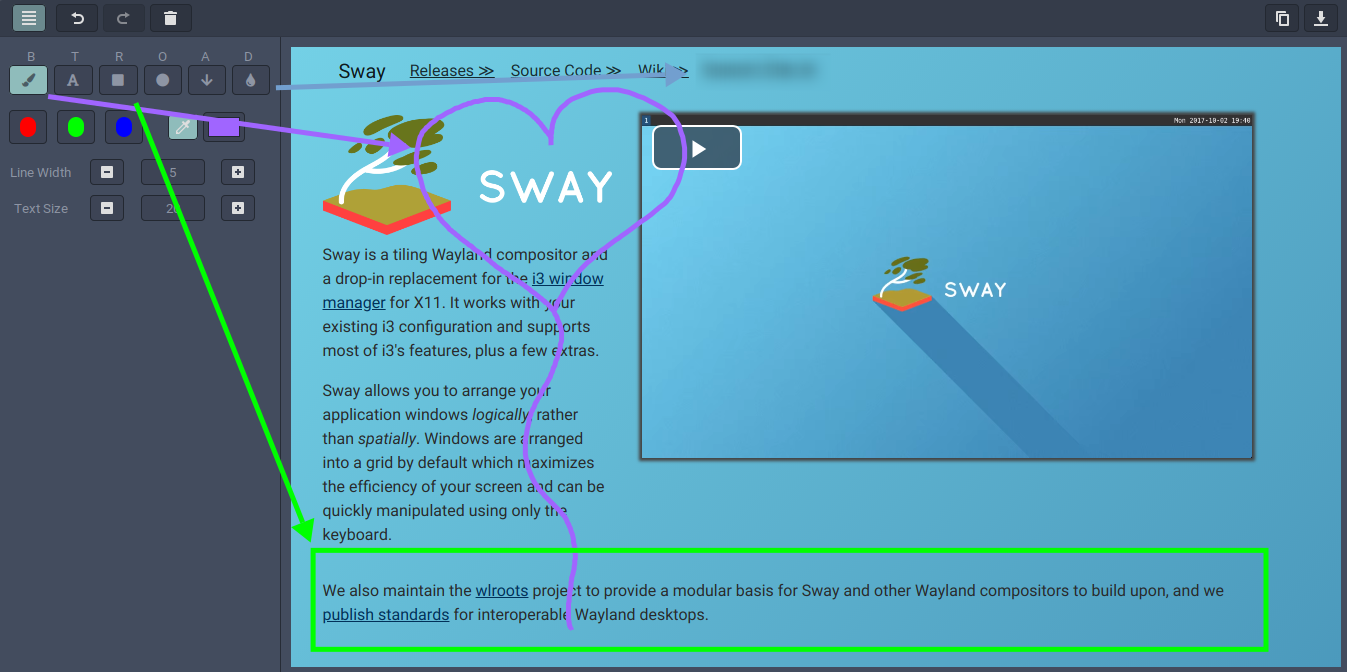
Output of grim (or any tool outputting an image file):
grim -g "$(slurp)" - | swappy -f -
Swappshot a PNG file:
swappy -f "~/Desktop/my-gnome-saved-file.png"
Print final surface to stdout (useful to pipe with other tools):
grim -g "$(slurp)" - | swappy -f - -o - | pngquant -
Grab a swappshot from a specific window under Sway, using swaymsg and jq:
grim -g "$(swaymsg -t get_tree | jq -r '.. | select(.pid? and .visible?) | .rect | "\(.x),\(.y) \(.width)x\(.height)"' | slurp)" - | swappy -f -
The config file is located at $XDG_CONFIG_HOME/swappy/config or at $HOME/.config/swappy/config.
The file follows the GLib conf format. See the man page for details. There is example config file here.
The following lines can be used as swappy's default:
[Default]
save_dir=$HOME/Desktop
save_filename_format=swappy-%Y%m%d-%H%M%S.png
show_panel=false
line_size=5
text_size=20
text_font=sans-serif
paint_mode=brush
early_exit=false
fill_shape=false
auto_save=false
custom_color=rgba(193,125,17,1)
transparent=false
transparency=50
save_dir is where swappshots will be saved, can contain env variables, when it does not exist, swappy attempts to create it first, but does not abort if directory creation failssave_filename_format: is the filename template, if it contains a date format, this will be parsed into a timestamp. Format is detailed in strftime(3). If this date format is missing, filename will have no timestampshow_panel is used to toggle the paint panel on or off upon startupline_size is the default line size (must be between 1 and 50)text_size is the default text size (must be between 10 and 50)text_font is the font used to render text, its format is pango friendlypaint_mode is the mode activated at application start (must be one of: brush|text|rectangle|ellipse|arrow|blur, matching is case-insensitive)early_exit is used to make the application exit after saving the picture or copying it to the clipboardfill_shape is used to toggle shape filling (for the rectangle and ellipsis tools) on or off upon startupauto_save is used to toggle auto saving of final buffer to save_dir upon exitcustom_color is used to set a default value for the custom colortransparency is used to set transparency of everything that is drawn during startuptransparent is used to toggle transparency during startupCtrl+b: Toggle Paint Panelb: Switch to Brushe t: Switch to Text (Editor)r s: Switch to Rectangle (Square)c o: Switch to Ellipse (Circle)a: Switch to Arrowd: Switch to Blur (d stands for droplet)R: Use Red ColorG: Use Green ColorB: Use Blue ColorC: Use Custom ColorMinus: Reduce Stroke SizePlus: Increase Stroke SizeEqual: Reset Stroke Sizef: Toggle Shape Fillingx k: Clear Paints (cannot be undone)T: Toggle TransparencyCtrl: Center Shape (Rectangle & Ellipse) based on draw startCtrl+z: UndoCtrl+Shift+z or Ctrl+y: RedoCtrl+s: Save to file (see man page)Ctrl+c: Copy to clipboardEscape or q or Ctrl+w: Quit swappywl-copy if installed and revert to gtk clipboard if not found.sudo pacman -S otf-font-awesomeInstall dependencies (on Arch, name can vary for other distros):
Optional dependencies:
wl-clipboard (to make sure the copy is saved if you close swappy)otf-font-awesome (to draw the paint icons properly)Then run:
meson setup build
ninja -C build
This section is for developers, maintainers and translators.
To add support to a new locale or when translations are updated:
src/po/LINGUAS (when new locales are added)po file (ignore and do not commit potential noise in other files):ninja -C build swappy-update-po
To rebuild the base template (should happen less often):
ninja -C build swappy-pot
See the meson documentation for details.
Pull requests are welcome. This project uses conventional commits to automate changelog generation.
We rely on standard-version which is part of the JavaScript ecosystem but works well with any project.
./script/github-release
Make sure everything is valid in the Draft release, then publish the draft.
Release tarballs are signed with this PGP key: F44D05A50F6C9EB5C81BCF966A6B35DBE9442683
MIT
(top 24 of 26)
23 followers · starred Sep 2023
122 followers · starred Oct 2024
407 followers · starred Sep 2023
202 followers · starred Jul 2020
A Wayland native snapshot editing tool, inspired by Snappy on macOS
C
1,508
310 commits
updated Dec 16, 2025
A Wayland native snapshot and editor tool, inspired by Snappy on macOS. Works great with grim, slurp and sway. But can easily work with other screen copy tools that can output a final image to stdout. See below.
Output of grim (or any tool outputting an image file):
grim -g "$(slurp)" - | swappy -f -
Swappshot a PNG file:
swappy -f "~/Desktop/my-gnome-saved-file.png"
Print final surface to stdout (useful to pipe with other tools):
grim -g "$(slurp)" - | swappy -f - -o - | pngquant -
Grab a swappshot from a specific window under Sway, using swaymsg and jq:
grim -g "$(swaymsg -t get_tree | jq -r '.. | select(.pid? and .visible?) | .rect | "\(.x),\(.y) \(.width)x\(.height)"' | slurp)" - | swappy -f -
The config file is located at $XDG_CONFIG_HOME/swappy/config or at $HOME/.config/swappy/config.
The file follows the GLib conf format. See the man page for details. There is example config file here.
The following lines can be used as swappy's default:
[Default]
save_dir=$HOME/Desktop
save_filename_format=swappy-%Y%m%d-%H%M%S.png
show_panel=false
line_size=5
text_size=20
text_font=sans-serif
paint_mode=brush
early_exit=false
fill_shape=false
auto_save=false
custom_color=rgba(193,125,17,1)
transparent=false
transparency=50
save_dir is where swappshots will be saved, can contain env variables, when it does not exist, swappy attempts to create it first, but does not abort if directory creation failssave_filename_format: is the filename template, if it contains a date format, this will be parsed into a timestamp. Format is detailed in strftime(3). If this date format is missing, filename will have no timestampshow_panel is used to toggle the paint panel on or off upon startupline_size is the default line size (must be between 1 and 50)text_size is the default text size (must be between 10 and 50)text_font is the font used to render text, its format is pango friendlypaint_mode is the mode activated at application start (must be one of: brush|text|rectangle|ellipse|arrow|blur, matching is case-insensitive)early_exit is used to make the application exit after saving the picture or copying it to the clipboardfill_shape is used to toggle shape filling (for the rectangle and ellipsis tools) on or off upon startupauto_save is used to toggle auto saving of final buffer to save_dir upon exitcustom_color is used to set a default value for the custom colortransparency is used to set transparency of everything that is drawn during startuptransparent is used to toggle transparency during startupCtrl+b: Toggle Paint Panelb: Switch to Brushe t: Switch to Text (Editor)r s: Switch to Rectangle (Square)c o: Switch to Ellipse (Circle)a: Switch to Arrowd: Switch to Blur (d stands for droplet)R: Use Red ColorG: Use Green ColorB: Use Blue ColorC: Use Custom ColorMinus: Reduce Stroke SizePlus: Increase Stroke SizeEqual: Reset Stroke Sizef: Toggle Shape Fillingx k: Clear Paints (cannot be undone)T: Toggle TransparencyCtrl: Center Shape (Rectangle & Ellipse) based on draw startCtrl+z: UndoCtrl+Shift+z or Ctrl+y: RedoCtrl+s: Save to file (see man page)Ctrl+c: Copy to clipboardEscape or q or Ctrl+w: Quit swappywl-copy if installed and revert to gtk clipboard if not found.sudo pacman -S otf-font-awesomeInstall dependencies (on Arch, name can vary for other distros):
Optional dependencies:
wl-clipboard (to make sure the copy is saved if you close swappy)otf-font-awesome (to draw the paint icons properly)Then run:
meson setup build
ninja -C build
This section is for developers, maintainers and translators.
To add support to a new locale or when translations are updated:
src/po/LINGUAS (when new locales are added)po file (ignore and do not commit potential noise in other files):ninja -C build swappy-update-po
To rebuild the base template (should happen less often):
ninja -C build swappy-pot
See the meson documentation for details.
Pull requests are welcome. This project uses conventional commits to automate changelog generation.
We rely on standard-version which is part of the JavaScript ecosystem but works well with any project.
./script/github-release
Make sure everything is valid in the Draft release, then publish the draft.
Release tarballs are signed with this PGP key: F44D05A50F6C9EB5C81BCF966A6B35DBE9442683
MIT
(top 24 of 26)
23 followers · starred Sep 2023
122 followers · starred Oct 2024
407 followers · starred Sep 2023
202 followers · starred Jul 2020