
README

Splash adds beautiful, adaptive colors to make logs easier to read.
Features
- Auto-detection of 16 popular log formats including programming language stack traces
- Mixed formats - handles multiple log formats in a single stream
- Search highlighting with string or regex patterns
- Adaptive colors that work with both light and dark terminals
- Streaming performance - processes logs in real-time
- Zero configuration - No config. Just pipe.
Screenshots
Splash supports many standard log formats and output from popular languages like go (test logs), java (exceptions), and python (tracebacks)
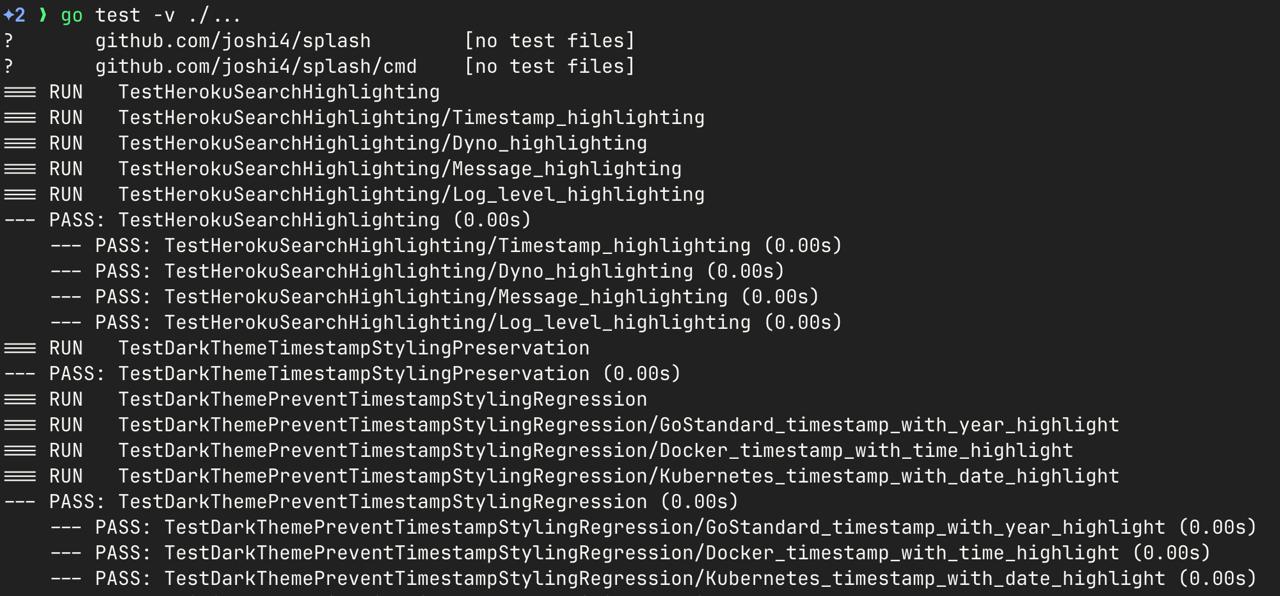 | 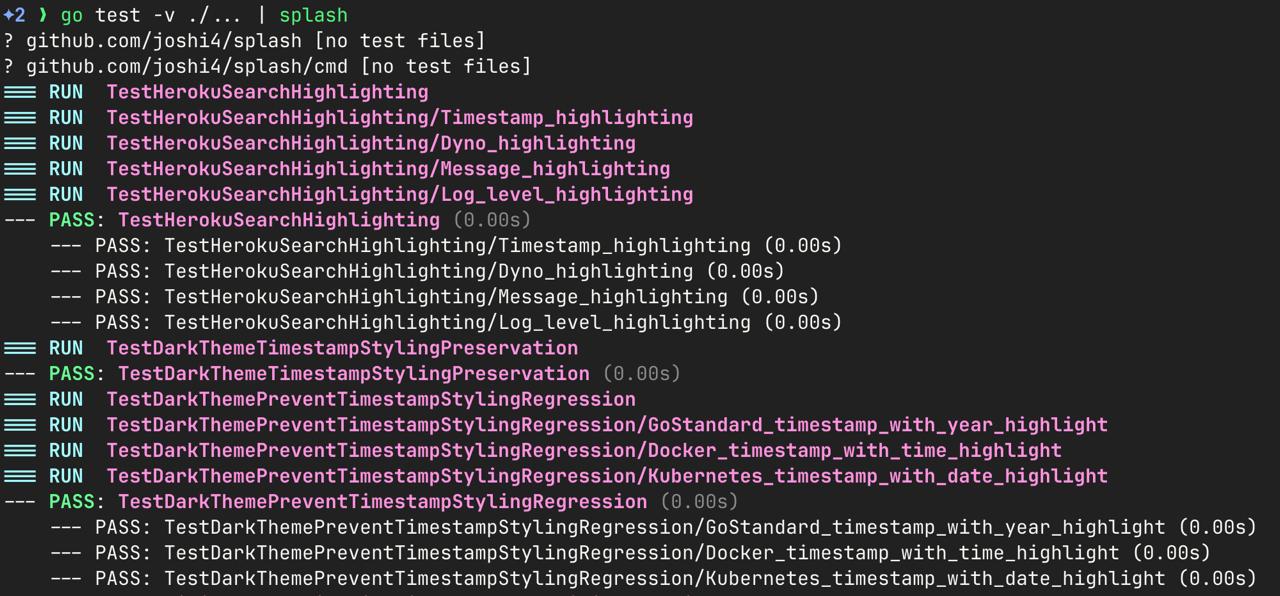 |
| go test -v ./... | go test -v ./... | splash |
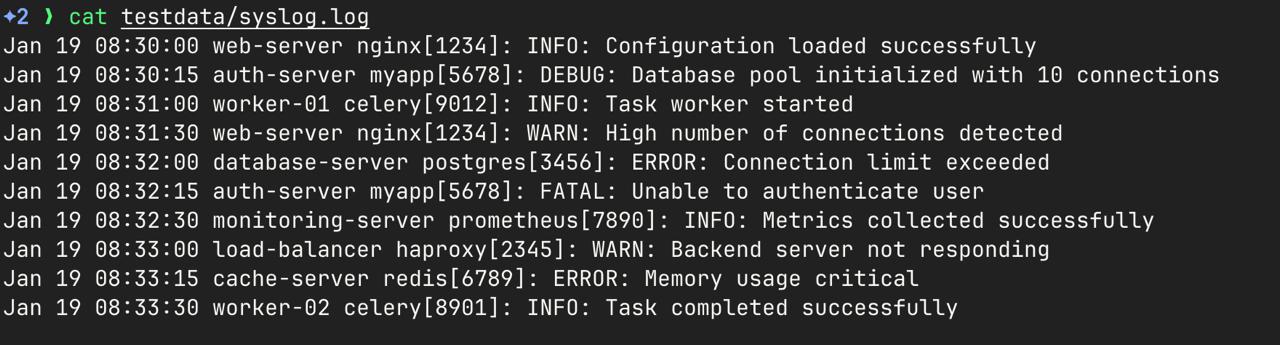 | 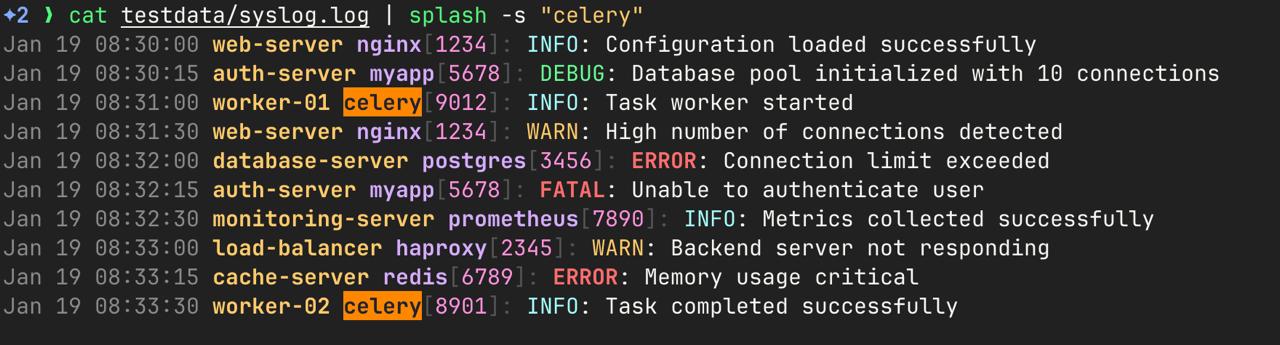 |
| Syslog Logs | Scan for strings easily with splash --search |
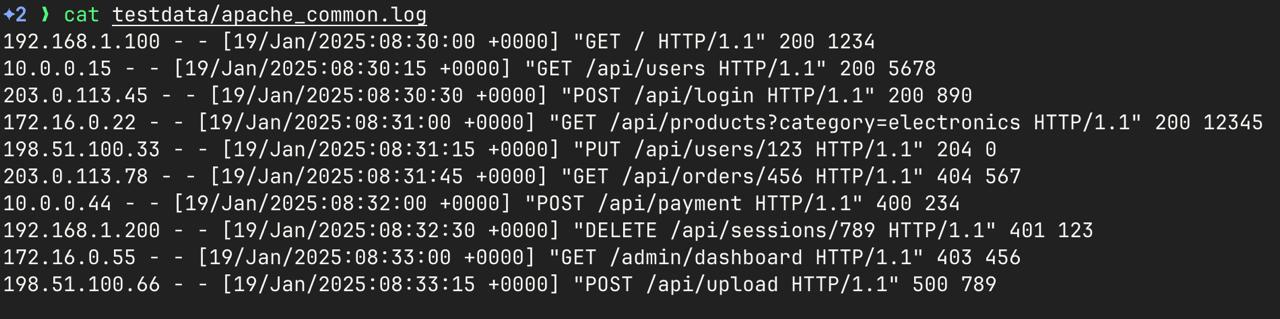 | 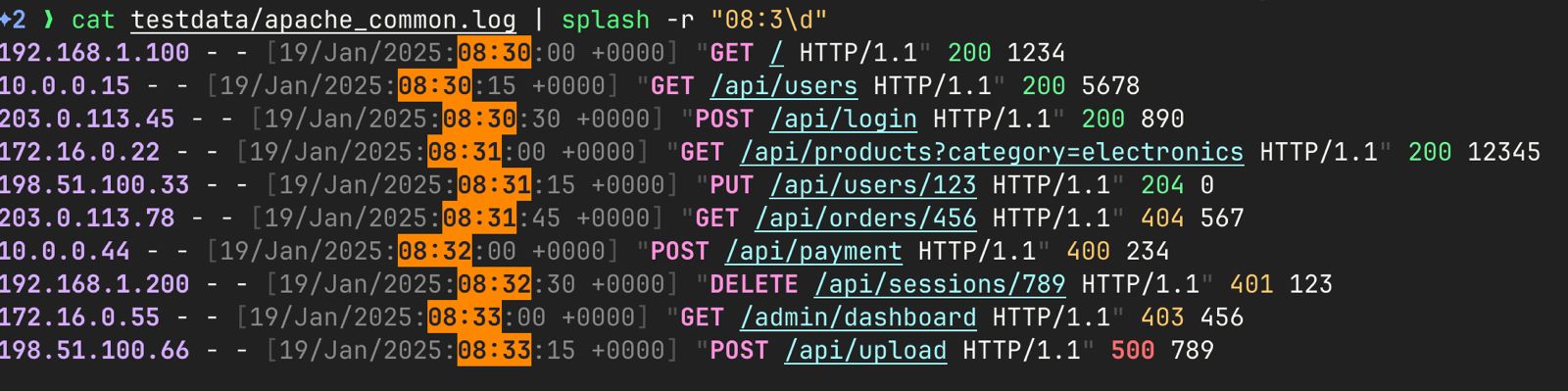 |
| Apache format logs | splash -r "08:3\d" to highlight all timestamps that match the regex pattern |
Installation
Install from Homebrew (Recommended)
brew tap joshi4/splash
brew install splash
For Linux users
curl -fsSL https://install.getsplash.sh | sh
For Go users
go install github.com/joshi4/splash@latest
Get Started
The easiest way to use Splash is to pipe any log output through it:
Basic Usage
echo '{"timestamp":"2025-01-19T10:30:00Z","level":"ERROR","message":"Connection failed","service":"api"}' | splash
Highlight errors
{ echo '{"level":"INFO","msg":"Starting up"}'; echo '{"level":"ERROR","msg":"Connection failed"}'; echo '{"level":"WARN","msg":"Slow query"}'; } | splash -s "ERROR"
Create HTTP logs and highlight error status codes
{ echo '192.168.1.1 - - [19/Jan/2025:10:30:00 +0000] "GET /api HTTP/1.1" 200 1234'; echo '192.168.1.2 - - [19/Jan/2025:10:30:01 +0000] "POST /api HTTP/1.1" 404 567'; } | splash -r "[45]\d\d"
Generate and monitor continuous output
while true; do echo "$(date -Iseconds) INFO Server is healthy"; sleep 2; done | splash
Create a mix of log formats to test detection
{
  echo 'Jan 19 10:30:00 localhost myapp[1234]: INFO Application started'
  echo '{"timestamp":"2025-01-19T10:30:01Z","level":"WARN","message":"High memory usage"}'
  echo '127.0.0.1 - - [19/Jan/2025:10:30:02 +0000] "GET /health HTTP/1.1" 200 15'
} | splash
Use with curl to monitor API responses (requires jq)
curl -s httpbin.org/json | jq -c . | splash
🔧 Command Line Options
splash [flags]

Flags:
  -s, --search string    Highlight lines containing this text
  -r, --regexp string    Highlight lines matching this regex pattern
  -h, --help            Show help information
Note: You cannot use both -s and -r flags simultaneously.
Programming Language Features
Splash provides specialized support for debugging and development outputs from popular programming languages:
| Format | Example |
|---|---|
| JavaScript Stack Traces | Error<br> at sum (/home/dev/Documents/trace.js:2:17)<br> at start (/home/dev/Documents/trace.js:11:13)<br> at Object.<anonymous> (/home/dev/Documents/trace.js:16:1) |
| Go Stack Traces | goroutine 1 [running]:<br>main.Example(0x2080c3f50, 0x2, 0x4, 0x425c0, 0x5, 0xa)<br> /Users/bill/Spaces/Go/Projects/src/github.com/goinaction/code/temp/main.go:9 +0x64 |
| Java Exceptions | Exception in thread "main" java.lang.ArithmeticException: / by zero<br> at com.example.MyClass.divide(MyClass.java:10)<br> at com.example.MyClass.calculate(MyClass.java:6) |
| Python Exceptions | Traceback (most recent call last):<br> File "example_trace.py", line 21, in <module><br> function_a()<br>ZeroDivisionError: division by zero |
| Go Test Output | === RUN TestReconcileCreatesServiceAccounts<br>--- PASS: TestName(0.00s)<br>=== RUN TestSportReconcilerCreatesNamespace |
Standard Log Formats
Splash automatically detects and colorizes these conventional log formats:
| Format | Example |
|---|---|
| JSON | {"timestamp":"2025-01-19T10:30:00Z","level":"ERROR","message":"DB failed"} |
| Logfmt | timestamp=2025-01-19T10:30:00Z level=error msg="DB failed" service=api |
| Apache Common | 127.0.0.1 - - [19/Jan/2025:10:30:00 +0000] "GET /api HTTP/1.1" 200 1234 |
| Nginx | 127.0.0.1 - - [19/Jan/2025:10:30:00 +0000] "GET /api HTTP/1.1" 200 1234 "-" "Mozilla/5.0" |
| Syslog | Jan 19 10:30:00 hostname myapp[1234]: ERROR: Database connection failed |
| Rsyslog | Aug 8 00:15:23 your-macbook-pro syslogd[347]: ASL Sender Statistics |
| Go Standard | 2025/01/19 10:30:00 ERROR: Database connection failed |
| Rails | [2025-01-19 10:30:00] ERROR -- : Database connection failed |
| Docker | 2025-01-19T10:30:00.123456789Z ERROR Database connection failed |
| Kubernetes | 2025-01-19T10:30:00.123Z 1 main.go:42] ERROR Database connection failed |
| Heroku | 2025-01-19T10:30:00+00:00 app[web.1]: ERROR Database connection failed |
Build from Source
git clone https://github.com/joshi4/splash.git
cd splash
go build
FAQ
I'm using a supported log format but it's not being detected. What should I do?
Sometimes logs are written to stderr instead of stdout. Try redirecting stderr to stdout:
your_command 2>&1 | splash
Contributing
- Fork the repository
- Create a feature branch:
git checkout -b feature-name - Make your changes and add tests
- Run tests:
go test ./... - Submit a pull request
Contributors


Similar repos


Languages
Go
98.7%
Shell
1.3%
README
Splash adds beautiful, adaptive colors to make logs easier to read.
Features
- Auto-detection of 16 popular log formats including programming language stack traces
- Mixed formats - handles multiple log formats in a single stream
- Search highlighting with string or regex patterns
- Adaptive colors that work with both light and dark terminals
- Streaming performance - processes logs in real-time
- Zero configuration - No config. Just pipe.
Screenshots
Splash supports many standard log formats and output from popular languages like go (test logs), java (exceptions), and python (tracebacks)
| |
| go test -v ./... | go test -v ./... | splash |
| |
| Syslog Logs | Scan for strings easily with splash --search |
| |
| Apache format logs | splash -r "08:3\d" to highlight all timestamps that match the regex pattern |
Installation
Install from Homebrew (Recommended)
brew tap joshi4/splash
brew install splash
For Linux users
curl -fsSL https://install.getsplash.sh | sh
For Go users
go install github.com/joshi4/splash@latest
Get Started
The easiest way to use Splash is to pipe any log output through it:
Basic Usage
echo '{"timestamp":"2025-01-19T10:30:00Z","level":"ERROR","message":"Connection failed","service":"api"}' | splash
Highlight errors
{ echo '{"level":"INFO","msg":"Starting up"}'; echo '{"level":"ERROR","msg":"Connection failed"}'; echo '{"level":"WARN","msg":"Slow query"}'; } | splash -s "ERROR"
Create HTTP logs and highlight error status codes
{ echo '192.168.1.1 - - [19/Jan/2025:10:30:00 +0000] "GET /api HTTP/1.1" 200 1234'; echo '192.168.1.2 - - [19/Jan/2025:10:30:01 +0000] "POST /api HTTP/1.1" 404 567'; } | splash -r "[45]\d\d"
Generate and monitor continuous output
while true; do echo "$(date -Iseconds) INFO Server is healthy"; sleep 2; done | splash
Create a mix of log formats to test detection
{
  echo 'Jan 19 10:30:00 localhost myapp[1234]: INFO Application started'
  echo '{"timestamp":"2025-01-19T10:30:01Z","level":"WARN","message":"High memory usage"}'
  echo '127.0.0.1 - - [19/Jan/2025:10:30:02 +0000] "GET /health HTTP/1.1" 200 15'
} | splash
Use with curl to monitor API responses (requires jq)
curl -s httpbin.org/json | jq -c . | splash
🔧 Command Line Options
splash [flags]

Flags:
  -s, --search string    Highlight lines containing this text
  -r, --regexp string    Highlight lines matching this regex pattern
  -h, --help            Show help information
Note: You cannot use both -s and -r flags simultaneously.
Programming Language Features
Splash provides specialized support for debugging and development outputs from popular programming languages:
| Format | Example |
|---|---|
| JavaScript Stack Traces | Error<br> at sum (/home/dev/Documents/trace.js:2:17)<br> at start (/home/dev/Documents/trace.js:11:13)<br> at Object.<anonymous> (/home/dev/Documents/trace.js:16:1) |
| Go Stack Traces | goroutine 1 [running]:<br>main.Example(0x2080c3f50, 0x2, 0x4, 0x425c0, 0x5, 0xa)<br> /Users/bill/Spaces/Go/Projects/src/github.com/goinaction/code/temp/main.go:9 +0x64 |
| Java Exceptions | Exception in thread "main" java.lang.ArithmeticException: / by zero<br> at com.example.MyClass.divide(MyClass.java:10)<br> at com.example.MyClass.calculate(MyClass.java:6) |
| Python Exceptions | Traceback (most recent call last):<br> File "example_trace.py", line 21, in <module><br> function_a()<br>ZeroDivisionError: division by zero |
| Go Test Output | === RUN TestReconcileCreatesServiceAccounts<br>--- PASS: TestName(0.00s)<br>=== RUN TestSportReconcilerCreatesNamespace |
Standard Log Formats
Splash automatically detects and colorizes these conventional log formats:
| Format | Example |
|---|---|
| JSON | {"timestamp":"2025-01-19T10:30:00Z","level":"ERROR","message":"DB failed"} |
| Logfmt | timestamp=2025-01-19T10:30:00Z level=error msg="DB failed" service=api |
| Apache Common | 127.0.0.1 - - [19/Jan/2025:10:30:00 +0000] "GET /api HTTP/1.1" 200 1234 |
| Nginx | 127.0.0.1 - - [19/Jan/2025:10:30:00 +0000] "GET /api HTTP/1.1" 200 1234 "-" "Mozilla/5.0" |
| Syslog | Jan 19 10:30:00 hostname myapp[1234]: ERROR: Database connection failed |
| Rsyslog | Aug 8 00:15:23 your-macbook-pro syslogd[347]: ASL Sender Statistics |
| Go Standard | 2025/01/19 10:30:00 ERROR: Database connection failed |
| Rails | [2025-01-19 10:30:00] ERROR -- : Database connection failed |
| Docker | 2025-01-19T10:30:00.123456789Z ERROR Database connection failed |
| Kubernetes | 2025-01-19T10:30:00.123Z 1 main.go:42] ERROR Database connection failed |
| Heroku | 2025-01-19T10:30:00+00:00 app[web.1]: ERROR Database connection failed |
Build from Source
git clone https://github.com/joshi4/splash.git
cd splash
go build
FAQ
I'm using a supported log format but it's not being detected. What should I do?
Sometimes logs are written to stderr instead of stdout. Try redirecting stderr to stdout:
your_command 2>&1 | splash
Contributing
- Fork the repository
- Create a feature branch:
git checkout -b feature-name - Make your changes and add tests
- Run tests:
go test ./... - Submit a pull request
Similar repos
Contributors
Languages
Go
98.7%
Shell
1.3%