
Builds simple esy native packages with minimal configuration.
Shell
112
74 commits
updated Sep 23, 2019
README
pesy: Native Reason Project from Json.
Use
package.jsonto automatically configure libraries and executables built with Dune.
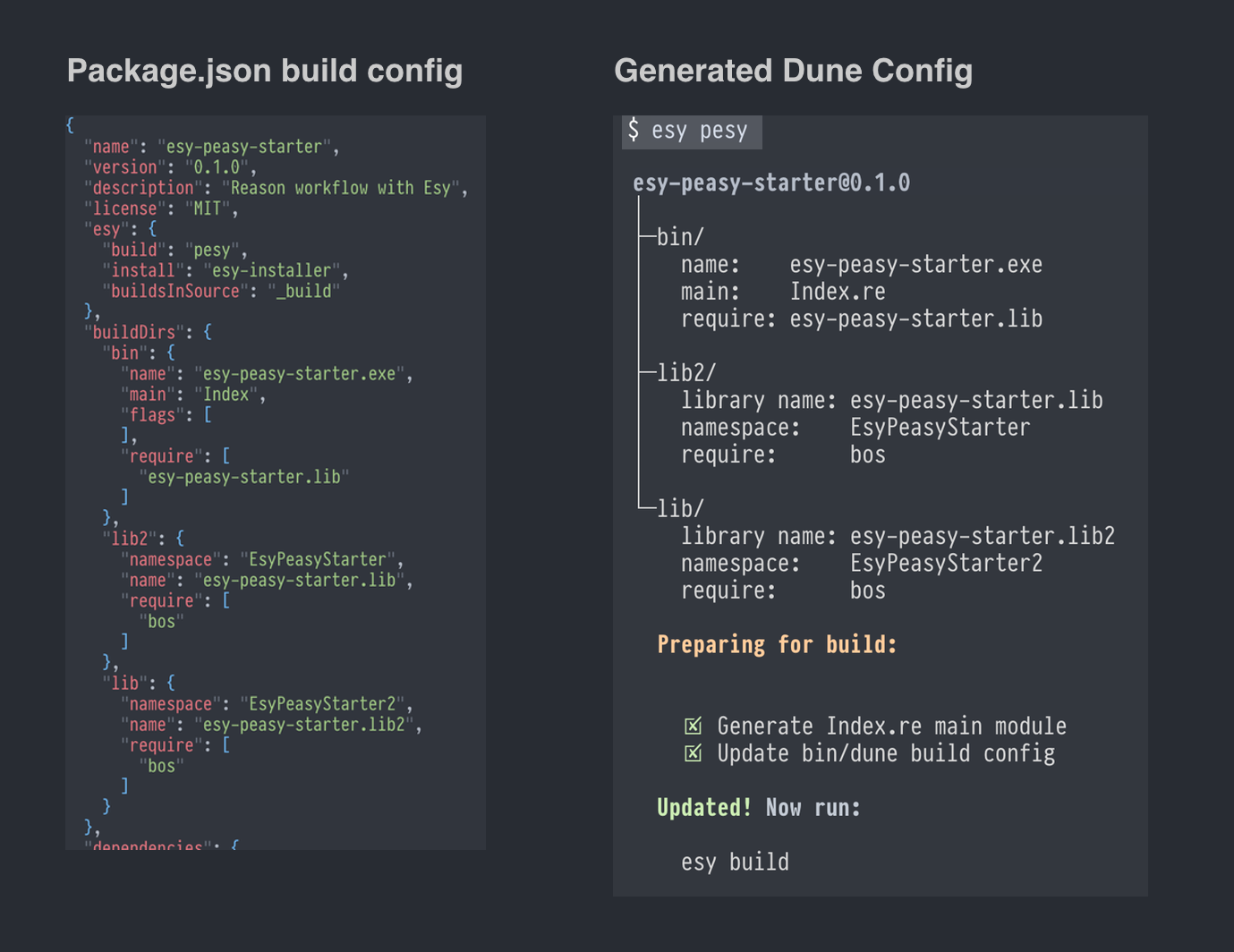
Commands:
pesy: Creates a new project in the current directory.esy: Builds the current project (just like every otheresyproject).esy pesy: Updates your build config frompackage.json(run this any time you changepackage.json).
pesy (Create New Project)
pesy global command creates esy projects instantly inside of any directory.
npm install -g pesy

cd my-project
pesy      # Hit enter to accept default name
This creates:
package.jsonwith useful dependencies/compilers..gitignoreandREADME.mdwith instructions for new contributors..circlecicontinuous integration with cache configured for ultra-fast pull requests.library/,executable/andtest/directory with starter modules.
esy (Build The Project)
Just like with any esy project, running esy from the project directory will
build it and fetch/install any dependencies you might need.
esy
Your project's
esy.buildfield is set topesy, which will runpesyto verify that all your build config is up to date before invoking the Dune build. It will let you know if you need to runesy pesyto update your build config from new changes topackage.json.
esy pesy: (Update Build Config Based On package.json)
esy pesy
If you change your buildDirs config in package.json, run this command to
update build configuration based on your latest package.json. If you forget
to run this command and try to build (by running esy) without first running
esy pesy, the build will remind you.
Configuring:
Configure your package.json's buildDirs field for multiple libraries and
executables.
buildDirs.DirectoryName means that a library or executable will be located at
./DirectoryName. The buildDirs.DirectoryName.name field determines the
public name of the library or executable. a name ending in .exe is
automatically configured as an executable, and a name of the form
packageName.anything is automatically configured to be a library with the
public name of packageName.anything.
"buildDirs": {
  "MyLibrary": {
    "name": "packageNameMyLibrary",
    "namespace": "MyLibrary",
    "require": ["console.lib"]
  },
  "Tests": {
    "name": "Tests.exe",
    "description": "Runs all the tests natively",
    "flags": ["-linkall"],
    "require": ["console.lib", "packageNameMyLibrary""]
  }
}
Supported Config
Not all config is supported. This is just a proof of concept. If you'd like to add support for more config fields, PRs are welcomed.
Binaries
| Field | Type | Description |
|---|---|---|
name | string | The name of the binary that must end with .exe. |
main | string | The name of the module that serves as the main entrypoint of the binary. |
modes | list(string) | Advanced linking modes. Each string should be of the form "(<compilation-mode> <binary-kind>)" where <compilation-mode> is one byte, native or best and <binary-kind> is one of c, exe, object, shared_object. |
Libraries
| Field | Type | Description |
|---|---|---|
name | string | The name of the library |
modes | list("byte"|"native"|"best") | Mode which should be built by default. Useful for disabling native compilation for some libraries. |
cNames | list(string) | List of strings to use as C stubs (filenames without the .c extension). |
virtualModules | list(string) | List of modules within the library that will have interfaces but no implementation, causing this library to be considered "virtual". Another library can then claim to "implement" this library by including "implements": "yourLibName". See Virtual Libraries |
implements | list(string) | List of virtual library names that this library implements. |
wrapped | `true | false` |
Both Libraries And Binaries
| Field | Type | Description |
|---|---|---|
require | list(string) | Public library names you want to be able to use. |
flags | list(string) | List of strings to pass to both native and bytecode compilers. |
ocamlcFlags | list(string) | List of flags to pass to ocamlc |
ocamloptFlags | list(string) | List of flags to pass to ocamlopt |
jsooFlags | list(string) | List of flags passed to jsoo |
preprocess | list(string) | List of preprocess options to enable. Primarily used to enable PPX |
ignoredSubdirs | list(string) | Subdirectory names to ignore (This feature is soon to be deprecated). |
includeSubdirs | "no"|"unqualified" | Default is "no", and changing to "unqualified" will compile modules at deeper directories than the place where the dune file is generated. See Dune docs |
rawBuildConfig | list(string) | Raw build config to be injected into the build config for this target. |
rawBuildConfigFooter | list(string) | Raw build config to be injected into the footer of the build config. |
Consuming New Package And Library Dependencies:
-
Add dependencies to
dependenciesinpackage.json. -
Add the name of that new dependencies library to
package.json'sbuildDirssection that you want to use the library within. For example, if your project builds a library in theexampleLib/directory, and you want it to depend on a library namedbos.topfrom an opam package namedbos, change thepackage.jsonto look like this:{ "name": "my-package", "dependencies": { "@opam/bos": "*" }, "buildDirs": { "exampleLib": { "namespace": "Examples", "name": "my-package.example-lib", "require": [ "bos.top" ] } } } -
Then run:
esy install  # Fetch dependency sources
esy pesy     # Configure the build based on package.json
esy build    # Do the build
Note: After adding/building a new dependency you can use
esy ls-libsto see which named libraries become available to you by adding the package dependency.
Tradeoffs:
esy-pesy is good for rapidly making new small executables/libraries. Once they
grow, you'll want to "eject out" of esy-pesy and begin customizing using a more
advanced build system.
Adding pesy to an existing project.
You probably don't need pesy if you have an existing project that is working
well, but to add pesy to an existing project, follow these steps:
1. Add a dependency on pesy, and configure buildDirs:
{
  "name": "my-package",
  "dependencies": {
    "pesy": "*"
  },
  "buildDirs": {
    "exampleLib": {
      "namespace": "Examples",
      "name": "my-package.example-lib",
      "require": [ "bos.top" ]
    },
    "bin": {
      "name": "my-package.exe",
      "require": [
        "my-package.lib"
      ]
    }
  }
}
2.Install and Build:
esy install
esy pesy  # Generate the project build config from json
esy build
Future Development:
The next major version of pesy is getting even simpler and better, and has
undergone a full native rewrite.
Follow the work in its new repo: https://github.com/esy/pesy.
Changes:
version 0.4.3 (6/20/2019)
Moved pesy to a devDependency of all newly created projects.
Also did the same for refmterr. This causes fewer package conflicts.
version 0.4.2 (6/16/2019)
Make new projects pin to ocaml 4.7.1004 so that it compiles with Reason,
since we're still waiting on Reason to work with 4.8.
version 0.4.0 (12/21/2018)
- Allow
buildDirsto contain deeper directories such as"path/to/my-lib": {...}". - Added support for
wrappedproperty on libraries. - Added support for
virtualModulesandimplements- properties for Dune virtual libraries. (This will only be supported if you mark your project as Dune 1.7 - not yet released). - Stopped using
ignore_subdirsin new projects, instead using(dirs (:standard \ _esy))which only works in Dune1.6.0+, so made new projects have a lower bound of Dune1.6.0. - Support new properties
rawBuildConfigwhich will be inserted at the bottom of the target being configured (library/executable).- It expects an array of strings, each string being a separate line in the generated config.
- Support new properties
rawBuildConfigFooterwhich will be inserted at the bottom of the entire Dune file for the target being configured.- It expects an array of strings, each string being a separate line in the generated config.
- Support new properties
modesfor binaries and librarieslist(string).
Contributors



Similar repos


Languages
Shell
100.0%
Builds simple esy native packages with minimal configuration.
Shell
112
74 commits
updated Sep 23, 2019
README
pesy: Native Reason Project from Json.
Use
package.jsonto automatically configure libraries and executables built with Dune.
Commands:
pesy: Creates a new project in the current directory.esy: Builds the current project (just like every otheresyproject).esy pesy: Updates your build config frompackage.json(run this any time you changepackage.json).
pesy (Create New Project)
pesy global command creates esy projects instantly inside of any directory.
npm install -g pesy

cd my-project
pesy      # Hit enter to accept default name
This creates:
package.jsonwith useful dependencies/compilers..gitignoreandREADME.mdwith instructions for new contributors..circlecicontinuous integration with cache configured for ultra-fast pull requests.library/,executable/andtest/directory with starter modules.
esy (Build The Project)
Just like with any esy project, running esy from the project directory will
build it and fetch/install any dependencies you might need.
esy
Your project's
esy.buildfield is set topesy, which will runpesyto verify that all your build config is up to date before invoking the Dune build. It will let you know if you need to runesy pesyto update your build config from new changes topackage.json.
esy pesy: (Update Build Config Based On package.json)
esy pesy
If you change your buildDirs config in package.json, run this command to
update build configuration based on your latest package.json. If you forget
to run this command and try to build (by running esy) without first running
esy pesy, the build will remind you.
Configuring:
Configure your package.json's buildDirs field for multiple libraries and
executables.
buildDirs.DirectoryName means that a library or executable will be located at
./DirectoryName. The buildDirs.DirectoryName.name field determines the
public name of the library or executable. a name ending in .exe is
automatically configured as an executable, and a name of the form
packageName.anything is automatically configured to be a library with the
public name of packageName.anything.
"buildDirs": {
  "MyLibrary": {
    "name": "packageNameMyLibrary",
    "namespace": "MyLibrary",
    "require": ["console.lib"]
  },
  "Tests": {
    "name": "Tests.exe",
    "description": "Runs all the tests natively",
    "flags": ["-linkall"],
    "require": ["console.lib", "packageNameMyLibrary""]
  }
}
Supported Config
Not all config is supported. This is just a proof of concept. If you'd like to add support for more config fields, PRs are welcomed.
Binaries
| Field | Type | Description |
|---|---|---|
name | string | The name of the binary that must end with .exe. |
main | string | The name of the module that serves as the main entrypoint of the binary. |
modes | list(string) | Advanced linking modes. Each string should be of the form "(<compilation-mode> <binary-kind>)" where <compilation-mode> is one byte, native or best and <binary-kind> is one of c, exe, object, shared_object. |
Libraries
| Field | Type | Description |
|---|---|---|
name | string | The name of the library |
modes | list("byte"|"native"|"best") | Mode which should be built by default. Useful for disabling native compilation for some libraries. |
cNames | list(string) | List of strings to use as C stubs (filenames without the .c extension). |
virtualModules | list(string) | List of modules within the library that will have interfaces but no implementation, causing this library to be considered "virtual". Another library can then claim to "implement" this library by including "implements": "yourLibName". See Virtual Libraries |
implements | list(string) | List of virtual library names that this library implements. |
wrapped | `true | false` |
Both Libraries And Binaries
| Field | Type | Description |
|---|---|---|
require | list(string) | Public library names you want to be able to use. |
flags | list(string) | List of strings to pass to both native and bytecode compilers. |
ocamlcFlags | list(string) | List of flags to pass to ocamlc |
ocamloptFlags | list(string) | List of flags to pass to ocamlopt |
jsooFlags | list(string) | List of flags passed to jsoo |
preprocess | list(string) | List of preprocess options to enable. Primarily used to enable PPX |
ignoredSubdirs | list(string) | Subdirectory names to ignore (This feature is soon to be deprecated). |
includeSubdirs | "no"|"unqualified" | Default is "no", and changing to "unqualified" will compile modules at deeper directories than the place where the dune file is generated. See Dune docs |
rawBuildConfig | list(string) | Raw build config to be injected into the build config for this target. |
rawBuildConfigFooter | list(string) | Raw build config to be injected into the footer of the build config. |
Consuming New Package And Library Dependencies:
-
Add dependencies to
dependenciesinpackage.json. -
Add the name of that new dependencies library to
package.json'sbuildDirssection that you want to use the library within. For example, if your project builds a library in theexampleLib/directory, and you want it to depend on a library namedbos.topfrom an opam package namedbos, change thepackage.jsonto look like this:{ "name": "my-package", "dependencies": { "@opam/bos": "*" }, "buildDirs": { "exampleLib": { "namespace": "Examples", "name": "my-package.example-lib", "require": [ "bos.top" ] } } } -
Then run:
esy install  # Fetch dependency sources
esy pesy     # Configure the build based on package.json
esy build    # Do the build
Note: After adding/building a new dependency you can use
esy ls-libsto see which named libraries become available to you by adding the package dependency.
Tradeoffs:
esy-pesy is good for rapidly making new small executables/libraries. Once they
grow, you'll want to "eject out" of esy-pesy and begin customizing using a more
advanced build system.
Adding pesy to an existing project.
You probably don't need pesy if you have an existing project that is working
well, but to add pesy to an existing project, follow these steps:
1. Add a dependency on pesy, and configure buildDirs:
{
  "name": "my-package",
  "dependencies": {
    "pesy": "*"
  },
  "buildDirs": {
    "exampleLib": {
      "namespace": "Examples",
      "name": "my-package.example-lib",
      "require": [ "bos.top" ]
    },
    "bin": {
      "name": "my-package.exe",
      "require": [
        "my-package.lib"
      ]
    }
  }
}
2.Install and Build:
esy install
esy pesy  # Generate the project build config from json
esy build
Future Development:
The next major version of pesy is getting even simpler and better, and has
undergone a full native rewrite.
Follow the work in its new repo: https://github.com/esy/pesy.
Changes:
version 0.4.3 (6/20/2019)
Moved pesy to a devDependency of all newly created projects.
Also did the same for refmterr. This causes fewer package conflicts.
version 0.4.2 (6/16/2019)
Make new projects pin to ocaml 4.7.1004 so that it compiles with Reason,
since we're still waiting on Reason to work with 4.8.
version 0.4.0 (12/21/2018)
- Allow
buildDirsto contain deeper directories such as"path/to/my-lib": {...}". - Added support for
wrappedproperty on libraries. - Added support for
virtualModulesandimplements- properties for Dune virtual libraries. (This will only be supported if you mark your project as Dune 1.7 - not yet released). - Stopped using
ignore_subdirsin new projects, instead using(dirs (:standard \ _esy))which only works in Dune1.6.0+, so made new projects have a lower bound of Dune1.6.0. - Support new properties
rawBuildConfigwhich will be inserted at the bottom of the target being configured (library/executable).- It expects an array of strings, each string being a separate line in the generated config.
- Support new properties
rawBuildConfigFooterwhich will be inserted at the bottom of the entire Dune file for the target being configured.- It expects an array of strings, each string being a separate line in the generated config.
- Support new properties
modesfor binaries and librarieslist(string).
Similar repos
Contributors
Languages
Shell
100.0%