
Official download kit of the BecomingLit dataset from the NeurIPS 2025 paper: 'BecomingLit: Relightable Gaussian Avatars with Hybrid Neural Shading'
See the codeREADME
BecomingLit Dataset
Paper | Video | Project Page
This is the official download repository for the BecomingLit dataset introduced in the NeurIPS 2025 paper BecomingLit: Relightable Gaussian Avatars with Hybrid Neural Shading.
It contains multi-view recordings of facial performances in a light-stage under both uniform and one-light-at-a-time (OLAT) illuminations.
1. Overview
Participant Overview
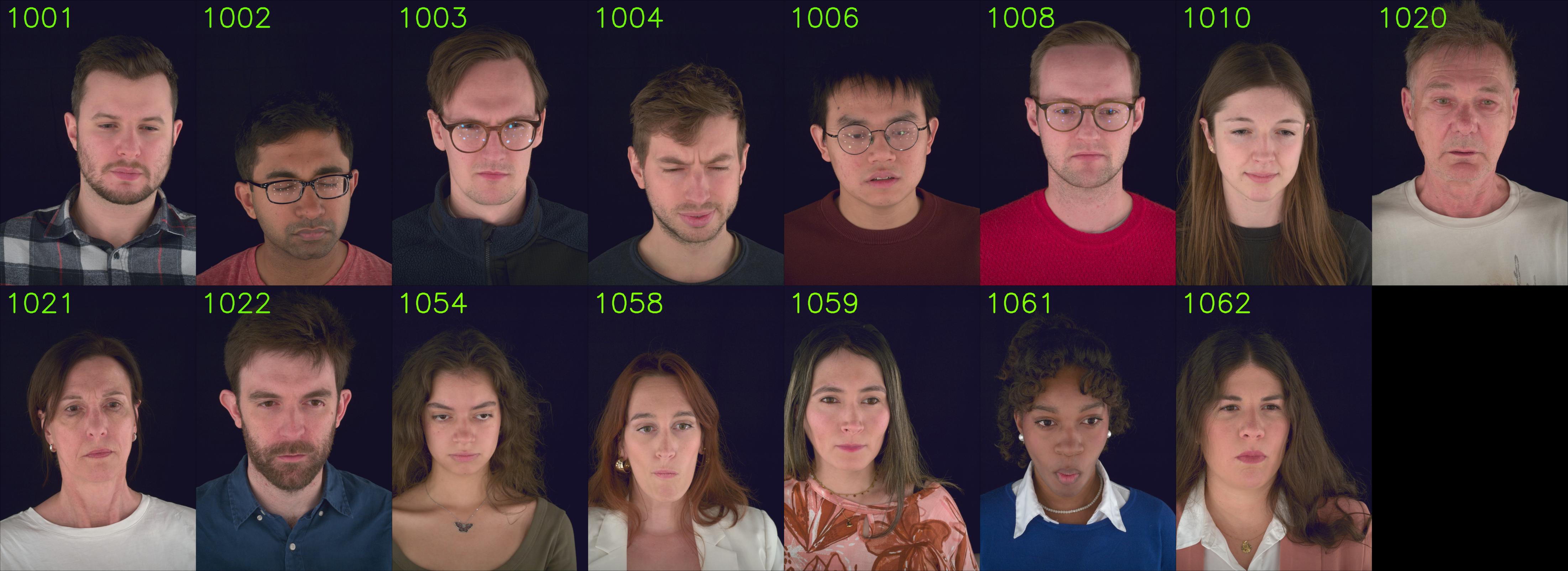
Camera Overview
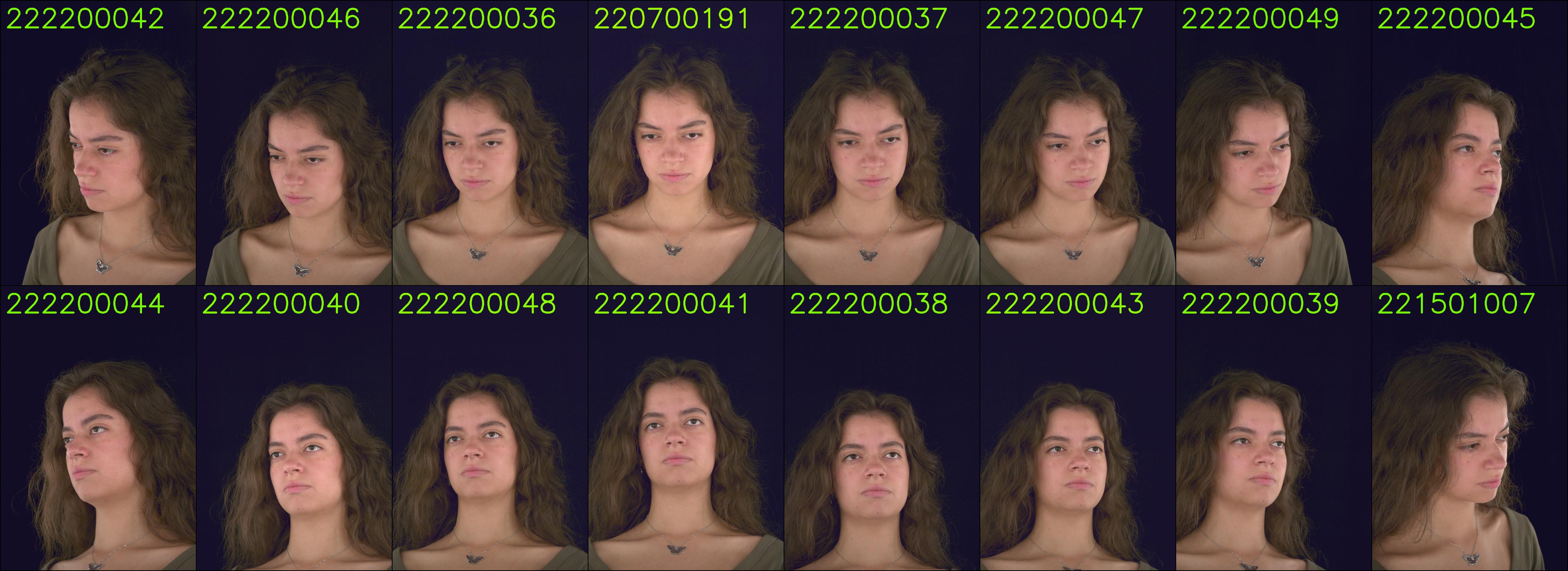
Light Pattern Overview
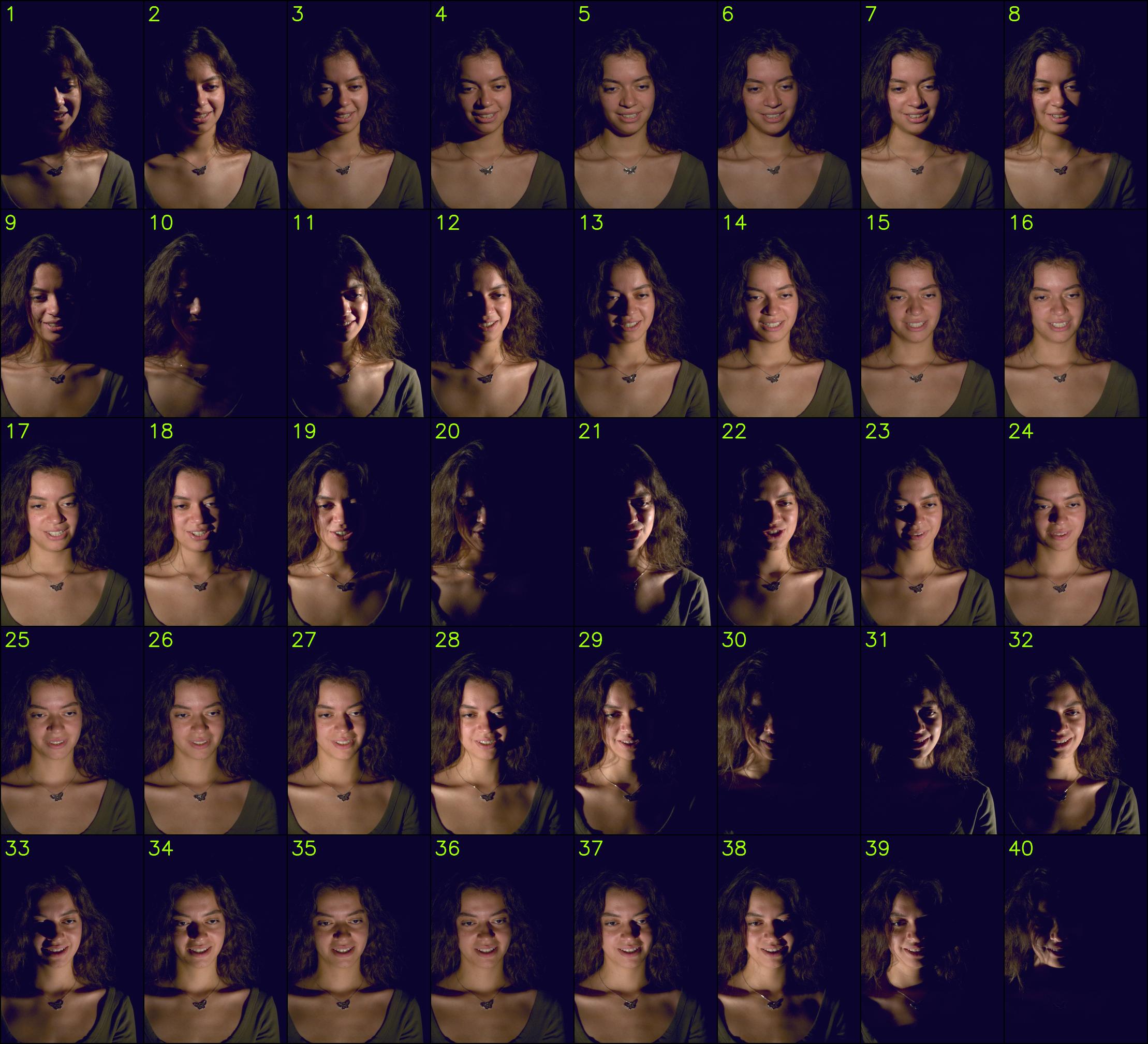
2. Data Access & Setup
- Request access to the BecomingLit dataset: https://forms.gle/twwZCWDahDnjFzaTA
- Once approved, you will receive a mail with the download link in the form of
BECOMINGLIT_DATA_URL = "..." - Create a file at
~/.config/becominglit_data/.envwith following content:BECOMINGLIT_DATA_URL = "<<<URL YOU GOT WHEN REQUESTING ACCESS TO BECOMINGLIT>>>" - Install this repository via
pip install git+https://github.com/jonathsch/becominglit-dataset.git - Use the download script in this repository to download the parts of the BecomingLit dataset that you need.
- Use the password sent to you via email to unzip the downloaded data.
- Enjoy!
3. Download Scripts
Upon installation of the repository with pip, a bl-data script is automatically made available that is the main tool for downloading the dataset.
You can investigate it via:
bl-data --help
If for some reason the bl-data command cannot be found, you can also invoke the script via
python src/becominglit_dataset/manage_data.py
from the repository root.
3.1. Get an Overview
bl-data list
Lists all participant IDs that are available for download.
bl-data list $ID
Lists all available sequences for participant $ID.
3.2. Download data
To download the dataset to your local folder ${becominglit_folder} run:
bl-data download ${becominglit_folder}
The script will first summarize all the files to download with an estimate of the total size and ask for confirmation before the actual download happens.
Since the full dataset is more than 1.5 TB large, the script provides several parameters to download only parts of the dataset.
Use
bl-data download --help
to get a description of each option.
In principle, the dataset contains #PARTICIPANTS x #SEQUENCES x #CAMERAS many zip files, and one can select a subset for each dimension to narrow down the download:
--participant: select participant(s) to download--sequence: select sequence(s) to download--camera: select camera(s) to download--n_workersSpecify how many downloads should happen in parallel
For example,
bl-data download ${becominglit_folder} --participant 1001
downloads all videos for participant 1001, while
bl-data download ${becominglit_folder} --sequence EMOTIONS --camera 222200037
would download all participants but only the 222200037 camera for the EMOTIONS sequence.
3.3. Unzip data
To unzip the downloaded images, you can use the following command. The password will be provided together with the download link when your access request is approved.
bl-data unzip ${becominglit_folder} --password "<<<PASSWORD>>>" [--remove-zips]
This will unzip all zip files in the specified ${becominglit_folder} into their respective folders.
If the --remove-zips flag is provided, the original zip files will be deleted after successful extraction to save disk space.
4. Usage
Structure
BECOMINGLIT_DATASET/
├─ PARTICIPANT_ID/
│  ├─ calibration/
│  │  ├─ camera_calibration.json          # Extrinsics & intrinsics (world_to_cam, OpenCV convention, metric units)
│  │  ├─ color_calibration.json           # 3x3 linear-RGB color correction matrices (per camera)
│  │  └─ light_pattern_metadata.json      # light positions & pattern definitions (name, light_index, duration)
│  └─ sequences/
│     ├─ SEQUENCE_NAME/                   # e.g., EMOTIONS, EXP-*, etc.
│     │  ├─ light_pattern_per_frame.json  # Mapping: frame_id -> light pattern index
│     │  └─ images/
│     │     ├─ cam_CAM_ID/
│     │     │  ├─ image_FRAME_ID.avif
│     │     │  └─ ...
│     │     └─ ...
│     └─ ...
└─ ...
Calibration Data
Each participant folder has a calibration folder that contains the following files:
Camera Parameters
The camera_calibration.json file that contains extrinsic and intrinsic parameters.
Extrinsics are given in world_to_cam format with the camera space following OpenCV convention (x -> right, y -> down, z -> forward).
The world space is metric.
The intrinsics are given wrt to the full image resolution (3208 x 2200) and are shared for all 16 cameras.
Color Correction
The color_calibration.json file contains color correction data for each camera.
It contains a 3x3 color correction matrix that aligns the camera's RGB values in linear RGB space.
Light Calibration
The light_pattern_metadata.json file contains information about the light positions and the light activation patterns.
It contains:
light_positions: The list of 40 light positions in world space (metric)light_patterns: The list of light patterns that specifies for every pattern which light(s) are active for how many microseconds. For every pattern, it contains:name: The name of the pattern.- A list of tuples, each containing:
light_index: The index of the light that is active (0-39).duration: The duration in microseconds for which the light is active.
In addition, each sequence folder contains a light_pattern_per_frame.json file that specifies the index of the light pattern that is active for each frame in the sequence.
For example, if you're looking for the fully-lit frames (index 0 in the light patterns), you can find the corresponding frames with the following code snippet:
import json

with open("light_pattern_per_frame.json", "r") as f:
    light_pattern_per_frame = json.load(f)

fully_lit_frames = [frame_id for frame_id, pattern_idx in light_pattern_per_frame if pattern_idx == 0]
When using the BecomingLit dataset, please cite the original NeurIPS paper:
@inproceedings{
  schmidt2025becominglit,
  title={BecomingLit: Relightable Gaussian Avatars with Hybrid Neural Shading},
  author={Jonathan Schmidt and Simon Giebenhain and Matthias Niessner},
  booktitle={The Thirty-ninth Annual Conference on Neural Information Processing Systems},
  year={2025},
}
Contact Jonathan Schmidt for questions, comments and reporting bugs, or open a GitHub issue.
Similar repos



Languages
Python
100.0%
Official download kit of the BecomingLit dataset from the NeurIPS 2025 paper: 'BecomingLit: Relightable Gaussian Avatars with Hybrid Neural Shading'
See the codeREADME
BecomingLit Dataset
Paper | Video | Project Page
This is the official download repository for the BecomingLit dataset introduced in the NeurIPS 2025 paper BecomingLit: Relightable Gaussian Avatars with Hybrid Neural Shading.
It contains multi-view recordings of facial performances in a light-stage under both uniform and one-light-at-a-time (OLAT) illuminations.
1. Overview
Participant Overview
Camera Overview
Light Pattern Overview
2. Data Access & Setup
- Request access to the BecomingLit dataset: https://forms.gle/twwZCWDahDnjFzaTA
- Once approved, you will receive a mail with the download link in the form of
BECOMINGLIT_DATA_URL = "..." - Create a file at
~/.config/becominglit_data/.envwith following content:BECOMINGLIT_DATA_URL = "<<<URL YOU GOT WHEN REQUESTING ACCESS TO BECOMINGLIT>>>" - Install this repository via
pip install git+https://github.com/jonathsch/becominglit-dataset.git - Use the download script in this repository to download the parts of the BecomingLit dataset that you need.
- Use the password sent to you via email to unzip the downloaded data.
- Enjoy!
3. Download Scripts
Upon installation of the repository with pip, a bl-data script is automatically made available that is the main tool for downloading the dataset.
You can investigate it via:
bl-data --help
If for some reason the bl-data command cannot be found, you can also invoke the script via
python src/becominglit_dataset/manage_data.py
from the repository root.
3.1. Get an Overview
bl-data list
Lists all participant IDs that are available for download.
bl-data list $ID
Lists all available sequences for participant $ID.
3.2. Download data
To download the dataset to your local folder ${becominglit_folder} run:
bl-data download ${becominglit_folder}
The script will first summarize all the files to download with an estimate of the total size and ask for confirmation before the actual download happens.
Since the full dataset is more than 1.5 TB large, the script provides several parameters to download only parts of the dataset.
Use
bl-data download --help
to get a description of each option.
In principle, the dataset contains #PARTICIPANTS x #SEQUENCES x #CAMERAS many zip files, and one can select a subset for each dimension to narrow down the download:
--participant: select participant(s) to download--sequence: select sequence(s) to download--camera: select camera(s) to download--n_workersSpecify how many downloads should happen in parallel
For example,
bl-data download ${becominglit_folder} --participant 1001
downloads all videos for participant 1001, while
bl-data download ${becominglit_folder} --sequence EMOTIONS --camera 222200037
would download all participants but only the 222200037 camera for the EMOTIONS sequence.
3.3. Unzip data
To unzip the downloaded images, you can use the following command. The password will be provided together with the download link when your access request is approved.
bl-data unzip ${becominglit_folder} --password "<<<PASSWORD>>>" [--remove-zips]
This will unzip all zip files in the specified ${becominglit_folder} into their respective folders.
If the --remove-zips flag is provided, the original zip files will be deleted after successful extraction to save disk space.
4. Usage
Structure
BECOMINGLIT_DATASET/
├─ PARTICIPANT_ID/
│  ├─ calibration/
│  │  ├─ camera_calibration.json          # Extrinsics & intrinsics (world_to_cam, OpenCV convention, metric units)
│  │  ├─ color_calibration.json           # 3x3 linear-RGB color correction matrices (per camera)
│  │  └─ light_pattern_metadata.json      # light positions & pattern definitions (name, light_index, duration)
│  └─ sequences/
│     ├─ SEQUENCE_NAME/                   # e.g., EMOTIONS, EXP-*, etc.
│     │  ├─ light_pattern_per_frame.json  # Mapping: frame_id -> light pattern index
│     │  └─ images/
│     │     ├─ cam_CAM_ID/
│     │     │  ├─ image_FRAME_ID.avif
│     │     │  └─ ...
│     │     └─ ...
│     └─ ...
└─ ...
Calibration Data
Each participant folder has a calibration folder that contains the following files:
Camera Parameters
The camera_calibration.json file that contains extrinsic and intrinsic parameters.
Extrinsics are given in world_to_cam format with the camera space following OpenCV convention (x -> right, y -> down, z -> forward).
The world space is metric.
The intrinsics are given wrt to the full image resolution (3208 x 2200) and are shared for all 16 cameras.
Color Correction
The color_calibration.json file contains color correction data for each camera.
It contains a 3x3 color correction matrix that aligns the camera's RGB values in linear RGB space.
Light Calibration
The light_pattern_metadata.json file contains information about the light positions and the light activation patterns.
It contains:
light_positions: The list of 40 light positions in world space (metric)light_patterns: The list of light patterns that specifies for every pattern which light(s) are active for how many microseconds. For every pattern, it contains:name: The name of the pattern.- A list of tuples, each containing:
light_index: The index of the light that is active (0-39).duration: The duration in microseconds for which the light is active.
In addition, each sequence folder contains a light_pattern_per_frame.json file that specifies the index of the light pattern that is active for each frame in the sequence.
For example, if you're looking for the fully-lit frames (index 0 in the light patterns), you can find the corresponding frames with the following code snippet:
import json

with open("light_pattern_per_frame.json", "r") as f:
    light_pattern_per_frame = json.load(f)

fully_lit_frames = [frame_id for frame_id, pattern_idx in light_pattern_per_frame if pattern_idx == 0]
When using the BecomingLit dataset, please cite the original NeurIPS paper:
@inproceedings{
  schmidt2025becominglit,
  title={BecomingLit: Relightable Gaussian Avatars with Hybrid Neural Shading},
  author={Jonathan Schmidt and Simon Giebenhain and Matthias Niessner},
  booktitle={The Thirty-ninth Annual Conference on Neural Information Processing Systems},
  year={2025},
}
Contact Jonathan Schmidt for questions, comments and reporting bugs, or open a GitHub issue.
Similar repos
Languages
Python
100.0%