
A lightweight, modern PySide6 desktop interface for Espanso text expander. Manage matches and YAML configs effortlessly without manually editing files.
See the codeSee what people are saying
README
Espanso GUI
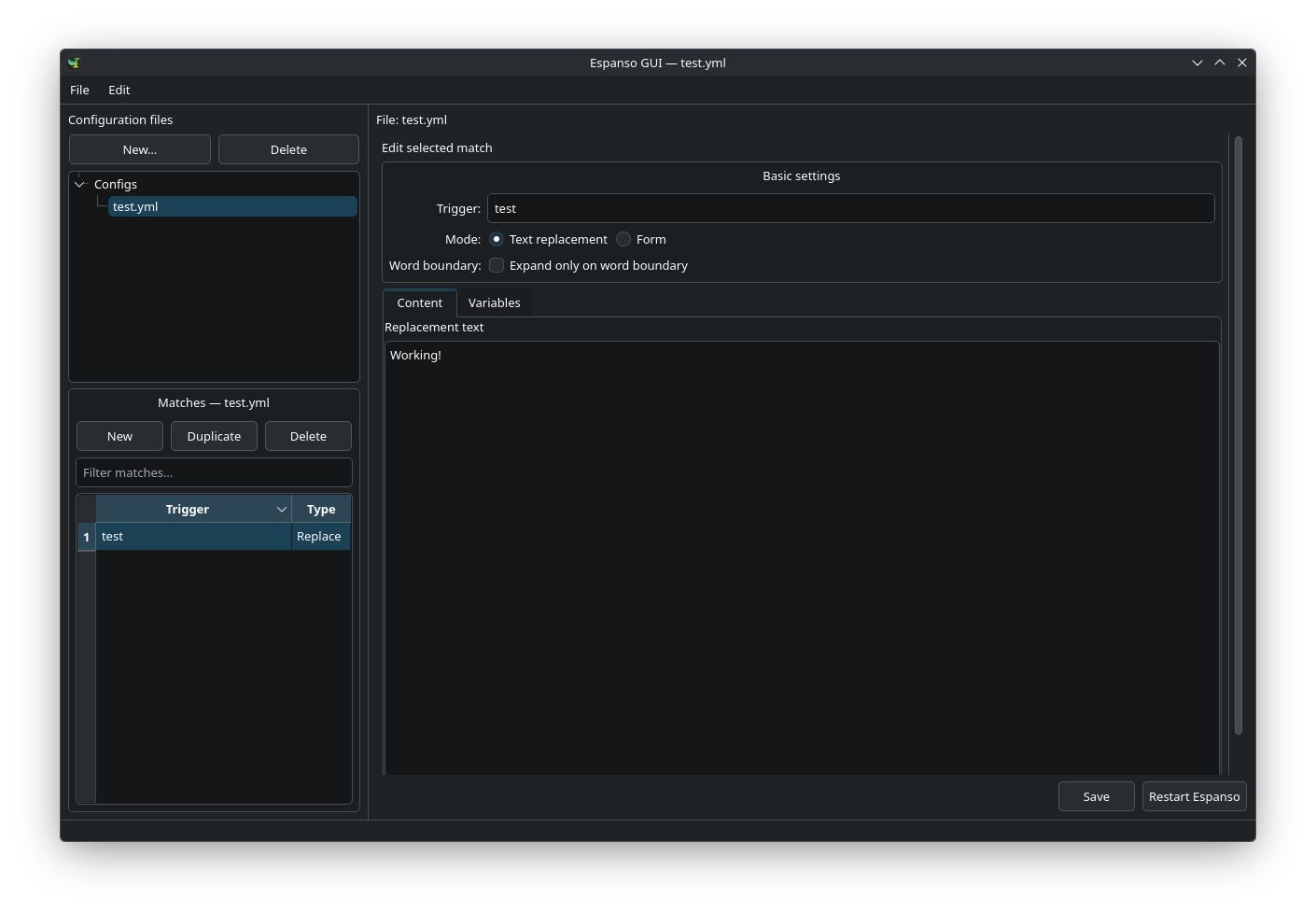
Espanso GUI is a desktop editor for Espanso match files. It provides a graphical way to maintain text-expansion rules while working with the same configuration files that Espanso uses.
Espanso GUI is an independent project and is not affiliated with Espanso.
What it does
- Browse, create, rename, duplicate, move, and delete match files and matches
- Edit replacement matches, forms, form fields, and variables
- Work with shell, script, form, and choice variables
- Search and sort matches by trigger, type, or content
- Open the complete match-file YAML when an option is not exposed by the editor
- Manage Espanso's
default.ymland application-specific configuration profiles - Restart Espanso after saving changes
The graphical editor handles the common match types. Expert YAML mode is available for advanced Espanso options and validates the document before saving.
Installation
Install Espanso first. Espanso GUI looks for its configuration directory automatically and does not create a separate set of match files.
Linux
The install script supports Debian, Ubuntu, Arch Linux, and compatible distributions. It downloads the latest release package and requires administrator access.
curl -fsSL https://raw.githubusercontent.com/johannjdk/espanso-gui/main/scripts/install-linux.sh | sh
Alternatively, download a package from the releases page.
For Debian and Ubuntu:
sudo apt install ./espanso-gui-all.deb
For Arch Linux:
sudo pacman -U ./espanso-gui-any.pkg.tar.zst
macOS
Download the appropriate DMG from the releases page:
- Apple silicon:
espanso-gui-macos-arm64.dmg - Intel:
espanso-gui-macos-x64.dmg
Open the DMG and move Espanso GUI to the Applications folder.
Windows
Windows builds are made on Windows x64. With Python 3.10 or newer installed, run the following in PowerShell from the repository root:
.\scripts\build-windows.ps1
The resulting archive is written to dist/. Extract it and start Espanso GUI.exe.
Run from source
Python 3.10 or newer is required.
git clone https://github.com/johannjdk/espanso-gui.git
cd espanso-gui
python -m venv .venv
source .venv/bin/activate
pip install -e .
espanso-gui
Using the application
The configuration directory is selected from the operating system:
| Platform | Match directory |
|---|---|
| Linux | $XDG_CONFIG_HOME/espanso/match or ~/.config/espanso/match |
| macOS | ~/Library/Application Support/espanso/match |
| Windows | %APPDATA%\\espanso\\match |
Select a file in the left panel, select a match, and save when finished. Use Restart Espanso to reload the configuration immediately. The restart action requires the espanso command to be available on your system.
For configuration profiles, open File → Espanso configuration…. default.yml applies everywhere; other profiles use Espanso filters such as filter_exec, filter_class, filter_title, or filter_os. Espanso does not support application-specific profiles on Wayland.
Contributing
Bug reports and feature requests belong in the issue tracker. Pull requests should describe the change and include reproduction or test notes where useful.
License
Espanso GUI is licensed under the GNU General Public License v3.0.
The application icon is derived from the Espanso project and is distributed under the same license. Espanso is a separate project; see its license for details.
Similar repos


Languages
Python
68.2%
HTML
20.8%
Shell
8.7%
PowerShell
2.3%
A lightweight, modern PySide6 desktop interface for Espanso text expander. Manage matches and YAML configs effortlessly without manually editing files.
See the codeSee what people are saying
README
Espanso GUI
Espanso GUI is a desktop editor for Espanso match files. It provides a graphical way to maintain text-expansion rules while working with the same configuration files that Espanso uses.
Espanso GUI is an independent project and is not affiliated with Espanso.
What it does
- Browse, create, rename, duplicate, move, and delete match files and matches
- Edit replacement matches, forms, form fields, and variables
- Work with shell, script, form, and choice variables
- Search and sort matches by trigger, type, or content
- Open the complete match-file YAML when an option is not exposed by the editor
- Manage Espanso's
default.ymland application-specific configuration profiles - Restart Espanso after saving changes
The graphical editor handles the common match types. Expert YAML mode is available for advanced Espanso options and validates the document before saving.
Installation
Install Espanso first. Espanso GUI looks for its configuration directory automatically and does not create a separate set of match files.
Linux
The install script supports Debian, Ubuntu, Arch Linux, and compatible distributions. It downloads the latest release package and requires administrator access.
curl -fsSL https://raw.githubusercontent.com/johannjdk/espanso-gui/main/scripts/install-linux.sh | sh
Alternatively, download a package from the releases page.
For Debian and Ubuntu:
sudo apt install ./espanso-gui-all.deb
For Arch Linux:
sudo pacman -U ./espanso-gui-any.pkg.tar.zst
macOS
Download the appropriate DMG from the releases page:
- Apple silicon:
espanso-gui-macos-arm64.dmg - Intel:
espanso-gui-macos-x64.dmg
Open the DMG and move Espanso GUI to the Applications folder.
Windows
Windows builds are made on Windows x64. With Python 3.10 or newer installed, run the following in PowerShell from the repository root:
.\scripts\build-windows.ps1
The resulting archive is written to dist/. Extract it and start Espanso GUI.exe.
Run from source
Python 3.10 or newer is required.
git clone https://github.com/johannjdk/espanso-gui.git
cd espanso-gui
python -m venv .venv
source .venv/bin/activate
pip install -e .
espanso-gui
Using the application
The configuration directory is selected from the operating system:
| Platform | Match directory |
|---|---|
| Linux | $XDG_CONFIG_HOME/espanso/match or ~/.config/espanso/match |
| macOS | ~/Library/Application Support/espanso/match |
| Windows | %APPDATA%\\espanso\\match |
Select a file in the left panel, select a match, and save when finished. Use Restart Espanso to reload the configuration immediately. The restart action requires the espanso command to be available on your system.
For configuration profiles, open File → Espanso configuration…. default.yml applies everywhere; other profiles use Espanso filters such as filter_exec, filter_class, filter_title, or filter_os. Espanso does not support application-specific profiles on Wayland.
Contributing
Bug reports and feature requests belong in the issue tracker. Pull requests should describe the change and include reproduction or test notes where useful.
License
Espanso GUI is licensed under the GNU General Public License v3.0.
The application icon is derived from the Espanso project and is distributed under the same license. Espanso is a separate project; see its license for details.
Similar repos
Languages
Python
68.2%
HTML
20.8%
Shell
8.7%
PowerShell
2.3%