
PlantUML eaxmples for UML, ERD, wireframes, mind maps, JSON, YAML, WBS, ASCII art, Gantt charts, C4 models, and more
Shell
263
72 commits
updated Jan 29, 2026
README
PlantUML examples
PlantUML is a software tool that uses text formatting to create graphic diagrams. This page introduces PlantUML by showing examples with diagrams and source code, for UML, ERD, wireframes, mind maps, JSON, YAML, WBS, ASCII art, Gantt charts, C4 models, and more.
Sequence diagram
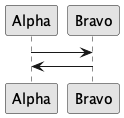
View Source
@startuml
skinparam monochrome true
Alpha -> Bravo
Bravo -> Alpha
@enduml
Sequence diagram with steps and divider
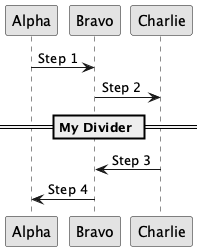
View Source
@startuml
skinparam monochrome true
Alpha -> Bravo: Step 1
Bravo -> Charlie: Step 2
== My Divider ==
Charlie -> Bravo: Step 3
Bravo -> Alpha: Step 4
@enduml
Sequence diagram with participant shapes
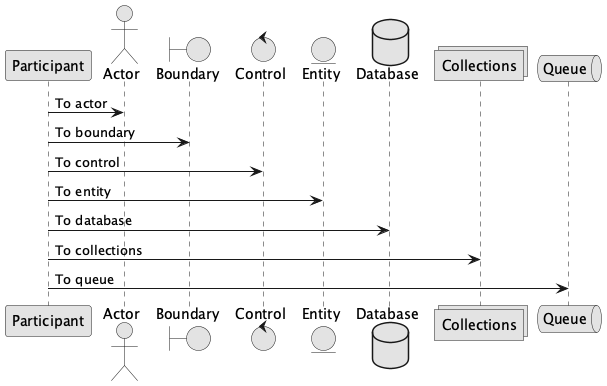
View Source
@startuml
skinparam monochrome true
participant Participant as Foo
actor       Actor       as Foo1
boundary    Boundary    as Foo2
control     Control     as Foo3
entity      Entity      as Foo4
database    Database    as Foo5
collections Collections as Foo6
queue       Queue       as Foo7
Foo -> Foo1 : To actor
Foo -> Foo2 : To boundary
Foo -> Foo3 : To control
Foo -> Foo4 : To entity
Foo -> Foo5 : To database
Foo -> Foo6 : To collections
Foo -> Foo7: To queue
@enduml
Usecase diagram

View Source
@startuml
skinparam monochrome true
left to right direction
User1 --> (Story1)
(Story1) --> (Story2)
(Story2) --> (Story3)
@enduml
Object diagram
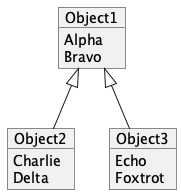
View Source
@startuml skinparam monochrome trueobject Object1 { Alpha Bravo }
object Object2 { Charlie Delta }
object Object3 { Echo Foxtrot }
Object1 <|-- Object2 Object1 <|-- Object3 @enduml
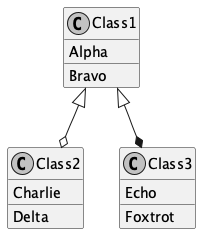
Class diagram
View Source
@startuml skinparam monochrome true' If you want to hide the "C" circle, then uncomment this line: ' hide circle
class Class1 { {field} Alpha {method} Bravo }
class Class2 { {field} Charlie {method} Delta }
class Class3 { {field} Echo {method} Foxtrot }
Class1 <|--o Class2 Class1 <|--* Class3 @enduml
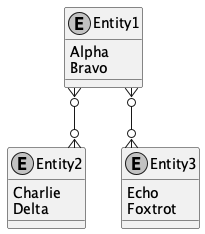
Entity relationship diagram (ERD)
View Source
@startuml skinparam monochrome true skinparam linetype ortho' If you want to hide the "E" circle, then uncomment this line: ' hide circle
entity Entity1 { Alpha Bravo }
entity Entity2 { Charlie Delta }
entity Entity3 { Echo Foxtrot }
Entity1 }o-down-o{ Entity2 Entity1 }o-down-o{ Entity3 @enduml
Package styles

View Source
@startuml
package "Demo Node" <> {
  object Object1
}
package "Demo Rectangle" <> {
  object Object2
}
package "Demo Folder" <> {
  object Object3
}
package "Demo Frame" <> {
  object Object4
}
package "Demo Cloud" <> {
  object Object5
}
package "Demo Database" <> {
  object Object6
}
@enduml
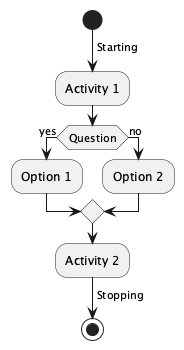
Activity diagram
View Source
@startuml
skinparam monochrome true
start
-> Starting;
:Activity 1;
if (Question) then (yes)
  :Option 1;
else (no)
  :Option 2;
endif
:Activity 2;
-> Stopping;
stop
@enduml
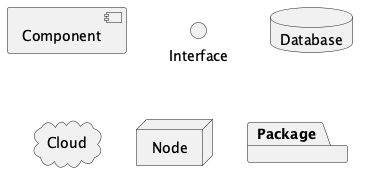
Component diagram of items
View Source
@startuml
skinparam monochrome true
component "Component"
interface "Interface"
database "Database"
cloud "Cloud"
node "Node"
package "Package"
@enduml
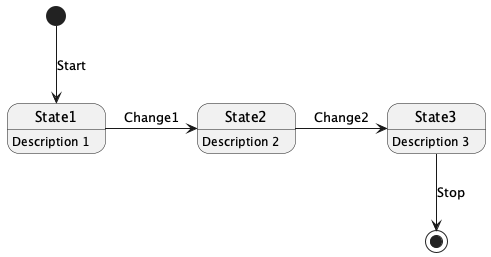
State diagram
View Source
@startuml
skinparam monochrome true
[*] --> State1 : Start
State1 -> State2 : Change1
State2 -> State3 : Change2
State3 --> [*] : Stop
State1 : Description 1
State2 : Description 2
State3 : Description 3
@enduml
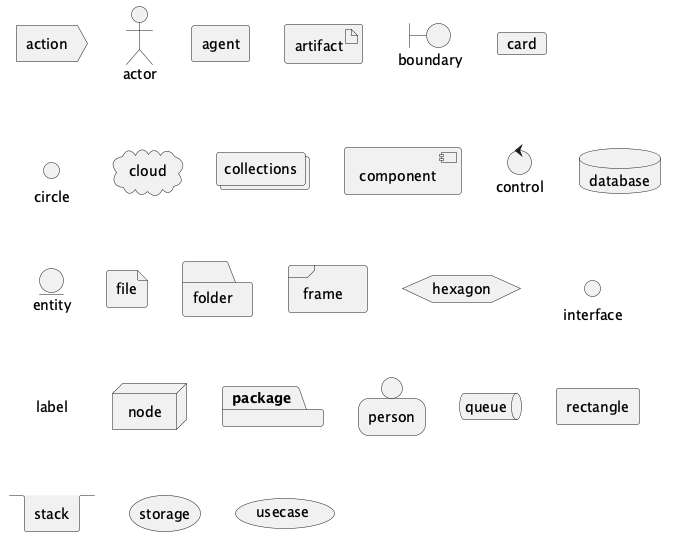
Deployment diagram items
View Source
@startuml
skinparam monochrome true
action action
actor actor
agent agent
artifact artifact
boundary boundary
card card
circle circle
cloud cloud
collections collections
component component
control control
database database
entity entity
file file
folder folder
frame frame
hexagon hexagon
interface interface
label label
node node
package package
person person
queue queue
rectangle rectangle
stack stack
storage storage
usecase usecase
@enduml
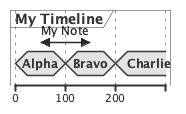
Timing diagram
View Source
@startuml
skinparam monochrome true
concise "My Timeline" as T
@T
0 is Alpha
+100 is Bravo
+100 is Charlie
@50 <-> @+100 : My Note
@enduml
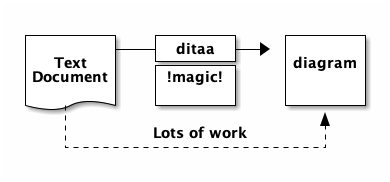
Diagrams through ASCII art (DITAA)
View Source
@startditaa
+--------+   +-------+    +-------+
|        +---+ ditaa +--> |       |
|  Text  |   +-------+    |diagram|
|Document|   |!magic!|    |       |
|     {d}|   |       |    |       |
+---+----+   +-------+    +-------+
    :                         ^
    |       Lots of work      |
    +-------------------------+
@endditaa
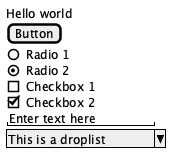
Wireframe
View Source
@startsalt
{
  Hello world
  [Button]
  ()  Radio 1
  (X) Radio 2
  []  Checkbox 1
  [X] Checkbox 2
  "Enter text here   "
  ^This is a droplist^
}
@endsalt
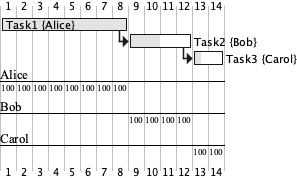
Gantt chart
View Source
@startgantt
skinparam monochrome true
[Task1] on {Alice} requires 8 days
then [Task2] on {Bob} requires 4 days and is 50% complete
then [Task3] on {Carol} lasts 2 days and is 25% complete
@endgantt
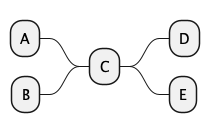
Mind map
View Source
@startmindmap
+ C
++ D
++ E
-- A
-- B
@endmindmap
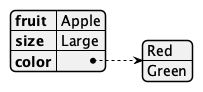
JSON data
View Source
@startjson
{
   "fruit":"Apple",
   "size":"Large",
   "color": ["Red", "Green"]
}
@endjson
YAML data
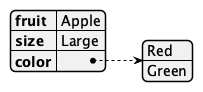
View Source
@startyaml
fruit: Apple
size: Large
color:
  - Red
  - Green
@endyaml
Network diagram
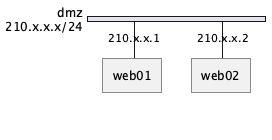
View Source
@startuml
nwdiag {
  network dmz {
      address = "210.x.x.x/24"
  web01 [address = "210.x.x.1"];
  web02 [address = "210.x.x.2"];

}
}
@enduml
Work breakdown structure (WBS)
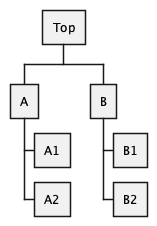
View Source
@startwbs
* Top
** A
*** A1
*** A2
** B
*** B1
*** B2
@endwbs
OpenIconic

View Source
@startuml
title: <&heart> Demo <&heart>
@enduml
OpenIconic provides open source icons. OpenIconic is now built-in to PlantUML.
Font Awesome

View Source
@startuml
skinparam monochrome true
!include
rectangle "<$star>"
@enduml
Procedure
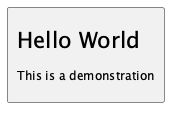
View Source
@startuml!procedure $demo($name, $headline, $description) card $name as "\nsize:22$headline\n\nsize:12$description\n" !endprocedure
$demo(MyCard, "Hello World", "This is a demonstration")
@enduml
Procedure layout
View Source
@startuml skinparam monochrome true skinparam defaultTextAlignment center!procedure $layout($shape, $name, $openiconic, $headline, $description) $shape $name as "\n\nsize:44<&$openiconic>\nsize:22<U+00A0><U+00A0>$headline<U+00A0><U+00A0>\n\n<U+00A0><U+00A0>$description<U+00A0><U+00A0>\n\n" !endprocedure
$layout(card, MyCard, heart, "Hello World", "This is a demonstration")
@enduml
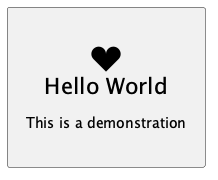
This shows how to create your own procedure to create a custom layout with a shape, object name, OpenIconic icon, headline that uses big size text, and a description that uses normal size text.
Area diagram
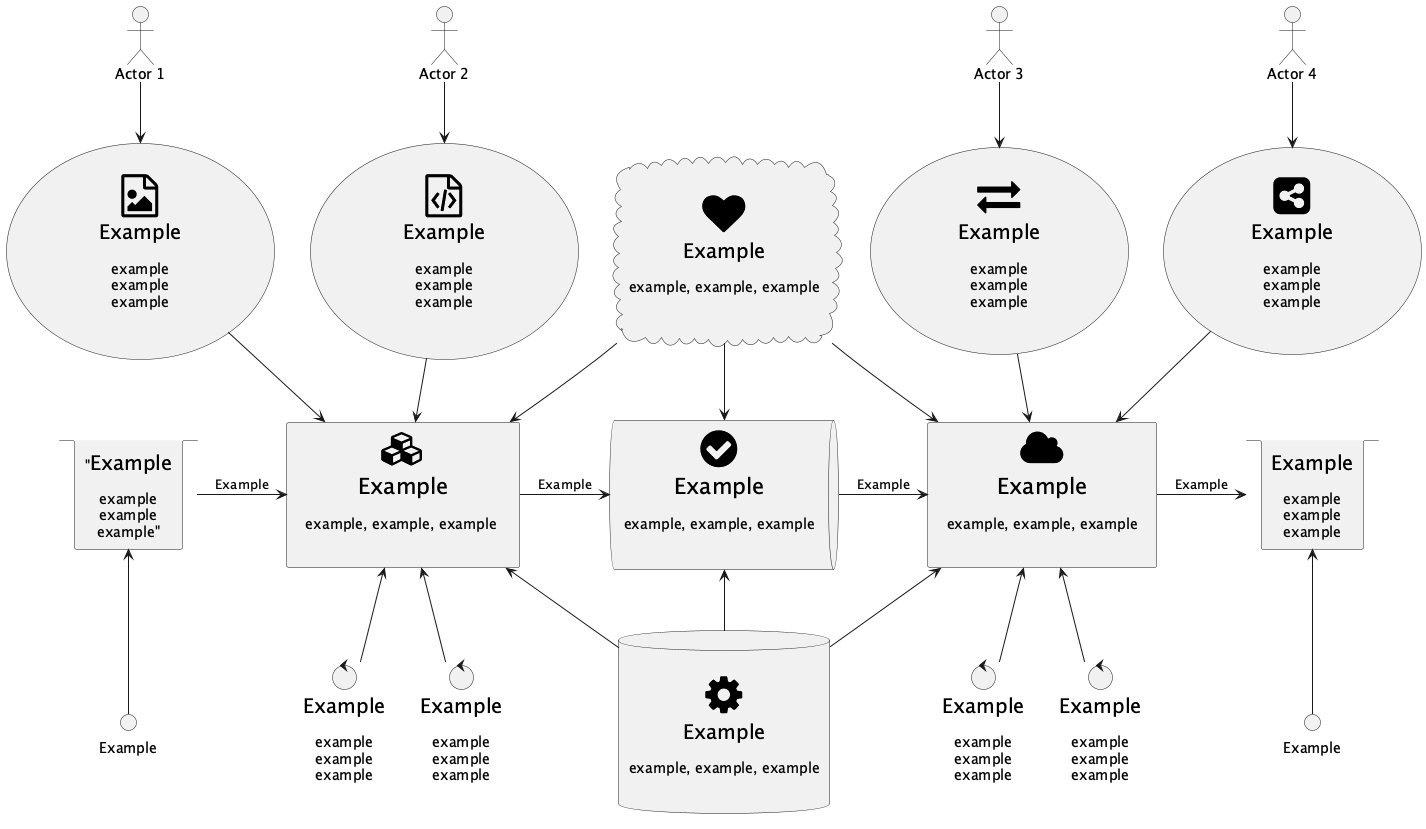
The area diagram is an example deployment diagram that shows a bunch of areas and how they interrelate. This example is useful for seeing a real-world diagram, that uses boxes, arrows, Font Awesome icons, multi-line text, Unicode padding, font sizes, and more.
View Source
@startuml skinparam monochrome true skinparam defaultTextAlignment center' icons !include <tupadr3/font-awesome/check_circle> !include <tupadr3/font-awesome/cloud> !include <tupadr3/font-awesome/cubes> !include <tupadr3/font-awesome/exchange> !include <tupadr3/font-awesome/file_code_o> !include <tupadr3/font-awesome/file_image_o> !include <tupadr3/font-awesome/gavel> !include <tupadr3/font-awesome/gear> !include <tupadr3/font-awesome/globe> !include <tupadr3/font-awesome/heart> !include <tupadr3/font-awesome/share_alt_square>
' Pipeline objects stack ""size:20Example\n\nexample\nexample\nexample"" as StackLeft card "<$cubes>\nsize:22<U+00A0><U+00A0>Example<U+00A0><U+00A0>\n\n<U+00A0><U+00A0>example, example, example <U+00A0><U+00A0>\n\n" as Pipeline1 queue "<$check_circle>\nsize:22<U+00A0><U+00A0>Example<U+00A0><U+00A0>\n\n<U+00A0><U+00A0>example, example, example<U+00A0><U+00A0>\n\n" as Pipeline2 card "<$cloud>\nsize:22<U+00A0><U+00A0>Example<U+00A0><U+00A0>\n\n<U+00A0><U+00A0>example, example, example<U+00A0><U+00A0>\n\n" as Pipeline3 stack "size:20Example\n\nexample\nexample\nexample" as StackRight
' Pipeline flow StackLeft -r-> Pipeline1 : "Example" Pipeline1 -r-> Pipeline2 : "Example" Pipeline2 -r-> Pipeline3 : "Example" Pipeline3 -r-> StackRight : "Example"
' Left side interface "Example" as InterfaceLeft InterfaceLeft -u-> StackLeft
' Right side interface "Example" as InterfaceRight InterfaceRight -u-> StackRight
' Actor 1 actor "Actor 1" as Actor1 usecase "\n<$file_image_o>\nsize:20<U+00A0><U+00A0>Example<U+00A0><U+00A0>\n\nexample\nexample\nexample\n\n" as UseCase1 Actor1 -d-> UseCase1 UseCase1 -d-> Pipeline1
' Actor 2 actor "Actor 2" as Actor2 usecase "\n<$file_code_o>\nsize:20<U+00A0><U+00A0>Example<U+00A0><U+00A0>\n\nexample\nexample\nexample\n\n" as UseCase2 Actor2 -d-> UseCase2 UseCase2 -d-> Pipeline1
' Actor 3 actor "Actor 3" as Actor3 usecase "\n<$exchange>\nsize:20Example\n\nexample\nexample\nexample\n\n" as UseCase3 Actor3 -d-> UseCase3 UseCase3 -d-> Pipeline3
' Actor 4 actor "Actor 4" as Actor4 usecase "\n<$share_alt_square>\nsize:20Example\n\nexample\nexample\nexample\n\n" as UseCase4 Actor4 -d-> UseCase4 UseCase4 -d-> Pipeline3
' Diamond upper area cloud "\n<$heart>\nsize:20Example\n\nexample, example, example\n\n" as DiamondUpper DiamondUpper -d-> Pipeline1 DiamondUpper -d-> Pipeline2 DiamondUpper -d-> Pipeline3
' Diamond lower area database "\n<$gear>\nsize:20Example\n\nexample, example, example\n\n" as DiamondLower DiamondLower -u-> Pipeline1 DiamondLower -u-> Pipeline2 DiamondLower -u-> Pipeline3
' Hinting UseCase1 -[hidden]r- UseCase2 UseCase2 -[hidden]r- DiamondUpper DiamondUpper -[hidden]r- UseCase3 UseCase3 -[hidden]r- UseCase4
' Pipeline 1 controls control "size:20Example\n\nexample\nexample\nexample" as Pipeline1Control1 control "size:20Example\n\nexample\nexample\nexample" as Pipeline1Control2 Pipeline1Control1 -u-> Pipeline1 Pipeline1Control2 -u-> Pipeline1
' Pipeline 3 controls control "size:20Example\n\nexample\nexample\nexample" as Pipeline3Control1 control "size:20Example\n\nexample\nexample\nexample" as Pipeline3Control2 Pipeline3Control1 -u-> Pipeline3 Pipeline3Control2 -u-> Pipeline3
@enduml
Standard library
View Source
@startuml
stdlib
@enduml
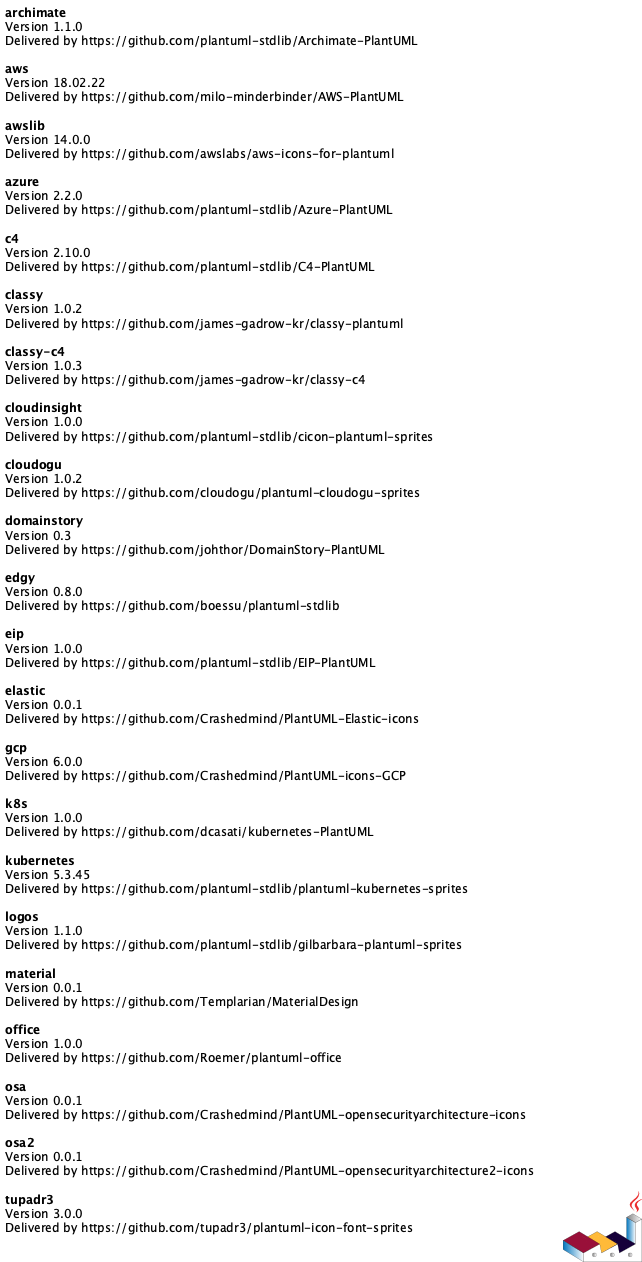
You can list standard library folders by using the special diagram "stdlib".
OpenIconic list
View Source
@startuml
listopeniconic
@enduml
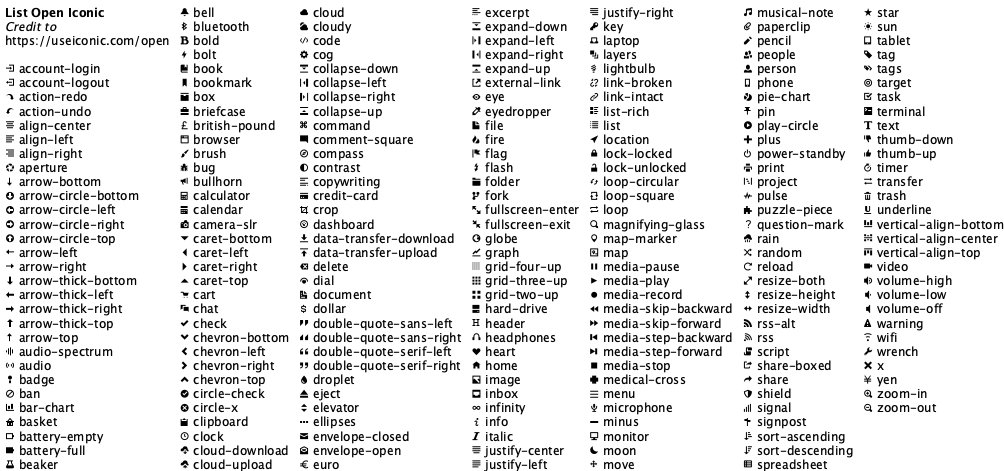
You can list all the OpenIconic icon names and images by using the special diagram "listopeniconic".
C4 model
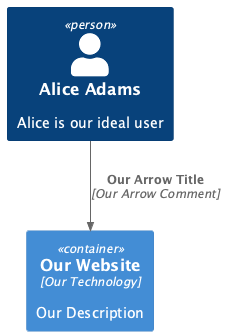
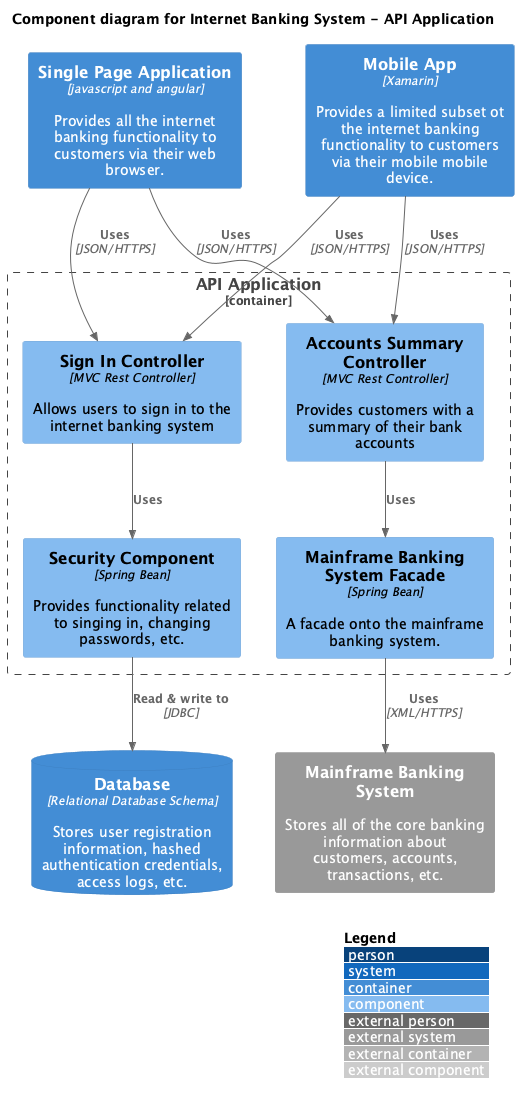
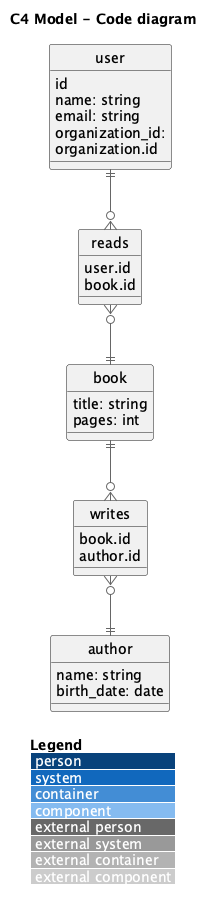
C4 Model focuses diagrams on four areas: Context, Containers, Components, Code.
C4 model: context diagram
C4 model: container diagram
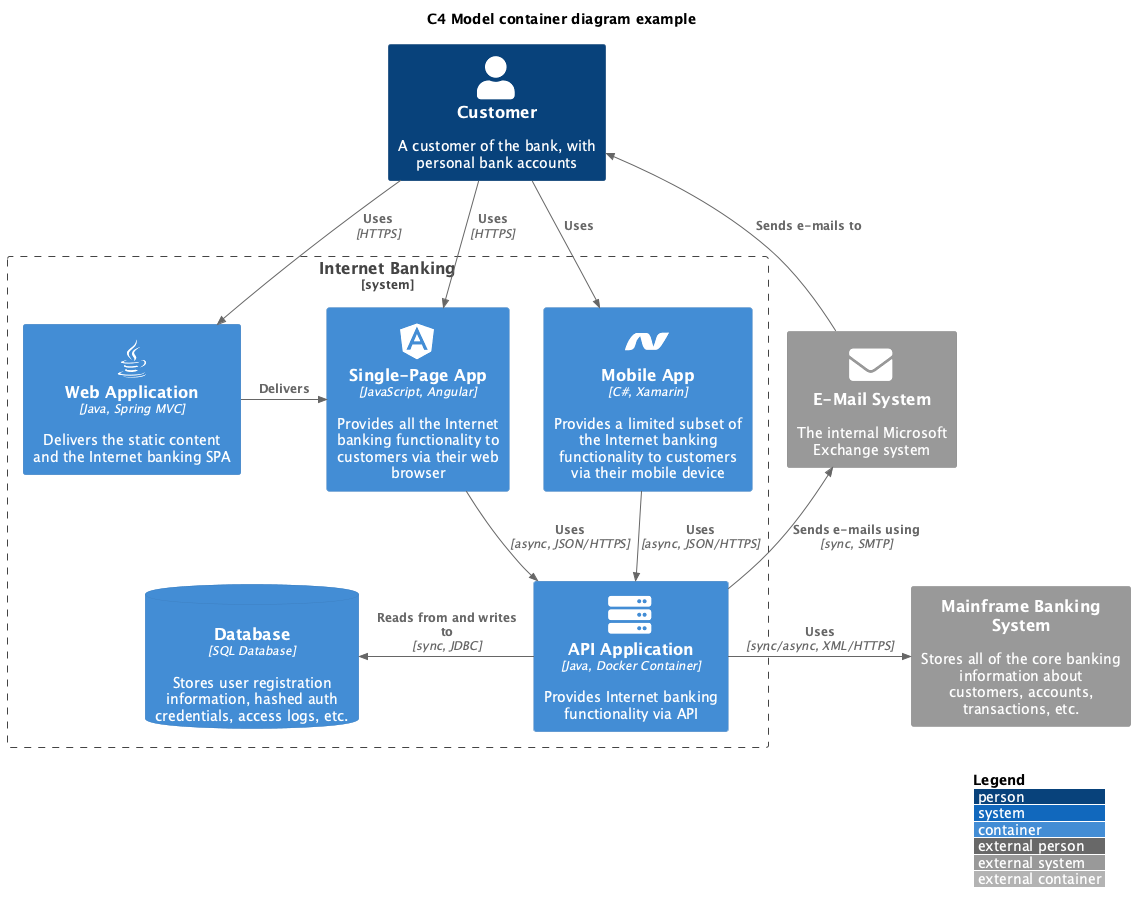
See also: C4 model container diagram with steps
C4 model: component diagram
C4 model: code diagram
ArchiMate
ArchiMate focuses on enterprise architecture modeling language.
ArchiMate modeling
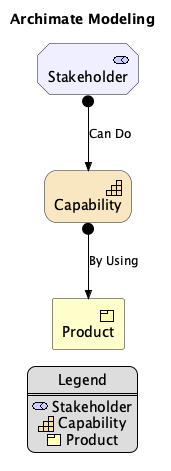
View Source
@startuml skinparam monochrome true !include sprite $stakeholder jar:archimate/motivation-stakeholder sprite $capability jar:archimate/strategy-capability sprite $product jar:archimate/business-producttitle ArchiMate Modeling Motivation_Stakeholder(Stakeholder, "Stakeholder") Strategy_Capability(Capability, "Capability") Business_Product(Product, "Product") Rel_Assignment(Stakeholder, Capability, "Can Do") Rel_Assignment(Capability, Product, "By Using")
legend left Legend
<$stakeholder> Stakeholder <$capability> Capability <$product> Product endlegend
@enduml
ArchiMate grouping

View Source
@startuml !include sprite $stakeholder jar:archimate/motivation-stakeholder sprite $capability jar:archimate/strategy-capability sprite $product jar:archimate/business-producttitle ArchiMate Modeling Layers
Grouping(Stakeholders, "Stakeholders") { Motivation_Stakeholder(Stakeholder1, "Stakeholder 1") Motivation_Stakeholder(Stakeholder2, "Stakeholder 2") }
Grouping(Drivers, "Drivers") { Motivation_Driver(Driver1, "Driver 1") Motivation_Driver(Driver2, "Driver 2") }
Grouping(Assessments, "Assessments") { Motivation_Assessment(Assessment1, "Assessment 1") Motivation_Assessment(Assessment2, "Assessment 2") }
Grouping(Goals, "Goals") { Motivation_Goal(Goal1, "Goal 1") Motivation_Goal(Goal2, "Goal 2") }
Grouping(Outcomes, "Outcomes") { Motivation_Outcome(Outcome1, "Outcome 1") Motivation_Outcome(Outcome2, "Outcome 2") }
Grouping(Requirements, "Requirements") { Motivation_Requirement(Requirement1, "Requirement 1") Motivation_Requirement(Requirement2, "Requirement 2") }
@enduml
ArchiMate elements
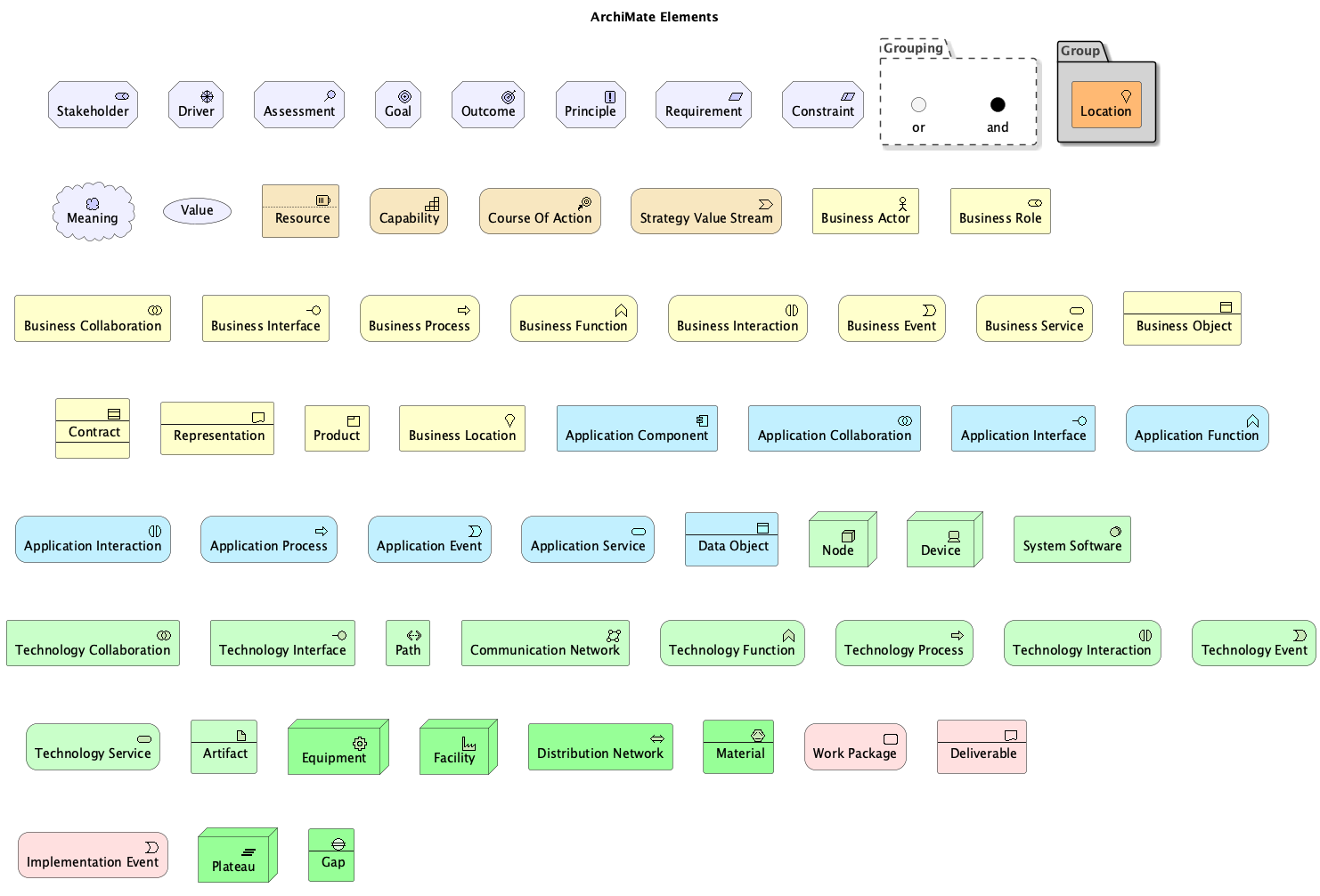
View Source
@startuml !includetitle ArchiMate Elements
' Motivation Elements Motivation_Stakeholder(Stakeholder, "Stakeholder") Motivation_Driver(Driver, "Driver") Motivation_Assessment(Motivation_Assessment, "Assessment") Motivation_Goal(Goal, "Goal") Motivation_Outcome(Outcome, "Outcome") Motivation_Principle(Principle, "Principle") Motivation_Requirement(Requirement, "Requirement") Motivation_Constraint(Constraint, "Constraint") Motivation_Meaning(Meaning, "Meaning") Motivation_Value(Value, "Value")
' Strategy Elements Strategy_Resource(Resource, "Resource") Strategy_Capability(Capability, "Capability") Strategy_CourseOfAction(CourseOfAction, "Course Of Action") Strategy_ValueStream(ValueStream, "Strategy Value Stream")
' Business Elements Business_Actor(Business_Actor, "Business Actor") Business_Role(Business_Role, "Business Role") Business_Collaboration(Business_Collaboration, "Business Collaboration") Business_Interface(Business_Interface, "Business Interface") Business_Process(Business_Process, "Business Process") Business_Function(Business_Function, "Business Function") Business_Interaction(Business_Interaction, "Business Interaction") Business_Event(Business_Event, "Business Event") Business_Service(Business_Service, "Business Service") Business_Object(Business_Object, "Business Object") Business_Contract(Business_Contract, "Contract") Business_Representation(Business_Representation, "Representation") Business_Product(Business_Product, "Product") Business_Location(Business_Location, "Business Location")
' Application Elements Application_Component(Application_Component, "Application Component") Application_Collaboration(Application_Collaboration, "Application Collaboration") Application_Interface(Application_Interface, "Application Interface") Application_Function(Application_Function, "Application Function") Application_Interaction(Application_Interaction, "Application Interaction") Application_Process(Application_Process, "Application Process") Application_Event(Application_Event, "Application Event") Application_Service(Application_Service, "Application Service") Application_DataObject(Application_DataObject, "Data Object")
' Technology Elements Technology_Node(Node, "Node") Technology_Device(Device, "Device") Technology_SystemSoftware(SystemSoftware, "System Software") Technology_Collaboration(Technology_Collaboration, "Technology Collaboration") Technology_Interface(Technology_Interface, "Technology Interface") Technology_Path(Path, "Path") Technology_CommunicationNetwork(CommunicationNetwork, "Communication Network") Technology_Function(Technology_Function, "Technology Function") Technology_Process(Technology_Process, "Technology Process") Technology_Interaction(Technology_Interaction, "Technology Interaction") Technology_Event(Technology_Event, "Technology Event") Technology_Service(Technology_Service, "Technology Service") Technology_Artifact(Artifact, "Artifact")
'Physical Elements Physical_Equipment(Equipment, "Equipment") Physical_Facility(Facility, "Facility") Physical_DistributionNetwork(DistributionNetwork, "Distribution Network") Physical_Material(Material, "Material")
'Implementation Elements Implementation_WorkPackage(WorkPackage, "Work Package") Implementation_Deliverable(Deliverable, "Deliverable") Implementation_Event(Implementation_Event, "Implementation Event") Implementation_Plateau(Plateau, "Plateau") Implementation_Gap(Gap, "Gap")
'Other Elements Grouping(Grouping, "Grouping") { Junction_Or(Junction_Or, "or") Junction_And(Junction_And, "and") } Group(Group, "Group") { Other_Location(Other_Location, "Location") }
@enduml
ArchiMate sprites
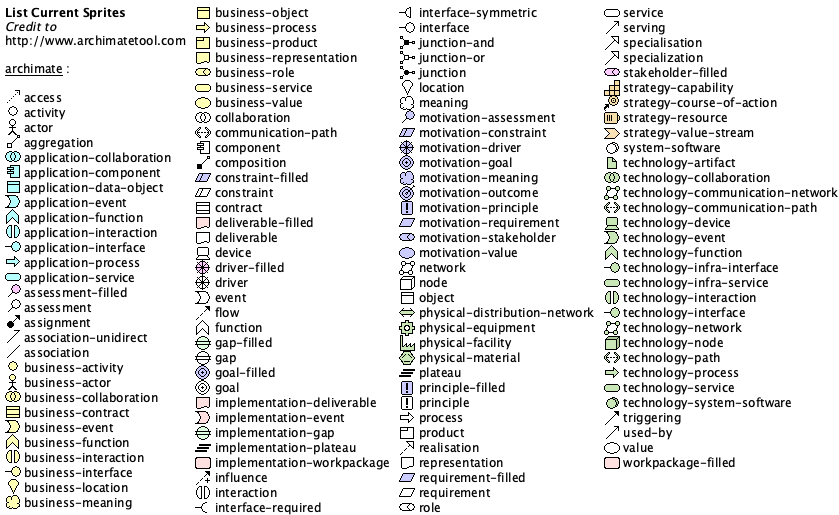
View Source
@startuml
listsprite
@enduml
Contributors

70 commits

2 commits
Similar repos


Languages
Shell
100.0%
PlantUML eaxmples for UML, ERD, wireframes, mind maps, JSON, YAML, WBS, ASCII art, Gantt charts, C4 models, and more
Shell
263
72 commits
updated Jan 29, 2026
README
PlantUML examples
PlantUML is a software tool that uses text formatting to create graphic diagrams. This page introduces PlantUML by showing examples with diagrams and source code, for UML, ERD, wireframes, mind maps, JSON, YAML, WBS, ASCII art, Gantt charts, C4 models, and more.
Sequence diagram
View Source
@startuml
skinparam monochrome true
Alpha -> Bravo
Bravo -> Alpha
@enduml
Sequence diagram with steps and divider
View Source
@startuml
skinparam monochrome true
Alpha -> Bravo: Step 1
Bravo -> Charlie: Step 2
== My Divider ==
Charlie -> Bravo: Step 3
Bravo -> Alpha: Step 4
@enduml
Sequence diagram with participant shapes
View Source
@startuml
skinparam monochrome true
participant Participant as Foo
actor       Actor       as Foo1
boundary    Boundary    as Foo2
control     Control     as Foo3
entity      Entity      as Foo4
database    Database    as Foo5
collections Collections as Foo6
queue       Queue       as Foo7
Foo -> Foo1 : To actor
Foo -> Foo2 : To boundary
Foo -> Foo3 : To control
Foo -> Foo4 : To entity
Foo -> Foo5 : To database
Foo -> Foo6 : To collections
Foo -> Foo7: To queue
@enduml
Usecase diagram
View Source
@startuml
skinparam monochrome true
left to right direction
User1 --> (Story1)
(Story1) --> (Story2)
(Story2) --> (Story3)
@enduml
Object diagram
View Source
@startuml skinparam monochrome trueobject Object1 { Alpha Bravo }
object Object2 { Charlie Delta }
object Object3 { Echo Foxtrot }
Object1 <|-- Object2 Object1 <|-- Object3 @enduml
Class diagram
View Source
@startuml skinparam monochrome true' If you want to hide the "C" circle, then uncomment this line: ' hide circle
class Class1 { {field} Alpha {method} Bravo }
class Class2 { {field} Charlie {method} Delta }
class Class3 { {field} Echo {method} Foxtrot }
Class1 <|--o Class2 Class1 <|--* Class3 @enduml
Entity relationship diagram (ERD)
View Source
@startuml skinparam monochrome true skinparam linetype ortho' If you want to hide the "E" circle, then uncomment this line: ' hide circle
entity Entity1 { Alpha Bravo }
entity Entity2 { Charlie Delta }
entity Entity3 { Echo Foxtrot }
Entity1 }o-down-o{ Entity2 Entity1 }o-down-o{ Entity3 @enduml
Package styles
View Source
@startuml
package "Demo Node" <> {
  object Object1
}
package "Demo Rectangle" <> {
  object Object2
}
package "Demo Folder" <> {
  object Object3
}
package "Demo Frame" <> {
  object Object4
}
package "Demo Cloud" <> {
  object Object5
}
package "Demo Database" <> {
  object Object6
}
@enduml
Activity diagram
View Source
@startuml
skinparam monochrome true
start
-> Starting;
:Activity 1;
if (Question) then (yes)
  :Option 1;
else (no)
  :Option 2;
endif
:Activity 2;
-> Stopping;
stop
@enduml
Component diagram of items
View Source
@startuml
skinparam monochrome true
component "Component"
interface "Interface"
database "Database"
cloud "Cloud"
node "Node"
package "Package"
@enduml
State diagram
View Source
@startuml
skinparam monochrome true
[*] --> State1 : Start
State1 -> State2 : Change1
State2 -> State3 : Change2
State3 --> [*] : Stop
State1 : Description 1
State2 : Description 2
State3 : Description 3
@enduml
Deployment diagram items
View Source
@startuml
skinparam monochrome true
action action
actor actor
agent agent
artifact artifact
boundary boundary
card card
circle circle
cloud cloud
collections collections
component component
control control
database database
entity entity
file file
folder folder
frame frame
hexagon hexagon
interface interface
label label
node node
package package
person person
queue queue
rectangle rectangle
stack stack
storage storage
usecase usecase
@enduml
Timing diagram
View Source
@startuml
skinparam monochrome true
concise "My Timeline" as T
@T
0 is Alpha
+100 is Bravo
+100 is Charlie
@50 <-> @+100 : My Note
@enduml
Diagrams through ASCII art (DITAA)
View Source
@startditaa
+--------+   +-------+    +-------+
|        +---+ ditaa +--> |       |
|  Text  |   +-------+    |diagram|
|Document|   |!magic!|    |       |
|     {d}|   |       |    |       |
+---+----+   +-------+    +-------+
    :                         ^
    |       Lots of work      |
    +-------------------------+
@endditaa
Wireframe
View Source
@startsalt
{
  Hello world
  [Button]
  ()  Radio 1
  (X) Radio 2
  []  Checkbox 1
  [X] Checkbox 2
  "Enter text here   "
  ^This is a droplist^
}
@endsalt
Gantt chart
View Source
@startgantt
skinparam monochrome true
[Task1] on {Alice} requires 8 days
then [Task2] on {Bob} requires 4 days and is 50% complete
then [Task3] on {Carol} lasts 2 days and is 25% complete
@endgantt
Mind map
View Source
@startmindmap
+ C
++ D
++ E
-- A
-- B
@endmindmap
JSON data
View Source
@startjson
{
   "fruit":"Apple",
   "size":"Large",
   "color": ["Red", "Green"]
}
@endjson
YAML data
View Source
@startyaml
fruit: Apple
size: Large
color:
  - Red
  - Green
@endyaml
Network diagram
View Source
@startuml
nwdiag {
  network dmz {
      address = "210.x.x.x/24"
  web01 [address = "210.x.x.1"];
  web02 [address = "210.x.x.2"];

}
}
@enduml
Work breakdown structure (WBS)
View Source
@startwbs
* Top
** A
*** A1
*** A2
** B
*** B1
*** B2
@endwbs
OpenIconic
View Source
@startuml
title: <&heart> Demo <&heart>
@enduml
OpenIconic provides open source icons. OpenIconic is now built-in to PlantUML.
Font Awesome
View Source
@startuml
skinparam monochrome true
!include
rectangle "<$star>"
@enduml
Procedure
View Source
@startuml!procedure $demo($name, $headline, $description) card $name as "\nsize:22$headline\n\nsize:12$description\n" !endprocedure
$demo(MyCard, "Hello World", "This is a demonstration")
@enduml
Procedure layout
View Source
@startuml skinparam monochrome true skinparam defaultTextAlignment center!procedure $layout($shape, $name, $openiconic, $headline, $description) $shape $name as "\n\nsize:44<&$openiconic>\nsize:22<U+00A0><U+00A0>$headline<U+00A0><U+00A0>\n\n<U+00A0><U+00A0>$description<U+00A0><U+00A0>\n\n" !endprocedure
$layout(card, MyCard, heart, "Hello World", "This is a demonstration")
@enduml
This shows how to create your own procedure to create a custom layout with a shape, object name, OpenIconic icon, headline that uses big size text, and a description that uses normal size text.
Area diagram
The area diagram is an example deployment diagram that shows a bunch of areas and how they interrelate. This example is useful for seeing a real-world diagram, that uses boxes, arrows, Font Awesome icons, multi-line text, Unicode padding, font sizes, and more.
View Source
@startuml skinparam monochrome true skinparam defaultTextAlignment center' icons !include <tupadr3/font-awesome/check_circle> !include <tupadr3/font-awesome/cloud> !include <tupadr3/font-awesome/cubes> !include <tupadr3/font-awesome/exchange> !include <tupadr3/font-awesome/file_code_o> !include <tupadr3/font-awesome/file_image_o> !include <tupadr3/font-awesome/gavel> !include <tupadr3/font-awesome/gear> !include <tupadr3/font-awesome/globe> !include <tupadr3/font-awesome/heart> !include <tupadr3/font-awesome/share_alt_square>
' Pipeline objects stack ""size:20Example\n\nexample\nexample\nexample"" as StackLeft card "<$cubes>\nsize:22<U+00A0><U+00A0>Example<U+00A0><U+00A0>\n\n<U+00A0><U+00A0>example, example, example <U+00A0><U+00A0>\n\n" as Pipeline1 queue "<$check_circle>\nsize:22<U+00A0><U+00A0>Example<U+00A0><U+00A0>\n\n<U+00A0><U+00A0>example, example, example<U+00A0><U+00A0>\n\n" as Pipeline2 card "<$cloud>\nsize:22<U+00A0><U+00A0>Example<U+00A0><U+00A0>\n\n<U+00A0><U+00A0>example, example, example<U+00A0><U+00A0>\n\n" as Pipeline3 stack "size:20Example\n\nexample\nexample\nexample" as StackRight
' Pipeline flow StackLeft -r-> Pipeline1 : "Example" Pipeline1 -r-> Pipeline2 : "Example" Pipeline2 -r-> Pipeline3 : "Example" Pipeline3 -r-> StackRight : "Example"
' Left side interface "Example" as InterfaceLeft InterfaceLeft -u-> StackLeft
' Right side interface "Example" as InterfaceRight InterfaceRight -u-> StackRight
' Actor 1 actor "Actor 1" as Actor1 usecase "\n<$file_image_o>\nsize:20<U+00A0><U+00A0>Example<U+00A0><U+00A0>\n\nexample\nexample\nexample\n\n" as UseCase1 Actor1 -d-> UseCase1 UseCase1 -d-> Pipeline1
' Actor 2 actor "Actor 2" as Actor2 usecase "\n<$file_code_o>\nsize:20<U+00A0><U+00A0>Example<U+00A0><U+00A0>\n\nexample\nexample\nexample\n\n" as UseCase2 Actor2 -d-> UseCase2 UseCase2 -d-> Pipeline1
' Actor 3 actor "Actor 3" as Actor3 usecase "\n<$exchange>\nsize:20Example\n\nexample\nexample\nexample\n\n" as UseCase3 Actor3 -d-> UseCase3 UseCase3 -d-> Pipeline3
' Actor 4 actor "Actor 4" as Actor4 usecase "\n<$share_alt_square>\nsize:20Example\n\nexample\nexample\nexample\n\n" as UseCase4 Actor4 -d-> UseCase4 UseCase4 -d-> Pipeline3
' Diamond upper area cloud "\n<$heart>\nsize:20Example\n\nexample, example, example\n\n" as DiamondUpper DiamondUpper -d-> Pipeline1 DiamondUpper -d-> Pipeline2 DiamondUpper -d-> Pipeline3
' Diamond lower area database "\n<$gear>\nsize:20Example\n\nexample, example, example\n\n" as DiamondLower DiamondLower -u-> Pipeline1 DiamondLower -u-> Pipeline2 DiamondLower -u-> Pipeline3
' Hinting UseCase1 -[hidden]r- UseCase2 UseCase2 -[hidden]r- DiamondUpper DiamondUpper -[hidden]r- UseCase3 UseCase3 -[hidden]r- UseCase4
' Pipeline 1 controls control "size:20Example\n\nexample\nexample\nexample" as Pipeline1Control1 control "size:20Example\n\nexample\nexample\nexample" as Pipeline1Control2 Pipeline1Control1 -u-> Pipeline1 Pipeline1Control2 -u-> Pipeline1
' Pipeline 3 controls control "size:20Example\n\nexample\nexample\nexample" as Pipeline3Control1 control "size:20Example\n\nexample\nexample\nexample" as Pipeline3Control2 Pipeline3Control1 -u-> Pipeline3 Pipeline3Control2 -u-> Pipeline3
@enduml
Standard library
View Source
@startuml
stdlib
@enduml
You can list standard library folders by using the special diagram "stdlib".
OpenIconic list
View Source
@startuml
listopeniconic
@enduml
You can list all the OpenIconic icon names and images by using the special diagram "listopeniconic".
C4 model
C4 Model focuses diagrams on four areas: Context, Containers, Components, Code.
C4 model: context diagram
C4 model: container diagram
See also: C4 model container diagram with steps
C4 model: component diagram
C4 model: code diagram
ArchiMate
ArchiMate focuses on enterprise architecture modeling language.
ArchiMate modeling
View Source
@startuml skinparam monochrome true !include sprite $stakeholder jar:archimate/motivation-stakeholder sprite $capability jar:archimate/strategy-capability sprite $product jar:archimate/business-producttitle ArchiMate Modeling Motivation_Stakeholder(Stakeholder, "Stakeholder") Strategy_Capability(Capability, "Capability") Business_Product(Product, "Product") Rel_Assignment(Stakeholder, Capability, "Can Do") Rel_Assignment(Capability, Product, "By Using")
legend left Legend
<$stakeholder> Stakeholder <$capability> Capability <$product> Product endlegend
@enduml
ArchiMate grouping
View Source
@startuml !include sprite $stakeholder jar:archimate/motivation-stakeholder sprite $capability jar:archimate/strategy-capability sprite $product jar:archimate/business-producttitle ArchiMate Modeling Layers
Grouping(Stakeholders, "Stakeholders") { Motivation_Stakeholder(Stakeholder1, "Stakeholder 1") Motivation_Stakeholder(Stakeholder2, "Stakeholder 2") }
Grouping(Drivers, "Drivers") { Motivation_Driver(Driver1, "Driver 1") Motivation_Driver(Driver2, "Driver 2") }
Grouping(Assessments, "Assessments") { Motivation_Assessment(Assessment1, "Assessment 1") Motivation_Assessment(Assessment2, "Assessment 2") }
Grouping(Goals, "Goals") { Motivation_Goal(Goal1, "Goal 1") Motivation_Goal(Goal2, "Goal 2") }
Grouping(Outcomes, "Outcomes") { Motivation_Outcome(Outcome1, "Outcome 1") Motivation_Outcome(Outcome2, "Outcome 2") }
Grouping(Requirements, "Requirements") { Motivation_Requirement(Requirement1, "Requirement 1") Motivation_Requirement(Requirement2, "Requirement 2") }
@enduml
ArchiMate elements
View Source
@startuml !includetitle ArchiMate Elements
' Motivation Elements Motivation_Stakeholder(Stakeholder, "Stakeholder") Motivation_Driver(Driver, "Driver") Motivation_Assessment(Motivation_Assessment, "Assessment") Motivation_Goal(Goal, "Goal") Motivation_Outcome(Outcome, "Outcome") Motivation_Principle(Principle, "Principle") Motivation_Requirement(Requirement, "Requirement") Motivation_Constraint(Constraint, "Constraint") Motivation_Meaning(Meaning, "Meaning") Motivation_Value(Value, "Value")
' Strategy Elements Strategy_Resource(Resource, "Resource") Strategy_Capability(Capability, "Capability") Strategy_CourseOfAction(CourseOfAction, "Course Of Action") Strategy_ValueStream(ValueStream, "Strategy Value Stream")
' Business Elements Business_Actor(Business_Actor, "Business Actor") Business_Role(Business_Role, "Business Role") Business_Collaboration(Business_Collaboration, "Business Collaboration") Business_Interface(Business_Interface, "Business Interface") Business_Process(Business_Process, "Business Process") Business_Function(Business_Function, "Business Function") Business_Interaction(Business_Interaction, "Business Interaction") Business_Event(Business_Event, "Business Event") Business_Service(Business_Service, "Business Service") Business_Object(Business_Object, "Business Object") Business_Contract(Business_Contract, "Contract") Business_Representation(Business_Representation, "Representation") Business_Product(Business_Product, "Product") Business_Location(Business_Location, "Business Location")
' Application Elements Application_Component(Application_Component, "Application Component") Application_Collaboration(Application_Collaboration, "Application Collaboration") Application_Interface(Application_Interface, "Application Interface") Application_Function(Application_Function, "Application Function") Application_Interaction(Application_Interaction, "Application Interaction") Application_Process(Application_Process, "Application Process") Application_Event(Application_Event, "Application Event") Application_Service(Application_Service, "Application Service") Application_DataObject(Application_DataObject, "Data Object")
' Technology Elements Technology_Node(Node, "Node") Technology_Device(Device, "Device") Technology_SystemSoftware(SystemSoftware, "System Software") Technology_Collaboration(Technology_Collaboration, "Technology Collaboration") Technology_Interface(Technology_Interface, "Technology Interface") Technology_Path(Path, "Path") Technology_CommunicationNetwork(CommunicationNetwork, "Communication Network") Technology_Function(Technology_Function, "Technology Function") Technology_Process(Technology_Process, "Technology Process") Technology_Interaction(Technology_Interaction, "Technology Interaction") Technology_Event(Technology_Event, "Technology Event") Technology_Service(Technology_Service, "Technology Service") Technology_Artifact(Artifact, "Artifact")
'Physical Elements Physical_Equipment(Equipment, "Equipment") Physical_Facility(Facility, "Facility") Physical_DistributionNetwork(DistributionNetwork, "Distribution Network") Physical_Material(Material, "Material")
'Implementation Elements Implementation_WorkPackage(WorkPackage, "Work Package") Implementation_Deliverable(Deliverable, "Deliverable") Implementation_Event(Implementation_Event, "Implementation Event") Implementation_Plateau(Plateau, "Plateau") Implementation_Gap(Gap, "Gap")
'Other Elements Grouping(Grouping, "Grouping") { Junction_Or(Junction_Or, "or") Junction_And(Junction_And, "and") } Group(Group, "Group") { Other_Location(Other_Location, "Location") }
@enduml
ArchiMate sprites
View Source
@startuml
listsprite
@enduml
Similar repos
Contributors
70 commits
2 commits
Languages
Shell
100.0%