
README
Beardbolt
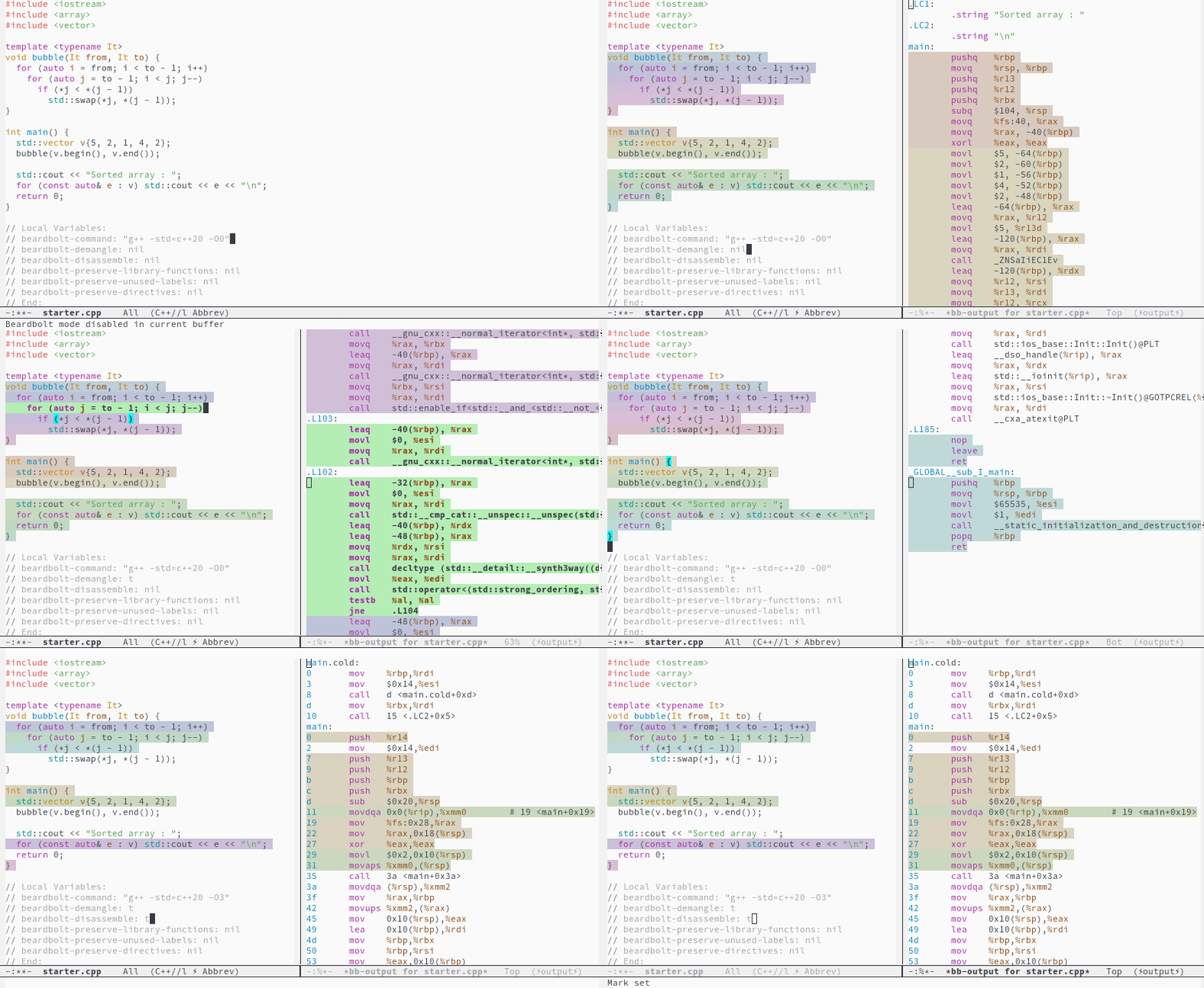
A fork-rewrite of RMSbolt, itself a supercharged implementation of Godbolt, the Compiler Explorer but for Emacs, instead of a clunky browser.
Beardbolt shows assembly output for given source code file, making it easy to see what the compiler is doing.
It also highlights which source code corresponds to a given assembly, and vice versa.
Why Beardbolt over RMSbolt
- 3-5x faster on typical files, more on larger files. See here for benchmarks.
- Doesn't require file to be saved.
- 🌈Has pretty rainbows🌈
- Has useful Godbolt features like "execute program" and "preserve/filter library functions" .
- Simpler code (less than half the LOC, though less funcional in some regards if we're honest).
Why RMSbolt over Beardbolt
- Supports way more languages/compilers. Beardbolt only C, C++ and Rust.
- Supports more Emacs versions. Beardbolt probably only 28+
Installation
cd /path/to/beardbolt/clone
make
(add-to-list 'load-path "/path/to/beardbolt/clone")
(require 'beardbolt)
M-x beardbolt-starter
Main commands
-
beardbolt-starter: Lets you start a new experiment in one of the supported languages. Automatically startbeardbolt-mode. -
beardbolt-mode: Starts a minor mode that automatically re-compiles buffer code every few changes to the source code. -
beardbolt-compile: Manually start a compilation. Bound toC-c C-cinbeardbolt-mode.
Options as local variables
Beardbolt's behaviour can be tweaked with some options that more or less correspond to the ones of Compiler Explorer. You may set them globally (they're normal Emacs customization variables), but they're probably more useful as file-local cookies, like you see in the animated gif above.
Beardbolt will pick them up immediately on each run.
-
beardbolt-command: Main compiler command to run. May be something like"gcc -O3". Leave unset to have Beardbolt try to guess from some nearbycompilation_commands.json. -
beardbolt-disassemble: Compile, assemble, then disassemble usingobjdumpand present that input instead of assembly code. -
beardbolt-asm-format: Choose betweenintelandattformats. -
beardbolt-preserve-directives: Keep every non-code, non-label asm directive. -
beardbolt-preserve-unused-labels: Keep unused asm labels. -
beardbolt-preserve-library-functions: Keep functions with no code related to current file. -
beardbolt-demangle: Demangle any mangled symbols of resulting assembly withc++filt. -
beardbolt-execute: If non-nil, run the resulting program in the compilation buffer. If a string, run with these arguments. Ift, runs without arguments. -
beardbolt-ccj-extra-flags: A string of extra compilation flags to append to the compilation command devined fromcompile_commands.json. -
beardbolt-shuffle-rainbow: Use less pretty rainbow colors, but potentially more useful and contrasting ones.
Benchmarks vs RMSbolt
First, a word on what "fast" means. The performance metric to optimize is responsiveness: the goal is not only to provide this a live view of the assembly output as quickly as possible, and also to intrude as little as possible in the user's editing.
Both Beardbolt and RMSbolt extensions work in a two-step fashion. Most of the speed gains of Beardbolt happen in step 2.
-
The file is saved somewhere and partially compiled by an external program
This happens asynchronously. It might takes several seconds and spin up your CPU, but it does not generally harm the UX inside Emacs.
-
Some Elisp processing takes place on the assembly output
This happens inside Emacs, and it's generally bad if it takes a long time, because Emacs is single-threaded and has no easily accessible asynchronous mechanisms for this type of work.
Results
To run the benchmarks, have both RMSbolt and Beardbolt clones side-by-side, then:
$ cd /path/to/beardbolt/clone
$ EMACS=~/Source/Emacs/emacs/src/emacs make benchmark
/home/capitaomorte/Source/Emacs/emacs/src/emacs -Q -L . --batch -l beardbolt-benchmark starters/slow-to-process.cpp
RMSbolt timings for slow-to-process.cpp
  samples: (1.329s 1.316s 1.338s 1.345s 1.341s)
  average: 1.334s
Beardbolt timings for slow-to-process.cpp
  samples: (0.324s 0.338s 0.334s 0.334s 0.342s)
  average: 0.334s
/home/capitaomorte/Source/Emacs/emacs/src/emacs -Q -L . --batch -l beardbolt-benchmark starters/vector-emplace-back.cpp
RMSbolt timings for vector-emplace-back.cpp
  samples: (0.234s 0.223s 0.223s 0.240s 0.224s)
  average: 0.229s
Beardbolt timings for vector-emplace-back.cpp
  samples: (0.086s 0.074s 0.073s 0.074s 0.089s)
  average: 0.079s
/home/capitaomorte/Source/Emacs/emacs/src/emacs -Q -L . --batch -l beardbolt-benchmark starters/unordered-multimap-emplace.cpp
RMSbolt timings for unordered-multimap-emplace.cpp
  samples: (0.534s 0.523s 0.524s 0.523s 0.529s)
  average: 0.527s
Beardbolt timings for unordered-multimap-emplace.cpp
  samples: (0.103s 0.123s 0.103s 0.102s 0.118s)
  average: 0.110s
This ran beardbolt-compile and rmsbolt-compile 5 times on small
two cppreference.com examples
(1, 2) as well as a known "slow" file found in
RMSbolt's bug tracker.
To make the benchmark fair(er?) I patched rmsbolt.el to generate
slightly less debug with -g1 instead of -g, and thus benefit from
the same speedup that beardbolt.el.
The results were obtained on my Thinkpad T480 running Emacs 29 (without native compilation).
Contributors



Similar repos


Languages
Emacs Lisp
53.7%
C++
43.6%
C
1.3%
README
Beardbolt
A fork-rewrite of RMSbolt, itself a supercharged implementation of Godbolt, the Compiler Explorer but for Emacs, instead of a clunky browser.
Beardbolt shows assembly output for given source code file, making it easy to see what the compiler is doing.
It also highlights which source code corresponds to a given assembly, and vice versa.
Why Beardbolt over RMSbolt
- 3-5x faster on typical files, more on larger files. See here for benchmarks.
- Doesn't require file to be saved.
- 🌈Has pretty rainbows🌈
- Has useful Godbolt features like "execute program" and "preserve/filter library functions" .
- Simpler code (less than half the LOC, though less funcional in some regards if we're honest).
Why RMSbolt over Beardbolt
- Supports way more languages/compilers. Beardbolt only C, C++ and Rust.
- Supports more Emacs versions. Beardbolt probably only 28+
Installation
cd /path/to/beardbolt/clone
make
(add-to-list 'load-path "/path/to/beardbolt/clone")
(require 'beardbolt)
M-x beardbolt-starter
Main commands
-
beardbolt-starter: Lets you start a new experiment in one of the supported languages. Automatically startbeardbolt-mode. -
beardbolt-mode: Starts a minor mode that automatically re-compiles buffer code every few changes to the source code. -
beardbolt-compile: Manually start a compilation. Bound toC-c C-cinbeardbolt-mode.
Options as local variables
Beardbolt's behaviour can be tweaked with some options that more or less correspond to the ones of Compiler Explorer. You may set them globally (they're normal Emacs customization variables), but they're probably more useful as file-local cookies, like you see in the animated gif above.
Beardbolt will pick them up immediately on each run.
-
beardbolt-command: Main compiler command to run. May be something like"gcc -O3". Leave unset to have Beardbolt try to guess from some nearbycompilation_commands.json. -
beardbolt-disassemble: Compile, assemble, then disassemble usingobjdumpand present that input instead of assembly code. -
beardbolt-asm-format: Choose betweenintelandattformats. -
beardbolt-preserve-directives: Keep every non-code, non-label asm directive. -
beardbolt-preserve-unused-labels: Keep unused asm labels. -
beardbolt-preserve-library-functions: Keep functions with no code related to current file. -
beardbolt-demangle: Demangle any mangled symbols of resulting assembly withc++filt. -
beardbolt-execute: If non-nil, run the resulting program in the compilation buffer. If a string, run with these arguments. Ift, runs without arguments. -
beardbolt-ccj-extra-flags: A string of extra compilation flags to append to the compilation command devined fromcompile_commands.json. -
beardbolt-shuffle-rainbow: Use less pretty rainbow colors, but potentially more useful and contrasting ones.
Benchmarks vs RMSbolt
First, a word on what "fast" means. The performance metric to optimize is responsiveness: the goal is not only to provide this a live view of the assembly output as quickly as possible, and also to intrude as little as possible in the user's editing.
Both Beardbolt and RMSbolt extensions work in a two-step fashion. Most of the speed gains of Beardbolt happen in step 2.
-
The file is saved somewhere and partially compiled by an external program
This happens asynchronously. It might takes several seconds and spin up your CPU, but it does not generally harm the UX inside Emacs.
-
Some Elisp processing takes place on the assembly output
This happens inside Emacs, and it's generally bad if it takes a long time, because Emacs is single-threaded and has no easily accessible asynchronous mechanisms for this type of work.
Results
To run the benchmarks, have both RMSbolt and Beardbolt clones side-by-side, then:
$ cd /path/to/beardbolt/clone
$ EMACS=~/Source/Emacs/emacs/src/emacs make benchmark
/home/capitaomorte/Source/Emacs/emacs/src/emacs -Q -L . --batch -l beardbolt-benchmark starters/slow-to-process.cpp
RMSbolt timings for slow-to-process.cpp
  samples: (1.329s 1.316s 1.338s 1.345s 1.341s)
  average: 1.334s
Beardbolt timings for slow-to-process.cpp
  samples: (0.324s 0.338s 0.334s 0.334s 0.342s)
  average: 0.334s
/home/capitaomorte/Source/Emacs/emacs/src/emacs -Q -L . --batch -l beardbolt-benchmark starters/vector-emplace-back.cpp
RMSbolt timings for vector-emplace-back.cpp
  samples: (0.234s 0.223s 0.223s 0.240s 0.224s)
  average: 0.229s
Beardbolt timings for vector-emplace-back.cpp
  samples: (0.086s 0.074s 0.073s 0.074s 0.089s)
  average: 0.079s
/home/capitaomorte/Source/Emacs/emacs/src/emacs -Q -L . --batch -l beardbolt-benchmark starters/unordered-multimap-emplace.cpp
RMSbolt timings for unordered-multimap-emplace.cpp
  samples: (0.534s 0.523s 0.524s 0.523s 0.529s)
  average: 0.527s
Beardbolt timings for unordered-multimap-emplace.cpp
  samples: (0.103s 0.123s 0.103s 0.102s 0.118s)
  average: 0.110s
This ran beardbolt-compile and rmsbolt-compile 5 times on small
two cppreference.com examples
(1, 2) as well as a known "slow" file found in
RMSbolt's bug tracker.
To make the benchmark fair(er?) I patched rmsbolt.el to generate
slightly less debug with -g1 instead of -g, and thus benefit from
the same speedup that beardbolt.el.
The results were obtained on my Thinkpad T480 running Emacs 29 (without native compilation).
Similar repos
Contributors
Languages
Emacs Lisp
53.7%
C++
43.6%
C
1.3%