
README
Mutaml: A Mutation Tester for OCaml 
Mutaml is a mutation testing tool for OCaml.
Briefly, that means Mutaml tries to change your code randomly to see
if the changes are caught by your tests.
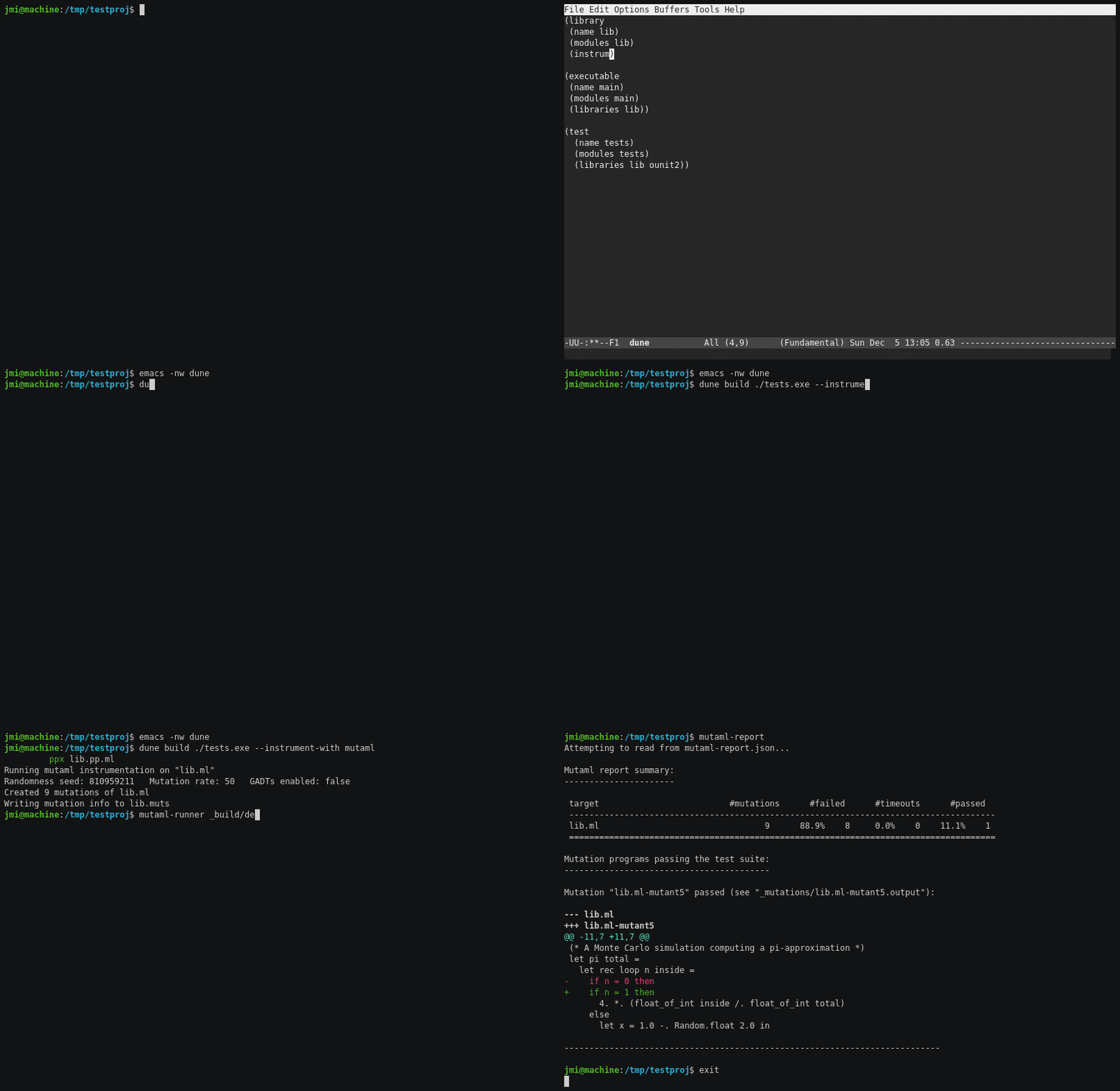
In more detail: Mutation testing is
a form of fault injection used to assess the quality of a program's
test suite. Mutation testing works by repeatedly making small, breaking
changes to a program's text, such as turning a + into -, negating
the condition of an if-then-else, ..., and subsequently rerunning
the test suite to see if each such 'mutant program' is 'killed'
(caught) by one or more tests in the test suite. By finding examples of
uncaught wrong behaviour, mutation testing can thereby reveal
limitations of an existing test suite and indirectly suggest
improvements.
Since OCaml already prevents many potential programming errors at compile time due to its strong type system, pattern-match compiler warnings, etc. Mutaml favors mutations that
- preserve typing and
- would not be caught statically, e.g., changes in the values computed.
Mutaml consists of:
- a
ppxlib-preprocessor that first transforms the program under test. mutaml-runnerthat loops through a range of possible program mutations, and saves the output from running the test suite on each of the mutantsmutaml-reportthat prints a test report to the console.
Installation:
You can install mutaml with a single opam command:
$ opam install mutaml
Alternatively, you can also install it from a clone of the repository:
$ git clone https://github.com/jmid/mutaml.git
$ cd mutaml
$ opam install .
Instructions:
How you can use mutaml depends on your project's build setup.
For now it has only been tested with dune, but it should work
with other build systems supporting an explicit two-staged build
process.
Using Mutaml with dune
-
Mark the target code for instrumentation in your
dunefile(s):(library (public_name your_library) (instrumentation (backend mutaml)))Using
dune'sinstrumentationstanza, your project's code is only instrumented when you pass the--instrument-with mutamloption. -
Compile your test code with
mutamlinstrumentation enabled:$ dune build test --instrument-with mutamlassuming you have a
test/mytests.mltest driver. This creates/overwrites an individuallib.mutsfile for each instrumentedlib.mlfile and an overview filemutaml-mut-files.txtlisting them. These files are written todune's current build context. -
Start
mutaml-runner, passing the name of the test executable to run:$ mutaml-runner _build/default/test/mytests.exeThis reads from the files written in step 2. Running the command also creates/overwrites the file
mutaml-report.json. You can also pass a command that runs the executable throughduneif you prefer:$ mutaml-runner "dune exec --no-build test/mytests.exe" -
Generate a report, optionally passing the json-file (
mutaml-report.json) created above:$ mutaml-reportBy default this prints
diffs for each mutation that flew under the radar of your test suite. Thediffoutput can be suppressed by passing--no-diff.
Steps 3 and 4 output a number of additional files.
These are all written to a dedicated directory named _mutations.
Instrumentation Options and Environment Variables
The preprocessor's behaviour can be configured through either
environment variables or instrumentation options in the dune file:
MUTAML_SEED- an integer value to seedmutaml-ppx's randomized mutations (overridden by instrumentation option-seed)MUTAML_MUT_RATE- a integer between 0 and 100 to specify the mutation frequency (0 means never and 100 means always - overridden by instrumentation option-mut-rate)MUTAML_GADT- allow only pattern mutations compatible with GADTs (trueorfalse, overridden by instrumentation option-gadt)
For example, the following dune file sets all three instrumentation
options:
 (executable
  (name test)
  (instrumentation (backend mutaml -seed 42 -mut-rate 75 -gadt false))
 )
We could achieve the same behaviour by setting three environment variables:
  $ export MUTAML_SEED=42
  $ export MUTAML_MUT_RATE=75
  $ export MUTAML_GADT=false
If you do both, the values passed as instrumentation options in the
dune file take precedence.
Runner Options and Environment Variables
By default, mutaml-runner expects to find the preprocessor's output
files in the default build context _build/default. This can be
configured via an environment variable or a command-line option, e.g.,
if instrumentation is enabled via another dune-workspace build context:
MUTAML_BUILD_CONTEXT- a path prefix string (overridden by command-line option--build-context)
mutaml-runner also repeats test suite runs for all instrumented
lib.ml files by default. An option --muts muts-file is available
to enable more targeted mutation testing. Running, e.g.,
mutaml-runner --muts lib/lib2.muts _build/default/test/mytests.exe
will only consider mutations of the corresponding library
lib/lib2.ml, which the runner searches for in the build context.
Report Options and Environment Variables
Currently mutaml-report uses diff --color -u as its default
command to print diffs. It falls back to diff -u when the
environment variable CI is true. The used command can also be
configured with an environment variable:
MUTAML_DIFF_COMMAND- the command and options to use instead, e.g.MUTAML_DIFF_COMMAND="diff -U 5"will disable colored outputs and add 5 lines of unified context. Mutaml expects the specified command to support--labeloptions.
Passing the option --no-diff to mutaml-report prevents any
mutation diffs from being printed.
Status
This is an alpha release. There are therefore rough edges:
-
Mutaml is designed to avoid repeated recompilation for each mutation. It does so by writing files during preprocessing which are later read during the
mutaml-runnertesting loop. As a consequence, if you attempt to merge steps 2 and 3 above into one step this will not work:$ mutaml-runner "dune test --force --instrument-with mutaml"The preprocessor in this case only writes the relevant files when
mutaml-runnerfirst calls the command, and thus after it needs the information contained in the files... -
There are issues to force
duneto rebuild. This can affect Mutaml, e.g., in case just an environment variable changed.dune cleanis a crude but effective work-around to this issue. -
The output files to
_build/defaultare not registered withdune. This means rerunning steps 2,3,4 above will fail, as the additional output files in_build/defaultare not cached byduneand hence deleted. Againdune cleanis a crude but effective work-around. -
...
Mutations should not introduce compiler errors, be it type errors or from the pattern-match compiler. If you encounter a situation where this happens please report it in an issue.
Acknowledgements
Mutaml was developed with support from the OCaml Software Foundation. While developing it, I also benefitted from studying the source code of bisect_ppx.
Contributors


Similar repos


Languages
OCaml
95.5%
Dune
2.4%
Shell
1.4%
README
Mutaml: A Mutation Tester for OCaml
Mutaml is a mutation testing tool for OCaml.
Briefly, that means Mutaml tries to change your code randomly to see
if the changes are caught by your tests.
In more detail: Mutation testing is
a form of fault injection used to assess the quality of a program's
test suite. Mutation testing works by repeatedly making small, breaking
changes to a program's text, such as turning a + into -, negating
the condition of an if-then-else, ..., and subsequently rerunning
the test suite to see if each such 'mutant program' is 'killed'
(caught) by one or more tests in the test suite. By finding examples of
uncaught wrong behaviour, mutation testing can thereby reveal
limitations of an existing test suite and indirectly suggest
improvements.
Since OCaml already prevents many potential programming errors at compile time due to its strong type system, pattern-match compiler warnings, etc. Mutaml favors mutations that
- preserve typing and
- would not be caught statically, e.g., changes in the values computed.
Mutaml consists of:
- a
ppxlib-preprocessor that first transforms the program under test. mutaml-runnerthat loops through a range of possible program mutations, and saves the output from running the test suite on each of the mutantsmutaml-reportthat prints a test report to the console.
Installation:
You can install mutaml with a single opam command:
$ opam install mutaml
Alternatively, you can also install it from a clone of the repository:
$ git clone https://github.com/jmid/mutaml.git
$ cd mutaml
$ opam install .
Instructions:
How you can use mutaml depends on your project's build setup.
For now it has only been tested with dune, but it should work
with other build systems supporting an explicit two-staged build
process.
Using Mutaml with dune
-
Mark the target code for instrumentation in your
dunefile(s):(library (public_name your_library) (instrumentation (backend mutaml)))Using
dune'sinstrumentationstanza, your project's code is only instrumented when you pass the--instrument-with mutamloption. -
Compile your test code with
mutamlinstrumentation enabled:$ dune build test --instrument-with mutamlassuming you have a
test/mytests.mltest driver. This creates/overwrites an individuallib.mutsfile for each instrumentedlib.mlfile and an overview filemutaml-mut-files.txtlisting them. These files are written todune's current build context. -
Start
mutaml-runner, passing the name of the test executable to run:$ mutaml-runner _build/default/test/mytests.exeThis reads from the files written in step 2. Running the command also creates/overwrites the file
mutaml-report.json. You can also pass a command that runs the executable throughduneif you prefer:$ mutaml-runner "dune exec --no-build test/mytests.exe" -
Generate a report, optionally passing the json-file (
mutaml-report.json) created above:$ mutaml-reportBy default this prints
diffs for each mutation that flew under the radar of your test suite. Thediffoutput can be suppressed by passing--no-diff.
Steps 3 and 4 output a number of additional files.
These are all written to a dedicated directory named _mutations.
Instrumentation Options and Environment Variables
The preprocessor's behaviour can be configured through either
environment variables or instrumentation options in the dune file:
MUTAML_SEED- an integer value to seedmutaml-ppx's randomized mutations (overridden by instrumentation option-seed)MUTAML_MUT_RATE- a integer between 0 and 100 to specify the mutation frequency (0 means never and 100 means always - overridden by instrumentation option-mut-rate)MUTAML_GADT- allow only pattern mutations compatible with GADTs (trueorfalse, overridden by instrumentation option-gadt)
For example, the following dune file sets all three instrumentation
options:
 (executable
  (name test)
  (instrumentation (backend mutaml -seed 42 -mut-rate 75 -gadt false))
 )
We could achieve the same behaviour by setting three environment variables:
  $ export MUTAML_SEED=42
  $ export MUTAML_MUT_RATE=75
  $ export MUTAML_GADT=false
If you do both, the values passed as instrumentation options in the
dune file take precedence.
Runner Options and Environment Variables
By default, mutaml-runner expects to find the preprocessor's output
files in the default build context _build/default. This can be
configured via an environment variable or a command-line option, e.g.,
if instrumentation is enabled via another dune-workspace build context:
MUTAML_BUILD_CONTEXT- a path prefix string (overridden by command-line option--build-context)
mutaml-runner also repeats test suite runs for all instrumented
lib.ml files by default. An option --muts muts-file is available
to enable more targeted mutation testing. Running, e.g.,
mutaml-runner --muts lib/lib2.muts _build/default/test/mytests.exe
will only consider mutations of the corresponding library
lib/lib2.ml, which the runner searches for in the build context.
Report Options and Environment Variables
Currently mutaml-report uses diff --color -u as its default
command to print diffs. It falls back to diff -u when the
environment variable CI is true. The used command can also be
configured with an environment variable:
MUTAML_DIFF_COMMAND- the command and options to use instead, e.g.MUTAML_DIFF_COMMAND="diff -U 5"will disable colored outputs and add 5 lines of unified context. Mutaml expects the specified command to support--labeloptions.
Passing the option --no-diff to mutaml-report prevents any
mutation diffs from being printed.
Status
This is an alpha release. There are therefore rough edges:
-
Mutaml is designed to avoid repeated recompilation for each mutation. It does so by writing files during preprocessing which are later read during the
mutaml-runnertesting loop. As a consequence, if you attempt to merge steps 2 and 3 above into one step this will not work:$ mutaml-runner "dune test --force --instrument-with mutaml"The preprocessor in this case only writes the relevant files when
mutaml-runnerfirst calls the command, and thus after it needs the information contained in the files... -
There are issues to force
duneto rebuild. This can affect Mutaml, e.g., in case just an environment variable changed.dune cleanis a crude but effective work-around to this issue. -
The output files to
_build/defaultare not registered withdune. This means rerunning steps 2,3,4 above will fail, as the additional output files in_build/defaultare not cached byduneand hence deleted. Againdune cleanis a crude but effective work-around. -
...
Mutations should not introduce compiler errors, be it type errors or from the pattern-match compiler. If you encounter a situation where this happens please report it in an issue.
Acknowledgements
Mutaml was developed with support from the OCaml Software Foundation. While developing it, I also benefitted from studying the source code of bisect_ppx.
Similar repos
Contributors
Languages
OCaml
95.5%
Dune
2.4%
Shell
1.4%