A Rust library for creating Excel XLSX files.
See the codeThe rust_xlsxwriter library is a Rust crate for writing Excel files in the
xlsx format.
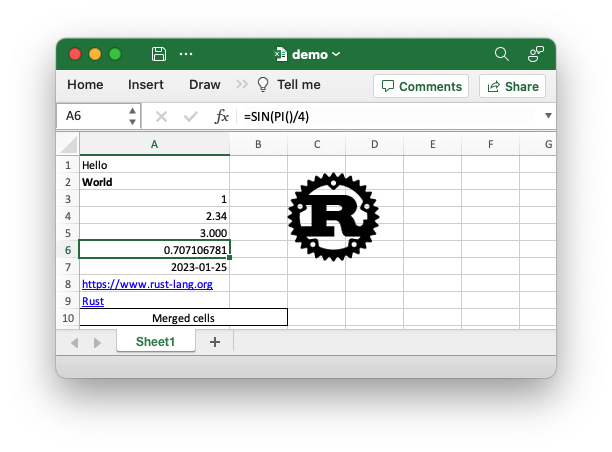
The rust_xlsxwriter crate can be used to write text, numbers, dates, and
formulas to multiple worksheets in a new Excel 2007+ .xlsx file. It has a
focus on performance and fidelity with the file format created by Excel. It
cannot be used to modify an existing file.
Sample code to generate the Excel file shown above.
use rust_xlsxwriter::*;

fn main() -> Result<(), XlsxError> {
    // Create a new Excel file object.
    let mut workbook = Workbook::new();

    // Create some formats to use in the worksheet.
    let bold_format = Format::new().set_bold();
    let decimal_format = Format::new().set_num_format("0.000");
    let date_format = Format::new().set_num_format("yyyy-mm-dd");
    let merge_format = Format::new()
        .set_border(FormatBorder::Thin)
        .set_align(FormatAlign::Center);

    // Add a worksheet to the workbook.
    let worksheet = workbook.add_worksheet();

    // Set the column width for clarity.
    worksheet.set_column_width(0, 22)?;

    // Write a string without formatting.
    worksheet.write(0, 0, "Hello")?;

    // Write a string with the bold format defined above.
    worksheet.write_with_format(1, 0, "World", &bold_format)?;

    // Write some numbers.
    worksheet.write(2, 0, 1)?;
    worksheet.write(3, 0, 2.34)?;

    // Write a number with formatting.
    worksheet.write_with_format(4, 0, 3.00, &decimal_format)?;

    // Write a formula.
    worksheet.write(5, 0, Formula::new("=SIN(PI()/4)"))?;

    // Write a date.
    let date = ExcelDateTime::from_ymd(2023, 1, 25)?;
    worksheet.write_with_format(6, 0, &date, &date_format)?;

    // Write some links.
    worksheet.write(7, 0, Url::new("https://www.rust-lang.org"))?;
    worksheet.write(8, 0, Url::new("https://www.rust-lang.org").set_text("Rust"))?;

    // Write some merged cells.
    worksheet.merge_range(9, 0, 9, 1, "Merged cells", &merge_format)?;

    // Insert an image.
    let image = Image::new("examples/rust_logo.png")?;
    worksheet.insert_image(1, 2, &image)?;

    // Save the file to disk.
    workbook.save("demo.xlsx")?;

    Ok(())
}
rust_xlsxwriter is a rewrite of the Python XlsxWriter library in Rust
by the same author, with additional Rust-like features and APIs. The
supported features are:
The rust_xlsxwriter crate was designed and implemented based around the
following design considerations:
rust_xlsxwriter library has sister
libraries written in C (libxlsxwriter), Python (XlsxWriter), and Perl
(Excel::Writer::XLSX), by the same author. Bug fixes and improvements in
one get transferred to the others.As mentioned above the rust_xlsxwriter library has sister libraries
written natively in C, Python, and Perl.
A relative performance comparison between the C, Rust, and Python versions is shown below. The Perl performance is similar to the Python library, so it has been omitted.
| Library | Relative to C | Relative to Rust |
|---|---|---|
| C/libxlsxwriter | 1.00 | |
rust_xlsxwriter | 1.14 | 1.00 |
| Python/XlsxWriter | 4.36 | 3.81 |
The C version is the fastest: it is 1.14 times faster than the Rust version and 4.36 times faster than the Python version. The Rust version is 3.81 times faster than the Python version.
See the Performance section for more details.
The following is a list of the features supported by the rust_xlsxwriter
crate.
Default
default: This includes all the standard functionality. The only
dependency is the zip crate.rust_xlsxwriter can be added to a Rust project as follows:
cargo add rust_xlsxwriter
Optional features
These are all off by default.
constant_memory: Keeps memory usage to a minimum when writing large files.
See Constant Memory Mode.enhanced_autofit: Adds support for autofitting formatted numbers and dates
via the ssfmt crate.serde: Adds support for Serde serialization.chrono: Adds support for Chrono date/time types to the API. See
IntoExcelDateTime.jiff: Adds support for Jiff date/time types to the API. See
IntoExcelDateTime.zlib: Improves performance of the zlib crate but adds a dependency on
zlib and a C compiler. This can be up to 1.5 times faster for large files.polars: Adds support for mapping between PolarsError and
rust_xlsxwriter::XlsxError. See also
polars_excel_writer.wasm: Adds a dependency on js-sys and wasm-bindgen to allow
compilation for wasm/JavaScript targets. See also
wasm-xlsxwriter.rust_decimal: Adds support for writing the
rust_decimal Decimal.zmij: Adds a dependency on zmij. This speeds up writing numeric
worksheet cells by around 10%. See the Performance documentation.A rust_xlsxwriter feature can be enabled in your Cargo.toml file as
follows:
cargo add rust_xlsxwriter -F constant_memory
Recent changes:
See the full Release Notes and Changelog.
rust_xlsxwriter library.
rust_xlsxwriter in a project and write a Hello World example.rust_xlsxwriter to write some
expense data to a spreadsheet.142 followers · starred Jan 2024
163 followers · starred Jan 2023
2,419 followers · starred Apr 2025
315 followers · starred Feb 2026
A Rust library for creating Excel XLSX files.
See the codeThe rust_xlsxwriter library is a Rust crate for writing Excel files in the
xlsx format.
The rust_xlsxwriter crate can be used to write text, numbers, dates, and
formulas to multiple worksheets in a new Excel 2007+ .xlsx file. It has a
focus on performance and fidelity with the file format created by Excel. It
cannot be used to modify an existing file.
Sample code to generate the Excel file shown above.
use rust_xlsxwriter::*;

fn main() -> Result<(), XlsxError> {
    // Create a new Excel file object.
    let mut workbook = Workbook::new();

    // Create some formats to use in the worksheet.
    let bold_format = Format::new().set_bold();
    let decimal_format = Format::new().set_num_format("0.000");
    let date_format = Format::new().set_num_format("yyyy-mm-dd");
    let merge_format = Format::new()
        .set_border(FormatBorder::Thin)
        .set_align(FormatAlign::Center);

    // Add a worksheet to the workbook.
    let worksheet = workbook.add_worksheet();

    // Set the column width for clarity.
    worksheet.set_column_width(0, 22)?;

    // Write a string without formatting.
    worksheet.write(0, 0, "Hello")?;

    // Write a string with the bold format defined above.
    worksheet.write_with_format(1, 0, "World", &bold_format)?;

    // Write some numbers.
    worksheet.write(2, 0, 1)?;
    worksheet.write(3, 0, 2.34)?;

    // Write a number with formatting.
    worksheet.write_with_format(4, 0, 3.00, &decimal_format)?;

    // Write a formula.
    worksheet.write(5, 0, Formula::new("=SIN(PI()/4)"))?;

    // Write a date.
    let date = ExcelDateTime::from_ymd(2023, 1, 25)?;
    worksheet.write_with_format(6, 0, &date, &date_format)?;

    // Write some links.
    worksheet.write(7, 0, Url::new("https://www.rust-lang.org"))?;
    worksheet.write(8, 0, Url::new("https://www.rust-lang.org").set_text("Rust"))?;

    // Write some merged cells.
    worksheet.merge_range(9, 0, 9, 1, "Merged cells", &merge_format)?;

    // Insert an image.
    let image = Image::new("examples/rust_logo.png")?;
    worksheet.insert_image(1, 2, &image)?;

    // Save the file to disk.
    workbook.save("demo.xlsx")?;

    Ok(())
}
rust_xlsxwriter is a rewrite of the Python XlsxWriter library in Rust
by the same author, with additional Rust-like features and APIs. The
supported features are:
The rust_xlsxwriter crate was designed and implemented based around the
following design considerations:
rust_xlsxwriter library has sister
libraries written in C (libxlsxwriter), Python (XlsxWriter), and Perl
(Excel::Writer::XLSX), by the same author. Bug fixes and improvements in
one get transferred to the others.As mentioned above the rust_xlsxwriter library has sister libraries
written natively in C, Python, and Perl.
A relative performance comparison between the C, Rust, and Python versions is shown below. The Perl performance is similar to the Python library, so it has been omitted.
| Library | Relative to C | Relative to Rust |
|---|---|---|
| C/libxlsxwriter | 1.00 | |
rust_xlsxwriter | 1.14 | 1.00 |
| Python/XlsxWriter | 4.36 | 3.81 |
The C version is the fastest: it is 1.14 times faster than the Rust version and 4.36 times faster than the Python version. The Rust version is 3.81 times faster than the Python version.
See the Performance section for more details.
The following is a list of the features supported by the rust_xlsxwriter
crate.
Default
default: This includes all the standard functionality. The only
dependency is the zip crate.rust_xlsxwriter can be added to a Rust project as follows:
cargo add rust_xlsxwriter
Optional features
These are all off by default.
constant_memory: Keeps memory usage to a minimum when writing large files.
See Constant Memory Mode.enhanced_autofit: Adds support for autofitting formatted numbers and dates
via the ssfmt crate.serde: Adds support for Serde serialization.chrono: Adds support for Chrono date/time types to the API. See
IntoExcelDateTime.jiff: Adds support for Jiff date/time types to the API. See
IntoExcelDateTime.zlib: Improves performance of the zlib crate but adds a dependency on
zlib and a C compiler. This can be up to 1.5 times faster for large files.polars: Adds support for mapping between PolarsError and
rust_xlsxwriter::XlsxError. See also
polars_excel_writer.wasm: Adds a dependency on js-sys and wasm-bindgen to allow
compilation for wasm/JavaScript targets. See also
wasm-xlsxwriter.rust_decimal: Adds support for writing the
rust_decimal Decimal.zmij: Adds a dependency on zmij. This speeds up writing numeric
worksheet cells by around 10%. See the Performance documentation.A rust_xlsxwriter feature can be enabled in your Cargo.toml file as
follows:
cargo add rust_xlsxwriter -F constant_memory
Recent changes:
See the full Release Notes and Changelog.
rust_xlsxwriter library.
rust_xlsxwriter in a project and write a Hello World example.rust_xlsxwriter to write some
expense data to a spreadsheet.142 followers · starred Jan 2024
163 followers · starred Jan 2023
2,419 followers · starred Apr 2025
315 followers · starred Feb 2026



