ARTEX 한국어판 · AI 자율 침투 테스트 프레임워크(upstream: Autumn-27/ARTEX, AGPL-3.0)
Go
1,621
792 commits
updated Oct 14, 2026
An autonomous penetration-testing system driven by LLM multi-agents (Go backend + Next.js frontend)
The UI and generated output default to English, and can be switched to Korean, Chinese, Spanish or Japanese in Settings (System → Settings → Display language). Changing the language also changes the language of agent-generated reports, summaries and chat replies.
English · 한국어 · 中文 · Español · 日本語



🚨 Security & misuse warning — read this first
This repository is published for use only within authorized environments, and only to build defensive and detection capabilities.
ARTEX is an autonomous offensive tool powerful enough to carry an attack from reconnaissance through intrusion to data exfiltration with little human involvement, so the harm from misuse is correspondingly large. In October 2026, several Korean news outlets reported that investigators had found indications the upstream ARTEX was used in personal-data breaches targeting Korean financial institutions; the related investigation is ongoing. This global edition is not published to help attackers. Its purpose is to help defenders understand how such autonomous AI attacks work and build the capability to detect and block them.
- Unauthorized use is a crime in itself. Do not run any scanning, probing, or exploitation against systems you do not own or for which you lack explicit written authorization. In the Republic of Korea, unauthorized intrusion into an information and communications network violates the Network Act, and the Personal Information Protection Act also applies where personal data is involved.
- Do not target live services or other parties' assets. Verify only in learning, research, and locally isolated environments you own (deliberately vulnerable targets such as OWASP Juice Shop or DVWA).
- Read it from a defender's point of view. This repository also compiles defensive and detection material, such as detection signatures and hardening checklists, for autonomous AI attacks. → Defense & Detection Guide (also in Korean)
If you do not agree to this warning and to the usage restrictions and disclaimer below, do not download or use this repository.
This repository is a localized edition of the Chinese open-source project Autumn-27/ARTEX (AGPL-3.0 · upstream repository currently unreachable, checked 2026-10), adapted so that users and teams worldwide can adopt it as-is. To preserve the agents' decision-making performance, the internal reasoning prompts are kept in the original language, and only the user-facing output (findings, summaries, reports, chat replies) is forced into the selected language (English by default). See "Why a global edition" below for the rationale.
ARTEX is a system in which several LLM-driven agents autonomously run a penetration test: they break goals down on their own, execute real tools, and accumulate discovered assets and vulnerabilities into a graph as they go. A single Go binary ships with the Next.js frontend embedded, and all data is stored in PostgreSQL.
Note on this edition's language. This fork makes the product usable in five languages — English (default), Korean, Chinese, Spanish, and Japanese — selectable in Settings. The user-facing output is forced into the selected language, while the agents' internal reasoning prompts are kept in the original language to preserve benchmarked performance. See Configuration for how the output language is enforced by a small code-fixed directive.
ARTEX may be used only against targets you own or for which you have explicit written authorization. Any scanning, probing, or exploitation beyond the authorized scope may itself be illegal.
Full license terms, usage restrictions, and the disclaimer are in the License and disclaimer section below. Using this tool constitutes your agreement to those terms.
Upstream ARTEX has its prompts, UI, and documentation entirely in Chinese, which made it cumbersome for anyone who does not read Chinese to read the results and share them with a team. This edition aims to:
The boundaries and design policy of this multilingual edition are documented in more detail in the repository's working notes. To make it easy to diff against the upstream repository, the original Chinese document is preserved as
README.zh.md.
The three screens below show the default English UI (switchable to Korean, Chinese, Spanish, and Japanese in Settings). The data comes from a local, isolated sandbox: every target is the fictional acme.com and private address ranges.
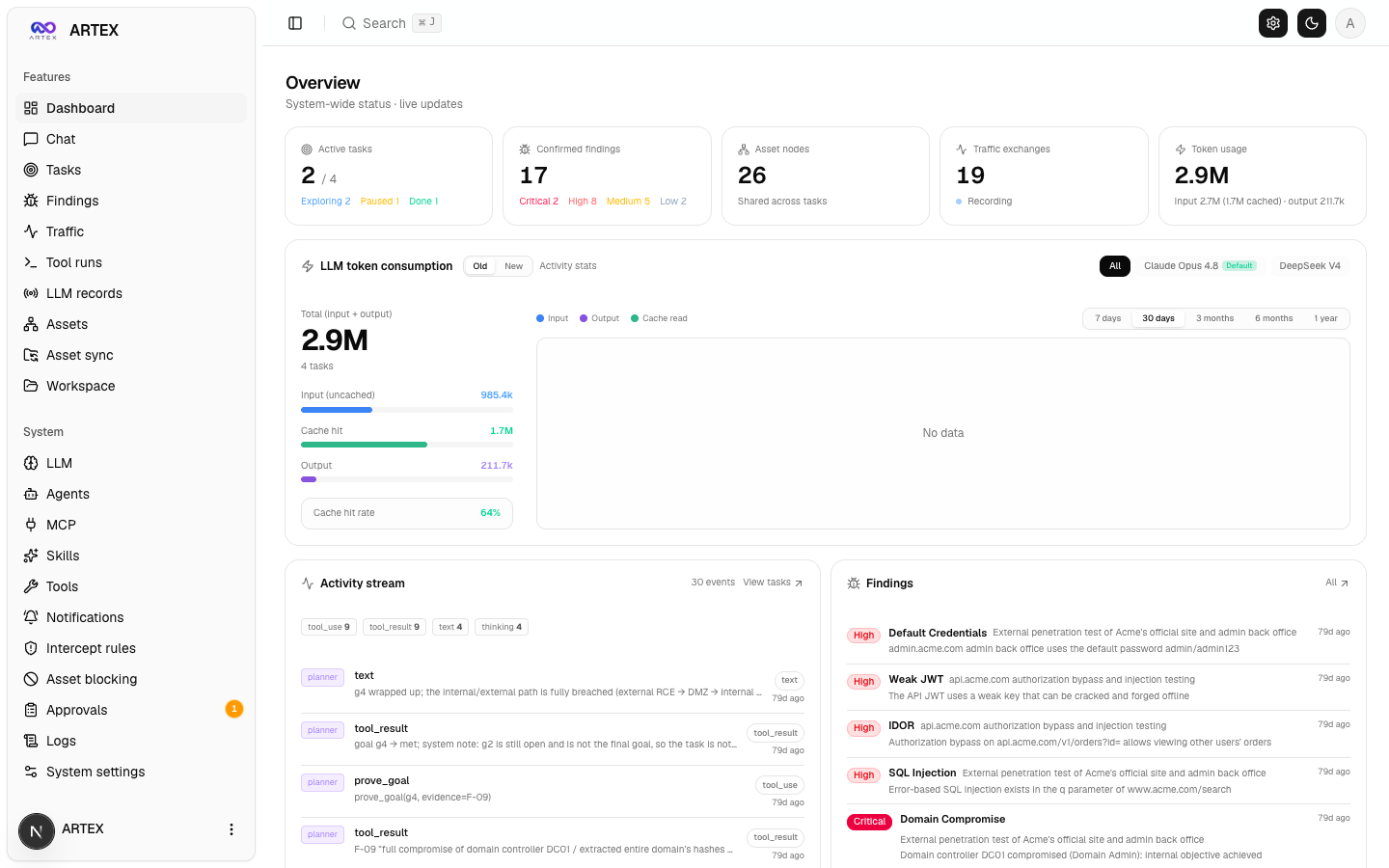
Dashboard — active tasks, confirmed findings, asset nodes, LLM token spend, and the activity feed on one screen.
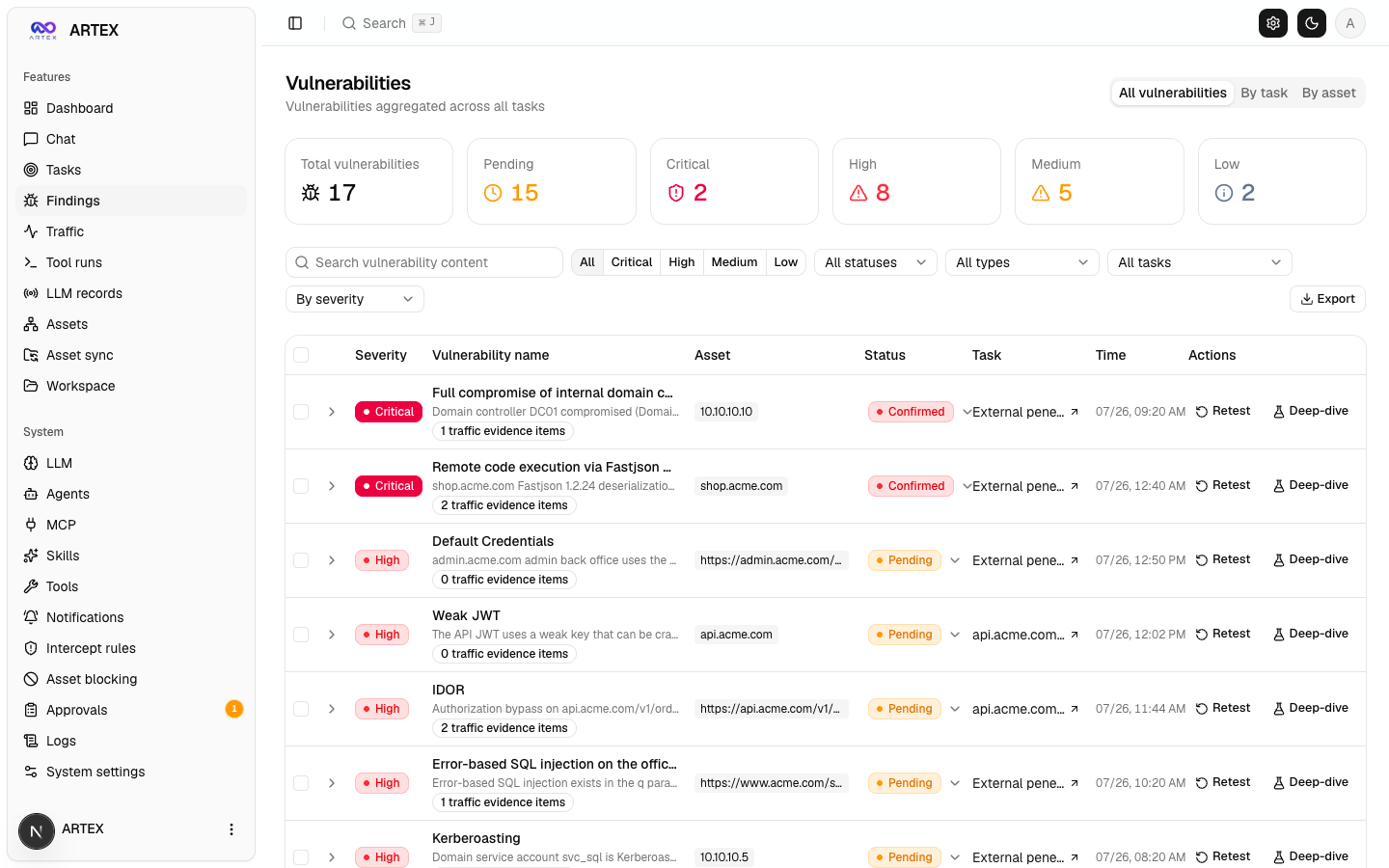
Findings — results aggregated by severity, status, asset, and owning task, exportable to CSV.
Finding titles are model-generated, so English technical terms can appear, mirroring the target app ([Model selection and output language](#model-selection-and-output-language)). The description under each title and the rest of the UI are in English (the default; switchable in Settings).
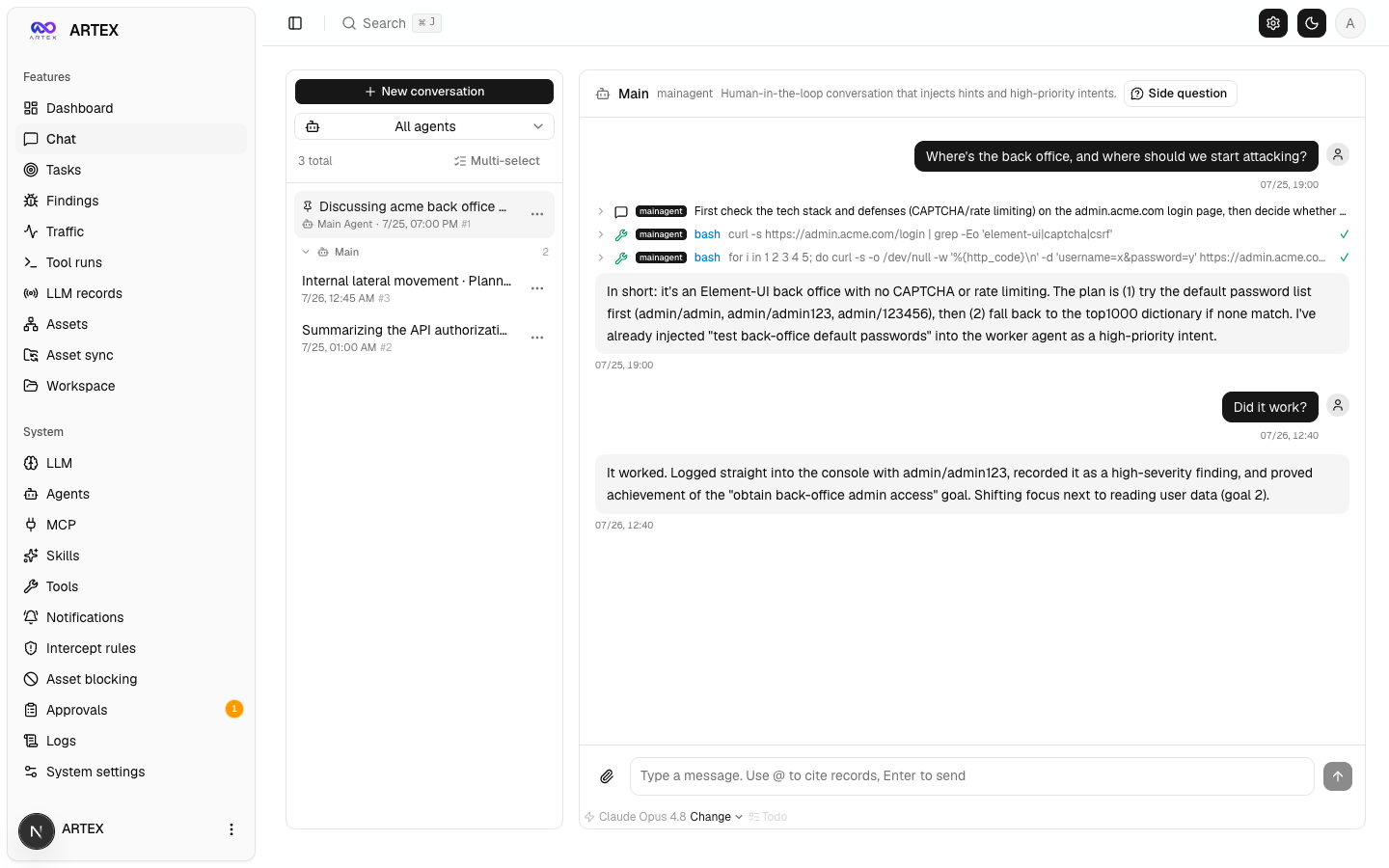
Chat — a human steps into the autonomous run to inject hints while the agent summarizes the attack chain in English.
The original (Chinese UI) screens are available in README.zh.md (Chinese UI).
Prerequisites: Docker and Docker Compose. The database is PostgreSQL, brought up by compose. Exploration requires an LLM (
ANTHROPIC_API_KEYorOPENAI_API_KEY; can also be set in the UI).
Image: the
artexservice indocker-compose.ymlpullsghcr.io/jiwoochris/artex-global, the global-edition image this repository publishes to GitHub Container Registry on every release tag (v*). The default tag islatest(the most recent release); setARTEX_TAGin.envto pin a specific release. Upstream's original imageautumn27/artexhas been taken down from Docker Hub and is no longer used.
git clone https://github.com/jiwoochris/artex-global.git
cd artex-global
cp .env.example .env          # set POSTGRES_PASSWORD; ANTHROPIC_API_KEY is optional
docker compose up -d          # brings up the artex image + postgres together
# → open http://localhost:8787 (on first visit, set the admin password at /setup)
#   /setup asks for the setup token printed in the startup log: docker compose logs artex | grep -F '[auth]'
The image bundles common tools (ripgrep, curl, vim, npm, nmap, and more), and when brought up with compose, ./skills and ./data are bind-mounted to the host and survive container recreation.
Upstream provides several methods: an install script (./install.sh), precompiled binaries (Releases), and a single-binary build from source. The commands and full procedure are collected in the "安装" (Installation) section of README.zh.md (in Chinese); the essentials are reproduced below.
Install script: running ./install.sh detects/installs Docker and then lets you choose "① all-in-Docker" or "② local compile and run." "① all-in-Docker" pulls and starts the same image as the quick start above (ghcr.io/jiwoochris/artex-global), while "② local compile and run" builds it yourself the same way as the single-binary build from source below.
Single-binary build from source:
cd web && npm ci && npm run build:static && cd ..   # 1) static frontend build
rm -rf server/webui/dist && mkdir -p server/webui/dist && cp -a web/out/. server/webui/dist/   # 2) sync into the embed directory (avoids nesting on rebuild)
CGO_ENABLED=0 go build -tags embedui -o artex ./cmd/artex   # 3) compile with the frontend embedded
./start.sh                                          # → http://localhost:8787
The
npm ciin step 1) installs the devDependencies the build needs (e.g.@tailwindcss/postcss). If your shell hasNODE_ENV=productionset,npm ciskips devDependencies and the build fails withError: Cannot find module '@tailwindcss/postcss'; in that case install withnpm ci --include=dev.
Launch with
start.sh(start.baton Windows) rather than running./artexdirectly. That script is a supervisor that restarts the program based on its exit code, and it also handles the UI's "one-click update."
Database (config.json, or override with the ARTEX_PG_DSN environment variable):
{
  "database": {
    "host": "127.0.0.1", "port": 5432,
    "user": "artex", "password": "yourpass",
    "dbname": "artex", "sslmode": "disable"
  }
}
LLM: export ANTHROPIC_API_KEY=sk-... (or OPENAI_API_KEY), or enter it on the UI's "LLM settings" page. Optional environment variables: ARTEX_LLM_PROVIDER / ARTEX_LLM_MODEL / ARTEX_LLM_BASE_URL / ARTEX_LLM_PROXY. To use a domestic or open model, point ARTEX_LLM_BASE_URL at an OpenAI-compatible endpoint.
Output language: this edition forces user-facing output into the selected language (English by default) via a small, code-fixed directive appended to each role's system prompt (it does not translate the reasoning body). Switch languages in Settings, or adapt that directive in agent/prompt.go (langDirective).
Concurrency: the number of worker agents spawned per task is adjustable under "System settings" (default 3).
Common flags: ./start.sh -addr :8787 -proxy :8788 — -addr is the frontend and API, -proxy is the traffic-recording proxy port. -addr defaults to 127.0.0.1:8787 (local connections only); pass an explicit bind address such as :8787 to serve other machines (see "First-run protection" below).
The output-language enforcement is driven by a prompt directive (langDirective() in agent/prompt.go), not a hard-coded cap. So how consistently the output stays in the selected language depends on the model's capability, the role, and the context. The validation figures below were measured with Korean output while Korean was the default; the same trend holds for the other languages.
claude-opus-4-8 kept user-facing output in Korean across all four roles — planner, worker, reporter, and an authorized-sandbox planning request — with no refusals. gpt-4o also stayed in Korean on the same scenarios. A cheaper, smaller model (for example gpt-4o-mini), by contrast, let the report fall back to the original language. Output-language quality tracks model capability directly, so use a capable model wherever a human reads the report.report_finding can lean toward English, mirroring the target app and its technical terms. In an earlier run, gpt-4o's planner situation summary also reverted to the original language on some turns. Stating "write in the selected language" explicitly in the task instruction raises the fidelity.max_tokens. A reasoning model that uses a separate thinking channel can spend a small response-token budget entirely on internal reasoning and leave the user-facing final answer empty. Here the answer itself disappears rather than the language, so set that LLM profile's max_tokens high enough.Token-cap pitfall on the OpenAI-compatible path. OpenAI-family models such as
gpt-4ocap response tokens at 16,384. OpenAI-compatible requests, however, carry a larger default output cap (32,768), so leaving it unchanged makes every call fail with400 (max_tokens is too large). In that case, set that profile'smax_tokensto 16,384 or lower on the LLM settings page. Anthropic-family models (including the defaultclaude-opus-4-8) allow 32,768 and do not hit this pitfall.
There is a single admin account (ARTEX) whose password is created on the first visit at /setup. So that whoever reaches a not-yet-initialised instance first cannot claim it, the following protections apply.
[auth] … Setup token: … to the console (docker compose logs artex under Docker). /setup and POST /api/auth/init (setup_token field) only create the password when that value matches, and wrong attempts are rate-limited. For unattended deployments pin it with ARTEX_SETUP_TOKEN, or set the password directly with ARTEX_ADMIN_PASSWORD (8+ characters).-addr default of artex and the port publishing in docker-compose.yml open the loopback interface only. To reach it from other machines use -addr :8787 or ARTEX_BIND=0.0.0.0 in .env, but finish the initial setup first and prefer the reverse-proxy layout below. Starting without a password on a non-loopback address logs a warning.reset-password.sh, or a direct DB edit) stop working within seconds. When recovering from a compromised account, also review custom tools, MCP, LLM and notification settings after changing the password./api only answers cross-origin browser calls from origins listed in ARTEX_CORS_ORIGINS (comma-separated). The embedded UI is same-origin, so this is normally empty; the default only allows next dev from dev.sh (http://localhost:5173).The frontend and the API/SSE are both served by the same backend port (default :8787), and the live activity stream connects same-origin by default. So there is no need to set NEXT_PUBLIC_SSE_BASE separately: expose only 443 to the public network and keep 8787 internal.
SSE holds a long-lived connection and keeps pushing events, so you must disable buffering in the reverse proxy. If you don't, the browser connects but receives no events (the activity stream appears stuck loading). An Nginx configuration example is in README.zh.md.
ARTEX is an autonomous penetration system driven by LLM multi-agents. It uses a single Go backend (with the Next.js frontend embedded) over PostgreSQL, and the agent capabilities are provided by the norma (currently unreachable, checked 2026-10) SDK. At its core is a dual-graph structure and the two autonomy mechanisms around it: process-level information exchange between workers, and the planner's multi-round shared todolist.
flowchart TB
  subgraph FE["Frontend Next.js (embedded in the single binary via go:embed)"]
    UI["Dashboard · Tasks · Assets · Coverage graph · Traffic · Workspace · System settings"]
  end
  subgraph SRV["server (Go net/http)"]
    API["REST /api/* JWT auth SSE"]
    ENG["engine scheduling loop"]
    MGR["Manager task/engine/store lifecycle"]
  end
  subgraph AG["agent (norma SDK)"]
    GO["goals goal decomposition + scope extraction"]
    PL["planner the only intent producer"]
    WK["worker executor ×N"]
    MA["mainagent human-in-the-loop"]
  end
  subgraph DB["PostgreSQL"]
    AGRAPH["Asset graph assets / companies / task_scope"]
    EGRAPH["Exploration graph exploration_nodes / anchors / activity"]
  end
  subgraph SUB["Supporting subsystems"]
    PROXY["traffic-recording proxy MITM + CA recording"]
    GUARD["guard / intercept tool approval gate"]
    ENR["enrich async DNS / HTTP enrichment"]
    EXT["MCP · skills · memory · report"]
  end

  UI -->|HTTP| API
  API --> MGR --> ENG
  ENG --> PL
  ENG --> WK
  API --> MA
  API --> GO
  PL --> DB
  WK --> DB
  MA --> DB
  GO --> DB
  WK -->|"records the full Bash / HTTP process"| PROXY
  WK --> GUARD
  WK --> ENR
  PL -.-> EXT
  WK -.-> EXT
  MA -.-> EXT
go:embed. It visualizes tasks, assets, exploration chains, and the coverage graph, and provides the human-in-the-loop chat.net/http routing, JWT auth, and SSE; the Manager owns the lifecycle of tasks, engines, and the DB store.plannerLoop and N worker goroutines, handling intent assignment, timeouts, pause, and drain.ToolSet exposes the dual graph as LLM tools.go:embed idempotently creates the tables on every startup.The system separates "what the target is" from "how far it has been tested" into two graphs that are independent yet linked by anchors.
root_domain / subdomain / ip / service / app / endpoint and belong to a company. The parent-child relationships (domain → subdomain → service → endpoint) and the dedup keys are all computed by the program; agents submit only the raw information.goal / intent / fact / finding / hint, connected by edges such as spawns / derived_from / yields / proves to form lineage chains.exploration_anchors(node_id, asset_id) pins intents, facts, and findings to concrete assets. This lets you query, from the exploration side, which asset a direction was attacking, and conversely which intent tested a given asset in this task and what facts it produced — in both directions.flowchart LR
subgraph EG["Exploration graph (per task · progress chain)"]
direction TB
G["goal"]
I1["intent A"]
F1["fact"]
I2["intent B"]
FD["finding"]
G -->|spawns| I1
I1 -->|yields| F1
F1 -->|derived_from| I2
I2 -->|proves| FD
end
subgraph AG["Asset graph (globally shared · source of truth)"]
direction TB
RD["root_domain"]
SD["subdomain"]
SV["service"]
EP["endpoint"]
RD --> SD --> SV --> EP
end
I1 -. anchor .-> SD
F1 -. anchor .-> SV
I2 -. anchor .-> EP
FD -. anchor .-> EP
Division of roles: the planner reads the state of the exploration graph and judges goals, emitting intents to the frontier only when there is a new direction not yet covered. A worker takes a single intent, executes it with real tools, writes the new assets/facts/findings into both graphs, and then stops. The asset graph is shared truth; the exploration graph is the per-task progress chain.
The engine is an event-driven closed loop. When the graph changes it wakes the planner; when the planner emits an intent a worker claims and executes it and writes the results; that write in turn triggers the next round. This cycle continues until a goal is proven (prove_goal).
sequenceDiagram
  autonumber
  participant EV as graph-change debounce
  participant P as planner
  participant FR as frontier intent queue
  participant W as worker
  participant PX as recording proxy
  participant DB as dual graph + activity

  EV-->>P: wake
  P->>DB: read state (graph_overview prefetch + coverage/scope)
  P->>FR: assign 0..N intents (with asset_ids)
  Note over P,FR: most wakes assign 0 — if there is no new direction, it ends
  W->>FR: claimNext to receive one intent
  W->>DB: fetch the intent's asset_ids source assets as initial info
  W->>PX: execute real tools (Kali / Bash / HTTP)
  PX-->>W: response (full process recorded + CA verification)
  W->>DB: record fact / asset / finding + step-by-step activity
  DB-->>EV: graph changed
  EV-->>P: wake again (closed loop)
In deep exploration, valuable observations (a particular error, a response fragment, a hidden parameter) often arise during one worker's execution process without being recorded as a formal fact. To avoid duplicated effort and let later workers build on earlier observations, workers can search the processes of other workers.
search_all_worker_traces(q) — search the execution processes of other workers in the same task by keyword (the worker's own intent steps are excluded automatically). Hits carry an intent_id.list_worker_traces / get_worker_trace(intent_id, step_ids=[…]) — first see which workers ran, then pull the full content of specific steps of a given worker to exchange details.This way, even when there is not yet a corresponding fact in the exploration graph, a later worker reuses observations from another's process. Information flows between workers at the "execution process" level while the boundaries stay intact (each worker still performs only its single assigned intent).
flowchart LR
  WA["worker A (intent #12)"] -->|"per-step activity"| ACT[("exploration graph · activity process store")]
  WB["worker B (intent #34)"] -->|"per-step activity"| ACT
  WC["worker C (intent #56)"] ==>|"① search_all_worker_traces(q)"| ACT
  ACT ==>|"② hits in A/B's steps (self excluded)"| WC
  WC ==>|"③ get_worker_trace(intent_id, step_ids)"| ACT
  ACT ==>|"④ return full process content"| WC
A real attack chain is often an ordered sequence of mutually dependent steps (e.g., find an injection point → obtain credentials → lateral movement → privilege escalation), and dispatching them all in parallel at once would tangle them. So the planner holds a planning todolist that persists per task and is shared across wakes.
flowchart TB
  subgraph TODO["shared todolist (persists per task · resident across wakes)"]
    direction LR
    T1["1 injection point [done]"]
    T2["2 obtain credentials [in progress]"]
    T3["3 lateral movement [awaiting prereq]"]
    T4["4 privilege escalation [awaiting prereq]"]
    T1 -. prereq satisfied .-> T2 -.-> T3 -.-> T4
  end
  R1["round 1 wake dispatch intent ①"] --> T1
  R2["round 2 (① yields fact) dispatch intent ②"] --> T2
  R3["round 3 (② yields fact) dispatch intent ③"] --> T3
This lets the attack chain progress reliably even in an "event-driven + stateless session" environment — without duplication and without going out of order. This is the core of how ARTEX completes multi-step attack chains autonomously.
This repository aims to help the defending side understand how autonomous AI attacks work and build the capability to detect and block them. It takes the ARTEX behavior seen in the architecture above and turns it around into a defender's view, laying out what to observe and where to tighten.
sigma convert for Splunk, Elasticsearch, and others), and the network layer as Suricata rules targeting the enrich prober and norma SDK WebFetch User-Agents.
attack.* tags, with nothing added by guesswork.artex_indicators.csv) and shipped as a ready-to-import MISP event (artex_indicators.misp.json) as well, so you can drop them straight into a SIEM lookup table or a threat-intelligence platform (MISP, or anything that ingests the MISP format) as indicators of compromise (IoCs). Every value is a string verified in the repository source, and each row carries its source file and detection rule.artex_host_triage.py, for the responder standing at a single suspected host's shell with no SIEM or network sensor. It checks the same fingerprints the rules above do, plus — on the box itself — the three host/DB indicators the indicator CSV deliberately carries without a Sigma rule because they are not log- or network-observable (the server listen port, the recording-proxy endpoint, the PostgreSQL exploration schema). It runs on the standard library alone with nothing to install, and every finding is a triage lead carrying the same caveat as its indicator row, never an attribution on its own.This material is continually expanded. Suggest additional detection rules or hardening items as issues, and when you send a rule directly, please follow the contract in the "Contributing detection rules and detection tests" section of the contributing guide (ground every indicator in observable fact, state the limits, pass static validation, and include a reproducible test).
Local development and testing:
./dev.sh # backend (:8787) + traffic proxy (:8788) + frontend next dev (:5173) → http://localhost:5173
go run ./cmd/artex (without -tags embedui the frontend is not embedded)cd web && npm run dev (proxies /api to the backend, with hot reload)go test ./...cd web && NEXT_PUBLIC_MOCK=1 npm run devFor other development topics (such as manual vulnerability re-verification), see the "开发" (Development) section of README.zh.md.
The changes this global edition adds on top of upstream ARTEX are tracked in the changelog (CHANGELOG.en.md).
This project is distributed under the GNU Affero General Public License v3.0 (AGPL-3.0). The full terms are in the LICENSE file at the repository root.
Anyone is free to use, modify, and distribute it, but derivative works must also be released under AGPL-3.0. In particular, if you modify this project and provide it to users over a network (e.g., as an online service), you must make the corresponding complete source code available to those users. This global edition likewise keeps AGPL-3.0.
⚠️ Important: an open-source license itself does not restrict how the software may be used. The "Usage restrictions" and "Disclaimer" below are an additional covenant and a serious notice that the original author requires of users — please observe them.
This project is provided "AS IS" without any warranty, express or implied. The original author and contributors are not liable for any direct or indirect damage, data loss, system damage, or legal dispute arising from the use of this tool (regardless of whether it was used appropriately). Downloading, installing, or using this project is deemed to constitute your having read, understood, and agreed to all of the above conditions.
All legal responsibility and consequences rest with the user.
187 followers · starred Oct 2026
368 followers · starred Oct 2026
24 followers · starred Oct 2026
ARTEX 한국어판 · AI 자율 침투 테스트 프레임워크(upstream: Autumn-27/ARTEX, AGPL-3.0)
Go
1,621
792 commits
updated Oct 14, 2026
An autonomous penetration-testing system driven by LLM multi-agents (Go backend + Next.js frontend)
The UI and generated output default to English, and can be switched to Korean, Chinese, Spanish or Japanese in Settings (System → Settings → Display language). Changing the language also changes the language of agent-generated reports, summaries and chat replies.
English · 한국어 · 中文 · Español · 日本語
🚨 Security & misuse warning — read this first
This repository is published for use only within authorized environments, and only to build defensive and detection capabilities.
ARTEX is an autonomous offensive tool powerful enough to carry an attack from reconnaissance through intrusion to data exfiltration with little human involvement, so the harm from misuse is correspondingly large. In October 2026, several Korean news outlets reported that investigators had found indications the upstream ARTEX was used in personal-data breaches targeting Korean financial institutions; the related investigation is ongoing. This global edition is not published to help attackers. Its purpose is to help defenders understand how such autonomous AI attacks work and build the capability to detect and block them.
- Unauthorized use is a crime in itself. Do not run any scanning, probing, or exploitation against systems you do not own or for which you lack explicit written authorization. In the Republic of Korea, unauthorized intrusion into an information and communications network violates the Network Act, and the Personal Information Protection Act also applies where personal data is involved.
- Do not target live services or other parties' assets. Verify only in learning, research, and locally isolated environments you own (deliberately vulnerable targets such as OWASP Juice Shop or DVWA).
- Read it from a defender's point of view. This repository also compiles defensive and detection material, such as detection signatures and hardening checklists, for autonomous AI attacks. → Defense & Detection Guide (also in Korean)
If you do not agree to this warning and to the usage restrictions and disclaimer below, do not download or use this repository.
This repository is a localized edition of the Chinese open-source project Autumn-27/ARTEX (AGPL-3.0 · upstream repository currently unreachable, checked 2026-10), adapted so that users and teams worldwide can adopt it as-is. To preserve the agents' decision-making performance, the internal reasoning prompts are kept in the original language, and only the user-facing output (findings, summaries, reports, chat replies) is forced into the selected language (English by default). See "Why a global edition" below for the rationale.
ARTEX is a system in which several LLM-driven agents autonomously run a penetration test: they break goals down on their own, execute real tools, and accumulate discovered assets and vulnerabilities into a graph as they go. A single Go binary ships with the Next.js frontend embedded, and all data is stored in PostgreSQL.
Note on this edition's language. This fork makes the product usable in five languages — English (default), Korean, Chinese, Spanish, and Japanese — selectable in Settings. The user-facing output is forced into the selected language, while the agents' internal reasoning prompts are kept in the original language to preserve benchmarked performance. See Configuration for how the output language is enforced by a small code-fixed directive.
ARTEX may be used only against targets you own or for which you have explicit written authorization. Any scanning, probing, or exploitation beyond the authorized scope may itself be illegal.
Full license terms, usage restrictions, and the disclaimer are in the License and disclaimer section below. Using this tool constitutes your agreement to those terms.
Upstream ARTEX has its prompts, UI, and documentation entirely in Chinese, which made it cumbersome for anyone who does not read Chinese to read the results and share them with a team. This edition aims to:
The boundaries and design policy of this multilingual edition are documented in more detail in the repository's working notes. To make it easy to diff against the upstream repository, the original Chinese document is preserved as
README.zh.md.
The three screens below show the default English UI (switchable to Korean, Chinese, Spanish, and Japanese in Settings). The data comes from a local, isolated sandbox: every target is the fictional acme.com and private address ranges.
Dashboard — active tasks, confirmed findings, asset nodes, LLM token spend, and the activity feed on one screen.
Findings — results aggregated by severity, status, asset, and owning task, exportable to CSV.
Finding titles are model-generated, so English technical terms can appear, mirroring the target app ([Model selection and output language](#model-selection-and-output-language)). The description under each title and the rest of the UI are in English (the default; switchable in Settings).
Chat — a human steps into the autonomous run to inject hints while the agent summarizes the attack chain in English.
The original (Chinese UI) screens are available in README.zh.md (Chinese UI).
Prerequisites: Docker and Docker Compose. The database is PostgreSQL, brought up by compose. Exploration requires an LLM (
ANTHROPIC_API_KEYorOPENAI_API_KEY; can also be set in the UI).
Image: the
artexservice indocker-compose.ymlpullsghcr.io/jiwoochris/artex-global, the global-edition image this repository publishes to GitHub Container Registry on every release tag (v*). The default tag islatest(the most recent release); setARTEX_TAGin.envto pin a specific release. Upstream's original imageautumn27/artexhas been taken down from Docker Hub and is no longer used.
git clone https://github.com/jiwoochris/artex-global.git
cd artex-global
cp .env.example .env          # set POSTGRES_PASSWORD; ANTHROPIC_API_KEY is optional
docker compose up -d          # brings up the artex image + postgres together
# → open http://localhost:8787 (on first visit, set the admin password at /setup)
#   /setup asks for the setup token printed in the startup log: docker compose logs artex | grep -F '[auth]'
The image bundles common tools (ripgrep, curl, vim, npm, nmap, and more), and when brought up with compose, ./skills and ./data are bind-mounted to the host and survive container recreation.
Upstream provides several methods: an install script (./install.sh), precompiled binaries (Releases), and a single-binary build from source. The commands and full procedure are collected in the "安装" (Installation) section of README.zh.md (in Chinese); the essentials are reproduced below.
Install script: running ./install.sh detects/installs Docker and then lets you choose "① all-in-Docker" or "② local compile and run." "① all-in-Docker" pulls and starts the same image as the quick start above (ghcr.io/jiwoochris/artex-global), while "② local compile and run" builds it yourself the same way as the single-binary build from source below.
Single-binary build from source:
cd web && npm ci && npm run build:static && cd ..   # 1) static frontend build
rm -rf server/webui/dist && mkdir -p server/webui/dist && cp -a web/out/. server/webui/dist/   # 2) sync into the embed directory (avoids nesting on rebuild)
CGO_ENABLED=0 go build -tags embedui -o artex ./cmd/artex   # 3) compile with the frontend embedded
./start.sh                                          # → http://localhost:8787
The
npm ciin step 1) installs the devDependencies the build needs (e.g.@tailwindcss/postcss). If your shell hasNODE_ENV=productionset,npm ciskips devDependencies and the build fails withError: Cannot find module '@tailwindcss/postcss'; in that case install withnpm ci --include=dev.
Launch with
start.sh(start.baton Windows) rather than running./artexdirectly. That script is a supervisor that restarts the program based on its exit code, and it also handles the UI's "one-click update."
Database (config.json, or override with the ARTEX_PG_DSN environment variable):
{
  "database": {
    "host": "127.0.0.1", "port": 5432,
    "user": "artex", "password": "yourpass",
    "dbname": "artex", "sslmode": "disable"
  }
}
LLM: export ANTHROPIC_API_KEY=sk-... (or OPENAI_API_KEY), or enter it on the UI's "LLM settings" page. Optional environment variables: ARTEX_LLM_PROVIDER / ARTEX_LLM_MODEL / ARTEX_LLM_BASE_URL / ARTEX_LLM_PROXY. To use a domestic or open model, point ARTEX_LLM_BASE_URL at an OpenAI-compatible endpoint.
Output language: this edition forces user-facing output into the selected language (English by default) via a small, code-fixed directive appended to each role's system prompt (it does not translate the reasoning body). Switch languages in Settings, or adapt that directive in agent/prompt.go (langDirective).
Concurrency: the number of worker agents spawned per task is adjustable under "System settings" (default 3).
Common flags: ./start.sh -addr :8787 -proxy :8788 — -addr is the frontend and API, -proxy is the traffic-recording proxy port. -addr defaults to 127.0.0.1:8787 (local connections only); pass an explicit bind address such as :8787 to serve other machines (see "First-run protection" below).
The output-language enforcement is driven by a prompt directive (langDirective() in agent/prompt.go), not a hard-coded cap. So how consistently the output stays in the selected language depends on the model's capability, the role, and the context. The validation figures below were measured with Korean output while Korean was the default; the same trend holds for the other languages.
claude-opus-4-8 kept user-facing output in Korean across all four roles — planner, worker, reporter, and an authorized-sandbox planning request — with no refusals. gpt-4o also stayed in Korean on the same scenarios. A cheaper, smaller model (for example gpt-4o-mini), by contrast, let the report fall back to the original language. Output-language quality tracks model capability directly, so use a capable model wherever a human reads the report.report_finding can lean toward English, mirroring the target app and its technical terms. In an earlier run, gpt-4o's planner situation summary also reverted to the original language on some turns. Stating "write in the selected language" explicitly in the task instruction raises the fidelity.max_tokens. A reasoning model that uses a separate thinking channel can spend a small response-token budget entirely on internal reasoning and leave the user-facing final answer empty. Here the answer itself disappears rather than the language, so set that LLM profile's max_tokens high enough.Token-cap pitfall on the OpenAI-compatible path. OpenAI-family models such as
gpt-4ocap response tokens at 16,384. OpenAI-compatible requests, however, carry a larger default output cap (32,768), so leaving it unchanged makes every call fail with400 (max_tokens is too large). In that case, set that profile'smax_tokensto 16,384 or lower on the LLM settings page. Anthropic-family models (including the defaultclaude-opus-4-8) allow 32,768 and do not hit this pitfall.
There is a single admin account (ARTEX) whose password is created on the first visit at /setup. So that whoever reaches a not-yet-initialised instance first cannot claim it, the following protections apply.
[auth] … Setup token: … to the console (docker compose logs artex under Docker). /setup and POST /api/auth/init (setup_token field) only create the password when that value matches, and wrong attempts are rate-limited. For unattended deployments pin it with ARTEX_SETUP_TOKEN, or set the password directly with ARTEX_ADMIN_PASSWORD (8+ characters).-addr default of artex and the port publishing in docker-compose.yml open the loopback interface only. To reach it from other machines use -addr :8787 or ARTEX_BIND=0.0.0.0 in .env, but finish the initial setup first and prefer the reverse-proxy layout below. Starting without a password on a non-loopback address logs a warning.reset-password.sh, or a direct DB edit) stop working within seconds. When recovering from a compromised account, also review custom tools, MCP, LLM and notification settings after changing the password./api only answers cross-origin browser calls from origins listed in ARTEX_CORS_ORIGINS (comma-separated). The embedded UI is same-origin, so this is normally empty; the default only allows next dev from dev.sh (http://localhost:5173).The frontend and the API/SSE are both served by the same backend port (default :8787), and the live activity stream connects same-origin by default. So there is no need to set NEXT_PUBLIC_SSE_BASE separately: expose only 443 to the public network and keep 8787 internal.
SSE holds a long-lived connection and keeps pushing events, so you must disable buffering in the reverse proxy. If you don't, the browser connects but receives no events (the activity stream appears stuck loading). An Nginx configuration example is in README.zh.md.
ARTEX is an autonomous penetration system driven by LLM multi-agents. It uses a single Go backend (with the Next.js frontend embedded) over PostgreSQL, and the agent capabilities are provided by the norma (currently unreachable, checked 2026-10) SDK. At its core is a dual-graph structure and the two autonomy mechanisms around it: process-level information exchange between workers, and the planner's multi-round shared todolist.
flowchart TB
  subgraph FE["Frontend Next.js (embedded in the single binary via go:embed)"]
    UI["Dashboard · Tasks · Assets · Coverage graph · Traffic · Workspace · System settings"]
  end
  subgraph SRV["server (Go net/http)"]
    API["REST /api/* JWT auth SSE"]
    ENG["engine scheduling loop"]
    MGR["Manager task/engine/store lifecycle"]
  end
  subgraph AG["agent (norma SDK)"]
    GO["goals goal decomposition + scope extraction"]
    PL["planner the only intent producer"]
    WK["worker executor ×N"]
    MA["mainagent human-in-the-loop"]
  end
  subgraph DB["PostgreSQL"]
    AGRAPH["Asset graph assets / companies / task_scope"]
    EGRAPH["Exploration graph exploration_nodes / anchors / activity"]
  end
  subgraph SUB["Supporting subsystems"]
    PROXY["traffic-recording proxy MITM + CA recording"]
    GUARD["guard / intercept tool approval gate"]
    ENR["enrich async DNS / HTTP enrichment"]
    EXT["MCP · skills · memory · report"]
  end

  UI -->|HTTP| API
  API --> MGR --> ENG
  ENG --> PL
  ENG --> WK
  API --> MA
  API --> GO
  PL --> DB
  WK --> DB
  MA --> DB
  GO --> DB
  WK -->|"records the full Bash / HTTP process"| PROXY
  WK --> GUARD
  WK --> ENR
  PL -.-> EXT
  WK -.-> EXT
  MA -.-> EXT
go:embed. It visualizes tasks, assets, exploration chains, and the coverage graph, and provides the human-in-the-loop chat.net/http routing, JWT auth, and SSE; the Manager owns the lifecycle of tasks, engines, and the DB store.plannerLoop and N worker goroutines, handling intent assignment, timeouts, pause, and drain.ToolSet exposes the dual graph as LLM tools.go:embed idempotently creates the tables on every startup.The system separates "what the target is" from "how far it has been tested" into two graphs that are independent yet linked by anchors.
root_domain / subdomain / ip / service / app / endpoint and belong to a company. The parent-child relationships (domain → subdomain → service → endpoint) and the dedup keys are all computed by the program; agents submit only the raw information.goal / intent / fact / finding / hint, connected by edges such as spawns / derived_from / yields / proves to form lineage chains.exploration_anchors(node_id, asset_id) pins intents, facts, and findings to concrete assets. This lets you query, from the exploration side, which asset a direction was attacking, and conversely which intent tested a given asset in this task and what facts it produced — in both directions.flowchart LR
subgraph EG["Exploration graph (per task · progress chain)"]
direction TB
G["goal"]
I1["intent A"]
F1["fact"]
I2["intent B"]
FD["finding"]
G -->|spawns| I1
I1 -->|yields| F1
F1 -->|derived_from| I2
I2 -->|proves| FD
end
subgraph AG["Asset graph (globally shared · source of truth)"]
direction TB
RD["root_domain"]
SD["subdomain"]
SV["service"]
EP["endpoint"]
RD --> SD --> SV --> EP
end
I1 -. anchor .-> SD
F1 -. anchor .-> SV
I2 -. anchor .-> EP
FD -. anchor .-> EP
Division of roles: the planner reads the state of the exploration graph and judges goals, emitting intents to the frontier only when there is a new direction not yet covered. A worker takes a single intent, executes it with real tools, writes the new assets/facts/findings into both graphs, and then stops. The asset graph is shared truth; the exploration graph is the per-task progress chain.
The engine is an event-driven closed loop. When the graph changes it wakes the planner; when the planner emits an intent a worker claims and executes it and writes the results; that write in turn triggers the next round. This cycle continues until a goal is proven (prove_goal).
sequenceDiagram
  autonumber
  participant EV as graph-change debounce
  participant P as planner
  participant FR as frontier intent queue
  participant W as worker
  participant PX as recording proxy
  participant DB as dual graph + activity

  EV-->>P: wake
  P->>DB: read state (graph_overview prefetch + coverage/scope)
  P->>FR: assign 0..N intents (with asset_ids)
  Note over P,FR: most wakes assign 0 — if there is no new direction, it ends
  W->>FR: claimNext to receive one intent
  W->>DB: fetch the intent's asset_ids source assets as initial info
  W->>PX: execute real tools (Kali / Bash / HTTP)
  PX-->>W: response (full process recorded + CA verification)
  W->>DB: record fact / asset / finding + step-by-step activity
  DB-->>EV: graph changed
  EV-->>P: wake again (closed loop)
In deep exploration, valuable observations (a particular error, a response fragment, a hidden parameter) often arise during one worker's execution process without being recorded as a formal fact. To avoid duplicated effort and let later workers build on earlier observations, workers can search the processes of other workers.
search_all_worker_traces(q) — search the execution processes of other workers in the same task by keyword (the worker's own intent steps are excluded automatically). Hits carry an intent_id.list_worker_traces / get_worker_trace(intent_id, step_ids=[…]) — first see which workers ran, then pull the full content of specific steps of a given worker to exchange details.This way, even when there is not yet a corresponding fact in the exploration graph, a later worker reuses observations from another's process. Information flows between workers at the "execution process" level while the boundaries stay intact (each worker still performs only its single assigned intent).
flowchart LR
  WA["worker A (intent #12)"] -->|"per-step activity"| ACT[("exploration graph · activity process store")]
  WB["worker B (intent #34)"] -->|"per-step activity"| ACT
  WC["worker C (intent #56)"] ==>|"① search_all_worker_traces(q)"| ACT
  ACT ==>|"② hits in A/B's steps (self excluded)"| WC
  WC ==>|"③ get_worker_trace(intent_id, step_ids)"| ACT
  ACT ==>|"④ return full process content"| WC
A real attack chain is often an ordered sequence of mutually dependent steps (e.g., find an injection point → obtain credentials → lateral movement → privilege escalation), and dispatching them all in parallel at once would tangle them. So the planner holds a planning todolist that persists per task and is shared across wakes.
flowchart TB
  subgraph TODO["shared todolist (persists per task · resident across wakes)"]
    direction LR
    T1["1 injection point [done]"]
    T2["2 obtain credentials [in progress]"]
    T3["3 lateral movement [awaiting prereq]"]
    T4["4 privilege escalation [awaiting prereq]"]
    T1 -. prereq satisfied .-> T2 -.-> T3 -.-> T4
  end
  R1["round 1 wake dispatch intent ①"] --> T1
  R2["round 2 (① yields fact) dispatch intent ②"] --> T2
  R3["round 3 (② yields fact) dispatch intent ③"] --> T3
This lets the attack chain progress reliably even in an "event-driven + stateless session" environment — without duplication and without going out of order. This is the core of how ARTEX completes multi-step attack chains autonomously.
This repository aims to help the defending side understand how autonomous AI attacks work and build the capability to detect and block them. It takes the ARTEX behavior seen in the architecture above and turns it around into a defender's view, laying out what to observe and where to tighten.
sigma convert for Splunk, Elasticsearch, and others), and the network layer as Suricata rules targeting the enrich prober and norma SDK WebFetch User-Agents.
attack.* tags, with nothing added by guesswork.artex_indicators.csv) and shipped as a ready-to-import MISP event (artex_indicators.misp.json) as well, so you can drop them straight into a SIEM lookup table or a threat-intelligence platform (MISP, or anything that ingests the MISP format) as indicators of compromise (IoCs). Every value is a string verified in the repository source, and each row carries its source file and detection rule.artex_host_triage.py, for the responder standing at a single suspected host's shell with no SIEM or network sensor. It checks the same fingerprints the rules above do, plus — on the box itself — the three host/DB indicators the indicator CSV deliberately carries without a Sigma rule because they are not log- or network-observable (the server listen port, the recording-proxy endpoint, the PostgreSQL exploration schema). It runs on the standard library alone with nothing to install, and every finding is a triage lead carrying the same caveat as its indicator row, never an attribution on its own.This material is continually expanded. Suggest additional detection rules or hardening items as issues, and when you send a rule directly, please follow the contract in the "Contributing detection rules and detection tests" section of the contributing guide (ground every indicator in observable fact, state the limits, pass static validation, and include a reproducible test).
Local development and testing:
./dev.sh # backend (:8787) + traffic proxy (:8788) + frontend next dev (:5173) → http://localhost:5173
go run ./cmd/artex (without -tags embedui the frontend is not embedded)cd web && npm run dev (proxies /api to the backend, with hot reload)go test ./...cd web && NEXT_PUBLIC_MOCK=1 npm run devFor other development topics (such as manual vulnerability re-verification), see the "开发" (Development) section of README.zh.md.
The changes this global edition adds on top of upstream ARTEX are tracked in the changelog (CHANGELOG.en.md).
This project is distributed under the GNU Affero General Public License v3.0 (AGPL-3.0). The full terms are in the LICENSE file at the repository root.
Anyone is free to use, modify, and distribute it, but derivative works must also be released under AGPL-3.0. In particular, if you modify this project and provide it to users over a network (e.g., as an online service), you must make the corresponding complete source code available to those users. This global edition likewise keeps AGPL-3.0.
⚠️ Important: an open-source license itself does not restrict how the software may be used. The "Usage restrictions" and "Disclaimer" below are an additional covenant and a serious notice that the original author requires of users — please observe them.
This project is provided "AS IS" without any warranty, express or implied. The original author and contributors are not liable for any direct or indirect damage, data loss, system damage, or legal dispute arising from the use of this tool (regardless of whether it was used appropriately). Downloading, installing, or using this project is deemed to constitute your having read, understood, and agreed to all of the above conditions.
All legal responsibility and consequences rest with the user.
187 followers · starred Oct 2026
368 followers · starred Oct 2026
24 followers · starred Oct 2026



