Jitsi Meet desktop application powered by :electron:
TypeScript
1,633
591 commits
updated Oct 14, 2026
Desktop application for Jitsi Meet built with Electron.
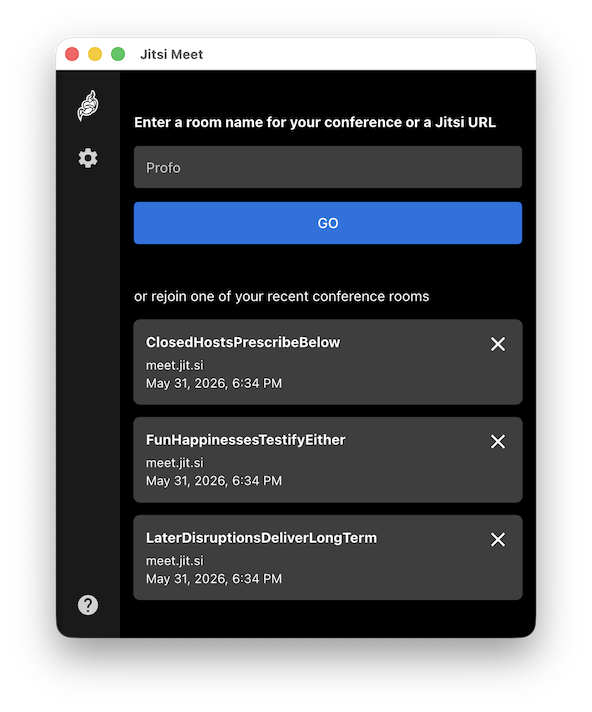
jitsi-meet://myroom (will open myroom on the configured Jitsi instance) or jitsi-meet://jitsi.mycompany.com/myroom (will open myroom on the Jitsi instance running on jitsi.mycompany.com)Download our latest release and you're off to the races!

For macOS users, you can install the application using the following command:
brew install --cask jitsi-meet
If you want to hack on this project, here is how you do it.
Install Node.js 22 first (or if you use nvm, switch to it by running nvm use).
npm install --global --production windows-build-tools
X11, PNG, and zlib development packages are necessary. On Debian-like systems, they can be installed as follows:
sudo apt install libx11-dev zlib1g-dev libpng-dev libxtst-dev
Install all required packages:
npm install
npm start
The debugger tools are available when running in dev mode, and can be activated with keyboard shortcuts as defined here.
They can also be displayed automatically with the application --show-dev-tools command line flag, or with the SHOW_DEV_TOOLS environment variable as shown:
SHOW_DEV_TOOLS=true npm start
npm run dist
jitsi-meet-electron-sdkFor instructions on SDK versus electron-app separation and how to set up local development using npm link, please refer to the Contributing and Local Development guide in the Jitsi Handbook.
git checkout -b release-1-2-3, replacing 1-2-3 with the desired release versionnpm version patch, replacing patch with minor or major as requiredgit push -u origin release-1-2-3gh pr creategh release create v1.2.3 --draft --title 1.2.3, replacing v1.2.3 and 1.2.3 with the desired release versionA warning that the app is unsigned will show up upon first install. This is expected.
None
If you can't execute the file directly after downloading it, try running chmod u+x ./jitsi-meet-x86_64.AppImage
If you experience a blank page after a Jitsi server upgrades, try removing the local cache files:
rm -rf ~/.config/Jitsi\ Meet/
The JSON files contain all the strings inside the application, and can be translated here.
New translations require the addition of a line in languages.ts.
Localize desktop file on linux requires the addition of a line in package.json.
Please search for Comment[hu] as an example to help add your translation of the English string Jitsi Meet Desktop App for your language.
Apache License 2.0. See the LICENSE file.
Jitsi is built by a large community of developers. If you want to participate, please join the community forum.
130 followers · starred Apr 2020
701 followers · starred Jul 2026
238 followers · starred Mar 2021
37 followers · starred Apr 2020
Jitsi Meet desktop application powered by :electron:
TypeScript
1,633
591 commits
updated Oct 14, 2026
Desktop application for Jitsi Meet built with Electron.
jitsi-meet://myroom (will open myroom on the configured Jitsi instance) or jitsi-meet://jitsi.mycompany.com/myroom (will open myroom on the Jitsi instance running on jitsi.mycompany.com)Download our latest release and you're off to the races!
For macOS users, you can install the application using the following command:
brew install --cask jitsi-meet
If you want to hack on this project, here is how you do it.
Install Node.js 22 first (or if you use nvm, switch to it by running nvm use).
npm install --global --production windows-build-tools
X11, PNG, and zlib development packages are necessary. On Debian-like systems, they can be installed as follows:
sudo apt install libx11-dev zlib1g-dev libpng-dev libxtst-dev
Install all required packages:
npm install
npm start
The debugger tools are available when running in dev mode, and can be activated with keyboard shortcuts as defined here.
They can also be displayed automatically with the application --show-dev-tools command line flag, or with the SHOW_DEV_TOOLS environment variable as shown:
SHOW_DEV_TOOLS=true npm start
npm run dist
jitsi-meet-electron-sdkFor instructions on SDK versus electron-app separation and how to set up local development using npm link, please refer to the Contributing and Local Development guide in the Jitsi Handbook.
git checkout -b release-1-2-3, replacing 1-2-3 with the desired release versionnpm version patch, replacing patch with minor or major as requiredgit push -u origin release-1-2-3gh pr creategh release create v1.2.3 --draft --title 1.2.3, replacing v1.2.3 and 1.2.3 with the desired release versionA warning that the app is unsigned will show up upon first install. This is expected.
None
If you can't execute the file directly after downloading it, try running chmod u+x ./jitsi-meet-x86_64.AppImage
If you experience a blank page after a Jitsi server upgrades, try removing the local cache files:
rm -rf ~/.config/Jitsi\ Meet/
The JSON files contain all the strings inside the application, and can be translated here.
New translations require the addition of a line in languages.ts.
Localize desktop file on linux requires the addition of a line in package.json.
Please search for Comment[hu] as an example to help add your translation of the English string Jitsi Meet Desktop App for your language.
Apache License 2.0. See the LICENSE file.
Jitsi is built by a large community of developers. If you want to participate, please join the community forum.
130 followers · starred Apr 2020
701 followers · starred Jul 2026
238 followers · starred Mar 2021
37 followers · starred Apr 2020