
Official implementation of TrajBooster
See the codeREADME
TrajBooster: Boosting Humanoid Whole-Body Manipulation via Trajectory-Centric Learning
📝 Paper | 🌍 Project Page | 🤗 Model | 🛢️ Dataset
🔥🔥 News
- (🔥 New) [2026/02/01] TrajBooster is accepted by ICRA-2026. 🎉🎉🎉
Overview
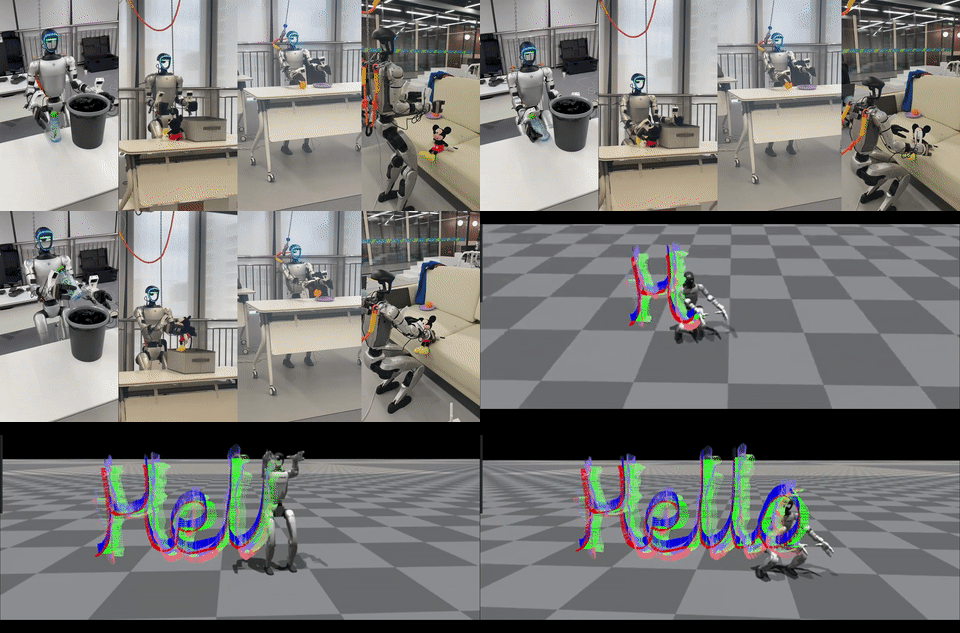
TrajBooster leverages abundant existing robot manipulation datasets to enhance humanoid whole-body manipulation capabilities. Our approach retargets end-effector trajectories from diverse robots to target humanoids using a specialized retargeting model. We then perform post-pre-training on a pre-trained Vision-Language-Action (VLA) model with this retargeted data, followed by fine-tuning with minimal real-world data. This methodology significantly reduces the burden of human teleoperation while improving action space comprehension and zero-shot skill transfer capabilities.
🚀 What's Included
This repository provides the official implementation of TrajBooster, featuring:
- 🤗 35-hour retargeted dataset: Unitree G1 whole-body manipulation actions retargeted from Agibot
- 🤗 Pre-trained model checkpoint: PPT_model ready for post-training with teleoperation data
- 🤖 Hardware deployment: Complete setup and code for Unitree G1 robot
- 🕹️ Teleoperation system: Real-robot teleoperation implementation and data collection pipeline
- 🧠 VLA model deployment: Real-robot deployment implementation for Vision-Language-Action models
- 📈 Training scripts: Retargeting model training code
- 📋 Documentation Hub: Comprehensive installation guides, deployment tutorials, and troubleshooting resources
Note: This repository builds upon our previous work at OpenWBC. If you find this work useful for your research or projects, please consider giving both repositories a ⭐ star to support our ongoing open-source contributions to the robotics community!
🎯 Key Features
- 🎯 Trajectory-Centric Learning: Revolutionary approach leveraging end-effector trajectory retargeting for precise manipulation control
- 🔄 Cross-Robot Knowledge Transfer: Seamlessly adapt and transfer skills across diverse robot platforms and morphologies
- ⚡ Minimal Real-World Training: Dramatically reduce dependency on expensive human teleoperation data collection
- 🚀 Zero-Shot Capabilities: Enhanced generalization and skill transfer to previously unseen manipulation tasks
- 🤖 Whole-Body Control: Complete humanoid robot manipulation with integrated Vision-Language-Action model capabilities
📋 Deployment Guide
This comprehensive guide covers three essential deployment phases:
- 🕹️ Unitree G1 Teleoperation & Data Collection - Complete setup and implementation
- 🎯 Post-Training Pipeline - Utilizing collected data for VLA model fine-tuning
- 🤖 Autonomous Deployment - Real-robot manipulation using post-trained VLA models
💡 Quick Start: We provide a PPT (Post-Pre-Trained) model for immediate deployment. Follow the sequential steps below for complete project reproduction.
🔬 Advanced Users: Interested in retargeting model training? Jump directly to Bonus: Retargeting Model Training
🔧 Troubleshooting Resources
For deployment issues, you could reference these excellent projects first:
- OpenWBC - Whole-body control implementation
- AVP Teleoperation - XR teleoperation framework
- OpenHomie - Humanoid robot deployment
🕹️ Phase 1: Teleoperation & Data Collection
Project Structure
g1_deploy/
│
├── avp_teleoperation/    # Upper-body control & image transmission
│
├── Hardware/            # Wrist camera hardware specs (optional)
│
└── HomieDeploy/         # Lower-body locomotion control
Setup Instructions
1. 📷 Wrist Camera Setup (Recommended)
- Hardware: Camera specifications and 3D-printable mount files available in
g1_deploy/Hardware/ - Benefits: Significantly improves VLA depth perception and manipulation accuracy
2. 🦵 Lower-Body Control Configuration
- Deploy
g1_deploy/HomieDeploy/to Unitree G1 onboard computer - Follow setup instructions in
g1_deploy/HomieDeploy/README.md - Result: Enable joystick-based teleoperation for locomotion
3. 🖐️ Upper-Body Control Setup
-
Configure AVP Teleoperation: Set up
avp_teleoperationfollowing the instructions ing1_deploy/avp_teleoperate/README.md. Configure thetvconda environment and set up the required certificates. -
Dual Deployment: Deploy the system on both your local PC (image client) and the G1 robot (image server).
On the Unitree robot terminal, run:
cd avp_teleoperate/teleop/
python image_server/image_server.py
On your PC, run:
cd avp_teleoperate/teleop/
python image_server/image_client.py
If you can see the video feed properly, the setup is working correctly. You can then close the
image_clientprogram and proceed with the following operations. -
Collect Teleoperation Data (On Your PC):
(tv) unitree@Host:~/avp_teleoperate/teleop$ python teleop_data_collecting.py --arm=G1_29 --hand=dex3 --task_dir='./utils/data' --recordFollow the interaction methods described in
g1_deploy/avp_teleoperate/README.mdto have the operator perform corresponding interactions using the Apple Vision Pro headset.
✅ Verification Checklist
- Operator 1: Real-time first-person robot view in Apple Vision Pro
- Operator 1: Smooth arm and hand control via AVP interface
- Operator 2: Responsive locomotion control (walking, squating)
📊 Data Processing
Follow setup instructions in OpenWBC_to_Lerobot/README.md
Convert collected teleoperation data to LeRobot format:
python convert_3views_to_lerobot.py \
    --input_dir /path/to/input \
    --output_dir ./lerobot_dataset \
    --dataset_name "YOUR_TASK" \
    --robot_type "g1" \
    --fps 30
🎯 Phase 2: VLA Model Post-Training
Utilize your collected and processed teleoperation data for model fine-tuning:
📖 Detailed Instructions: VLA_model/gr00t_modified_for_OpenWBC/README.md
Training Pipeline: Post-train our PPT (Post-Pre-Trained) Model with your domain-specific data
🤖 Phase 3: Autonomous VLA Deployment
Step 1: Initialize Image Server
# Terminal 1 (on Unitree G1)
cd avp_teleoperate/teleop/image_server
python image_server.py
🔍 Verification: Test image stream on local PC with
python image_client.py, then close before proceeding
Step 2: Lower-Body Control Activation
A. ⚠️ CRITICAL - System Reset
Execute: L1+A → L2+R2 → L2+A → L2+B
Expected: Arms hang (L2+A) → Arms down (L2+B)
B. Initialize Robot Control
# Terminal 2 (on Unitree G1)
cd unitree_sdk2/build/bin
./g1_control eth0  # or eth1 depending on network configuration
C. Launch Policy Inference
# Terminal 3 (on Unitree G1)
python g1_gym_deploy/scripts/deploy_policy_infer.py
D. Legs Activation
- Place robot on ground
- Press
R2(robot stands) - Press
R2again (activate autonomous mode)
⚠️ SAFETY NOTICE: Ensure complete understanding of all system components before deployment. Improper usage may result in hardware damage or safety hazards.
E. Start VLA Model Server
python scripts/G1_inference.py \
  --arm=G1_29 \
  --hand=dex3 \
  --model-path YOUR_MODEL_PATH \
  --goal YOUR_TASK \
  --frequency 20 \
  --vis \
  --filt
Bonus: Retargeting Model Training
📖 For detailed instructions, please refer to: retargeting_model/README.md
🔗 Resources
| Resource | Description | Link |
|---|---|---|
| Dataset | 35-hour Agibot→UnitreeG1 retargeted data (~30GB) | 🤗 HuggingFace |
| Model | Pre-trained PPT model checkpoint (~6GB) | 🤗 HuggingFace |
| Paper | Full technical details and evaluation | 📝 arXiv |
| Base Code | Underlying deployment framework | 🔗 WBC_Deploy |
📖 Citation
If you find our work helpful, please consider citing:
@article{liu2025trajbooster,
  title={TrajBooster: Boosting Humanoid Whole-Body Manipulation via Trajectory-Centric Learning},
  author={Liu, Jiacheng and Ding, Pengxiang and Zhou, Qihang and Wu, Yuxuan and Huang, Da and Peng, Zimian and Xiao, Wei and Zhang, Weinan and Yang, Lixin and Lu, Cewu and Wang, Donglin},
  journal={arXiv preprint arXiv:2509.11839},
  year={2025}
}
🙏 Acknowledgments
We thank the open-source robotics community and all contributors who made this work possible.
Similar repos


Languages
Jupyter Notebook
39.8%
C++
30.3%
Python
29.5%
Official implementation of TrajBooster
See the codeREADME
TrajBooster: Boosting Humanoid Whole-Body Manipulation via Trajectory-Centric Learning
📝 Paper | 🌍 Project Page | 🤗 Model | 🛢️ Dataset
🔥🔥 News
- (🔥 New) [2026/02/01] TrajBooster is accepted by ICRA-2026. 🎉🎉🎉
Overview
TrajBooster leverages abundant existing robot manipulation datasets to enhance humanoid whole-body manipulation capabilities. Our approach retargets end-effector trajectories from diverse robots to target humanoids using a specialized retargeting model. We then perform post-pre-training on a pre-trained Vision-Language-Action (VLA) model with this retargeted data, followed by fine-tuning with minimal real-world data. This methodology significantly reduces the burden of human teleoperation while improving action space comprehension and zero-shot skill transfer capabilities.
🚀 What's Included
This repository provides the official implementation of TrajBooster, featuring:
- 🤗 35-hour retargeted dataset: Unitree G1 whole-body manipulation actions retargeted from Agibot
- 🤗 Pre-trained model checkpoint: PPT_model ready for post-training with teleoperation data
- 🤖 Hardware deployment: Complete setup and code for Unitree G1 robot
- 🕹️ Teleoperation system: Real-robot teleoperation implementation and data collection pipeline
- 🧠 VLA model deployment: Real-robot deployment implementation for Vision-Language-Action models
- 📈 Training scripts: Retargeting model training code
- 📋 Documentation Hub: Comprehensive installation guides, deployment tutorials, and troubleshooting resources
Note: This repository builds upon our previous work at OpenWBC. If you find this work useful for your research or projects, please consider giving both repositories a ⭐ star to support our ongoing open-source contributions to the robotics community!
🎯 Key Features
- 🎯 Trajectory-Centric Learning: Revolutionary approach leveraging end-effector trajectory retargeting for precise manipulation control
- 🔄 Cross-Robot Knowledge Transfer: Seamlessly adapt and transfer skills across diverse robot platforms and morphologies
- ⚡ Minimal Real-World Training: Dramatically reduce dependency on expensive human teleoperation data collection
- 🚀 Zero-Shot Capabilities: Enhanced generalization and skill transfer to previously unseen manipulation tasks
- 🤖 Whole-Body Control: Complete humanoid robot manipulation with integrated Vision-Language-Action model capabilities
📋 Deployment Guide
This comprehensive guide covers three essential deployment phases:
- 🕹️ Unitree G1 Teleoperation & Data Collection - Complete setup and implementation
- 🎯 Post-Training Pipeline - Utilizing collected data for VLA model fine-tuning
- 🤖 Autonomous Deployment - Real-robot manipulation using post-trained VLA models
💡 Quick Start: We provide a PPT (Post-Pre-Trained) model for immediate deployment. Follow the sequential steps below for complete project reproduction.
🔬 Advanced Users: Interested in retargeting model training? Jump directly to Bonus: Retargeting Model Training
🔧 Troubleshooting Resources
For deployment issues, you could reference these excellent projects first:
- OpenWBC - Whole-body control implementation
- AVP Teleoperation - XR teleoperation framework
- OpenHomie - Humanoid robot deployment
🕹️ Phase 1: Teleoperation & Data Collection
Project Structure
g1_deploy/
│
├── avp_teleoperation/    # Upper-body control & image transmission
│
├── Hardware/            # Wrist camera hardware specs (optional)
│
└── HomieDeploy/         # Lower-body locomotion control
Setup Instructions
1. 📷 Wrist Camera Setup (Recommended)
- Hardware: Camera specifications and 3D-printable mount files available in
g1_deploy/Hardware/ - Benefits: Significantly improves VLA depth perception and manipulation accuracy
2. 🦵 Lower-Body Control Configuration
- Deploy
g1_deploy/HomieDeploy/to Unitree G1 onboard computer - Follow setup instructions in
g1_deploy/HomieDeploy/README.md - Result: Enable joystick-based teleoperation for locomotion
3. 🖐️ Upper-Body Control Setup
-
Configure AVP Teleoperation: Set up
avp_teleoperationfollowing the instructions ing1_deploy/avp_teleoperate/README.md. Configure thetvconda environment and set up the required certificates. -
Dual Deployment: Deploy the system on both your local PC (image client) and the G1 robot (image server).
On the Unitree robot terminal, run:
cd avp_teleoperate/teleop/
python image_server/image_server.py
On your PC, run:
cd avp_teleoperate/teleop/
python image_server/image_client.py
If you can see the video feed properly, the setup is working correctly. You can then close the
image_clientprogram and proceed with the following operations. -
Collect Teleoperation Data (On Your PC):
(tv) unitree@Host:~/avp_teleoperate/teleop$ python teleop_data_collecting.py --arm=G1_29 --hand=dex3 --task_dir='./utils/data' --recordFollow the interaction methods described in
g1_deploy/avp_teleoperate/README.mdto have the operator perform corresponding interactions using the Apple Vision Pro headset.
✅ Verification Checklist
- Operator 1: Real-time first-person robot view in Apple Vision Pro
- Operator 1: Smooth arm and hand control via AVP interface
- Operator 2: Responsive locomotion control (walking, squating)
📊 Data Processing
Follow setup instructions in OpenWBC_to_Lerobot/README.md
Convert collected teleoperation data to LeRobot format:
python convert_3views_to_lerobot.py \
    --input_dir /path/to/input \
    --output_dir ./lerobot_dataset \
    --dataset_name "YOUR_TASK" \
    --robot_type "g1" \
    --fps 30
🎯 Phase 2: VLA Model Post-Training
Utilize your collected and processed teleoperation data for model fine-tuning:
📖 Detailed Instructions: VLA_model/gr00t_modified_for_OpenWBC/README.md
Training Pipeline: Post-train our PPT (Post-Pre-Trained) Model with your domain-specific data
🤖 Phase 3: Autonomous VLA Deployment
Step 1: Initialize Image Server
# Terminal 1 (on Unitree G1)
cd avp_teleoperate/teleop/image_server
python image_server.py
🔍 Verification: Test image stream on local PC with
python image_client.py, then close before proceeding
Step 2: Lower-Body Control Activation
A. ⚠️ CRITICAL - System Reset
Execute: L1+A → L2+R2 → L2+A → L2+B
Expected: Arms hang (L2+A) → Arms down (L2+B)
B. Initialize Robot Control
# Terminal 2 (on Unitree G1)
cd unitree_sdk2/build/bin
./g1_control eth0  # or eth1 depending on network configuration
C. Launch Policy Inference
# Terminal 3 (on Unitree G1)
python g1_gym_deploy/scripts/deploy_policy_infer.py
D. Legs Activation
- Place robot on ground
- Press
R2(robot stands) - Press
R2again (activate autonomous mode)
⚠️ SAFETY NOTICE: Ensure complete understanding of all system components before deployment. Improper usage may result in hardware damage or safety hazards.
E. Start VLA Model Server
python scripts/G1_inference.py \
  --arm=G1_29 \
  --hand=dex3 \
  --model-path YOUR_MODEL_PATH \
  --goal YOUR_TASK \
  --frequency 20 \
  --vis \
  --filt
Bonus: Retargeting Model Training
📖 For detailed instructions, please refer to: retargeting_model/README.md
🔗 Resources
| Resource | Description | Link |
|---|---|---|
| Dataset | 35-hour Agibot→UnitreeG1 retargeted data (~30GB) | 🤗 HuggingFace |
| Model | Pre-trained PPT model checkpoint (~6GB) | 🤗 HuggingFace |
| Paper | Full technical details and evaluation | 📝 arXiv |
| Base Code | Underlying deployment framework | 🔗 WBC_Deploy |
📖 Citation
If you find our work helpful, please consider citing:
@article{liu2025trajbooster,
  title={TrajBooster: Boosting Humanoid Whole-Body Manipulation via Trajectory-Centric Learning},
  author={Liu, Jiacheng and Ding, Pengxiang and Zhou, Qihang and Wu, Yuxuan and Huang, Da and Peng, Zimian and Xiao, Wei and Zhang, Weinan and Yang, Lixin and Lu, Cewu and Wang, Donglin},
  journal={arXiv preprint arXiv:2509.11839},
  year={2025}
}
🙏 Acknowledgments
We thank the open-source robotics community and all contributors who made this work possible.
Similar repos
Languages
Jupyter Notebook
39.8%
C++
30.3%
Python
29.5%