
README
This repository is archived because all changes have been incorporated back into the official keyboard layout file of neo-layout.org. Please use it instead.
neo2-layout-osx
Neo2 keyboard layout file for macOS.
This is based on the file provided by neo-layout.org, but has a number of improvements:
- Improved caps lock layout: Top row still provides the numbers (special symbols require shift in addition to caps lock), letters are switched to lowercase when Shift is pressed, allow to type layer 3 symbols with Mod 3 when caps lock is active.
- Fixes to the handling of Mod 3+Cmd to increase compatibility with shortcuts (though, shortcuts involving M3 can still be problematic and will remain so for the foreseeable future).
- A few unassigned keys in the layout have been fixed.
- Fixed layer 4 minus.
- Fixed the layout of the Ctrl modifier to work in MacVim.
- Fixed compose function for ñ.
- Fixed layer 4 and 6 of the "grave_accent_and_tilde" key (the one left of 1).
- Fixed Ctrl+J.
- Alternative icons that can be used with the new dark mode in macOS Mojave.
Installation
- Download
Neo2.dmgfrom the Releases section. - Open the disk image.
- Run the "Keyboard Installer".
- Drag & drop
Neo2.bundleon the installer window. - Chose whether to install for the current user only or system-wide.
To get access to all layers, also install Karabiner Elements and import the Neo2 complex rule set. Activate the desired complex modifications (probably you want at least "Neo2 mode 3 key and layer 4" and "Neo2 layer 6" rules).
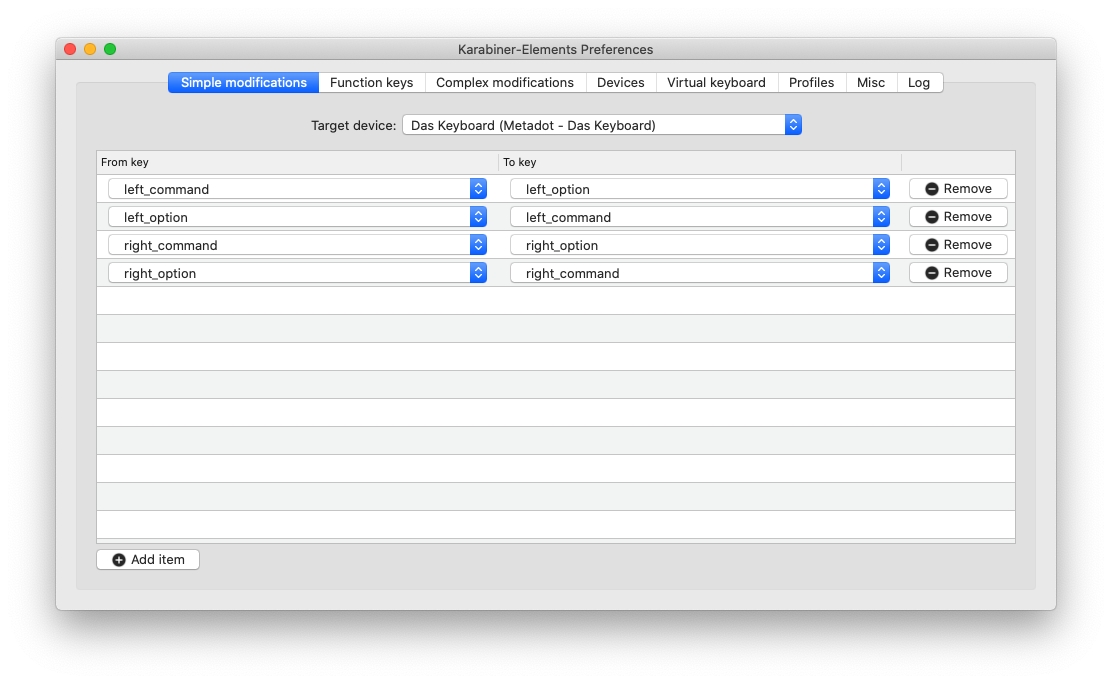
On Windows keyboards the Cmd and Alt keys are swapped compared to Apple keyboards. You may want switch the key assignment which can be done with "simple modifications" in Karabiner Elements (also specifically for a single device/keyboard if you have multiple keyboards). To swap all for keys add the following modifications:
| From key | To key |
|---|---|
left_command | left_option |
left_option | left_command |
right_command | right_option |
right_option | right_command |
Manual installation
- Copy
Neo2.bundle/Contents/Resources/Deutsch (Neo 2).keylayoutand one of the icons (neo*.icns) renamed toneo.icnsto~/Library/Keyboard Layouts/(user install) or/Library/Keyboard Layouts/(system-wide install). - Reboot.
- Add "Deutsch (Neo 2)" in the Input Sources tab of the Keyboard system settings.
Know issues
- While the left Option does not fully act as Mod 3 (it can be used in keyboard shortcuts and does not activate layer 6 in combination with Mod 4), it may map to layer 3 keys depending on how an application reads shortcuts. In particular, websites within a browser will usually see the layer 3 keys (i.e. Option+i becomes Option+/), while native applications often see the base layer.
- Some programs (often webbrowsers or webpages displayed in them) might interpret layer 3 keys as a shortcut. You can use one of the "Prevent keys from being treated as option key shortcut" rules in Karabiner Elements to prevent this. However, this can cause problems in other programs. Notably, the terminal in JetBrains IDEs (e.g. IntelliJ) will insert additional characters for those keys.
- When using one of the "Prevent keys from being treated as option key
shortcut" rules in Karabiner Elements, those keys will produce an additional
character in JetBrains IDE. This issue has been reported
upstream.
As a workaround, open Help | Edit Custom Properties, add
com.jetbrains.use.old.keyevent.processing=trueand restart the IDE.


Similar repos


README
This repository is archived because all changes have been incorporated back into the official keyboard layout file of neo-layout.org. Please use it instead.
neo2-layout-osx
Neo2 keyboard layout file for macOS.
This is based on the file provided by neo-layout.org, but has a number of improvements:
- Improved caps lock layout: Top row still provides the numbers (special symbols require shift in addition to caps lock), letters are switched to lowercase when Shift is pressed, allow to type layer 3 symbols with Mod 3 when caps lock is active.
- Fixes to the handling of Mod 3+Cmd to increase compatibility with shortcuts (though, shortcuts involving M3 can still be problematic and will remain so for the foreseeable future).
- A few unassigned keys in the layout have been fixed.
- Fixed layer 4 minus.
- Fixed the layout of the Ctrl modifier to work in MacVim.
- Fixed compose function for ñ.
- Fixed layer 4 and 6 of the "grave_accent_and_tilde" key (the one left of 1).
- Fixed Ctrl+J.
- Alternative icons that can be used with the new dark mode in macOS Mojave.
Installation
- Download
Neo2.dmgfrom the Releases section. - Open the disk image.
- Run the "Keyboard Installer".
- Drag & drop
Neo2.bundleon the installer window. - Chose whether to install for the current user only or system-wide.
To get access to all layers, also install Karabiner Elements and import the Neo2 complex rule set. Activate the desired complex modifications (probably you want at least "Neo2 mode 3 key and layer 4" and "Neo2 layer 6" rules).
On Windows keyboards the Cmd and Alt keys are swapped compared to Apple keyboards. You may want switch the key assignment which can be done with "simple modifications" in Karabiner Elements (also specifically for a single device/keyboard if you have multiple keyboards). To swap all for keys add the following modifications:
| From key | To key |
|---|---|
left_command | left_option |
left_option | left_command |
right_command | right_option |
right_option | right_command |
Manual installation
- Copy
Neo2.bundle/Contents/Resources/Deutsch (Neo 2).keylayoutand one of the icons (neo*.icns) renamed toneo.icnsto~/Library/Keyboard Layouts/(user install) or/Library/Keyboard Layouts/(system-wide install). - Reboot.
- Add "Deutsch (Neo 2)" in the Input Sources tab of the Keyboard system settings.
Know issues
- While the left Option does not fully act as Mod 3 (it can be used in keyboard shortcuts and does not activate layer 6 in combination with Mod 4), it may map to layer 3 keys depending on how an application reads shortcuts. In particular, websites within a browser will usually see the layer 3 keys (i.e. Option+i becomes Option+/), while native applications often see the base layer.
- Some programs (often webbrowsers or webpages displayed in them) might interpret layer 3 keys as a shortcut. You can use one of the "Prevent keys from being treated as option key shortcut" rules in Karabiner Elements to prevent this. However, this can cause problems in other programs. Notably, the terminal in JetBrains IDEs (e.g. IntelliJ) will insert additional characters for those keys.
- When using one of the "Prevent keys from being treated as option key
shortcut" rules in Karabiner Elements, those keys will produce an additional
character in JetBrains IDE. This issue has been reported
upstream.
As a workaround, open Help | Edit Custom Properties, add
com.jetbrains.use.old.keyevent.processing=trueand restart the IDE.