
Modern web UI for rsync with real-time output streaming, multiple concurrent jobs, command history, and full rsync options support. *Warning, project is new and largely vibe-coded-- USE AT YOUR OWN RISK | Put Caddy Basic Auth in front if exposed to internet*
8
stars
0
commits
JavaScript
primary language
Feb 2, 2026
updated
README
rsync-web
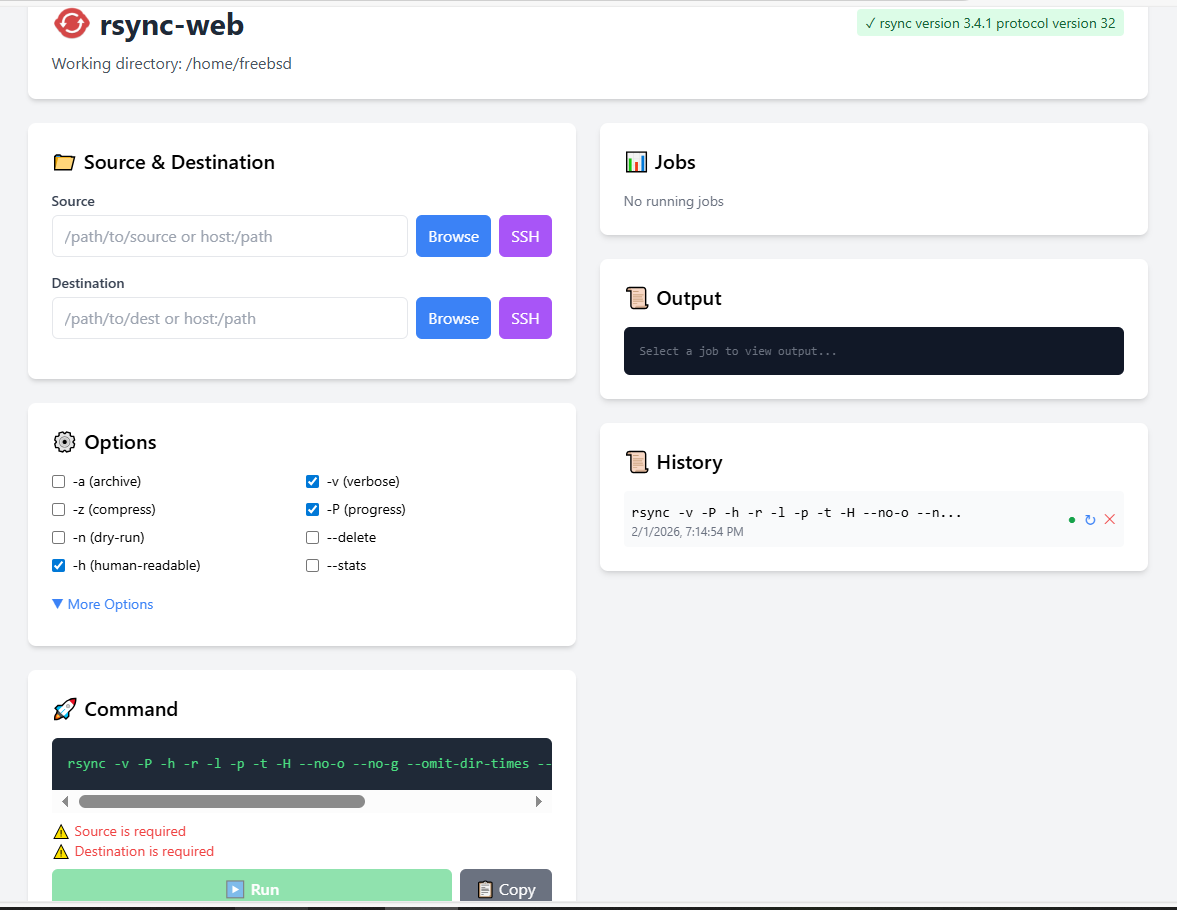
A modern, lightweight web UI for rsync with real-time output streaming via WebSockets.
Features
- Real-time output streaming - Watch rsync progress live via WebSocket (no page refresh needed)
- Multiple concurrent jobs - Run and monitor several rsync operations simultaneously
- Command history - View past commands, reuse them, or modify and re-run
- File browser - Navigate directories and select source/destination paths visually
- SSH host integration - Automatically reads hosts from
~/.ssh/config - Comprehensive rsync options - All common flags available via checkboxes:
- Archive (
-a), Verbose (-v), Compress (-z), Progress (-P) - Dry-run (
-n), Delete (--delete), Human-readable (-h) - Recursive, symlinks, permissions, times, group, owner, devices
- Partial, append, ignore-existing, size-only, checksum, backup
- Archive (
- Exclude patterns - Multi-line exclude support
- Custom options - Add any rsync flag (e.g.,
--bwlimit=1000) - rsync availability check - Warns if rsync isn't installed on the system
- Cross-platform - Works on Linux and FreeBSD
Installation
Pre-built binaries
Download from Releases (coming soon) or build from source.
Build from source
# Clone
git clone https://github.com/jgbrwn/rsync-web.git
cd rsync-web

# Build for current platform
make build

# Or build for specific platforms
make build-linux    # Linux amd64
make build-freebsd  # FreeBSD amd64
make build-all      # Both platforms
Requires Go 1.21+ and rsync installed on the target system.
Usage
# Run from current directory (files browsable from pwd)
./rsync-web

# Custom listen address and port
./rsync-web -listen 0.0.0.0:8080

# Custom working directory for file browsing
./rsync-web -dir /data/backups

# Combine options
./rsync-web -listen 192.168.1.100:9000 -dir /mnt/storage
Then open http://127.0.0.1:8000 in your browser.
Command-line Options
| Flag | Default | Description |
|---|---|---|
-listen | 127.0.0.1:8000 | Address and port to listen on |
-dir | Current directory | Working directory for file browsing |
How It Works
- Select source and destination - Type paths manually, use the file browser, or pick SSH hosts
- Configure options - Check the rsync flags you need, add excludes or custom options
- Preview command - See the exact rsync command that will run
- Run - Execute and watch real-time output in the browser
- Monitor - Switch between multiple running jobs, cancel if needed
- Reuse - Click any history entry to reload its settings
Architecture
- Backend: Go with gorilla/websocket for real-time streaming
- Database: SQLite (pure Go, no CGO) for command history
- Frontend: Vanilla JS with Tailwind CSS
- No external dependencies at runtime beyond rsync itself
FreeBSD Support
Fully tested on FreeBSD. Install rsync if needed:
pkg install rsync
All features work identically on FreeBSD and Linux.
Security Notes
- By default, listens only on
127.0.0.1(localhost) - File browser is restricted to the working directory and subdirectories
- No authentication built-in - use a reverse proxy if exposing to a network
License
MIT
See what people are saying
Hacker News (1)
Similar repos


Languages
JavaScript
31.8%
Go
29.3%
HTML
26.4%
CSS
11.7%
Modern web UI for rsync with real-time output streaming, multiple concurrent jobs, command history, and full rsync options support. *Warning, project is new and largely vibe-coded-- USE AT YOUR OWN RISK | Put Caddy Basic Auth in front if exposed to internet*
8
stars
0
commits
JavaScript
primary language
Feb 2, 2026
updated
README
rsync-web
A modern, lightweight web UI for rsync with real-time output streaming via WebSockets.
Features
- Real-time output streaming - Watch rsync progress live via WebSocket (no page refresh needed)
- Multiple concurrent jobs - Run and monitor several rsync operations simultaneously
- Command history - View past commands, reuse them, or modify and re-run
- File browser - Navigate directories and select source/destination paths visually
- SSH host integration - Automatically reads hosts from
~/.ssh/config - Comprehensive rsync options - All common flags available via checkboxes:
- Archive (
-a), Verbose (-v), Compress (-z), Progress (-P) - Dry-run (
-n), Delete (--delete), Human-readable (-h) - Recursive, symlinks, permissions, times, group, owner, devices
- Partial, append, ignore-existing, size-only, checksum, backup
- Archive (
- Exclude patterns - Multi-line exclude support
- Custom options - Add any rsync flag (e.g.,
--bwlimit=1000) - rsync availability check - Warns if rsync isn't installed on the system
- Cross-platform - Works on Linux and FreeBSD
Installation
Pre-built binaries
Download from Releases (coming soon) or build from source.
Build from source
# Clone
git clone https://github.com/jgbrwn/rsync-web.git
cd rsync-web

# Build for current platform
make build

# Or build for specific platforms
make build-linux    # Linux amd64
make build-freebsd  # FreeBSD amd64
make build-all      # Both platforms
Requires Go 1.21+ and rsync installed on the target system.
Usage
# Run from current directory (files browsable from pwd)
./rsync-web

# Custom listen address and port
./rsync-web -listen 0.0.0.0:8080

# Custom working directory for file browsing
./rsync-web -dir /data/backups

# Combine options
./rsync-web -listen 192.168.1.100:9000 -dir /mnt/storage
Then open http://127.0.0.1:8000 in your browser.
Command-line Options
| Flag | Default | Description |
|---|---|---|
-listen | 127.0.0.1:8000 | Address and port to listen on |
-dir | Current directory | Working directory for file browsing |
How It Works
- Select source and destination - Type paths manually, use the file browser, or pick SSH hosts
- Configure options - Check the rsync flags you need, add excludes or custom options
- Preview command - See the exact rsync command that will run
- Run - Execute and watch real-time output in the browser
- Monitor - Switch between multiple running jobs, cancel if needed
- Reuse - Click any history entry to reload its settings
Architecture
- Backend: Go with gorilla/websocket for real-time streaming
- Database: SQLite (pure Go, no CGO) for command history
- Frontend: Vanilla JS with Tailwind CSS
- No external dependencies at runtime beyond rsync itself
FreeBSD Support
Fully tested on FreeBSD. Install rsync if needed:
pkg install rsync
All features work identically on FreeBSD and Linux.
Security Notes
- By default, listens only on
127.0.0.1(localhost) - File browser is restricted to the working directory and subdirectories
- No authentication built-in - use a reverse proxy if exposing to a network
License
MIT
See what people are saying
Hacker News (1)
Similar repos
Languages
JavaScript
31.8%
Go
29.3%
HTML
26.4%
CSS
11.7%