
README
Elfeed goodies

Various bits and pieces to enhance the Elfeed user experience.
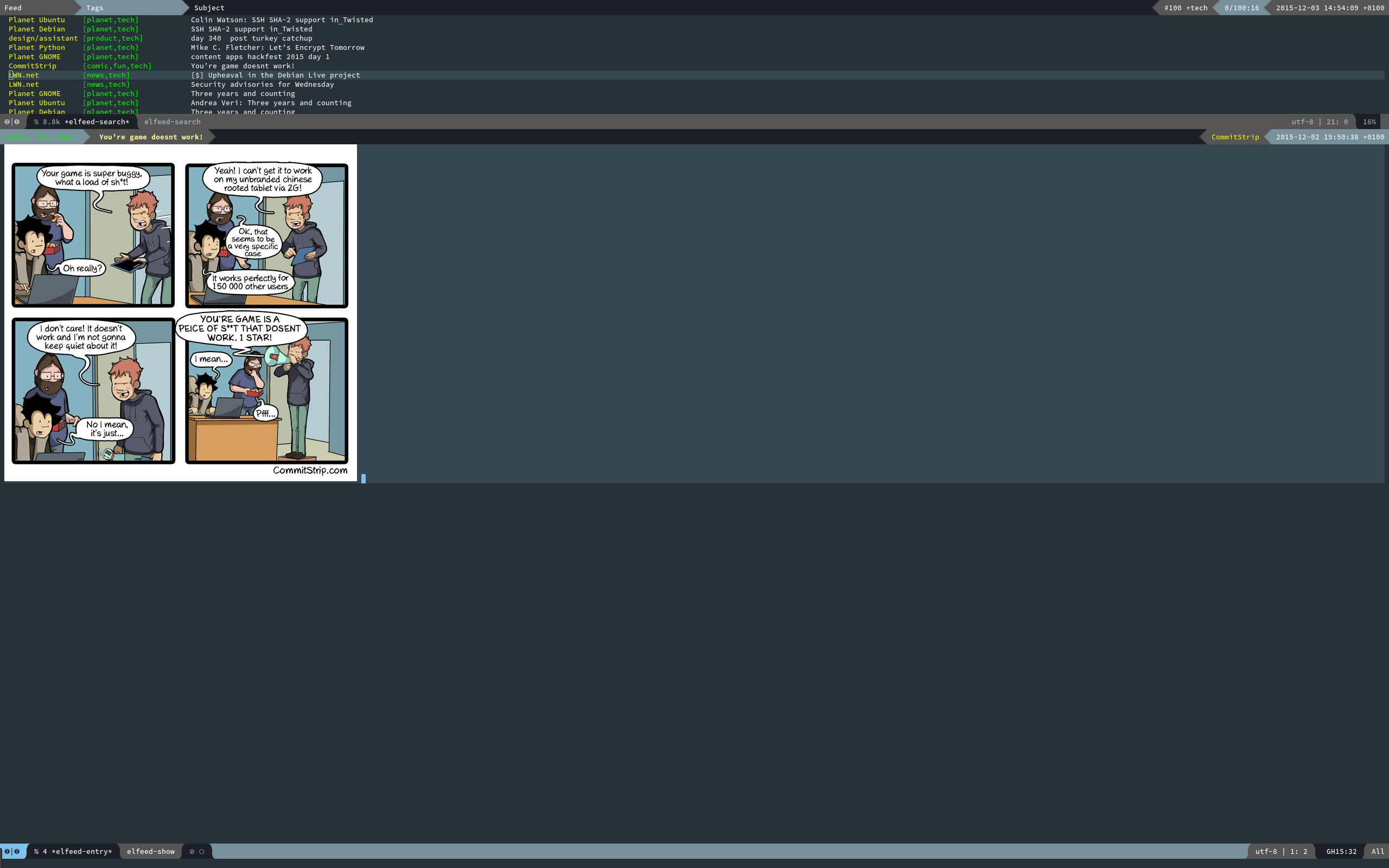
Features
- An adaptive, powerline-based header for the
*elfeed-search*and*elfeed-entry*buffers, with a matching entry format. - Split pane setup.
- A function to toggle the
*elfeed-log*buffer in a popup window. - Easy customisation.
Getting started
The easiest way to get started is to install the package via MELPA:
(package-install 'elfeed-goodies)
Following which, it is recommended to call the (elfeed-goodies/setup)
function, that sets up the various bits and pieces of the enhancements.
(require 'elfeed)
(require 'elfeed-goodies)

(elfeed-goodies/setup)
You can customise some aspects of the package with M-x customize-group elfeed-goodies.
Faces used by the package
The package does not define any new faces, but uses a number of them defined by Elfeed. They work reasonably well with most dark themes, but light ones they may have problems with. Consider customising the following faces:
powerline-active1,powerline-active2: Used for the powerline block backgrounds in the various headers.elfeed-search-feed-face: Used in the*elfeed-entry*header for the feed title, and in the*elfeed-search*buffer for the same purpose. Not to be confused with the entry title!elfeed-search-title-face: Used in the*elfeed-entry*header for the entry title, and in the*elfeed-search*buffer for the same purpose. Not to be confused with the feed title!elfeed-search-tag-face: Used in the*elfeed-entry*header for the tags list, and in the*elfeed-search*buffer for the same purpose.
Copyright & License
Copyright (c) 2015, 2016 Gergely Nagy, released under the terms of the GNU GPLv3+.
Contributors


Similar repos


Languages
Emacs Lisp
100.0%
README
Elfeed goodies
Various bits and pieces to enhance the Elfeed user experience.
Features
- An adaptive, powerline-based header for the
*elfeed-search*and*elfeed-entry*buffers, with a matching entry format. - Split pane setup.
- A function to toggle the
*elfeed-log*buffer in a popup window. - Easy customisation.
Getting started
The easiest way to get started is to install the package via MELPA:
(package-install 'elfeed-goodies)
Following which, it is recommended to call the (elfeed-goodies/setup)
function, that sets up the various bits and pieces of the enhancements.
(require 'elfeed)
(require 'elfeed-goodies)

(elfeed-goodies/setup)
You can customise some aspects of the package with M-x customize-group elfeed-goodies.
Faces used by the package
The package does not define any new faces, but uses a number of them defined by Elfeed. They work reasonably well with most dark themes, but light ones they may have problems with. Consider customising the following faces:
powerline-active1,powerline-active2: Used for the powerline block backgrounds in the various headers.elfeed-search-feed-face: Used in the*elfeed-entry*header for the feed title, and in the*elfeed-search*buffer for the same purpose. Not to be confused with the entry title!elfeed-search-title-face: Used in the*elfeed-entry*header for the entry title, and in the*elfeed-search*buffer for the same purpose. Not to be confused with the feed title!elfeed-search-tag-face: Used in the*elfeed-entry*header for the tags list, and in the*elfeed-search*buffer for the same purpose.
Copyright & License
Copyright (c) 2015, 2016 Gergely Nagy, released under the terms of the GNU GPLv3+.
Similar repos
Contributors
Languages
Emacs Lisp
100.0%