



A prompt library for Rust. Based on huh? for Go. Maintained by @jdx and @roele.
Sponsored by


View all sponsors
Run any example from the repository with cargo run --example <name>.
Start with grid_select, input, select, or multiselect; use themes -- dracula
to try a different theme. The animations below show the actual examples.
See the recording guide to regenerate them.
TABRun example with cargo run --example input.
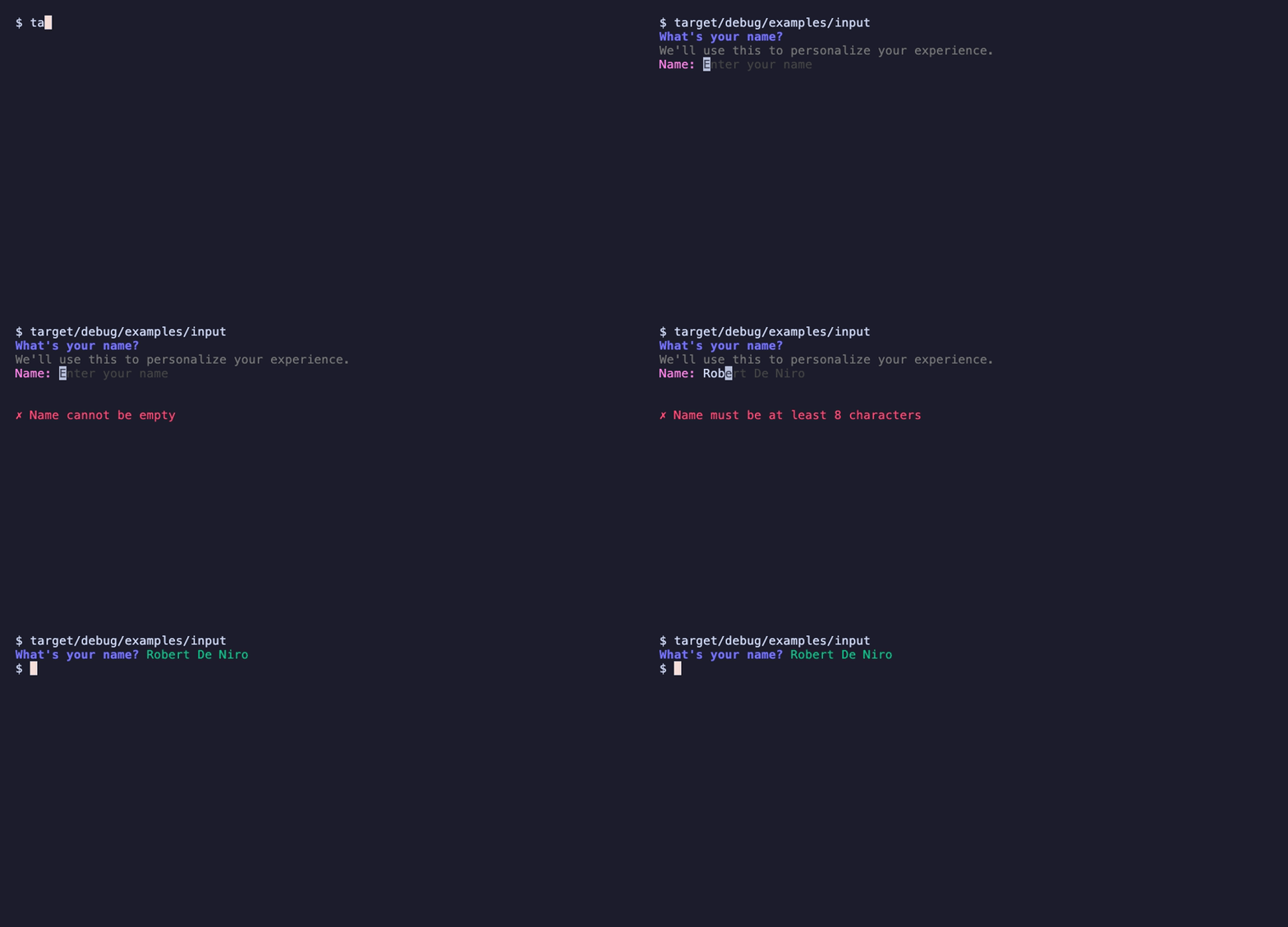
use demand::Input;

fn main() {
    let notempty_minlen = |s: &str| {
        if s.is_empty() {
            return Err("Name cannot be empty");
        }
        if s.len() < 8 {
            return Err("Name must be at least 8 characters");
        }
        Ok(())
    };

    let t = Input::new("What's your name?")
        .description("We'll use this to personalize your experience.")
        .placeholder("Enter your name")
        .prompt("Name: ")
        .suggestions(vec![
            "Adam Grant",
            "Danielle Steel",
            "Eveline Widmer-Schlumpf",
            "Robert De Niro",
            "Ronaldo Rodrigues de Jesus",
            "Sarah Michelle Gellar",
            "Yael Naim",
            "Zack Snyder",
        ])
        .validation(notempty_minlen);
    let i = t.run().expect("error running input");
}
Input supports the common emacs-style (GNU Readline default) bindings:
| Keys | Action |
|---|---|
| ←/→, ctrl-b/ctrl-f | move one character |
| alt-b/alt-f | move one word |
| home/end, ctrl-a/ctrl-e | move to start/end of line |
| backspace | delete the character before the cursor |
| delete, ctrl-d | delete the character under the cursor |
| ctrl-w, alt-backspace | delete the word before the cursor |
| alt-d | delete the word after the cursor |
| ctrl-u/ctrl-k | delete to the start/end of the line |
| ctrl-y | paste the text last deleted with the above |
| ctrl-t | swap the two characters around the cursor |
In password inputs, word commands act on the whole line so they don't reveal where the spaces are.
Run example with cargo run --example autocomplete_basic.

Run example with cargo run --example input-password.

Multi-line text, entered in the user's $VISUAL / $EDITOR. Press e to open the editor and enter to submit.
Run example with cargo run --example editor.
use demand::Editor;

fn main() {
    let notes = Editor::new("Release notes")
        .description("Summarize what changed in this release.")
        .default_value("## Changes\n\n- \n")
        .extension("md")
        .run()
        .expect("error running editor");
}
Shows a list of options. Run example with cargo run --example list.
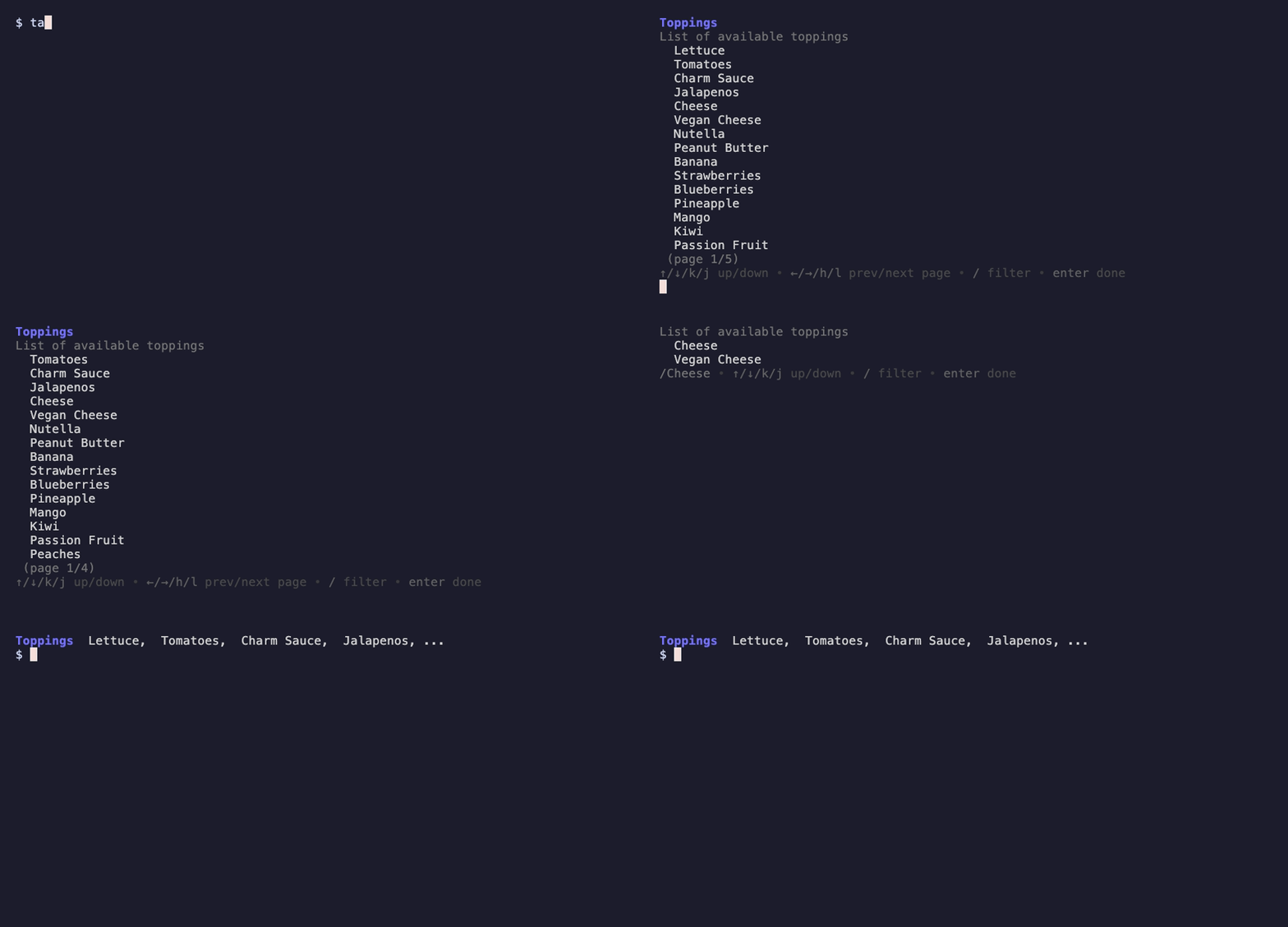
use demand::List;

fn main() {
    let list = List::new("Toppings")
        .description("List of available toppings")
        .item("Lettuce")
        .item("Tomatoes")
        .item("Charm Sauce")
        .item("Jalapenos")
        .item("Cheese")
        .item("Vegan Cheese")
        .item("Nutella")
        .item("Peanut Butter")
        .item("Banana")
        .filterable(true);
    list.run().expect("error running list")
}
Select from a list of options.
Run example with cargo run --example select.
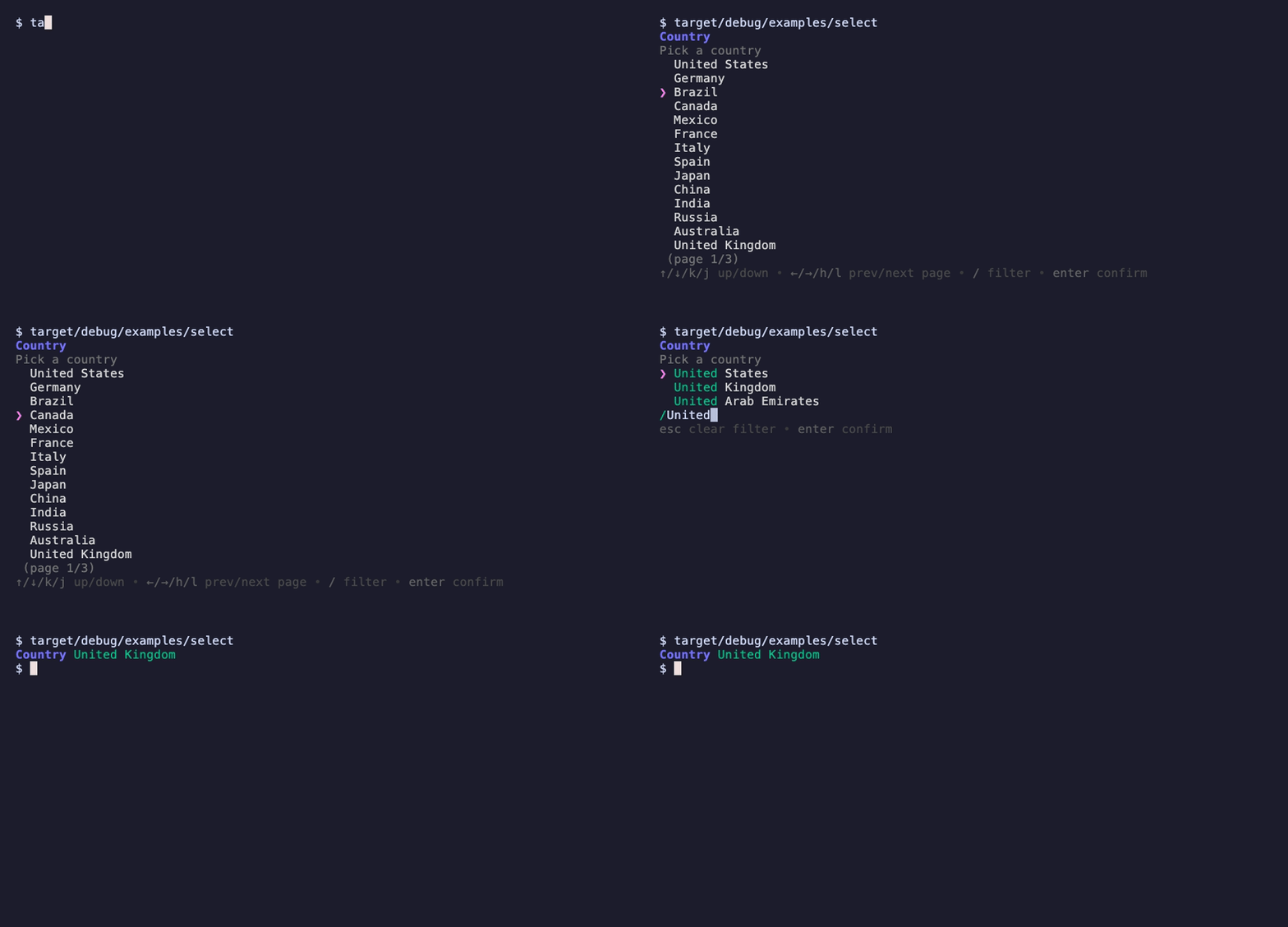
The abbreviated example below shows a few countries; the runnable demo includes more options to demonstrate pagination.
use demand::{DemandOption, Select};

fn main() {
    let select = Select::new("Country")
        .description("Pick a country")
        .filterable(true)
        .option(DemandOption::new("US").label("United States"))
        .option(DemandOption::new("DE").label("Germany"))
        .option(DemandOption::new("BR").label("Brazil").selected(true))
        .option(DemandOption::new("CA").label("Canada"))
        .option(DemandOption::new("GB").label("United Kingdom"));
    select.run().expect("error running select");
}
Select::handle returns a PromptHandle that another thread can use to change the title or description while the select is waiting for input.
On Windows, a change is shown at the next keypress rather than right away.
Run example with cargo run --example select_dynamic.
let mut select = Select::new("Coins inserted: 0")
    .option(DemandOption::new("Complete payment"))
    .option(DemandOption::new("Quit"));
let handle = select.handle();
std::thread::spawn(move || handle.set_title("Coins inserted: 50"));
let choice = select.run()?;
Select multiple options from a list.
Run example with cargo run --example multiselect.

use demand::{DemandOption, MultiSelect};

fn main() {
    let ms = MultiSelect::new("Toppings")
        .description("Select your toppings")
        .min(1)
        .max(4)
        .filterable(true)
        .option(DemandOption::new("Lettuce").selected(true))
        .option(DemandOption::new("Tomatoes").selected(true))
        .option(DemandOption::new("Charm Sauce"))
        .option(DemandOption::new("Jalapenos").label("Jalapeños"))
        .option(DemandOption::new("Cheese"))
        .option(DemandOption::new("Vegan Cheese"))
        .option(DemandOption::new("Nutella"));
    ms.run().expect("error running multi select");
}
Pick one column for each row of a table, e.g. which version to upgrade each package to. ↑/↓ move between rows, ←/→ move the row's choice between its cells. Empty cells aren't selectable.
Run example with cargo run --example grid_select.

use demand::{GridRow, GridSelect};

fn main() {
    let columns = ["Current", "Range", "Latest"];
    let grid = GridSelect::new("Pick the packages you want to upgrade")
        .columns(columns)
        .filterable(true)
        .row(GridRow::new("react").cell("^18.2.0").cell("^18.3.1").cell("^19.0.0"))
        .row(GridRow::new("chalk").cell("^4.1.2").empty_cell().cell("^5.0.0"))
        .row(GridRow::new("jest").cell("^27.4.7").cell("^27.5.1"));
    for (package, column) in grid.run().expect("error running grid select") {
        println!("{package}: {}", columns[column]);
    }
}
Confirm a question with a yes or no.
Run example with cargo run --example confirm.

use demand::Confirm;

fn main() {
    let ms = Confirm::new("Are you sure?")
        .affirmative("Yes!")
        .negative("No.");
    let yes = ms.run().expect("error running confirm");
}
Show a dialog with multiple buttons.
Run example with cargo run --example dialog.

use demand::{Dialog, DialogButton};

fn main() {
    let ms = Dialog::new("Are you sure?")
        .description("This will do a thing.")
        .buttons(vec![
            DialogButton::new("Ok"),
            DialogButton::new("Not sure"),
            DialogButton::new("Cancel"),
        ])
        .selected_button(1);
    ms.run().expect("error running confirm");
}
Spinners are used to indicate that a process is running.
Run example with cargo run --example spinner.

use std::{thread::sleep, time::Duration};

use demand::{Spinner, SpinnerStyle};

fn main() {
    Spinner::new("Loading Data...")
        .style(SpinnerStyle::line())
        .run(|| {
            sleep(Duration::from_secs(2));
        })
        .expect("error running spinner");
}
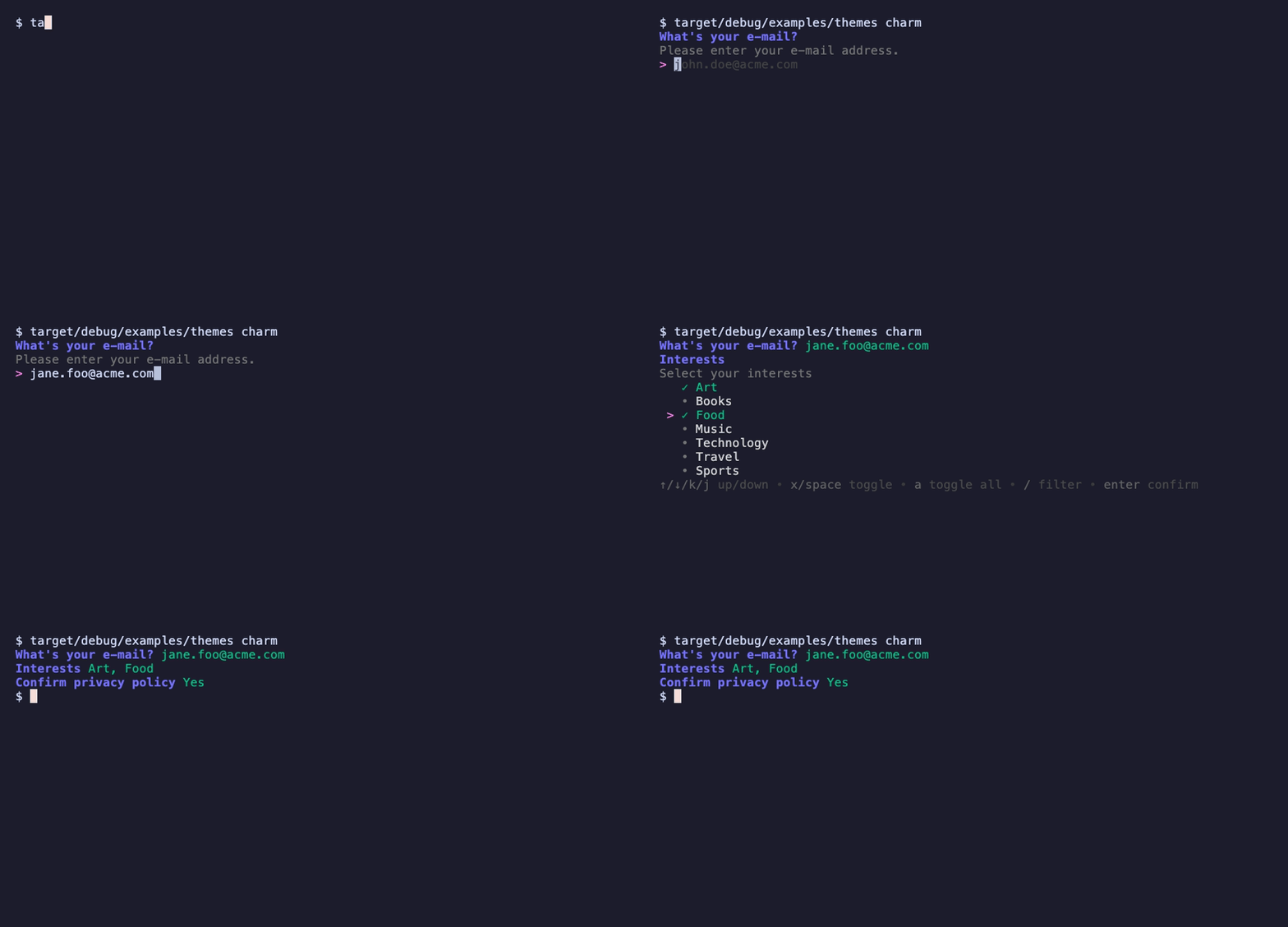
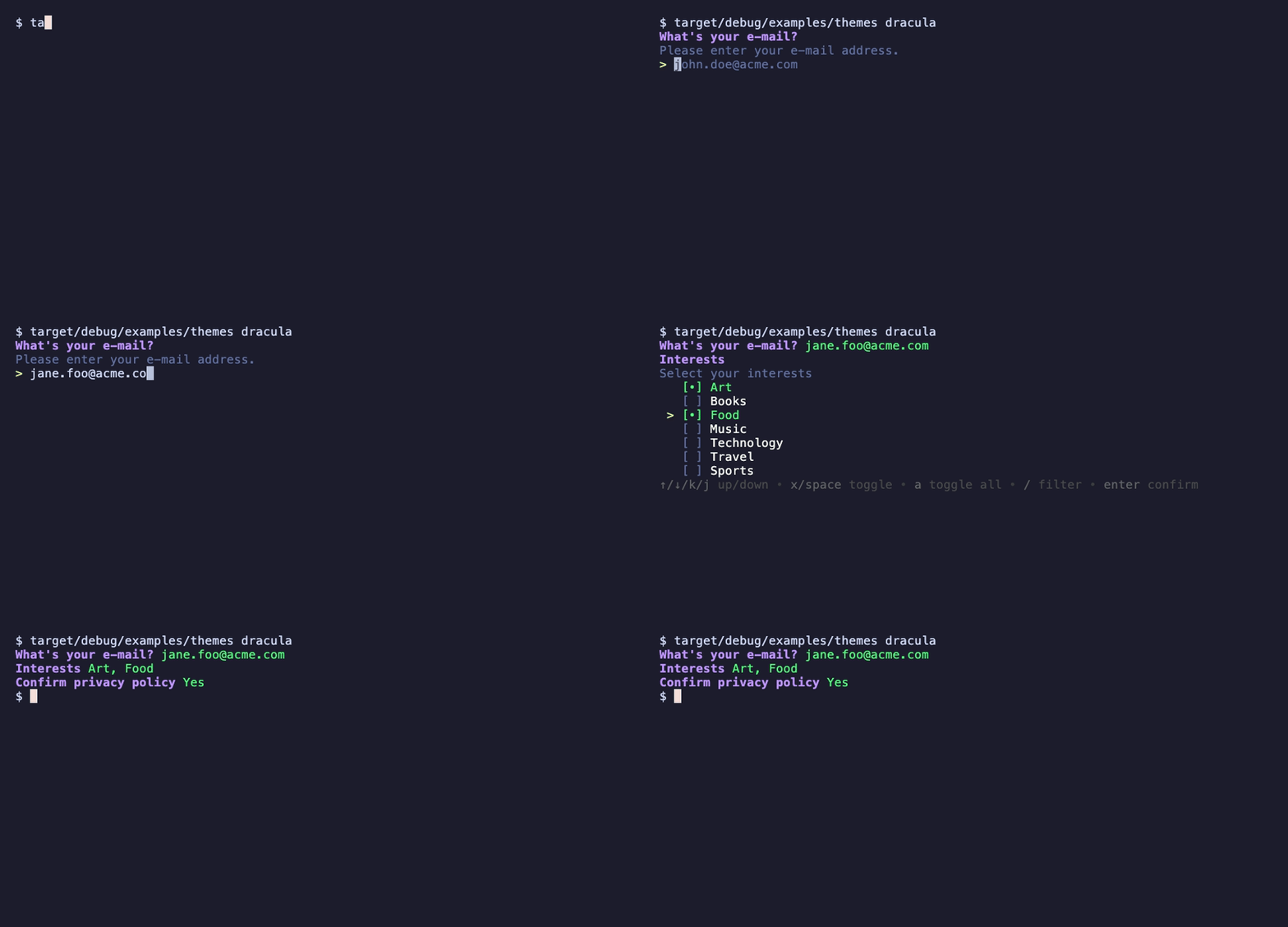
Supply your own custom theme or choose from one of the predefined themes:
Derive a custom theme from the default theme.
let theme = Theme {
    selected_prefix: String::from(" •"),
    selected_prefix_fg: Theme::color_rgb(2, 191, 135),
    unselected_prefix: String::from("  "),
    ..Theme::default()
};

Input::new("What's your e-mail?")
        .description("Please enter your e-mail address.")
        .placeholder("name@domain.com")
        .theme(&theme)
        .run()
        .expect("error running input")?;
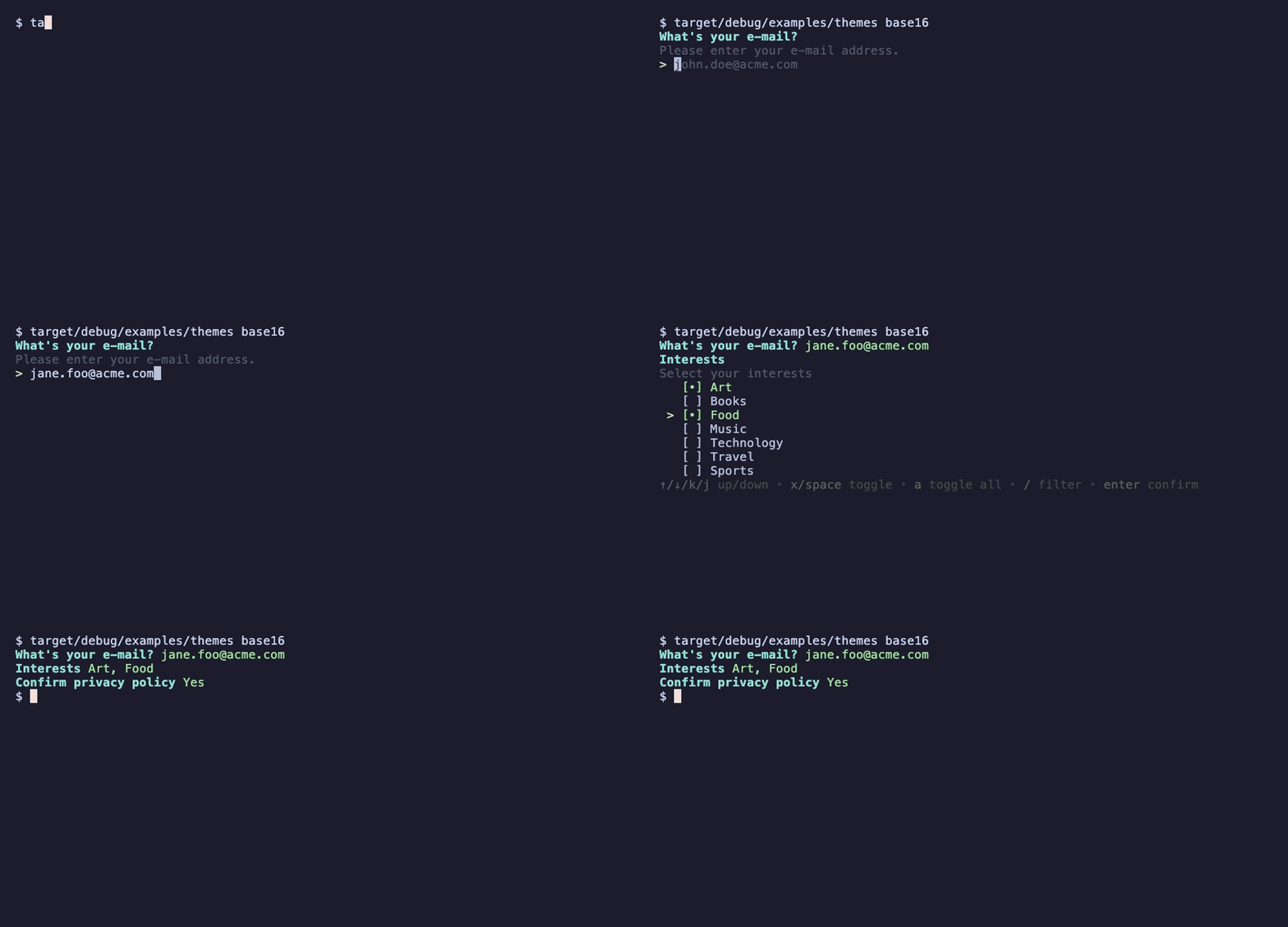
Default if colors are enabled in the console.

Default if colors are NOT enabled in the console.

Run with cargo run --example theme_editor.
The name of this library is inspired by a great mistranslation that soured US-French relations in 1830. In French, the verb "demander" means "to ask".
1,195 followers · starred Mar 2025
1,047 followers · starred Apr 2025
315 followers · starred Dec 2024
797 followers · starred Oct 2025
A prompt library for Rust. Based on huh? for Go. Maintained by @jdx and @roele.
Sponsored by
View all sponsors
Run any example from the repository with cargo run --example <name>.
Start with grid_select, input, select, or multiselect; use themes -- dracula
to try a different theme. The animations below show the actual examples.
See the recording guide to regenerate them.
TABRun example with cargo run --example input.
use demand::Input;

fn main() {
    let notempty_minlen = |s: &str| {
        if s.is_empty() {
            return Err("Name cannot be empty");
        }
        if s.len() < 8 {
            return Err("Name must be at least 8 characters");
        }
        Ok(())
    };

    let t = Input::new("What's your name?")
        .description("We'll use this to personalize your experience.")
        .placeholder("Enter your name")
        .prompt("Name: ")
        .suggestions(vec![
            "Adam Grant",
            "Danielle Steel",
            "Eveline Widmer-Schlumpf",
            "Robert De Niro",
            "Ronaldo Rodrigues de Jesus",
            "Sarah Michelle Gellar",
            "Yael Naim",
            "Zack Snyder",
        ])
        .validation(notempty_minlen);
    let i = t.run().expect("error running input");
}
Input supports the common emacs-style (GNU Readline default) bindings:
| Keys | Action |
|---|---|
| ←/→, ctrl-b/ctrl-f | move one character |
| alt-b/alt-f | move one word |
| home/end, ctrl-a/ctrl-e | move to start/end of line |
| backspace | delete the character before the cursor |
| delete, ctrl-d | delete the character under the cursor |
| ctrl-w, alt-backspace | delete the word before the cursor |
| alt-d | delete the word after the cursor |
| ctrl-u/ctrl-k | delete to the start/end of the line |
| ctrl-y | paste the text last deleted with the above |
| ctrl-t | swap the two characters around the cursor |
In password inputs, word commands act on the whole line so they don't reveal where the spaces are.
Run example with cargo run --example autocomplete_basic.
Run example with cargo run --example input-password.
Multi-line text, entered in the user's $VISUAL / $EDITOR. Press e to open the editor and enter to submit.
Run example with cargo run --example editor.
use demand::Editor;

fn main() {
    let notes = Editor::new("Release notes")
        .description("Summarize what changed in this release.")
        .default_value("## Changes\n\n- \n")
        .extension("md")
        .run()
        .expect("error running editor");
}
Shows a list of options. Run example with cargo run --example list.
use demand::List;

fn main() {
    let list = List::new("Toppings")
        .description("List of available toppings")
        .item("Lettuce")
        .item("Tomatoes")
        .item("Charm Sauce")
        .item("Jalapenos")
        .item("Cheese")
        .item("Vegan Cheese")
        .item("Nutella")
        .item("Peanut Butter")
        .item("Banana")
        .filterable(true);
    list.run().expect("error running list")
}
Select from a list of options.
Run example with cargo run --example select.
The abbreviated example below shows a few countries; the runnable demo includes more options to demonstrate pagination.
use demand::{DemandOption, Select};

fn main() {
    let select = Select::new("Country")
        .description("Pick a country")
        .filterable(true)
        .option(DemandOption::new("US").label("United States"))
        .option(DemandOption::new("DE").label("Germany"))
        .option(DemandOption::new("BR").label("Brazil").selected(true))
        .option(DemandOption::new("CA").label("Canada"))
        .option(DemandOption::new("GB").label("United Kingdom"));
    select.run().expect("error running select");
}
Select::handle returns a PromptHandle that another thread can use to change the title or description while the select is waiting for input.
On Windows, a change is shown at the next keypress rather than right away.
Run example with cargo run --example select_dynamic.
let mut select = Select::new("Coins inserted: 0")
    .option(DemandOption::new("Complete payment"))
    .option(DemandOption::new("Quit"));
let handle = select.handle();
std::thread::spawn(move || handle.set_title("Coins inserted: 50"));
let choice = select.run()?;
Select multiple options from a list.
Run example with cargo run --example multiselect.
use demand::{DemandOption, MultiSelect};

fn main() {
    let ms = MultiSelect::new("Toppings")
        .description("Select your toppings")
        .min(1)
        .max(4)
        .filterable(true)
        .option(DemandOption::new("Lettuce").selected(true))
        .option(DemandOption::new("Tomatoes").selected(true))
        .option(DemandOption::new("Charm Sauce"))
        .option(DemandOption::new("Jalapenos").label("Jalapeños"))
        .option(DemandOption::new("Cheese"))
        .option(DemandOption::new("Vegan Cheese"))
        .option(DemandOption::new("Nutella"));
    ms.run().expect("error running multi select");
}
Pick one column for each row of a table, e.g. which version to upgrade each package to. ↑/↓ move between rows, ←/→ move the row's choice between its cells. Empty cells aren't selectable.
Run example with cargo run --example grid_select.
use demand::{GridRow, GridSelect};

fn main() {
    let columns = ["Current", "Range", "Latest"];
    let grid = GridSelect::new("Pick the packages you want to upgrade")
        .columns(columns)
        .filterable(true)
        .row(GridRow::new("react").cell("^18.2.0").cell("^18.3.1").cell("^19.0.0"))
        .row(GridRow::new("chalk").cell("^4.1.2").empty_cell().cell("^5.0.0"))
        .row(GridRow::new("jest").cell("^27.4.7").cell("^27.5.1"));
    for (package, column) in grid.run().expect("error running grid select") {
        println!("{package}: {}", columns[column]);
    }
}
Confirm a question with a yes or no.
Run example with cargo run --example confirm.
use demand::Confirm;

fn main() {
    let ms = Confirm::new("Are you sure?")
        .affirmative("Yes!")
        .negative("No.");
    let yes = ms.run().expect("error running confirm");
}
Show a dialog with multiple buttons.
Run example with cargo run --example dialog.
use demand::{Dialog, DialogButton};

fn main() {
    let ms = Dialog::new("Are you sure?")
        .description("This will do a thing.")
        .buttons(vec![
            DialogButton::new("Ok"),
            DialogButton::new("Not sure"),
            DialogButton::new("Cancel"),
        ])
        .selected_button(1);
    ms.run().expect("error running confirm");
}
Spinners are used to indicate that a process is running.
Run example with cargo run --example spinner.
use std::{thread::sleep, time::Duration};

use demand::{Spinner, SpinnerStyle};

fn main() {
    Spinner::new("Loading Data...")
        .style(SpinnerStyle::line())
        .run(|| {
            sleep(Duration::from_secs(2));
        })
        .expect("error running spinner");
}
Supply your own custom theme or choose from one of the predefined themes:
Derive a custom theme from the default theme.
let theme = Theme {
    selected_prefix: String::from(" •"),
    selected_prefix_fg: Theme::color_rgb(2, 191, 135),
    unselected_prefix: String::from("  "),
    ..Theme::default()
};

Input::new("What's your e-mail?")
        .description("Please enter your e-mail address.")
        .placeholder("name@domain.com")
        .theme(&theme)
        .run()
        .expect("error running input")?;
Default if colors are enabled in the console.
Default if colors are NOT enabled in the console.
Run with cargo run --example theme_editor.
The name of this library is inspired by a great mistranslation that soured US-French relations in 1830. In French, the verb "demander" means "to ask".
1,195 followers · starred Mar 2025
1,047 followers · starred Apr 2025
315 followers · starred Dec 2024
797 followers · starred Oct 2025