
Time tracking you never fill in — rebuilds billable hours from Claude Code transcripts and Git
See the codeSee what people are saying
README
Estela
English · Español
Development time tracking you don't have to fill in. Estela reads what your AI agents and your Git already wrote to disk and rebuilds where your time went, along with what the AI cost.
npx estela setup
Twenty seconds later you have the last few months of your history. No account, no card, and nothing leaves your machine.
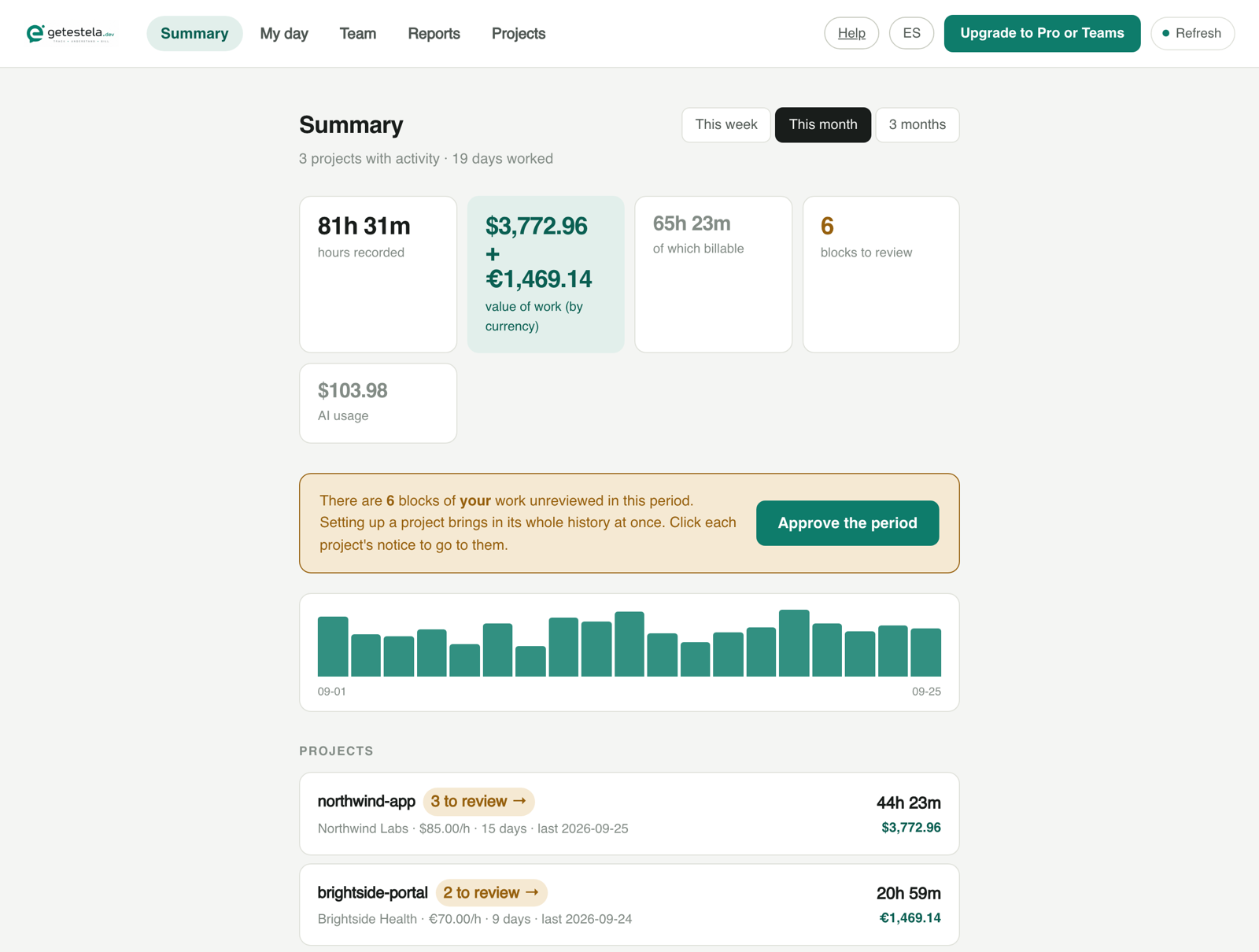
The local dashboard (estela web), here with the made-up data from estela demo.
Why it exists
A timer you have to remember to start always fails. And with an AI agent, time isn't measured in keystrokes anymore: it goes into writing the prompt, reading what comes back, and trying it out.
But that work leaves a trail. Claude Code saves every session in
~/.claude/projects/, Codex in ~/.codex/sessions/ and GitHub Copilot in VS
Code's workspaceStorage, with their model and tokens. Git records when you
committed and what. Estela reads all of it and lines it up.
Codex gives you measured hours and real AI cost, same as Claude Code. A
model that isn't in the price catalog gets an empty cost rather than an
invented one, and estela doctor tells you how many turns are in that
state.
GitHub Copilot in VS Code (chat and agent mode, on Windows, macOS and Linux) gives measured hours too: when each request starts and when it finishes. It has no AI cost, because Copilot is a flat subscription, and inline completions leave nothing on disk, so that time comes from your commits.
What it doesn't do:
- It doesn't install hooks. Your
huskyandlefthookstay untouched, and your commit messages aren't modified. An identifier written into history can't be taken back once it's pushed. - It doesn't inspect processes or your terminal. It reads files that already exist.
- It doesn't store the content of your prompts. Only when, how much, and with which model.
- It doesn't send anything anywhere. The free plan is entirely local.
Already using ccusage?
Keep it. ccusage reads the same files and tells you what the AI cost you; Estela tells you how many hours you worked and what to bill the client. Both only read, so they run side by side. Side-by-side comparison.
Getting started
You need Node 22.5 or later (for node:sqlite).
npx estela setup     # detects agents and repositories, rebuilds your history
npx estela web       # opens the dashboard at http://localhost:4319
npx estela doctor    # checks your data and flags anything wrong
npx estela --version
From inside Claude Code
If that's where you already are, Estela installs without leaving it:
/plugin marketplace add jdleonruiz/estela-cli
/plugin install estela@estela-cli
Then ask in plain words — "how many hours have I put into this?", "what can
I bill for this month?", "show me an example first" — and Claude Code reaches
for the right command on its own. The explicit forms are /estela:setup,
/estela:status and /estela:demo.
The demo fills a whole dashboard with made-up data and touches nothing of yours, which is the honest way to look at a program that wants to read your transcripts: see what it does before you let it near your own history.
No Claude Code, Codex or Copilot? It still works: without transcripts, Estela rebuilds your time from your commits alone, and marks it as estimated.
npm doesn't update global installs on its own. If you installed with
npm install -g estela, Estela tells you when there's a newer version (it asks
npm at most once a day, in the background, without blocking anything); update
with npm install -g estela@latest.
setup asks no questions and doesn't overwrite anything you've set up by hand:
you can run it again.
Estela speaks English and Spanish, following your system's language. Force one
with --lang en on any command, or ESTELA_LANG=en for good.
Windows
Estela runs on Windows. It's tested by hand on a real machine, not in CI, so if something looks off, open an issue. Two things trip people up before Estela even starts:
npm : ... cannot be loaded because running scripts is disabled— PowerShell blocks npm's own scripts by default. Once, and only for your user:Set-ExecutionPolicy -Scope CurrentUser RemoteSigned.npm error Class extends value undefined is not a constructor or null— you have two Node installs fighting over the same folder, usuallynvm-windowsplus a Node from the installer orwinget. Keep one: uninstall the standalone Node, thennvm install ltsandnvm use ltsfrom an administrator terminal.where.exe npmshould list a single path.
Reporting to a client
Projects are created as internal and without a rate, because making one up would produce fake numbers from the first minute. When one belongs to a real client:
estela client add --id acme --name "ACME" --currency EUR
estela project add --id acme-web --client acme --name "ACME website" --repo ~/dev/acme-web
estela rate set --project acme-web --rate 50

estela author --project acme-web      # which email you commit with there
estela report --project acme-web --cutoff 2026-08-31 --dry-run
estela author matters more than it looks. In a client's repository you
almost never commit with your global email, and without telling Estela it
captures three commits out of seventeen hundred.
The language is the client's, not your terminal's. What your client receives (the PDF, the CSV, the report and the published panel) comes out in the language you set for that client, so you can use Estela in Spanish and bill a company in English:
estela client add --id acme --name "ACME" --currency EUR --language en
Without it Estela uses your terminal's language, and tells you when it does.
Running client add again keeps the language you set (--language auto removes
it), and --lang en on a single command overrides everything. A published panel
is a static file, so to change its language you republish it.
The report backs up your work with hours and commits. It isn't an invoice: Estela doesn't issue tax documents, so attach it to your own.
A cutoff doesn't mean you stop working on the project. Without
--dry-run, estela report --cutoff <date> marks those hours as invoiced
and keeps letting new hours pile up for the next cutoff:
estela report --project acme-web --cutoff 2026-08-31 --pdf august.pdf
# ...keep working as usual...
estela report --project acme-web --cutoff 2026-09-30 --pdf september.pdf
When a project is genuinely done, close it — nothing gets deleted, and if
it captures work again (a teammate, or you without remembering), estela doctor flags it instead of silently losing it:
estela project close --project acme-web
estela project reopen --project acme-web   # if you need to pick it up again
Sharing progress with your client
estela login --email you@example.com    # once
estela publish --project acme-web
This uploads a read-only dashboard with an unguessable link, hosted on getestela.dev — no server of your own needed. It shows hours and commits; never your rate or your AI usage, because as long as you're the one paying for it that spend is yours, and a client who knows which part an AI generated has a new argument for negotiating your rate down.
Publishing again from the same machine reuses the link automatically. From a
different machine, pass --token with the existing one, or your client ends up
with a dead link. The Free plan allows one published dashboard at a time; Pro
and Teams have no limit.
What the AI actually costs
On a flat subscription, your real spend isn't the sum of the tokens: it's the fee split across what you used.
estela subscription add --id max --name "Claude Max" --fee 100
estela ai-cost
Cache is counted separately because it's usually most of the bill — ignoring it underestimated spend fivefold.
Hours no import will infer
Meetings, travel, research, and development without an agent that didn't leave commits either:
estela log --project acme-web --hours 1.5 --kind meeting --what "Weekly check-in"
An import never touches them.
Work without an agent
If you coded by hand, your commits are still a trail: Estela infers the time from them and marks it as estimated, so you know which part of your hours is measured and which is assumed. The estimate errs on the short side on purpose: these hours end up in a report someone pays for.
Plans
| Free | Pro | Teams | |
|---|---|---|---|
| Everything above, locally | ✓ | ✓ | ✓ |
| Sync across machines | — | ✓ | ✓ |
| Hosted dashboards at once | 1 | unlimited | unlimited |
| Measured team hours | — | — | ✓ |
| AI budget per project | — | — | ✓ |
| Projects | unlimited | unlimited | unlimited |
Pro is one person on several machines; Teams is several people.
Teams is billed per measured person — $10/month, €10 in the eurozone, three-person minimum — not per project. Projects are unlimited on purpose: if each one cost money you'd end up measuring only two or three, which is the opposite of what this is for. Someone on several projects is paid for once.
AI cost is reported per project, never per person: what each person spends out of their own pocket is theirs. Paying per seat doesn't change that.
More at getestela.dev.
Development
npm install
npm test
Node 22 and zero runtime dependencies, on purpose: nobody installs a program that reads their transcripts if they can't audit it, and an empty dependency list can be audited in an afternoon.
Contributing
Issues and pull requests are welcome, and the good first issues are a good place to start. One thing to know so nobody's put off: this repository mirrors the open part of a larger repo where the paid service also lives, which is why each commit here is a release. I review PRs here and apply them to the main repo keeping you as the author, and the next release commit credits you as co-author. PRs welcome — I merge them into the main repo.
Open source, closed service
Everything that installs on your machine is open source under the MIT license:
the CLI, what reads your transcripts and your git, what calculates hours and
cost, and the dashboard that estela web opens. It's exactly what
npm install estela downloads, and you can read it at
github.com/jdleonruiz/estela-cli.
Each npm version has a matching tag there.
What isn't here is the paid service: the server that syncs your machines and the one behind team projects. That part is closed, and it's what keeps the project going.
The split isn't an accident. The free plan works entirely without an account, a card, or a network connection, and that claim is worth nothing if you have to take it on faith: with the code in front of you, you can check for yourself that nothing leaves your machine.
The test fixtures are made up on purpose. The cases come from real repositories — that's why they cover messes nobody would think of — but neither a client's team roster nor how much each of its people commits belongs in a public repository.
Similar repos


Languages
TypeScript
83.8%
JavaScript
11.5%
CSS
3.8%
Time tracking you never fill in — rebuilds billable hours from Claude Code transcripts and Git
See the codeSee what people are saying
README
Estela
English · Español
Development time tracking you don't have to fill in. Estela reads what your AI agents and your Git already wrote to disk and rebuilds where your time went, along with what the AI cost.
npx estela setup
Twenty seconds later you have the last few months of your history. No account, no card, and nothing leaves your machine.
The local dashboard (estela web), here with the made-up data from estela demo.
Why it exists
A timer you have to remember to start always fails. And with an AI agent, time isn't measured in keystrokes anymore: it goes into writing the prompt, reading what comes back, and trying it out.
But that work leaves a trail. Claude Code saves every session in
~/.claude/projects/, Codex in ~/.codex/sessions/ and GitHub Copilot in VS
Code's workspaceStorage, with their model and tokens. Git records when you
committed and what. Estela reads all of it and lines it up.
Codex gives you measured hours and real AI cost, same as Claude Code. A
model that isn't in the price catalog gets an empty cost rather than an
invented one, and estela doctor tells you how many turns are in that
state.
GitHub Copilot in VS Code (chat and agent mode, on Windows, macOS and Linux) gives measured hours too: when each request starts and when it finishes. It has no AI cost, because Copilot is a flat subscription, and inline completions leave nothing on disk, so that time comes from your commits.
What it doesn't do:
- It doesn't install hooks. Your
huskyandlefthookstay untouched, and your commit messages aren't modified. An identifier written into history can't be taken back once it's pushed. - It doesn't inspect processes or your terminal. It reads files that already exist.
- It doesn't store the content of your prompts. Only when, how much, and with which model.
- It doesn't send anything anywhere. The free plan is entirely local.
Already using ccusage?
Keep it. ccusage reads the same files and tells you what the AI cost you; Estela tells you how many hours you worked and what to bill the client. Both only read, so they run side by side. Side-by-side comparison.
Getting started
You need Node 22.5 or later (for node:sqlite).
npx estela setup     # detects agents and repositories, rebuilds your history
npx estela web       # opens the dashboard at http://localhost:4319
npx estela doctor    # checks your data and flags anything wrong
npx estela --version
From inside Claude Code
If that's where you already are, Estela installs without leaving it:
/plugin marketplace add jdleonruiz/estela-cli
/plugin install estela@estela-cli
Then ask in plain words — "how many hours have I put into this?", "what can
I bill for this month?", "show me an example first" — and Claude Code reaches
for the right command on its own. The explicit forms are /estela:setup,
/estela:status and /estela:demo.
The demo fills a whole dashboard with made-up data and touches nothing of yours, which is the honest way to look at a program that wants to read your transcripts: see what it does before you let it near your own history.
No Claude Code, Codex or Copilot? It still works: without transcripts, Estela rebuilds your time from your commits alone, and marks it as estimated.
npm doesn't update global installs on its own. If you installed with
npm install -g estela, Estela tells you when there's a newer version (it asks
npm at most once a day, in the background, without blocking anything); update
with npm install -g estela@latest.
setup asks no questions and doesn't overwrite anything you've set up by hand:
you can run it again.
Estela speaks English and Spanish, following your system's language. Force one
with --lang en on any command, or ESTELA_LANG=en for good.
Windows
Estela runs on Windows. It's tested by hand on a real machine, not in CI, so if something looks off, open an issue. Two things trip people up before Estela even starts:
npm : ... cannot be loaded because running scripts is disabled— PowerShell blocks npm's own scripts by default. Once, and only for your user:Set-ExecutionPolicy -Scope CurrentUser RemoteSigned.npm error Class extends value undefined is not a constructor or null— you have two Node installs fighting over the same folder, usuallynvm-windowsplus a Node from the installer orwinget. Keep one: uninstall the standalone Node, thennvm install ltsandnvm use ltsfrom an administrator terminal.where.exe npmshould list a single path.
Reporting to a client
Projects are created as internal and without a rate, because making one up would produce fake numbers from the first minute. When one belongs to a real client:
estela client add --id acme --name "ACME" --currency EUR
estela project add --id acme-web --client acme --name "ACME website" --repo ~/dev/acme-web
estela rate set --project acme-web --rate 50

estela author --project acme-web      # which email you commit with there
estela report --project acme-web --cutoff 2026-08-31 --dry-run
estela author matters more than it looks. In a client's repository you
almost never commit with your global email, and without telling Estela it
captures three commits out of seventeen hundred.
The language is the client's, not your terminal's. What your client receives (the PDF, the CSV, the report and the published panel) comes out in the language you set for that client, so you can use Estela in Spanish and bill a company in English:
estela client add --id acme --name "ACME" --currency EUR --language en
Without it Estela uses your terminal's language, and tells you when it does.
Running client add again keeps the language you set (--language auto removes
it), and --lang en on a single command overrides everything. A published panel
is a static file, so to change its language you republish it.
The report backs up your work with hours and commits. It isn't an invoice: Estela doesn't issue tax documents, so attach it to your own.
A cutoff doesn't mean you stop working on the project. Without
--dry-run, estela report --cutoff <date> marks those hours as invoiced
and keeps letting new hours pile up for the next cutoff:
estela report --project acme-web --cutoff 2026-08-31 --pdf august.pdf
# ...keep working as usual...
estela report --project acme-web --cutoff 2026-09-30 --pdf september.pdf
When a project is genuinely done, close it — nothing gets deleted, and if
it captures work again (a teammate, or you without remembering), estela doctor flags it instead of silently losing it:
estela project close --project acme-web
estela project reopen --project acme-web   # if you need to pick it up again
Sharing progress with your client
estela login --email you@example.com    # once
estela publish --project acme-web
This uploads a read-only dashboard with an unguessable link, hosted on getestela.dev — no server of your own needed. It shows hours and commits; never your rate or your AI usage, because as long as you're the one paying for it that spend is yours, and a client who knows which part an AI generated has a new argument for negotiating your rate down.
Publishing again from the same machine reuses the link automatically. From a
different machine, pass --token with the existing one, or your client ends up
with a dead link. The Free plan allows one published dashboard at a time; Pro
and Teams have no limit.
What the AI actually costs
On a flat subscription, your real spend isn't the sum of the tokens: it's the fee split across what you used.
estela subscription add --id max --name "Claude Max" --fee 100
estela ai-cost
Cache is counted separately because it's usually most of the bill — ignoring it underestimated spend fivefold.
Hours no import will infer
Meetings, travel, research, and development without an agent that didn't leave commits either:
estela log --project acme-web --hours 1.5 --kind meeting --what "Weekly check-in"
An import never touches them.
Work without an agent
If you coded by hand, your commits are still a trail: Estela infers the time from them and marks it as estimated, so you know which part of your hours is measured and which is assumed. The estimate errs on the short side on purpose: these hours end up in a report someone pays for.
Plans
| Free | Pro | Teams | |
|---|---|---|---|
| Everything above, locally | ✓ | ✓ | ✓ |
| Sync across machines | — | ✓ | ✓ |
| Hosted dashboards at once | 1 | unlimited | unlimited |
| Measured team hours | — | — | ✓ |
| AI budget per project | — | — | ✓ |
| Projects | unlimited | unlimited | unlimited |
Pro is one person on several machines; Teams is several people.
Teams is billed per measured person — $10/month, €10 in the eurozone, three-person minimum — not per project. Projects are unlimited on purpose: if each one cost money you'd end up measuring only two or three, which is the opposite of what this is for. Someone on several projects is paid for once.
AI cost is reported per project, never per person: what each person spends out of their own pocket is theirs. Paying per seat doesn't change that.
More at getestela.dev.
Development
npm install
npm test
Node 22 and zero runtime dependencies, on purpose: nobody installs a program that reads their transcripts if they can't audit it, and an empty dependency list can be audited in an afternoon.
Contributing
Issues and pull requests are welcome, and the good first issues are a good place to start. One thing to know so nobody's put off: this repository mirrors the open part of a larger repo where the paid service also lives, which is why each commit here is a release. I review PRs here and apply them to the main repo keeping you as the author, and the next release commit credits you as co-author. PRs welcome — I merge them into the main repo.
Open source, closed service
Everything that installs on your machine is open source under the MIT license:
the CLI, what reads your transcripts and your git, what calculates hours and
cost, and the dashboard that estela web opens. It's exactly what
npm install estela downloads, and you can read it at
github.com/jdleonruiz/estela-cli.
Each npm version has a matching tag there.
What isn't here is the paid service: the server that syncs your machines and the one behind team projects. That part is closed, and it's what keeps the project going.
The split isn't an accident. The free plan works entirely without an account, a card, or a network connection, and that claim is worth nothing if you have to take it on faith: with the code in front of you, you can check for yourself that nothing leaves your machine.
The test fixtures are made up on purpose. The cases come from real repositories — that's why they cover messes nobody would think of — but neither a client's team roster nor how much each of its people commits belongs in a public repository.
Similar repos
Languages
TypeScript
83.8%
JavaScript
11.5%
CSS
3.8%