
:pencil: A markup-aware linter for prose built with speed and extensibility in mind.
See the codeREADME

Your style, our editor.
A command-line linter for prose. Turn your team's writing guidelines into checks that run
in your editor, in CI, and alongside your code—on macOS, Windows, and Linux, entirely offline.


Docs · Quickstart · Package Explorer · Vale Studio · Vale CMS · Blog · Discord
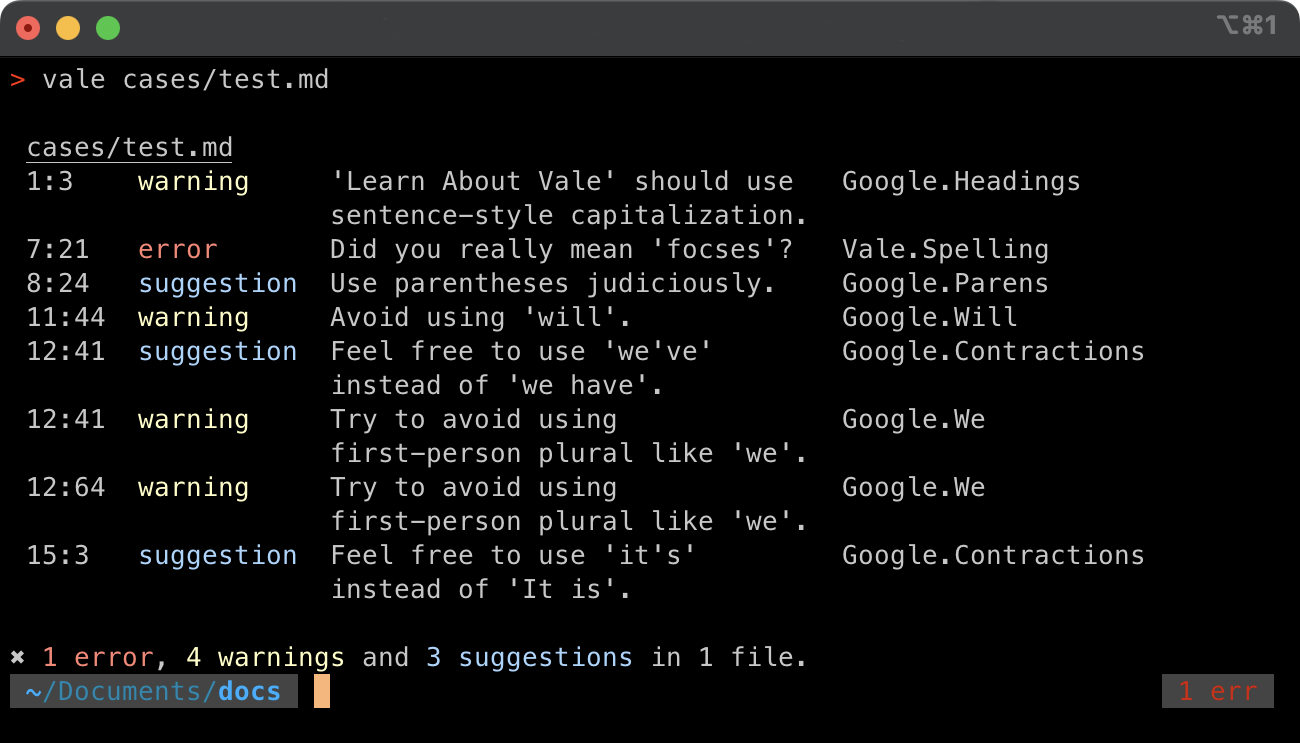
Vale doesn't ship opinions of its own. It's a framework for enforcing your style: a published guide like Microsoft's or Google's, an in-house set of terms, or both. It's run by teams at AWS, NVIDIA, Microsoft, GitLab, and Red Hat, among others who publish their configs.
$ vale sync
 SUCCESS  Synced 2 package(s) to 'styles'.

$ vale docs/

 docs/configure.md
 3:7   suggestion  Consider using 'use' instead of 'utilize'.              Microsoft.Wordiness
 3:44  suggestion  'are loaded' looks like passive voice.                  Microsoft.Passive
 9:12  error       Use 'Vale CLI' instead of 'Vale cli'.                   Docs.Terms

 docs/install.md
 3:40  warning     Use 'select' instead of the input-specific verb 'Click'. Microsoft.UIVerbs
 4:28  error       Did you really mean 'existant'?                         Vale.Spelling

✖ 2 errors, 1 warning and 2 suggestions in 2 files.
:heart: Sponsors
Hi there! I'm @jdkato, the sole developer of Vale. If you'd like to help me dedicate more time to developing, documenting, and supporting Vale, feel free to donate through GitHub Sponsors or Open Collective. Any donation—big, small, one-time, or recurring—is greatly appreciated!
Spotlights

Mintlify An AI-native documentation platform built for developers. Ships Vale as a built-in CI check. |

Promptless Suggests doc updates when your product changes. Runs Vale on every doc its agents write. |
Sponsors at $1,000 and above get a dedicated page on vale.sh.
Organizations

Everyone who funds Vale, individuals included, is listed on the sponsors page.
Infrastructure
Thanks to GitBook for hosting the documentation.

Why Vale
Most tools see text. Vale sees a document.
- It parses your markup instead of guessing at it. Markdown, AsciiDoc, reStructuredText, HTML, and every other format go through a real parser. A rule can target headings, lists, or table cells, and code spans, URLs, and fenced blocks are skipped before a rule ever runs. See Scopes.
- Your comments are documentation too. Vale lifts comments and docstrings out of source code with tree-sitter grammars, so a comment marker inside a string literal stays code. The Markdown in a Rust doc comment, or the reStructuredText in a Python docstring, is linted as though it were its own file. See Code.
- It finds prose in files that aren't prose. A View says where the writing is in an OpenAPI description, a notebook cell, or a commit message, so Vale lints that and passes over the rest.
- Rules are files, and they read grammar. Extension points in YAML run from a token list to part-of-speech patterns, cross-file relationships, readability formulas, and scripts. A rule can carry its own fix, which an editor applies with one keystroke and an agent applies without deciding anything.
- One binary, nothing alongside it. Written in Go, with no runtime to install and files linted in parallel. See the benchmark on GitLab's documentation.
- Private by design. Nothing leaves your machine: no account, no upload, and no training on your writing.
Install
| macOS | brew install vale |
| Windows | choco install vale · winget install -e --id errata-ai.Vale |
| Linux | sudo snap install vale · sudo pacman -S vale · sudo apt install vale |
| Docker | docker pull jdkato/vale |
| Go | go install github.com/vale-cli/vale/v3/cmd/vale@latest |
Every release also ships prebuilt binaries for each platform. Scoop, MacPorts, FreeBSD ports, conda-forge, the APT archive, and the rest are on the installation page.
Quickstart
Vale needs a configuration file that says where to keep styles and which to apply. Create one at the root of your project:
StylesPath = styles
MinAlertLevel = suggestion

Packages = Microsoft

[*.md]
BasedOnStyles = Vale, Microsoft
Then download the styles and lint something:
vale sync
vale README.md
The Quickstart walks through each step. To skip the reading, open a chat already pointed at vale.sh/AGENTS.md and have an assistant set it up.
Styles
A style is a folder of YAML rules. Start from one that's published—Microsoft, Google, Red Hat, and more are one line in your config away—and browse them all in the Package Explorer. Or write your own:
# styles/Docs/Terms.yml
extends: substitution
message: "Use '%s' instead of '%s'."
level: error
swap:
  'Vale cli|vale-cli': Vale CLI
That's the whole rule. See Styles for the rest, and Vale CMS to author a full project—config, rules, vocabularies, and tests—in the browser, with the real engine linting live.
Contributing
Bug reports, feature requests, documentation fixes, and pull requests are all welcome. Start with the contributing guide, which covers setting up a development environment, testing, benchmarking, and the contributor license agreement. This project follows a code of conduct.
License
Similar repos


Languages
Go
99.7%
:pencil: A markup-aware linter for prose built with speed and extensibility in mind.
See the codeREADME
Your style, our editor.
A command-line linter for prose. Turn your team's writing guidelines into checks that run
in your editor, in CI, and alongside your code—on macOS, Windows, and Linux, entirely offline.
Docs · Quickstart · Package Explorer · Vale Studio · Vale CMS · Blog · Discord
Vale doesn't ship opinions of its own. It's a framework for enforcing your style: a published guide like Microsoft's or Google's, an in-house set of terms, or both. It's run by teams at AWS, NVIDIA, Microsoft, GitLab, and Red Hat, among others who publish their configs.
$ vale sync
 SUCCESS  Synced 2 package(s) to 'styles'.

$ vale docs/

 docs/configure.md
 3:7   suggestion  Consider using 'use' instead of 'utilize'.              Microsoft.Wordiness
 3:44  suggestion  'are loaded' looks like passive voice.                  Microsoft.Passive
 9:12  error       Use 'Vale CLI' instead of 'Vale cli'.                   Docs.Terms

 docs/install.md
 3:40  warning     Use 'select' instead of the input-specific verb 'Click'. Microsoft.UIVerbs
 4:28  error       Did you really mean 'existant'?                         Vale.Spelling

✖ 2 errors, 1 warning and 2 suggestions in 2 files.
:heart: Sponsors
Hi there! I'm @jdkato, the sole developer of Vale. If you'd like to help me dedicate more time to developing, documenting, and supporting Vale, feel free to donate through GitHub Sponsors or Open Collective. Any donation—big, small, one-time, or recurring—is greatly appreciated!
Spotlights
|
Mintlify An AI-native documentation platform built for developers. Ships Vale as a built-in CI check. |
Promptless Suggests doc updates when your product changes. Runs Vale on every doc its agents write. |
Sponsors at $1,000 and above get a dedicated page on vale.sh.
Organizations
Everyone who funds Vale, individuals included, is listed on the sponsors page.
Infrastructure
Thanks to GitBook for hosting the documentation.
Why Vale
Most tools see text. Vale sees a document.
- It parses your markup instead of guessing at it. Markdown, AsciiDoc, reStructuredText, HTML, and every other format go through a real parser. A rule can target headings, lists, or table cells, and code spans, URLs, and fenced blocks are skipped before a rule ever runs. See Scopes.
- Your comments are documentation too. Vale lifts comments and docstrings out of source code with tree-sitter grammars, so a comment marker inside a string literal stays code. The Markdown in a Rust doc comment, or the reStructuredText in a Python docstring, is linted as though it were its own file. See Code.
- It finds prose in files that aren't prose. A View says where the writing is in an OpenAPI description, a notebook cell, or a commit message, so Vale lints that and passes over the rest.
- Rules are files, and they read grammar. Extension points in YAML run from a token list to part-of-speech patterns, cross-file relationships, readability formulas, and scripts. A rule can carry its own fix, which an editor applies with one keystroke and an agent applies without deciding anything.
- One binary, nothing alongside it. Written in Go, with no runtime to install and files linted in parallel. See the benchmark on GitLab's documentation.
- Private by design. Nothing leaves your machine: no account, no upload, and no training on your writing.
Install
| macOS | brew install vale |
| Windows | choco install vale · winget install -e --id errata-ai.Vale |
| Linux | sudo snap install vale · sudo pacman -S vale · sudo apt install vale |
| Docker | docker pull jdkato/vale |
| Go | go install github.com/vale-cli/vale/v3/cmd/vale@latest |
Every release also ships prebuilt binaries for each platform. Scoop, MacPorts, FreeBSD ports, conda-forge, the APT archive, and the rest are on the installation page.
Quickstart
Vale needs a configuration file that says where to keep styles and which to apply. Create one at the root of your project:
StylesPath = styles
MinAlertLevel = suggestion

Packages = Microsoft

[*.md]
BasedOnStyles = Vale, Microsoft
Then download the styles and lint something:
vale sync
vale README.md
The Quickstart walks through each step. To skip the reading, open a chat already pointed at vale.sh/AGENTS.md and have an assistant set it up.
Styles
A style is a folder of YAML rules. Start from one that's published—Microsoft, Google, Red Hat, and more are one line in your config away—and browse them all in the Package Explorer. Or write your own:
# styles/Docs/Terms.yml
extends: substitution
message: "Use '%s' instead of '%s'."
level: error
swap:
  'Vale cli|vale-cli': Vale CLI
That's the whole rule. See Styles for the rest, and Vale CMS to author a full project—config, rules, vocabularies, and tests—in the browser, with the real engine linting live.
Contributing
Bug reports, feature requests, documentation fixes, and pull requests are all welcome. Start with the contributing guide, which covers setting up a development environment, testing, benchmarking, and the contributor license agreement. This project follows a code of conduct.
License
Similar repos
Languages
Go
99.7%