
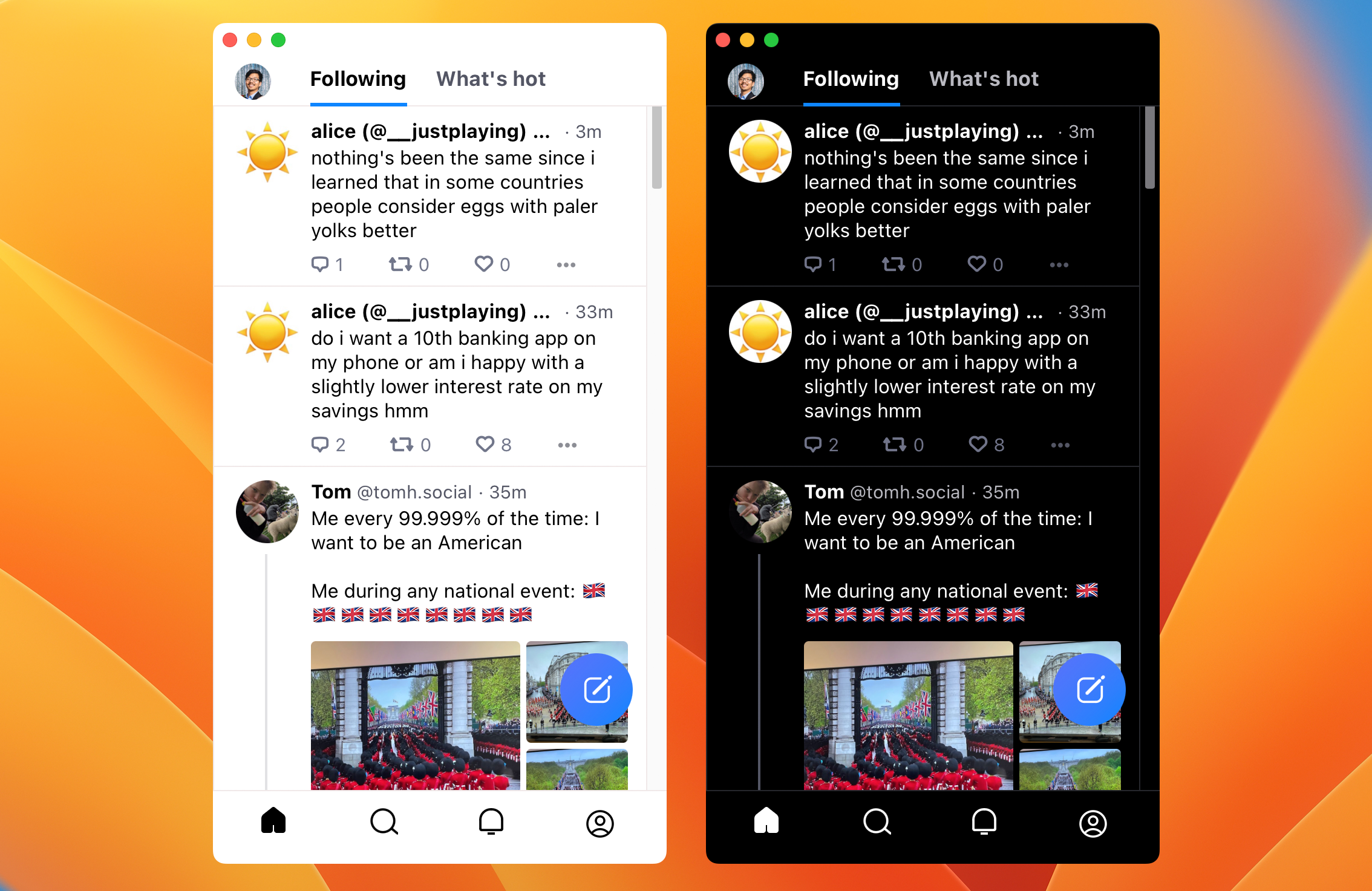
Sky.app is a great way to use Bluesky Social on MacOS, featuring keyboard shortcuts, Dark Mode Sync, and notification badges.
Swift
332
366 commits
updated May 9, 2026
README
Sky.app
Sky.app is a great way to use Bluesky Social on MacOS. It features keyboard shortcuts, Dark Mode Sync, and notification badges.
If you're looking for the official Bluesky Social iOS app, head on over to the App Store.
The current release is 0.5.3.
Installation
- DIY way: Clone the repo and build in XCode
- Easy way: Download the DMG from the Releases page
Keyboard Shortcuts
Posting
⌘-NNew Post
Navigation
⌘-⇧-RRefresh⌘-⇧-]Next Tab (or^-Tab)⌘-⇧-[Previous Tab (or^-⇧-Tab)
In Compact Mode:
⌘-1Home⌘-2Search⌘-3Chat⌘-4Notifications⌘-5Profile
In Desktop Mode:
⌘-1Home⌘-2Search⌘-3Notifications⌘-4Chat⌘-5Feed⌘-6Lists⌘-7Profile⌘-8Settings
Other
⌘-,Settings...⌘-KJump To...⌘-TOpen in Browser⌘-⇧-CCopy Share URL^-⌘-⇧-CCopy Current URL
Credits
Made by @jcsalterego.bsky.social.
App icon based on the work of Carmine Savarese.
Check for Updates powered by Sparkle.
Changelog
0.4.1
- Clean up ⌘-n behavior as
nis bound to New Post in-app - Fix color scheme sync (again)
- Some code cleanup around old window and view controllers
- Fix: Window control boxes disappear during lost focus #22
- Fix: White title bar and scroll bar #24
- ⌘-2 (Search) a second time will focus on search box
- Fix tab navigation
- Fix setZoomFactor crash
0.4.0
- Add (
⌘-,) to go to the Settings page - Fix color scheme sync
- Remove "Toggle Dark Mode" (for now?)
- Notification badges now include unread chat messages
- Fix notification badges
- Fix keybindings and menu items between Compact and Desktop modes
0.3.9
- Remove Developer Console #7
- Remove Mute Terms
- Fix page up/down #8
- Fix ⌘-n for New Post #9
- Fix ⌘-# for refresh #10
0.3.8
- Restore scrolling
- Restore tab navigation
- Fix menu item shortcuts (
⌘-1)
0.3.7
- More bug fixes for keyboard navigation
0.3.6
- Bug fixes for keyboard navigation
0.3.5
- Performance cleanup
0.3.4
Advanced > Translations in Windowopens up translations in its own window.- FIX: badge notification counts reflect muted threads
0.3.3
Advanced > Hide Replies in Followinghides replies in your Home Following timeline.
0.3.1
Jump To...allows for quick access to various sections- FIX: Dark Mode toggle when not in System mode
0.3.0
Check for Updates...available.
0.2.5
- Update View Menu and navigation hotkeys
0.2.4
- Zoom support
- Clean up "Search Posts By Newest First" loading
- Mute Terms also apply to search results
0.2.3
- Mute Terms: hide posts and notifications with certain words.
Advanced > Mute Terms > Edit... - FIX: Dev Console loading error
Escclears search terms when searching- Performance cleanup
0.2.1
- Rewrite
staging.bsky.apptobsky.app
0.2.0
- Use
bsky.app
0.1.4
⌘-1,⌘-2, etc now follow the available navigation, depending on whether you're in compact mode, or desktop mode- FIX: Some network calls failed to return correctly
0.1.3
- View > Toggle Dark Mode
- Performance updates
- ⌘-⇧-C now copies the Share URL (
staging.bsky.appbecomesbsky.app) - ^-⌘-⇧-C copies the Full URL, while increasing finger dexterity
- FIX: ⌘-5 opens Settings in compacted mode
0.1.2
- FIX:
⌘-Numbernavigation in non-compact view - New keyboard shortcuts:
- Go back in various contexts:
Esc - Next page:
PgDn,SPC - Prev page:
PgUp,⇧-SPC - Go to Top:
Home
- Go back in various contexts:
0.1.1
- FIX: Attach photos to posts
0.1.0
- Notarized ✨
0.0.9
- Fix Tab navigation in Dark Mode
Advanced > Developer Console
0.0.8
- Using
⌘-1for Home while you're already on the page will click the "Load More Posts" button. Same for Notifications. - Navigate inner tabs (Following, What's New):
- Previous Tab:
⌘-⇧-[or^-⇧-Tab - Next Tab:
⌘-⇧-]or^-Tab
- Previous Tab:
- Bonus key binding:
⌘-kgoes to Search Advanced > Search Posts By Newest Firstwill reorder searched posts in reverse chronological order.
0.0.7
- FIX: Restore Dark Mode sync scrollbars. Whoops.
0.0.6
- Notification badges! It might be a little wonky. One can always issue a Refresh (⌘-⇧-R).
- FIX: Dark Mode sync got outta whack. It is in whack now.
- FIX: Search page is scrollable now.
0.0.5
- ⌘-⇧-C to copy the current URL (#1)
0.0.4
- Open in Browser
0.0.3
- Full Light/Dark Mode sync (scrollbars included)
0.0.2
- Title bar follows dark mode
- FIX: Remove outer scrollbars
0.0.1
- Initial release
LICENSE
Contributors

366 commits
Similar repos


Languages
Swift
62.1%
JavaScript
26.7%
Python
6.1%
Shell
5.1%
Sky.app is a great way to use Bluesky Social on MacOS, featuring keyboard shortcuts, Dark Mode Sync, and notification badges.
Swift
332
366 commits
updated May 9, 2026
README
Sky.app
Sky.app is a great way to use Bluesky Social on MacOS. It features keyboard shortcuts, Dark Mode Sync, and notification badges.
If you're looking for the official Bluesky Social iOS app, head on over to the App Store.
The current release is 0.5.3.
Installation
- DIY way: Clone the repo and build in XCode
- Easy way: Download the DMG from the Releases page
Keyboard Shortcuts
Posting
⌘-NNew Post
Navigation
⌘-⇧-RRefresh⌘-⇧-]Next Tab (or^-Tab)⌘-⇧-[Previous Tab (or^-⇧-Tab)
In Compact Mode:
⌘-1Home⌘-2Search⌘-3Chat⌘-4Notifications⌘-5Profile
In Desktop Mode:
⌘-1Home⌘-2Search⌘-3Notifications⌘-4Chat⌘-5Feed⌘-6Lists⌘-7Profile⌘-8Settings
Other
⌘-,Settings...⌘-KJump To...⌘-TOpen in Browser⌘-⇧-CCopy Share URL^-⌘-⇧-CCopy Current URL
Credits
Made by @jcsalterego.bsky.social.
App icon based on the work of Carmine Savarese.
Check for Updates powered by Sparkle.
Changelog
0.4.1
- Clean up ⌘-n behavior as
nis bound to New Post in-app - Fix color scheme sync (again)
- Some code cleanup around old window and view controllers
- Fix: Window control boxes disappear during lost focus #22
- Fix: White title bar and scroll bar #24
- ⌘-2 (Search) a second time will focus on search box
- Fix tab navigation
- Fix setZoomFactor crash
0.4.0
- Add (
⌘-,) to go to the Settings page - Fix color scheme sync
- Remove "Toggle Dark Mode" (for now?)
- Notification badges now include unread chat messages
- Fix notification badges
- Fix keybindings and menu items between Compact and Desktop modes
0.3.9
- Remove Developer Console #7
- Remove Mute Terms
- Fix page up/down #8
- Fix ⌘-n for New Post #9
- Fix ⌘-# for refresh #10
0.3.8
- Restore scrolling
- Restore tab navigation
- Fix menu item shortcuts (
⌘-1)
0.3.7
- More bug fixes for keyboard navigation
0.3.6
- Bug fixes for keyboard navigation
0.3.5
- Performance cleanup
0.3.4
Advanced > Translations in Windowopens up translations in its own window.- FIX: badge notification counts reflect muted threads
0.3.3
Advanced > Hide Replies in Followinghides replies in your Home Following timeline.
0.3.1
Jump To...allows for quick access to various sections- FIX: Dark Mode toggle when not in System mode
0.3.0
Check for Updates...available.
0.2.5
- Update View Menu and navigation hotkeys
0.2.4
- Zoom support
- Clean up "Search Posts By Newest First" loading
- Mute Terms also apply to search results
0.2.3
- Mute Terms: hide posts and notifications with certain words.
Advanced > Mute Terms > Edit... - FIX: Dev Console loading error
Escclears search terms when searching- Performance cleanup
0.2.1
- Rewrite
staging.bsky.apptobsky.app
0.2.0
- Use
bsky.app
0.1.4
⌘-1,⌘-2, etc now follow the available navigation, depending on whether you're in compact mode, or desktop mode- FIX: Some network calls failed to return correctly
0.1.3
- View > Toggle Dark Mode
- Performance updates
- ⌘-⇧-C now copies the Share URL (
staging.bsky.appbecomesbsky.app) - ^-⌘-⇧-C copies the Full URL, while increasing finger dexterity
- FIX: ⌘-5 opens Settings in compacted mode
0.1.2
- FIX:
⌘-Numbernavigation in non-compact view - New keyboard shortcuts:
- Go back in various contexts:
Esc - Next page:
PgDn,SPC - Prev page:
PgUp,⇧-SPC - Go to Top:
Home
- Go back in various contexts:
0.1.1
- FIX: Attach photos to posts
0.1.0
- Notarized ✨
0.0.9
- Fix Tab navigation in Dark Mode
Advanced > Developer Console
0.0.8
- Using
⌘-1for Home while you're already on the page will click the "Load More Posts" button. Same for Notifications. - Navigate inner tabs (Following, What's New):
- Previous Tab:
⌘-⇧-[or^-⇧-Tab - Next Tab:
⌘-⇧-]or^-Tab
- Previous Tab:
- Bonus key binding:
⌘-kgoes to Search Advanced > Search Posts By Newest Firstwill reorder searched posts in reverse chronological order.
0.0.7
- FIX: Restore Dark Mode sync scrollbars. Whoops.
0.0.6
- Notification badges! It might be a little wonky. One can always issue a Refresh (⌘-⇧-R).
- FIX: Dark Mode sync got outta whack. It is in whack now.
- FIX: Search page is scrollable now.
0.0.5
- ⌘-⇧-C to copy the current URL (#1)
0.0.4
- Open in Browser
0.0.3
- Full Light/Dark Mode sync (scrollbars included)
0.0.2
- Title bar follows dark mode
- FIX: Remove outer scrollbars
0.0.1
- Initial release
LICENSE
Similar repos
Contributors
366 commits
Languages
Swift
62.1%
JavaScript
26.7%
Python
6.1%
Shell
5.1%