
See what people are saying (1)
README
English · Español · Português · Italiano · Français · हिन्दी · 日本語 · 中文
ComfyUI-OldTimeRadio
Install and run it
- In ComfyUI open Extensions -> Node Manager, search old time radio, click Install.
- Install ffmpeg:
winget install Gyan.FFmpegon Windows,brew install ffmpegon a Mac. - Restart ComfyUI.
- Workflow -> Browse Templates -> EXTENSIONS -> comfyui-old-time-radio, open
otr_canonical. - Press Queue. The first run downloads about 12 GB. Your episode is an
.mp4in<your ComfyUI output folder>/otr/obs/.
It performs your story, not only its own. On the OTR_LedgerScriptWriter
node set source_bank to my_story and type your idea into custom_premise;
story_characters, story_plot and story_setting on the same node take the
rest. Leave them blank and the pack rolls a show of its own: tonight's news, a
public-domain book, a scene of Shakespeare, or original fiction.
It speaks English, Español, Português, Italiano, Français, हिन्दी, 日本語 and 中文. One episode_language
switch on the same node carries the writing, the voices and the captions;
apple/MULTILINGUAL.md says how each one performs.
Change nothing else in the graph. You need an NVIDIA card with 8 GB or more, a 16 GB
Apple Silicon Mac, or just a CPU (start ComfyUI with --cpu; slow but it works),
plus about 25 GB of free disk. No account, no API key, nothing paid. If a step
fails, Make an episode below walks through each one.



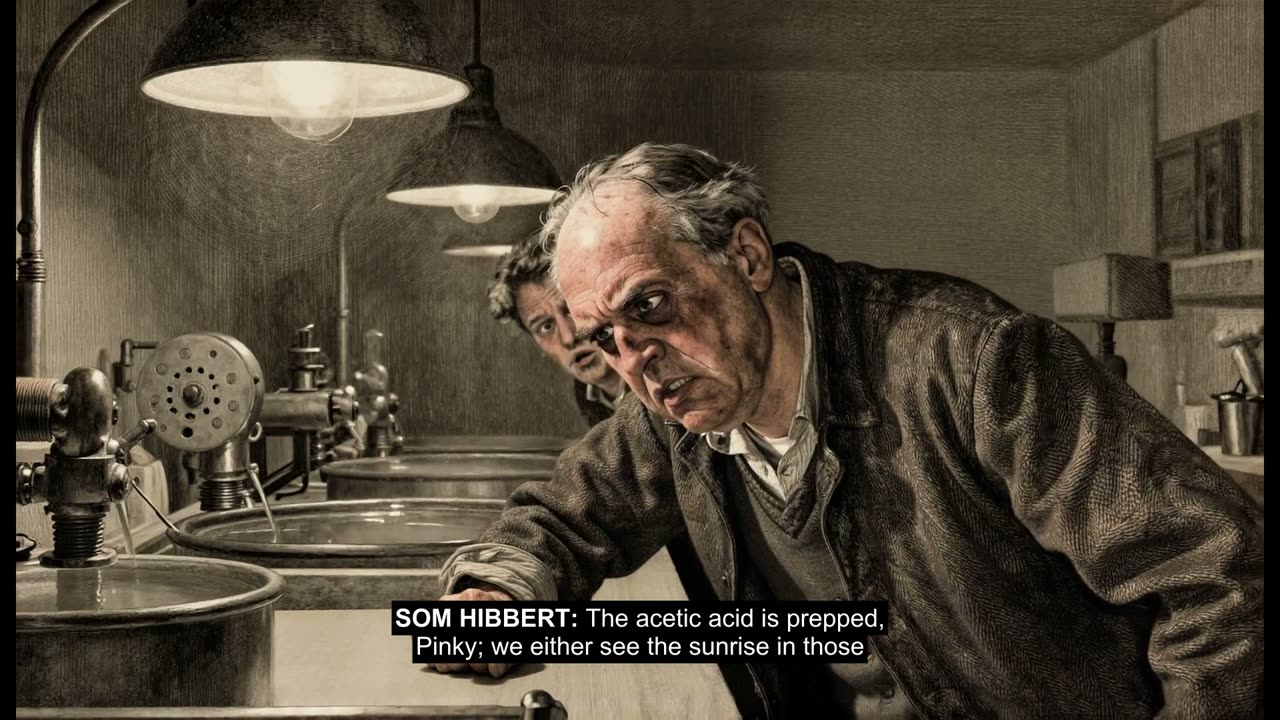
"Good evening. This is SIGNAL LOST."
Hear a complete episode first -- ninety seconds
The Shivering Gauge: a film archivist and his apprentice racing
vinegar syndrome through one night in the lab. Written, cast, performed, scored,
drawn and cut on one machine, from a Library of Congress feed. Its sound effects
are not a library: this episode ran the foley lane (otr_16gb_foley),
where the video model generates the scene's own audio and the workflow mixes it
under the voices. The default graph draws its pictures from the audio instead;
the foley lane is a 16 GB pick, not the starting point.
That is how every episode opens. What follows is a radio drama nobody has heard
before: a script written on your own machine from tonight's news, a public-domain
story, a scene of Shakespeare, or nothing at all; a cast of neural voices and an
announcer; a theme composed in the musical style of wherever the story came
from; pictures to watch while you listen;
burned captions and a credit roll. One workflow, one press of Queue, and a
finished .mp4 lands in your output folder.
One episode_language switch carries writing, Kokoro casting, captions and
audience-facing credits. Captions mirror the written line rather than
translating it. The admitted rows, the voice pools, and how Shakespeare and
Public Domain perform in another language are in
apple/MULTILINGUAL.md.
Every model runs on your own machine: no account, no API key, no paid service,
on NVIDIA cards and on Apple Silicon. media_archive and scifi_news_pro
read public RSS feeds when they come up, so a default run reaches the internet for tonight's
news and for the first model download and for nothing else. Paid options exist
for people who want them, and every one of them stays off until you turn it
on.
API keys (Google, OpenRouter, Comfy Cloud)
You do not need these. Local is the default. Never paste a key into a workflow widget.
Google and OpenRouter -- two ways to enter a key
Same recipe for both.
- Put the key on the first line of the
.secretfile in this pack folder. - Or keep the key in a file you already have, and put that file's full path
on the first line of the matching
.locationfile in this pack folder.
| Lane | Key file | Or point from | Also accepted |
|---|---|---|---|
google.secret | google_api_key.location | OTR_GOOGLE_API_KEY, GEMINI_API_KEY, GOOGLE_API_KEY | |
| OpenRouter | openrouter.secret | openrouter_api_key.location | OPENROUTER_API_KEY |
Environment wins if more than one is set. Both files stay off git. Restart
ComfyUI after you add one. api_key.location.example in this folder is the
blank reminder.
What a Google key gets you, and the one limit that shapes it. With a key
in place the Google lane writes the script (Gemini Flash / Flash-Lite), casts
and speaks every part (Gemini TTS), scores it (Lyria) and draws every still
(Gemini image) -- a whole episode with no GPU at all: nothing loads
locally, so it runs on a laptop with no graphics card. What it does not do
by default is generate video, and the reason is worth knowing before you go
looking for the switch: on Google's paid Tier 1, every Veo model allows
2 requests a minute and 10 a day, while a single episode's video needs
run well past that ceiling. No arrangement of a Tier 1 key finishes a Veo episode, so the
shipped Google presets composite the stills instead (still_flat) and never
call Veo.
If your Google account is on a higher tier, turn video on yourself -- the engines are built, tested and waiting:
- Pick
google_veo_video(orgoogle_omni_video) in the VideoDirector dropdowns, or run thegoogle_veo_low_1act/google_veo_low_3actlane presets instead of thegoogle_still_*pair. OTR_GOOGLE_VEO_MODEL_IDchooses the model --veo-3.1-lite-generate-preview(cheapest),veo-3.1-fast-generate-preview,veo-3.1-generate-preview. Each has its own daily allowance, so they run out separately.- A 429 mid-episode is a quota wall, not a broken key: the run keeps its place, floors the beat to its still, and publishes anyway.
- Google's own Increase Requests tab (Cloud console → Quotas) is how the daily number goes up without waiting for Tier 2.
Comfy Cloud -- sign into the app
Sign into Comfy with a Comfy API key (the API-key option on ComfyUI's
sign-in dialog; a plain email or Google login injects no key). That is the
whole instruction. The pack reads the same
api_key_comfy_org hidden input ComfyUI's own partner nodes use, and
nothing else: no key file, no environment variable on the server.
Headless box with no login: put the key in OTR_COMFY_API_KEY in the
environment of the machine that submits the prompt and submit through
scripts/otr_api.py, which sends it as extra_data.api_key_comfy_org
exactly as the app's sign-in would.
What those lanes turn on, and how to pick a hosted writer, is apple/CLOUD.md.
Make an episode
New to ComfyUI? This is a short read and then a button. You need a working ComfyUI (Desktop, portable or a git install -- any of them), about 25 GB of free disk -- the first run fetches roughly 12 GB of models, and an episode's working files need room too -- and one of the machines below. You do not need an account, an API key, a paid service, or any of the saved graphs further down this page: those are per-machine presets you can grow into. Installing the pack and pressing Queue is the whole path.
| Your machine | What to expect on a first short episode |
|---|---|
| NVIDIA, 16 GB or more | Minutes for a one-act show. Every default is proven here, and all but the heaviest video lanes are open to you. |
| NVIDIA, 10 to 15 GB | Minutes. The defaults are proven both above and below you, so run the canonical as shipped. No pre-set graph exists for this class yet. |
| NVIDIA, 8 GB | Minutes. Proven on an RTX 4060 laptop; the heaviest video lanes are not for you. |
| Apple Silicon, 16 GB | It runs. Every Mac graph published a finished episode on a 16 GB M4 on 2026-09-13 -- the writer is the same Qwen3.5-4B the canonical ships, unquantized, unchanged. Tens of minutes. Read apple/MAC.md first anyway: memory is unified, so an out-of-memory here can reboot the machine, and the fit has no margin for anything else running. |
| No GPU at all | About twenty minutes, and it works -- measured, not assumed. Start ComfyUI with --cpu. |
| AMD | It runs. First full episode off a Radeon on 2026-09-14 -- RDNA4 (R9700), Ubuntu 24.04, ROCm 7.2, clean pass. Still tier only, and RDNA3 / Windows / 8 GB are untested. apple/ROCM.md has the receipt and what is still open. |
Install the pack. In ComfyUI, open Extensions -> Node Manager and search
for old time radio (registry id comfyui-old-time-radio, publisher fluxus).
Or clone it into custom_nodes/:
git clone https://github.com/jbrick2070/ComfyUI-OldTimeRadio
python -m pip install -r ComfyUI-OldTimeRadio/requirements.txt
Run that pip install with ComfyUI's own Python, not a system one -- this
is the most common way an install fails, and it fails much later, as nodes that
quietly refuse to load. Python 3.10 through 3.13 are fine for English;
multilingual Kokoro needs the torch path on 3.10 through 3.12. Python 3.14 has
no Kokoro voice build yet. main is the branch: it is the default and the only
one that moves. A clone made before 2026-09-13 wants re-cloning rather than
pulling.
Put ffmpeg and ffprobe on your PATH. Both binaries, and a current
build: winget install Gyan.FFmpeg on Windows, brew install ffmpeg on a Mac.
On Debian or Ubuntu take a static build -- 22.04's apt ffmpeg is too old to
write the MP4 this pack makes -- and install one monospace font
(fonts-dejavu-core is enough) for the captions. You do not have to check
versions yourself for the part that would waste a whole render: the pack pushes
a fifth of a second of silence through your build at the start of every run and
refuses in about a second if it cannot write the final audio, rather than at the
end. That early check covers the MUX only. Burned captions need more from
ffmpeg -- the ass filter and libx264 -- and a build without them produces a
finished, playable episode with no captions on it, which the console says out
loud. A full winget/brew/static build has everything; the imageio-ffmpeg
wheel that comes down with the requirements typically does not.
apple/INSTALL.md has the version floor and what was
measured where.
Restart ComfyUI fully and look for [OldTimeRadio] in the console and an
OldTimeRadio category in the node menu. The first restart after installing
fetches the Kokoro voices (a few hundred MB, and on Python 3.13 the ONNX model
with them) so the default voice is ready before you ever queue -- if the console
pauses on [OldTimeRadio] lines, that is what it is doing.
Load the show. Workflow → Browse Templates → EXTENSIONS →
comfyui-old-time-radio (the entry is named after the pack's folder, so a git
clone lists it as ComfyUI-OldTimeRadio). There is exactly one entry,
otr_canonical. Open it and press Queue. (If the gallery lists it but opening it fails, drag
custom_nodes/ComfyUI-OldTimeRadio/workflows/otr_canonical.json onto the canvas
instead -- same graph, and it has happened.) You do not have to change anything: every dropdown already
holds a working value, and the ones set to roll pick for themselves, so two runs
in a row give you two different shows.
Wait, then look in <your ComfyUI output folder>/otr/obs/. The first run
downloads about 12 GB -- the writer, the music model and its text encoder, and
the Kokoro voices -- and then writes, casts, performs, scores and cuts an episode.
Later runs skip the download. On a 16 GB NVIDIA card a short episode is minutes;
on CPU it is a long wait, and that is the model working, not a hang.
The canvas shows you almost nothing until the end. No thumbnail, no player, no progress picture while it works -- and then a single still from the finished episode on the last node. The file is the real product and the folder is where it lives; the still is only there so a finished run does not look like one that did nothing. The first person outside this project to run it had no still, went looking in the UI, found nothing, and only then found the files.
That folder is the finish line, and the console tells you what
happened. obs_publish OK -> <path> names the published file.
obs_publish BLOCKED -- ... means the run SUCCEEDED and only the published
copy was withheld, because the episode's rights receipt did not clear -- the
finished episode is in otr/episodes/<episode>/. No obs_publish line at
all means the run did not finish, however green the console looked; go to
When something goes wrong.
To stop a run, press Cancel in the ComfyUI menu (or clear the queue). It
stops at the next step rather than instantly, so a long video beat finishes
first. Nothing is published, and the part-built episode stays in
otr/episodes/<episode>/.
Queue one episode at a time. The ledger that carries an episode between
nodes is held per process, so two runs in flight can read each other's. On a
machine with more than one GPU, start ComfyUI with CUDA_VISIBLE_DEVICES set to
the card you want.
The long form of the install, with the traps: apple/INSTALL.md and apple/RUN.md.
Would rather hand it to an AI agent? apple/AGENT_INSTALL.md is written for one -- Claude Code, Codex, Cursor, Gemini CLI, whatever you use -- with a prompt to paste, a verification command for every step, and the traps that waste an agent's time. It is an alternative to the path above, not a requirement: nothing here needs an agent.
The widgets worth touching
All on OTR_LedgerScriptWriter. Everything else has a considered default.
| Widget | What it does |
|---|---|
episode_title | Blank, and the show titles itself. Anything you type becomes the title card. |
num_characters | Speaking parts. Ships at 2. |
act_count | 1 for a short show, 3 for a full one with act breaks. Ships at 1. This is what moves the clock -- episodes here run about one to four minutes, and three acts is roughly three times the render, not three times the fun. |
custom_premise | A sentence or two of your own. Blank means the source decides. |
source_bank | Where the story comes from. Ships on roll, which picks any eligible bank. |
visual_style | How it looks. Ships on roll. The ids are in apple/STYLES.md. |
creativity | balanced by default. |
lemmy_cameo | Whether a character named Lemmy drops by. Ships on roll, about an 11% chance. |
episode_language | One switch. See apple/MULTILINGUAL.md. |
Pin source_bank and visual_style when you want to compare two runs; a rolled
bank and a rolled style change more than anything else you could adjust.
Your own story: set source_bank to my_story (the dropdown lists bank
ids, so that is the value to pick) and put your idea in custom_premise. The
story_characters, story_plot, story_setting and story_author fields on the
same node take the rest. That bank exists to produce your idea rather than adapt
something. Since 2026-09-13 the roll can land on it like any other bank: a run
that arrives with those fields blank writes a standing premise that ships
with the pack, so it always has something to perform. Anything you type wins
over it.
The guides that ship with it
Everything under apple/ is in the pack, whichever way you installed it. (The
folder name is historical; the guides cover every platform.)
| Page | The question it answers |
|---|---|
| apple/INSTALL.md | How do I get the nodes loading? |
| apple/AGENT_INSTALL.md | Can an AI agent do that install for me? |
| apple/RUN.md | Where does the first episode land, and what if it does not? |
| apple/BANKS.md | What kind of episode do I get? |
| apple/MULTILINGUAL.md | How does the language switch work? |
| apple/MACHINES.md | What runs on my machine, and where do the weights come from? |
| apple/WRITERS.md | Which language model writes the script? |
| apple/VOICES.md | Who speaks, and which engine says it? |
| apple/MUSIC.md | Why is the theme this genre, and why is there no music? |
| apple/IMAGE_MODELS.md | What draws the still pictures? |
| apple/VIDEO_MODELS.md | How does a beat become moving picture? |
| apple/STYLES.md | How does the episode look? |
| apple/UPSCALERS.md | Why is the upscale step off? |
| apple/MAC.md | What is different on Apple Silicon? |
| apple/ROCM.md | What is different on AMD? |
| apple/RUNPOD.md | How do I rent a GPU for a lane my card cannot hold? |
| apple/CLOUD.md | How do I turn on a paid writer? |
| apple/EXTENDING.md | How do I add an engine, bank, writer, or language? |
| apple/PREFLIGHT.md | Will what I built actually work? |
| apple/LLM_PREFLIGHT.md | How do I add a writer LLM? |
The development record -- bug logs, measurements, design notes -- lives under
docs/ in the
GitHub tree
and is not part of a Manager install. Nothing in this file depends on it.
What it makes
The story
Every runnable source bank rolls automatically -- My Story among them, writing the standing premise when you leave its fields blank -- and one dropdown row, custom_source_bank, is not a bank but the signpost for adding your own. Each bank is
independent -- its own story pack, its own fetch -- and each fails closed: a bad
source, a context overflow or a broken contract stops the run rather than shipping
a degraded story. The language model writes every line of prose; Python validates,
it never rewrites.
| Bank | Where the story comes from |
|---|---|
scifi_news_pro | A live science feed, turned into science-fiction radio. |
media_archive | Media RSS and archive items, turned into restoration-adventure episodes. |
public_domain | A faithful radio adaptation of a public-domain source text. |
shakespeare | A Folger scene, adapted with the author's own language carried as written. The Folger texts are noncommercial (CC BY-NC), and an episode inherits that. How another language performs that text is in apple/MULTILINGUAL.md. |
original | No source at all: original fiction seeded from an entropy draw. |
my_story | Your idea, characters, plot and setting. Rolled like any other bank; a blank run writes the standing premise that ships with the pack. |
The music each bank gets
Every bank has a fixed musical identity, and the composer leads every cue with it.
| Bank | Idiom |
|---|---|
media_archive | small-group jazz quartet, relaxed swing -- brushed drums, walking upright bass, piano, tenor sax |
original | salsa conjunto at 100 BPM, clave-driven -- congas and timbales, montuno, tumbao, brass |
public_domain | Chicago house at 122 BPM, soulful and steady -- TR-707, rolling bass, warm piano chords |
scifi_news_pro | Detroit techno at 128 BPM, hypnotic machine funk -- TR-909, sub bass, detuned stabs |
shakespeare | Elizabethan consort music -- viols, recorders, lute |
my_story | Yours. Type it into the music_style widget on OTR_StableAudioTheme: "gamelan orchestra", "surf rock", "solo cello". Blank means the house radio orchestra. |
music_style is honoured on my_story only. Every other bank keeps the idiom
in the table above whatever is typed -- the pairings are part of how each bank
sounds, and they are fixed so an episode's music matches where its story came
from.
The look
The visual styles, rolled or pinned on visual_style, live in
apple/STYLES.md. visual_storybased is minted from the
story rather than loaded from a pack -- which is why you will not find it
among the files in nodes/visual_styles/.
A style only shows where there is a picture to style. It drives the stills
and the video-diffusion lanes. The procedural lanes the canonical ships
draw their frames from the audio and never read it -- so on a default run the
style is written into the episode's filename and changes nothing you can see.
Switch a video role to a still_* or diffusion lane, or pin an image engine,
and the style starts doing its job.
The engines
The video, image, voice and music layers are each a registry of swappable engines, chosen per role from dropdowns. Whatever you pick is honoured exactly: a missing or out-of-memory engine stops the render with a named error rather than swapping in something you did not choose. No engine is ever silently swapped for another one.
That promise is about ENGINE CHOICE, and it is worth saying where it stops.
Infrastructure failures below the engines do have recovery paths, and they say
so in the log rather than in silence: if pyloudnorm cannot measure a master,
the older peak-based mastering runs instead; if no monospace font can be loaded,
the credits fall back to a bitmap font and look worse; if a voice bank cannot
serve the requested gender, casting stamps the line gender_unservable and
continues. One of them is sharper than the others: if the master WAV cannot be
written to disk, the run continues and produces a video-only episode rather
than stopping. Each of those prints what it did; none of them substitutes an
engine you did not pick.
What otr_canonical ships, and why:
- Video: procedural, audio-reactive lanes --
viz_mxc_cpu,viz_green,viz_camera-- one per role. They draw their own frames, download nothing, and run on every machine including CPU. Real video diffusion (LTX, Wan, HuMo, AnimateDiff, MiniMax H3) and thestill_*family are all one dropdown away. - Images:
z_image_turbo, sitting dormant. The procedural video lanes consume no still, so the image weights are never fetched on a default run. Switch a video role to a still-consuming lane and they download then. - Voices:
kokoroon both slots. It is the only one-click voice on every platform, which is why it is the default. The voice engines come with a Manager install, except one: the IndexTTS2 voice cloner ships in the GitHub tree only. Chatterbox and Dia assume Windows -- they run in their own venv and install through PowerShell scripts with no shell twin. PointOTR_CHATTERBOX_VENVorOTR_DIA_VENVat your own interpreter to run them elsewhere; nothing here has proven that path. - Music:
stable_audio_3. Commercially clean and ungated. MusicGen remains selectable and is noncommercial.
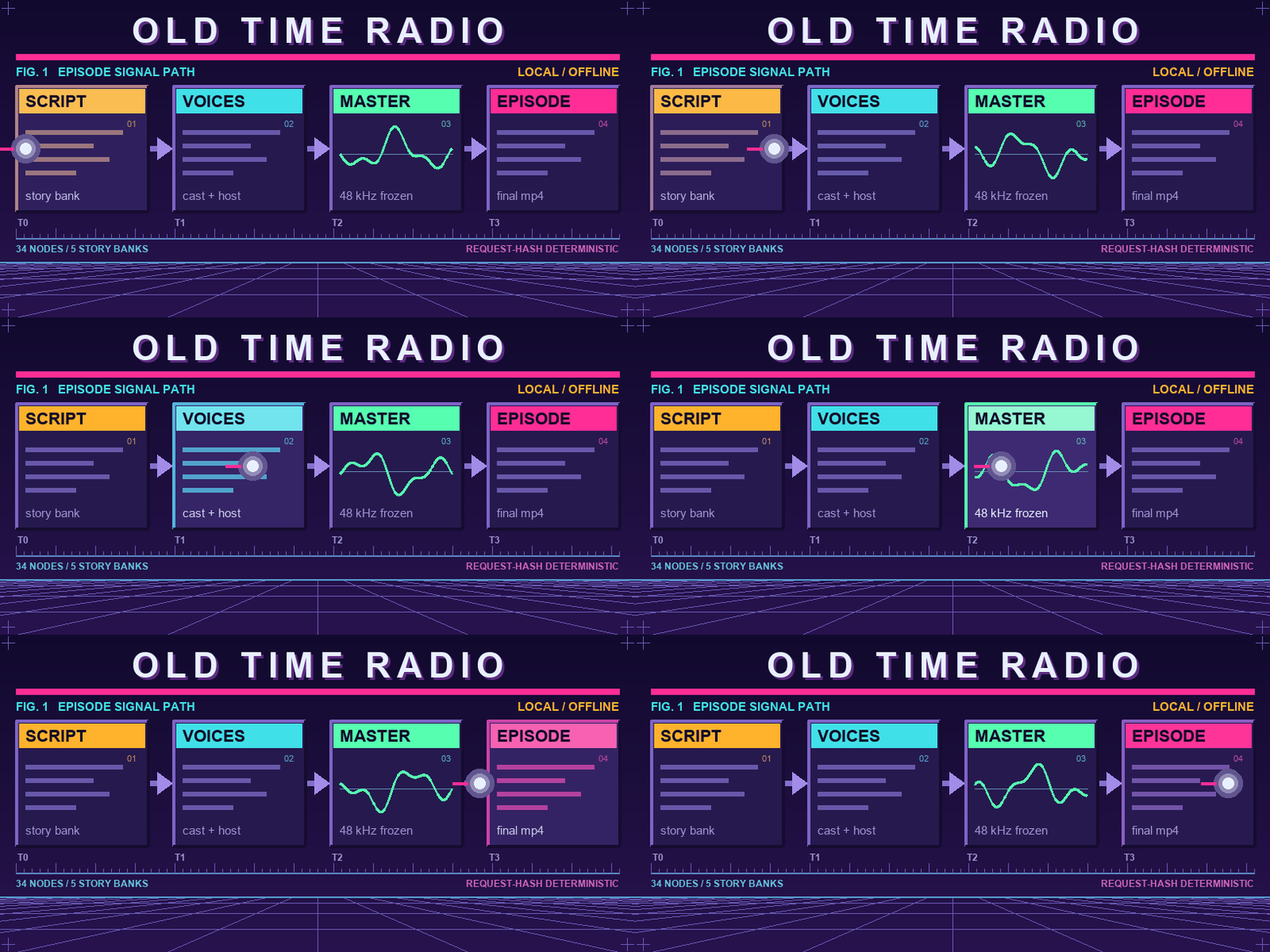
Audio is the source of truth. The script is written, cast and performed into one
frozen 48 kHz master, and that master defines the timeline; video is rendered to
fit it and muxed in last. The archival copy in otr/episodes/ keeps that audio
byte-identical; the published copy in otr/obs/ re-encodes it to AAC for players.
source bank -> LedgerScriptWriter -> LedgerFreezeCascade -> CastLock
    -> character voices + announcer + theme  -> SceneSequencer -> AudioEnhance
    -> EpisodeAssembler                                    ==> 48 kHz MASTER (frozen)
    -> VideoDirector / ShotLock -> image prompts -> VideoRenderBatch
    -> SilentComposite -> CaptionBurn -> CreditsRoll -> MasterAudioMux
                                                       ==> final .mp4 in otr/obs/
Renders are deterministic for a given request hash, and every episode carries a
ledger (episode_canon.json) recording what actually ran.
The engine dropdowns live on OTR_VideoDirector (video and image roles), OTR_CastLock (the two voice slots) and OTR_StableAudioTheme (music). The writer dropdowns are on OTR_LedgerScriptWriter. You never need every weight in this workflow: one graph ships, and its dropdowns decide what it loads.
| role | the canonical ships | what it costs |
|---|---|---|
| video | viz_mxc_cpu / viz_green / viz_camera | nothing -- they draw their own frames |
| images | z_image_turbo, dormant | nothing on a default run; those video lanes consume no still |
| voices | kokoro on both slots | fetches once, about 0.3 GiB |
| music | stable_audio_3 | fetches once |
| writer | Qwen/Qwen3.5-4B | fetches once, about 8.7 GiB |
The image trap. With the procedural video lanes the z_image_turbo default
costs nothing. Pick a still_* or ltx098_low_video lane and it wakes up: a
19 GB download, and on a 16 GB Mac an out-of-memory. If you did not mean to
spend that, set the three image dropdowns to sd15 (2 GB, same job) at the
same time. Both fetch themselves; the only thing that changes is which one
you spend.
The writer is the biggest single download and, on a Mac, the biggest single
memory user. Qwen/Qwen3.5-4B is the default because it is ungated,
Apache-2.0, and the smallest row proven everywhere.
apple/MACHINES.md says which other writers fit
your machine, and the pack refuses before downloading if you pick one that
will not.
A graph pre-set for your machine
otr_canonical names no vendor anywhere and resolves your device at run time,
so it is correct as shipped on NVIDIA, Apple Silicon and CPU. If you would rather
skip the dropdowns, the pack also ships a generated graph per machine profile in
custom_nodes/ComfyUI-OldTimeRadio/workflows/variants/ -- one per machine class and episode kind, named
otr_<machine>_<tier>.json. Browse Templates lists only the canonical -- its
scanner looks one directory deep -- so these are files you drag onto the
canvas or open with Workflow → Open. Never hand-edit one; each is the canonical
with its dropdowns set, regenerated from it, and checked against it.
The tiers are named by what the episode is made of. low runs the procedural
visualiser lanes and needs no video or image weights at all. still generates
one image per beat and animates it (still_motion). video is real video
diffusion. foley is video that generates its own sound, mixed under the
voices; mime is the same render as a silent performance -- the video's
own sound carries its beats and the voices and music are muted there.
animatediff is SD 1.5 motion driven by the text prompt alone; it mints
no still. Kokoro voices on every graph; the upscaler is off.
Each machine-tier preset opens at three acts and three characters, and the hardware proof
behind shipping was a one-act episode. The qualification run smokes every
graph in a night, which means overriding the act count; the preset itself is
unchanged and is what you get when you open it. Both facts are true and neither
implies the other.
Every pre-set graph scores with Stable Audio 3, the same engine the canonical opens on -- ungated, and commercially clean. The one exception is the CPU preset, which scores with MusicGen, because Stable Audio 3 declares CUDA and Metal only. MusicGen is noncommercial (see Licence), so on that preset alone, change the music dropdown on OTR_StableAudioTheme if that matters to you.
Which file to open, what each engine costs, and every hand-fetched weight: apple/MACHINES.md.
Every
shipping graph above has put a finished episode into otr/obs/ on the
hardware its section names, all on 2026-09-13, the day 2.0.0 was published: the
8 GB rows on a physical RTX 4060 laptop, which by now
has published 11 documented full OTR episodes through this pack; the 16 GB rows
on an RTX 5080 laptop; the Apple rows on a Mac mini M4 with 16 GB; and the CPU
row on that same 5080 laptop with
ComfyUI started in --cpu mode, the card present and unused. draft means not
yet promoted -- it is a status, not a verdict on proof: the AMD stills graph
reads draft and has an outside tester's published episode behind it.
scripts/otr_provision.py needs the git clone: scripts/ is not in a
Manager install. The saved graphs in workflows/variants/ need nothing but a
drag, and the weights a graph selects download at queue time whenever the pack
can fetch them itself.
A few engines build their graph out of another pack's nodes. Those are ComfyUI
node packs, not Python packages, so pip cannot supply them. Install them into
custom_nodes/ and restart. Nothing the canonical selects needs any of these.
The AnimateDiff lanes, the otr_nvidia_8gb_haunted graph among them, want ComfyUI-AnimateDiff-Evolved;
ltx23_*, ltx25_* and wan22_* want ComfyUI-GGUF
-- the LTX 2.5 lanes also want the one-file patch described in patches/README.md.
If you pick one of these lanes without its pack, the render stops with an error
that names the pack and its URL.
Weights, tokens and downloads
Most engines fetch their own weights the first time a dropdown selects them
-- either through the engine's own library and the Hugging Face cache, or through
OTR_WorkflowValidator, a node inside the graph that looks at what you actually
picked and pulls only that, before the writer runs. The cache lives inside your
ComfyUI install at models/huggingface -- this pack points HF_HOME there
at startup if you have not set it yourself -- so that is the volume the ~12 GB
lands on. If it is short of room, set HF_HOME before launching, because
setting it later creates a second cache rather than moving the first.
You do not need a Hugging Face token to run OTR. Everything the canonical
selects, and everything the 8 GB and Mac graphs select, is ungated. A token is
needed only for the handful of gated rows -- google/gemma-2-2b-it, the LTX 2.5
video weights, stable_audio_music -- and for those you accept the licence on
the model's page while signed in, then log in locally once:
hf auth login
Never paste a token into a workflow widget. No node here asks for one, and a
value saved into a graph travels with it -- into every workflow you share, every
queue entry, and the metadata of every image you generate. A token in the login
file, or in HF_TOKEN in the environment that launches ComfyUI, is the whole
setup. ComfyUI Desktop on Windows does not inherit user-scope environment
variables -- the pack bridges that itself there, reading HF_TOKEN out of your
user registry at load and exporting it into the process, so a token you set that
way does work. The login file is still the habit to build: it is the one that
works on every platform.
The weights that do not fetch themselves -- every hand-fetched file, its
repository, its size, and the folder under models/ it goes in -- are listed in
apple/MACHINES.md. Where no manifest exists, the
engine refuses by name before anything else runs, and that refusal is the install
instruction.
The script step alone can run on OpenRouter, Google, or Comfy Credits; voices, music, images and video stay local either way. It costs money and it is off until you turn it on. apple/CLOUD.md has the switches.
Where things land
Everything for an episode goes under your ComfyUI output folder:
otr/episodes/<episode>/-- the working files: stems, frames, intermediate clips, and the ledger.otr/obs/-- the finished, playable episodes.
The published file is named after what produced it, so a folder of episodes reads at a glance without opening any of them:
<title>_<timestamp>__<style>__<video>__<image>__<tts>__<bank>__<writer>__<music>_final.mp4
A lane that renders no stills reports none in the image field. Point OBS, or any
player with a watch folder, at otr/obs/ for a continuous broadcast -- new
episodes appear there as they render.
When something goes wrong
The whole OldTimeRadio category is missing. That is never a missing library
-- each node loads in its own try/except, so a missing library costs one node and
prints [OldTimeRadio] Skipped '<name>': <reason>. A total absence means the pack
is in the wrong folder or ComfyUI crashed during startup before any node loaded.
One node is missing. Find that Skipped line in the console; it names the
library. Install it into ComfyUI's own interpreter.
The render stops naming a missing class (ADE_*, UnetLoaderGGUF, LTXV*).
The lane you picked needs a node pack; the message names it.
The render stops naming a missing file. The lane needs weights that do not fetch themselves. The message names the file; it never quietly substitutes another. apple/MACHINES.md says where it comes from.
It refuses before downloading, saying the writer will not fit. You picked a language model bigger than your card's ceiling. Pick a smaller one.
No mp4, and the log mentions ffmpeg or ffprobe. You need both binaries. The
imageio-ffmpeg wheel that comes down with the requirements ships only ffmpeg.
If yours lives somewhere unusual, set OTR_FFMPEG to the binary's full path.
neither kokoro backend is installed at the first voice line. Python 3.10 to
3.12 run Kokoro on torch and serve every admitted language. Python 3.13
runs English through kokoro-onnx on the CPU; non-English rows do not use that
backend. Python 3.14 has no Kokoro build yet and is refused. The message names
the exact pip line. An English episode can use Bark instead, except on a 16 GB
Mac where Bark is a memory hazard. Non-English rows admit Kokoro only.
A gated model returns HTTP 401. The LTX 2.5 weights and gemma-2-2b-it need a
licence click on Hugging Face plus a login; every default weight is ungated.
On a Mac, a 19 GB download starts the moment you queue. The image dropdowns
still say z_image_turbo while the video lane you picked consumes a still. Set
the image dropdowns to sd15 first.
The episode plays but has no captions. Your ffmpeg can write the audio
but cannot burn text: captions need the ass filter and libx264, and the
lightweight imageio-ffmpeg wheel usually ships neither. The console says
CAPABILITY GAP on this host and names it. The episode is finished and correct
otherwise -- it is not re-rendered, because a host's missing filter is not worth
throwing an episode away. Install a full ffmpeg (winget install Gyan.FFmpeg,
brew install ffmpeg, or a static Linux build) and the next run has them.
It ran, but nothing showed up in ComfyUI. The last node draws one still
from the finished episode; nothing else in the graph draws anything, and the
still is skipped rather than retried if it cannot be made. Either way the
episode is a file: look in <your ComfyUI output folder>/otr/obs/ for the
finished .mp4, and in otr/episodes/<episode>/ for the working files it was
built from. If you run ComfyUI in Docker, that is whichever host folder you
mapped to ComfyUI's output directory.
Still stuck? Open an issue at
github.com/jbrick2070/ComfyUI-OldTimeRadio/issues
with the console from the end backwards -- the [OldTimeRadio] lines and the
last error are what identify it.
It finished but nothing is in otr/obs/. Find the obs_publish line in
the console first, because there are two different answers. obs_publish BLOCKED -- ... means the run SUCCEEDED and the episode is in
otr/episodes/<episode>/; only the published copy was withheld, because the
rights receipt did not clear. No obs_publish line at all means a real failure:
read the console from the end backwards for the first error, and if it has been
quiet for more than five minutes after the downloads finished, it is not going
to finish.
Two GPUs, and it measured the wrong one. Launch ComfyUI with
CUDA_VISIBLE_DEVICES set so the card you want is the only one it sees. The
pack reads VRAM from CUDA device 0, so a box whose device 0 is an integrated or
smaller card gets sized against that one.
BUG-LOCAL-098 on a second queue. Restart ComfyUI and queue again. The
check caught bitsandbytes silently falling back to fp16 on a reload, and refused
the wrongly-quantized model rather than rendering with it.
The one thing to know before you run it
Some episodes hand a line to the wrong character. A character may claim a
job that belongs to someone else, or -- rarest and most obvious -- address
themselves by name. It is uncommon and it does not break a render, but it is
real, and it is the one limitation that changes whether you want this at all.
The automatic fix made episodes worse on a 12B model, the largest a 16 GB card
holds, so it ships off; on a much larger model the switch is
JUDGE_ATTRIBUTION in nodes/_otr_ledger_clean.py.
AMD has a receipt. An outside tester ran
workflows/variants/otr_amd_still.json end to end on a Radeon AI PRO R9700
(RDNA4) under ROCm 7.2 on Ubuntu 24.04, 2026-09-14, with no edits to the graph,
and published a finished episode. Nobody on the project owns a Radeon, so what
is proven is the still tier on that one card: RDNA3, Windows and the 8 GB AMD
profile are still unmeasured. The profile ships draft because status
records promotion, not proof.
apple/ROCM.md has the graph, the lab profiles, a five-minute
probe that downloads nothing, and the open questions. The first episode off a
Radeon earns its author the AMD column in
apple/MACHINES.md.
Adding to it
You can add an engine, a source bank, a writer LLM, or an
episode language. apple/EXTENDING.md is the recipe,
apple/LLM_PREFLIGHT.md is the writer-LLM page,
and apple/PREFLIGHT.md is the checklist, and the rule
underneath both is the same one the rest of the pack lives by: green tests are
not a lane. The proof is one real render through otr_canonical that lands a
file in otr/obs/.
Adding a bank uses scripts/otr_check.py, so it wants the git clone.
Development runs under a sibling QA harness, the ComfyUI Custom Node Survival Guide: a machine-readable bible of bugs distilled from this project's live incidents, with a regression suite that runs against the pack after every change. Only bugs that actually failed in a real run get in.
Licence and credits
The pack is MIT. It is built on ComfyUI and the open-weight LTX, Wan, HuMo, AnimateDiff, Z-Image-Turbo, Lumina, Kokoro, Stable Audio, Qwen and Gemma ecosystems, plus the optional Chatterbox, Dia, Bark, MusicGen and IndexTTS2 engines -- thanks to all of their authors.
The shipped defaults are not a blanket commercial clearance. A few optional, off-by-default pieces carry restricted terms:
flux_gen1(Flux.1-dev) -- BFL non-commercial licence.ideogram4_local-- non-commercial model agreement; the code ships, the weights do not.h3_low_video/h3_low_audio_in(MiniMax H3) -- a personal, non-transferable authorization the maintainer obtained directly from MiniMax. It does not carry to your install.- The AnimateDiff lanes are declared not commercially clean. The haunted lane's motion module publishes no licence grant at all; fine for personal use, not cleared for commercial redistribution.
musicgenandindextts2carry non-commercial terms;bark's are unconfirmed.- Several heavier video lanes --
ltx25_*, thehumo*family,mesh_stage,wan22_high_fast-- also declare themselves not commercially clean in their adapters. Read each model's own licence. - The
shakespearebank adapts Folger Digital Texts, which are CC BY-NC.
Review the exact source, engine and weight licences before commercial use. A successful render is not a licence receipt.
The Lemmy easter egg
Every so often a character named Lemmy makes a cameo -- a small tribute carried across the project's generations. Born of the machine, still loud on the airwaves.
Known failures at 2.3.0
The test suite is not green, and this release ships anyway. The failing tests fall into a few classes, and none of them sits on the default path of a fresh install rendering an episode on the shipped still lane:
- Cloud-lane fixtures. The Google video adapters and a cloud LTX receipt test fail on a partner-result contract the fixture no longer satisfies, and the cloud variant graphs drift from their expected-widget list.
- Artifacts that are not on this machine. Some receipts cite audition
wavs under
otr/episodes/lemmy_cross_engine/by hash. The files were removed from the maintainer's output tree and the receipts still name them. - The portable voice bank. Its route tests expect a generic Lemmy to be cast on the portable IndexTTS2 route when his qualified route is unavailable; he is cast on a kokoro voice instead. This predates the 2.3.0 work and has not been diagnosed.
- Profile and sweep checks. A few 8 GB video profiles declare a canvas their engine overrules, a static sweep finds LLM call sites without a slot tag, and the auto-download disk-space precheck reads this machine's free space.
docs/known-failures.md explains why the expected-failure set is kept empty on purpose, and docs/2026-09-19-ship-regression.md classifies each failing test by name. If one of these reaches you in practice, open an issue with the episode's ledger attached.
Contributors

5,670 commits
Similar repos


Languages
Python
98.9%
See what people are saying (1)
README
English · Español · Português · Italiano · Français · हिन्दी · 日本語 · 中文
ComfyUI-OldTimeRadio
Install and run it
- In ComfyUI open Extensions -> Node Manager, search old time radio, click Install.
- Install ffmpeg:
winget install Gyan.FFmpegon Windows,brew install ffmpegon a Mac. - Restart ComfyUI.
- Workflow -> Browse Templates -> EXTENSIONS -> comfyui-old-time-radio, open
otr_canonical. - Press Queue. The first run downloads about 12 GB. Your episode is an
.mp4in<your ComfyUI output folder>/otr/obs/.
It performs your story, not only its own. On the OTR_LedgerScriptWriter
node set source_bank to my_story and type your idea into custom_premise;
story_characters, story_plot and story_setting on the same node take the
rest. Leave them blank and the pack rolls a show of its own: tonight's news, a
public-domain book, a scene of Shakespeare, or original fiction.
It speaks English, Español, Português, Italiano, Français, हिन्दी, 日本語 and 中文. One episode_language
switch on the same node carries the writing, the voices and the captions;
apple/MULTILINGUAL.md says how each one performs.
Change nothing else in the graph. You need an NVIDIA card with 8 GB or more, a 16 GB
Apple Silicon Mac, or just a CPU (start ComfyUI with --cpu; slow but it works),
plus about 25 GB of free disk. No account, no API key, nothing paid. If a step
fails, Make an episode below walks through each one.
"Good evening. This is SIGNAL LOST."
Hear a complete episode first -- ninety seconds
The Shivering Gauge: a film archivist and his apprentice racing
vinegar syndrome through one night in the lab. Written, cast, performed, scored,
drawn and cut on one machine, from a Library of Congress feed. Its sound effects
are not a library: this episode ran the foley lane (otr_16gb_foley),
where the video model generates the scene's own audio and the workflow mixes it
under the voices. The default graph draws its pictures from the audio instead;
the foley lane is a 16 GB pick, not the starting point.
That is how every episode opens. What follows is a radio drama nobody has heard
before: a script written on your own machine from tonight's news, a public-domain
story, a scene of Shakespeare, or nothing at all; a cast of neural voices and an
announcer; a theme composed in the musical style of wherever the story came
from; pictures to watch while you listen;
burned captions and a credit roll. One workflow, one press of Queue, and a
finished .mp4 lands in your output folder.
One episode_language switch carries writing, Kokoro casting, captions and
audience-facing credits. Captions mirror the written line rather than
translating it. The admitted rows, the voice pools, and how Shakespeare and
Public Domain perform in another language are in
apple/MULTILINGUAL.md.
Every model runs on your own machine: no account, no API key, no paid service,
on NVIDIA cards and on Apple Silicon. media_archive and scifi_news_pro
read public RSS feeds when they come up, so a default run reaches the internet for tonight's
news and for the first model download and for nothing else. Paid options exist
for people who want them, and every one of them stays off until you turn it
on.
API keys (Google, OpenRouter, Comfy Cloud)
You do not need these. Local is the default. Never paste a key into a workflow widget.
Google and OpenRouter -- two ways to enter a key
Same recipe for both.
- Put the key on the first line of the
.secretfile in this pack folder. - Or keep the key in a file you already have, and put that file's full path
on the first line of the matching
.locationfile in this pack folder.
| Lane | Key file | Or point from | Also accepted |
|---|---|---|---|
google.secret | google_api_key.location | OTR_GOOGLE_API_KEY, GEMINI_API_KEY, GOOGLE_API_KEY | |
| OpenRouter | openrouter.secret | openrouter_api_key.location | OPENROUTER_API_KEY |
Environment wins if more than one is set. Both files stay off git. Restart
ComfyUI after you add one. api_key.location.example in this folder is the
blank reminder.
What a Google key gets you, and the one limit that shapes it. With a key
in place the Google lane writes the script (Gemini Flash / Flash-Lite), casts
and speaks every part (Gemini TTS), scores it (Lyria) and draws every still
(Gemini image) -- a whole episode with no GPU at all: nothing loads
locally, so it runs on a laptop with no graphics card. What it does not do
by default is generate video, and the reason is worth knowing before you go
looking for the switch: on Google's paid Tier 1, every Veo model allows
2 requests a minute and 10 a day, while a single episode's video needs
run well past that ceiling. No arrangement of a Tier 1 key finishes a Veo episode, so the
shipped Google presets composite the stills instead (still_flat) and never
call Veo.
If your Google account is on a higher tier, turn video on yourself -- the engines are built, tested and waiting:
- Pick
google_veo_video(orgoogle_omni_video) in the VideoDirector dropdowns, or run thegoogle_veo_low_1act/google_veo_low_3actlane presets instead of thegoogle_still_*pair. OTR_GOOGLE_VEO_MODEL_IDchooses the model --veo-3.1-lite-generate-preview(cheapest),veo-3.1-fast-generate-preview,veo-3.1-generate-preview. Each has its own daily allowance, so they run out separately.- A 429 mid-episode is a quota wall, not a broken key: the run keeps its place, floors the beat to its still, and publishes anyway.
- Google's own Increase Requests tab (Cloud console → Quotas) is how the daily number goes up without waiting for Tier 2.
Comfy Cloud -- sign into the app
Sign into Comfy with a Comfy API key (the API-key option on ComfyUI's
sign-in dialog; a plain email or Google login injects no key). That is the
whole instruction. The pack reads the same
api_key_comfy_org hidden input ComfyUI's own partner nodes use, and
nothing else: no key file, no environment variable on the server.
Headless box with no login: put the key in OTR_COMFY_API_KEY in the
environment of the machine that submits the prompt and submit through
scripts/otr_api.py, which sends it as extra_data.api_key_comfy_org
exactly as the app's sign-in would.
What those lanes turn on, and how to pick a hosted writer, is apple/CLOUD.md.
Make an episode
New to ComfyUI? This is a short read and then a button. You need a working ComfyUI (Desktop, portable or a git install -- any of them), about 25 GB of free disk -- the first run fetches roughly 12 GB of models, and an episode's working files need room too -- and one of the machines below. You do not need an account, an API key, a paid service, or any of the saved graphs further down this page: those are per-machine presets you can grow into. Installing the pack and pressing Queue is the whole path.
| Your machine | What to expect on a first short episode |
|---|---|
| NVIDIA, 16 GB or more | Minutes for a one-act show. Every default is proven here, and all but the heaviest video lanes are open to you. |
| NVIDIA, 10 to 15 GB | Minutes. The defaults are proven both above and below you, so run the canonical as shipped. No pre-set graph exists for this class yet. |
| NVIDIA, 8 GB | Minutes. Proven on an RTX 4060 laptop; the heaviest video lanes are not for you. |
| Apple Silicon, 16 GB | It runs. Every Mac graph published a finished episode on a 16 GB M4 on 2026-09-13 -- the writer is the same Qwen3.5-4B the canonical ships, unquantized, unchanged. Tens of minutes. Read apple/MAC.md first anyway: memory is unified, so an out-of-memory here can reboot the machine, and the fit has no margin for anything else running. |
| No GPU at all | About twenty minutes, and it works -- measured, not assumed. Start ComfyUI with --cpu. |
| AMD | It runs. First full episode off a Radeon on 2026-09-14 -- RDNA4 (R9700), Ubuntu 24.04, ROCm 7.2, clean pass. Still tier only, and RDNA3 / Windows / 8 GB are untested. apple/ROCM.md has the receipt and what is still open. |
Install the pack. In ComfyUI, open Extensions -> Node Manager and search
for old time radio (registry id comfyui-old-time-radio, publisher fluxus).
Or clone it into custom_nodes/:
git clone https://github.com/jbrick2070/ComfyUI-OldTimeRadio
python -m pip install -r ComfyUI-OldTimeRadio/requirements.txt
Run that pip install with ComfyUI's own Python, not a system one -- this
is the most common way an install fails, and it fails much later, as nodes that
quietly refuse to load. Python 3.10 through 3.13 are fine for English;
multilingual Kokoro needs the torch path on 3.10 through 3.12. Python 3.14 has
no Kokoro voice build yet. main is the branch: it is the default and the only
one that moves. A clone made before 2026-09-13 wants re-cloning rather than
pulling.
Put ffmpeg and ffprobe on your PATH. Both binaries, and a current
build: winget install Gyan.FFmpeg on Windows, brew install ffmpeg on a Mac.
On Debian or Ubuntu take a static build -- 22.04's apt ffmpeg is too old to
write the MP4 this pack makes -- and install one monospace font
(fonts-dejavu-core is enough) for the captions. You do not have to check
versions yourself for the part that would waste a whole render: the pack pushes
a fifth of a second of silence through your build at the start of every run and
refuses in about a second if it cannot write the final audio, rather than at the
end. That early check covers the MUX only. Burned captions need more from
ffmpeg -- the ass filter and libx264 -- and a build without them produces a
finished, playable episode with no captions on it, which the console says out
loud. A full winget/brew/static build has everything; the imageio-ffmpeg
wheel that comes down with the requirements typically does not.
apple/INSTALL.md has the version floor and what was
measured where.
Restart ComfyUI fully and look for [OldTimeRadio] in the console and an
OldTimeRadio category in the node menu. The first restart after installing
fetches the Kokoro voices (a few hundred MB, and on Python 3.13 the ONNX model
with them) so the default voice is ready before you ever queue -- if the console
pauses on [OldTimeRadio] lines, that is what it is doing.
Load the show. Workflow → Browse Templates → EXTENSIONS →
comfyui-old-time-radio (the entry is named after the pack's folder, so a git
clone lists it as ComfyUI-OldTimeRadio). There is exactly one entry,
otr_canonical. Open it and press Queue. (If the gallery lists it but opening it fails, drag
custom_nodes/ComfyUI-OldTimeRadio/workflows/otr_canonical.json onto the canvas
instead -- same graph, and it has happened.) You do not have to change anything: every dropdown already
holds a working value, and the ones set to roll pick for themselves, so two runs
in a row give you two different shows.
Wait, then look in <your ComfyUI output folder>/otr/obs/. The first run
downloads about 12 GB -- the writer, the music model and its text encoder, and
the Kokoro voices -- and then writes, casts, performs, scores and cuts an episode.
Later runs skip the download. On a 16 GB NVIDIA card a short episode is minutes;
on CPU it is a long wait, and that is the model working, not a hang.
The canvas shows you almost nothing until the end. No thumbnail, no player, no progress picture while it works -- and then a single still from the finished episode on the last node. The file is the real product and the folder is where it lives; the still is only there so a finished run does not look like one that did nothing. The first person outside this project to run it had no still, went looking in the UI, found nothing, and only then found the files.
That folder is the finish line, and the console tells you what
happened. obs_publish OK -> <path> names the published file.
obs_publish BLOCKED -- ... means the run SUCCEEDED and only the published
copy was withheld, because the episode's rights receipt did not clear -- the
finished episode is in otr/episodes/<episode>/. No obs_publish line at
all means the run did not finish, however green the console looked; go to
When something goes wrong.
To stop a run, press Cancel in the ComfyUI menu (or clear the queue). It
stops at the next step rather than instantly, so a long video beat finishes
first. Nothing is published, and the part-built episode stays in
otr/episodes/<episode>/.
Queue one episode at a time. The ledger that carries an episode between
nodes is held per process, so two runs in flight can read each other's. On a
machine with more than one GPU, start ComfyUI with CUDA_VISIBLE_DEVICES set to
the card you want.
The long form of the install, with the traps: apple/INSTALL.md and apple/RUN.md.
Would rather hand it to an AI agent? apple/AGENT_INSTALL.md is written for one -- Claude Code, Codex, Cursor, Gemini CLI, whatever you use -- with a prompt to paste, a verification command for every step, and the traps that waste an agent's time. It is an alternative to the path above, not a requirement: nothing here needs an agent.
The widgets worth touching
All on OTR_LedgerScriptWriter. Everything else has a considered default.
| Widget | What it does |
|---|---|
episode_title | Blank, and the show titles itself. Anything you type becomes the title card. |
num_characters | Speaking parts. Ships at 2. |
act_count | 1 for a short show, 3 for a full one with act breaks. Ships at 1. This is what moves the clock -- episodes here run about one to four minutes, and three acts is roughly three times the render, not three times the fun. |
custom_premise | A sentence or two of your own. Blank means the source decides. |
source_bank | Where the story comes from. Ships on roll, which picks any eligible bank. |
visual_style | How it looks. Ships on roll. The ids are in apple/STYLES.md. |
creativity | balanced by default. |
lemmy_cameo | Whether a character named Lemmy drops by. Ships on roll, about an 11% chance. |
episode_language | One switch. See apple/MULTILINGUAL.md. |
Pin source_bank and visual_style when you want to compare two runs; a rolled
bank and a rolled style change more than anything else you could adjust.
Your own story: set source_bank to my_story (the dropdown lists bank
ids, so that is the value to pick) and put your idea in custom_premise. The
story_characters, story_plot, story_setting and story_author fields on the
same node take the rest. That bank exists to produce your idea rather than adapt
something. Since 2026-09-13 the roll can land on it like any other bank: a run
that arrives with those fields blank writes a standing premise that ships
with the pack, so it always has something to perform. Anything you type wins
over it.
The guides that ship with it
Everything under apple/ is in the pack, whichever way you installed it. (The
folder name is historical; the guides cover every platform.)
| Page | The question it answers |
|---|---|
| apple/INSTALL.md | How do I get the nodes loading? |
| apple/AGENT_INSTALL.md | Can an AI agent do that install for me? |
| apple/RUN.md | Where does the first episode land, and what if it does not? |
| apple/BANKS.md | What kind of episode do I get? |
| apple/MULTILINGUAL.md | How does the language switch work? |
| apple/MACHINES.md | What runs on my machine, and where do the weights come from? |
| apple/WRITERS.md | Which language model writes the script? |
| apple/VOICES.md | Who speaks, and which engine says it? |
| apple/MUSIC.md | Why is the theme this genre, and why is there no music? |
| apple/IMAGE_MODELS.md | What draws the still pictures? |
| apple/VIDEO_MODELS.md | How does a beat become moving picture? |
| apple/STYLES.md | How does the episode look? |
| apple/UPSCALERS.md | Why is the upscale step off? |
| apple/MAC.md | What is different on Apple Silicon? |
| apple/ROCM.md | What is different on AMD? |
| apple/RUNPOD.md | How do I rent a GPU for a lane my card cannot hold? |
| apple/CLOUD.md | How do I turn on a paid writer? |
| apple/EXTENDING.md | How do I add an engine, bank, writer, or language? |
| apple/PREFLIGHT.md | Will what I built actually work? |
| apple/LLM_PREFLIGHT.md | How do I add a writer LLM? |
The development record -- bug logs, measurements, design notes -- lives under
docs/ in the
GitHub tree
and is not part of a Manager install. Nothing in this file depends on it.
What it makes
The story
Every runnable source bank rolls automatically -- My Story among them, writing the standing premise when you leave its fields blank -- and one dropdown row, custom_source_bank, is not a bank but the signpost for adding your own. Each bank is
independent -- its own story pack, its own fetch -- and each fails closed: a bad
source, a context overflow or a broken contract stops the run rather than shipping
a degraded story. The language model writes every line of prose; Python validates,
it never rewrites.
| Bank | Where the story comes from |
|---|---|
scifi_news_pro | A live science feed, turned into science-fiction radio. |
media_archive | Media RSS and archive items, turned into restoration-adventure episodes. |
public_domain | A faithful radio adaptation of a public-domain source text. |
shakespeare | A Folger scene, adapted with the author's own language carried as written. The Folger texts are noncommercial (CC BY-NC), and an episode inherits that. How another language performs that text is in apple/MULTILINGUAL.md. |
original | No source at all: original fiction seeded from an entropy draw. |
my_story | Your idea, characters, plot and setting. Rolled like any other bank; a blank run writes the standing premise that ships with the pack. |
The music each bank gets
Every bank has a fixed musical identity, and the composer leads every cue with it.
| Bank | Idiom |
|---|---|
media_archive | small-group jazz quartet, relaxed swing -- brushed drums, walking upright bass, piano, tenor sax |
original | salsa conjunto at 100 BPM, clave-driven -- congas and timbales, montuno, tumbao, brass |
public_domain | Chicago house at 122 BPM, soulful and steady -- TR-707, rolling bass, warm piano chords |
scifi_news_pro | Detroit techno at 128 BPM, hypnotic machine funk -- TR-909, sub bass, detuned stabs |
shakespeare | Elizabethan consort music -- viols, recorders, lute |
my_story | Yours. Type it into the music_style widget on OTR_StableAudioTheme: "gamelan orchestra", "surf rock", "solo cello". Blank means the house radio orchestra. |
music_style is honoured on my_story only. Every other bank keeps the idiom
in the table above whatever is typed -- the pairings are part of how each bank
sounds, and they are fixed so an episode's music matches where its story came
from.
The look
The visual styles, rolled or pinned on visual_style, live in
apple/STYLES.md. visual_storybased is minted from the
story rather than loaded from a pack -- which is why you will not find it
among the files in nodes/visual_styles/.
A style only shows where there is a picture to style. It drives the stills
and the video-diffusion lanes. The procedural lanes the canonical ships
draw their frames from the audio and never read it -- so on a default run the
style is written into the episode's filename and changes nothing you can see.
Switch a video role to a still_* or diffusion lane, or pin an image engine,
and the style starts doing its job.
The engines
The video, image, voice and music layers are each a registry of swappable engines, chosen per role from dropdowns. Whatever you pick is honoured exactly: a missing or out-of-memory engine stops the render with a named error rather than swapping in something you did not choose. No engine is ever silently swapped for another one.
That promise is about ENGINE CHOICE, and it is worth saying where it stops.
Infrastructure failures below the engines do have recovery paths, and they say
so in the log rather than in silence: if pyloudnorm cannot measure a master,
the older peak-based mastering runs instead; if no monospace font can be loaded,
the credits fall back to a bitmap font and look worse; if a voice bank cannot
serve the requested gender, casting stamps the line gender_unservable and
continues. One of them is sharper than the others: if the master WAV cannot be
written to disk, the run continues and produces a video-only episode rather
than stopping. Each of those prints what it did; none of them substitutes an
engine you did not pick.
What otr_canonical ships, and why:
- Video: procedural, audio-reactive lanes --
viz_mxc_cpu,viz_green,viz_camera-- one per role. They draw their own frames, download nothing, and run on every machine including CPU. Real video diffusion (LTX, Wan, HuMo, AnimateDiff, MiniMax H3) and thestill_*family are all one dropdown away. - Images:
z_image_turbo, sitting dormant. The procedural video lanes consume no still, so the image weights are never fetched on a default run. Switch a video role to a still-consuming lane and they download then. - Voices:
kokoroon both slots. It is the only one-click voice on every platform, which is why it is the default. The voice engines come with a Manager install, except one: the IndexTTS2 voice cloner ships in the GitHub tree only. Chatterbox and Dia assume Windows -- they run in their own venv and install through PowerShell scripts with no shell twin. PointOTR_CHATTERBOX_VENVorOTR_DIA_VENVat your own interpreter to run them elsewhere; nothing here has proven that path. - Music:
stable_audio_3. Commercially clean and ungated. MusicGen remains selectable and is noncommercial.
Audio is the source of truth. The script is written, cast and performed into one
frozen 48 kHz master, and that master defines the timeline; video is rendered to
fit it and muxed in last. The archival copy in otr/episodes/ keeps that audio
byte-identical; the published copy in otr/obs/ re-encodes it to AAC for players.
source bank -> LedgerScriptWriter -> LedgerFreezeCascade -> CastLock
    -> character voices + announcer + theme  -> SceneSequencer -> AudioEnhance
    -> EpisodeAssembler                                    ==> 48 kHz MASTER (frozen)
    -> VideoDirector / ShotLock -> image prompts -> VideoRenderBatch
    -> SilentComposite -> CaptionBurn -> CreditsRoll -> MasterAudioMux
                                                       ==> final .mp4 in otr/obs/
Renders are deterministic for a given request hash, and every episode carries a
ledger (episode_canon.json) recording what actually ran.
The engine dropdowns live on OTR_VideoDirector (video and image roles), OTR_CastLock (the two voice slots) and OTR_StableAudioTheme (music). The writer dropdowns are on OTR_LedgerScriptWriter. You never need every weight in this workflow: one graph ships, and its dropdowns decide what it loads.
| role | the canonical ships | what it costs |
|---|---|---|
| video | viz_mxc_cpu / viz_green / viz_camera | nothing -- they draw their own frames |
| images | z_image_turbo, dormant | nothing on a default run; those video lanes consume no still |
| voices | kokoro on both slots | fetches once, about 0.3 GiB |
| music | stable_audio_3 | fetches once |
| writer | Qwen/Qwen3.5-4B | fetches once, about 8.7 GiB |
The image trap. With the procedural video lanes the z_image_turbo default
costs nothing. Pick a still_* or ltx098_low_video lane and it wakes up: a
19 GB download, and on a 16 GB Mac an out-of-memory. If you did not mean to
spend that, set the three image dropdowns to sd15 (2 GB, same job) at the
same time. Both fetch themselves; the only thing that changes is which one
you spend.
The writer is the biggest single download and, on a Mac, the biggest single
memory user. Qwen/Qwen3.5-4B is the default because it is ungated,
Apache-2.0, and the smallest row proven everywhere.
apple/MACHINES.md says which other writers fit
your machine, and the pack refuses before downloading if you pick one that
will not.
A graph pre-set for your machine
otr_canonical names no vendor anywhere and resolves your device at run time,
so it is correct as shipped on NVIDIA, Apple Silicon and CPU. If you would rather
skip the dropdowns, the pack also ships a generated graph per machine profile in
custom_nodes/ComfyUI-OldTimeRadio/workflows/variants/ -- one per machine class and episode kind, named
otr_<machine>_<tier>.json. Browse Templates lists only the canonical -- its
scanner looks one directory deep -- so these are files you drag onto the
canvas or open with Workflow → Open. Never hand-edit one; each is the canonical
with its dropdowns set, regenerated from it, and checked against it.
The tiers are named by what the episode is made of. low runs the procedural
visualiser lanes and needs no video or image weights at all. still generates
one image per beat and animates it (still_motion). video is real video
diffusion. foley is video that generates its own sound, mixed under the
voices; mime is the same render as a silent performance -- the video's
own sound carries its beats and the voices and music are muted there.
animatediff is SD 1.5 motion driven by the text prompt alone; it mints
no still. Kokoro voices on every graph; the upscaler is off.
Each machine-tier preset opens at three acts and three characters, and the hardware proof
behind shipping was a one-act episode. The qualification run smokes every
graph in a night, which means overriding the act count; the preset itself is
unchanged and is what you get when you open it. Both facts are true and neither
implies the other.
Every pre-set graph scores with Stable Audio 3, the same engine the canonical opens on -- ungated, and commercially clean. The one exception is the CPU preset, which scores with MusicGen, because Stable Audio 3 declares CUDA and Metal only. MusicGen is noncommercial (see Licence), so on that preset alone, change the music dropdown on OTR_StableAudioTheme if that matters to you.
Which file to open, what each engine costs, and every hand-fetched weight: apple/MACHINES.md.
Every
shipping graph above has put a finished episode into otr/obs/ on the
hardware its section names, all on 2026-09-13, the day 2.0.0 was published: the
8 GB rows on a physical RTX 4060 laptop, which by now
has published 11 documented full OTR episodes through this pack; the 16 GB rows
on an RTX 5080 laptop; the Apple rows on a Mac mini M4 with 16 GB; and the CPU
row on that same 5080 laptop with
ComfyUI started in --cpu mode, the card present and unused. draft means not
yet promoted -- it is a status, not a verdict on proof: the AMD stills graph
reads draft and has an outside tester's published episode behind it.
scripts/otr_provision.py needs the git clone: scripts/ is not in a
Manager install. The saved graphs in workflows/variants/ need nothing but a
drag, and the weights a graph selects download at queue time whenever the pack
can fetch them itself.
A few engines build their graph out of another pack's nodes. Those are ComfyUI
node packs, not Python packages, so pip cannot supply them. Install them into
custom_nodes/ and restart. Nothing the canonical selects needs any of these.
The AnimateDiff lanes, the otr_nvidia_8gb_haunted graph among them, want ComfyUI-AnimateDiff-Evolved;
ltx23_*, ltx25_* and wan22_* want ComfyUI-GGUF
-- the LTX 2.5 lanes also want the one-file patch described in patches/README.md.
If you pick one of these lanes without its pack, the render stops with an error
that names the pack and its URL.
Weights, tokens and downloads
Most engines fetch their own weights the first time a dropdown selects them
-- either through the engine's own library and the Hugging Face cache, or through
OTR_WorkflowValidator, a node inside the graph that looks at what you actually
picked and pulls only that, before the writer runs. The cache lives inside your
ComfyUI install at models/huggingface -- this pack points HF_HOME there
at startup if you have not set it yourself -- so that is the volume the ~12 GB
lands on. If it is short of room, set HF_HOME before launching, because
setting it later creates a second cache rather than moving the first.
You do not need a Hugging Face token to run OTR. Everything the canonical
selects, and everything the 8 GB and Mac graphs select, is ungated. A token is
needed only for the handful of gated rows -- google/gemma-2-2b-it, the LTX 2.5
video weights, stable_audio_music -- and for those you accept the licence on
the model's page while signed in, then log in locally once:
hf auth login
Never paste a token into a workflow widget. No node here asks for one, and a
value saved into a graph travels with it -- into every workflow you share, every
queue entry, and the metadata of every image you generate. A token in the login
file, or in HF_TOKEN in the environment that launches ComfyUI, is the whole
setup. ComfyUI Desktop on Windows does not inherit user-scope environment
variables -- the pack bridges that itself there, reading HF_TOKEN out of your
user registry at load and exporting it into the process, so a token you set that
way does work. The login file is still the habit to build: it is the one that
works on every platform.
The weights that do not fetch themselves -- every hand-fetched file, its
repository, its size, and the folder under models/ it goes in -- are listed in
apple/MACHINES.md. Where no manifest exists, the
engine refuses by name before anything else runs, and that refusal is the install
instruction.
The script step alone can run on OpenRouter, Google, or Comfy Credits; voices, music, images and video stay local either way. It costs money and it is off until you turn it on. apple/CLOUD.md has the switches.
Where things land
Everything for an episode goes under your ComfyUI output folder:
otr/episodes/<episode>/-- the working files: stems, frames, intermediate clips, and the ledger.otr/obs/-- the finished, playable episodes.
The published file is named after what produced it, so a folder of episodes reads at a glance without opening any of them:
<title>_<timestamp>__<style>__<video>__<image>__<tts>__<bank>__<writer>__<music>_final.mp4
A lane that renders no stills reports none in the image field. Point OBS, or any
player with a watch folder, at otr/obs/ for a continuous broadcast -- new
episodes appear there as they render.
When something goes wrong
The whole OldTimeRadio category is missing. That is never a missing library
-- each node loads in its own try/except, so a missing library costs one node and
prints [OldTimeRadio] Skipped '<name>': <reason>. A total absence means the pack
is in the wrong folder or ComfyUI crashed during startup before any node loaded.
One node is missing. Find that Skipped line in the console; it names the
library. Install it into ComfyUI's own interpreter.
The render stops naming a missing class (ADE_*, UnetLoaderGGUF, LTXV*).
The lane you picked needs a node pack; the message names it.
The render stops naming a missing file. The lane needs weights that do not fetch themselves. The message names the file; it never quietly substitutes another. apple/MACHINES.md says where it comes from.
It refuses before downloading, saying the writer will not fit. You picked a language model bigger than your card's ceiling. Pick a smaller one.
No mp4, and the log mentions ffmpeg or ffprobe. You need both binaries. The
imageio-ffmpeg wheel that comes down with the requirements ships only ffmpeg.
If yours lives somewhere unusual, set OTR_FFMPEG to the binary's full path.
neither kokoro backend is installed at the first voice line. Python 3.10 to
3.12 run Kokoro on torch and serve every admitted language. Python 3.13
runs English through kokoro-onnx on the CPU; non-English rows do not use that
backend. Python 3.14 has no Kokoro build yet and is refused. The message names
the exact pip line. An English episode can use Bark instead, except on a 16 GB
Mac where Bark is a memory hazard. Non-English rows admit Kokoro only.
A gated model returns HTTP 401. The LTX 2.5 weights and gemma-2-2b-it need a
licence click on Hugging Face plus a login; every default weight is ungated.
On a Mac, a 19 GB download starts the moment you queue. The image dropdowns
still say z_image_turbo while the video lane you picked consumes a still. Set
the image dropdowns to sd15 first.
The episode plays but has no captions. Your ffmpeg can write the audio
but cannot burn text: captions need the ass filter and libx264, and the
lightweight imageio-ffmpeg wheel usually ships neither. The console says
CAPABILITY GAP on this host and names it. The episode is finished and correct
otherwise -- it is not re-rendered, because a host's missing filter is not worth
throwing an episode away. Install a full ffmpeg (winget install Gyan.FFmpeg,
brew install ffmpeg, or a static Linux build) and the next run has them.
It ran, but nothing showed up in ComfyUI. The last node draws one still
from the finished episode; nothing else in the graph draws anything, and the
still is skipped rather than retried if it cannot be made. Either way the
episode is a file: look in <your ComfyUI output folder>/otr/obs/ for the
finished .mp4, and in otr/episodes/<episode>/ for the working files it was
built from. If you run ComfyUI in Docker, that is whichever host folder you
mapped to ComfyUI's output directory.
Still stuck? Open an issue at
github.com/jbrick2070/ComfyUI-OldTimeRadio/issues
with the console from the end backwards -- the [OldTimeRadio] lines and the
last error are what identify it.
It finished but nothing is in otr/obs/. Find the obs_publish line in
the console first, because there are two different answers. obs_publish BLOCKED -- ... means the run SUCCEEDED and the episode is in
otr/episodes/<episode>/; only the published copy was withheld, because the
rights receipt did not clear. No obs_publish line at all means a real failure:
read the console from the end backwards for the first error, and if it has been
quiet for more than five minutes after the downloads finished, it is not going
to finish.
Two GPUs, and it measured the wrong one. Launch ComfyUI with
CUDA_VISIBLE_DEVICES set so the card you want is the only one it sees. The
pack reads VRAM from CUDA device 0, so a box whose device 0 is an integrated or
smaller card gets sized against that one.
BUG-LOCAL-098 on a second queue. Restart ComfyUI and queue again. The
check caught bitsandbytes silently falling back to fp16 on a reload, and refused
the wrongly-quantized model rather than rendering with it.
The one thing to know before you run it
Some episodes hand a line to the wrong character. A character may claim a
job that belongs to someone else, or -- rarest and most obvious -- address
themselves by name. It is uncommon and it does not break a render, but it is
real, and it is the one limitation that changes whether you want this at all.
The automatic fix made episodes worse on a 12B model, the largest a 16 GB card
holds, so it ships off; on a much larger model the switch is
JUDGE_ATTRIBUTION in nodes/_otr_ledger_clean.py.
AMD has a receipt. An outside tester ran
workflows/variants/otr_amd_still.json end to end on a Radeon AI PRO R9700
(RDNA4) under ROCm 7.2 on Ubuntu 24.04, 2026-09-14, with no edits to the graph,
and published a finished episode. Nobody on the project owns a Radeon, so what
is proven is the still tier on that one card: RDNA3, Windows and the 8 GB AMD
profile are still unmeasured. The profile ships draft because status
records promotion, not proof.
apple/ROCM.md has the graph, the lab profiles, a five-minute
probe that downloads nothing, and the open questions. The first episode off a
Radeon earns its author the AMD column in
apple/MACHINES.md.
Adding to it
You can add an engine, a source bank, a writer LLM, or an
episode language. apple/EXTENDING.md is the recipe,
apple/LLM_PREFLIGHT.md is the writer-LLM page,
and apple/PREFLIGHT.md is the checklist, and the rule
underneath both is the same one the rest of the pack lives by: green tests are
not a lane. The proof is one real render through otr_canonical that lands a
file in otr/obs/.
Adding a bank uses scripts/otr_check.py, so it wants the git clone.
Development runs under a sibling QA harness, the ComfyUI Custom Node Survival Guide: a machine-readable bible of bugs distilled from this project's live incidents, with a regression suite that runs against the pack after every change. Only bugs that actually failed in a real run get in.
Licence and credits
The pack is MIT. It is built on ComfyUI and the open-weight LTX, Wan, HuMo, AnimateDiff, Z-Image-Turbo, Lumina, Kokoro, Stable Audio, Qwen and Gemma ecosystems, plus the optional Chatterbox, Dia, Bark, MusicGen and IndexTTS2 engines -- thanks to all of their authors.
The shipped defaults are not a blanket commercial clearance. A few optional, off-by-default pieces carry restricted terms:
flux_gen1(Flux.1-dev) -- BFL non-commercial licence.ideogram4_local-- non-commercial model agreement; the code ships, the weights do not.h3_low_video/h3_low_audio_in(MiniMax H3) -- a personal, non-transferable authorization the maintainer obtained directly from MiniMax. It does not carry to your install.- The AnimateDiff lanes are declared not commercially clean. The haunted lane's motion module publishes no licence grant at all; fine for personal use, not cleared for commercial redistribution.
musicgenandindextts2carry non-commercial terms;bark's are unconfirmed.- Several heavier video lanes --
ltx25_*, thehumo*family,mesh_stage,wan22_high_fast-- also declare themselves not commercially clean in their adapters. Read each model's own licence. - The
shakespearebank adapts Folger Digital Texts, which are CC BY-NC.
Review the exact source, engine and weight licences before commercial use. A successful render is not a licence receipt.
The Lemmy easter egg
Every so often a character named Lemmy makes a cameo -- a small tribute carried across the project's generations. Born of the machine, still loud on the airwaves.
Known failures at 2.3.0
The test suite is not green, and this release ships anyway. The failing tests fall into a few classes, and none of them sits on the default path of a fresh install rendering an episode on the shipped still lane:
- Cloud-lane fixtures. The Google video adapters and a cloud LTX receipt test fail on a partner-result contract the fixture no longer satisfies, and the cloud variant graphs drift from their expected-widget list.
- Artifacts that are not on this machine. Some receipts cite audition
wavs under
otr/episodes/lemmy_cross_engine/by hash. The files were removed from the maintainer's output tree and the receipts still name them. - The portable voice bank. Its route tests expect a generic Lemmy to be cast on the portable IndexTTS2 route when his qualified route is unavailable; he is cast on a kokoro voice instead. This predates the 2.3.0 work and has not been diagnosed.
- Profile and sweep checks. A few 8 GB video profiles declare a canvas their engine overrules, a static sweep finds LLM call sites without a slot tag, and the auto-download disk-space precheck reads this machine's free space.
docs/known-failures.md explains why the expected-failure set is kept empty on purpose, and docs/2026-09-19-ship-regression.md classifies each failing test by name. If one of these reaches you in practice, open an issue with the episode's ledger attached.
Similar repos
Contributors
5,670 commits
Languages
Python
98.9%