
A digital twin that learns what you'd want — and does it. Delegated judgment with safety constraints, explanations, and progressive trust.
See the codeSee what people are saying
README
SkyTwin
Open-source personal AI. A digital twin that learns what matters to you, with you in control.





Imagine opening your day to a short list of what needs you, with the context already there: what happened, why it matters, and what your AI thinks you would want to do. Correct it once, and see what it learned.
That's the experience SkyTwin is building. Your digital twin is a growing model of your preferences, risk tolerance, and decision patterns. The goal is fewer repeated explanations and less routine decision work, with a visible reason behind each suggestion and clear limits on what it may do for you.
If personal AI already appeals to you, SkyTwin gives you a way to explore the next question: how should an assistant learn your judgment, earn permission to act, and stay accountable as it improves? You can inspect its memory, correct its assumptions, choose where reasoning runs, and adapt the source.
Download the current desktop alpha · Explore SkyTwin · Take the five-minute tour · Run the latest source
Try it today: the current unsigned desktop alpha is a real packaged app for Apple Silicon Macs, x64 Windows, and x86-64 Linux—no source checkout required. On first launch, create an account by supplying a Google Web Application OAuth client that you create and control; the desktop window runs the local dashboard and walks you through the consent flow. After the first account is established, an authenticated browser can use the same dashboard at http://localhost:3200. A fictional-data sample remains available when you do not want to connect an inbox. This is an alpha release: expect OS warnings, and do not interpret it as a managed OAuth service, Google verification, signing, or notarization claim.
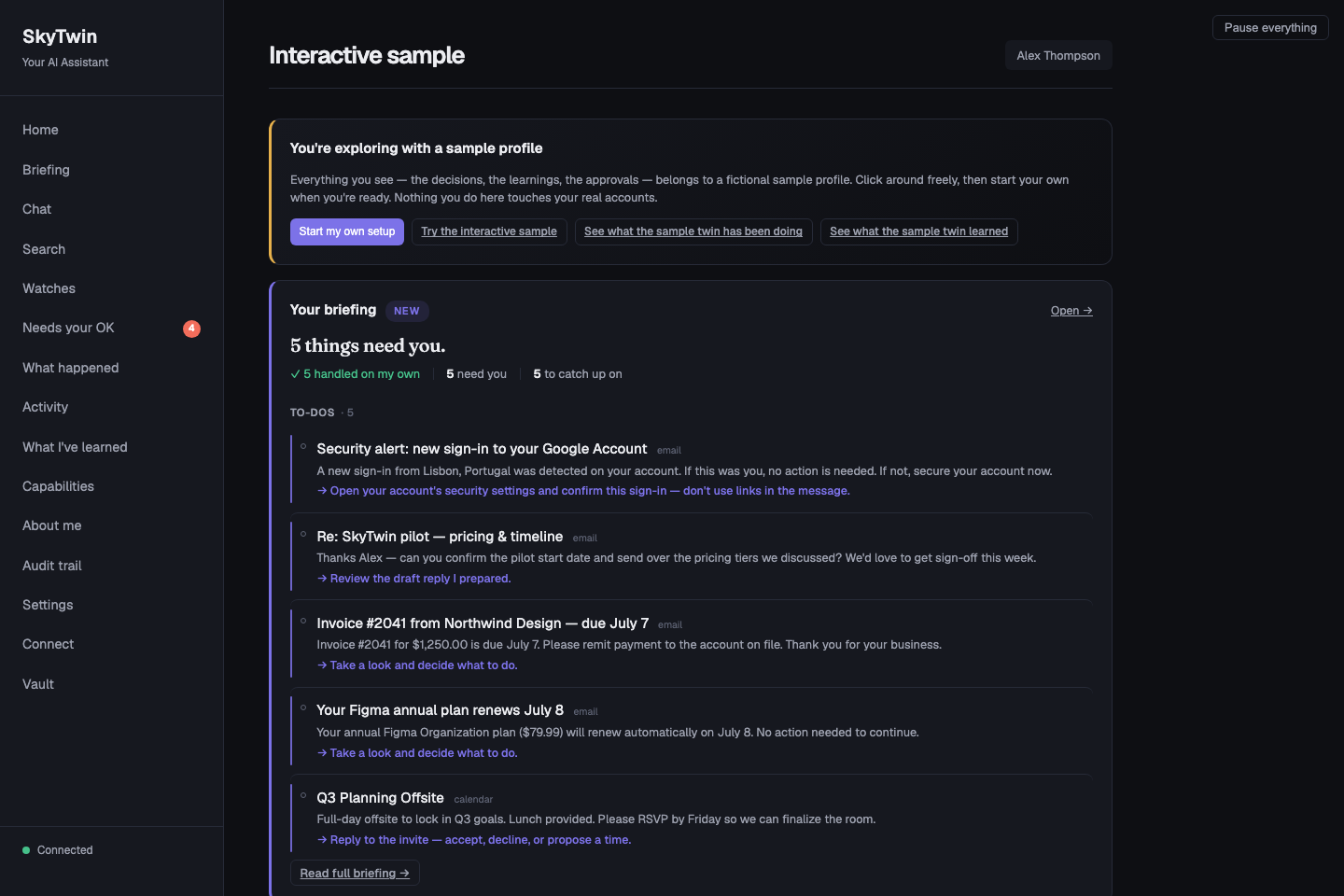
Actual app screenshot from a source development run, using fictional sample data. The messages, account indicators, and “handled” counts illustrate the product; no real account is connected and no real task was executed.
A personal AI you can get to know
The core principle is ask the twin before asking the user. The intended experience brings a few things together:
- Know what needs you. A briefing separates things to act on from things to catch up on, with the source behind each item.
- Stop repeating yourself. Preferences have supporting evidence, confidence, and a history you can inspect. You can see what the twin believes and correct it.
- Understand the suggestion. Review what happened, which preferences mattered, why an action was proposed, and how to change its mind.
- Give it room at your pace. The policy model starts with suggestions and checks trust, spend, risk, reversibility, and origin before considering an action. You decide what authority to grant.
- Keep your choices yours. Local reasoning is the default and does not silently fall back to a remote provider. Hosted reasoning is an explicit choice. The code is Apache-2.0 licensed.
The current desktop alpha lets you connect a real Gmail inbox through your own Google OAuth app. Use its desktop window for first-account setup; the same local web dashboard can be used in a browser that already holds a valid SkyTwin session. The fictional sample lets you experience the review-and-correct loop without connecting an account. The Gmail path is an advanced alpha capability—not a supported managed SkyTwin OAuth service or a claim of current Google verification.
Try the experience
For the fastest real-app path, download the current desktop alpha. Start with the screenshot-led walkthrough, or follow the source start guide to explore the fictional sample yourself. You do not need an inbox, credentials, or an AI provider key for the sample.
- Meet the sample twin. Open the fictional profile's briefing and see what needs a decision, alongside what is just useful to know.
- Follow a suggestion. Inspect a decision, the evidence behind it, and the explanation of why it needs approval.
- Try a correction. Use the sample's simulated approve, reject, or correct controls and see the session-local learning. The product views are read-only; these interactions have no provider, connector, or execution-adapter effects.
- Explore what it remembers. Visit “What I've learned” to see the preferences behind the suggestions. Think about which of your own routines you would want a twin to learn.
For a plain-language walkthrough, begin with how to use the fictional sample, then use the documentation site: how to start, how safety works, where inference runs, and the five-minute fictional-data demo.
Where this is headed
These examples explain the intended judgment model; they are not a list of workflows included in the current desktop artifacts. The beta release contract below limits launch support to workflows backed by tagged-artifact evidence.
| Future scenario | Intended experience |
|---|---|
| Newsletter arrives | Your twin recognizes your archive pattern and proposes moving the message out of the Inbox. You confirm before the mailbox changes, and the explanation is logged. |
| Calendar conflict | You always prioritize skip-level 1:1s over standups. Standup rescheduled with a note to the organizer. |
| Subscription renewal | $15.99/mo streaming service, used 3x this month, 18 months of renewals. Auto-renewed within your spend norms. |
| Grocery reorder | Repeats your last order with your substitution rules. Flags the one item that jumped 15% in price. |
| Flight booking | Finds the United aisle seat, morning departure, direct, $380. At high trust: books it. At low trust: presents top 3 options. |
| Unknown sender email | Low confidence. Escalates with a one-line summary so you can decide in 5 seconds instead of 5 minutes. |
What makes the twin yours
Conversation connects to decisions. SkyTwin includes chat and an “Ask your twin” surface. Its broader goal is to bring the same personal context into briefings, suggestions, and eventually connected-account actions, so useful work can begin without a new prompt each time.
Trust grows domain by domain. New users start at observer — the system only suggests. Its trust model lets approvals and corrections inform autonomy separately for each domain; trust in email triage need not imply trust with your calendar. See the policy types and policy engine.
Safety constraints are the product. Typed candidate-action paths through the policy engine apply spend limits, trust-tier gating, reversibility checks, and sensitivity classification; the release-wide entry-path inventory remains a beta gate. The system can be inspected, overridden, narrowed, and shut off at any time. Read the full safety model →
Recorded decisions are inspectable. Supported paths can produce an explanation record covering what happened, the evidence and preferences used, the selected action, and correction guidance. Release-wide explanation coverage is still under audit, and a hosted model's internal reasoning remains subject to that provider's own transparency limits.
Your twin is inspectable. It's not a vector embedding or a bag of keywords. It's a typed, versioned data structure where every preference has a confidence level, supporting evidence, and provenance. Contradictions are tracked, not hidden.
Memory knows who said what. Signals from supported connectors arrive stamped with an authoring tier — content you wrote vs. a newsletter vs. an inbound stranger — and tier-weighted retrieval lets self-authored content outrank broadcast noise. The twin feels like it knows you instead of just having read your inbox.
You can teach a Watch. The source includes versioned, read-only signal-digest workflows: describe what to watch for, replay a candidate, compare revisions, and explicitly activate or roll back a version. These are a separate development surface, outside the disposable sample credential. Model-assisted authoring requires a qualified model, artifact, and runtime build; the current catalog's downloadable model has not cleared that quality gate. Explore Watches →
Go deeper when you're ready
| If you want to… | Start here | Then go deeper |
|---|---|---|
| Try the packaged desktop app now | Download the alpha | Alpha limitations and OS warning steps |
| Connect a real Gmail inbox from the app (or an authenticated local web session) | Gmail setup guide | Privacy boundary and Google API plan |
| Understand the idea without installing anything | Documentation site | Plain-language FAQ and glossary |
| See the product model safely | Five-minute fictional-data walkthrough | Safety model and data guide |
| Run and inspect the source | Source start guide | Operations guide and troubleshooting |
| Extend it with tools or agents | Agent and MCP guide | Architecture and reference |
The rest of this README covers installation, source architecture, deployment, and release status. The full documentation index keeps every technical guide within reach.
Quick Start
Download the desktop alpha
Open the SkyTwin desktop alpha release →
Download the installer for Apple Silicon macOS, x64 Windows, or x86-64 Linux and open the packaged app. No repository checkout is required. This is the quickest way to try SkyTwin as an application rather than only reading the tour or running the fictional source sample.
The alpha is unsigned. macOS Gatekeeper and Windows SmartScreen will warn on
first launch; follow the platform-specific steps below.
It packages current 0.6.106.0 source under the prerelease tag
alpha-0.6.106.0. It is not the planned supported v0.7.0-beta and does not carry
signing,
notarization, auto-update, or clean-machine evidence.
The same current alpha can connect a real Gmail inbox or open the account-free
sample. Keep the app running and open Connect Gmail in its desktop
window for the reliable first-account flow. The same page is served at
http://localhost:3200/#/connect-gmail, but a fresh browser does not inherit the
desktop's session token; use that browser route only after the browser has been
paired or otherwise authenticated. Create a Web Application OAuth client in a Google
Cloud project you control, add SkyTwin's loopback callback URLs, then paste the
client ID and secret into the wizard. SkyTwin requests Google identity,
Calendar, gmail.readonly, and
gmail.modify scopes and its worker uses the resulting grant to ingest live
signals. Use a test account first: the OAuth client secret and newly authorized
tokens are stored without app-level encryption in the alpha's configured
database, the build is unsigned, and supported Gmail/Calendar mutation is not
part of the capability claim. Follow the real-inbox setup guide.
Build from source (one-command, macOS / Linux / WSL)
curl -fsSL https://raw.githubusercontent.com/jayzalowitz/skytwin/main/install.sh | bash
The installer detects your OS, installs anything missing (Homebrew on mac, Node 20+, pnpm), fetches the official CockroachDB single-node binary (hash-verified), clones the repo to ~/skytwin, runs the bootstrap, starts the services, and opens the dashboard at http://localhost:3200 once it's up. Re-running pulls latest and restarts.
The command above intentionally follows the moving main branch. For a
reviewable, immutable source evaluation, use the exact-commit archive workflow
in Internal Source Candidates. Those
archives are source-only internal materials, not public releases, and preserve
the existing signed-artifact beta gate.
No Docker required. Before v0.6.56 the installer pulled Docker Desktop and ran CockroachDB inside a container — by far the heaviest dependency on the list, with its own EULA and a "open it once after install" gotcha. The default path now installs the CRDB binary directly into ~/.local/share/skytwin/bin/cockroach and spawns it as a child process. Docker remains supported via SKYTWIN_USE_DOCKER=true for users who already have a Docker workflow.
To stop later: cd ~/skytwin && ./bin/skytwin-dev --stop.
The first 60 seconds in a development/source run:
- The dashboard opens. "Ask your twin" can show a predicted action, confidence, alternatives, and an explanation; the exact model-backed path depends on an available local runtime or provider, while deterministic fallbacks cover supported paths when no model responds.
- After
pnpm db:seed, click "Just show me around" on the welcome screen to skip OAuth and use the development demo seed. Alex has recent decisions, a daily briefing, four pending approvals, "What I've learned", Capabilities, Search, and a trust bar climbing toward "handle most things". The development seed also includes Pat (a power user) and Carol (a brand-new user), so the dev "Switch user" button tells three stories. This development path can exercise mock approval actions; it is separate from the packaged build's read-only data authority and isolated, non-persistent simulation. - The welcome screen recommends a local model from the machine's RAM, architecture, and free disk. The current maintained catalog contains one pinned Qwen2.5 1.5B Instruct Q4_K_M artifact (about 1.0 GiB). The artifact is downloaded on request and must pass exact-size, SHA-256, registry, and runtime-compatibility checks before automatic discovery will load it. A compatible llama.cpp binary remains a separate prerequisite. The artifact remains available for ordinary local inference but is not qualified for adaptive-workflow authoring because it did not clear the checked-in quality gate. "Change" opens Settings → AI (and the local memory backend).
- Want to look around first? Press Esc, click the × in the modal corner, or hit Skip for now — the dashboard chrome stays navigable behind the modal, and a "Sign in" button on the placeholder gets you back into the wizard whenever you're ready.
- The packaged alpha offers both its isolated sample and the installation-bound
BYO Google wizard. Advanced source operators can explicitly enable the same
provider path with
SKYTWIN_GOOGLE_CONNECTION_MODE=experimental. Neither path is a managed or supported public OAuth service.
Advanced env vars
The default source install starts SkyTwin's core services without Docker or a hosted-model API key. Model-backed reasoning still requires an available local runtime plus verified model artifact, or a provider you configure. Power users can opt into:
| Env var | Effect |
|---|---|
SKYTWIN_USE_DOCKER=true | Run CockroachDB inside Docker instead of as a native binary. Useful for users who already have Docker and prefer container lifecycle. |
SKYTWIN_DOCKER_SQL_PORT, SKYTWIN_DOCKER_ADMIN_PORT, SKYTWIN_DOCKER_API_PORT | Override Docker Compose host ports for SQL, the Cockroach admin UI, and the optional API container. Useful when another Conductor workspace or local stack already owns 26257, 8080, or 3000. |
TURBO_DEV_CONCURRENCY | Override the pnpm dev Turbo concurrency. The default is 50, high enough for the current persistent dev task count. |
SKYTWIN_DEV_SKIP_PORT_PREFLIGHT=1 | Bypass the pnpm dev port preflight. Use only when you intentionally want Turbo to try starting even though a required dev port is already listening. |
SKYTWIN_WITH_OLLAMA=true | Install Ollama + pull the gemma4 model (~9.6GB). Without this opt-in, local inference requires a separately installed llama.cpp binary and compatible model. |
SKYTWIN_DISABLE_EMBEDDED=1 | Skip the embedded LLM provider in the API's provider chain. Pair with hosted-only keys (e.g. ANTHROPIC_API_KEY) for reproducible evaluation runs. |
SKYTWIN_LLAMA_MODEL=/path/model.gguf | Opt into a user-managed model path. This explicit override bypasses the managed-model manifest and registry checks; the user is responsible for the artifact's provenance and compatibility. |
SKYTWIN_REASONING_MODE | Pin the environment-driven chain to on_device or bring_your_own_provider. Mixed local/remote chains require this explicit choice. Verified private cloud is configured per user in Settings so its key and isolated provider snapshot are explicit. |
SKYTWIN_CRDB_VERSION | Pin a non-default CockroachDB version. Refresh the hash tables in bin/skytwin-db and apps/desktop/scripts/build-single-binary.sh together. |
On-device Ollama requires Ollama 0.18 or newer. SkyTwin adds Ollama's
request-scoped :local source selector to every on-device call and never
retries the unqualified model name; this prevents a loopback daemon from
relaying a remote-backed model alias. General local chat is supported, but
released Ollama builds do not attest the exact served digest/runtime on each
chat response, so adaptive workflow authoring and summaries currently fail
closed. For defense in depth, disable Ollama Cloud globally with
OLLAMA_NO_CLOUD=1 or disable_ollama_cloud: true.
Manual setup
If you'd rather drive each step yourself:
Prerequisites
- Node.js >= 20
- pnpm >= 9
- That's it. CockroachDB is fetched as a native binary by
bin/skytwin-db install. No Docker, no system DB install.
git clone https://github.com/jayzalowitz/skytwin.git && cd skytwin
pnpm install

# Fetch + start CockroachDB (native binary, hash-verified)
./bin/skytwin-db install
./bin/skytwin-db start
./bin/skytwin-db ensure-db

# Configure
cp .env.example .env   # edit with your values

# Migrate and seed
pnpm db:migrate
pnpm db:seed

# Build and run
pnpm build
pnpm dev
The API starts on localhost:3100, the web dashboard on localhost:3200.
pnpm dev preflights the API, web, OpenClaw bridge, and Twin MCP ports before
Turbo starts. If another process owns a required port, it prints the owning
PID/command/cwd; if this same workspace is already healthy, it exits cleanly
instead of starting a duplicate dev stack.
The OpenClaw bridge is supervised during pnpm dev, so a one-off child
SIGKILL/exit 137 restarts the bridge without tearing down API/web/worker; fast
crash loops still fail visibly.
Validating the install path
Before shipping, regression-check the install end-to-end across a matrix of Linux distros:
./bin/validate-installs              # Ubuntu 22.04, Debian 12, Fedora 40
./bin/validate-installs ubuntu       # one distro
./bin/validate-installs --keep-on-fail ubuntu  # leave container alive on failure
Each run spawns a fresh OS container, untars a snapshot of the working
tree, runs install.sh exactly the way a real user would, and asserts
the dashboard responds at localhost:3200. macOS/Windows are exercised
via the same install.sh and bin/skytwin-db codepaths but need a real
machine to verify the platform-specific bits (Homebrew, NSIS, etc.).
Running Tests
pnpm test # 4,800+ tests across 400+ files in 31 packages + 8 apps
Downloadable desktop alpha
View the desktop alpha release →
The published alpha artifacts are a usable packaged application, not just the
fictional demo. They bundle the desktop stack described by their release notes,
including CockroachDB, but they are unsigned and are not supported public-beta
installers. The tagged release path can generate and attach updater manifests,
but no qualifying beta release is currently published; do not infer manifest
presence or update support from the current preview. Check the release notes for
the exact features in an artifact. In
builds from current source, a local model and the llama.cpp runtime are not
bundled: SkyTwin can recommend a maintained artifact for the machine and download
it only after the user starts the install. A compatible runtime remains a separate
prerequisite, while a hosted provider remains an explicit opt-in.
The alpha also includes a real-inbox mode. Keep it running and use
Connect Gmail inside the desktop window for first-account setup. The same
page is available at http://localhost:3200/#/connect-gmail to a browser that
already has a valid SkyTwin session; opening it in a fresh browser does not copy
the desktop session. The wizard walks you through creating a
personal Google Cloud OAuth client and grants the worker access to ingest your
Gmail and Calendar data. This is the quickest way to try SkyTwin with an actual
inbox, but it carries the alpha's older plaintext credential/token custody and
unsigned-build limitations. Use a test Google account first and see the
step-by-step Gmail guide.
Release boundary: the current unsigned alpha packages the guarded, account-free sample session but does not claim verified managed-model delivery or beta evidence. Check the release notes for the exact features in an artifact. The desktop can open a short-lived sample whose database-backed surface remains read-only; approve, reject, correct, and learn interactions run only in a separate, session-local simulation that cannot reach providers or execution adapters. Its browser credential is tab-scoped and bypasses offline caching and replay.
| OS | Direct alpha download |
|---|---|
| macOS (Apple Silicon) | Open the current release assets |
| Windows | Open the current release assets |
| Linux | Open the current AppImage, .deb, and .rpm assets |
⚠ Unsigned builds (for now). Code-signing certs (Apple Developer + Windows EV) are a pending launch step, so your OS warns on first launch:
- macOS: right-click the app → Open → Open (clears Gatekeeper once).
- Windows: SmartScreen → More info → Run anyway.
Signing and notarization are stop-ship requirements for a supported public beta.
How It Works
This is the source architecture and connected-account pipeline. The guarded current-source preview feeds it isolated fictional sample data by default. The current desktop alpha can instead ingest a real Gmail inbox through a self-created Google OAuth client, and source operators can enable the retained path explicitly in experimental mode.
  Gmail, Calendar, etc.
         │
         ▼
  ┌──────────────┐
  │   Connectors  │  Ingest signals from your accounts
  └──────┬───────┘
         ▼
  ┌──────────────┐
  │   Decision    │  "What's happening? What would
  │   Engine      │   the user want here?"
  └──────┬───────┘
         ▼
  ┌──────────────┐
  │  Twin Model   │  Your preferences, patterns,
  │  + Memory     │  and episodic memory (gbrain default,
  │               │  MemPalace optional)
  └──────┬───────┘
         ▼
  ┌──────────────┐
  │   Policy      │  Spend limits, trust tiers,
  │   Engine      │  safety constraints
  └──────┬───────┘
         ▼
    ┌────┴────┐
    ▼         ▼
 Auto-     Escalate
 execute   with context
    │         │
    ▼         ▼
 Explain   You decide
    │         │
    └────┬────┘
         ▼
  ┌──────────────┐
  │  Feedback     │  Your response trains the twin
  │  Loop         │  to be better next time
  └──────────────┘
Supported decision paths can persist explanation and feedback records. Release-wide coverage is still being audited before the public beta.
Architecture
SkyTwin is a TypeScript monorepo (pnpm + Turborepo) with 31 packages and 8 apps:
apps/
  api/                HTTP API — decisions, user management, webhooks, /api/voice/*
  web/                Dashboard — review decisions, manage preferences, configure policies
  worker/             Background jobs — async execution, briefing generation, memory action loop, tier backfill
  idle-miner-runner/  Desktop-managed child that scans approved project roots only while the machine is idle
  desktop/            Electron app — macOS (.dmg), Windows (.exe), Linux (.AppImage)
  mobile/             React Native (Expo) — QR pairing, push notifications, SSE, voice capture
  openclaw-bridge/    OpenClaw proxy — bridges local API to OpenClaw execution service
  twin-mcp-server/    MCP server exposing the twin's read-only surface to external clients

packages/
  shared-types/                   TypeScript interfaces — the dependency root for everything
  config/                         Env var loading and validation
  core/                           Retry logic, circuit breaker, error types, logging
  db/                             CockroachDB client, migrations, repositories
  twin-model/                     Twin profile CRUD, preference learning, confidence scoring
  decision-engine/                Event interpretation, candidate generation, action selection
  policy-engine/                  Trust tiers, spend limits, domain policies, safety checks
  policy-prompts/                 Versioned LLM prompts with JSON schema validation and deterministic fallbacks
  ironclaw-adapter/               Execution adapter with HMAC auth, retries, circuit breaker
  execution-router/               Adapter selection, fallback chains, risk modifiers, plugin discovery
  llm-client/                     Unified LLM client — local, conventional, and admitted TrustedRouter paths; NEAR represented but blocked
  near-confidential/              Fail-closed NEAR verification contract; no transport is runtime-admitted
  embedded-llm/                   Local-first: llama.cpp text, whisper.cpp STT, Piper TTS — spawn-based
  explanations/                   Human-readable explanation generation
  connectors/                     Gmail / Google Calendar / Outlook mail+calendar / mock connectors; real accounts are opt-in alpha/experimental paths
  assistant/                      Stateless chat service wrapping LlmClient with context enrichment
  capability-engine/              Infers user app capabilities from signals (keyword v1 + LLM verification)
  credential-vault/               AES-256-GCM + scrypt primitives for the experimental token vault (not production-default encryption)
  idle-miner/                     Filesystem scanner that extracts project metadata during idle time
  mcp-host/                       Manages MCP servers (stdio/HTTP/SSE) with circuit breakers + telemetry
  dxt/                            Serializes/deserializes DXT artifacts (packed MCP server configs)
  observability/                  In-memory metrics + ring-buffered rollup for the capability loop
  registry-client/                Loads curated MCP registry entries with OAuth quirks and service lookup
  routines/                       Typed read-only Watch providers: canonical payloads, compilation, replay, semantic diff, and run evidence
  mempalace/                      Legacy memory: episodic, knowledge graph, 4-layer retrieval (opt-in backend)
  memory-port/                    Backend-agnostic MemoryPort interface + capability negotiation
  memory-gbrain/                  Default gbrain-compatible backend on CRDB; upstream CLI interoperability adapter (never runtime-selected)
  memory-gbrain-crdb-adapter/     CRDB driver for gbrain — tier-weighted RRF, pin/hide, embedding providers
  memory-hybrid/                  Composes any two MemoryPort impls — per-capability read routing
  memory-mempalace/               MemoryPort adapter for the legacy mempalace classes
  evals/                          Decision quality evaluation and regression testing
Tech Stack
| Layer | Technology |
|---|---|
| Language | TypeScript (strict, ES2022) |
| Database | CockroachDB (PostgreSQL wire protocol) |
| Runtime | Node.js >= 20 |
| Package Manager | pnpm with workspaces |
| Build | Turborepo |
| Desktop | Electron + electron-builder |
| Mobile | React Native + Expo |
| Testing | Vitest (4,800+ tests) |
| CI/CD | GitHub Actions |
| Execution | IronClaw, OpenClaw (via local bridge), and Direct execution — trust-ranked selection with ambiguous attempts held for reconciliation |
Deployment
Reverse proxies and TRUST_PROXY_HOPS
The API uses req.ip for every IP-keyed check: the session-auth
localhost dev-bypass, the OAuth new-user rate limit, the
/api/v1/demo/preview per-IP bucket, and any future per-client limit.
Behind any reverse proxy, req.ip is the proxy's address by default —
which collapses every per-IP limit into a single shared bucket. You
need TRUST_PROXY_HOPS set to the exact number of trusted hops between
the Node process and the real client.
The number you want is "trusted proxies between this Node process and the
actual client" — count every box that legitimately appends to
X-Forwarded-For on its way in, including any platform-injected router
your provider sits behind.
| Topology | TRUST_PROXY_HOPS |
|---|---|
| Direct (no proxy, or untrusted upstream) | 0 (default) |
| Single reverse proxy (your own nginx, Caddy, ELB target) | 1 |
| Single platform hop (Fly's edge, Render's router, Heroku's app router, an AWS ALB on its own) | 1 |
| CDN → your reverse proxy (Cloudflare → nginx → Node, no platform router) | 2 |
| CDN → platform router → Node (Cloudflare → Fly/Render/Heroku → Node) | 2 |
| CDN → platform router → your reverse proxy → Node (Cloudflare → Fly → nginx → Node) | 3 |
| Multi-hop edge (Cloudflare → AWS WAF → ALB → Node) | 3+ |
If you can't draw the topology from memory, prefer Express's array/CIDR
form for trust proxy (set per-network, not per-hop) — see the
Express docs. Hop
counts are simple but brittle when a platform inserts a hop you didn't
know about.
Setting this too high is a security hole. A client-controlled
X-Forwarded-For becomes req.ip and bypasses every per-IP limit by
header rotation. When in doubt, prefer fewer hops.
Verify after deploy:
curl -H 'X-Forwarded-For: 1.2.3.4' https://your-api/api/health/live
# response includes {"clientIp": "..."} — should NOT be "1.2.3.4"
# unless 1.2.3.4 is actually a trusted upstream
If clientIp in the response matches the spoofed header, your
TRUST_PROXY_HOPS is too permissive and rate-limit bypass is open.
Public demo preview (/api/v1/demo/preview)
The public LLM-backed preview endpoint has three layers of protection:
| Env var | Default | Purpose |
|---|---|---|
DEMO_PREVIEW_DISABLED | unset | Set to 1 to return 503 unconditionally — operator kill switch when the endpoint gets abused. |
DEMO_PREVIEW_GLOBAL_LIMIT_PER_HOUR | 500 | Hard global cap across all callers. Survives misconfigured TRUST_PROXY_HOPS and rotated-IP abuse. |
| Per-IP bucket | 20 / 5 min | Built in. Effectiveness depends on TRUST_PROXY_HOPS resolving the real client IP. |
The per-IP bucket and the global cap are process-local. If you run multiple API replicas, the global cap multiplies by replica count. For unauthenticated public deployments at scale, replace the in-memory counter with Redis or a DB row with atomic increment (tracked in TODOS.md as a P3).
Trust Tiers
SkyTwin uses a progressive trust model. Autonomy is earned, not assumed.
| Tier | What It Means |
|---|---|
observer | Default for new users. The twin proposes actions and surfaces them as approval requests — you approve, reject, or edit. Never auto-executes. |
suggest | Drafts actions for your review. You approve or edit before anything happens. |
low_autonomy | Auto-executes low-risk, reversible actions in trusted domains. Escalates everything else. |
moderate_autonomy | Handles most routine decisions. Escalates novel situations and high-cost actions. |
high_autonomy | Acts on your behalf across domains. Still respects hard limits and irreversibility checks. |
Trust is domain-specific. You might be at moderate_autonomy for email but suggest for calendar. A bad decision in one domain can reduce trust in that domain without affecting others.
Documentation
| Document | What's Inside |
|---|---|
| How to Use the Fictional Sample | A plain-language, screenshot-led tour of the current source development sample. It identifies its fictional data and distinguishes it from published technical-preview installers. |
| FAQ and Glossary | Direct answers and defined terms for preview status, safety, privacy, inference, agents, and the release boundary. |
| Data and Memory Guide | Current storage disclosure, credential separation, backup/restore semantics, memory backends, and control boundaries. |
| Integration Status | What is available in the fictional sample, how local MCP and admitted execution differ, and which connector or DXT surfaces remain unavailable or forward-looking. |
| Troubleshooting | Source-run baseline checks, migrations, seeding, local build recovery, ports, and safe issue-reporting guidance. |
| Documentation Site | Human evaluation guides plus architecture, safety, inference/privacy, MCP-agent, operations, release-evidence, and contribution references. The Pages site is source-first; GitHub remains canonical for implementation details. |
| Versioned Workflows | Public guide to teaching, replaying, explicitly activating, immutably revising, and rolling back the current read-only signal-digest workflow; the full source contract remains in Adaptive Workflows. |
| The Deck | 22 slides: every capability claim paired with the mechanism that constrains it. Each claim-and-gate slide carries a collapsible source block citing the file and lines it came from; the "why now" and positioning slides cite external sources instead, and three narrative slides carry no citation block (source) |
| Product Spec | Vision, target user, operating principles, example workflows |
| Adaptive Workflows | Canonical source contract for immutable signal-digest workflows, model qualification, exact run evidence, backup/restore, and CockroachDB invariants |
| Technical Spec | Architecture, data flow, API endpoints, database schema |
| Safety Model | Threat model, trust tiers, defense layers, safety philosophy |
| Inference Receipts | Versioned receipt contract, decision-event capture, developer verifier, trust boundary, and current UI/export limitations |
| Confidential Inference | Local-first admission, fail-closed TrustedRouter, and why NEAR AI remains verification-pending |
| Decision Engine | Situation interpretation, risk assessment, confidence scoring |
| IronClaw Integration | Execution adapter, HMAC auth, failure handling |
| CockroachDB Architecture | Schema design, query patterns, versioning, receipt and effect boundaries |
| Evals | Evaluation harness, scenario simulation, calibration metrics |
| Launch Plan | Procurement + sequencing to public download links |
| Launch-Readiness Report | Historical audit with a current account-free launch override; the claim ledger remains authoritative |
| Release Procedure | How the evidence-gated tag workflow verifies and publishes a release |
| Beta Claim Ledger | Machine-checked release contract, evidence, limitations, owners, and stop-ship status |
Current preview and account boundaries
Public source-preview snapshots
use date-based source-preview-* tags and contain source only, not desktop
installers. They are a way to try an exact revision with local development tools;
they do not certify the planned public beta. See the
release guide.
The isolated, account-free fictional-data sample in current source is the supported preview. It lets you evaluate the interaction model, explanations, controls, and boundaries without giving SkyTwin an inbox, credentials, or a provider key. Published unsigned technical-preview installers predate portions of this guarded sample path.
The Start guide explains what the installer changes locally. The sample is intentionally separate from real accounts: its product views are read-only, and its approve/reject/correct interactions are session-local simulations with no provider, connector, or execution-adapter effects.
A candidate action is evaluated against policy, trust, spend, risk, reversibility, and provenance. A model suggestion is never the authority to run work. Local reasoning does not fall through to a hosted provider. A hosted provider is an explicit network choice. The verified-private boundary admits only explicit interactive TrustedRouter calls after SkyTwin verifies fresh same-session gateway attestation and an exact-byte confidential-route receipt; NEAR AI remains unavailable.
The guarded current-source sample and future supported beta do not ship a
supported managed Google OAuth service. That does not mean real-inbox use is
absent: the current desktop alpha exposes a five-step Gmail wizard in its
window and serves it at http://localhost:3200/#/connect-gmail for already
authenticated browser sessions, and a source deployment
can enable the retained provider path only with the exact
SKYTWIN_GOOGLE_CONNECTION_MODE=experimental opt-in. The alpha includes a
SkyTwin-team client ID for initial identity and Calendar authorization, then
requires a user-created Google Web Application client for Gmail; a source
operator supplies the client through environment configuration. Google grants
the requested calendar.events and gmail.modify scopes broad event and
mailbox-write authority, but SkyTwin's current release claim is ingestion and
proposals—not supported Gmail send/archive or Calendar mutation. This remains an
advanced alpha/experimental path: the alpha's client secret and OAuth tokens
lack app-level encryption, Google testing-mode grants can expire after seven
days, and the current Gmail archive workflow does not claim a complete
mailbox-mutation runtime. Microsoft code is retained behind the same source flag
but has no equivalent supported setup claim.
The source tree also contains a default-off Gmail archive proposal experiment
(SKYTWIN_GMAIL_ARCHIVE_ENABLED=true) for unsupported account-connected
development. It can persist an owner-bound proposal and record an explicit
approval or rejection, but the response deliberately reports
execution: null: no Gmail mutation caller, recovery worker, or feedback
projection is wired into runtime yet. Enabling the flag is not an execution or
release-support claim.
Project Status
SkyTwin is preparing a desktop-first v0.7.0-beta. It is not release-ready:
fresh packaged-sample and managed-model validation, production key management,
signed/notarized artifacts, SBOMs, provenance, and clean-machine evidence remain
stop-ship items. The machine-checked
docs/beta-claim-ledger.json is the source of
truth for release claims and support status. Current builds remain technical
previews; the unsigned alpha packages the guarded sample and BYO Google path but
does not carry verified managed-model or beta evidence. The core decision pipeline,
twin model, policy engine, and swappable memory layer are implemented. Google
connector and OAuth code ships in the alpha and can be enabled explicitly for an
experimental source deployment. Managed
Google access is deferred. Mobile remains a
source/development surface rather than part of the beta support matrix.
The supported beta topology is one non-demo human owner per installation.
Installation credentials and dynamically discovered credential requirements are
shared installation configuration; local multi-owner and hosted deployments are
outside the beta support boundary.
Free and open-source forever for personal use. Team and hosted tiers are planned for organizations that need shared policies, audit logs, or managed infrastructure — see docs/launch-plan.md for the split.
What works in the development/source tree today:
- One-command install (
curl | bash) on macOS, Linux, and WSL — installs every dependency, clones the repo, starts the services, opens the dashboard - "Ask your twin" widget on the dashboard — type any situation, get a predicted action with reasoning and confidence, no accounts required
- A fully populated development demo seed with mock approval actions, plus a separate guarded sample session in the current packaged alpha. Its database-backed surface is read-only; a dedicated simulation can approve, reject, or correct fixed proposals and demonstrate session-local learning without invoking real connectors, providers, credentials, or execution adapters.
- Inbox-Intelligence briefing — a daily/weekly digest that splits to-dos (act) from topics (FYI), cites the source signal behind every item, persists memory-derived action opportunities, routes them through policy plus IronClaw/OpenClaw/Direct execution, reports queued/executed/blocked/learning-needed outcomes, and offers a "Power view" toggle for the technical detail behind each call
- Versioned signal-digest workflows — teach a read-only Watch in plain language, resolve at most one missing detail, replay the candidate against real owner-scoped signals, explicitly activate an immutable version, propose a minimal correction, compare the replay, and atomically roll back. Every adaptive run pins the exact version, compiled payload, complete-evidence commitment, bounded display snapshot, and the version's sanitized inference identity when model-assisted (or an explicit no-inference state for user-authored revisions); deterministic matching remains available when summary generation does not.
- Full decision pipeline: signal → interpret → decide → policy check → execute/escalate → explain → learn
- Mode-scoped model reasoning: on-device embedded/Ollama or an explicitly selected provider chain, with fallback contained inside the selected location boundary, request-scoped local-only enforcement for Ollama, and deterministic rules when no eligible provider responds
- Twin model with versioned profiles, confidence scoring, and preference learning
- Policy engine with spend limits, trust tiers, and domain-specific rules
- Swappable memory backend: SkyTwin's gbrain-compatible implementation is the default, running vector + tsvector RRF directly on CRDB. Upstream gbrain v0.50.5.0 supports PGLite and PostgreSQL, not CockroachDB; its unchanged schema/runtime fails the supported CRDB path on PostgreSQL-specific DDL/functions, and its CLI does not implement SkyTwin's complete write, episode, and graph contract. The real CLI integration is therefore only a programmatic interoperability adapter and is not selected by SkyTwin's runtime factory. Optional hybrid mode adds the legacy spatial Memory Palace (#197). Selectable per-installation via
MEMORY_BACKENDand per-user via the dashboard. Seedocs/memory-swap.md. - Web dashboard for reviewing decisions, managing preferences, configuring AI providers, and auditing
- Desktop build targets for macOS, Windows, and Linux; current artifacts are unsigned and not yet in the beta support matrix
- Mobile source/development app (iOS, Android) with QR pairing, push notifications, and voice capture that sends audio to the paired desktop for transcription
- Local model backends for llama.cpp text, whisper.cpp STT, and Piper TTS (
/api/voice/transcribeand/api/voice/synthesize); each backend is on-device only when its compatible binary and model are present - SSRF-safe URL validation for all LLM provider endpoints, with DNS rebinding protection
- Dynamic adapter discovery for third-party execution plugins
- Repository-wide tests and packaging workflows on GitHub Actions
What's next:
- More connectors (Slack, Notion, bank feeds)
- Hosted version with multi-tenant support
- Improved preference learning from implicit signals
Contributing
We welcome contributions. See CONTRIBUTING.md for guidelines on getting started, running tests, and submitting pull requests.
Security
Found a vulnerability? See SECURITY.md for responsible disclosure instructions.
License
Apache License 2.0 — use it, modify it, build on it.
How this stays alive
Free and open source forever for personal use. Future Team and Hosted tiers are planned for organizations that need shared policies, audit logs, or managed infrastructure. Personal features will never be paywalled.
No prices today — we're not ready to commit numbers, and overpromising on a backlog you haven't shipped is the easiest trust to lose. The shape of the future, not the price list.
Contributors

394 commits

77 commits
Similar repos


Languages
TypeScript
79.5%
JavaScript
18.8%
A digital twin that learns what you'd want — and does it. Delegated judgment with safety constraints, explanations, and progressive trust.
See the codeSee what people are saying
README
SkyTwin
Open-source personal AI. A digital twin that learns what matters to you, with you in control.
Imagine opening your day to a short list of what needs you, with the context already there: what happened, why it matters, and what your AI thinks you would want to do. Correct it once, and see what it learned.
That's the experience SkyTwin is building. Your digital twin is a growing model of your preferences, risk tolerance, and decision patterns. The goal is fewer repeated explanations and less routine decision work, with a visible reason behind each suggestion and clear limits on what it may do for you.
If personal AI already appeals to you, SkyTwin gives you a way to explore the next question: how should an assistant learn your judgment, earn permission to act, and stay accountable as it improves? You can inspect its memory, correct its assumptions, choose where reasoning runs, and adapt the source.
Download the current desktop alpha · Explore SkyTwin · Take the five-minute tour · Run the latest source
Try it today: the current unsigned desktop alpha is a real packaged app for Apple Silicon Macs, x64 Windows, and x86-64 Linux—no source checkout required. On first launch, create an account by supplying a Google Web Application OAuth client that you create and control; the desktop window runs the local dashboard and walks you through the consent flow. After the first account is established, an authenticated browser can use the same dashboard at http://localhost:3200. A fictional-data sample remains available when you do not want to connect an inbox. This is an alpha release: expect OS warnings, and do not interpret it as a managed OAuth service, Google verification, signing, or notarization claim.
Actual app screenshot from a source development run, using fictional sample data. The messages, account indicators, and “handled” counts illustrate the product; no real account is connected and no real task was executed.
A personal AI you can get to know
The core principle is ask the twin before asking the user. The intended experience brings a few things together:
- Know what needs you. A briefing separates things to act on from things to catch up on, with the source behind each item.
- Stop repeating yourself. Preferences have supporting evidence, confidence, and a history you can inspect. You can see what the twin believes and correct it.
- Understand the suggestion. Review what happened, which preferences mattered, why an action was proposed, and how to change its mind.
- Give it room at your pace. The policy model starts with suggestions and checks trust, spend, risk, reversibility, and origin before considering an action. You decide what authority to grant.
- Keep your choices yours. Local reasoning is the default and does not silently fall back to a remote provider. Hosted reasoning is an explicit choice. The code is Apache-2.0 licensed.
The current desktop alpha lets you connect a real Gmail inbox through your own Google OAuth app. Use its desktop window for first-account setup; the same local web dashboard can be used in a browser that already holds a valid SkyTwin session. The fictional sample lets you experience the review-and-correct loop without connecting an account. The Gmail path is an advanced alpha capability—not a supported managed SkyTwin OAuth service or a claim of current Google verification.
Try the experience
For the fastest real-app path, download the current desktop alpha. Start with the screenshot-led walkthrough, or follow the source start guide to explore the fictional sample yourself. You do not need an inbox, credentials, or an AI provider key for the sample.
- Meet the sample twin. Open the fictional profile's briefing and see what needs a decision, alongside what is just useful to know.
- Follow a suggestion. Inspect a decision, the evidence behind it, and the explanation of why it needs approval.
- Try a correction. Use the sample's simulated approve, reject, or correct controls and see the session-local learning. The product views are read-only; these interactions have no provider, connector, or execution-adapter effects.
- Explore what it remembers. Visit “What I've learned” to see the preferences behind the suggestions. Think about which of your own routines you would want a twin to learn.
For a plain-language walkthrough, begin with how to use the fictional sample, then use the documentation site: how to start, how safety works, where inference runs, and the five-minute fictional-data demo.
Where this is headed
These examples explain the intended judgment model; they are not a list of workflows included in the current desktop artifacts. The beta release contract below limits launch support to workflows backed by tagged-artifact evidence.
| Future scenario | Intended experience |
|---|---|
| Newsletter arrives | Your twin recognizes your archive pattern and proposes moving the message out of the Inbox. You confirm before the mailbox changes, and the explanation is logged. |
| Calendar conflict | You always prioritize skip-level 1:1s over standups. Standup rescheduled with a note to the organizer. |
| Subscription renewal | $15.99/mo streaming service, used 3x this month, 18 months of renewals. Auto-renewed within your spend norms. |
| Grocery reorder | Repeats your last order with your substitution rules. Flags the one item that jumped 15% in price. |
| Flight booking | Finds the United aisle seat, morning departure, direct, $380. At high trust: books it. At low trust: presents top 3 options. |
| Unknown sender email | Low confidence. Escalates with a one-line summary so you can decide in 5 seconds instead of 5 minutes. |
What makes the twin yours
Conversation connects to decisions. SkyTwin includes chat and an “Ask your twin” surface. Its broader goal is to bring the same personal context into briefings, suggestions, and eventually connected-account actions, so useful work can begin without a new prompt each time.
Trust grows domain by domain. New users start at observer — the system only suggests. Its trust model lets approvals and corrections inform autonomy separately for each domain; trust in email triage need not imply trust with your calendar. See the policy types and policy engine.
Safety constraints are the product. Typed candidate-action paths through the policy engine apply spend limits, trust-tier gating, reversibility checks, and sensitivity classification; the release-wide entry-path inventory remains a beta gate. The system can be inspected, overridden, narrowed, and shut off at any time. Read the full safety model →
Recorded decisions are inspectable. Supported paths can produce an explanation record covering what happened, the evidence and preferences used, the selected action, and correction guidance. Release-wide explanation coverage is still under audit, and a hosted model's internal reasoning remains subject to that provider's own transparency limits.
Your twin is inspectable. It's not a vector embedding or a bag of keywords. It's a typed, versioned data structure where every preference has a confidence level, supporting evidence, and provenance. Contradictions are tracked, not hidden.
Memory knows who said what. Signals from supported connectors arrive stamped with an authoring tier — content you wrote vs. a newsletter vs. an inbound stranger — and tier-weighted retrieval lets self-authored content outrank broadcast noise. The twin feels like it knows you instead of just having read your inbox.
You can teach a Watch. The source includes versioned, read-only signal-digest workflows: describe what to watch for, replay a candidate, compare revisions, and explicitly activate or roll back a version. These are a separate development surface, outside the disposable sample credential. Model-assisted authoring requires a qualified model, artifact, and runtime build; the current catalog's downloadable model has not cleared that quality gate. Explore Watches →
Go deeper when you're ready
| If you want to… | Start here | Then go deeper |
|---|---|---|
| Try the packaged desktop app now | Download the alpha | Alpha limitations and OS warning steps |
| Connect a real Gmail inbox from the app (or an authenticated local web session) | Gmail setup guide | Privacy boundary and Google API plan |
| Understand the idea without installing anything | Documentation site | Plain-language FAQ and glossary |
| See the product model safely | Five-minute fictional-data walkthrough | Safety model and data guide |
| Run and inspect the source | Source start guide | Operations guide and troubleshooting |
| Extend it with tools or agents | Agent and MCP guide | Architecture and reference |
The rest of this README covers installation, source architecture, deployment, and release status. The full documentation index keeps every technical guide within reach.
Quick Start
Download the desktop alpha
Open the SkyTwin desktop alpha release →
Download the installer for Apple Silicon macOS, x64 Windows, or x86-64 Linux and open the packaged app. No repository checkout is required. This is the quickest way to try SkyTwin as an application rather than only reading the tour or running the fictional source sample.
The alpha is unsigned. macOS Gatekeeper and Windows SmartScreen will warn on
first launch; follow the platform-specific steps below.
It packages current 0.6.106.0 source under the prerelease tag
alpha-0.6.106.0. It is not the planned supported v0.7.0-beta and does not carry
signing,
notarization, auto-update, or clean-machine evidence.
The same current alpha can connect a real Gmail inbox or open the account-free
sample. Keep the app running and open Connect Gmail in its desktop
window for the reliable first-account flow. The same page is served at
http://localhost:3200/#/connect-gmail, but a fresh browser does not inherit the
desktop's session token; use that browser route only after the browser has been
paired or otherwise authenticated. Create a Web Application OAuth client in a Google
Cloud project you control, add SkyTwin's loopback callback URLs, then paste the
client ID and secret into the wizard. SkyTwin requests Google identity,
Calendar, gmail.readonly, and
gmail.modify scopes and its worker uses the resulting grant to ingest live
signals. Use a test account first: the OAuth client secret and newly authorized
tokens are stored without app-level encryption in the alpha's configured
database, the build is unsigned, and supported Gmail/Calendar mutation is not
part of the capability claim. Follow the real-inbox setup guide.
Build from source (one-command, macOS / Linux / WSL)
curl -fsSL https://raw.githubusercontent.com/jayzalowitz/skytwin/main/install.sh | bash
The installer detects your OS, installs anything missing (Homebrew on mac, Node 20+, pnpm), fetches the official CockroachDB single-node binary (hash-verified), clones the repo to ~/skytwin, runs the bootstrap, starts the services, and opens the dashboard at http://localhost:3200 once it's up. Re-running pulls latest and restarts.
The command above intentionally follows the moving main branch. For a
reviewable, immutable source evaluation, use the exact-commit archive workflow
in Internal Source Candidates. Those
archives are source-only internal materials, not public releases, and preserve
the existing signed-artifact beta gate.
No Docker required. Before v0.6.56 the installer pulled Docker Desktop and ran CockroachDB inside a container — by far the heaviest dependency on the list, with its own EULA and a "open it once after install" gotcha. The default path now installs the CRDB binary directly into ~/.local/share/skytwin/bin/cockroach and spawns it as a child process. Docker remains supported via SKYTWIN_USE_DOCKER=true for users who already have a Docker workflow.
To stop later: cd ~/skytwin && ./bin/skytwin-dev --stop.
The first 60 seconds in a development/source run:
- The dashboard opens. "Ask your twin" can show a predicted action, confidence, alternatives, and an explanation; the exact model-backed path depends on an available local runtime or provider, while deterministic fallbacks cover supported paths when no model responds.
- After
pnpm db:seed, click "Just show me around" on the welcome screen to skip OAuth and use the development demo seed. Alex has recent decisions, a daily briefing, four pending approvals, "What I've learned", Capabilities, Search, and a trust bar climbing toward "handle most things". The development seed also includes Pat (a power user) and Carol (a brand-new user), so the dev "Switch user" button tells three stories. This development path can exercise mock approval actions; it is separate from the packaged build's read-only data authority and isolated, non-persistent simulation. - The welcome screen recommends a local model from the machine's RAM, architecture, and free disk. The current maintained catalog contains one pinned Qwen2.5 1.5B Instruct Q4_K_M artifact (about 1.0 GiB). The artifact is downloaded on request and must pass exact-size, SHA-256, registry, and runtime-compatibility checks before automatic discovery will load it. A compatible llama.cpp binary remains a separate prerequisite. The artifact remains available for ordinary local inference but is not qualified for adaptive-workflow authoring because it did not clear the checked-in quality gate. "Change" opens Settings → AI (and the local memory backend).
- Want to look around first? Press Esc, click the × in the modal corner, or hit Skip for now — the dashboard chrome stays navigable behind the modal, and a "Sign in" button on the placeholder gets you back into the wizard whenever you're ready.
- The packaged alpha offers both its isolated sample and the installation-bound
BYO Google wizard. Advanced source operators can explicitly enable the same
provider path with
SKYTWIN_GOOGLE_CONNECTION_MODE=experimental. Neither path is a managed or supported public OAuth service.
Advanced env vars
The default source install starts SkyTwin's core services without Docker or a hosted-model API key. Model-backed reasoning still requires an available local runtime plus verified model artifact, or a provider you configure. Power users can opt into:
| Env var | Effect |
|---|---|
SKYTWIN_USE_DOCKER=true | Run CockroachDB inside Docker instead of as a native binary. Useful for users who already have Docker and prefer container lifecycle. |
SKYTWIN_DOCKER_SQL_PORT, SKYTWIN_DOCKER_ADMIN_PORT, SKYTWIN_DOCKER_API_PORT | Override Docker Compose host ports for SQL, the Cockroach admin UI, and the optional API container. Useful when another Conductor workspace or local stack already owns 26257, 8080, or 3000. |
TURBO_DEV_CONCURRENCY | Override the pnpm dev Turbo concurrency. The default is 50, high enough for the current persistent dev task count. |
SKYTWIN_DEV_SKIP_PORT_PREFLIGHT=1 | Bypass the pnpm dev port preflight. Use only when you intentionally want Turbo to try starting even though a required dev port is already listening. |
SKYTWIN_WITH_OLLAMA=true | Install Ollama + pull the gemma4 model (~9.6GB). Without this opt-in, local inference requires a separately installed llama.cpp binary and compatible model. |
SKYTWIN_DISABLE_EMBEDDED=1 | Skip the embedded LLM provider in the API's provider chain. Pair with hosted-only keys (e.g. ANTHROPIC_API_KEY) for reproducible evaluation runs. |
SKYTWIN_LLAMA_MODEL=/path/model.gguf | Opt into a user-managed model path. This explicit override bypasses the managed-model manifest and registry checks; the user is responsible for the artifact's provenance and compatibility. |
SKYTWIN_REASONING_MODE | Pin the environment-driven chain to on_device or bring_your_own_provider. Mixed local/remote chains require this explicit choice. Verified private cloud is configured per user in Settings so its key and isolated provider snapshot are explicit. |
SKYTWIN_CRDB_VERSION | Pin a non-default CockroachDB version. Refresh the hash tables in bin/skytwin-db and apps/desktop/scripts/build-single-binary.sh together. |
On-device Ollama requires Ollama 0.18 or newer. SkyTwin adds Ollama's
request-scoped :local source selector to every on-device call and never
retries the unqualified model name; this prevents a loopback daemon from
relaying a remote-backed model alias. General local chat is supported, but
released Ollama builds do not attest the exact served digest/runtime on each
chat response, so adaptive workflow authoring and summaries currently fail
closed. For defense in depth, disable Ollama Cloud globally with
OLLAMA_NO_CLOUD=1 or disable_ollama_cloud: true.
Manual setup
If you'd rather drive each step yourself:
Prerequisites
- Node.js >= 20
- pnpm >= 9
- That's it. CockroachDB is fetched as a native binary by
bin/skytwin-db install. No Docker, no system DB install.
git clone https://github.com/jayzalowitz/skytwin.git && cd skytwin
pnpm install

# Fetch + start CockroachDB (native binary, hash-verified)
./bin/skytwin-db install
./bin/skytwin-db start
./bin/skytwin-db ensure-db

# Configure
cp .env.example .env   # edit with your values

# Migrate and seed
pnpm db:migrate
pnpm db:seed

# Build and run
pnpm build
pnpm dev
The API starts on localhost:3100, the web dashboard on localhost:3200.
pnpm dev preflights the API, web, OpenClaw bridge, and Twin MCP ports before
Turbo starts. If another process owns a required port, it prints the owning
PID/command/cwd; if this same workspace is already healthy, it exits cleanly
instead of starting a duplicate dev stack.
The OpenClaw bridge is supervised during pnpm dev, so a one-off child
SIGKILL/exit 137 restarts the bridge without tearing down API/web/worker; fast
crash loops still fail visibly.
Validating the install path
Before shipping, regression-check the install end-to-end across a matrix of Linux distros:
./bin/validate-installs              # Ubuntu 22.04, Debian 12, Fedora 40
./bin/validate-installs ubuntu       # one distro
./bin/validate-installs --keep-on-fail ubuntu  # leave container alive on failure
Each run spawns a fresh OS container, untars a snapshot of the working
tree, runs install.sh exactly the way a real user would, and asserts
the dashboard responds at localhost:3200. macOS/Windows are exercised
via the same install.sh and bin/skytwin-db codepaths but need a real
machine to verify the platform-specific bits (Homebrew, NSIS, etc.).
Running Tests
pnpm test # 4,800+ tests across 400+ files in 31 packages + 8 apps
Downloadable desktop alpha
View the desktop alpha release →
The published alpha artifacts are a usable packaged application, not just the
fictional demo. They bundle the desktop stack described by their release notes,
including CockroachDB, but they are unsigned and are not supported public-beta
installers. The tagged release path can generate and attach updater manifests,
but no qualifying beta release is currently published; do not infer manifest
presence or update support from the current preview. Check the release notes for
the exact features in an artifact. In
builds from current source, a local model and the llama.cpp runtime are not
bundled: SkyTwin can recommend a maintained artifact for the machine and download
it only after the user starts the install. A compatible runtime remains a separate
prerequisite, while a hosted provider remains an explicit opt-in.
The alpha also includes a real-inbox mode. Keep it running and use
Connect Gmail inside the desktop window for first-account setup. The same
page is available at http://localhost:3200/#/connect-gmail to a browser that
already has a valid SkyTwin session; opening it in a fresh browser does not copy
the desktop session. The wizard walks you through creating a
personal Google Cloud OAuth client and grants the worker access to ingest your
Gmail and Calendar data. This is the quickest way to try SkyTwin with an actual
inbox, but it carries the alpha's older plaintext credential/token custody and
unsigned-build limitations. Use a test Google account first and see the
step-by-step Gmail guide.
Release boundary: the current unsigned alpha packages the guarded, account-free sample session but does not claim verified managed-model delivery or beta evidence. Check the release notes for the exact features in an artifact. The desktop can open a short-lived sample whose database-backed surface remains read-only; approve, reject, correct, and learn interactions run only in a separate, session-local simulation that cannot reach providers or execution adapters. Its browser credential is tab-scoped and bypasses offline caching and replay.
| OS | Direct alpha download |
|---|---|
| macOS (Apple Silicon) | Open the current release assets |
| Windows | Open the current release assets |
| Linux | Open the current AppImage, .deb, and .rpm assets |
⚠ Unsigned builds (for now). Code-signing certs (Apple Developer + Windows EV) are a pending launch step, so your OS warns on first launch:
- macOS: right-click the app → Open → Open (clears Gatekeeper once).
- Windows: SmartScreen → More info → Run anyway.
Signing and notarization are stop-ship requirements for a supported public beta.
How It Works
This is the source architecture and connected-account pipeline. The guarded current-source preview feeds it isolated fictional sample data by default. The current desktop alpha can instead ingest a real Gmail inbox through a self-created Google OAuth client, and source operators can enable the retained path explicitly in experimental mode.
  Gmail, Calendar, etc.
         │
         ▼
  ┌──────────────┐
  │   Connectors  │  Ingest signals from your accounts
  └──────┬───────┘
         ▼
  ┌──────────────┐
  │   Decision    │  "What's happening? What would
  │   Engine      │   the user want here?"
  └──────┬───────┘
         ▼
  ┌──────────────┐
  │  Twin Model   │  Your preferences, patterns,
  │  + Memory     │  and episodic memory (gbrain default,
  │               │  MemPalace optional)
  └──────┬───────┘
         ▼
  ┌──────────────┐
  │   Policy      │  Spend limits, trust tiers,
  │   Engine      │  safety constraints
  └──────┬───────┘
         ▼
    ┌────┴────┐
    ▼         ▼
 Auto-     Escalate
 execute   with context
    │         │
    ▼         ▼
 Explain   You decide
    │         │
    └────┬────┘
         ▼
  ┌──────────────┐
  │  Feedback     │  Your response trains the twin
  │  Loop         │  to be better next time
  └──────────────┘
Supported decision paths can persist explanation and feedback records. Release-wide coverage is still being audited before the public beta.
Architecture
SkyTwin is a TypeScript monorepo (pnpm + Turborepo) with 31 packages and 8 apps:
apps/
  api/                HTTP API — decisions, user management, webhooks, /api/voice/*
  web/                Dashboard — review decisions, manage preferences, configure policies
  worker/             Background jobs — async execution, briefing generation, memory action loop, tier backfill
  idle-miner-runner/  Desktop-managed child that scans approved project roots only while the machine is idle
  desktop/            Electron app — macOS (.dmg), Windows (.exe), Linux (.AppImage)
  mobile/             React Native (Expo) — QR pairing, push notifications, SSE, voice capture
  openclaw-bridge/    OpenClaw proxy — bridges local API to OpenClaw execution service
  twin-mcp-server/    MCP server exposing the twin's read-only surface to external clients

packages/
  shared-types/                   TypeScript interfaces — the dependency root for everything
  config/                         Env var loading and validation
  core/                           Retry logic, circuit breaker, error types, logging
  db/                             CockroachDB client, migrations, repositories
  twin-model/                     Twin profile CRUD, preference learning, confidence scoring
  decision-engine/                Event interpretation, candidate generation, action selection
  policy-engine/                  Trust tiers, spend limits, domain policies, safety checks
  policy-prompts/                 Versioned LLM prompts with JSON schema validation and deterministic fallbacks
  ironclaw-adapter/               Execution adapter with HMAC auth, retries, circuit breaker
  execution-router/               Adapter selection, fallback chains, risk modifiers, plugin discovery
  llm-client/                     Unified LLM client — local, conventional, and admitted TrustedRouter paths; NEAR represented but blocked
  near-confidential/              Fail-closed NEAR verification contract; no transport is runtime-admitted
  embedded-llm/                   Local-first: llama.cpp text, whisper.cpp STT, Piper TTS — spawn-based
  explanations/                   Human-readable explanation generation
  connectors/                     Gmail / Google Calendar / Outlook mail+calendar / mock connectors; real accounts are opt-in alpha/experimental paths
  assistant/                      Stateless chat service wrapping LlmClient with context enrichment
  capability-engine/              Infers user app capabilities from signals (keyword v1 + LLM verification)
  credential-vault/               AES-256-GCM + scrypt primitives for the experimental token vault (not production-default encryption)
  idle-miner/                     Filesystem scanner that extracts project metadata during idle time
  mcp-host/                       Manages MCP servers (stdio/HTTP/SSE) with circuit breakers + telemetry
  dxt/                            Serializes/deserializes DXT artifacts (packed MCP server configs)
  observability/                  In-memory metrics + ring-buffered rollup for the capability loop
  registry-client/                Loads curated MCP registry entries with OAuth quirks and service lookup
  routines/                       Typed read-only Watch providers: canonical payloads, compilation, replay, semantic diff, and run evidence
  mempalace/                      Legacy memory: episodic, knowledge graph, 4-layer retrieval (opt-in backend)
  memory-port/                    Backend-agnostic MemoryPort interface + capability negotiation
  memory-gbrain/                  Default gbrain-compatible backend on CRDB; upstream CLI interoperability adapter (never runtime-selected)
  memory-gbrain-crdb-adapter/     CRDB driver for gbrain — tier-weighted RRF, pin/hide, embedding providers
  memory-hybrid/                  Composes any two MemoryPort impls — per-capability read routing
  memory-mempalace/               MemoryPort adapter for the legacy mempalace classes
  evals/                          Decision quality evaluation and regression testing
Tech Stack
| Layer | Technology |
|---|---|
| Language | TypeScript (strict, ES2022) |
| Database | CockroachDB (PostgreSQL wire protocol) |
| Runtime | Node.js >= 20 |
| Package Manager | pnpm with workspaces |
| Build | Turborepo |
| Desktop | Electron + electron-builder |
| Mobile | React Native + Expo |
| Testing | Vitest (4,800+ tests) |
| CI/CD | GitHub Actions |
| Execution | IronClaw, OpenClaw (via local bridge), and Direct execution — trust-ranked selection with ambiguous attempts held for reconciliation |
Deployment
Reverse proxies and TRUST_PROXY_HOPS
The API uses req.ip for every IP-keyed check: the session-auth
localhost dev-bypass, the OAuth new-user rate limit, the
/api/v1/demo/preview per-IP bucket, and any future per-client limit.
Behind any reverse proxy, req.ip is the proxy's address by default —
which collapses every per-IP limit into a single shared bucket. You
need TRUST_PROXY_HOPS set to the exact number of trusted hops between
the Node process and the real client.
The number you want is "trusted proxies between this Node process and the
actual client" — count every box that legitimately appends to
X-Forwarded-For on its way in, including any platform-injected router
your provider sits behind.
| Topology | TRUST_PROXY_HOPS |
|---|---|
| Direct (no proxy, or untrusted upstream) | 0 (default) |
| Single reverse proxy (your own nginx, Caddy, ELB target) | 1 |
| Single platform hop (Fly's edge, Render's router, Heroku's app router, an AWS ALB on its own) | 1 |
| CDN → your reverse proxy (Cloudflare → nginx → Node, no platform router) | 2 |
| CDN → platform router → Node (Cloudflare → Fly/Render/Heroku → Node) | 2 |
| CDN → platform router → your reverse proxy → Node (Cloudflare → Fly → nginx → Node) | 3 |
| Multi-hop edge (Cloudflare → AWS WAF → ALB → Node) | 3+ |
If you can't draw the topology from memory, prefer Express's array/CIDR
form for trust proxy (set per-network, not per-hop) — see the
Express docs. Hop
counts are simple but brittle when a platform inserts a hop you didn't
know about.
Setting this too high is a security hole. A client-controlled
X-Forwarded-For becomes req.ip and bypasses every per-IP limit by
header rotation. When in doubt, prefer fewer hops.
Verify after deploy:
curl -H 'X-Forwarded-For: 1.2.3.4' https://your-api/api/health/live
# response includes {"clientIp": "..."} — should NOT be "1.2.3.4"
# unless 1.2.3.4 is actually a trusted upstream
If clientIp in the response matches the spoofed header, your
TRUST_PROXY_HOPS is too permissive and rate-limit bypass is open.
Public demo preview (/api/v1/demo/preview)
The public LLM-backed preview endpoint has three layers of protection:
| Env var | Default | Purpose |
|---|---|---|
DEMO_PREVIEW_DISABLED | unset | Set to 1 to return 503 unconditionally — operator kill switch when the endpoint gets abused. |
DEMO_PREVIEW_GLOBAL_LIMIT_PER_HOUR | 500 | Hard global cap across all callers. Survives misconfigured TRUST_PROXY_HOPS and rotated-IP abuse. |
| Per-IP bucket | 20 / 5 min | Built in. Effectiveness depends on TRUST_PROXY_HOPS resolving the real client IP. |
The per-IP bucket and the global cap are process-local. If you run multiple API replicas, the global cap multiplies by replica count. For unauthenticated public deployments at scale, replace the in-memory counter with Redis or a DB row with atomic increment (tracked in TODOS.md as a P3).
Trust Tiers
SkyTwin uses a progressive trust model. Autonomy is earned, not assumed.
| Tier | What It Means |
|---|---|
observer | Default for new users. The twin proposes actions and surfaces them as approval requests — you approve, reject, or edit. Never auto-executes. |
suggest | Drafts actions for your review. You approve or edit before anything happens. |
low_autonomy | Auto-executes low-risk, reversible actions in trusted domains. Escalates everything else. |
moderate_autonomy | Handles most routine decisions. Escalates novel situations and high-cost actions. |
high_autonomy | Acts on your behalf across domains. Still respects hard limits and irreversibility checks. |
Trust is domain-specific. You might be at moderate_autonomy for email but suggest for calendar. A bad decision in one domain can reduce trust in that domain without affecting others.
Documentation
| Document | What's Inside |
|---|---|
| How to Use the Fictional Sample | A plain-language, screenshot-led tour of the current source development sample. It identifies its fictional data and distinguishes it from published technical-preview installers. |
| FAQ and Glossary | Direct answers and defined terms for preview status, safety, privacy, inference, agents, and the release boundary. |
| Data and Memory Guide | Current storage disclosure, credential separation, backup/restore semantics, memory backends, and control boundaries. |
| Integration Status | What is available in the fictional sample, how local MCP and admitted execution differ, and which connector or DXT surfaces remain unavailable or forward-looking. |
| Troubleshooting | Source-run baseline checks, migrations, seeding, local build recovery, ports, and safe issue-reporting guidance. |
| Documentation Site | Human evaluation guides plus architecture, safety, inference/privacy, MCP-agent, operations, release-evidence, and contribution references. The Pages site is source-first; GitHub remains canonical for implementation details. |
| Versioned Workflows | Public guide to teaching, replaying, explicitly activating, immutably revising, and rolling back the current read-only signal-digest workflow; the full source contract remains in Adaptive Workflows. |
| The Deck | 22 slides: every capability claim paired with the mechanism that constrains it. Each claim-and-gate slide carries a collapsible source block citing the file and lines it came from; the "why now" and positioning slides cite external sources instead, and three narrative slides carry no citation block (source) |
| Product Spec | Vision, target user, operating principles, example workflows |
| Adaptive Workflows | Canonical source contract for immutable signal-digest workflows, model qualification, exact run evidence, backup/restore, and CockroachDB invariants |
| Technical Spec | Architecture, data flow, API endpoints, database schema |
| Safety Model | Threat model, trust tiers, defense layers, safety philosophy |
| Inference Receipts | Versioned receipt contract, decision-event capture, developer verifier, trust boundary, and current UI/export limitations |
| Confidential Inference | Local-first admission, fail-closed TrustedRouter, and why NEAR AI remains verification-pending |
| Decision Engine | Situation interpretation, risk assessment, confidence scoring |
| IronClaw Integration | Execution adapter, HMAC auth, failure handling |
| CockroachDB Architecture | Schema design, query patterns, versioning, receipt and effect boundaries |
| Evals | Evaluation harness, scenario simulation, calibration metrics |
| Launch Plan | Procurement + sequencing to public download links |
| Launch-Readiness Report | Historical audit with a current account-free launch override; the claim ledger remains authoritative |
| Release Procedure | How the evidence-gated tag workflow verifies and publishes a release |
| Beta Claim Ledger | Machine-checked release contract, evidence, limitations, owners, and stop-ship status |
Current preview and account boundaries
Public source-preview snapshots
use date-based source-preview-* tags and contain source only, not desktop
installers. They are a way to try an exact revision with local development tools;
they do not certify the planned public beta. See the
release guide.
The isolated, account-free fictional-data sample in current source is the supported preview. It lets you evaluate the interaction model, explanations, controls, and boundaries without giving SkyTwin an inbox, credentials, or a provider key. Published unsigned technical-preview installers predate portions of this guarded sample path.
The Start guide explains what the installer changes locally. The sample is intentionally separate from real accounts: its product views are read-only, and its approve/reject/correct interactions are session-local simulations with no provider, connector, or execution-adapter effects.
A candidate action is evaluated against policy, trust, spend, risk, reversibility, and provenance. A model suggestion is never the authority to run work. Local reasoning does not fall through to a hosted provider. A hosted provider is an explicit network choice. The verified-private boundary admits only explicit interactive TrustedRouter calls after SkyTwin verifies fresh same-session gateway attestation and an exact-byte confidential-route receipt; NEAR AI remains unavailable.
The guarded current-source sample and future supported beta do not ship a
supported managed Google OAuth service. That does not mean real-inbox use is
absent: the current desktop alpha exposes a five-step Gmail wizard in its
window and serves it at http://localhost:3200/#/connect-gmail for already
authenticated browser sessions, and a source deployment
can enable the retained provider path only with the exact
SKYTWIN_GOOGLE_CONNECTION_MODE=experimental opt-in. The alpha includes a
SkyTwin-team client ID for initial identity and Calendar authorization, then
requires a user-created Google Web Application client for Gmail; a source
operator supplies the client through environment configuration. Google grants
the requested calendar.events and gmail.modify scopes broad event and
mailbox-write authority, but SkyTwin's current release claim is ingestion and
proposals—not supported Gmail send/archive or Calendar mutation. This remains an
advanced alpha/experimental path: the alpha's client secret and OAuth tokens
lack app-level encryption, Google testing-mode grants can expire after seven
days, and the current Gmail archive workflow does not claim a complete
mailbox-mutation runtime. Microsoft code is retained behind the same source flag
but has no equivalent supported setup claim.
The source tree also contains a default-off Gmail archive proposal experiment
(SKYTWIN_GMAIL_ARCHIVE_ENABLED=true) for unsupported account-connected
development. It can persist an owner-bound proposal and record an explicit
approval or rejection, but the response deliberately reports
execution: null: no Gmail mutation caller, recovery worker, or feedback
projection is wired into runtime yet. Enabling the flag is not an execution or
release-support claim.
Project Status
SkyTwin is preparing a desktop-first v0.7.0-beta. It is not release-ready:
fresh packaged-sample and managed-model validation, production key management,
signed/notarized artifacts, SBOMs, provenance, and clean-machine evidence remain
stop-ship items. The machine-checked
docs/beta-claim-ledger.json is the source of
truth for release claims and support status. Current builds remain technical
previews; the unsigned alpha packages the guarded sample and BYO Google path but
does not carry verified managed-model or beta evidence. The core decision pipeline,
twin model, policy engine, and swappable memory layer are implemented. Google
connector and OAuth code ships in the alpha and can be enabled explicitly for an
experimental source deployment. Managed
Google access is deferred. Mobile remains a
source/development surface rather than part of the beta support matrix.
The supported beta topology is one non-demo human owner per installation.
Installation credentials and dynamically discovered credential requirements are
shared installation configuration; local multi-owner and hosted deployments are
outside the beta support boundary.
Free and open-source forever for personal use. Team and hosted tiers are planned for organizations that need shared policies, audit logs, or managed infrastructure — see docs/launch-plan.md for the split.
What works in the development/source tree today:
- One-command install (
curl | bash) on macOS, Linux, and WSL — installs every dependency, clones the repo, starts the services, opens the dashboard - "Ask your twin" widget on the dashboard — type any situation, get a predicted action with reasoning and confidence, no accounts required
- A fully populated development demo seed with mock approval actions, plus a separate guarded sample session in the current packaged alpha. Its database-backed surface is read-only; a dedicated simulation can approve, reject, or correct fixed proposals and demonstrate session-local learning without invoking real connectors, providers, credentials, or execution adapters.
- Inbox-Intelligence briefing — a daily/weekly digest that splits to-dos (act) from topics (FYI), cites the source signal behind every item, persists memory-derived action opportunities, routes them through policy plus IronClaw/OpenClaw/Direct execution, reports queued/executed/blocked/learning-needed outcomes, and offers a "Power view" toggle for the technical detail behind each call
- Versioned signal-digest workflows — teach a read-only Watch in plain language, resolve at most one missing detail, replay the candidate against real owner-scoped signals, explicitly activate an immutable version, propose a minimal correction, compare the replay, and atomically roll back. Every adaptive run pins the exact version, compiled payload, complete-evidence commitment, bounded display snapshot, and the version's sanitized inference identity when model-assisted (or an explicit no-inference state for user-authored revisions); deterministic matching remains available when summary generation does not.
- Full decision pipeline: signal → interpret → decide → policy check → execute/escalate → explain → learn
- Mode-scoped model reasoning: on-device embedded/Ollama or an explicitly selected provider chain, with fallback contained inside the selected location boundary, request-scoped local-only enforcement for Ollama, and deterministic rules when no eligible provider responds
- Twin model with versioned profiles, confidence scoring, and preference learning
- Policy engine with spend limits, trust tiers, and domain-specific rules
- Swappable memory backend: SkyTwin's gbrain-compatible implementation is the default, running vector + tsvector RRF directly on CRDB. Upstream gbrain v0.50.5.0 supports PGLite and PostgreSQL, not CockroachDB; its unchanged schema/runtime fails the supported CRDB path on PostgreSQL-specific DDL/functions, and its CLI does not implement SkyTwin's complete write, episode, and graph contract. The real CLI integration is therefore only a programmatic interoperability adapter and is not selected by SkyTwin's runtime factory. Optional hybrid mode adds the legacy spatial Memory Palace (#197). Selectable per-installation via
MEMORY_BACKENDand per-user via the dashboard. Seedocs/memory-swap.md. - Web dashboard for reviewing decisions, managing preferences, configuring AI providers, and auditing
- Desktop build targets for macOS, Windows, and Linux; current artifacts are unsigned and not yet in the beta support matrix
- Mobile source/development app (iOS, Android) with QR pairing, push notifications, and voice capture that sends audio to the paired desktop for transcription
- Local model backends for llama.cpp text, whisper.cpp STT, and Piper TTS (
/api/voice/transcribeand/api/voice/synthesize); each backend is on-device only when its compatible binary and model are present - SSRF-safe URL validation for all LLM provider endpoints, with DNS rebinding protection
- Dynamic adapter discovery for third-party execution plugins
- Repository-wide tests and packaging workflows on GitHub Actions
What's next:
- More connectors (Slack, Notion, bank feeds)
- Hosted version with multi-tenant support
- Improved preference learning from implicit signals
Contributing
We welcome contributions. See CONTRIBUTING.md for guidelines on getting started, running tests, and submitting pull requests.
Security
Found a vulnerability? See SECURITY.md for responsible disclosure instructions.
License
Apache License 2.0 — use it, modify it, build on it.
How this stays alive
Free and open source forever for personal use. Future Team and Hosted tiers are planned for organizations that need shared policies, audit logs, or managed infrastructure. Personal features will never be paywalled.
No prices today — we're not ready to commit numbers, and overpromising on a backlog you haven't shipped is the easiest trust to lose. The shape of the future, not the price list.
Similar repos
Contributors
394 commits
77 commits
Languages
TypeScript
79.5%
JavaScript
18.8%