
A modern, web-based dashboard to easily manage, import, and automatically load payloads on your PS5.
C
372
149 commits
updated Sep 29, 2026
README

PS5 Payload Manager
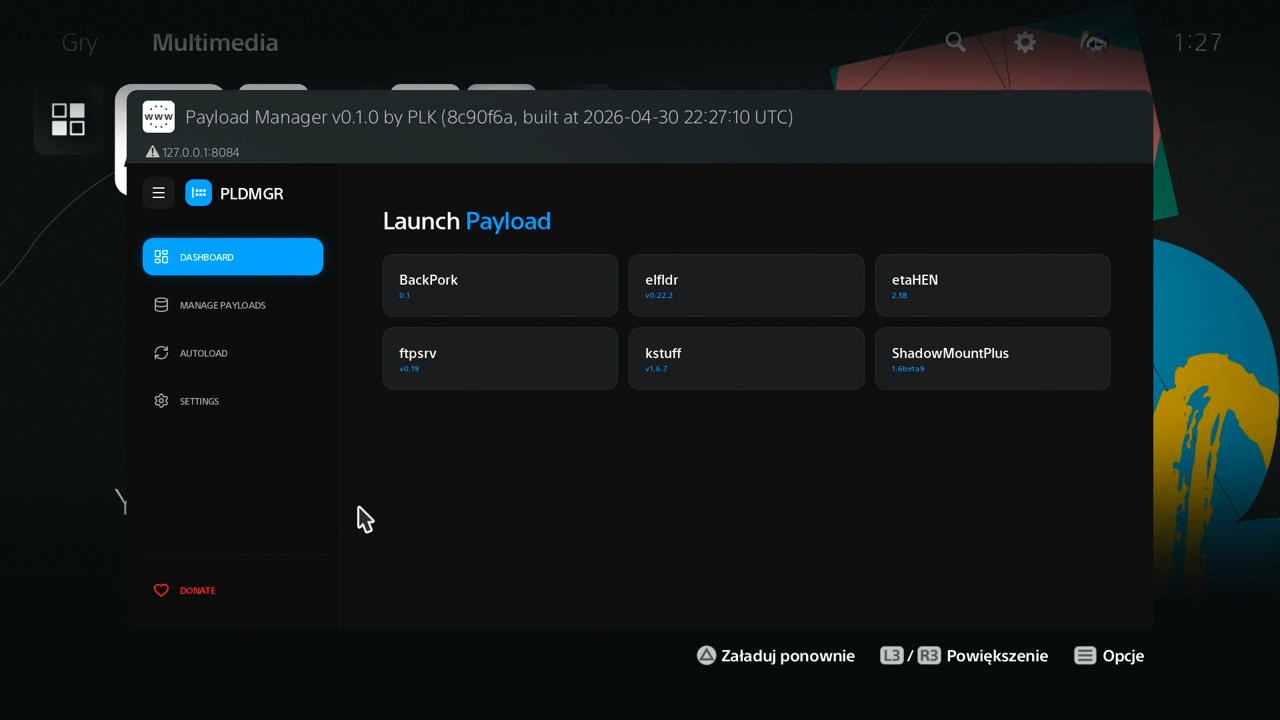
A modern, web-based dashboard to easily manage, import, and automatically load payloads on your PS5.

Features
- Web-Based Interface: A modern dashboard to manage payloads from your PC, phone, or the PS5 itself.
- Import Payloads: Easily add new payloads from a USB drive or download them from the cloud repository.
- Automated Startup: Set up a list of payloads to load automatically whenever you start the manager.
- Home Screen Shortcut: Installs a dedicated "Payload Manager" app icon to your PS5 home screen for quick access.
- Auto-Close Disc Player: Optional setting to automatically close the Disc Player on startup (useful for BD-JB users).
Installation
Using an Autoloader (Recommended)
It is highly recommended to use Payload Manager together with an Autoloader:
pldmgr.elf is already included as the default payload in the latest versions of the Autoloaders linked above.
If you are using an older version and don't want to update the entire autoloader, you can simply:
- Place
pldmgr.elfinto yourautoloaddirectory. - Add
pldmgr.elfas the only entry in yourautoload.txtconfig file.
Standalone / Manual Loading
You can also manually load the manager like any other .elf file. Grab the latest version from the Releases page.
Custom Repositories
You can add third-party payload repositories to the manager. To learn how to create your own repository JSON and host it, see the Custom Repositories Guide.
Translations
PS5 Payload Manager supports multiple languages thanks to the community! If you'd like to help translate the app into your native language or improve existing translations, please visit our Crowdin project. All translations are managed exclusively through Crowdin.
Translation Guidelines:
- Please only submit translations in languages you are fluent in.
- Only translate strings when you know exactly what they mean in the context of the app. If you're unsure, it's much better to leave it untranslated than to guess incorrectly.
- Pro Tip: The best way to translate is to have the Payload Manager running on your PS5 or browser so you can navigate the UI and see the exact context of the buttons and descriptions you are translating!
Supported Languages
| Language | Progress | Translator(s) |
|---|---|---|
| Arabic |  | mohamad.z.k28, abdoulacadat, DumDum143, HoussamLovy, c0ncerta, sgs2ofameer |
| Chinese Simplified |  | owendswang, carlchina |
| French |  | Oblik20, Chronoss |
| German |  | stylefile, xEasy4Breezy, FENDHOUSE, baschte, mighel88 |
| Italian |  | Leon90 |
| Japanese |  | Jane101KR |
| Korean |  | Jane101KR, pop9871517 |
| Persian |  | Epinor, FCGre |
| Polish |  | najdek |
| Portuguese, Brazilian |  | matmarson, slipttees, marcusvrb |
| Russian |  | Akela-1979 |
| Spanish |  | Slayver95, kXmpX, sagatgs |
| Thai |  | Modmycon, hpokemon776 |
| Turkish |  | Sezar61, hpokemon776 |
| Ukrainian |  | Mikeeee |
Credits
- John Törnblom - for the shell UI installer and various payloads used as reference.
- BenNoxXD - for the Disc Player App termination logic.
- owendswang - for contributions
- Everyone else contributing to the PS5 homebrew scene.
Donations
If you'd like to support my work, please check out the DONATE.md file.
Development
For build instructions and deployment details, see DEVELOPMENT.md.
Similar repos


Languages
C
50.2%
JavaScript
45.1%
CSS
1.9%
Shell
1.4%
Makefile
1.0%
A modern, web-based dashboard to easily manage, import, and automatically load payloads on your PS5.
C
372
149 commits
updated Sep 29, 2026
README
PS5 Payload Manager
A modern, web-based dashboard to easily manage, import, and automatically load payloads on your PS5.
Features
- Web-Based Interface: A modern dashboard to manage payloads from your PC, phone, or the PS5 itself.
- Import Payloads: Easily add new payloads from a USB drive or download them from the cloud repository.
- Automated Startup: Set up a list of payloads to load automatically whenever you start the manager.
- Home Screen Shortcut: Installs a dedicated "Payload Manager" app icon to your PS5 home screen for quick access.
- Auto-Close Disc Player: Optional setting to automatically close the Disc Player on startup (useful for BD-JB users).
Installation
Using an Autoloader (Recommended)
It is highly recommended to use Payload Manager together with an Autoloader:
pldmgr.elf is already included as the default payload in the latest versions of the Autoloaders linked above.
If you are using an older version and don't want to update the entire autoloader, you can simply:
- Place
pldmgr.elfinto yourautoloaddirectory. - Add
pldmgr.elfas the only entry in yourautoload.txtconfig file.
Standalone / Manual Loading
You can also manually load the manager like any other .elf file. Grab the latest version from the Releases page.
Custom Repositories
You can add third-party payload repositories to the manager. To learn how to create your own repository JSON and host it, see the Custom Repositories Guide.
Translations
PS5 Payload Manager supports multiple languages thanks to the community! If you'd like to help translate the app into your native language or improve existing translations, please visit our Crowdin project. All translations are managed exclusively through Crowdin.
Translation Guidelines:
- Please only submit translations in languages you are fluent in.
- Only translate strings when you know exactly what they mean in the context of the app. If you're unsure, it's much better to leave it untranslated than to guess incorrectly.
- Pro Tip: The best way to translate is to have the Payload Manager running on your PS5 or browser so you can navigate the UI and see the exact context of the buttons and descriptions you are translating!
Supported Languages
| Language | Progress | Translator(s) |
|---|---|---|
| Arabic | | mohamad.z.k28, abdoulacadat, DumDum143, HoussamLovy, c0ncerta, sgs2ofameer |
| Chinese Simplified | | owendswang, carlchina |
| French | | Oblik20, Chronoss |
| German | | stylefile, xEasy4Breezy, FENDHOUSE, baschte, mighel88 |
| Italian | | Leon90 |
| Japanese | | Jane101KR |
| Korean | | Jane101KR, pop9871517 |
| Persian | | Epinor, FCGre |
| Polish | | najdek |
| Portuguese, Brazilian | | matmarson, slipttees, marcusvrb |
| Russian | | Akela-1979 |
| Spanish | | Slayver95, kXmpX, sagatgs |
| Thai | | Modmycon, hpokemon776 |
| Turkish | | Sezar61, hpokemon776 |
| Ukrainian | | Mikeeee |
Credits
- John Törnblom - for the shell UI installer and various payloads used as reference.
- BenNoxXD - for the Disc Player App termination logic.
- owendswang - for contributions
- Everyone else contributing to the PS5 homebrew scene.
Donations
If you'd like to support my work, please check out the DONATE.md file.
Development
For build instructions and deployment details, see DEVELOPMENT.md.
Similar repos
Languages
C
50.2%
JavaScript
45.1%
CSS
1.9%
Shell
1.4%
Makefile
1.0%