
The fastest, cheapest browser agent (with Jev), with deep reasoning when it matters
See the codeSee what people are saying
README
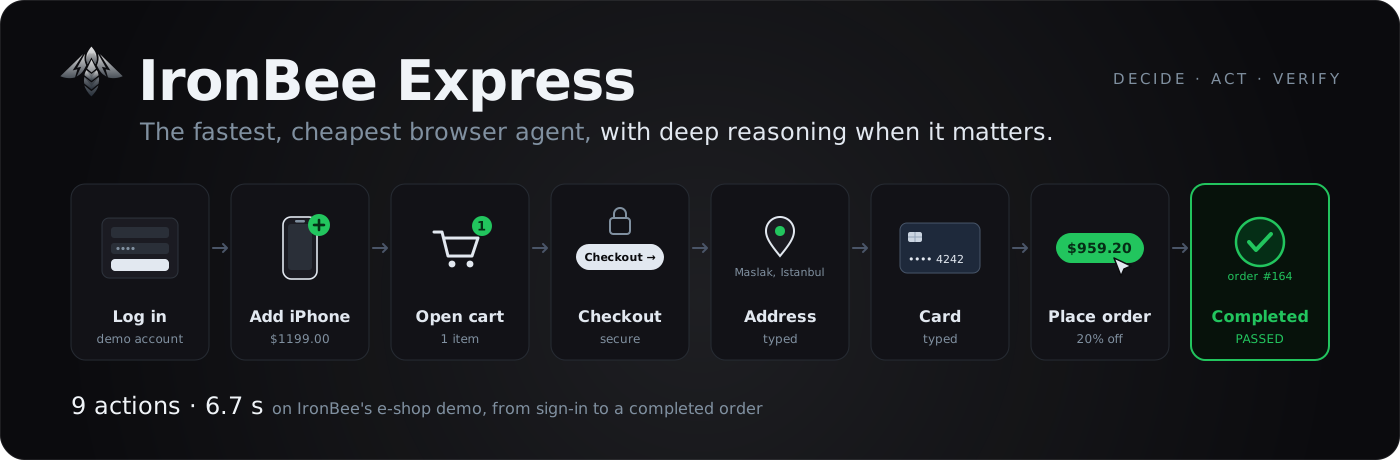
IronBee Express
The fastest, cheapest browser agent, with deep reasoning when it matters.
It checks whether your app really did what the page says, and when it didn't, finds the root cause.





[!IMPORTANT] The IronBee Express waitlist is open. Get early access to IronBee Express on the IronBee platform. Join the waitlist →
[!NOTE] Made by IronBee, the verification and intelligence layer for AI coding agents. When an agent finishes a change, IronBee checks it at runtime, in the browser and in the backend, and returns a clear verdict, pass or fail, with the evidence behind it. IronBee Express works without it; connect IronBee and every run is kept with its video, and the backend's traces and logs join the review. Try IronBee free →
Quick start · How it works · Examples · Docs · Troubleshooting
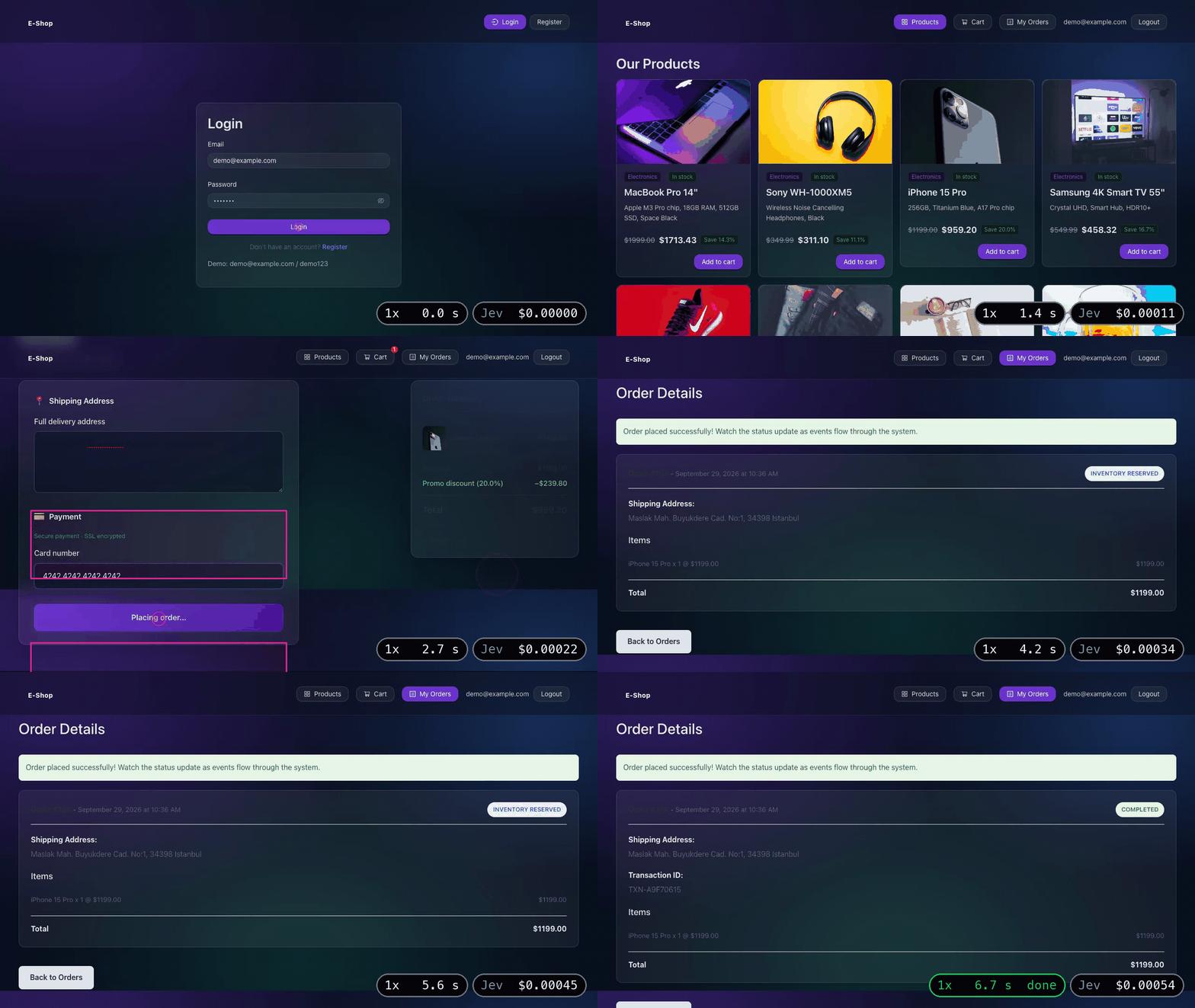
A real run at 1× speed: from sign-in to a completed order, 9 actions in 6.7 s. Jev's cost for the run, its review included: $0.00054.
IronBee Express is a goal-driven browser agent. You describe the task in one sentence, for example "Log in, add the iPhone 15 Pro to the cart, then open the cart", and it carries it out in a real browser. After the run it reviews what happened: the final page, the API responses and, with IronBee, the logs and traces of the backend services. You do not write assertions.
Each step is one decision by TypeSafe Jev over the page's controls and one call to IronBee DevTools, which performs the action and returns the next snapshot. Model output never becomes a selector, a coordinate or a script: an action can only target a control, an option or a value that was offered.
Why IronBee Express
- Fastest and cheapest. There is no LLM in the loop by default. Each step is a single Jev choice among the page's controls, about 300 ms, with no text generated and no screenshot sent. On IronBee's e-shop demo, signing in, adding twelve products and removing four, 20 actions, takes about 12 s with Jev deciding every step. A saved scenario replays with no step decisions at all: the same 20 actions take about 4 s.
- It reviews the whole run and finds the root cause. If the page says "Order placed successfully!"
while the API returns
PAYMENT_FAILED, the run fails, and the review points at the response or the backend log that shows why. Failed requests, console errors, backend spans and logs are reviewed against your goal. - Record once, replay. A passing run of a scenario is cached and replayed without engine decisions. When the page changes, the engine continues from the step that no longer matches and the recording is updated.
- Secrets are not shown to models. Passwords and tokens are typed by reference; neither the engine nor a text model receives the value, and it is masked in everything a model sees, including when a page displays it.
- Hands over to a person when needed. For a social login, a CAPTCHA or an SMS code, the run pauses, the UI shows "Your turn" over the live view, and the run continues from the page you leave it on.
- Deep reasoning when it matters. Add an LLM (Anthropic, OpenAI, OpenRouter, or the Claude Code / Codex CLI) and it writes free text, takes the controls when the engine is stuck, and explains a failed run in plain words: what went wrong and where, from the page, the API responses and the backend's logs. The fast path stays LLM-free.
Quick start
You need Node.js 22+, Google Chrome and a TypeSafe API key.
git clone https://github.com/ironbee-ai/ironbee-express.git
cd ironbee-express
npm install
npm run build
echo 'TYPESAFE_API_KEY=…' > .env
Run an example in the web UI
npm run dev -- ui
# → http://127.0.0.1:15986
Load an example from the list on the left and press Run. You watch the browser as it works,
then get the verdict and the evidence behind it. The e-shop examples sign in to IronBee's demo shop, so type its password,
demo123, in the password row.
Or in the terminal
npm run dev -- run --scenario eshop-add-to-cart --password password=demo123
  1 +0.77s ✓ CLICK [6] button "Login"  [p=0.97 decide 753ms act 1672ms]
  2 +2.83s ✓ CLICK [11] button "Add to cart" (Electronics In stock MacBook Pro 14" Apple M3 Pro chip, 18G…)  [p=0.60 decide 393ms act 165ms]
  3 +3.27s ✓ CLICK [12] button "Add to cart" (Electronics In stock Sony WH-1000XM5 Wireless Noise Cancell…)  [p=0.62 decide 275ms act 46ms]
  …
 15 +7.50s ✓ CLICK [22] button "Add to cart" (Accessories In stock Patagonia Backpack 30L Recycled Polyes…)  [p=0.90 decide 333ms act 50ms]
 16 +7.85s ✓ CLICK [8] button "shopping-cart Cart"  [p=0.97 decide 295ms act 168ms]
 17 +8.32s ✓ CLICK [31] button "Remove" ($749.99)  [p=0.92 decide 301ms act 35ms]
 18 +8.64s ✓ CLICK [25] button "Remove" ($139.99)  [p=0.92 decide 287ms act 50ms]
 19 +8.96s ✓ CLICK [34] button "Remove" ($299.99)  [p=0.88 decide 275ms act 994ms]
 20 +10.24s ✓ CLICK [28] button "Remove" ($89.99)  [p=0.80 decide 278ms act 338ms]
 21 +10.88s · DONE  [p=0.80 decide 305ms]

DONE in 11.69s — 20 actions, 21 decisions
…
PASSED — goal done; no problems found
The goal: log in, add all twelve products from across the page, open the cart and remove four of them. The first run explores with Jev and records how it was done. Run it again and it replays that recording in about 4 s, with no engine decisions.
npm run dev -- <command> runs the ibexpress CLI from the project folder; the docs write it as
ibexpress <command>. Add --headed to watch the browser window.
Your own goal
Give a start page, the goal in one sentence and the values it needs. On the demo shop, this checkout is meant to fail: the page says the order was placed, but the backend did not process it.
npm run dev -- run \
  --url https://eshop.demo.ironbee.dev/ \
  --goal 'Log in, add the "Sony WH-1000XM5" headphones to the cart, check out with shipping address "Maslak Mah. Buyukdere Cad. No:1, 34398 Istanbul" and card number "4242 4242 4242 4242", place the order, then open My Orders.' \
  --value email=demo@example.com --password password=demo123
Abridged output:
  5 +3.38s ✓ TYPE_TEXT [20] textbox "Full delivery address" ← "Maslak Mah. Buyukdere Cad. No:1, 34398 Istanbul"  [p=0.96 decide 317ms act 86ms]
  6 +3.77s ✓ TYPE_TEXT [21] textbox "Card number" ← "4242 4242 4242 4242"  [p=0.94 decide 311ms act 838ms]
  …
  8 +5.34s ✓ CLICK [23] button "Place order — $ 311.10"  [p=0.98 decide 298ms act 1143ms]
  9 +6.80s ✗ DONE  [p=0.74 decide 323ms]  (the goal failed (p=0.83); the evidence shows GET /api/orders/131 → 200)

FAILED in 7.57s — 8 actions, 9 decisions (the goal failed (p=0.83); the evidence shows GET /api/orders/131 → 200)
…
FAILED — the goal was not reached: notification-service: 📧 SENDING EMAIL NOTIFICATION To: demo@example.com Subject: Order #131 Could Not Be Processed. Reason: Insufficient inventory
goal failed (p=0.74) · 1 problem in 1 anomaly reviewed
  ✗✗ CRITICAL [log] frontend: [OrderDetailPage] order ended with status FAILED: 131
The page says the order was placed, but the order's API response says it failed, so the run fails at DONE. That needs nothing but the engine key. With IronBee connected, the review also reads the backend's logs. The last lines above come from there: they name the notification service's message and rate the frontend's log of the failed order as critical.
[!TIP] Put the exact texts to type in quotes in the goal (
"Istanbul"). Without a text model, Jev chooses only among your--values, your secrets and what the goal quotes.
How it works
flowchart LR
    G([Goal]) --> S[Snapshot<br/>indexed controls]
    S --> J{{Jev<br/>one request}}
    J -->|operation + target| A[control_act<br/>guard → act → settle]
    A -->|next snapshot| S
    J -->|DONE| V{{Review<br/>page · API · console<br/>spans · logs}}
    V --> R([PASSED / FAILED])
    J -. stuck .-> L[Text model<br/>takes the controls]
    L -. hands back .-> J
    J -. needs a person .-> U[Your turn]
    U -. Continue .-> S
Each step, Jev picks an operation and a target from the controls DevTools offers:
CLICK · TYPE_TEXT · SELECT · PRESS_ENTER · HOVER · PRESS_KEY · GO_BACK / GO_FORWARD ·
SCROLL_DOWN / SCROLL_UP · SWITCH_TAB / CLOSE_TAB · WAIT · ASK_USER · DONE · BLOCKED.
DevTools re-checks that the control is still the one Jev decided on, acts, waits for the page to
settle, and returns the next snapshot, all in one call.
Progress is measured on what the page says, so a click that reloads the same page counts as no
change, and the next decision is told so in plain words. DONE is only a claim: it is accepted when the
page and the API responses show the goal done.
How a run is reviewed
flowchart LR
    D[Run ends] --> C[Collect anomalies<br/>4xx/5xx · failed requests<br/>console errors<br/>failed / slow spans<br/>WARN+ logs]
    C --> G[Group alike ones<br/>request pattern + status<br/>span service + name<br/>log message shape]
    G --> J{{Jev judges each<br/>for this goal}}
    J --> V[none · minor · major · critical]
    V --> P([Passed = goal done<br/>and nothing major or critical])
- At DONE: do the page and the API show the goal done? If not yet, DONE is rejected and the agent keeps going; if the evidence shows the goal failed, the run ends failed right there.
- After the run: every anomaly is collected mechanically; whether it matters is Jev's call, for your goal. No text is matched against keywords. With IronBee connected, spans and logs from every backend service join in.
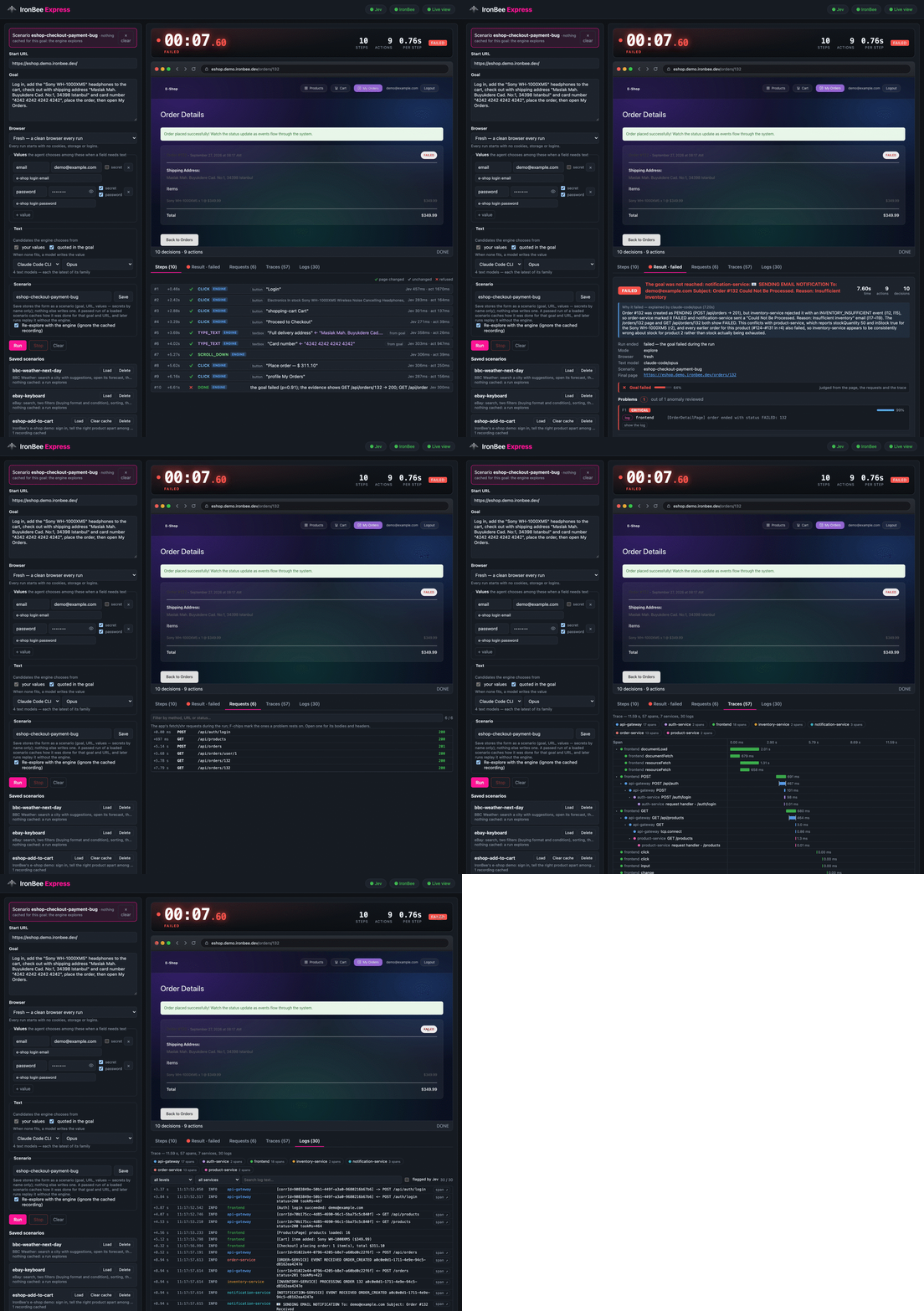
More: review.
Record once, replay without the engine
--save-as checkout saves the prompt as a scenario. A passing run caches how it was done
(./.ibexpress/cache, never committed), and --scenario checkout then replays it with no engine
decisions: the checkout goes from 6.8 s explored to 1.6–1.9 s replayed. If the page changed and a
step can't be found, the engine takes over from there and the recording is healed.
More: scenarios.
Examples
Ready-to-run prompts ship in examples/scenarios/. Load one in the UI and press
Run, or run it from the terminal with npm run dev -- run --scenario <name>. The e-shop examples
also need the demo password: --password password=demo123.
| Example | Site | What it exercises |
|---|---|---|
google-flights-round-trip | Google Flights | autocomplete, a two-date picker, passenger count |
google-maps-transit | Google Maps | suggestions, public transport, a departure time (uses a text model) |
ebay-keyboard | eBay | search, two filters, sorting, the first listing |
ikea-office-chair | IKEA | search, a color filter, sort by price, product details |
bbc-weather-next-day | BBC Weather | a city search, its forecast, the next day |
eshop-add-to-cart | IronBee e-shop demo | sign in with a secret, add twelve products, remove four: 20 actions, about 12 s explored, about 4 s replayed |
eshop-checkout | IronBee e-shop demo | sign in, buy the iPhone 15 Pro with an address and a card, wait until the order is completed: 9 actions, about 6.7 s; places a real order |
eshop-checkout-payment-bug | IronBee e-shop demo | a full checkout; expected to fail (the page reports success, the backend does not) |
Timings, notes and how recordings are kept: examples.
IronBee platform
Connect IronBee and every run becomes a session on the platform (verdict, tool calls, video), and the run's distributed trace, from the browser through every backend service, is read back into the review. A failed run lists the backend logs behind it. Nothing to configure: press Connect IronBee in the UI (sign in or sign up, free), or reuse the login of the IronBee CLI or editor extension. Without IronBee everything still runs; runs are just not reported.
To use IronBee Express on the IronBee platform itself, join the waitlist.
More: IronBee.
More capabilities
When a person is needed
Some steps only the person running the test can do: a social or single sign-on login, a CAPTCHA, a code
sent to a phone, a value nothing in the run provides. Jev then chooses ASK_USER: the run pauses, the
UI shows "Your turn" over the live view and passes your clicks and typing to the browser, and
Continue resumes from the page you left it on. Your time is not counted as the run's. A saved
scenario records the hand-over and pauses there again on replay. From the terminal this needs
--headed (you act in the browser window, then press Enter). With nobody to hand over to, ASK_USER is
not offered. See your turn.
Where typed text comes from
The engine chooses a value from your --values / --secrets (secrets by name only; each may carry
a --value-desc saying what it is for; a login password is given with --password, or marked
password in the UI, and is then typed into the start site's password fields only) or strings the goal
puts in quotes. When none fits, a text model you pick writes one: the Anthropic, OpenAI or OpenRouter API
(ANTHROPIC_API_KEY, OPENAI_API_KEY, OPENROUTER_API_KEY), or the Claude Code / Codex CLI with their
own login; --text-model provider/model, or the UI's model picker. See text and secrets.
Fresh browser or a saved profile
By default every run starts in a fresh browser: no cookies, no storage, no logins. Pick a saved
profile instead (the UI's Browser picker, --profile name, or a scenario's profile) and its cookies,
storage and logins stay between runs: sign in once and later runs start signed in. Profiles live in
.ibexpress/profiles/ (kept out of git, since they hold live sessions); list or delete them with
npm run dev -- profiles list | delete. Runs in one profile affect each other (a cart, an open
session), which is why the fresh browser is the default.
Dialogs, new tabs and iframes
- Native dialogs (
alert/confirm/prompt) are held for Jev to answer: the snapshot is the dialog, so a "Delete this?" is confirmed or cancelled on purpose. - New tabs (
target=_blank,window.open) are followed like a person would; Jev can alsoSWITCH_TAB/CLOSE_TAB. A recording continues on each tab (one video per tab). - Iframes (an embedded payment or login form) with
IBEXPRESS_IFRAMES=true(off by default). Their controls are offered like the page's, and the run's secrets (never a password) may be typed into the frames the start site embeds. Keep it off where the start site embeds content you don't trust.
Documentation
Start at the docs index, or jump straight in:
| Guide | What's in it |
|---|---|
| Examples | the shipped scenarios, timings, how to run them |
| Configuration | the main settings, CLI commands and flags |
| Web UI | the run form, the live view, steps, the result and its evidence |
| Review | how a run is judged: evidence, anomalies, verdict |
| Scenarios | save, record, replay, heal |
| Text and secrets | values, secrets, text models and their providers, a text model taking over |
| Your turn | handing the browser to a person |
| IronBee | reporting, the trace the review reads, connecting |
Working on IronBee Express itself? See contributing.
Troubleshooting
The Jev pill is red, or a run stops with "is not usable"
jev (jev-latest) is not usable: TYPESAFE_API_KEY / JEV_API_KEY is not set
The key was not read. .env is loaded from the directory you run in, so it belongs at the root of
your checkout — src/.env is never read, and a missing file is ignored silently. It is read once at
startup, so restart the UI after editing it. export FOO=... lines are fine. This check only reads the
configuration; it does not call the API, so "API key configured" does not mean the key is valid.
"The DevTools daemon exited during start"
The DevTools daemon exited during start (code 1)
Run npm run build first, and again after you update the project. A run needs the built files in
dist/, and npm run dev does not build them.
A port is already in use
listen EADDRINUSE: address already in use 127.0.0.1:15986
Another program, or a UI you already started, is using the port. Pick another one:
npm run dev -- ui --port 16000.
A run can fail the same way with The DevTools daemon did not become healthy in time, usually because
something else holds the daemon's port (2071 by default). Add --port <n> to the command.
A scenario asks for secrets you already gave
Scenario checkout needs the secret(s) password (pass --secret name=… )
Secret values are never saved, only their names. Give them again on every run, for example
--password password=env:ESHOP_PW or --secret name=…, or fill in the secret rows in the UI.
A scenario explores instead of replaying, or needs the engine on every run
- A recording is saved only after a run of that scenario passes its review.
npm run dev -- scenarios listshows how many recordings each scenario has. - A recording belongs to one goal and one start URL. After you edit either, the next run explores and records again.
--exploreignores the recording for one run.- A site whose content changes between visits (search results, A/B tests) may need the engine on
every replay. That is expected.
npm run dev -- scenarios clear-cache <name>starts that scenario over.
The run ends BLOCKED on a login, CAPTCHA or SMS-code page
These steps need a person. The run hands the browser over only when someone can take it:
- always in the UI;
- in the terminal only with
--headed: you act in the browser window, then press Enter.
Without that, the run cannot get past the page.
A field stays empty or gets the wrong text
Jev only chooses among the values you give, your secrets, and the texts your goal puts in quotes.
- Give the value with
--value name=text. - If the field's label does not match the name, add
--value-desc name=what-it-is-for. - Or put the exact text in quotes in the goal.
For free text, choose a text model: --text-model provider/model, or the model picker in the UI.
A text model is missing from the list
A provider appears once its key is set (ANTHROPIC_API_KEY, OPENAI_API_KEY, OPENROUTER_API_KEY),
or once its CLI (claude, codex) is installed, on your PATH and logged in. .env is read at
startup, so restart the UI after changing it.
The run was not reported to IronBee
- Connect first: Connect IronBee in the UI, from a browser on the same machine, or
ironbee loginwith the IronBee CLI. - A saved login is used only for its own domain (
IRONBEE_DOMAIN,ironbee.aiby default). IBEXPRESS_IRONBEE_REPORT=offturns reporting off.- When the platform rejects a send, the run still finishes. The output shows a warning with the reason ("NOT reported: …").
The run ends with BUDGET
The goal needed more steps than a run allows: 60 actions and 120 decisions by default. Raise
IBEXPRESS_MAX_ACTIONS and IBEXPRESS_MAX_DECISIONS in .env, or split the goal into smaller ones.
Limits
- The review is a model's judgement, so it is probabilistic. It looks at the most recent requests, logs and spans of a run, not at all of them.
- The agent only works with controls it can see on screen, and scrolls to reach the rest. Controls
inside iframes are off unless you turn them on with
IBEXPRESS_IFRAMES. - Secrets are never shown to a model. In a few setups they are sent as a value rather than typed by reference; see text and secrets.
License
Elastic License 2.0 © 2026 IronBee Inc.
Similar repos


Languages
TypeScript
87.3%
JavaScript
8.7%
CSS
3.2%
The fastest, cheapest browser agent (with Jev), with deep reasoning when it matters
See the codeSee what people are saying
README
IronBee Express
The fastest, cheapest browser agent, with deep reasoning when it matters.
It checks whether your app really did what the page says, and when it didn't, finds the root cause.
[!IMPORTANT] The IronBee Express waitlist is open. Get early access to IronBee Express on the IronBee platform. Join the waitlist →
[!NOTE] Made by IronBee, the verification and intelligence layer for AI coding agents. When an agent finishes a change, IronBee checks it at runtime, in the browser and in the backend, and returns a clear verdict, pass or fail, with the evidence behind it. IronBee Express works without it; connect IronBee and every run is kept with its video, and the backend's traces and logs join the review. Try IronBee free →
Quick start · How it works · Examples · Docs · Troubleshooting
A real run at 1× speed: from sign-in to a completed order, 9 actions in 6.7 s. Jev's cost for the run, its review included: $0.00054.
IronBee Express is a goal-driven browser agent. You describe the task in one sentence, for example "Log in, add the iPhone 15 Pro to the cart, then open the cart", and it carries it out in a real browser. After the run it reviews what happened: the final page, the API responses and, with IronBee, the logs and traces of the backend services. You do not write assertions.
Each step is one decision by TypeSafe Jev over the page's controls and one call to IronBee DevTools, which performs the action and returns the next snapshot. Model output never becomes a selector, a coordinate or a script: an action can only target a control, an option or a value that was offered.
Why IronBee Express
- Fastest and cheapest. There is no LLM in the loop by default. Each step is a single Jev choice among the page's controls, about 300 ms, with no text generated and no screenshot sent. On IronBee's e-shop demo, signing in, adding twelve products and removing four, 20 actions, takes about 12 s with Jev deciding every step. A saved scenario replays with no step decisions at all: the same 20 actions take about 4 s.
- It reviews the whole run and finds the root cause. If the page says "Order placed successfully!"
while the API returns
PAYMENT_FAILED, the run fails, and the review points at the response or the backend log that shows why. Failed requests, console errors, backend spans and logs are reviewed against your goal. - Record once, replay. A passing run of a scenario is cached and replayed without engine decisions. When the page changes, the engine continues from the step that no longer matches and the recording is updated.
- Secrets are not shown to models. Passwords and tokens are typed by reference; neither the engine nor a text model receives the value, and it is masked in everything a model sees, including when a page displays it.
- Hands over to a person when needed. For a social login, a CAPTCHA or an SMS code, the run pauses, the UI shows "Your turn" over the live view, and the run continues from the page you leave it on.
- Deep reasoning when it matters. Add an LLM (Anthropic, OpenAI, OpenRouter, or the Claude Code / Codex CLI) and it writes free text, takes the controls when the engine is stuck, and explains a failed run in plain words: what went wrong and where, from the page, the API responses and the backend's logs. The fast path stays LLM-free.
Quick start
You need Node.js 22+, Google Chrome and a TypeSafe API key.
git clone https://github.com/ironbee-ai/ironbee-express.git
cd ironbee-express
npm install
npm run build
echo 'TYPESAFE_API_KEY=…' > .env
Run an example in the web UI
npm run dev -- ui
# → http://127.0.0.1:15986
Load an example from the list on the left and press Run. You watch the browser as it works,
then get the verdict and the evidence behind it. The e-shop examples sign in to IronBee's demo shop, so type its password,
demo123, in the password row.
Or in the terminal
npm run dev -- run --scenario eshop-add-to-cart --password password=demo123
  1 +0.77s ✓ CLICK [6] button "Login"  [p=0.97 decide 753ms act 1672ms]
  2 +2.83s ✓ CLICK [11] button "Add to cart" (Electronics In stock MacBook Pro 14" Apple M3 Pro chip, 18G…)  [p=0.60 decide 393ms act 165ms]
  3 +3.27s ✓ CLICK [12] button "Add to cart" (Electronics In stock Sony WH-1000XM5 Wireless Noise Cancell…)  [p=0.62 decide 275ms act 46ms]
  …
 15 +7.50s ✓ CLICK [22] button "Add to cart" (Accessories In stock Patagonia Backpack 30L Recycled Polyes…)  [p=0.90 decide 333ms act 50ms]
 16 +7.85s ✓ CLICK [8] button "shopping-cart Cart"  [p=0.97 decide 295ms act 168ms]
 17 +8.32s ✓ CLICK [31] button "Remove" ($749.99)  [p=0.92 decide 301ms act 35ms]
 18 +8.64s ✓ CLICK [25] button "Remove" ($139.99)  [p=0.92 decide 287ms act 50ms]
 19 +8.96s ✓ CLICK [34] button "Remove" ($299.99)  [p=0.88 decide 275ms act 994ms]
 20 +10.24s ✓ CLICK [28] button "Remove" ($89.99)  [p=0.80 decide 278ms act 338ms]
 21 +10.88s · DONE  [p=0.80 decide 305ms]

DONE in 11.69s — 20 actions, 21 decisions
…
PASSED — goal done; no problems found
The goal: log in, add all twelve products from across the page, open the cart and remove four of them. The first run explores with Jev and records how it was done. Run it again and it replays that recording in about 4 s, with no engine decisions.
npm run dev -- <command> runs the ibexpress CLI from the project folder; the docs write it as
ibexpress <command>. Add --headed to watch the browser window.
Your own goal
Give a start page, the goal in one sentence and the values it needs. On the demo shop, this checkout is meant to fail: the page says the order was placed, but the backend did not process it.
npm run dev -- run \
  --url https://eshop.demo.ironbee.dev/ \
  --goal 'Log in, add the "Sony WH-1000XM5" headphones to the cart, check out with shipping address "Maslak Mah. Buyukdere Cad. No:1, 34398 Istanbul" and card number "4242 4242 4242 4242", place the order, then open My Orders.' \
  --value email=demo@example.com --password password=demo123
Abridged output:
  5 +3.38s ✓ TYPE_TEXT [20] textbox "Full delivery address" ← "Maslak Mah. Buyukdere Cad. No:1, 34398 Istanbul"  [p=0.96 decide 317ms act 86ms]
  6 +3.77s ✓ TYPE_TEXT [21] textbox "Card number" ← "4242 4242 4242 4242"  [p=0.94 decide 311ms act 838ms]
  …
  8 +5.34s ✓ CLICK [23] button "Place order — $ 311.10"  [p=0.98 decide 298ms act 1143ms]
  9 +6.80s ✗ DONE  [p=0.74 decide 323ms]  (the goal failed (p=0.83); the evidence shows GET /api/orders/131 → 200)

FAILED in 7.57s — 8 actions, 9 decisions (the goal failed (p=0.83); the evidence shows GET /api/orders/131 → 200)
…
FAILED — the goal was not reached: notification-service: 📧 SENDING EMAIL NOTIFICATION To: demo@example.com Subject: Order #131 Could Not Be Processed. Reason: Insufficient inventory
goal failed (p=0.74) · 1 problem in 1 anomaly reviewed
  ✗✗ CRITICAL [log] frontend: [OrderDetailPage] order ended with status FAILED: 131
The page says the order was placed, but the order's API response says it failed, so the run fails at DONE. That needs nothing but the engine key. With IronBee connected, the review also reads the backend's logs. The last lines above come from there: they name the notification service's message and rate the frontend's log of the failed order as critical.
[!TIP] Put the exact texts to type in quotes in the goal (
"Istanbul"). Without a text model, Jev chooses only among your--values, your secrets and what the goal quotes.
How it works
flowchart LR
    G([Goal]) --> S[Snapshot<br/>indexed controls]
    S --> J{{Jev<br/>one request}}
    J -->|operation + target| A[control_act<br/>guard → act → settle]
    A -->|next snapshot| S
    J -->|DONE| V{{Review<br/>page · API · console<br/>spans · logs}}
    V --> R([PASSED / FAILED])
    J -. stuck .-> L[Text model<br/>takes the controls]
    L -. hands back .-> J
    J -. needs a person .-> U[Your turn]
    U -. Continue .-> S
Each step, Jev picks an operation and a target from the controls DevTools offers:
CLICK · TYPE_TEXT · SELECT · PRESS_ENTER · HOVER · PRESS_KEY · GO_BACK / GO_FORWARD ·
SCROLL_DOWN / SCROLL_UP · SWITCH_TAB / CLOSE_TAB · WAIT · ASK_USER · DONE · BLOCKED.
DevTools re-checks that the control is still the one Jev decided on, acts, waits for the page to
settle, and returns the next snapshot, all in one call.
Progress is measured on what the page says, so a click that reloads the same page counts as no
change, and the next decision is told so in plain words. DONE is only a claim: it is accepted when the
page and the API responses show the goal done.
How a run is reviewed
flowchart LR
    D[Run ends] --> C[Collect anomalies<br/>4xx/5xx · failed requests<br/>console errors<br/>failed / slow spans<br/>WARN+ logs]
    C --> G[Group alike ones<br/>request pattern + status<br/>span service + name<br/>log message shape]
    G --> J{{Jev judges each<br/>for this goal}}
    J --> V[none · minor · major · critical]
    V --> P([Passed = goal done<br/>and nothing major or critical])
- At DONE: do the page and the API show the goal done? If not yet, DONE is rejected and the agent keeps going; if the evidence shows the goal failed, the run ends failed right there.
- After the run: every anomaly is collected mechanically; whether it matters is Jev's call, for your goal. No text is matched against keywords. With IronBee connected, spans and logs from every backend service join in.
More: review.
Record once, replay without the engine
--save-as checkout saves the prompt as a scenario. A passing run caches how it was done
(./.ibexpress/cache, never committed), and --scenario checkout then replays it with no engine
decisions: the checkout goes from 6.8 s explored to 1.6–1.9 s replayed. If the page changed and a
step can't be found, the engine takes over from there and the recording is healed.
More: scenarios.
Examples
Ready-to-run prompts ship in examples/scenarios/. Load one in the UI and press
Run, or run it from the terminal with npm run dev -- run --scenario <name>. The e-shop examples
also need the demo password: --password password=demo123.
| Example | Site | What it exercises |
|---|---|---|
google-flights-round-trip | Google Flights | autocomplete, a two-date picker, passenger count |
google-maps-transit | Google Maps | suggestions, public transport, a departure time (uses a text model) |
ebay-keyboard | eBay | search, two filters, sorting, the first listing |
ikea-office-chair | IKEA | search, a color filter, sort by price, product details |
bbc-weather-next-day | BBC Weather | a city search, its forecast, the next day |
eshop-add-to-cart | IronBee e-shop demo | sign in with a secret, add twelve products, remove four: 20 actions, about 12 s explored, about 4 s replayed |
eshop-checkout | IronBee e-shop demo | sign in, buy the iPhone 15 Pro with an address and a card, wait until the order is completed: 9 actions, about 6.7 s; places a real order |
eshop-checkout-payment-bug | IronBee e-shop demo | a full checkout; expected to fail (the page reports success, the backend does not) |
Timings, notes and how recordings are kept: examples.
IronBee platform
Connect IronBee and every run becomes a session on the platform (verdict, tool calls, video), and the run's distributed trace, from the browser through every backend service, is read back into the review. A failed run lists the backend logs behind it. Nothing to configure: press Connect IronBee in the UI (sign in or sign up, free), or reuse the login of the IronBee CLI or editor extension. Without IronBee everything still runs; runs are just not reported.
To use IronBee Express on the IronBee platform itself, join the waitlist.
More: IronBee.
More capabilities
When a person is needed
Some steps only the person running the test can do: a social or single sign-on login, a CAPTCHA, a code
sent to a phone, a value nothing in the run provides. Jev then chooses ASK_USER: the run pauses, the
UI shows "Your turn" over the live view and passes your clicks and typing to the browser, and
Continue resumes from the page you left it on. Your time is not counted as the run's. A saved
scenario records the hand-over and pauses there again on replay. From the terminal this needs
--headed (you act in the browser window, then press Enter). With nobody to hand over to, ASK_USER is
not offered. See your turn.
Where typed text comes from
The engine chooses a value from your --values / --secrets (secrets by name only; each may carry
a --value-desc saying what it is for; a login password is given with --password, or marked
password in the UI, and is then typed into the start site's password fields only) or strings the goal
puts in quotes. When none fits, a text model you pick writes one: the Anthropic, OpenAI or OpenRouter API
(ANTHROPIC_API_KEY, OPENAI_API_KEY, OPENROUTER_API_KEY), or the Claude Code / Codex CLI with their
own login; --text-model provider/model, or the UI's model picker. See text and secrets.
Fresh browser or a saved profile
By default every run starts in a fresh browser: no cookies, no storage, no logins. Pick a saved
profile instead (the UI's Browser picker, --profile name, or a scenario's profile) and its cookies,
storage and logins stay between runs: sign in once and later runs start signed in. Profiles live in
.ibexpress/profiles/ (kept out of git, since they hold live sessions); list or delete them with
npm run dev -- profiles list | delete. Runs in one profile affect each other (a cart, an open
session), which is why the fresh browser is the default.
Dialogs, new tabs and iframes
- Native dialogs (
alert/confirm/prompt) are held for Jev to answer: the snapshot is the dialog, so a "Delete this?" is confirmed or cancelled on purpose. - New tabs (
target=_blank,window.open) are followed like a person would; Jev can alsoSWITCH_TAB/CLOSE_TAB. A recording continues on each tab (one video per tab). - Iframes (an embedded payment or login form) with
IBEXPRESS_IFRAMES=true(off by default). Their controls are offered like the page's, and the run's secrets (never a password) may be typed into the frames the start site embeds. Keep it off where the start site embeds content you don't trust.
Documentation
Start at the docs index, or jump straight in:
| Guide | What's in it |
|---|---|
| Examples | the shipped scenarios, timings, how to run them |
| Configuration | the main settings, CLI commands and flags |
| Web UI | the run form, the live view, steps, the result and its evidence |
| Review | how a run is judged: evidence, anomalies, verdict |
| Scenarios | save, record, replay, heal |
| Text and secrets | values, secrets, text models and their providers, a text model taking over |
| Your turn | handing the browser to a person |
| IronBee | reporting, the trace the review reads, connecting |
Working on IronBee Express itself? See contributing.
Troubleshooting
The Jev pill is red, or a run stops with "is not usable"
jev (jev-latest) is not usable: TYPESAFE_API_KEY / JEV_API_KEY is not set
The key was not read. .env is loaded from the directory you run in, so it belongs at the root of
your checkout — src/.env is never read, and a missing file is ignored silently. It is read once at
startup, so restart the UI after editing it. export FOO=... lines are fine. This check only reads the
configuration; it does not call the API, so "API key configured" does not mean the key is valid.
"The DevTools daemon exited during start"
The DevTools daemon exited during start (code 1)
Run npm run build first, and again after you update the project. A run needs the built files in
dist/, and npm run dev does not build them.
A port is already in use
listen EADDRINUSE: address already in use 127.0.0.1:15986
Another program, or a UI you already started, is using the port. Pick another one:
npm run dev -- ui --port 16000.
A run can fail the same way with The DevTools daemon did not become healthy in time, usually because
something else holds the daemon's port (2071 by default). Add --port <n> to the command.
A scenario asks for secrets you already gave
Scenario checkout needs the secret(s) password (pass --secret name=… )
Secret values are never saved, only their names. Give them again on every run, for example
--password password=env:ESHOP_PW or --secret name=…, or fill in the secret rows in the UI.
A scenario explores instead of replaying, or needs the engine on every run
- A recording is saved only after a run of that scenario passes its review.
npm run dev -- scenarios listshows how many recordings each scenario has. - A recording belongs to one goal and one start URL. After you edit either, the next run explores and records again.
--exploreignores the recording for one run.- A site whose content changes between visits (search results, A/B tests) may need the engine on
every replay. That is expected.
npm run dev -- scenarios clear-cache <name>starts that scenario over.
The run ends BLOCKED on a login, CAPTCHA or SMS-code page
These steps need a person. The run hands the browser over only when someone can take it:
- always in the UI;
- in the terminal only with
--headed: you act in the browser window, then press Enter.
Without that, the run cannot get past the page.
A field stays empty or gets the wrong text
Jev only chooses among the values you give, your secrets, and the texts your goal puts in quotes.
- Give the value with
--value name=text. - If the field's label does not match the name, add
--value-desc name=what-it-is-for. - Or put the exact text in quotes in the goal.
For free text, choose a text model: --text-model provider/model, or the model picker in the UI.
A text model is missing from the list
A provider appears once its key is set (ANTHROPIC_API_KEY, OPENAI_API_KEY, OPENROUTER_API_KEY),
or once its CLI (claude, codex) is installed, on your PATH and logged in. .env is read at
startup, so restart the UI after changing it.
The run was not reported to IronBee
- Connect first: Connect IronBee in the UI, from a browser on the same machine, or
ironbee loginwith the IronBee CLI. - A saved login is used only for its own domain (
IRONBEE_DOMAIN,ironbee.aiby default). IBEXPRESS_IRONBEE_REPORT=offturns reporting off.- When the platform rejects a send, the run still finishes. The output shows a warning with the reason ("NOT reported: …").
The run ends with BUDGET
The goal needed more steps than a run allows: 60 actions and 120 decisions by default. Raise
IBEXPRESS_MAX_ACTIONS and IBEXPRESS_MAX_DECISIONS in .env, or split the goal into smaller ones.
Limits
- The review is a model's judgement, so it is probabilistic. It looks at the most recent requests, logs and spans of a run, not at all of them.
- The agent only works with controls it can see on screen, and scrolls to reach the rest. Controls
inside iframes are off unless you turn them on with
IBEXPRESS_IFRAMES. - Secrets are never shown to a model. In a few setups they are sent as a value rather than typed by reference; see text and secrets.
License
Elastic License 2.0 © 2026 IronBee Inc.
Similar repos
Languages
TypeScript
87.3%
JavaScript
8.7%
CSS
3.2%