DPVS is a high performance Layer-4 load balancer based on DPDK.
C
3,242
1,415 commits
updated Dec 31, 2025



DPVS is a high performance Layer-4 load balancer based on DPDK. It derives from Linux Virtual Server LVS and its modification alibaba/LVS.
Notes: The name
DPVScomes from "DPDK-LVS".
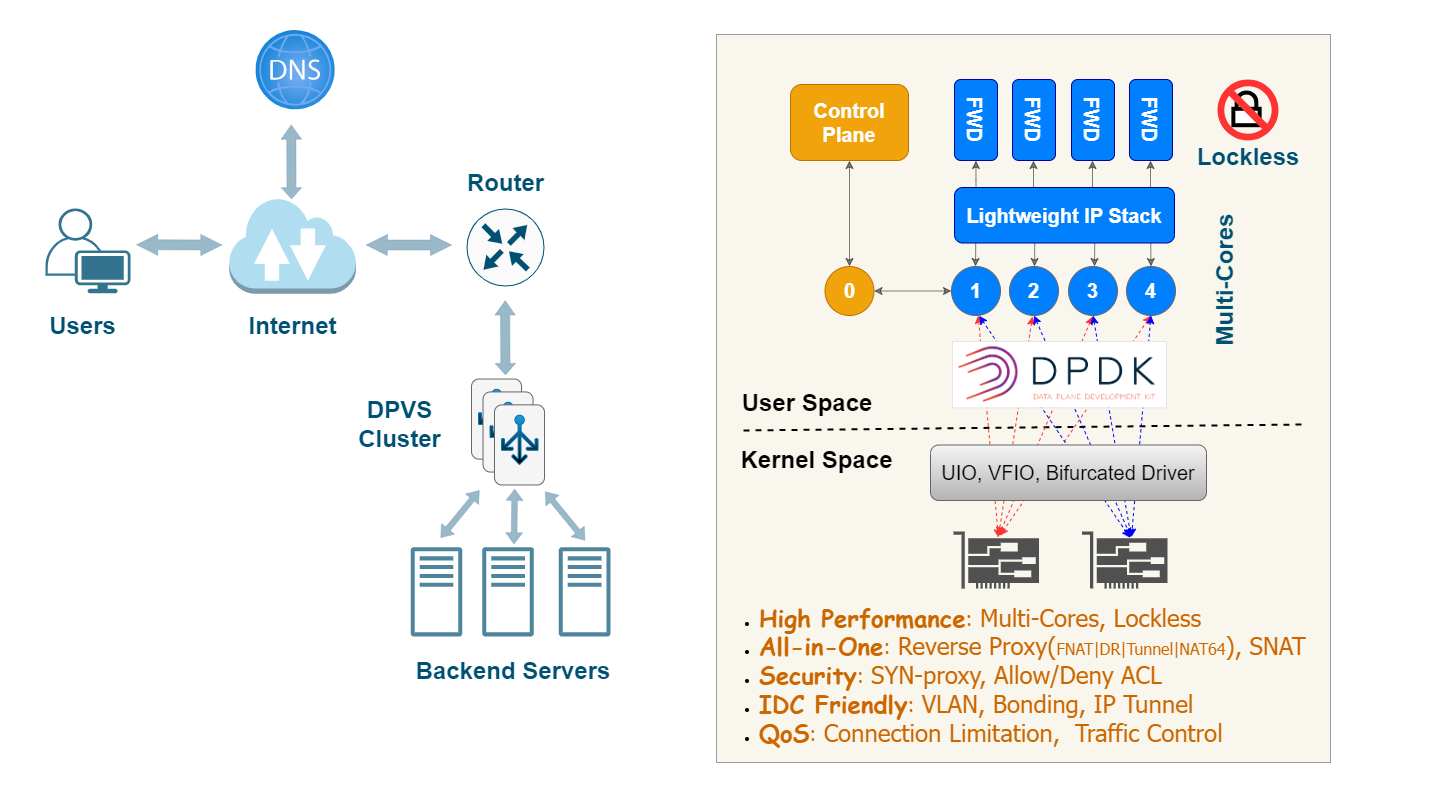
Several techniques are applied for high performance:
Major features of DPVS including:
dpip ipvsadm command line tools, or from config files of keepalived, or via restful API provided by dpvs-agent.DPVS consists of the modules illustrated in the diagram below.

This quick start is performed in the environments described below.
Other environments should also be OK if DPDK works, please check DPDK Supported Hardware and DPDK System Requirements for more information.
Notes:
- Please check this link for NICs supported by DPDK: http://core.dpdk.org/supported.
Flow Control(rte_flow) is required forFNATandSNATmode when DPVS running on multi-cores unlessconn redirectis enabled. The minimum requirements to ensure DPVS works with multi-core properly is thatrte_flowmust support "ipv4, ipv6, tcp, udp" four items, and "drop, queue" two actions.- DPVS doesn't confine itself to the this test environments. In fact, DPVS is an user-space application which relies very little on operating system, kernel versions, compilers, and other platform discrepancies. As far as is known, DPVS has been verified at least in the following environments.
- Anolis 8.6, 8.8, 8.9
- GCC 8.5
- Kernel: 3.10.0, 4.18.0, 5.10.134
- NIC: Intel IXGBE, NVIDIA MLX5
- Centos 7.x and GCC 4.8 are also supported by DPVS versions earlier than v1.10.
$ git clone https://github.com/iqiyi/dpvs.git
$ cd dpvs
Well, let's start from DPDK then.
Currently, dpdk-24.11 is recommended for DPVS, and we will not support dpdk versions earlier than dpdk-20.11 any more. If you are still using earlier dpdk versions, please use earlier DPVS releases. The best matched DPDK versions are listed in the table below.
| DPVS Version | DPDK Version |
|---|---|
| v1.10 | 24.11 |
| v1.9 | 20.11 |
| v1.8 | 18.11 |
| v1.7 or earlier | 17.11 or earlier |
Notes: You can skip this section if experienced with DPDK, and refer to this link for details.
$ wget https://fast.dpdk.org/rel/dpdk-24.11.tar.xz   # download from dpdk.org if link failed.
$ tar xf dpdk-24.11.tar.xz
There are some patches for DPDK to support extra features needed by DPVS. Apply them if needed. For example, there's a patch for DPDK ixgbe flow, apply it if you are using the ixgbe network adapter.
Notes: It's assumed we are in DPVS root directory where you have installed dpdk-24.11 source codes. Please note it's not mandatory, just for convenience.
$ cd <path-of-dpvs>
$ cp patch/dpdk-24.11/*.patch dpdk-24.11/
$ cd dpdk-24.11/
$ patch -p1 < 0001-pdump-add-cmdline-packet-filters-for-dpdk-pdump-tool.patch
$ patch -p1 < 0002-debug-enable-dpdk-eal-memory
$ patch -p1 < 0003-ixgbe_flow-patch-ixgbe-fdir-rte_flow-for-dpvs.patch
$ ...
Tips: It's advised to patch all if your are not sure about what they are meant for.
Use meson-ninja to build DPDK, and export environment variable PKG_CONFIG_PATH for DPDK application (DPVS). The sub-Makefile src/dpdk.mk in DPVS will check the presence of libdpdk.
$ cd dpdk-24.11
$ mkdir dpdklib                 # user desired install folder
$ mkdir dpdkbuild               # user desired build folder
$ meson -Denable_kmods=true -Dprefix=dpdklib dpdkbuild
$ ninja -C dpdkbuild
$ cd dpdkbuild; ninja install
$ export PKG_CONFIG_PATH=$(pwd)/../dpdklib/lib64/pkgconfig/
Tips: You can use script dpdk-build.sh to facilitate dpdk build. Run
dpdk-build.sh -hfor the usage of the script.
Next is to set up DPDK hugepage. Our test environment is NUMA system. For single-node system please refer to the link.
$ # for NUMA machine
$ echo 8192 > /sys/devices/system/node/node0/hugepages/hugepages-2048kB/nr_hugepages
$ echo 8192 > /sys/devices/system/node/node1/hugepages/hugepages-2048kB/nr_hugepages
By default, hugetlbfs is mounted at /dev/hugepages, as shown below.
$ mount | grep hugetlbfs
hugetlbfs on /dev/hugepages type hugetlbfs (rw,relatime)
If it's not your case, you should mount hugetlbfs by yourself.
$ mkdir /mnt/huge
$ mount -t hugetlbfs nodev /mnt/huge
Notes:
- Hugepages of other sizes, such as 1GB-size hugepages, can also be used if your system supports.
- It's recommended to reserve hugepage memory and isolate CPUs used by DPVS with linux kernel cmdline options in production environments, for example
isolcpus=1-9 default_hugepagesz=1G hugepagesz=1G hugepages=32.
Next, install kernel modules required by DPDK and DPVS.
DPDK driver kernel module:
Depending on your NIC and system, NIC may require binding a DPDK-compitable driver, such as vfio-pci, igb_uio, or uio_pci_generic. Note that some NICs supporting bifircated driver should skip the step. Refer to DPDK Linux Drivers for details. In this test, we use the linux standard UIO kernel module uio_pci_generic for the ixgbe NIC.
KNI kernel module:
The KNI kernel module, library and PMD has been removed since DPDK 23.11 release. DPVS has replaced it with virtio-user devices(namely virtio-user kni) since v1.10. Nevertheless, the kernel module rte_kni.ko is required if you are still using DPDK KNI in earlier DPDK/DPVS versions as a solution to the exception data path.
$ modprobe uio_pci_generic

$ ## bind eth0 to uio_pci_generic (Be aware: Network on eth0 will get broken!)
$ ./usertools/dpdk-devbind.py --status
$ ifconfig eth0 down          # assuming eth0's pci-bus location is 0000:06:00.0
$ ./usertools/dpdk-devbind.py -b uio_pci_generic 0000:06:00.0
Notes:
- The test in our Quick Start uses only one NIC. Bind as many NICs as required in your DPVS application to DPDK driver kernel module. For example, you should bind at least 2 NICs if you are testing DPVS with two-arm.
dpdk-devbind.py -ucan be used to unbind driver and switch it back to Linux driver. Uselspciorethtool -i eth0to check the NIC's PCI bus-id. Please refer to DPDK Doc:Binding and Unbinding Network Ports to/from the Kernel Modules for more details.- NVIDIA/Mellanox NIC uses bifurcated driver which doesn't rely on UIO/VFIO driver, so NOT bind any DPDK driver kernel module, but NVIDIA MLNX_OFED/EN is required. Refer to Mellanox DPDK for its PMD and Compilation Prerequisites for OFED installation.
- A kernel module parameter
carrierwas added torte_kni.kofor DPDK 18.11~23.11, and the default value for it is "off". We need to loadrte_kni.kowith extra parametercarrier=onto make KNI devices work properly.- Following the DPDK technical board decision and refinement, the KNI kernel module, library and PMD was removed from the DPDK 23.11 release (refer to ABI and API Deprecation(DPDK 22.11)). As a replacement solution, DPVS has supported virtio-user as exception path since v1.9.10, which is default off in v1.9 and can be enabled with
CONFIG_KNI_VIRTIO_USERin config.mk.- Multiple DPVS instances can run on a single server if there are enough NICs or VFs within one NIC. Refer to tutorial:Multiple Instances for details.
It's simple, just set PKG_CONFIG_PATH and build it.
$ export PKG_CONFIG_PATH=<path-of-libdpdk.pc>  # normally located at dpdklib/lib64/pkgconfig/
$ cd <path-of-dpvs>

$ make              # or "make -j" to speed up
$ make install
Notes:
- Build dependencies may be needed, such as
pkg-config(version 0.29.2+,automake,libnl3,libnl-genl-3.0,openssl,poptandnumactl. You can install the missing dependencies with package manager of your system, e.g.,yum install popt-devel automake(CentOS) orapt install libpopt-dev autoconfig(Ubuntu).- Early
pkg-configversions (v0.29.2 before) may cause dpvs build failure. If so, please upgrade this tool. Specially, you may upgrade thepkg-configon Centos7 to meet the version requirement.- If you want to compile
dpvs-agentandhealthcheck, enableCONFIG_DPVS_AGENTin config.mk, and install Golang build environments(Refer to go.mod file for required Golang version).
Output binary files are installed to dpvs/bin.
$ ls bin/
dpip  dpvs  dpvs-agent  healthcheck  ipvsadm  keepalived
dpvs is the main program.dpip is the tool to manage IP address, route, vlan, neigh, etc.ipvsadm and keepalived come from LVS, both are modified.dpvs-agent and healthcheck are alternatives to keepalived powered with HTTP API developed with Golang.Now, dpvs.conf must locate at /etc/dpvs.conf, just copy it from conf/dpvs.conf.single-nic.sample.
$ cp conf/dpvs.conf.single-nic.sample /etc/dpvs.conf
and start DPVS,
$ cd <path-of-dpvs>/bin
$ ./dpvs &

$ # alternatively and strongly advised, start DPVS with NIC and CPU explicitly specified:
$ ./dpvs -- -a 0000:06:00.0 -l 1-9
Tips:
- Run
./dpvs --helpfor DPVS supported command line options, and./dpvs -- --helpfor common DPDK EAL command line options.- The default
dpvs.confrequire 9 CPUs(1 master worker, 8 slave workers), modify it if not so many available CPUs in your system.
Check if it's get started ?
$ ./dpip link show
1: dpdk0: socket 0 mtu 1500 rx-queue 8 tx-queue 8
    UP 10000 Mbps full-duplex fixed-nego promisc-off
    addr A0:36:9F:9D:61:F4 OF_RX_IP_CSUM OF_TX_IP_CSUM OF_TX_TCP_CSUM OF_TX_UDP_CSUM
If you see this message. Well done, DPVS is working with NIC dpdk0!
Don't worry if you see this error:
EAL: Error - exiting with code: 1
  Cause: ports in DPDK RTE (2) != ports in dpvs.conf(1)
It means the number of NIC recognized by DPVS mismatched
/etc/dpvs.conf. Please either modify NIC number indpvs.confor specify NICs with EAL option-aexplicitly.
What config items does dpvs.conf support? How to configure them? Well, DPVS maintains a config item file conf/dpvs.conf.items which lists all supported config entries, default values, and feasible value ranges. Besides, some sample config files maintained in ./conf/dpvs.*.sample gives practical configurations of DPVS in corresponding circumstances.
The test topology looks like the following diagram.
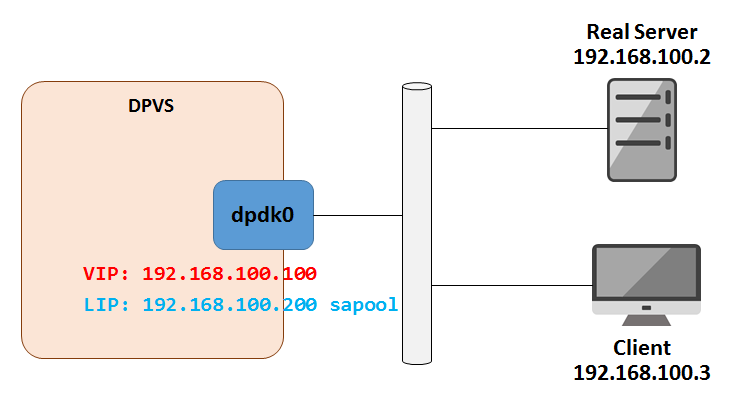
Set VIP and Local IP (LIP, needed by FNAT mode) on DPVS. Let's put commands into setup.sh. You do some check by ./ipvsadm -ln, ./dpip addr show.
$ cat setup.sh
VIP=192.168.100.100
LIP=192.168.100.200
RS=192.168.100.2

./dpip addr add ${VIP}/24 dev dpdk0
./ipvsadm -A -t ${VIP}:80 -s rr
./ipvsadm -a -t ${VIP}:80 -r ${RS}:80 -b

./ipvsadm --add-laddr -z ${LIP} -t ${VIP}:80 -F dpdk0
$
$ ./setup.sh
Access VIP from Client, it looks good!
client $ curl 192.168.100.100
Your ip:port : 192.168.100.3:56890
More examples can be found in the Tutorial Document. Including,
FNAT reverse proxy.DR) mode setup.keepalived) setup.SNAT mode for Internet access from internal network.Bonding, VLAN, kni, ipip/GRE tunnel).UOA module to get real UDP client IP/port in FNAT.We also listed some frequently asked questions in the FAQ Document. It may help when you run into problems with DPVS.
Browse the doc directory for other documentations, including:
Our test shows the forwarding speed (PPS/packets per second) of DPVS is several times than LVS and as good as Google's Maglev.
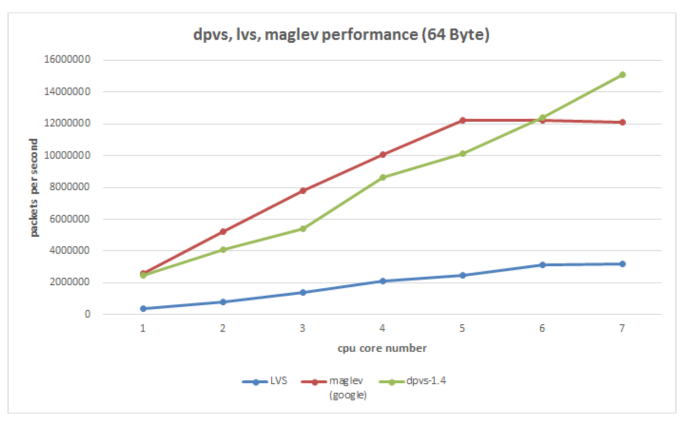
Click here for the lastest performance data.
Please refer to the License file for details.
Please refer to the CONTRIBUTING file for details.
Currently, DPVS has been widely accepted by dozens of community cooperators, who have successfully used and contributed a lot to DPVS. We just list some of them alphabetically as below.
DPVS is developed by iQiYi QLB team since April 2016. It's widely used in iQiYi IDC for L4 load balancer and SNAT clusters, and we have already replaced nearly all our LVS clusters with DPVS. We open-sourced DPVS at October 2017, and are excited to see that more people can get involved in this project. Welcome to try, report issues and submit pull requests. And please feel free to contact us through Github or Email.
https://github.com/iqiyi/dpvsiig_cloud_qlb # qiyi.com (Please remove the white-spaces and replace # with @).2,781 followers · starred Mar 2019
92 followers · starred Sep 2025
650 followers · starred Oct 2017
937 followers · starred Oct 2022
DPVS is a high performance Layer-4 load balancer based on DPDK.
C
3,242
1,415 commits
updated Dec 31, 2025
DPVS is a high performance Layer-4 load balancer based on DPDK. It derives from Linux Virtual Server LVS and its modification alibaba/LVS.
Notes: The name
DPVScomes from "DPDK-LVS".
Several techniques are applied for high performance:
Major features of DPVS including:
dpip ipvsadm command line tools, or from config files of keepalived, or via restful API provided by dpvs-agent.DPVS consists of the modules illustrated in the diagram below.
This quick start is performed in the environments described below.
Other environments should also be OK if DPDK works, please check DPDK Supported Hardware and DPDK System Requirements for more information.
Notes:
- Please check this link for NICs supported by DPDK: http://core.dpdk.org/supported.
Flow Control(rte_flow) is required forFNATandSNATmode when DPVS running on multi-cores unlessconn redirectis enabled. The minimum requirements to ensure DPVS works with multi-core properly is thatrte_flowmust support "ipv4, ipv6, tcp, udp" four items, and "drop, queue" two actions.- DPVS doesn't confine itself to the this test environments. In fact, DPVS is an user-space application which relies very little on operating system, kernel versions, compilers, and other platform discrepancies. As far as is known, DPVS has been verified at least in the following environments.
- Anolis 8.6, 8.8, 8.9
- GCC 8.5
- Kernel: 3.10.0, 4.18.0, 5.10.134
- NIC: Intel IXGBE, NVIDIA MLX5
- Centos 7.x and GCC 4.8 are also supported by DPVS versions earlier than v1.10.
$ git clone https://github.com/iqiyi/dpvs.git
$ cd dpvs
Well, let's start from DPDK then.
Currently, dpdk-24.11 is recommended for DPVS, and we will not support dpdk versions earlier than dpdk-20.11 any more. If you are still using earlier dpdk versions, please use earlier DPVS releases. The best matched DPDK versions are listed in the table below.
| DPVS Version | DPDK Version |
|---|---|
| v1.10 | 24.11 |
| v1.9 | 20.11 |
| v1.8 | 18.11 |
| v1.7 or earlier | 17.11 or earlier |
Notes: You can skip this section if experienced with DPDK, and refer to this link for details.
$ wget https://fast.dpdk.org/rel/dpdk-24.11.tar.xz   # download from dpdk.org if link failed.
$ tar xf dpdk-24.11.tar.xz
There are some patches for DPDK to support extra features needed by DPVS. Apply them if needed. For example, there's a patch for DPDK ixgbe flow, apply it if you are using the ixgbe network adapter.
Notes: It's assumed we are in DPVS root directory where you have installed dpdk-24.11 source codes. Please note it's not mandatory, just for convenience.
$ cd <path-of-dpvs>
$ cp patch/dpdk-24.11/*.patch dpdk-24.11/
$ cd dpdk-24.11/
$ patch -p1 < 0001-pdump-add-cmdline-packet-filters-for-dpdk-pdump-tool.patch
$ patch -p1 < 0002-debug-enable-dpdk-eal-memory
$ patch -p1 < 0003-ixgbe_flow-patch-ixgbe-fdir-rte_flow-for-dpvs.patch
$ ...
Tips: It's advised to patch all if your are not sure about what they are meant for.
Use meson-ninja to build DPDK, and export environment variable PKG_CONFIG_PATH for DPDK application (DPVS). The sub-Makefile src/dpdk.mk in DPVS will check the presence of libdpdk.
$ cd dpdk-24.11
$ mkdir dpdklib                 # user desired install folder
$ mkdir dpdkbuild               # user desired build folder
$ meson -Denable_kmods=true -Dprefix=dpdklib dpdkbuild
$ ninja -C dpdkbuild
$ cd dpdkbuild; ninja install
$ export PKG_CONFIG_PATH=$(pwd)/../dpdklib/lib64/pkgconfig/
Tips: You can use script dpdk-build.sh to facilitate dpdk build. Run
dpdk-build.sh -hfor the usage of the script.
Next is to set up DPDK hugepage. Our test environment is NUMA system. For single-node system please refer to the link.
$ # for NUMA machine
$ echo 8192 > /sys/devices/system/node/node0/hugepages/hugepages-2048kB/nr_hugepages
$ echo 8192 > /sys/devices/system/node/node1/hugepages/hugepages-2048kB/nr_hugepages
By default, hugetlbfs is mounted at /dev/hugepages, as shown below.
$ mount | grep hugetlbfs
hugetlbfs on /dev/hugepages type hugetlbfs (rw,relatime)
If it's not your case, you should mount hugetlbfs by yourself.
$ mkdir /mnt/huge
$ mount -t hugetlbfs nodev /mnt/huge
Notes:
- Hugepages of other sizes, such as 1GB-size hugepages, can also be used if your system supports.
- It's recommended to reserve hugepage memory and isolate CPUs used by DPVS with linux kernel cmdline options in production environments, for example
isolcpus=1-9 default_hugepagesz=1G hugepagesz=1G hugepages=32.
Next, install kernel modules required by DPDK and DPVS.
DPDK driver kernel module:
Depending on your NIC and system, NIC may require binding a DPDK-compitable driver, such as vfio-pci, igb_uio, or uio_pci_generic. Note that some NICs supporting bifircated driver should skip the step. Refer to DPDK Linux Drivers for details. In this test, we use the linux standard UIO kernel module uio_pci_generic for the ixgbe NIC.
KNI kernel module:
The KNI kernel module, library and PMD has been removed since DPDK 23.11 release. DPVS has replaced it with virtio-user devices(namely virtio-user kni) since v1.10. Nevertheless, the kernel module rte_kni.ko is required if you are still using DPDK KNI in earlier DPDK/DPVS versions as a solution to the exception data path.
$ modprobe uio_pci_generic

$ ## bind eth0 to uio_pci_generic (Be aware: Network on eth0 will get broken!)
$ ./usertools/dpdk-devbind.py --status
$ ifconfig eth0 down          # assuming eth0's pci-bus location is 0000:06:00.0
$ ./usertools/dpdk-devbind.py -b uio_pci_generic 0000:06:00.0
Notes:
- The test in our Quick Start uses only one NIC. Bind as many NICs as required in your DPVS application to DPDK driver kernel module. For example, you should bind at least 2 NICs if you are testing DPVS with two-arm.
dpdk-devbind.py -ucan be used to unbind driver and switch it back to Linux driver. Uselspciorethtool -i eth0to check the NIC's PCI bus-id. Please refer to DPDK Doc:Binding and Unbinding Network Ports to/from the Kernel Modules for more details.- NVIDIA/Mellanox NIC uses bifurcated driver which doesn't rely on UIO/VFIO driver, so NOT bind any DPDK driver kernel module, but NVIDIA MLNX_OFED/EN is required. Refer to Mellanox DPDK for its PMD and Compilation Prerequisites for OFED installation.
- A kernel module parameter
carrierwas added torte_kni.kofor DPDK 18.11~23.11, and the default value for it is "off". We need to loadrte_kni.kowith extra parametercarrier=onto make KNI devices work properly.- Following the DPDK technical board decision and refinement, the KNI kernel module, library and PMD was removed from the DPDK 23.11 release (refer to ABI and API Deprecation(DPDK 22.11)). As a replacement solution, DPVS has supported virtio-user as exception path since v1.9.10, which is default off in v1.9 and can be enabled with
CONFIG_KNI_VIRTIO_USERin config.mk.- Multiple DPVS instances can run on a single server if there are enough NICs or VFs within one NIC. Refer to tutorial:Multiple Instances for details.
It's simple, just set PKG_CONFIG_PATH and build it.
$ export PKG_CONFIG_PATH=<path-of-libdpdk.pc>  # normally located at dpdklib/lib64/pkgconfig/
$ cd <path-of-dpvs>

$ make              # or "make -j" to speed up
$ make install
Notes:
- Build dependencies may be needed, such as
pkg-config(version 0.29.2+,automake,libnl3,libnl-genl-3.0,openssl,poptandnumactl. You can install the missing dependencies with package manager of your system, e.g.,yum install popt-devel automake(CentOS) orapt install libpopt-dev autoconfig(Ubuntu).- Early
pkg-configversions (v0.29.2 before) may cause dpvs build failure. If so, please upgrade this tool. Specially, you may upgrade thepkg-configon Centos7 to meet the version requirement.- If you want to compile
dpvs-agentandhealthcheck, enableCONFIG_DPVS_AGENTin config.mk, and install Golang build environments(Refer to go.mod file for required Golang version).
Output binary files are installed to dpvs/bin.
$ ls bin/
dpip  dpvs  dpvs-agent  healthcheck  ipvsadm  keepalived
dpvs is the main program.dpip is the tool to manage IP address, route, vlan, neigh, etc.ipvsadm and keepalived come from LVS, both are modified.dpvs-agent and healthcheck are alternatives to keepalived powered with HTTP API developed with Golang.Now, dpvs.conf must locate at /etc/dpvs.conf, just copy it from conf/dpvs.conf.single-nic.sample.
$ cp conf/dpvs.conf.single-nic.sample /etc/dpvs.conf
and start DPVS,
$ cd <path-of-dpvs>/bin
$ ./dpvs &

$ # alternatively and strongly advised, start DPVS with NIC and CPU explicitly specified:
$ ./dpvs -- -a 0000:06:00.0 -l 1-9
Tips:
- Run
./dpvs --helpfor DPVS supported command line options, and./dpvs -- --helpfor common DPDK EAL command line options.- The default
dpvs.confrequire 9 CPUs(1 master worker, 8 slave workers), modify it if not so many available CPUs in your system.
Check if it's get started ?
$ ./dpip link show
1: dpdk0: socket 0 mtu 1500 rx-queue 8 tx-queue 8
    UP 10000 Mbps full-duplex fixed-nego promisc-off
    addr A0:36:9F:9D:61:F4 OF_RX_IP_CSUM OF_TX_IP_CSUM OF_TX_TCP_CSUM OF_TX_UDP_CSUM
If you see this message. Well done, DPVS is working with NIC dpdk0!
Don't worry if you see this error:
EAL: Error - exiting with code: 1
  Cause: ports in DPDK RTE (2) != ports in dpvs.conf(1)
It means the number of NIC recognized by DPVS mismatched
/etc/dpvs.conf. Please either modify NIC number indpvs.confor specify NICs with EAL option-aexplicitly.
What config items does dpvs.conf support? How to configure them? Well, DPVS maintains a config item file conf/dpvs.conf.items which lists all supported config entries, default values, and feasible value ranges. Besides, some sample config files maintained in ./conf/dpvs.*.sample gives practical configurations of DPVS in corresponding circumstances.
The test topology looks like the following diagram.
Set VIP and Local IP (LIP, needed by FNAT mode) on DPVS. Let's put commands into setup.sh. You do some check by ./ipvsadm -ln, ./dpip addr show.
$ cat setup.sh
VIP=192.168.100.100
LIP=192.168.100.200
RS=192.168.100.2

./dpip addr add ${VIP}/24 dev dpdk0
./ipvsadm -A -t ${VIP}:80 -s rr
./ipvsadm -a -t ${VIP}:80 -r ${RS}:80 -b

./ipvsadm --add-laddr -z ${LIP} -t ${VIP}:80 -F dpdk0
$
$ ./setup.sh
Access VIP from Client, it looks good!
client $ curl 192.168.100.100
Your ip:port : 192.168.100.3:56890
More examples can be found in the Tutorial Document. Including,
FNAT reverse proxy.DR) mode setup.keepalived) setup.SNAT mode for Internet access from internal network.Bonding, VLAN, kni, ipip/GRE tunnel).UOA module to get real UDP client IP/port in FNAT.We also listed some frequently asked questions in the FAQ Document. It may help when you run into problems with DPVS.
Browse the doc directory for other documentations, including:
Our test shows the forwarding speed (PPS/packets per second) of DPVS is several times than LVS and as good as Google's Maglev.
Click here for the lastest performance data.
Please refer to the License file for details.
Please refer to the CONTRIBUTING file for details.
Currently, DPVS has been widely accepted by dozens of community cooperators, who have successfully used and contributed a lot to DPVS. We just list some of them alphabetically as below.
DPVS is developed by iQiYi QLB team since April 2016. It's widely used in iQiYi IDC for L4 load balancer and SNAT clusters, and we have already replaced nearly all our LVS clusters with DPVS. We open-sourced DPVS at October 2017, and are excited to see that more people can get involved in this project. Welcome to try, report issues and submit pull requests. And please feel free to contact us through Github or Email.
https://github.com/iqiyi/dpvsiig_cloud_qlb # qiyi.com (Please remove the white-spaces and replace # with @).2,781 followers · starred Mar 2019
92 followers · starred Sep 2025
650 followers · starred Oct 2017
937 followers · starred Oct 2022