
See what people are saying
README
pi-console
A Neovim frontend for the Pi coding agent, with tmux to keep multiple conversations running and an overview to keep track of them so you no longer need to bounce back and forth between your favorite editor and the TUI.
Your existing Pi credentials, instructions, skills, settings, and packages carry over; the extensions needed by the UI are bundled.
This is a work in progress. The main reason for sharing this repository is to serve as an inspiration for others who want to build something similar. I use this project daily so I will continue to improve/add features, but I do not guarantee that it will be maintained or supported in the future. If you want to use it, please read the requirements and installation instructions carefully (or have your agent do it).
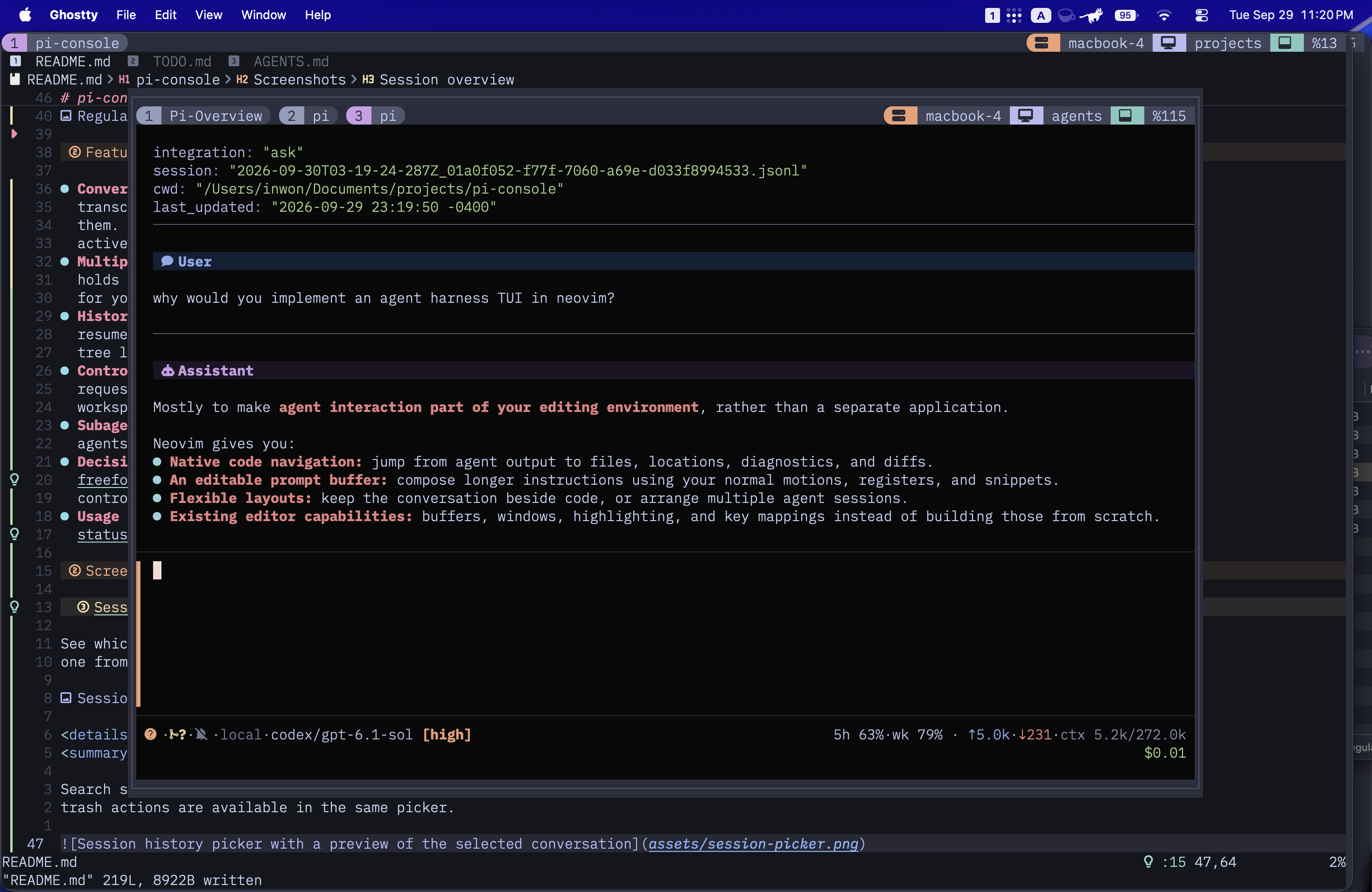
Features
- Conversations in Neovim. Editable Markdown prompts and rendered transcripts, with tool output and thinking available to open when you need them. Switch models and thinking levels, or send another prompt to steer an active run.
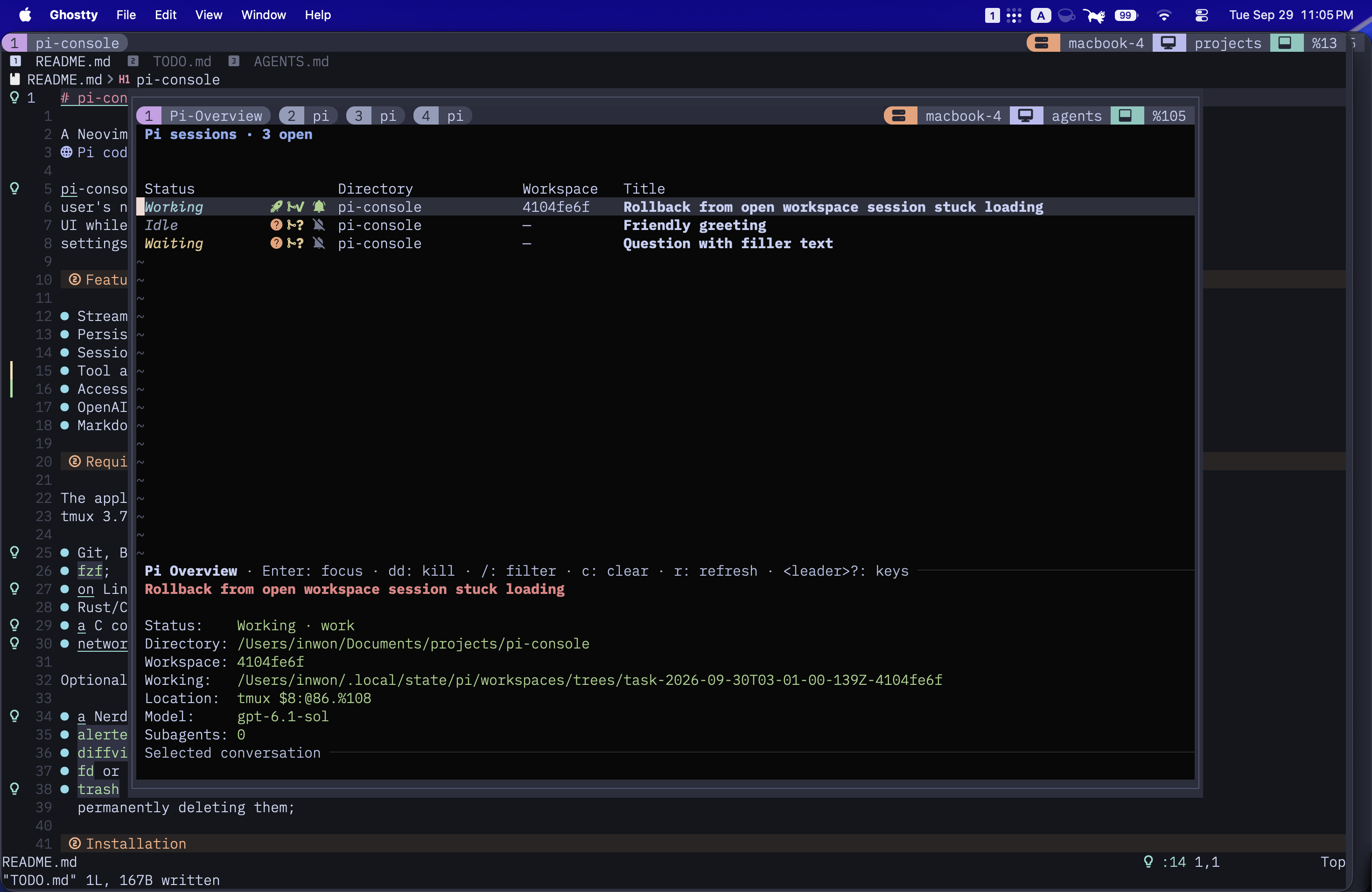
- Multiple sessions without losing your place. A persistent tmux session holds your conversations. The overview shows who's working, idle, or waiting for you, along with each session's directory and workspace.
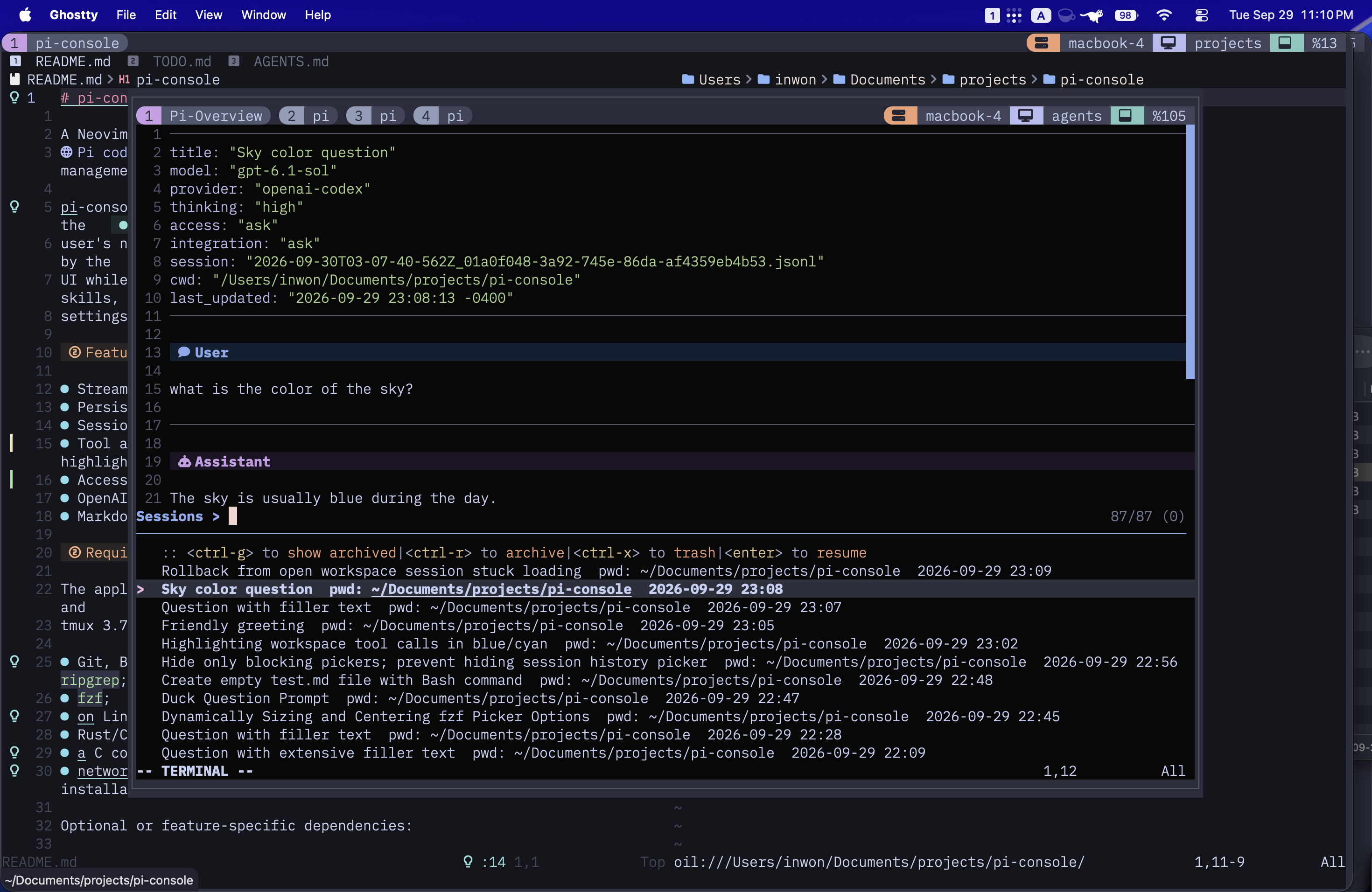
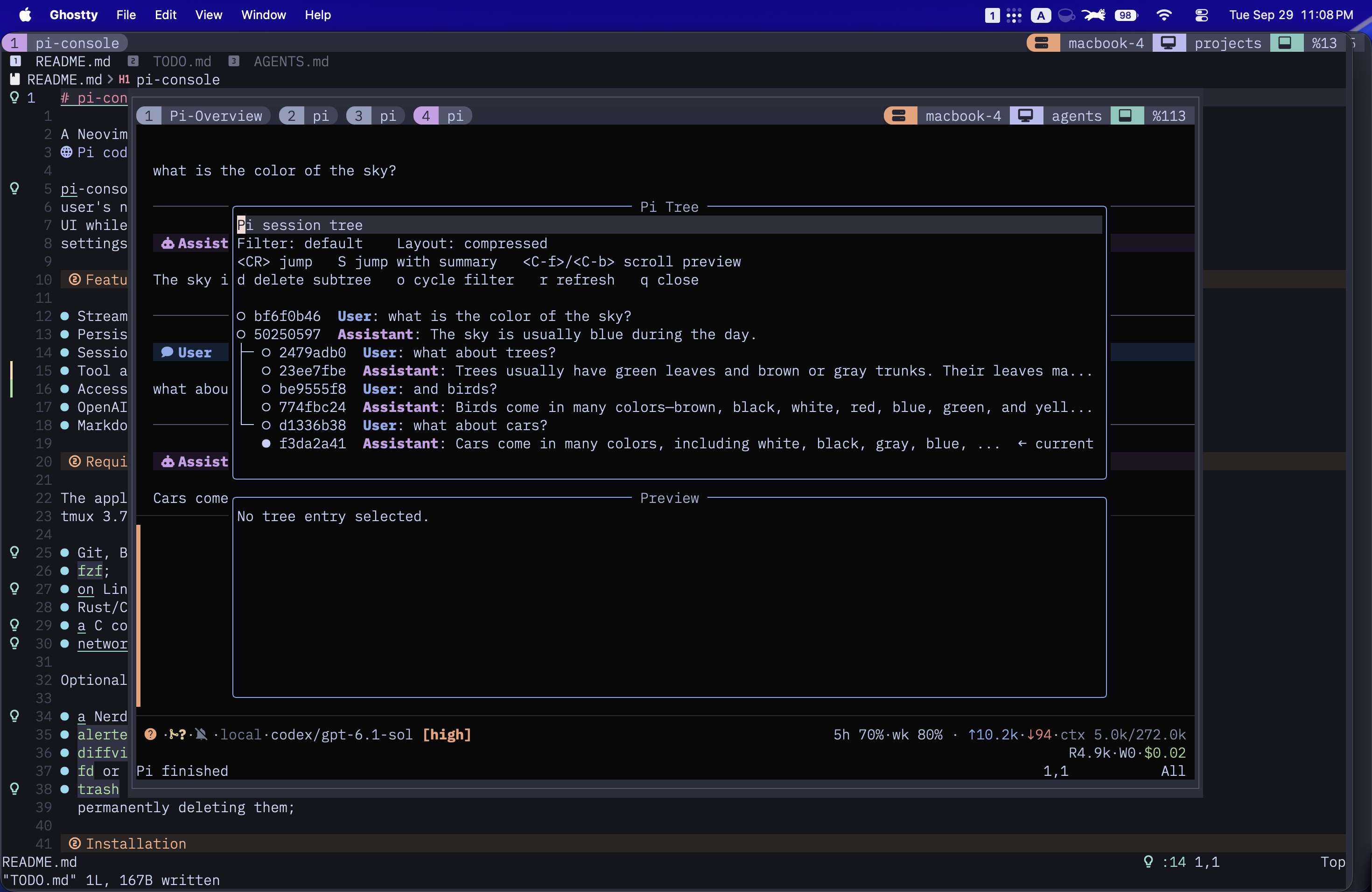
- History you can navigate. Fuzzy-find sessions with transcript previews, resume old work, and archive, restore, or trash conversations. The session tree lets you revisit earlier messages and explore a different branch.
- Control over agent changes. Choose an access mode, inspect approval requests with highlighted commands and diffs, and work in isolated Git workspaces. Review workspace changes before integrating them.
- Subagents you can follow. Delegate work to foreground or background agents and inspect their transcripts without leaving the parent conversation.
- Decisions and progress in the UI. Multiple-choice questions with a freeform response option, structured task lists, and desktop notification controls.
- Usage at a glance. Session token, context, and cost information in the statusline, plus OpenAI Codex quota and reset times in a dedicated view.
Screenshots
Session overview
See which conversations need attention, check their workspaces, and jump into one from a single overview.
Session picker and transcript preview
Search saved conversations and read a preview before resuming. Archive and trash actions are available in the same picker.
Conversation tree
Navigate conversation branches and jump back to an earlier message, with an optional summary when switching context.
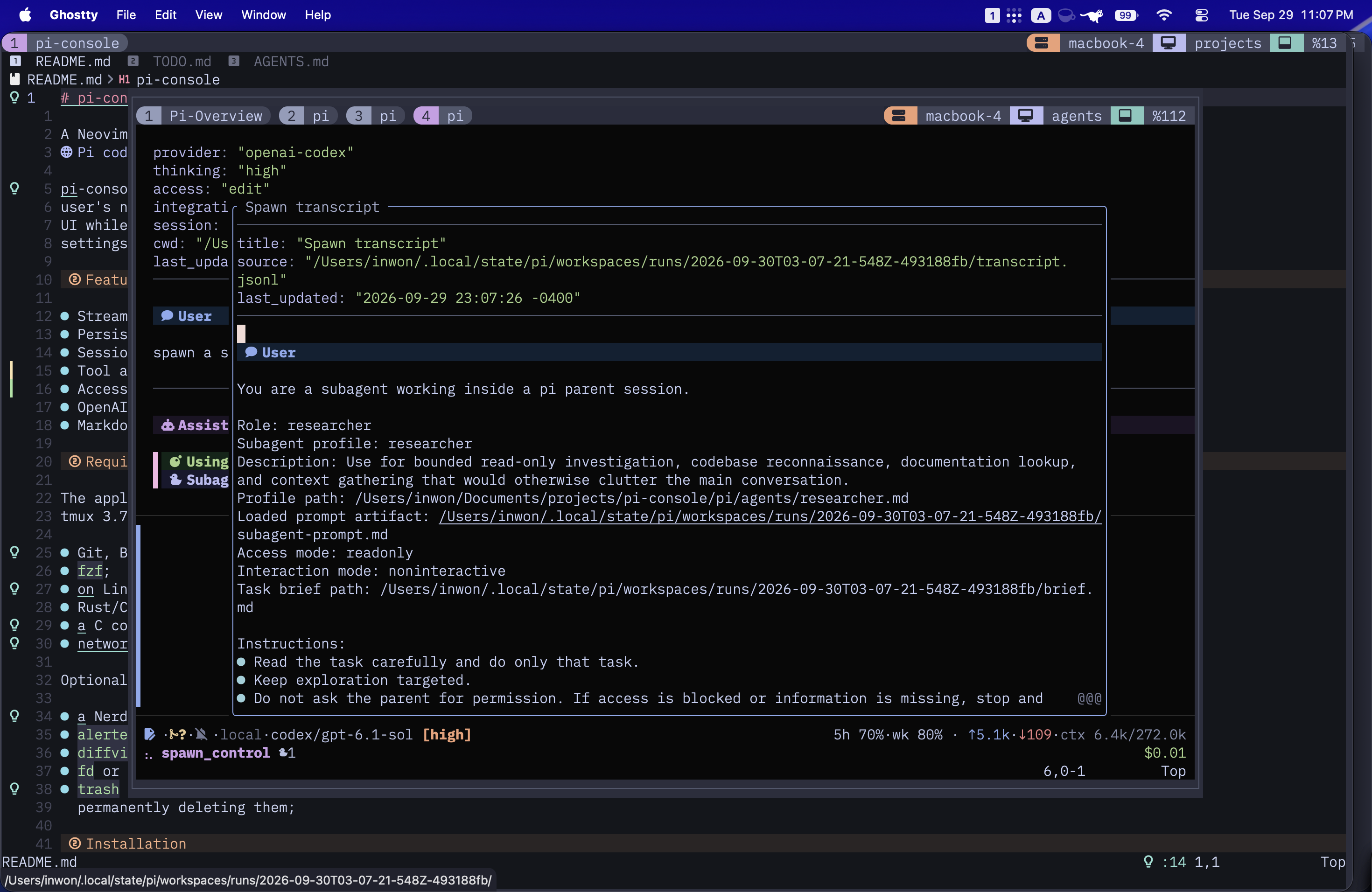
Subagent transcript
Open a delegated agent's transcript alongside the parent conversation.
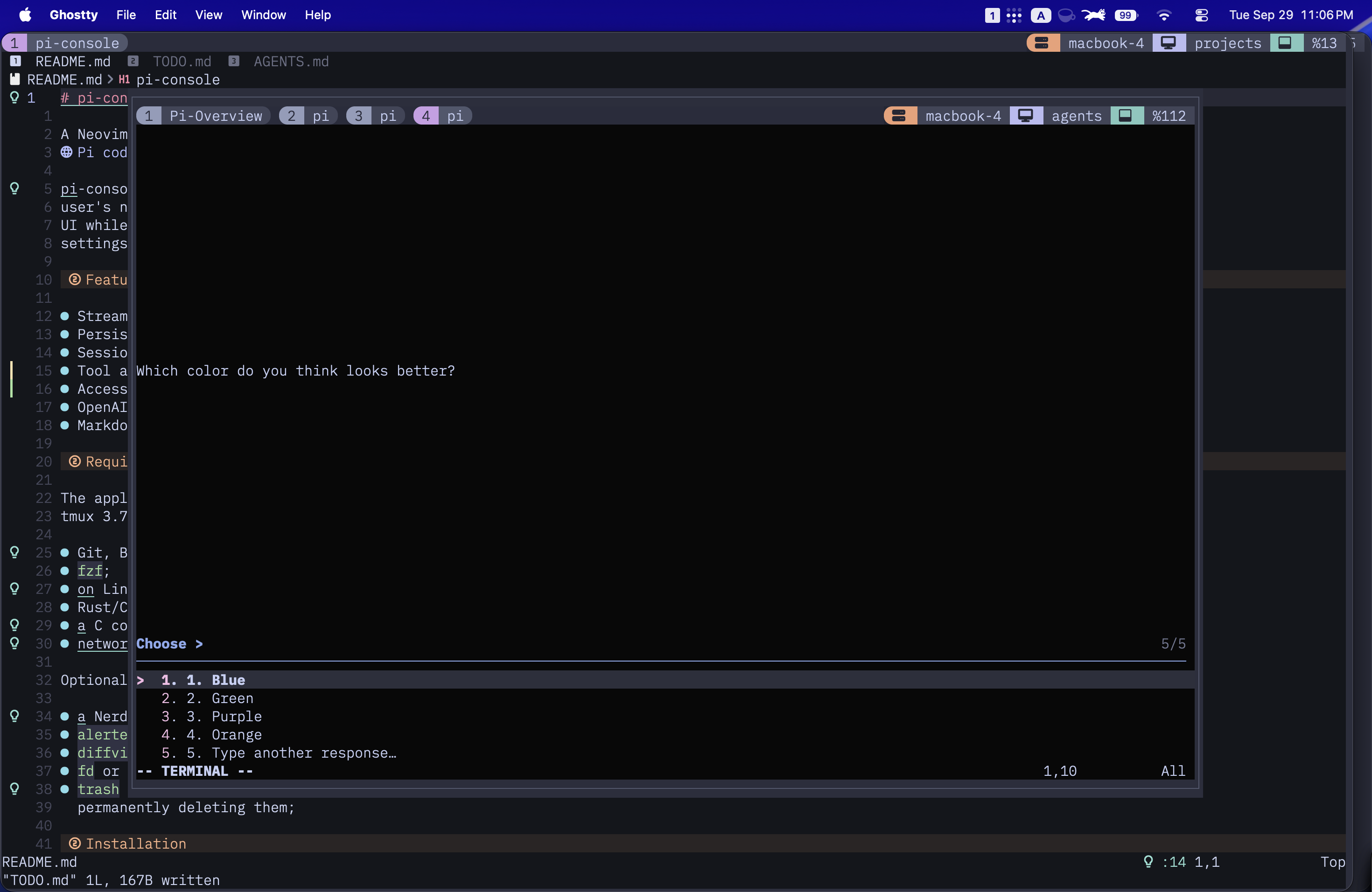
Question picker
Choose an answer or write your own response when the agent needs a decision.
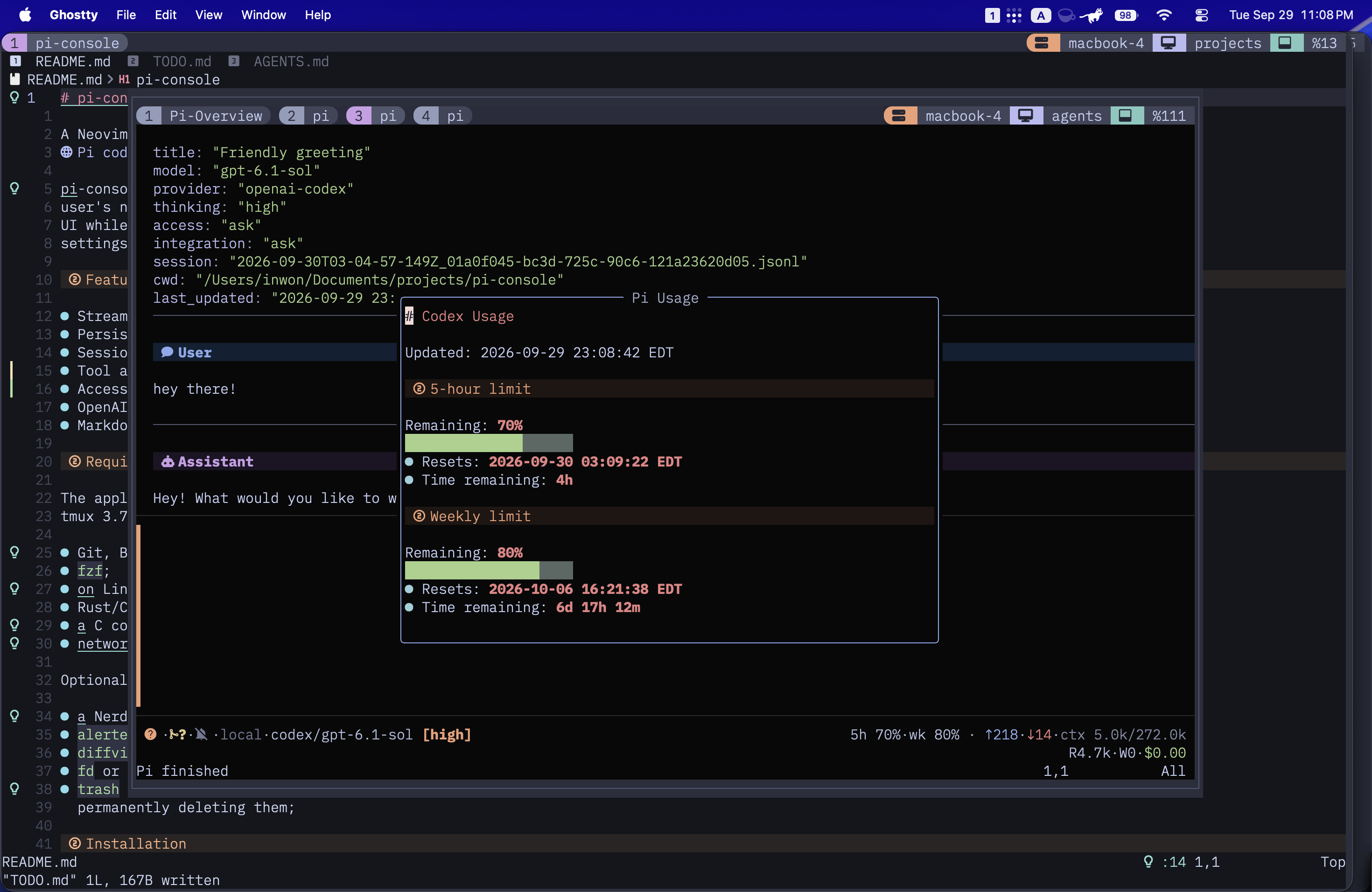
OpenAI Codex usage
Check the remaining five-hour and weekly quotas, with reset times.
Requirements
The application is currently developed against Neovim 0.12, Pi 0.87.1, and tmux 3.7. It also requires:
- Git, Bash, curl, Node.js 20.11 or newer, npm,
realpath, andripgrep; fzf;- on Linux,
bubblewrapandsocatfor OS-enforced command sandboxing; - Rust/Cargo to build
blink.cmp; - a C compiler and parser toolchain for Tree-sitter;
- network access during initial package, plugin, and parser installation.
Optional or feature-specific dependencies:
- a Nerd Font and a true-color terminal for the intended interface;
alerterfor desktop notifications, which are currently macOS-only;diffview.nvimin the regular Neovim configuration used by workspace review (only if you want to view diff from workspace changes)fdorfdfindfor faster file completion;trashorgio trashto move deleted sessions to the OS trash instead of permanently deleting them;
Installation
Install the latest published release:
curl -fsSL https://raw.githubusercontent.com/inwonakng/pi-console/main/scripts/install.sh | bash
Until the first release is published, the installer reports that it is using
the main branch. It installs the application under
~/.local/share/pi-console, registers pi/ as a global Pi package, and writes
the pi-console command to ~/.local/bin. Set XDG_DATA_HOME,
PI_CONSOLE_INSTALL_DIR, or PI_CONSOLE_BIN_DIR to override those locations.
Running the installer again updates the existing managed installation. To select a release or another Git ref explicitly:
curl -fsSL https://raw.githubusercontent.com/inwonakng/pi-console/main/scripts/install.sh | bash -s -- --version v0.1.0
curl -fsSL https://raw.githubusercontent.com/inwonakng/pi-console/main/scripts/install.sh | bash -s -- --ref main
The installer offers to add the tmux integration when it has access to an
interactive terminal. Pass --configure-tmux or --no-configure-tmux to make
that choice non-interactively.
tmux integration
The installer can add this path-independent line to the main tmux configuration:
if-shell "command -v pi-console >/dev/null 2>&1" "run-shell 'pi-console --tmux setup'"
The command resolves its application directory and sources the matching tmux integration. Reload tmux, then use:
| Binding | Action |
|---|---|
<prefix>g | Toggle the agents popup |
<prefix>G | Start a conversation in the current pane's directory |
<prefix>o | Open or focus the persistent overview |
You can also run pi-console directly from a project directory. Inside
pi-console, <leader>? shows the complete context-sensitive key list.
Configuration
Optional extension overrides may be copied from
pi/pi-console-config.example.yaml to
~/.pi/agent/pi-console-config.yaml.
pi-console uses the existing Pi agent directory, including credentials,
instructions, skills, prompts, models, and other packages. Its dedicated
Neovim application is named pi-console-nvim, so its Neovim configuration,
data, state, and cache remain separate from both the installed application and
the user's normal Neovim setup.
Bundled Pi extensions
The global Pi package loads these extensions in pi-console and ordinary Pi sessions:
| Extension | Capability |
|---|---|
access-mode | Sandboxed read-only, approval, edit, and unrestricted access modes |
auto-title | Automatic and explicit session titles |
codex-usage | OpenAI Codex usage status |
history | Session history, archive, restore, and transcript operations |
litellm | LiteLLM model provider support |
notifications | Completion notifications |
question | Structured multiple-choice questions |
spawn | Background and foreground subagents |
todowrite | Structured task lists |
tree | Session-tree navigation helpers |
web-search | DuckDuckGo search and page fetching |
workspace | Isolated Git workspaces and integration |
The access modes are:
readonly: project reads with persistent writes and shell network access denied;ask: the read-only baseline, with capability prompts after a sandbox denial;edit: automatic workspace writes with prompts for shell network access; andfull: unrestricted host-user filesystem and network access.
The package registers the tool names bash, question, spawn, spawn_control,
todowrite, web_search, web_fetch, and workspace. Pi resolves duplicate
tool names by extension precedence and then registration order: project and
user extension resources take precedence over package resources, and the first
package registration wins between packages. Users can therefore override a
bundled tool with a project or user extension, or reorder package declarations
when two packages register the same name. pi config can disable individual
package extensions, although disabling an extension also disables the related
pi-console feature.
The profiles under pi/agents/ are defaults used by the bundled spawn
extension, not a standard Pi resource directory. Additional profiles can be
placed in ~/.pi/agent/agents/ or a trusted project's .pi/agents/ directory.
A user profile overrides a bundled profile with the same name, and a project
profile overrides both.
Development
For a checkout-based setup, run scripts/install-dev.sh
from the repository root. It registers the local Pi package and links
pi-console to the checkout. Restart running Pi/Neovim processes after edits.
License
Similar repos


Languages
Lua
57.1%
TypeScript
40.2%
Shell
2.7%
See what people are saying
README
pi-console
A Neovim frontend for the Pi coding agent, with tmux to keep multiple conversations running and an overview to keep track of them so you no longer need to bounce back and forth between your favorite editor and the TUI.
Your existing Pi credentials, instructions, skills, settings, and packages carry over; the extensions needed by the UI are bundled.
This is a work in progress. The main reason for sharing this repository is to serve as an inspiration for others who want to build something similar. I use this project daily so I will continue to improve/add features, but I do not guarantee that it will be maintained or supported in the future. If you want to use it, please read the requirements and installation instructions carefully (or have your agent do it).
Features
- Conversations in Neovim. Editable Markdown prompts and rendered transcripts, with tool output and thinking available to open when you need them. Switch models and thinking levels, or send another prompt to steer an active run.
- Multiple sessions without losing your place. A persistent tmux session holds your conversations. The overview shows who's working, idle, or waiting for you, along with each session's directory and workspace.
- History you can navigate. Fuzzy-find sessions with transcript previews, resume old work, and archive, restore, or trash conversations. The session tree lets you revisit earlier messages and explore a different branch.
- Control over agent changes. Choose an access mode, inspect approval requests with highlighted commands and diffs, and work in isolated Git workspaces. Review workspace changes before integrating them.
- Subagents you can follow. Delegate work to foreground or background agents and inspect their transcripts without leaving the parent conversation.
- Decisions and progress in the UI. Multiple-choice questions with a freeform response option, structured task lists, and desktop notification controls.
- Usage at a glance. Session token, context, and cost information in the statusline, plus OpenAI Codex quota and reset times in a dedicated view.
Screenshots
Session overview
See which conversations need attention, check their workspaces, and jump into one from a single overview.
Session picker and transcript preview
Search saved conversations and read a preview before resuming. Archive and trash actions are available in the same picker.
Conversation tree
Navigate conversation branches and jump back to an earlier message, with an optional summary when switching context.
Subagent transcript
Open a delegated agent's transcript alongside the parent conversation.
Question picker
Choose an answer or write your own response when the agent needs a decision.
OpenAI Codex usage
Check the remaining five-hour and weekly quotas, with reset times.
Requirements
The application is currently developed against Neovim 0.12, Pi 0.87.1, and tmux 3.7. It also requires:
- Git, Bash, curl, Node.js 20.11 or newer, npm,
realpath, andripgrep; fzf;- on Linux,
bubblewrapandsocatfor OS-enforced command sandboxing; - Rust/Cargo to build
blink.cmp; - a C compiler and parser toolchain for Tree-sitter;
- network access during initial package, plugin, and parser installation.
Optional or feature-specific dependencies:
- a Nerd Font and a true-color terminal for the intended interface;
alerterfor desktop notifications, which are currently macOS-only;diffview.nvimin the regular Neovim configuration used by workspace review (only if you want to view diff from workspace changes)fdorfdfindfor faster file completion;trashorgio trashto move deleted sessions to the OS trash instead of permanently deleting them;
Installation
Install the latest published release:
curl -fsSL https://raw.githubusercontent.com/inwonakng/pi-console/main/scripts/install.sh | bash
Until the first release is published, the installer reports that it is using
the main branch. It installs the application under
~/.local/share/pi-console, registers pi/ as a global Pi package, and writes
the pi-console command to ~/.local/bin. Set XDG_DATA_HOME,
PI_CONSOLE_INSTALL_DIR, or PI_CONSOLE_BIN_DIR to override those locations.
Running the installer again updates the existing managed installation. To select a release or another Git ref explicitly:
curl -fsSL https://raw.githubusercontent.com/inwonakng/pi-console/main/scripts/install.sh | bash -s -- --version v0.1.0
curl -fsSL https://raw.githubusercontent.com/inwonakng/pi-console/main/scripts/install.sh | bash -s -- --ref main
The installer offers to add the tmux integration when it has access to an
interactive terminal. Pass --configure-tmux or --no-configure-tmux to make
that choice non-interactively.
tmux integration
The installer can add this path-independent line to the main tmux configuration:
if-shell "command -v pi-console >/dev/null 2>&1" "run-shell 'pi-console --tmux setup'"
The command resolves its application directory and sources the matching tmux integration. Reload tmux, then use:
| Binding | Action |
|---|---|
<prefix>g | Toggle the agents popup |
<prefix>G | Start a conversation in the current pane's directory |
<prefix>o | Open or focus the persistent overview |
You can also run pi-console directly from a project directory. Inside
pi-console, <leader>? shows the complete context-sensitive key list.
Configuration
Optional extension overrides may be copied from
pi/pi-console-config.example.yaml to
~/.pi/agent/pi-console-config.yaml.
pi-console uses the existing Pi agent directory, including credentials,
instructions, skills, prompts, models, and other packages. Its dedicated
Neovim application is named pi-console-nvim, so its Neovim configuration,
data, state, and cache remain separate from both the installed application and
the user's normal Neovim setup.
Bundled Pi extensions
The global Pi package loads these extensions in pi-console and ordinary Pi sessions:
| Extension | Capability |
|---|---|
access-mode | Sandboxed read-only, approval, edit, and unrestricted access modes |
auto-title | Automatic and explicit session titles |
codex-usage | OpenAI Codex usage status |
history | Session history, archive, restore, and transcript operations |
litellm | LiteLLM model provider support |
notifications | Completion notifications |
question | Structured multiple-choice questions |
spawn | Background and foreground subagents |
todowrite | Structured task lists |
tree | Session-tree navigation helpers |
web-search | DuckDuckGo search and page fetching |
workspace | Isolated Git workspaces and integration |
The access modes are:
readonly: project reads with persistent writes and shell network access denied;ask: the read-only baseline, with capability prompts after a sandbox denial;edit: automatic workspace writes with prompts for shell network access; andfull: unrestricted host-user filesystem and network access.
The package registers the tool names bash, question, spawn, spawn_control,
todowrite, web_search, web_fetch, and workspace. Pi resolves duplicate
tool names by extension precedence and then registration order: project and
user extension resources take precedence over package resources, and the first
package registration wins between packages. Users can therefore override a
bundled tool with a project or user extension, or reorder package declarations
when two packages register the same name. pi config can disable individual
package extensions, although disabling an extension also disables the related
pi-console feature.
The profiles under pi/agents/ are defaults used by the bundled spawn
extension, not a standard Pi resource directory. Additional profiles can be
placed in ~/.pi/agent/agents/ or a trusted project's .pi/agents/ directory.
A user profile overrides a bundled profile with the same name, and a project
profile overrides both.
Development
For a checkout-based setup, run scripts/install-dev.sh
from the repository root. It registers the local Pi package and links
pi-console to the checkout. Restart running Pi/Neovim processes after edits.
License
Similar repos
Languages
Lua
57.1%
TypeScript
40.2%
Shell
2.7%