React Native Google Mobile Ads enables you to monetize your app with AdMob.
See the code







React Native Google Mobile Ads lets you monetize your app with Google AdMob or Google Ad Manager. It wraps the native Google Mobile Ads SDKs for iOS and Android.
npx expo install and configure through the bundled config plugin. Bare React Native CLI apps are fully supported.npx expo install react-native-google-mobile-ads expo-dev-client
Add your AdMob App IDs to the config plugin in app.json, then create a development build (the module does not run in Expo Go):
{
  "expo": {
    "plugins": [
      [
        "react-native-google-mobile-ads",
        {
          "androidAppId": "ca-app-pub-xxxxxxxx~xxxxxxxx",
          "iosAppId": "ca-app-pub-xxxxxxxx~xxxxxxxx"
        }
      ]
    ]
  }
}
Next: gather consent, initialize the SDK and show your first ad by following Getting Started. Bare React Native CLI projects start at Install with React Native CLI.
App open ads are a special ad format intended for publishers wishing to monetize their app load screens.
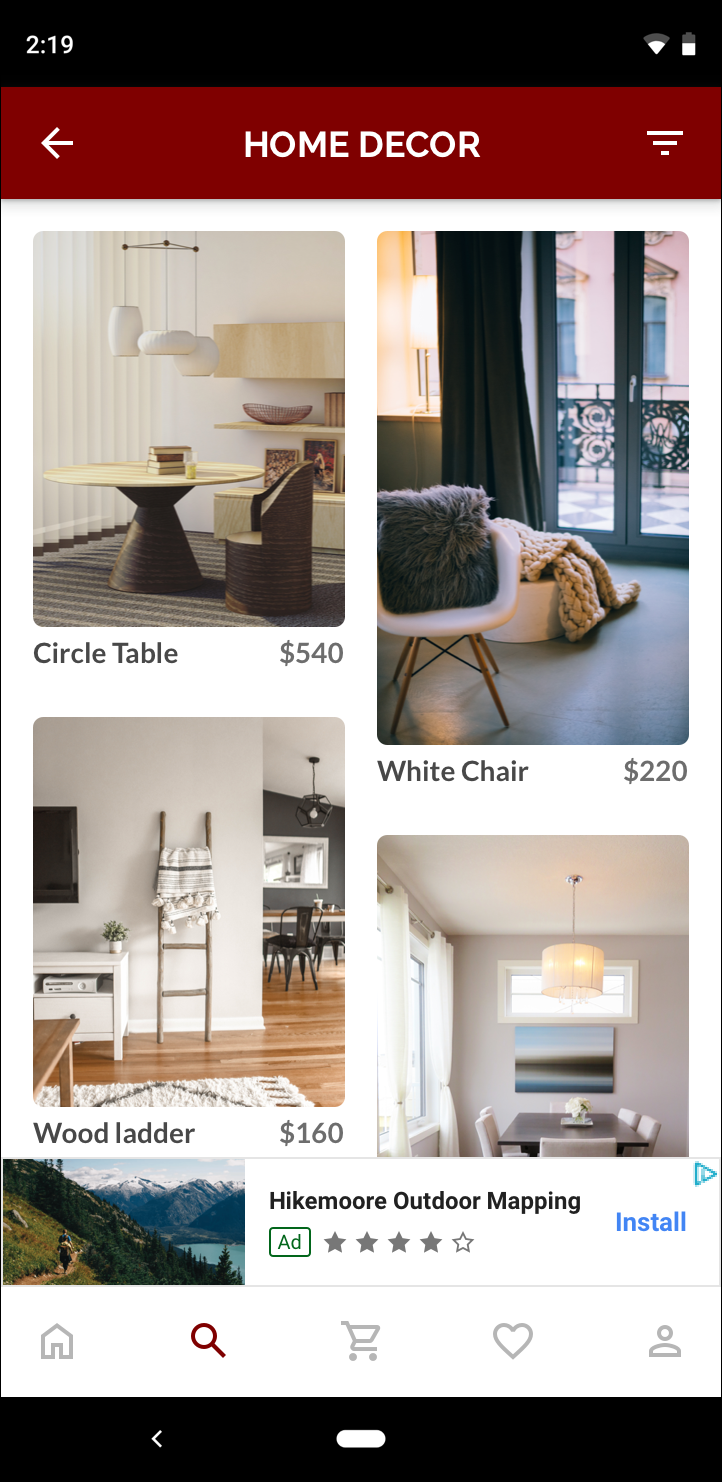
Banner ad units display rectangular ads that occupy a portion of an app's layout. They stay on screen while users are interacting with the app, either anchored at the top or bottom of the screen or inline with content as the user scrolls. Banner ads can refresh automatically after a certain period of time.
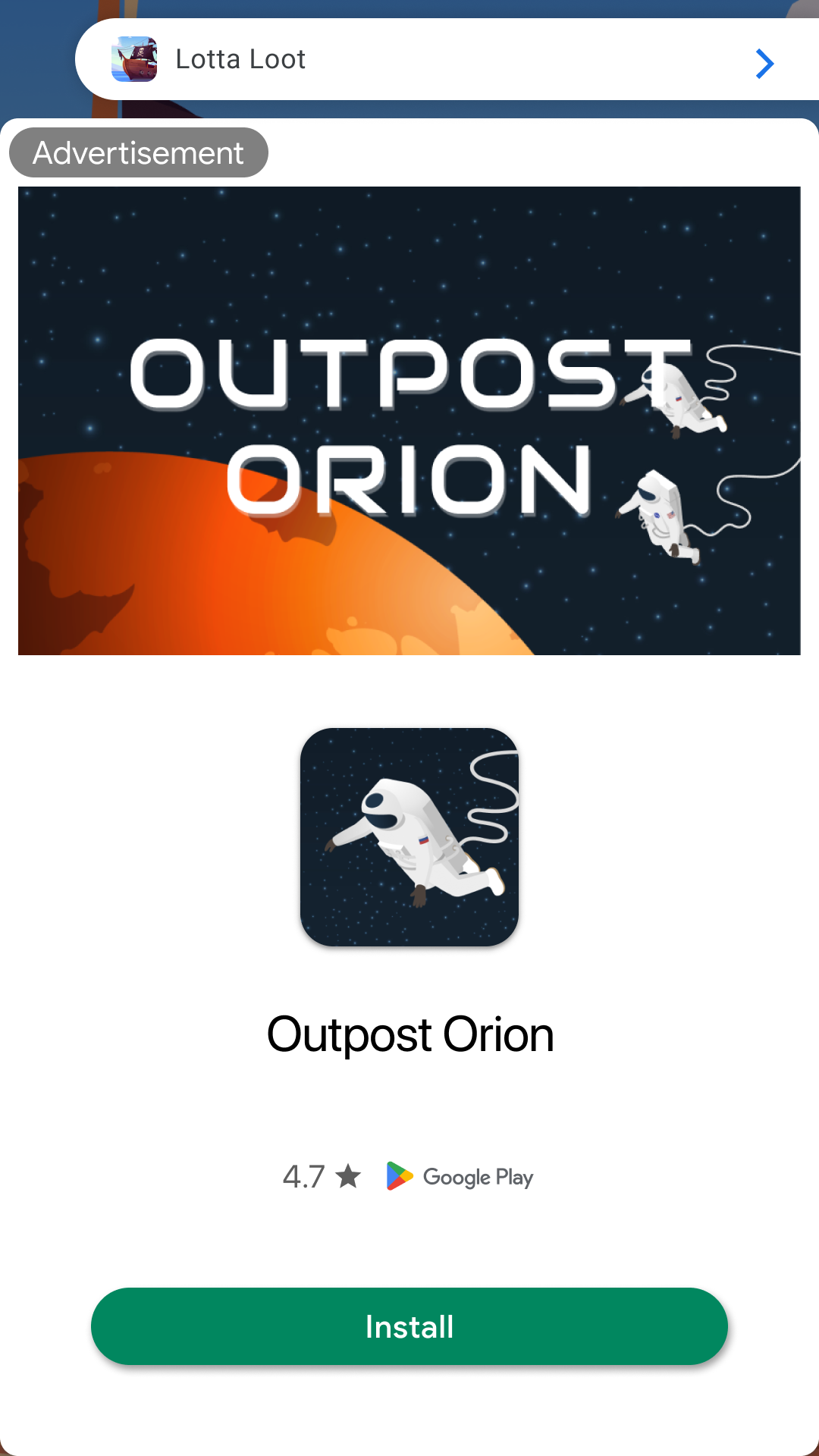
A dynamically sized banner that is full-width and auto-height. Anchored adaptive banners are expected to be always on-screen, locked to the screen’s top or bottom.
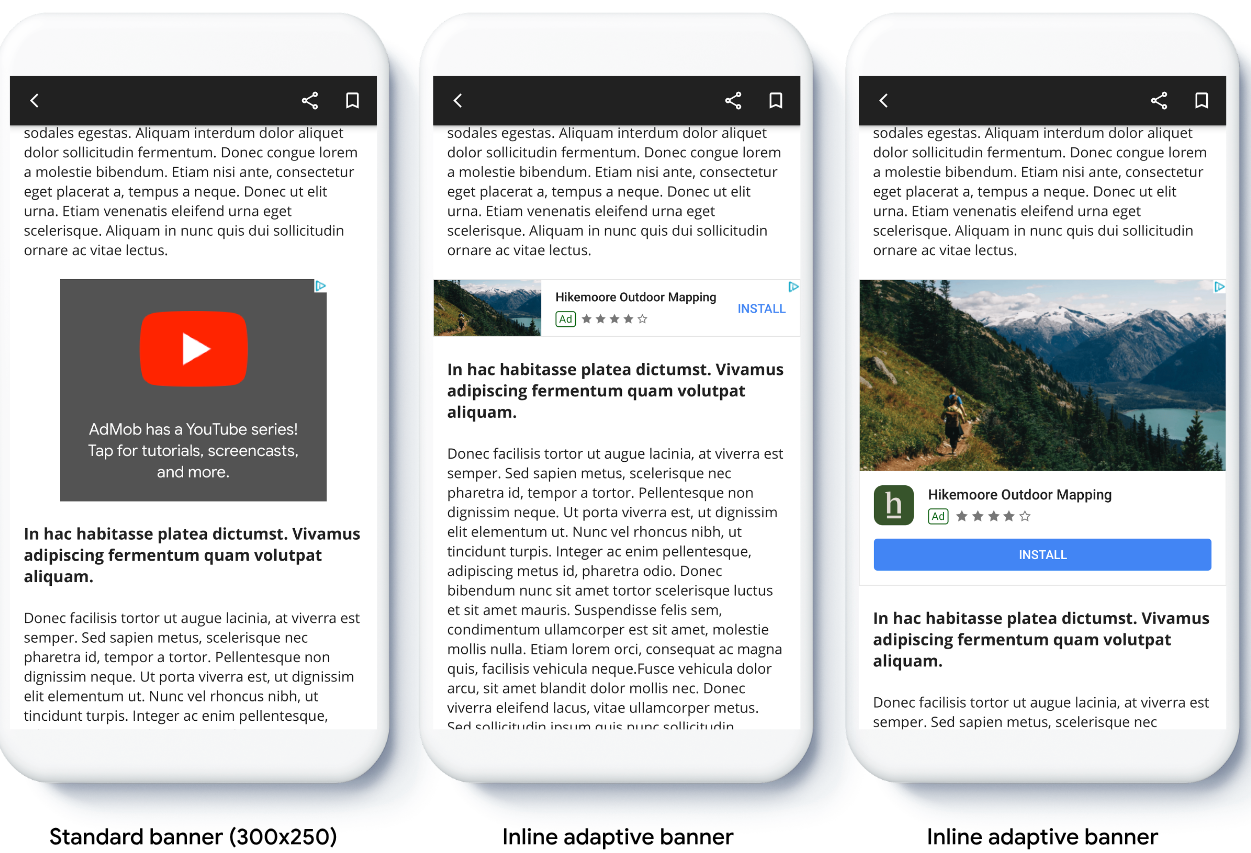
Inline adaptive banners are larger, taller banners compared to anchored adaptive banners. They are of variable height, and can be as tall as the device screen. They are intended to be placed in scrolling content.
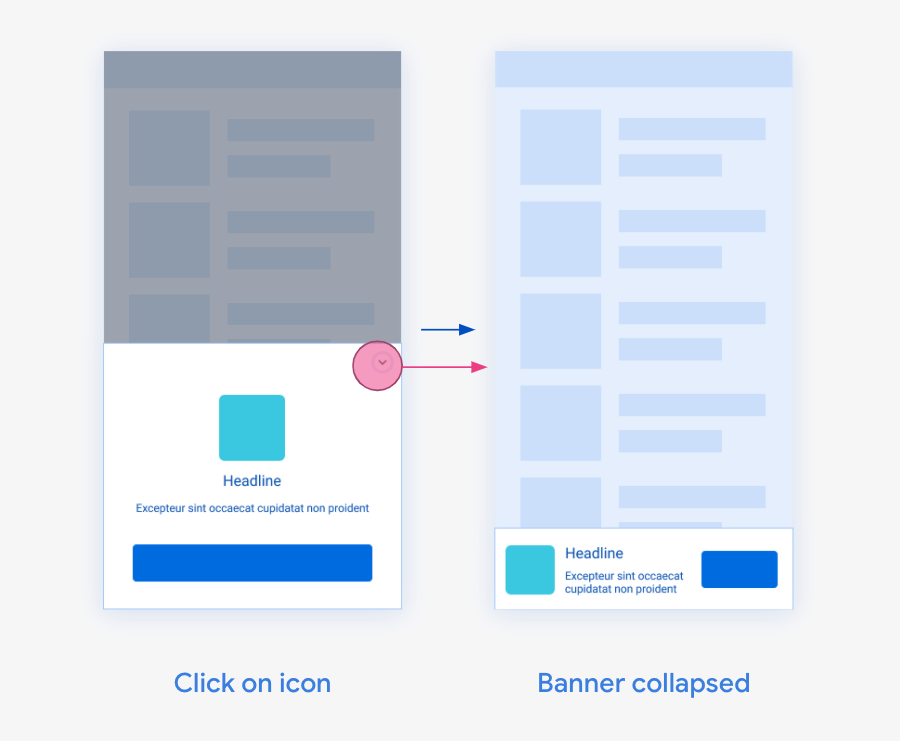
Collapsible banner ads are intended to improve performance of anchored ads that are otherwise a smaller size.
The Google Mobile Ads SDK supports fixed ad sizes for situations where adaptive banners ads don't meet your needs. Banner (320x50), Large banner (320x100), Medium rectangle (300x250), full banner (468x60) and leaderboard (728x90).
Native ads allow you to customize the look and feel of the ads that appear in your app. You decide how and where they're placed, so the layout is more consistent with your app's design.

Interstitial ad units show full-page ads in your app. Place them at natural breaks & transitions in your app's interface, such as after level completion in a gaming app.

AdMob rewarded ad units allow you to reward users with in-app items for interacting with video ads, playable ads, and surveys.

Rewarded interstitial is a type of incentivized ad format that allows you to offer rewards for ads that appear automatically during natural app transitions. Unlike rewarded ads, users don't opt in to view a rewarded interstitial, but Google requires an intro screen with clear reward messaging and an option to skip before the ad shows.

Version 17 requires React Native 0.86.0 or newer with the New Architecture enabled. The Legacy Architecture is no longer supported. Expo projects need a development build (Expo Go is not supported). The minimum operating system versions are iOS 15.1 and Android API level 24. See Prerequisites for the full list.
On Android you can choose the classic Google Mobile Ads SDK (default) or the GMA Next-Gen SDK at build time; the JavaScript API is the same either way. See GMA Next-Gen SDK (Android).
Every surface below works on the New Architecture. Surfaces marked To-Do still run through React Native's interoperability layer and have not yet been ported to a native Turbo Module or Fabric component; the port does not change the JavaScript API.
| Platform | Feature | Status |
|---|---|---|
| iOS | Mobile Ads SDK Methods (Turbo Native Module) | ✅ Complete |
| iOS | Banners (Fabric Native Component) | ✅ Complete |
| iOS | Full Screen Ads (Turbo Native Module) | ✅ Complete |
| iOS | Native Ads (Turbo Native Module, Fabric Native Component) | ✅ Complete |
| iOS | User Messaging Platform (Turbo Native Module) | ✅ Complete |
| iOS | EventEmitter (Turbo Native Module) | ⏳ To-Do |
| Android | Mobile Ads SDK Methods (Turbo Native Module) | ⏳ To-Do |
| Android | Banners (Fabric Native Component) | 🟡 Partial: multi-format banner ported, standard banner To-Do |
| Android | Full Screen Ads (Turbo Native Module) | ⏳ To-Do |
| Android | Native Ads (Turbo Native Module, Fabric Native Component) | ✅ Complete |
| Android | User Messaging Platform (Turbo Native Module) | ⏳ To-Do |
| Android | EventEmitter (Turbo Native Module) | ⏳ To-Do |
This package ships an integrator guide for coding agents at
AGENTS.md
(also installed at node_modules/react-native-google-mobile-ads/AGENTS.md). Point your agent at it
before it writes ad code. See For AI agents.

Built and maintained by Invertase.
426 followers · starred Apr 2025
314 followers · starred Oct 2022
10 followers · starred Jan 2023
54 followers · starred Sep 2021
React Native Google Mobile Ads enables you to monetize your app with AdMob.
See the code
React Native Google Mobile Ads lets you monetize your app with Google AdMob or Google Ad Manager. It wraps the native Google Mobile Ads SDKs for iOS and Android.
npx expo install and configure through the bundled config plugin. Bare React Native CLI apps are fully supported.npx expo install react-native-google-mobile-ads expo-dev-client
Add your AdMob App IDs to the config plugin in app.json, then create a development build (the module does not run in Expo Go):
{
  "expo": {
    "plugins": [
      [
        "react-native-google-mobile-ads",
        {
          "androidAppId": "ca-app-pub-xxxxxxxx~xxxxxxxx",
          "iosAppId": "ca-app-pub-xxxxxxxx~xxxxxxxx"
        }
      ]
    ]
  }
}
Next: gather consent, initialize the SDK and show your first ad by following Getting Started. Bare React Native CLI projects start at Install with React Native CLI.
App open ads are a special ad format intended for publishers wishing to monetize their app load screens.
Banner ad units display rectangular ads that occupy a portion of an app's layout. They stay on screen while users are interacting with the app, either anchored at the top or bottom of the screen or inline with content as the user scrolls. Banner ads can refresh automatically after a certain period of time.
A dynamically sized banner that is full-width and auto-height. Anchored adaptive banners are expected to be always on-screen, locked to the screen’s top or bottom.
Inline adaptive banners are larger, taller banners compared to anchored adaptive banners. They are of variable height, and can be as tall as the device screen. They are intended to be placed in scrolling content.
Collapsible banner ads are intended to improve performance of anchored ads that are otherwise a smaller size.
The Google Mobile Ads SDK supports fixed ad sizes for situations where adaptive banners ads don't meet your needs. Banner (320x50), Large banner (320x100), Medium rectangle (300x250), full banner (468x60) and leaderboard (728x90).
Native ads allow you to customize the look and feel of the ads that appear in your app. You decide how and where they're placed, so the layout is more consistent with your app's design.
Interstitial ad units show full-page ads in your app. Place them at natural breaks & transitions in your app's interface, such as after level completion in a gaming app.
AdMob rewarded ad units allow you to reward users with in-app items for interacting with video ads, playable ads, and surveys.
Rewarded interstitial is a type of incentivized ad format that allows you to offer rewards for ads that appear automatically during natural app transitions. Unlike rewarded ads, users don't opt in to view a rewarded interstitial, but Google requires an intro screen with clear reward messaging and an option to skip before the ad shows.
Version 17 requires React Native 0.86.0 or newer with the New Architecture enabled. The Legacy Architecture is no longer supported. Expo projects need a development build (Expo Go is not supported). The minimum operating system versions are iOS 15.1 and Android API level 24. See Prerequisites for the full list.
On Android you can choose the classic Google Mobile Ads SDK (default) or the GMA Next-Gen SDK at build time; the JavaScript API is the same either way. See GMA Next-Gen SDK (Android).
Every surface below works on the New Architecture. Surfaces marked To-Do still run through React Native's interoperability layer and have not yet been ported to a native Turbo Module or Fabric component; the port does not change the JavaScript API.
| Platform | Feature | Status |
|---|---|---|
| iOS | Mobile Ads SDK Methods (Turbo Native Module) | ✅ Complete |
| iOS | Banners (Fabric Native Component) | ✅ Complete |
| iOS | Full Screen Ads (Turbo Native Module) | ✅ Complete |
| iOS | Native Ads (Turbo Native Module, Fabric Native Component) | ✅ Complete |
| iOS | User Messaging Platform (Turbo Native Module) | ✅ Complete |
| iOS | EventEmitter (Turbo Native Module) | ⏳ To-Do |
| Android | Mobile Ads SDK Methods (Turbo Native Module) | ⏳ To-Do |
| Android | Banners (Fabric Native Component) | 🟡 Partial: multi-format banner ported, standard banner To-Do |
| Android | Full Screen Ads (Turbo Native Module) | ⏳ To-Do |
| Android | Native Ads (Turbo Native Module, Fabric Native Component) | ✅ Complete |
| Android | User Messaging Platform (Turbo Native Module) | ⏳ To-Do |
| Android | EventEmitter (Turbo Native Module) | ⏳ To-Do |
This package ships an integrator guide for coding agents at
AGENTS.md
(also installed at node_modules/react-native-google-mobile-ads/AGENTS.md). Point your agent at it
before it writes ad code. See For AI agents.
Built and maintained by Invertase.
426 followers · starred Apr 2025
314 followers · starred Oct 2022
10 followers · starred Jan 2023
54 followers · starred Sep 2021



