Luka Milivojevic1, Nikola Popovic1,†, Sayan Deb Sarkar2, Sebastian Koch3, Iro Armeni2, Luc Van Gool1, Danda Pani Paudel1
1INSAIT, Sofia University "St. Kliment Ohridski"
2Stanford University
3Ulm University
†Project lead
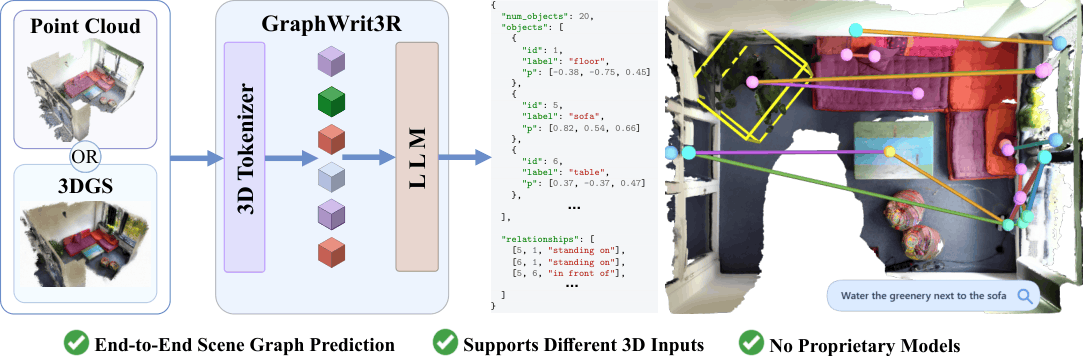
3D scene graphs provide a structured representation of complex environments by encoding objects, their semantic attributes, and the spatial and functional relationships between them. Current approaches for 3D scene graph generation suffer from several fundamental limitations. They rely on complex multi-stage pipelines with explicit intermediate representations, making systems fragile and prone to error propagation. They assume access to ground-truth object annotations during inference, which deviates from real-world scenarios. They depend on proprietary models, hindering open-source deployment, or incur prohibitively slow inference.
We present GraphWrit3R, a simple end-to-end method that takes a 3D point cloud, Gaussian Splats, or a combination of both as input, and directly outputs a complete scene graph as a structured JSON script. The graph lists all objects, their semantic attributes, and the relationships between them, while avoiding the limitations above. Point cloud inputs are encoded via Sonata and Gaussian Splat inputs via Chorus, with both modalities projected onto a shared voxel grid and fused through a per-voxel contrastive alignment loss before being decoded by a large language model. As a natural consequence of the language-model decoder, GraphWrit3R also supports open-vocabulary querying.
The code has been tested with:
An NVIDIA GPU with sufficient memory is required for training.
conda create -y -n graphwrit3r python=3.11
conda activate graphwrit3r
Install PyTorch with a CUDA version compatible with your system. For CUDA 12.4:
pip install \
  torch==2.4.1+cu124 \
  torchvision==0.19.1+cu124 \
  torchaudio==2.4.1+cu124 \
  --index-url https://download.pytorch.org/whl/cu124
If your system does not provide a CUDA toolkit for building extensions:
conda install -y -c nvidia/label/cuda-12.4.1 \
  cuda=12.4 \
  cuda-toolkit=12.4 \
  cuda-nvcc=12.4 \
  cuda-compiler=12.4 \
  cuda-cudart=12.4
Install build tools:
conda install -y -c conda-forge \
  gcc=13.2 \
  gxx=13.2 \
  ninja \
  cmake \
  git \
  wget \
  sparsehash
When using a Conda-provided CUDA toolkit:
export CUDA_HOME="$CONDA_PREFIX"
export PATH="$CUDA_HOME/bin:$PATH"
export LD_LIBRARY_PATH="$CONDA_PREFIX/lib:$CONDA_PREFIX/lib64:${LD_LIBRARY_PATH:-}"
For Hopper GPUs such as H100/H200, set:
export TORCH_CUDA_ARCH_LIST="9.0"
For other GPUs, set the corresponding CUDA compute capability before compiling custom CUDA extensions.
From the repository root:
pip install poetry
poetry config virtualenvs.create false --local
poetry install
poe install-training
Install FlashAttention:
pip install flash-attn --no-build-isolation --no-cache-dir
Install PyTorch Geometric packages compatible with PyTorch 2.4 and CUDA 12.4:
pip install \
  --find-links https://data.pyg.org/whl/torch-2.4.0+cu124.html \
  torch-scatter \
  torch-sparse \
  torch-cluster \
  torch-geometric
Install spconv:
pip install spconv-cu124
Install the remaining dependencies:
pip install \
  ftfy regex tqdm h5py pyyaml plyfile==1.1 termcolor \
  black yapf numba matplotlib sharedarray timm \
  peft==0.17.1 huggingface_hub==0.34.4 \
  umap-learn==0.5.9.post2 wandb tensorboard tensorboardx
Install CLIP and OCNN:
pip install --no-deps git+https://github.com/openai/CLIP.git

pip install \
  git+https://github.com/octree-nn/ocnn-pytorch.git \
  --no-deps \
  --no-build-isolation
GraphWrit3R uses external datasets and checkpoints that must be downloaded separately. Please follow the licenses and terms of use of the original data providers.
| Input | Source | Expected layout |
|---|---|---|
| SceneVerse 3RScan point clouds | SceneVerse | $SCENEVERSE_SCAN_DATA_ROOT/pcd_with_global_alignment/<scan_id>.pth |
| 3DSSG metadata and subset splits | 3DSSG subset data | $DATA_3DSSG_ROOT/objects.json, $DATA_3DSSG_ROOT/relationships.json, $DATA_3DSSG_SUBSET_ROOT/relationships_{train,validation}.json |
| 3RScan raw scans | 3RScan toolkit | $R3SCAN_ROOT/<scan_id>/mesh.refined.v2.obj, $R3SCAN_ROOT/<scan_id>/semseg.v2.json |
| 3RScan 3DGS data | GaussianWorld/3rscan_mcmc_3dgs | $RAW_3DGS_ROOT/<scan_id>/ckpts/point_cloud_30000.ply |
| Chorus checkpoint | SceneSplatPro/chorus | $CHORUS_CKPT_DIR/lang-dino-enc-pretrain-scan-ppv2-mp3d-mcmc.pth |
The 3DGS data is distributed separately from this repository. Access may require accepting the corresponding dataset terms on Hugging Face.
Choose a data directory and export the paths used below:
export GRAPHWRIT3R_ROOT="$(pwd)"
export DATA_ROOT="$GRAPHWRIT3R_ROOT/data"

export DATA_3DSSG_ROOT="$DATA_ROOT/3DSSG"
export DATA_3DSSG_SUBSET_ROOT="$DATA_ROOT/3DSSG_subset"
export SCENEVERSE_SCAN_DATA_ROOT="$DATA_ROOT/sceneverse_3rscan/3RScan/scan_data"
export R3SCAN_ROOT="$DATA_ROOT/3RScan"
export RAW_3DGS_ROOT="$DATA_ROOT/3rscan_mcmc_3dgs"

export FULL_SCENE_GRAPH_ROOT="$DATA_ROOT/graphwrit3r_full_scene_graphs"
export PCD_DATASET_ROOT="$DATA_ROOT/graphwrit3r_3dssg_subset"
export INTERMEDIATE_3DGS_ROOT="$DATA_ROOT/graphwrit3r_3dgs_intermediate"
export PREPARED_3DGS_ROOT="$DATA_ROOT/graphwrit3r_prepared_3dgs"
export FINAL_DATASET_ROOT="$DATA_ROOT/graphwrit3r_scene_graphs"
export CHORUS_CKPT_DIR="$DATA_ROOT/chorus_ckpt"

cd "$GRAPHWRIT3R_ROOT"
Download the Chorus checkpoint when initializing fusion from the base Chorus/SpatialLM checkpoint:
mkdir -p "$CHORUS_CKPT_DIR"

huggingface-cli download SceneSplatPro/chorus \
  lang-dino-enc-pretrain-scan-ppv2-mp3d-mcmc.pth \
  --local-dir "$CHORUS_CKPT_DIR"
Compute 3DSSG object boxes from SceneVerse-aligned 3RScan point clouds:
python scripts/extract_3dssg_obbs.py \
  --objects_json "$DATA_3DSSG_ROOT/objects.json" \
  --relationships_json "$DATA_3DSSG_ROOT/relationships.json" \
  --pcd_root "$SCENEVERSE_SCAN_DATA_ROOT" \
  --output_dir "$FULL_SCENE_GRAPH_ROOT"
Create the 3DSSG-subset point-cloud dataset:
python scripts/extract_3dssg_subset.py \
  --subset_dir "$DATA_3DSSG_SUBSET_ROOT" \
  --scene_graph_dir "$FULL_SCENE_GRAPH_ROOT" \
  --pcd_root "$SCENEVERSE_SCAN_DATA_ROOT" \
  --output_dir "$PCD_DATASET_ROOT"
Expected output:
$PCD_DATASET_ROOT/
├── pcd/
│   └── <scan_id>_split<split_num>.ply
├── scene_graph_train.json
├── scene_graph_val.json
└── dataset_info.json
Preprocess the downloaded 3RScan 3DGS data:
python scripts/prepare_chorus_sonata_raw_bridge_subsets_parallel.py \
  --dataset-root "$PCD_DATASET_ROOT" \
  --chorus-root "$RAW_3DGS_ROOT" \
  --r3scan-root "$R3SCAN_ROOT" \
  --output-root "$INTERMEDIATE_3DGS_ROOT" \
  --splits train,val \
  --workers 4 \
  --match-radius-voxels 2
Create the final 3DGS representation used during training:
python scripts/prepare_native_chorus_cache_from_raw_bridge.py \
  --raw-bridge-root "$INTERMEDIATE_3DGS_ROOT" \
  --output-root "$PREPARED_3DGS_ROOT" \
  --splits train,val \
  --workers 4 \
  --native-match-radius 2 \
  --crop-mode radius \
  --crop-margin-meters 0.25
Expected output:
$PREPARED_3DGS_ROOT/
├── train/
│   └── <scan_id>_split<split_num>/
│       ├── coord.npy
│       ├── color.npy
│       ├── opacity.npy
│       ├── scale.npy
│       ├── quat.npy
│       ├── sonata_grid.npy
│       ├── raw_splat_indices.npy
│       └── summary.json
└── val/
    └── ...
Scenes without matching point clouds, 3DGS files, or 3RScan metadata are skipped during preprocessing.
Create the final dataset root used for training:
python scripts/build_spatiallm_chorus_fusion_dataset.py \
  --source-root "$PCD_DATASET_ROOT" \
  --output-root "$FINAL_DATASET_ROOT" \
  --aligned-root "$PREPARED_3DGS_ROOT" \
  --overwrite
Expected output:
$FINAL_DATASET_ROOT/
├── pcd -> $PCD_DATASET_ROOT/pcd
├── scene_graph_train.json
├── scene_graph_val.json
└── dataset_info.json
Configuration files are provided in configs/. The main fields that need to be adapted to a local setup are:
dataset_dir
output_dir
chorus_aligned_root
chorus_checkpoint
cache_dir  # optional
chorus_repo_root can remain third_party/chorus when commands are run from the GraphWrit3R repository root.
A minimal Chorus-fusion configuration looks like:
dataset_dir: data/graphwrit3r_scene_graphs
dataset: scene_graph_train
eval_dataset: scene_graph_val

chorus_fusion_enabled: true
chorus_repo_root: third_party/chorus
chorus_config: chorus_3dgs
chorus_checkpoint: data/chorus_ckpt/lang-dino-enc-pretrain-scan-ppv2-mp3d-mcmc.pth
chorus_aligned_root: data/graphwrit3r_prepared_3dgs
chorus_input_mode: prepared
chorus_missing_policy: pcd
Set chorus_checkpoint: null only when model_name_or_path points to a GraphWrit3R checkpoint that already contains Chorus weights. When starting from a base SpatialLM/Qwen checkpoint and adding Chorus fusion for the first time, keep chorus_checkpoint set to the pretrained Chorus checkpoint.
Choose one of the provided configuration files and launch training:
CONFIG="configs/YOUR_CONFIG.yaml"
python train.py "$CONFIG"
For multi-GPU training on one node, set NPROC_PER_NODE to the number of GPUs:
NPROC_PER_NODE=8 \
python train.py "$CONFIG"
GraphWrit3R supports scene-graph generation from point clouds, 3D Gaussian Splats, or their averaged fusion.
Set a trained checkpoint and an output directory:
export GRAPHWRIT3R_CKPT="$DATA_ROOT/checkpoints/graphwrit3r"
export INFERENCE_OUTPUT="$DATA_ROOT/graphwrit3r_inference"
python inference_scene_graph.py \
  --model_path "$GRAPHWRIT3R_CKPT" \
  --point_cloud "$FINAL_DATASET_ROOT/pcd" \
  --val_json "$FINAL_DATASET_ROOT/scene_graph_val.json" \
  --output "$INFERENCE_OUTPUT/pcd" \
  --chorus_fusion_mode pcd \
  --temperature 0.00001 \
  --top_p 1.0 \
  --top_k 1 \
  --max_new_tokens 8192
python inference_scene_graph.py \
  --model_path "$GRAPHWRIT3R_CKPT" \
  --val_json "$FINAL_DATASET_ROOT/scene_graph_val.json" \
  --output "$INFERENCE_OUTPUT/3dgs" \
  --chorus_aligned_root "$PREPARED_3DGS_ROOT" \
  --chorus_fusion_mode chorus \
  --chorus_missing_policy error \
  --temperature 0.00001 \
  --top_p 1.0 \
  --top_k 1 \
  --max_new_tokens 8192
python inference_scene_graph.py \
  --model_path "$GRAPHWRIT3R_CKPT" \
  --point_cloud "$FINAL_DATASET_ROOT/pcd" \
  --val_json "$FINAL_DATASET_ROOT/scene_graph_val.json" \
  --output "$INFERENCE_OUTPUT/avg" \
  --chorus_aligned_root "$PREPARED_3DGS_ROOT" \
  --chorus_fusion_mode avg \
  --temperature 0.00001 \
  --top_p 1.0 \
  --top_k 1 \
  --max_new_tokens 8192
Evaluate generated scene graphs with:
python -m sg_eval.eval_scene_graph \
  --predictions "$INFERENCE_OUTPUT/pcd" \
  --ground_truth "$FINAL_DATASET_ROOT/scene_graph_val.json" \
  --dataset_dir "$FINAL_DATASET_ROOT" \
  --train_scene_graphs "$FINAL_DATASET_ROOT/scene_graph_train.json" \
  --val_scene_graphs "$FINAL_DATASET_ROOT/scene_graph_val.json"
Replace "$INFERENCE_OUTPUT/pcd" with the output directory for the inference mode being evaluated.
Prediction directories should contain files named <scene_id>_sg.json, which is the default output format of inference_scene_graph.py.
Install the optional visualization dependencies:
pip install pyviz3d pillow sentence-transformers
Choose a predicted scene graph and its scene ID:
export SCENE_ID="SCAN_ID_split1"
export GRAPH_JSON="$INFERENCE_OUTPUT/pcd/${SCENE_ID}_sg.json"
export VIZ_OUTPUT="$DATA_ROOT/scene_graph_viz"
Render the scene graph:
python scripts/visualize_3dssg_scene_graph_pyviz3d.py \
  --graph-json "$GRAPH_JSON" \
  --scene-id "$SCENE_ID" \
  --graph-kind predicted \
  --r3scan-root "$R3SCAN_ROOT" \
  --sceneverse-pcd-root "$SCENEVERSE_SCAN_DATA_ROOT" \
  --base-mode sceneverse_textured_mesh_points \
  --mesh-point-samples 1800000 \
  --mesh-point-size 9 \
  --paper-point-size 22 \
  --scene-top-trim-percent 10 \
  --paper-camera-fov 58 \
  --paper-camera-distance-scale 1.35 \
  --box-alpha 0.18 \
  --edge-width 0.012 \
  --edge-alpha 0.9 \
  --ui-mode paper_demo \
  --tour-duration 18 \
  --output-dir "$VIZ_OUTPUT" \
  --output-name "${SCENE_ID}_demo"
For static viewing, serve the generated viewer directory with a local HTTP server:
cd "$VIZ_OUTPUT/${SCENE_ID}_demo"
python -m http.server 6008
For live text querying:
python scripts/serve_scene_graph_query.py \
  --viewer-dir "$VIZ_OUTPUT/${SCENE_ID}_demo" \
  --host 127.0.0.1 \
  --port 6008
This project builds on open-source research and codebases for 3D scene understanding, point-cloud representation learning, Gaussian Splatting, and language-model-based structured prediction.
We thank the authors and maintainers of 3DSSG, 3RScan, SceneVerse, Sonata, Chorus, SpatialLM, and related open-source projects.
@article{milivojevic2026graphwrit3r,
  title   = {GraphWrit3R: End-to-End 3D Scene Graph Writing},
  author  = {Milivojevic, Luka and Popovic, Nikola and Deb Sarkar, Sayan and Koch, Sebastian and Armeni, Iro and Van Gool, Luc and Paudel, Danda Pani},
  journal = {40th Conference on Neural Information Processing Systems (NeurIPS 2026)},
  year    = {2026}
}
Luka Milivojevic1, Nikola Popovic1,†, Sayan Deb Sarkar2, Sebastian Koch3, Iro Armeni2, Luc Van Gool1, Danda Pani Paudel1
1INSAIT, Sofia University "St. Kliment Ohridski"
2Stanford University
3Ulm University
†Project lead
3D scene graphs provide a structured representation of complex environments by encoding objects, their semantic attributes, and the spatial and functional relationships between them. Current approaches for 3D scene graph generation suffer from several fundamental limitations. They rely on complex multi-stage pipelines with explicit intermediate representations, making systems fragile and prone to error propagation. They assume access to ground-truth object annotations during inference, which deviates from real-world scenarios. They depend on proprietary models, hindering open-source deployment, or incur prohibitively slow inference.
We present GraphWrit3R, a simple end-to-end method that takes a 3D point cloud, Gaussian Splats, or a combination of both as input, and directly outputs a complete scene graph as a structured JSON script. The graph lists all objects, their semantic attributes, and the relationships between them, while avoiding the limitations above. Point cloud inputs are encoded via Sonata and Gaussian Splat inputs via Chorus, with both modalities projected onto a shared voxel grid and fused through a per-voxel contrastive alignment loss before being decoded by a large language model. As a natural consequence of the language-model decoder, GraphWrit3R also supports open-vocabulary querying.
The code has been tested with:
An NVIDIA GPU with sufficient memory is required for training.
conda create -y -n graphwrit3r python=3.11
conda activate graphwrit3r
Install PyTorch with a CUDA version compatible with your system. For CUDA 12.4:
pip install \
  torch==2.4.1+cu124 \
  torchvision==0.19.1+cu124 \
  torchaudio==2.4.1+cu124 \
  --index-url https://download.pytorch.org/whl/cu124
If your system does not provide a CUDA toolkit for building extensions:
conda install -y -c nvidia/label/cuda-12.4.1 \
  cuda=12.4 \
  cuda-toolkit=12.4 \
  cuda-nvcc=12.4 \
  cuda-compiler=12.4 \
  cuda-cudart=12.4
Install build tools:
conda install -y -c conda-forge \
  gcc=13.2 \
  gxx=13.2 \
  ninja \
  cmake \
  git \
  wget \
  sparsehash
When using a Conda-provided CUDA toolkit:
export CUDA_HOME="$CONDA_PREFIX"
export PATH="$CUDA_HOME/bin:$PATH"
export LD_LIBRARY_PATH="$CONDA_PREFIX/lib:$CONDA_PREFIX/lib64:${LD_LIBRARY_PATH:-}"
For Hopper GPUs such as H100/H200, set:
export TORCH_CUDA_ARCH_LIST="9.0"
For other GPUs, set the corresponding CUDA compute capability before compiling custom CUDA extensions.
From the repository root:
pip install poetry
poetry config virtualenvs.create false --local
poetry install
poe install-training
Install FlashAttention:
pip install flash-attn --no-build-isolation --no-cache-dir
Install PyTorch Geometric packages compatible with PyTorch 2.4 and CUDA 12.4:
pip install \
  --find-links https://data.pyg.org/whl/torch-2.4.0+cu124.html \
  torch-scatter \
  torch-sparse \
  torch-cluster \
  torch-geometric
Install spconv:
pip install spconv-cu124
Install the remaining dependencies:
pip install \
  ftfy regex tqdm h5py pyyaml plyfile==1.1 termcolor \
  black yapf numba matplotlib sharedarray timm \
  peft==0.17.1 huggingface_hub==0.34.4 \
  umap-learn==0.5.9.post2 wandb tensorboard tensorboardx
Install CLIP and OCNN:
pip install --no-deps git+https://github.com/openai/CLIP.git

pip install \
  git+https://github.com/octree-nn/ocnn-pytorch.git \
  --no-deps \
  --no-build-isolation
GraphWrit3R uses external datasets and checkpoints that must be downloaded separately. Please follow the licenses and terms of use of the original data providers.
| Input | Source | Expected layout |
|---|---|---|
| SceneVerse 3RScan point clouds | SceneVerse | $SCENEVERSE_SCAN_DATA_ROOT/pcd_with_global_alignment/<scan_id>.pth |
| 3DSSG metadata and subset splits | 3DSSG subset data | $DATA_3DSSG_ROOT/objects.json, $DATA_3DSSG_ROOT/relationships.json, $DATA_3DSSG_SUBSET_ROOT/relationships_{train,validation}.json |
| 3RScan raw scans | 3RScan toolkit | $R3SCAN_ROOT/<scan_id>/mesh.refined.v2.obj, $R3SCAN_ROOT/<scan_id>/semseg.v2.json |
| 3RScan 3DGS data | GaussianWorld/3rscan_mcmc_3dgs | $RAW_3DGS_ROOT/<scan_id>/ckpts/point_cloud_30000.ply |
| Chorus checkpoint | SceneSplatPro/chorus | $CHORUS_CKPT_DIR/lang-dino-enc-pretrain-scan-ppv2-mp3d-mcmc.pth |
The 3DGS data is distributed separately from this repository. Access may require accepting the corresponding dataset terms on Hugging Face.
Choose a data directory and export the paths used below:
export GRAPHWRIT3R_ROOT="$(pwd)"
export DATA_ROOT="$GRAPHWRIT3R_ROOT/data"

export DATA_3DSSG_ROOT="$DATA_ROOT/3DSSG"
export DATA_3DSSG_SUBSET_ROOT="$DATA_ROOT/3DSSG_subset"
export SCENEVERSE_SCAN_DATA_ROOT="$DATA_ROOT/sceneverse_3rscan/3RScan/scan_data"
export R3SCAN_ROOT="$DATA_ROOT/3RScan"
export RAW_3DGS_ROOT="$DATA_ROOT/3rscan_mcmc_3dgs"

export FULL_SCENE_GRAPH_ROOT="$DATA_ROOT/graphwrit3r_full_scene_graphs"
export PCD_DATASET_ROOT="$DATA_ROOT/graphwrit3r_3dssg_subset"
export INTERMEDIATE_3DGS_ROOT="$DATA_ROOT/graphwrit3r_3dgs_intermediate"
export PREPARED_3DGS_ROOT="$DATA_ROOT/graphwrit3r_prepared_3dgs"
export FINAL_DATASET_ROOT="$DATA_ROOT/graphwrit3r_scene_graphs"
export CHORUS_CKPT_DIR="$DATA_ROOT/chorus_ckpt"

cd "$GRAPHWRIT3R_ROOT"
Download the Chorus checkpoint when initializing fusion from the base Chorus/SpatialLM checkpoint:
mkdir -p "$CHORUS_CKPT_DIR"

huggingface-cli download SceneSplatPro/chorus \
  lang-dino-enc-pretrain-scan-ppv2-mp3d-mcmc.pth \
  --local-dir "$CHORUS_CKPT_DIR"
Compute 3DSSG object boxes from SceneVerse-aligned 3RScan point clouds:
python scripts/extract_3dssg_obbs.py \
  --objects_json "$DATA_3DSSG_ROOT/objects.json" \
  --relationships_json "$DATA_3DSSG_ROOT/relationships.json" \
  --pcd_root "$SCENEVERSE_SCAN_DATA_ROOT" \
  --output_dir "$FULL_SCENE_GRAPH_ROOT"
Create the 3DSSG-subset point-cloud dataset:
python scripts/extract_3dssg_subset.py \
  --subset_dir "$DATA_3DSSG_SUBSET_ROOT" \
  --scene_graph_dir "$FULL_SCENE_GRAPH_ROOT" \
  --pcd_root "$SCENEVERSE_SCAN_DATA_ROOT" \
  --output_dir "$PCD_DATASET_ROOT"
Expected output:
$PCD_DATASET_ROOT/
├── pcd/
│   └── <scan_id>_split<split_num>.ply
├── scene_graph_train.json
├── scene_graph_val.json
└── dataset_info.json
Preprocess the downloaded 3RScan 3DGS data:
python scripts/prepare_chorus_sonata_raw_bridge_subsets_parallel.py \
  --dataset-root "$PCD_DATASET_ROOT" \
  --chorus-root "$RAW_3DGS_ROOT" \
  --r3scan-root "$R3SCAN_ROOT" \
  --output-root "$INTERMEDIATE_3DGS_ROOT" \
  --splits train,val \
  --workers 4 \
  --match-radius-voxels 2
Create the final 3DGS representation used during training:
python scripts/prepare_native_chorus_cache_from_raw_bridge.py \
  --raw-bridge-root "$INTERMEDIATE_3DGS_ROOT" \
  --output-root "$PREPARED_3DGS_ROOT" \
  --splits train,val \
  --workers 4 \
  --native-match-radius 2 \
  --crop-mode radius \
  --crop-margin-meters 0.25
Expected output:
$PREPARED_3DGS_ROOT/
├── train/
│   └── <scan_id>_split<split_num>/
│       ├── coord.npy
│       ├── color.npy
│       ├── opacity.npy
│       ├── scale.npy
│       ├── quat.npy
│       ├── sonata_grid.npy
│       ├── raw_splat_indices.npy
│       └── summary.json
└── val/
    └── ...
Scenes without matching point clouds, 3DGS files, or 3RScan metadata are skipped during preprocessing.
Create the final dataset root used for training:
python scripts/build_spatiallm_chorus_fusion_dataset.py \
  --source-root "$PCD_DATASET_ROOT" \
  --output-root "$FINAL_DATASET_ROOT" \
  --aligned-root "$PREPARED_3DGS_ROOT" \
  --overwrite
Expected output:
$FINAL_DATASET_ROOT/
├── pcd -> $PCD_DATASET_ROOT/pcd
├── scene_graph_train.json
├── scene_graph_val.json
└── dataset_info.json
Configuration files are provided in configs/. The main fields that need to be adapted to a local setup are:
dataset_dir
output_dir
chorus_aligned_root
chorus_checkpoint
cache_dir  # optional
chorus_repo_root can remain third_party/chorus when commands are run from the GraphWrit3R repository root.
A minimal Chorus-fusion configuration looks like:
dataset_dir: data/graphwrit3r_scene_graphs
dataset: scene_graph_train
eval_dataset: scene_graph_val

chorus_fusion_enabled: true
chorus_repo_root: third_party/chorus
chorus_config: chorus_3dgs
chorus_checkpoint: data/chorus_ckpt/lang-dino-enc-pretrain-scan-ppv2-mp3d-mcmc.pth
chorus_aligned_root: data/graphwrit3r_prepared_3dgs
chorus_input_mode: prepared
chorus_missing_policy: pcd
Set chorus_checkpoint: null only when model_name_or_path points to a GraphWrit3R checkpoint that already contains Chorus weights. When starting from a base SpatialLM/Qwen checkpoint and adding Chorus fusion for the first time, keep chorus_checkpoint set to the pretrained Chorus checkpoint.
Choose one of the provided configuration files and launch training:
CONFIG="configs/YOUR_CONFIG.yaml"
python train.py "$CONFIG"
For multi-GPU training on one node, set NPROC_PER_NODE to the number of GPUs:
NPROC_PER_NODE=8 \
python train.py "$CONFIG"
GraphWrit3R supports scene-graph generation from point clouds, 3D Gaussian Splats, or their averaged fusion.
Set a trained checkpoint and an output directory:
export GRAPHWRIT3R_CKPT="$DATA_ROOT/checkpoints/graphwrit3r"
export INFERENCE_OUTPUT="$DATA_ROOT/graphwrit3r_inference"
python inference_scene_graph.py \
  --model_path "$GRAPHWRIT3R_CKPT" \
  --point_cloud "$FINAL_DATASET_ROOT/pcd" \
  --val_json "$FINAL_DATASET_ROOT/scene_graph_val.json" \
  --output "$INFERENCE_OUTPUT/pcd" \
  --chorus_fusion_mode pcd \
  --temperature 0.00001 \
  --top_p 1.0 \
  --top_k 1 \
  --max_new_tokens 8192
python inference_scene_graph.py \
  --model_path "$GRAPHWRIT3R_CKPT" \
  --val_json "$FINAL_DATASET_ROOT/scene_graph_val.json" \
  --output "$INFERENCE_OUTPUT/3dgs" \
  --chorus_aligned_root "$PREPARED_3DGS_ROOT" \
  --chorus_fusion_mode chorus \
  --chorus_missing_policy error \
  --temperature 0.00001 \
  --top_p 1.0 \
  --top_k 1 \
  --max_new_tokens 8192
python inference_scene_graph.py \
  --model_path "$GRAPHWRIT3R_CKPT" \
  --point_cloud "$FINAL_DATASET_ROOT/pcd" \
  --val_json "$FINAL_DATASET_ROOT/scene_graph_val.json" \
  --output "$INFERENCE_OUTPUT/avg" \
  --chorus_aligned_root "$PREPARED_3DGS_ROOT" \
  --chorus_fusion_mode avg \
  --temperature 0.00001 \
  --top_p 1.0 \
  --top_k 1 \
  --max_new_tokens 8192
Evaluate generated scene graphs with:
python -m sg_eval.eval_scene_graph \
  --predictions "$INFERENCE_OUTPUT/pcd" \
  --ground_truth "$FINAL_DATASET_ROOT/scene_graph_val.json" \
  --dataset_dir "$FINAL_DATASET_ROOT" \
  --train_scene_graphs "$FINAL_DATASET_ROOT/scene_graph_train.json" \
  --val_scene_graphs "$FINAL_DATASET_ROOT/scene_graph_val.json"
Replace "$INFERENCE_OUTPUT/pcd" with the output directory for the inference mode being evaluated.
Prediction directories should contain files named <scene_id>_sg.json, which is the default output format of inference_scene_graph.py.
Install the optional visualization dependencies:
pip install pyviz3d pillow sentence-transformers
Choose a predicted scene graph and its scene ID:
export SCENE_ID="SCAN_ID_split1"
export GRAPH_JSON="$INFERENCE_OUTPUT/pcd/${SCENE_ID}_sg.json"
export VIZ_OUTPUT="$DATA_ROOT/scene_graph_viz"
Render the scene graph:
python scripts/visualize_3dssg_scene_graph_pyviz3d.py \
  --graph-json "$GRAPH_JSON" \
  --scene-id "$SCENE_ID" \
  --graph-kind predicted \
  --r3scan-root "$R3SCAN_ROOT" \
  --sceneverse-pcd-root "$SCENEVERSE_SCAN_DATA_ROOT" \
  --base-mode sceneverse_textured_mesh_points \
  --mesh-point-samples 1800000 \
  --mesh-point-size 9 \
  --paper-point-size 22 \
  --scene-top-trim-percent 10 \
  --paper-camera-fov 58 \
  --paper-camera-distance-scale 1.35 \
  --box-alpha 0.18 \
  --edge-width 0.012 \
  --edge-alpha 0.9 \
  --ui-mode paper_demo \
  --tour-duration 18 \
  --output-dir "$VIZ_OUTPUT" \
  --output-name "${SCENE_ID}_demo"
For static viewing, serve the generated viewer directory with a local HTTP server:
cd "$VIZ_OUTPUT/${SCENE_ID}_demo"
python -m http.server 6008
For live text querying:
python scripts/serve_scene_graph_query.py \
  --viewer-dir "$VIZ_OUTPUT/${SCENE_ID}_demo" \
  --host 127.0.0.1 \
  --port 6008
This project builds on open-source research and codebases for 3D scene understanding, point-cloud representation learning, Gaussian Splatting, and language-model-based structured prediction.
We thank the authors and maintainers of 3DSSG, 3RScan, SceneVerse, Sonata, Chorus, SpatialLM, and related open-source projects.
@article{milivojevic2026graphwrit3r,
  title   = {GraphWrit3R: End-to-End 3D Scene Graph Writing},
  author  = {Milivojevic, Luka and Popovic, Nikola and Deb Sarkar, Sayan and Koch, Sebastian and Armeni, Iro and Van Gool, Luc and Paudel, Danda Pani},
  journal = {40th Conference on Neural Information Processing Systems (NeurIPS 2026)},
  year    = {2026}
}



