
README
Floater-Free-Gaussian-Splatting
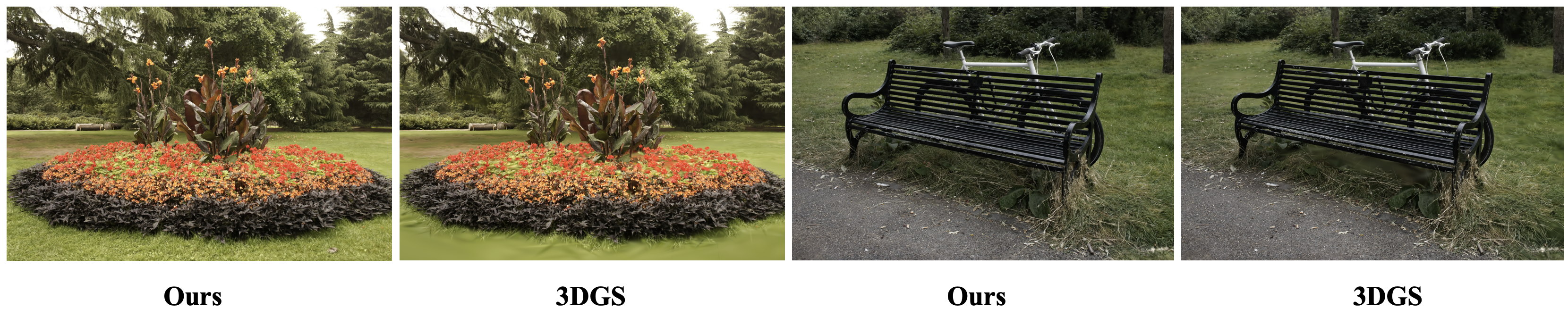
This repo uses the absolute value of the gradient of pixel pairs for GS to accumulate the gradient of each GS. Since the preprint paper absGS did the same thing, therefore, you can also consider this repo as an unofficial implementation of absGS.
Compared to Pixel-GS, our project can achieve the removal of floaters without significantly increasing the number of GS. In some scenarios where the point cloud distribution is good, it can reduce the number of point clouds. Compared to Radsplat, our method does not require training zipnerf, and the training time on a 3090 is approximately 30 minutes.
Dataset
In this project, you can use:
- synthetic dataset from NeRF, and NSVF
- real-world dataset from Mip-NeRF 360 and tandt_db.
And the data structure should be organized as follows:
data/
├── NeRF
│   ├── Chair/
│   ├── Drums/
│   ├── ...
├── NSVF
│   ├── Bike/
│   ├── Lifestyle/
│   ├── ...
├── Mip-360
│   ├── bicycle/
│   ├── bonsai/
│   ├── ...
├── tandt_db
│   ├── db/
│   │   ├── drjohnson/
│   │   ├── playroom/
│   ├── tandt/
│   │   ├── train/
│   │   ├── truck/
Run
Environment
git clone https://github.com/ingra14m/floater-free-gaussian-splatting --recursive
cd floater-free-gaussian-splatting

conda create -n abs-gaussian-env python=3.8
conda activate abs-gaussian-env

# install pytorch
pip install torch==1.13.1+cu116 torchvision==0.14.1+cu116 --extra-index-url https://download.pytorch.org/whl/cu116

# install dependencies
pip install -r requirements.txt
Train
python train.py -s your/path/to/the/dataset -m your/path/to/save --eval

# Mip-360
python train.py -s your/path/to/the/dataset -m your/path/to/save --eval -r [2/4]

# Others
python train.py -s your/path/to/the/dataset -m your/path/to/save --eval
It should be noted that we adopted the same approach as ZipNeRF, Pixel-GS, and RadSplat, downsampling outdoor scenes (bicycle, garden, stump, flower, treehill) by 4 times and indoor scenes (bonsai, counter, kitchen, room) by 2 times.
Render
python render.py -m your/path/to/save --eval --skip_train
Render Video
python render.py -m your/path/to/save --eval --skip_train --skip_test --render_video
Metrics
python metrics.py -m your/path/to/save
Results
Mip360
| Scene | PSNR | SSIM | LPIPS | Mem | FPS |
|---|---|---|---|---|---|
| bicycle | 25.82 | 0.7989 | 0.1656 | 1441 | 66 |
| bonsai | 32.41 | 0.9502 | 0.1608 | 258 | 170 |
| counter | 29.22 | 0.9187 | 0.1687 | 261 | 125 |
| garden | 27.95 | 0.8799 | 0.0934 | 971 | 65 |
| kitchen | 31.91 | 0.9351 | 0.1081 | 434 | 99 |
| room | 31.78 | 0.9331 | 0.1750 | 416 | 114 |
| stump | 27.3 | 0.7976 | 0.1848 | 1043 | 103 |
| flower | 21.84 | 0.6495 | 0.2629 | 888 | 105 |
| treehill | 22.39 | 0.6475 | 0.2697 | 1087 | 87 |
| Average | 27.85 | 0.8345 | 0.1765 | 755 | 104 |
NeRF
| Scene | PSNR | SSIM | LPIPS | Mem | FPS |
|---|---|---|---|---|---|
| chair | 35.69 | 0.9879 | 0.0103 | 101 | 219 |
| drums | 26.33 | 0.955 | 0.0363 | 74 | 300 |
| ficus | 35.54 | 0.987 | 0.0117 | 48 | 386 |
| hotdog | 38.17 | 0.9857 | 0.0185 | 44 | 331 |
| lego | 36.4 | 0.9833 | 0.0148 | 61 | 317 |
| materials | 30.61 | 0.961 | 0.0357 | 33 | 444 |
| mic | 36.73 | 0.9926 | 0.0063 | 39 | 307 |
| ship | 31.85 | 0.9061 | 0.0998 | 89 | 212 |
| Average | 33.92 | 0.9698 | 0.0292 | 61 | 315 |
NSVF
| Scene | PSNR | SSIM | LPIPS | Mem | FPS |
|---|---|---|---|---|---|
| Bike | 40.74 | 0.9939 | 0.0056 | 23 | 459 |
| Lifestyle | 33.21 | 0.9795 | 0.027 | 40 | 379 |
| Palace | 39.05 | 0.9835 | 0.0156 | 74 | 280 |
| Robot | 39.24 | 0.9936 | 0.0067 | 53 | 319 |
| Spaceship | 36.78 | 0.9915 | 0.0096 | 22 | 437 |
| Steamtrain | 37.71 | 0.9933 | 0.008 | 48 | 267 |
| Toad | 37.28 | 0.9853 | 0.0173 | 102 | 273 |
| Wineholder | 32.71 | 0.975 | 0.025 | 64 | 191 |
| Average | 37.09 | 0.9869 | 0.0143 | 53 | 326 |
Methods
Don't forget to install the new diff-gaussian-rasterization in diff-gaussian-rasterization-extentions. This pipeline supports pre-filter, depth visualization, and uses additional variables to store the contribution of each pixel to the GS gradient (the contribution should obviously be positive).
// vanilla gradients for densification
atomicAdd(&dL_dmean2D[global_id].x, dL_dG * dG_ddelx * ddelx_dx);
atomicAdd(&dL_dmean2D[global_id].y, dL_dG * dG_ddely * ddely_dy);

// abs gradients for densification
atomicAdd(&dL_dmean2D_densify[global_id].x, fabsf(dL_dG * dG_ddelx * ddelx_dx));
atomicAdd(&dL_dmean2D_densify[global_id].y, fabsf(dL_dG * dG_ddely * ddely_dy));
BibTex
This idea is the same as absGS and Gaussian Opacity Fields. The difference is that we have set the densify_grad_threshold to 0.0005, and all other parameters are used as in vanilla 3D-GS. If you find this project useful, please don't forget to cite these two awesome papers.
@article{ye2024absgs,
  title={AbsGS: Recovering Fine Details for 3D Gaussian Splatting},
  author={Ye, Zongxin and Li, Wenyu and Liu, Sidun and Qiao, Peng and Dou, Yong},
  journal={arXiv preprint arXiv:2404.10484},
  year={2024}
}

@article{Yu2024GOF,
  author    = {Yu, Zehao and Sattler, Torsten and Geiger, Andreas},
  title     = {Gaussian Opacity Fields: Efficient High-quality Compact Surface Reconstruction in Unbounded Scenes},
  journal   = {arXiv:2404.10772},
  year      = {2024},
}
Similar repos


Languages
Python
100.0%
README
Floater-Free-Gaussian-Splatting
This repo uses the absolute value of the gradient of pixel pairs for GS to accumulate the gradient of each GS. Since the preprint paper absGS did the same thing, therefore, you can also consider this repo as an unofficial implementation of absGS.
Compared to Pixel-GS, our project can achieve the removal of floaters without significantly increasing the number of GS. In some scenarios where the point cloud distribution is good, it can reduce the number of point clouds. Compared to Radsplat, our method does not require training zipnerf, and the training time on a 3090 is approximately 30 minutes.
Dataset
In this project, you can use:
- synthetic dataset from NeRF, and NSVF
- real-world dataset from Mip-NeRF 360 and tandt_db.
And the data structure should be organized as follows:
data/
├── NeRF
│   ├── Chair/
│   ├── Drums/
│   ├── ...
├── NSVF
│   ├── Bike/
│   ├── Lifestyle/
│   ├── ...
├── Mip-360
│   ├── bicycle/
│   ├── bonsai/
│   ├── ...
├── tandt_db
│   ├── db/
│   │   ├── drjohnson/
│   │   ├── playroom/
│   ├── tandt/
│   │   ├── train/
│   │   ├── truck/
Run
Environment
git clone https://github.com/ingra14m/floater-free-gaussian-splatting --recursive
cd floater-free-gaussian-splatting

conda create -n abs-gaussian-env python=3.8
conda activate abs-gaussian-env

# install pytorch
pip install torch==1.13.1+cu116 torchvision==0.14.1+cu116 --extra-index-url https://download.pytorch.org/whl/cu116

# install dependencies
pip install -r requirements.txt
Train
python train.py -s your/path/to/the/dataset -m your/path/to/save --eval

# Mip-360
python train.py -s your/path/to/the/dataset -m your/path/to/save --eval -r [2/4]

# Others
python train.py -s your/path/to/the/dataset -m your/path/to/save --eval
It should be noted that we adopted the same approach as ZipNeRF, Pixel-GS, and RadSplat, downsampling outdoor scenes (bicycle, garden, stump, flower, treehill) by 4 times and indoor scenes (bonsai, counter, kitchen, room) by 2 times.
Render
python render.py -m your/path/to/save --eval --skip_train
Render Video
python render.py -m your/path/to/save --eval --skip_train --skip_test --render_video
Metrics
python metrics.py -m your/path/to/save
Results
Mip360
| Scene | PSNR | SSIM | LPIPS | Mem | FPS |
|---|---|---|---|---|---|
| bicycle | 25.82 | 0.7989 | 0.1656 | 1441 | 66 |
| bonsai | 32.41 | 0.9502 | 0.1608 | 258 | 170 |
| counter | 29.22 | 0.9187 | 0.1687 | 261 | 125 |
| garden | 27.95 | 0.8799 | 0.0934 | 971 | 65 |
| kitchen | 31.91 | 0.9351 | 0.1081 | 434 | 99 |
| room | 31.78 | 0.9331 | 0.1750 | 416 | 114 |
| stump | 27.3 | 0.7976 | 0.1848 | 1043 | 103 |
| flower | 21.84 | 0.6495 | 0.2629 | 888 | 105 |
| treehill | 22.39 | 0.6475 | 0.2697 | 1087 | 87 |
| Average | 27.85 | 0.8345 | 0.1765 | 755 | 104 |
NeRF
| Scene | PSNR | SSIM | LPIPS | Mem | FPS |
|---|---|---|---|---|---|
| chair | 35.69 | 0.9879 | 0.0103 | 101 | 219 |
| drums | 26.33 | 0.955 | 0.0363 | 74 | 300 |
| ficus | 35.54 | 0.987 | 0.0117 | 48 | 386 |
| hotdog | 38.17 | 0.9857 | 0.0185 | 44 | 331 |
| lego | 36.4 | 0.9833 | 0.0148 | 61 | 317 |
| materials | 30.61 | 0.961 | 0.0357 | 33 | 444 |
| mic | 36.73 | 0.9926 | 0.0063 | 39 | 307 |
| ship | 31.85 | 0.9061 | 0.0998 | 89 | 212 |
| Average | 33.92 | 0.9698 | 0.0292 | 61 | 315 |
NSVF
| Scene | PSNR | SSIM | LPIPS | Mem | FPS |
|---|---|---|---|---|---|
| Bike | 40.74 | 0.9939 | 0.0056 | 23 | 459 |
| Lifestyle | 33.21 | 0.9795 | 0.027 | 40 | 379 |
| Palace | 39.05 | 0.9835 | 0.0156 | 74 | 280 |
| Robot | 39.24 | 0.9936 | 0.0067 | 53 | 319 |
| Spaceship | 36.78 | 0.9915 | 0.0096 | 22 | 437 |
| Steamtrain | 37.71 | 0.9933 | 0.008 | 48 | 267 |
| Toad | 37.28 | 0.9853 | 0.0173 | 102 | 273 |
| Wineholder | 32.71 | 0.975 | 0.025 | 64 | 191 |
| Average | 37.09 | 0.9869 | 0.0143 | 53 | 326 |
Methods
Don't forget to install the new diff-gaussian-rasterization in diff-gaussian-rasterization-extentions. This pipeline supports pre-filter, depth visualization, and uses additional variables to store the contribution of each pixel to the GS gradient (the contribution should obviously be positive).
// vanilla gradients for densification
atomicAdd(&dL_dmean2D[global_id].x, dL_dG * dG_ddelx * ddelx_dx);
atomicAdd(&dL_dmean2D[global_id].y, dL_dG * dG_ddely * ddely_dy);

// abs gradients for densification
atomicAdd(&dL_dmean2D_densify[global_id].x, fabsf(dL_dG * dG_ddelx * ddelx_dx));
atomicAdd(&dL_dmean2D_densify[global_id].y, fabsf(dL_dG * dG_ddely * ddely_dy));
BibTex
This idea is the same as absGS and Gaussian Opacity Fields. The difference is that we have set the densify_grad_threshold to 0.0005, and all other parameters are used as in vanilla 3D-GS. If you find this project useful, please don't forget to cite these two awesome papers.
@article{ye2024absgs,
  title={AbsGS: Recovering Fine Details for 3D Gaussian Splatting},
  author={Ye, Zongxin and Li, Wenyu and Liu, Sidun and Qiao, Peng and Dou, Yong},
  journal={arXiv preprint arXiv:2404.10484},
  year={2024}
}

@article{Yu2024GOF,
  author    = {Yu, Zehao and Sattler, Torsten and Geiger, Andreas},
  title     = {Gaussian Opacity Fields: Efficient High-quality Compact Surface Reconstruction in Unbounded Scenes},
  journal   = {arXiv:2404.10772},
  year      = {2024},
}
Similar repos
Languages
Python
100.0%