
README

Realtime-Venus
A full-duplex interaction system with asynchronous delegation
Venus Team(Ant Group) and Tsinghua University
English | 简体中文





Overview · Quick start · Results · Code map · Citation
Overview
See, listen, and respond in real time—with background tasks running alongside the conversation. Realtime-Venus combines full-duplex conversational models with an asynchronous execution framework. You can ask the assistant to work on a task and continue talking while it runs. The result returns to the same conversation for spoken delivery.
The project brings together three components:
| Component | Role |
|---|---|
| Realtime-Venus-Omni · 9B | A conversational model for streaming audio and video, proactive interaction, and native speech generation. |
| Realtime-Venus-Audio · 9B | A separately trained model for spoken interaction, audio understanding, and native speech generation. |
| Realtime-Venus-Harness | A shared runtime that captures delegated requests, executes background work, and returns results to the originating conversation. |
What Realtime-Venus enables
- Continuous audiovisual interaction. Omni observes streaming camera and microphone input and can initiate a response when the evolving scene calls for it.
- Full-duplex conversation. The models process incoming speech while speaking, learning to distinguish acknowledgments and background speech from interruptions that call for a revised response.
- Asynchronous delegation. A model can hand a natural-language task to Harness for reasoning or tool execution while live interaction continues.
- Results in the same conversation. Harness prepares a reply; the conversational model handles its timing and native speech output. Work tracking separates task completion from spoken delivery.
The paper describes the model family, dual-loop runtime, training data, and evaluation. This source release includes the Omni model integration, the reusable Harness package, and a browser demo using a Codex task backend. The demo's microphone-only mode also uses Omni.
Quick start
1. Install dependencies
Standalone inference requires Python 3.10, CUDA, and FFmpeg. Run the following commands from the source repository root. First install the download helper's dependencies:
python -m pip install 'huggingface_hub>=0.34' 'PyYAML>=6.0'
The unified downloader reads the root config.yaml in the single Hugging Face repository inclusionAI/Realtime-Venus to locate the model directories. Choose one download:
| Models | Command |
|---|---|
| Omni only | python download_models.py --model omni --local-dir . |
| Audio only | python download_models.py --model audio --local-dir . |
| Both models | python download_models.py --model all --local-dir . |
Omitting --model defaults to all. The downloader saves the root config.yaml and each selected model's complete directory under --local-dir, displays the standard Hugging Face Hub progress bars, and reuses cached files on later runs.
The same downloader is available from Python. It returns the selected local model directories as Path objects:
from download_models import download_models

paths = download_models(model="omni", local_dir=".")
model_dir = paths["omni"]
The ModelScope mirror is an optional alternative, downloaded directly with its own CLI:
python -m pip install modelscope
modelscope download --model inclusionAI/Realtime-Venus --local_dir . \
  --include "Realtime-Venus-Omni/*" "Realtime-Venus-Audio/*"
Then install the dependencies for your selected model:
# Realtime-Venus-Omni
python -m pip install -r Realtime-Venus-Omni/requirements.txt

# Realtime-Venus-Audio
python -m pip install -r requirements.txt
For the browser demo, run the installer on Linux. It creates an isolated Python 3.11/3.12 environment and installs the model, web service, and Harness dependencies:
bash install.sh
Then choose standalone inference or the online experience below.
2. Frontend Usage
Use the local checkpoints downloaded above. With --local-dir ., they are in ./Realtime-Venus-Omni/ and ./Realtime-Venus-Audio/ for the models you selected. Replace the /path/to/ placeholders below with those directories, or with your chosen download location.
Realtime-Venus-Omni
Offline video chat. Generate text and speech responses based on the input video. The two examples demonstrate basic video chat and chat with long-video memory.
export REALTIME_VENUS_MODEL_PATH=/path/to/Realtime-Venus-Omni

python frontend/Realtime-Venus-Omni/offline_chat.py
# With long-video Memory
python frontend/Realtime-Venus-Omni/offline_memory_chat.py
Full-duplex video interaction. Stream the visual and audio content of a recorded video into the model as it generates text and speech responses. The three examples demonstrate text questions, spoken questions, and long-video memory.
python frontend/Realtime-Venus-Omni/duplex_chat.py
python frontend/Realtime-Venus-Omni/duplex_speech_in_chat.py
python frontend/Realtime-Venus-Omni/duplex_memory_chat.py
Duplex examples save subtitled videos. See the Omni guide for inputs and output paths.
Realtime-Venus-Audio
Offline audio understanding. Provide a complete audio clip for the model to understand and respond to in text.
python frontend/Realtime-Venus-Audio/audio_offline_chat.py \
  --model-path /path/to/Realtime-Venus-Audio \
  --audio frontend/Realtime-Venus-Audio/case/case_offline.wav
Full-duplex audio interaction. Stream recorded audio into the model and generate speech responses while it continues listening. Save the output as a 24 kHz WAV file.
python frontend/Realtime-Venus-Audio/audio_duplex_chat.py \
  --model-path /path/to/Realtime-Venus-Audio \
  --audio frontend/Realtime-Venus-Audio/case/case_duplex.wav \
  --output output/duplex_response.wav
Both scripts accept --system-prompt and --prompt; see the Audio guide for decoding options.
3. Talk to Realtime-Venus
The online Duplex demo requires at least one NVIDIA A100 GPU. Configure the frontend model in root config.json, and configure task execution in harness/config.json. The Demo file references the Harness file through harness.config.
Follow the Demo configuration guide and Harness configuration guide, then start:
bash start.sh --config config.json
Choose model.type: "audio" for microphone and audio upload, or "video" (also accepts "omni") for camera with microphone and video upload. Set model.path to the corresponding downloaded checkpoint. Complete Codex login if prompted; default ports are 8031 for the model and 8032 for the web service.
On your local computer, keep this tunnel open, replacing user@server with your SSH login:
ssh -N -L 8032:127.0.0.1:8032 user@server
Open http://localhost:8032, complete Settings and start a conversation. See the Demo guide for service management.
4. Android Demo (Beta)
Download the Android demo: Realtime-Venus-0918.apk — Beta. This is a Beta release for research and demonstration. See the release page for package details.
Results
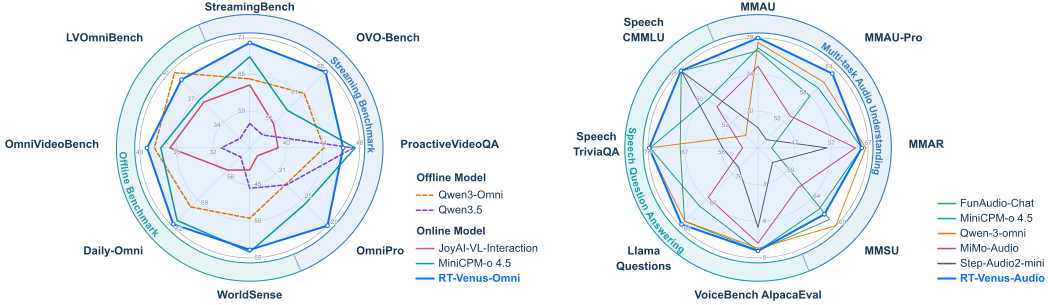
Figure 1. Video and audio understanding results from the paper.
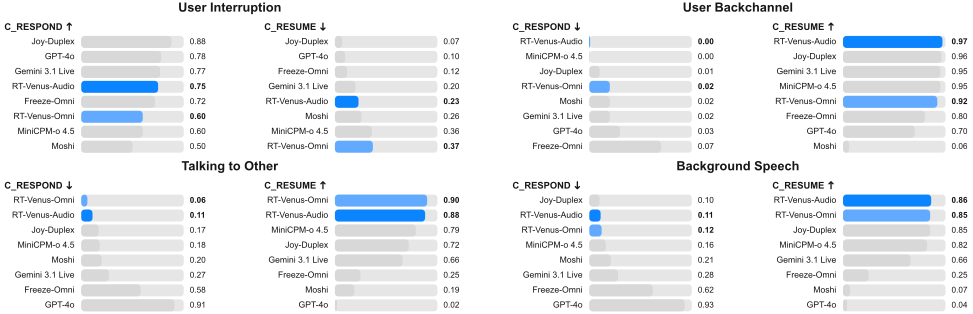
Figure 2. Full-duplex interaction results from the paper.
Code map
Realtime-Venus/
├── harness/                # Context, routing, agents, work state, and delivery
│   ├── README.md
│   └── requirements.txt    # Harness media dependencies
├── frontend/
│   ├── Realtime-Venus-Omni/ # Audiovisual inference examples
│   └── Realtime-Venus-Audio/ # Audio inference examples and input samples
├── demos/
│   ├── model/              # Checkpoint adapter and model HTTP API
│   ├── server/             # Web sessions, media, settings, and artifacts
│   ├── static/             # Browser UI, capture, playback, and logos
│   ├── launcher/           # Configuration and process supervision
│   ├── settings.py         # Saved task and model preferences
│   ├── install.py          # Isolated environment installation
│   └── requirements.txt    # Model and application dependencies
├── assets/                 # Paper figures, report, and Demo screenshot
├── download_models.py      # Download Omni, Audio, or both using the HF manifest
├── pyproject.toml          # Standalone Harness package
├── requirements.txt        # Shared dependency entry for inference examples
├── config.json             # Frontend model, web service and Harness config path
└── install.sh / start.sh    # Install, start, inspect, and stop the Demo
Citation
@article{zhao2026realtime,
  title={{Realtime-Venus}: A full-duplex interaction system with asynchronous delegation},
  author={{Venus Team(Ant Group), Tsinghua University}},
  journal={arXiv preprint arXiv:2609.13814},
  year={2026}
}
License
The source code in this repository is licensed under the Apache License 2.0, except for components with separate license notices. Third-party fonts and paper figures retain their respective licenses; see the license files in demos/static/fonts/ and assets/README.md.
© 2026 Realtime-Venus Authors.
Realtime-Venus is a research project by Venus Team, in collaboration with Tsinghua University.
The content on this page is for research and demonstration purposes only.
Contributors

8 commits

1 commits
Similar repos



Languages
Python
99.9%
README
Realtime-Venus
A full-duplex interaction system with asynchronous delegation
Venus Team(Ant Group) and Tsinghua University
English | 简体中文
Overview · Quick start · Results · Code map · Citation
Overview
See, listen, and respond in real time—with background tasks running alongside the conversation. Realtime-Venus combines full-duplex conversational models with an asynchronous execution framework. You can ask the assistant to work on a task and continue talking while it runs. The result returns to the same conversation for spoken delivery.
The project brings together three components:
| Component | Role |
|---|---|
| Realtime-Venus-Omni · 9B | A conversational model for streaming audio and video, proactive interaction, and native speech generation. |
| Realtime-Venus-Audio · 9B | A separately trained model for spoken interaction, audio understanding, and native speech generation. |
| Realtime-Venus-Harness | A shared runtime that captures delegated requests, executes background work, and returns results to the originating conversation. |
What Realtime-Venus enables
- Continuous audiovisual interaction. Omni observes streaming camera and microphone input and can initiate a response when the evolving scene calls for it.
- Full-duplex conversation. The models process incoming speech while speaking, learning to distinguish acknowledgments and background speech from interruptions that call for a revised response.
- Asynchronous delegation. A model can hand a natural-language task to Harness for reasoning or tool execution while live interaction continues.
- Results in the same conversation. Harness prepares a reply; the conversational model handles its timing and native speech output. Work tracking separates task completion from spoken delivery.
The paper describes the model family, dual-loop runtime, training data, and evaluation. This source release includes the Omni model integration, the reusable Harness package, and a browser demo using a Codex task backend. The demo's microphone-only mode also uses Omni.
Quick start
1. Install dependencies
Standalone inference requires Python 3.10, CUDA, and FFmpeg. Run the following commands from the source repository root. First install the download helper's dependencies:
python -m pip install 'huggingface_hub>=0.34' 'PyYAML>=6.0'
The unified downloader reads the root config.yaml in the single Hugging Face repository inclusionAI/Realtime-Venus to locate the model directories. Choose one download:
| Models | Command |
|---|---|
| Omni only | python download_models.py --model omni --local-dir . |
| Audio only | python download_models.py --model audio --local-dir . |
| Both models | python download_models.py --model all --local-dir . |
Omitting --model defaults to all. The downloader saves the root config.yaml and each selected model's complete directory under --local-dir, displays the standard Hugging Face Hub progress bars, and reuses cached files on later runs.
The same downloader is available from Python. It returns the selected local model directories as Path objects:
from download_models import download_models

paths = download_models(model="omni", local_dir=".")
model_dir = paths["omni"]
The ModelScope mirror is an optional alternative, downloaded directly with its own CLI:
python -m pip install modelscope
modelscope download --model inclusionAI/Realtime-Venus --local_dir . \
  --include "Realtime-Venus-Omni/*" "Realtime-Venus-Audio/*"
Then install the dependencies for your selected model:
# Realtime-Venus-Omni
python -m pip install -r Realtime-Venus-Omni/requirements.txt

# Realtime-Venus-Audio
python -m pip install -r requirements.txt
For the browser demo, run the installer on Linux. It creates an isolated Python 3.11/3.12 environment and installs the model, web service, and Harness dependencies:
bash install.sh
Then choose standalone inference or the online experience below.
2. Frontend Usage
Use the local checkpoints downloaded above. With --local-dir ., they are in ./Realtime-Venus-Omni/ and ./Realtime-Venus-Audio/ for the models you selected. Replace the /path/to/ placeholders below with those directories, or with your chosen download location.
Realtime-Venus-Omni
Offline video chat. Generate text and speech responses based on the input video. The two examples demonstrate basic video chat and chat with long-video memory.
export REALTIME_VENUS_MODEL_PATH=/path/to/Realtime-Venus-Omni

python frontend/Realtime-Venus-Omni/offline_chat.py
# With long-video Memory
python frontend/Realtime-Venus-Omni/offline_memory_chat.py
Full-duplex video interaction. Stream the visual and audio content of a recorded video into the model as it generates text and speech responses. The three examples demonstrate text questions, spoken questions, and long-video memory.
python frontend/Realtime-Venus-Omni/duplex_chat.py
python frontend/Realtime-Venus-Omni/duplex_speech_in_chat.py
python frontend/Realtime-Venus-Omni/duplex_memory_chat.py
Duplex examples save subtitled videos. See the Omni guide for inputs and output paths.
Realtime-Venus-Audio
Offline audio understanding. Provide a complete audio clip for the model to understand and respond to in text.
python frontend/Realtime-Venus-Audio/audio_offline_chat.py \
  --model-path /path/to/Realtime-Venus-Audio \
  --audio frontend/Realtime-Venus-Audio/case/case_offline.wav
Full-duplex audio interaction. Stream recorded audio into the model and generate speech responses while it continues listening. Save the output as a 24 kHz WAV file.
python frontend/Realtime-Venus-Audio/audio_duplex_chat.py \
  --model-path /path/to/Realtime-Venus-Audio \
  --audio frontend/Realtime-Venus-Audio/case/case_duplex.wav \
  --output output/duplex_response.wav
Both scripts accept --system-prompt and --prompt; see the Audio guide for decoding options.
3. Talk to Realtime-Venus
The online Duplex demo requires at least one NVIDIA A100 GPU. Configure the frontend model in root config.json, and configure task execution in harness/config.json. The Demo file references the Harness file through harness.config.
Follow the Demo configuration guide and Harness configuration guide, then start:
bash start.sh --config config.json
Choose model.type: "audio" for microphone and audio upload, or "video" (also accepts "omni") for camera with microphone and video upload. Set model.path to the corresponding downloaded checkpoint. Complete Codex login if prompted; default ports are 8031 for the model and 8032 for the web service.
On your local computer, keep this tunnel open, replacing user@server with your SSH login:
ssh -N -L 8032:127.0.0.1:8032 user@server
Open http://localhost:8032, complete Settings and start a conversation. See the Demo guide for service management.
4. Android Demo (Beta)
Download the Android demo: Realtime-Venus-0918.apk — Beta. This is a Beta release for research and demonstration. See the release page for package details.
Results
Figure 1. Video and audio understanding results from the paper.
Figure 2. Full-duplex interaction results from the paper.
Code map
Realtime-Venus/
├── harness/                # Context, routing, agents, work state, and delivery
│   ├── README.md
│   └── requirements.txt    # Harness media dependencies
├── frontend/
│   ├── Realtime-Venus-Omni/ # Audiovisual inference examples
│   └── Realtime-Venus-Audio/ # Audio inference examples and input samples
├── demos/
│   ├── model/              # Checkpoint adapter and model HTTP API
│   ├── server/             # Web sessions, media, settings, and artifacts
│   ├── static/             # Browser UI, capture, playback, and logos
│   ├── launcher/           # Configuration and process supervision
│   ├── settings.py         # Saved task and model preferences
│   ├── install.py          # Isolated environment installation
│   └── requirements.txt    # Model and application dependencies
├── assets/                 # Paper figures, report, and Demo screenshot
├── download_models.py      # Download Omni, Audio, or both using the HF manifest
├── pyproject.toml          # Standalone Harness package
├── requirements.txt        # Shared dependency entry for inference examples
├── config.json             # Frontend model, web service and Harness config path
└── install.sh / start.sh    # Install, start, inspect, and stop the Demo
Citation
@article{zhao2026realtime,
  title={{Realtime-Venus}: A full-duplex interaction system with asynchronous delegation},
  author={{Venus Team(Ant Group), Tsinghua University}},
  journal={arXiv preprint arXiv:2609.13814},
  year={2026}
}
License
The source code in this repository is licensed under the Apache License 2.0, except for components with separate license notices. Third-party fonts and paper figures retain their respective licenses; see the license files in demos/static/fonts/ and assets/README.md.
© 2026 Realtime-Venus Authors.
Realtime-Venus is a research project by Venus Team, in collaboration with Tsinghua University.
The content on this page is for research and demonstration purposes only.
Similar repos
Contributors
8 commits
1 commits
Languages
Python
99.9%