Open-source AI companion that lives on your desk. Built with ESP32-S3, touch, voice, and any AI model.
See the code



An open-source, Tamagotchi-inspired AI companion for your desk, built on ESP32-S3.
What FUMI Does · Demo · Firmware Setup · Backend · Download Firmware · Contributing
FUMI combines animated expressions, touch interaction, virtual pet mechanics, and real voice conversations in a compact physical device.
It combines:
FUMI is not locked to one model provider. The same firmware can talk to a backend configured for OpenAI, Anthropic Claude, xAI Grok, OpenRouter, Ollama, or another compatible API.
Development status: active / experimental. The firmware in this repository is the latest project source provided for this release. Hardware and provider support should be considered tested only where explicitly marked below.
┌──────────────────────┐
│       FUMI           │
│  ESP32-S3 + LVGL     │
│                      │
│  Touch • Life • Voice│
└──────────┬───────────┘
           │ HTTPS
           ▼
┌──────────────────────┐
│     FUMI Backend     │
│                      │
│ /brain     /voice    │
└──────────┬───────────┘
           │
     ┌─────┼──────────────┐
     ▼     ▼              ▼
   OpenAI Claude          Grok
     │     │              │
     └─────┼──────────────┘
           ▼
      OpenRouter
        Ollama
   Compatible APIs
The repository includes demo/index.html, which lets you test /brain from a browser without the physical device. If device authentication is enabled, enter the same optional device token in the demo.
Run the backend:
cd backend
cp .env.example .env
# Configure the provider and model in .env
npm run dev
Then open demo/index.html and enter your backend URL.
Important: the browser demo proves the backend path works. It is not a substitute for an end-to-end hardware demo.
The repository includes the real prototype demo at docs/assets/fumi-demo.mp4.
Do not publish media that exposes passwords, API keys, private SSIDs, or private conversations.
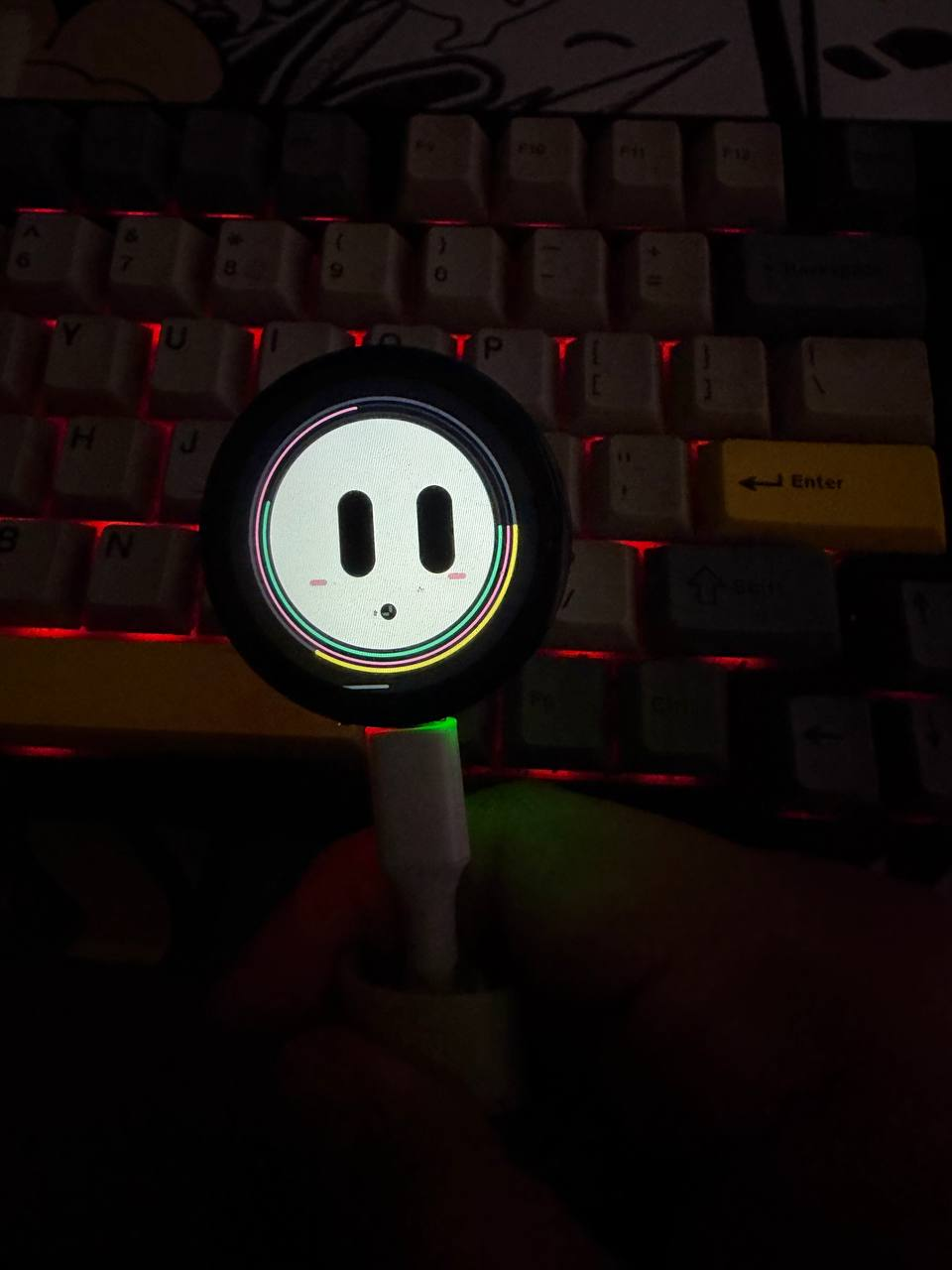
▶ Watch the real FUMI prototype demo
The backend uses an adapter-style provider configuration.
| Provider | Backend setting |
|---|---|
| OpenAI | LLM_PROVIDER=openai |
| Anthropic Claude | LLM_PROVIDER=anthropic |
| xAI Grok | LLM_PROVIDER=xai |
| OpenRouter | LLM_PROVIDER=openrouter |
| Ollama | LLM_PROVIDER=ollama |
| OpenAI-compatible APIs | LLM_PROVIDER=openai-compatible |
Set the model ID supported by your account:
LLM_PROVIDER=anthropic
LLM_MODEL=your-supported-claude-model
or:
LLM_PROVIDER=xai
LLM_MODEL=your-supported-grok-model
Model names, availability, pricing, and capabilities change over time. Use the model ID currently supported by your provider account.
Voice input and text generation are separate.
The reference backend currently uses OpenAI speech-to-text for /voice, then sends the transcript to the selected text model.
For example:
FUMI microphone
      │
      ▼
   WAV upload
      │
      ▼
speech-to-text
      │
      ▼
 transcript
      │
      ▼
selected text model
      │
      ▼
 FUMI response
This means you can use Claude or Grok for FUMI's personality/answer while using a separate speech provider.
FUMI/
├── firmware/
├── backend/
├── demo/
├── docs/
│   └── assets/
├── scripts/
├── .github/
├── CONTRIBUTING.md
├── SECURITY.md
├── CHANGELOG.md
├── LICENSE
└── README.md
The firmware requires the upstream Waveshare driver files and the libraries shipped with its Arduino example. Run the dependency setup script first; it fetches the official source and generates the local Arduino sketch folder. Install any bundled libraries listed by the upstream example into your Arduino libraries folder before compiling.
Windows PowerShell:
powershell -ExecutionPolicy Bypass -File .\\scripts\\setup-waveshare.ps1
macOS / Linux:
bash scripts/setup-waveshare.sh
Then open firmware/build/LVGL_Arduino/LVGL_Arduino.ino in Arduino IDE. Edit the generated local file firmware/build/LVGL_Arduino/fumi_config.h with your Wi-Fi credentials and backend URLs.
Recommended development baseline:
ESP32S3 Dev Module240MHz (WiFi)QIO 80MHz16MB (128Mb)Huge APP (3MB No OTA/1MB SPIFFS)OPI PSRAMCore 1Core 1Hardware CDC and JTAGUART0 / Hardware CDCDisabledCopy:
firmware/fumi_config.h.example
to:
firmware/fumi_config.h
Then fill in:
#define FUMI_WIFI_SSID_CONFIG "YOUR_WIFI_SSID"
#define FUMI_WIFI_PASSWORD_CONFIG "YOUR_WIFI_PASSWORD"
#define FUMI_BRAIN_URL_CONFIG "https://your-backend/brain"
#define FUMI_VOICE_URL_CONFIG "https://your-backend/voice"
fumi_config.h is ignored by Git.
Requires Node.js 20.6+.
cd backend
cp .env.example .env
npm install
npm run check
npm test
npm run dev
Health:
curl http://localhost:8787/health
Chat:
curl -X POST http://localhost:8787/brain -H "Content-Type: application/json" -d '{"message":"Hey FUMI, introduce yourself."}'
The backend preserves FUMI's original state-event contract (event, hunger, happiness, energy, bond, affection, playfulness, sleeping, expression, and age_seconds) and returns action, expression, and message. The same /brain route also supports a plain message for the browser demo. The backend returns a simple contract that the firmware can consume:
{
  "ok": true,
  "reply": "Hello!",
  "action": "talk",
  "expression": "normal",
  "provider": "openai",
  "model": "your-model"
}
Never put model-provider API keys in the ESP32 firmware.
The intended architecture is:
ESP32
  │
  │ device request
  ▼
Your backend
  │
  │ provider API key stays here
  ▼
AI provider
Before exposing a backend publicly, add authentication/device pairing, rate limiting, usage limits, and restrictive CORS.
See SECURITY.md.
FUMI is an open-source project, and contributions from makers and developers are welcome.
New to the project? Start here:
You can contribute through documentation, reproducible bug reports, firmware improvements, backend development, or UI and animation work.
Before opening a pull request, please read the contribution guidelines and test your changes where possible.
Found a problem or have an idea? Open an issue and tell us what you found.
FUMI is presented as a complete open-source reference build in this repository:
Hardware demos and dependency files in this repository should always match the actual hardware build being released.
Want to try FUMI on your ESP32-S3 board without compiling the firmware yourself?
main branch.fumi-firmware-* artifact ZIP.README.txt.README.txt before using any binary.Artifact retention: Build artifacts are currently retained for 14 days. Downloaded files can be kept locally.
MIT. See LICENSE.
FUMI is an independent open-source project and is not affiliated with or endorsed by OpenAI, Anthropic, xAI, OpenRouter, Ollama, or Waveshare.
Open-source AI companion that lives on your desk. Built with ESP32-S3, touch, voice, and any AI model.
See the code
An open-source, Tamagotchi-inspired AI companion for your desk, built on ESP32-S3.
What FUMI Does · Demo · Firmware Setup · Backend · Download Firmware · Contributing
FUMI combines animated expressions, touch interaction, virtual pet mechanics, and real voice conversations in a compact physical device.
It combines:
FUMI is not locked to one model provider. The same firmware can talk to a backend configured for OpenAI, Anthropic Claude, xAI Grok, OpenRouter, Ollama, or another compatible API.
Development status: active / experimental. The firmware in this repository is the latest project source provided for this release. Hardware and provider support should be considered tested only where explicitly marked below.
┌──────────────────────┐
│       FUMI           │
│  ESP32-S3 + LVGL     │
│                      │
│  Touch • Life • Voice│
└──────────┬───────────┘
           │ HTTPS
           ▼
┌──────────────────────┐
│     FUMI Backend     │
│                      │
│ /brain     /voice    │
└──────────┬───────────┘
           │
     ┌─────┼──────────────┐
     ▼     ▼              ▼
   OpenAI Claude          Grok
     │     │              │
     └─────┼──────────────┘
           ▼
      OpenRouter
        Ollama
   Compatible APIs
The repository includes demo/index.html, which lets you test /brain from a browser without the physical device. If device authentication is enabled, enter the same optional device token in the demo.
Run the backend:
cd backend
cp .env.example .env
# Configure the provider and model in .env
npm run dev
Then open demo/index.html and enter your backend URL.
Important: the browser demo proves the backend path works. It is not a substitute for an end-to-end hardware demo.
The repository includes the real prototype demo at docs/assets/fumi-demo.mp4.
Do not publish media that exposes passwords, API keys, private SSIDs, or private conversations.
▶ Watch the real FUMI prototype demo
The backend uses an adapter-style provider configuration.
| Provider | Backend setting |
|---|---|
| OpenAI | LLM_PROVIDER=openai |
| Anthropic Claude | LLM_PROVIDER=anthropic |
| xAI Grok | LLM_PROVIDER=xai |
| OpenRouter | LLM_PROVIDER=openrouter |
| Ollama | LLM_PROVIDER=ollama |
| OpenAI-compatible APIs | LLM_PROVIDER=openai-compatible |
Set the model ID supported by your account:
LLM_PROVIDER=anthropic
LLM_MODEL=your-supported-claude-model
or:
LLM_PROVIDER=xai
LLM_MODEL=your-supported-grok-model
Model names, availability, pricing, and capabilities change over time. Use the model ID currently supported by your provider account.
Voice input and text generation are separate.
The reference backend currently uses OpenAI speech-to-text for /voice, then sends the transcript to the selected text model.
For example:
FUMI microphone
      │
      ▼
   WAV upload
      │
      ▼
speech-to-text
      │
      ▼
 transcript
      │
      ▼
selected text model
      │
      ▼
 FUMI response
This means you can use Claude or Grok for FUMI's personality/answer while using a separate speech provider.
FUMI/
├── firmware/
├── backend/
├── demo/
├── docs/
│   └── assets/
├── scripts/
├── .github/
├── CONTRIBUTING.md
├── SECURITY.md
├── CHANGELOG.md
├── LICENSE
└── README.md
The firmware requires the upstream Waveshare driver files and the libraries shipped with its Arduino example. Run the dependency setup script first; it fetches the official source and generates the local Arduino sketch folder. Install any bundled libraries listed by the upstream example into your Arduino libraries folder before compiling.
Windows PowerShell:
powershell -ExecutionPolicy Bypass -File .\\scripts\\setup-waveshare.ps1
macOS / Linux:
bash scripts/setup-waveshare.sh
Then open firmware/build/LVGL_Arduino/LVGL_Arduino.ino in Arduino IDE. Edit the generated local file firmware/build/LVGL_Arduino/fumi_config.h with your Wi-Fi credentials and backend URLs.
Recommended development baseline:
ESP32S3 Dev Module240MHz (WiFi)QIO 80MHz16MB (128Mb)Huge APP (3MB No OTA/1MB SPIFFS)OPI PSRAMCore 1Core 1Hardware CDC and JTAGUART0 / Hardware CDCDisabledCopy:
firmware/fumi_config.h.example
to:
firmware/fumi_config.h
Then fill in:
#define FUMI_WIFI_SSID_CONFIG "YOUR_WIFI_SSID"
#define FUMI_WIFI_PASSWORD_CONFIG "YOUR_WIFI_PASSWORD"
#define FUMI_BRAIN_URL_CONFIG "https://your-backend/brain"
#define FUMI_VOICE_URL_CONFIG "https://your-backend/voice"
fumi_config.h is ignored by Git.
Requires Node.js 20.6+.
cd backend
cp .env.example .env
npm install
npm run check
npm test
npm run dev
Health:
curl http://localhost:8787/health
Chat:
curl -X POST http://localhost:8787/brain -H "Content-Type: application/json" -d '{"message":"Hey FUMI, introduce yourself."}'
The backend preserves FUMI's original state-event contract (event, hunger, happiness, energy, bond, affection, playfulness, sleeping, expression, and age_seconds) and returns action, expression, and message. The same /brain route also supports a plain message for the browser demo. The backend returns a simple contract that the firmware can consume:
{
  "ok": true,
  "reply": "Hello!",
  "action": "talk",
  "expression": "normal",
  "provider": "openai",
  "model": "your-model"
}
Never put model-provider API keys in the ESP32 firmware.
The intended architecture is:
ESP32
  │
  │ device request
  ▼
Your backend
  │
  │ provider API key stays here
  ▼
AI provider
Before exposing a backend publicly, add authentication/device pairing, rate limiting, usage limits, and restrictive CORS.
See SECURITY.md.
FUMI is an open-source project, and contributions from makers and developers are welcome.
New to the project? Start here:
You can contribute through documentation, reproducible bug reports, firmware improvements, backend development, or UI and animation work.
Before opening a pull request, please read the contribution guidelines and test your changes where possible.
Found a problem or have an idea? Open an issue and tell us what you found.
FUMI is presented as a complete open-source reference build in this repository:
Hardware demos and dependency files in this repository should always match the actual hardware build being released.
Want to try FUMI on your ESP32-S3 board without compiling the firmware yourself?
main branch.fumi-firmware-* artifact ZIP.README.txt.README.txt before using any binary.Artifact retention: Build artifacts are currently retained for 14 days. Downloaded files can be kept locally.
MIT. See LICENSE.
FUMI is an independent open-source project and is not affiliated with or endorsed by OpenAI, Anthropic, xAI, OpenRouter, Ollama, or Waveshare.





