Terraform textual UI
See the code


TFTUI is a terminal UI for viewing and working with your Terraform state.
Browse the full state tree, search it, read individual resources, reveal sensitive values, taint or remove resources, and create and apply plans — without leaving the terminal.
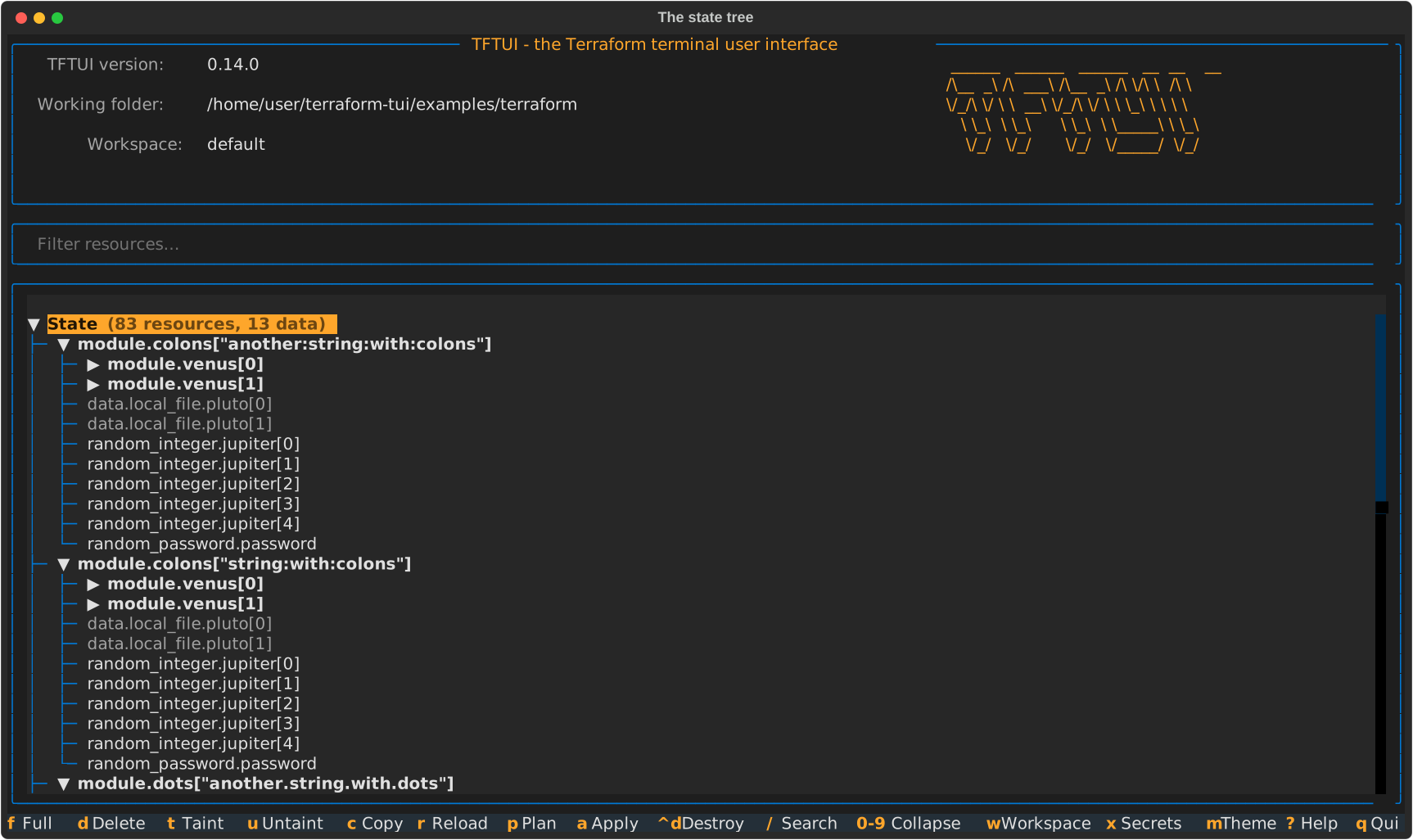
More screenshots: docs/screenshots.md
| Tool | Install | Upgrade | Run |
|---|---|---|---|
| Homebrew | brew install idoavrah/homebrew/tftui | brew upgrade tftui | cd /path/to/terraform/project && tftui |
| pipx | pipx install tftui | pipx upgrade tftui | cd /path/to/terraform/project && tftui |
| uv | uv tool install tftui | uv tool upgrade tftui | cd /path/to/terraform/project && tftui |
| pip | pip install tftui | pip install --upgrade tftui | cd /path/to/terraform/project && tftui |
Requires Python 3.10 or newer and a terraform (or compatible) binary on PATH.
Press ? in the application for the full list.
| Key | Action |
|---|---|
↑ ↓ / j k | Move up and down |
← → / h l | Collapse and expand, or step in and out |
Enter | View the resource, or expand the module |
Esc | Back to the state tree |
/ | Filter the tree, or search within a resource or plan |
n N | Next / previous match when searching a resource or plan |
0–9 | Collapse the tree to a module depth (0 expands everything) |
Space | Select the resource — or, on a module, everything under it |
Ctrl+A | Clear the selection |
T U D | Taint, untaint, or remove from state |
P | Create a plan |
Ctrl+D | Create a destruction plan |
A | Apply the current plan |
X | Reveal sensitive values |
F | Full screen (hold Shift or Option to select text) |
C | Copy to clipboard |
R | Refresh state |
W | Switch workspace |
M | Toggle light and dark mode |
Q | Quit |
Every option can be set with a flag or an environment variable. Flags win.
| Flag | Environment variable | Meaning |
|---|---|---|
-e, --executable | TFTUI_EXECUTABLE | Binary to drive (default terraform) |
-f, --var-file | TFTUI_VAR_FILE | tfvars file; repeat the flag for several |
-C, --chdir | TFTUI_WORKING_DIR | Directory to run in (default current) |
-n, --no-init | TFTUI_NO_INIT | Skip terraform init on startup |
-o, --offline | TFTUI_OFFLINE | No outbound calls at all |
-d, --disable-usage-tracking | TFTUI_DISABLE_USAGE_TRACKING | Turn off usage tracking |
-l, --light-mode | TFTUI_LIGHT_MODE | Start in the light theme |
-g, --generate-debug-log | TFTUI_DEBUG_LOG | Write tftui.log in the working directory |
-v, --version | — | Print the version and exit |
Repeat -f as often as you need; the files are applied in order, so a later
one overrides an earlier one. They are passed to init as well as to plan,
which is what OpenTofu 1.8+ needs to evaluate variables used in a backend
block.
tftui -f common.tfvars -f prod.tfvars
The environment variable takes a list separated by your platform's path
separator (: on Linux and macOS, ; on Windows):
export TFTUI_VAR_FILE="common.tfvars:prod.tfvars"
tftui --executable tofu
tftui --executable terragrunt
Terraform state routinely contains secrets, so tftui is deliberate about them:
(sensitive value) until you press X.0700) and
deleted when the plan is superseded, applied, or the program exits. They are
never written into your Terraform directory, where they could be committed by
accident.$ are safe.-d, or turn off every outbound call — tracking and the update
check alike — with -o.See CONTRIBUTING.md. In short:
make setup     # install dependencies and git hooks
make check     # lint, type-check and test
make run       # run against the bundled example project
See CHANGELOG.md.
741 followers · starred Jan 2024
5,592 followers · starred Jul 2023
162 followers · starred Aug 2025
181 followers · starred Aug 2023
Terraform textual UI
See the code
TFTUI is a terminal UI for viewing and working with your Terraform state.
Browse the full state tree, search it, read individual resources, reveal sensitive values, taint or remove resources, and create and apply plans — without leaving the terminal.
More screenshots: docs/screenshots.md
| Tool | Install | Upgrade | Run |
|---|---|---|---|
| Homebrew | brew install idoavrah/homebrew/tftui | brew upgrade tftui | cd /path/to/terraform/project && tftui |
| pipx | pipx install tftui | pipx upgrade tftui | cd /path/to/terraform/project && tftui |
| uv | uv tool install tftui | uv tool upgrade tftui | cd /path/to/terraform/project && tftui |
| pip | pip install tftui | pip install --upgrade tftui | cd /path/to/terraform/project && tftui |
Requires Python 3.10 or newer and a terraform (or compatible) binary on PATH.
Press ? in the application for the full list.
| Key | Action |
|---|---|
↑ ↓ / j k | Move up and down |
← → / h l | Collapse and expand, or step in and out |
Enter | View the resource, or expand the module |
Esc | Back to the state tree |
/ | Filter the tree, or search within a resource or plan |
n N | Next / previous match when searching a resource or plan |
0–9 | Collapse the tree to a module depth (0 expands everything) |
Space | Select the resource — or, on a module, everything under it |
Ctrl+A | Clear the selection |
T U D | Taint, untaint, or remove from state |
P | Create a plan |
Ctrl+D | Create a destruction plan |
A | Apply the current plan |
X | Reveal sensitive values |
F | Full screen (hold Shift or Option to select text) |
C | Copy to clipboard |
R | Refresh state |
W | Switch workspace |
M | Toggle light and dark mode |
Q | Quit |
Every option can be set with a flag or an environment variable. Flags win.
| Flag | Environment variable | Meaning |
|---|---|---|
-e, --executable | TFTUI_EXECUTABLE | Binary to drive (default terraform) |
-f, --var-file | TFTUI_VAR_FILE | tfvars file; repeat the flag for several |
-C, --chdir | TFTUI_WORKING_DIR | Directory to run in (default current) |
-n, --no-init | TFTUI_NO_INIT | Skip terraform init on startup |
-o, --offline | TFTUI_OFFLINE | No outbound calls at all |
-d, --disable-usage-tracking | TFTUI_DISABLE_USAGE_TRACKING | Turn off usage tracking |
-l, --light-mode | TFTUI_LIGHT_MODE | Start in the light theme |
-g, --generate-debug-log | TFTUI_DEBUG_LOG | Write tftui.log in the working directory |
-v, --version | — | Print the version and exit |
Repeat -f as often as you need; the files are applied in order, so a later
one overrides an earlier one. They are passed to init as well as to plan,
which is what OpenTofu 1.8+ needs to evaluate variables used in a backend
block.
tftui -f common.tfvars -f prod.tfvars
The environment variable takes a list separated by your platform's path
separator (: on Linux and macOS, ; on Windows):
export TFTUI_VAR_FILE="common.tfvars:prod.tfvars"
tftui --executable tofu
tftui --executable terragrunt
Terraform state routinely contains secrets, so tftui is deliberate about them:
(sensitive value) until you press X.0700) and
deleted when the plan is superseded, applied, or the program exits. They are
never written into your Terraform directory, where they could be committed by
accident.$ are safe.-d, or turn off every outbound call — tracking and the update
check alike — with -o.See CONTRIBUTING.md. In short:
make setup     # install dependencies and git hooks
make check     # lint, type-check and test
make run       # run against the bundled example project
See CHANGELOG.md.
741 followers · starred Jan 2024
5,592 followers · starred Jul 2023
162 followers · starred Aug 2025
181 followers · starred Aug 2023