
A traditional floating compositor for Omarchy, designed as a drop-in replacement for Hyprland.
Rust
72
498 commits
updated Sep 15, 2026
README
ChonkStep
A performance-focused Wayland compositor and window manager, built as a Hyprland drop-in for Omarchy.
Keep Omarchy's menu bar, applications, themes, keybindings and desktop services. ChonkStep provides the window management underneath: responsive floating windows, optional layouts, native decorations and a desktop menu that follows Omarchy. Written in Rust, with an emphasis on bounded work, efficient rendering and low idle overhead.
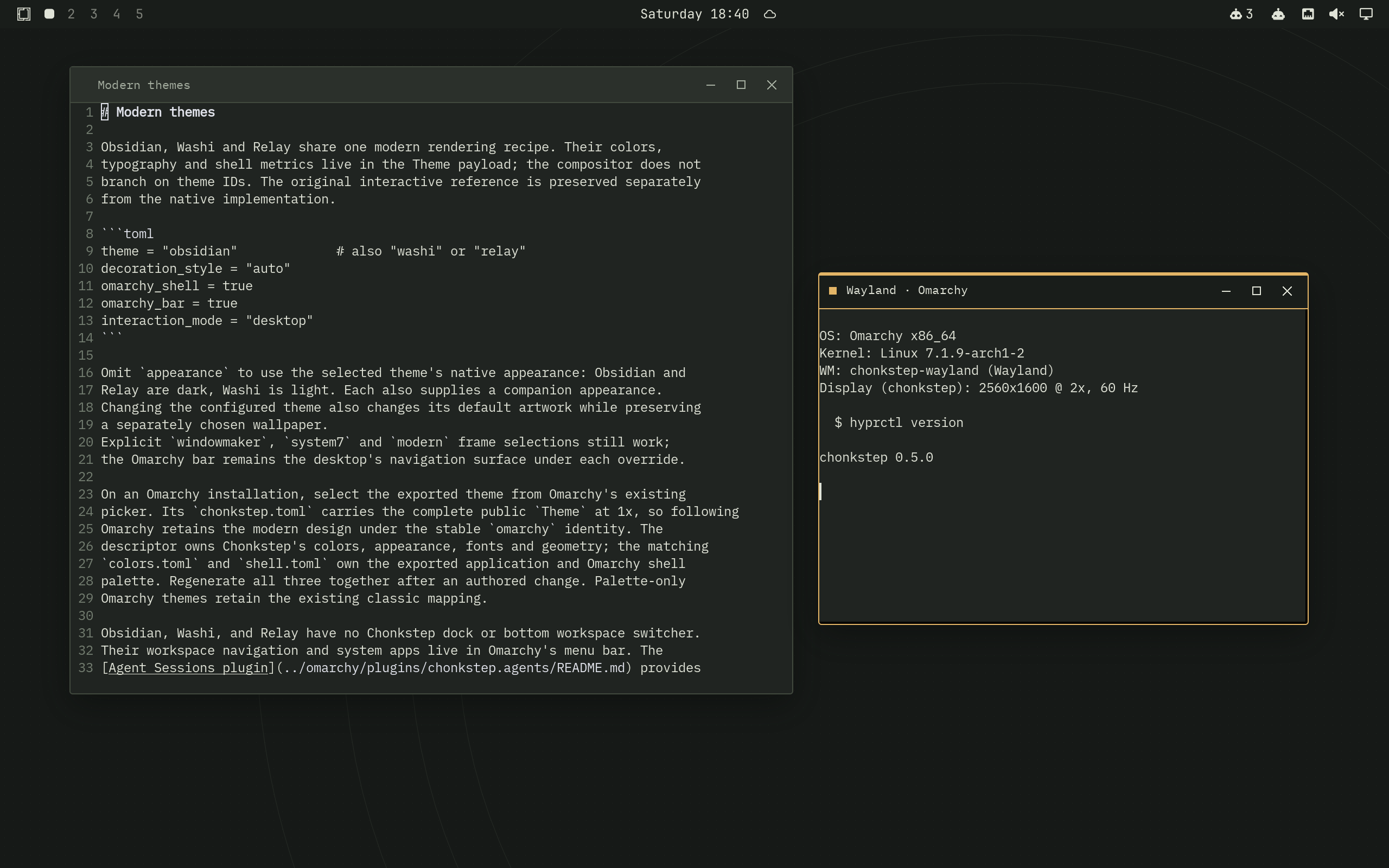
Obsidian. A live Wayland session running ChonkStep, Omarchy and native applications.
Omarchy first
ChonkStep implements the Hyprland request and event sockets used by Omarchy,
translates supported hyprctl operations, and follows supported settings in
~/.config/hypr/. Omarchy continues to own the bar, workspace indicators,
launchers, system panels, notifications, lock screen and theme picker.
Right-click the desktop for ChonkStep's native menu, populated from Omarchy's menu tree. Right-click a titlebar for window commands. Change themes through Omarchy and the window decorations, menus, wallpaper and application palette follow in place.
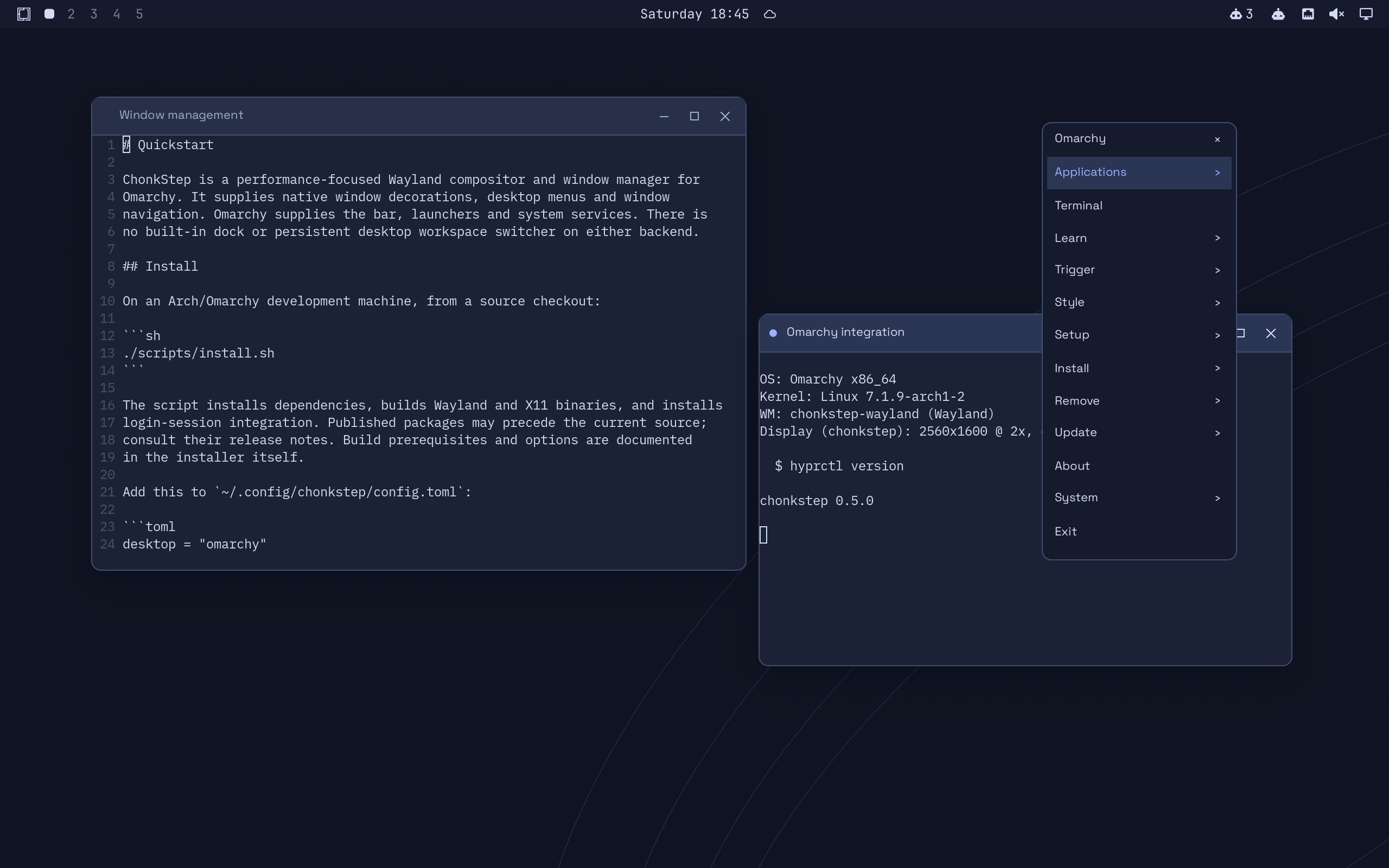
“Drop-in” describes the integration target, not complete Hyprland feature parity. This is alpha software. Supported commands and remaining gaps are listed in the IPC compatibility reference, Hyprland configuration guide and Omarchy integration guide. Hyprland can remain installed alongside ChonkStep.
Agent sessions in the menu bar
The Agent Sessions Omarchy plugin brings connected Codex, Claude Code, OpenCode and configured T3 sessions into one searchable panel. See which sessions are working, waiting or idle, then jump to a verified terminal or session destination.
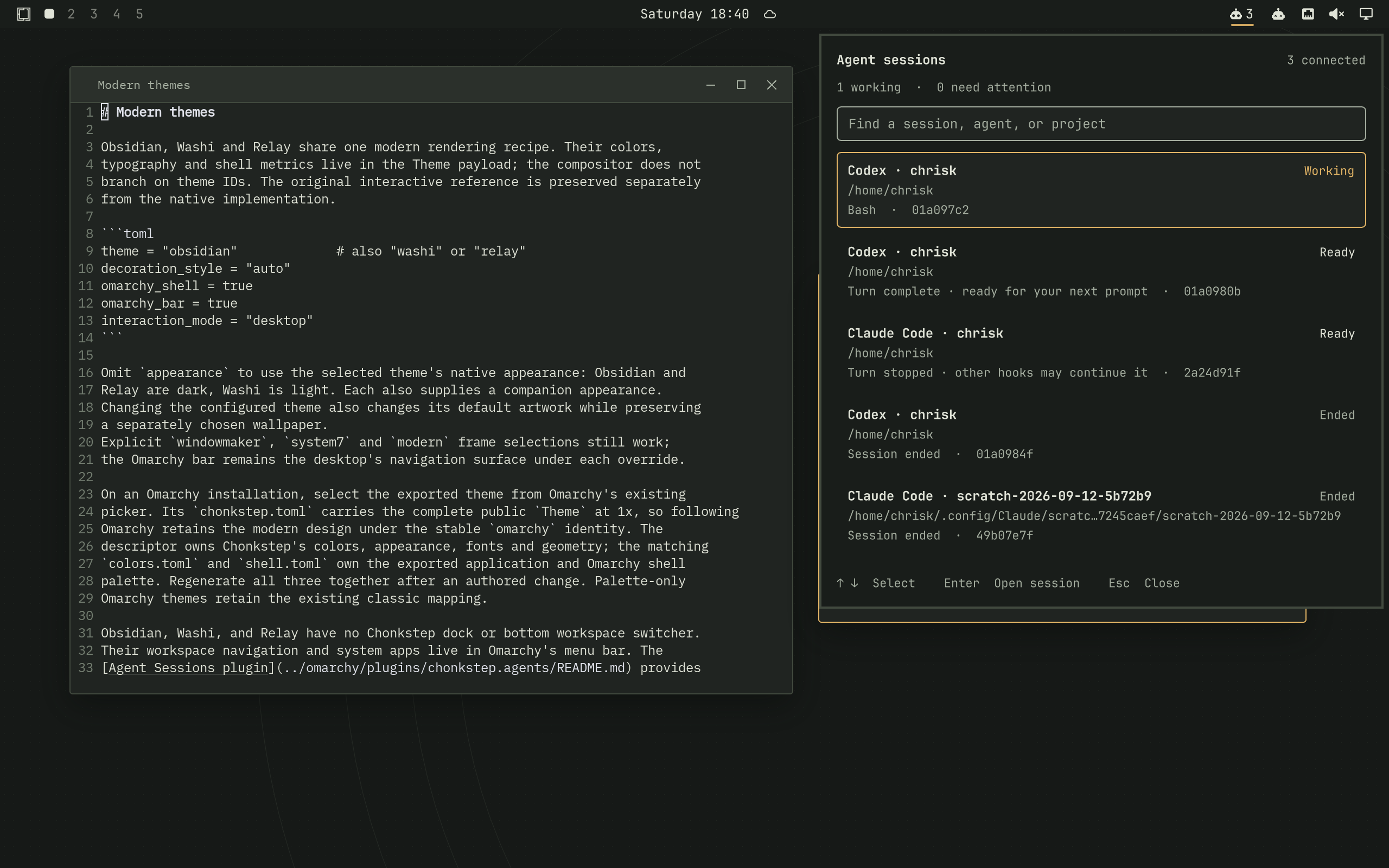
Session adapters, lifecycle tracking and navigation run in a separate local service. The compositor does not host a model or poll provider APIs. The plugin uses the real Omarchy shell and follows its theme. See setup and supported integrations and the plugin guide.
Themes for a modern desktop
Obsidian, Washi and Relay share a native decoration engine, with distinct colors, typography and artwork. Each has light and dark renditions. The same theme data drives window frames, desktop menus and window navigation; exported Omarchy themes coordinate the rest of the desktop.
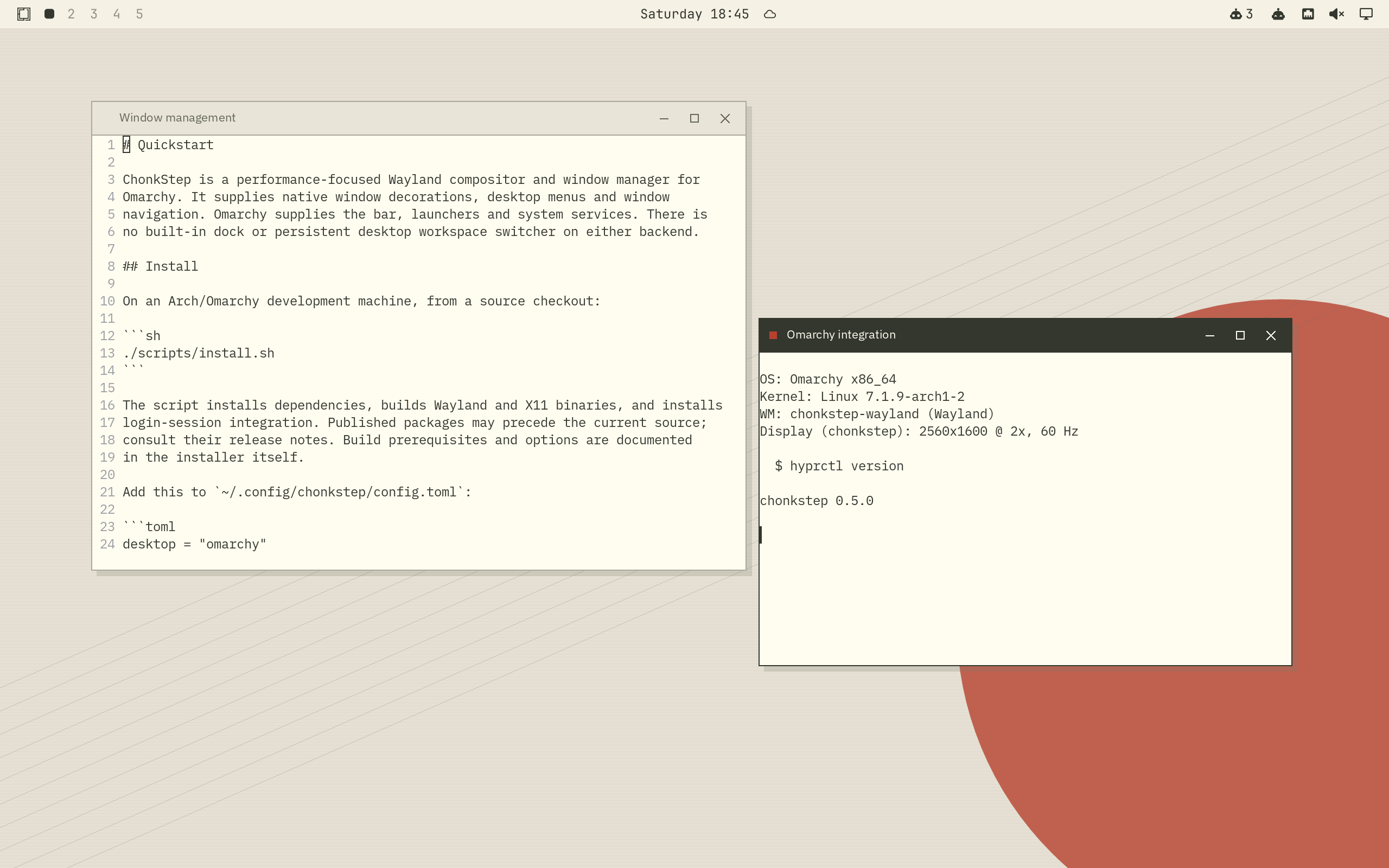
Washi. The light theme, with the same window-management behavior and Omarchy services.
Themes change appearance, not architecture. There is no built-in dock, launcher strip or persistent desktop workspace switcher in any theme, on Wayland or X11. Omarchy provides that desktop UI externally. The old dock host, instruments, samplers and tile protocol have been removed from the compositor codebase. Future desktop components belong in separate applications or plugins.
The theme guide covers selection, appearance overrides and export. System 7 themes provide three period desktop patterns with their native window chrome through the same picker. Decoration styles can also be selected independently of the palette.
Performance is a design constraint
- Damage-driven rendering. Redraw changed regions and reuse decoration, text and GPU resources when the scene is unchanged.
- Native window previews. Wayland Overview transforms existing client textures; it does not continually read the desktop back into CPU screenshots.
- A lean shell. No persistent dock surfaces, tile buffers, instrument sampling threads or dock sockets. Minimizing a window no longer captures an image for a desktop icon.
- Bounded work. Input, IPC, capture queues and caches have explicit limits. Slow external services run outside the compositor's render loop.
- GPU-aware presentation. Direct scanout and hardware cursor paths are used when the output, hardware and scene permit them.
We measure idle CPU, retained memory, input workloads, rendering and capture behavior. Results include hardware, output geometry, build profile and raw evidence; an isolated software-rendered test is not a native GPU benchmark. See performance measurements, memory behavior and the GPU pipeline. Removing the dock eliminates its allocations and background work; the total session footprint still depends on applications, output resolution and effects.
Window management
- Floating windows with minimize, maximize, shade, fullscreen, snapping, eight-edge resizing and per-window rules.
- Freeform, Mosaic and Flow layouts, with restoration of the original floating arrangement when returning to Freeform.
- Alt-Tab with commit on modifier release and Escape to cancel. Minimized windows remain selectable and restore when chosen.
- On-demand Overview with live windows, workspace navigation and window moves.
- Optional session restore, monitor-aware placement and Mac-style keyboard interaction.
The persistent workspace indicator belongs to Omarchy's bar. Workspaces, keyboard navigation and the modal Overview remain window-manager features. See keybindings, gestures, Mac interaction and display spaces.
Install and try it
The current release is 0.6.1. Check the release notes for the version being installed.
On an Arch/Omarchy development machine:
git clone https://github.com/iconidentify/chonkstep.git
cd chonkstep
./scripts/install.sh
The installer installs dependencies, builds the binaries and installs session integration. Read the quickstart and Omarchy setup before choosing the session at login. An Omarchy configuration starts with:
# ~/.config/chonkstep/config.toml
desktop = "omarchy"
For an isolated modern-theme preview from a running Wayland desktop:
cargo build --release -p chonkstep-wayland -p chonk-shell --bins
./scripts/preview-modern.sh obsidian
A theme or configuration reload applies in place. Installing a new compositor binary takes effect at the next login; restarting a Wayland compositor closes its client connections.
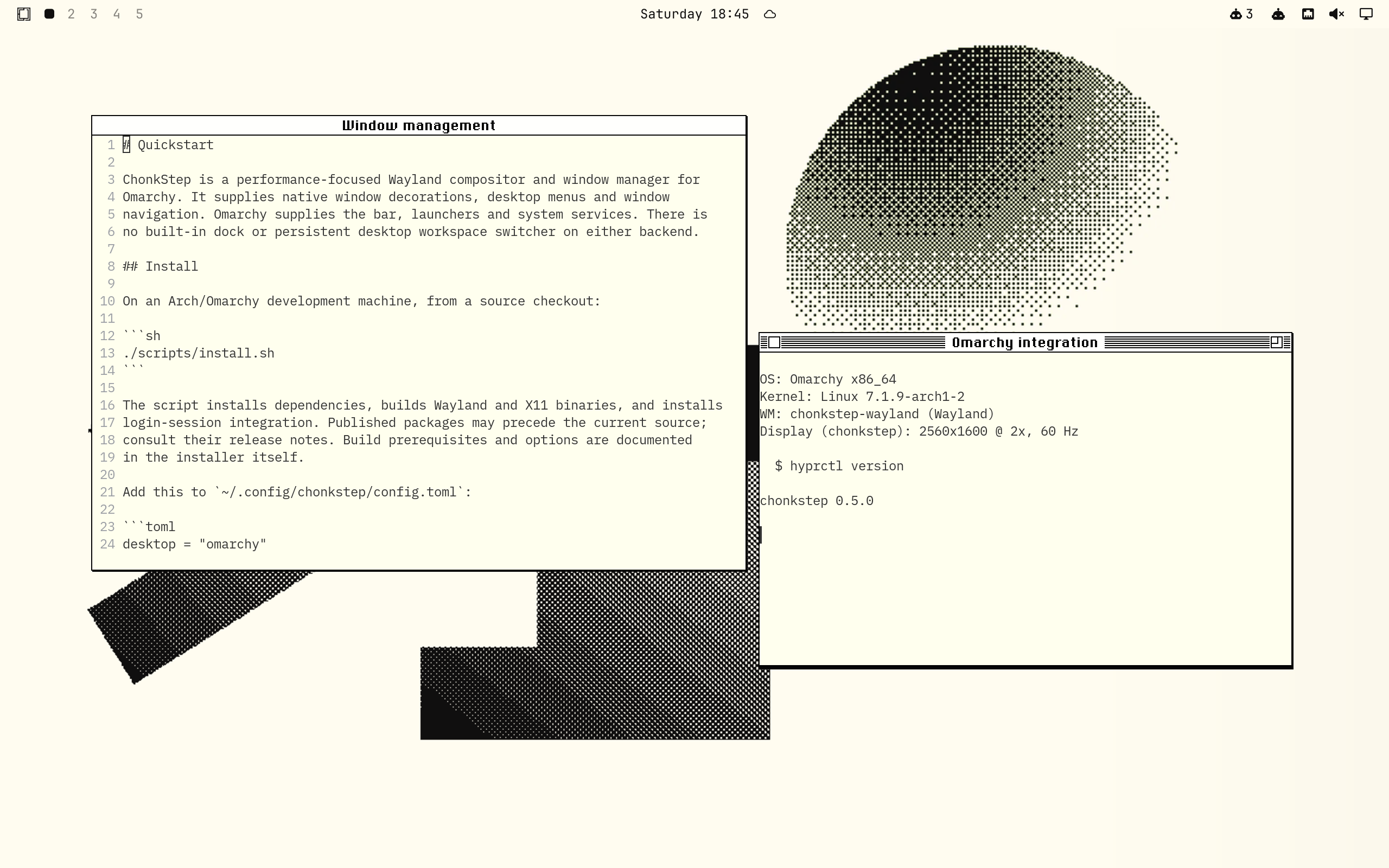
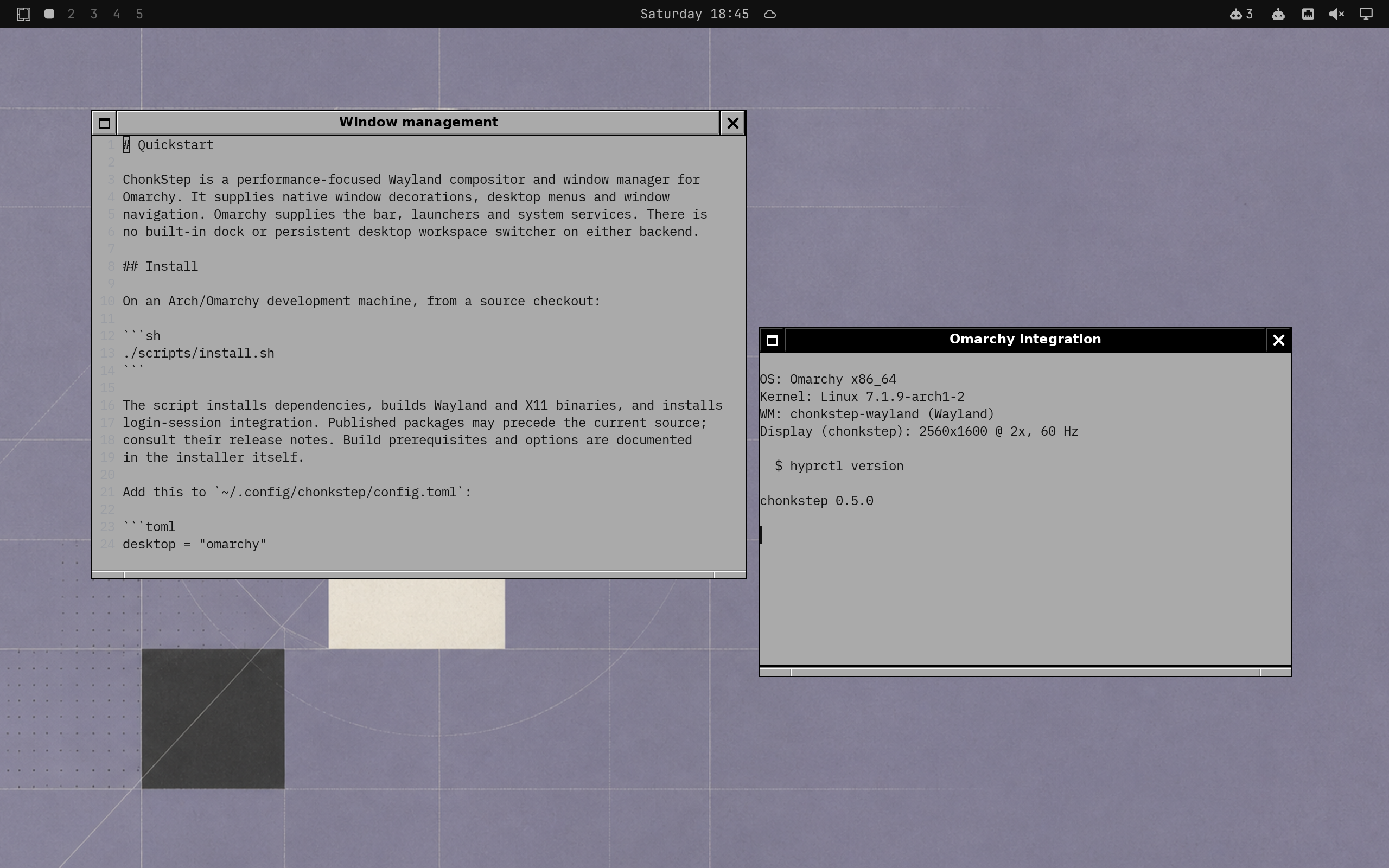
Retro appearance, modern window management
System 7 and NeXTSTEP remain optional decoration styles. They are visual choices within the same windowing system; recreating an entire historical desktop is no longer the project's direction.
| System 7 | NeXTSTEP |
|---|---|
 |  |
Wayland and Omarchy are the primary development focus. The X11 backend shares the window-management core and desktop menus, and also has no built-in dock. It remains available as a secondary backend.
Development
The backend-independent wm-core handles window policy; wm-wayland and
wm-x11 implement display-server behavior. chonk-shell supplies menus,
transient navigation and Omarchy integration. wm-theme owns themed rendering,
and chonk-hyprland-ipc implements the compatibility interface. Desktop plugins
and agent adapters run outside these compositor components.
scripts/check.sh all
scripts/e2e.sh --headless --release
The end-to-end suite boots isolated compositors, launches real clients and checks input, geometry and screenshots. See performance for the measurement harness and the changelog for earlier releases.
License
GPL-3.0-only. Bundled fonts and artwork retain their individual licenses.
Contributors

498 commits
See what people are saying
Similar repos


Languages
Rust
93.3%
Python
3.7%
Shell
2.2%
A traditional floating compositor for Omarchy, designed as a drop-in replacement for Hyprland.
Rust
72
498 commits
updated Sep 15, 2026
README
ChonkStep
A performance-focused Wayland compositor and window manager, built as a Hyprland drop-in for Omarchy.
Keep Omarchy's menu bar, applications, themes, keybindings and desktop services. ChonkStep provides the window management underneath: responsive floating windows, optional layouts, native decorations and a desktop menu that follows Omarchy. Written in Rust, with an emphasis on bounded work, efficient rendering and low idle overhead.
Obsidian. A live Wayland session running ChonkStep, Omarchy and native applications.
Omarchy first
ChonkStep implements the Hyprland request and event sockets used by Omarchy,
translates supported hyprctl operations, and follows supported settings in
~/.config/hypr/. Omarchy continues to own the bar, workspace indicators,
launchers, system panels, notifications, lock screen and theme picker.
Right-click the desktop for ChonkStep's native menu, populated from Omarchy's menu tree. Right-click a titlebar for window commands. Change themes through Omarchy and the window decorations, menus, wallpaper and application palette follow in place.
“Drop-in” describes the integration target, not complete Hyprland feature parity. This is alpha software. Supported commands and remaining gaps are listed in the IPC compatibility reference, Hyprland configuration guide and Omarchy integration guide. Hyprland can remain installed alongside ChonkStep.
Agent sessions in the menu bar
The Agent Sessions Omarchy plugin brings connected Codex, Claude Code, OpenCode and configured T3 sessions into one searchable panel. See which sessions are working, waiting or idle, then jump to a verified terminal or session destination.
Session adapters, lifecycle tracking and navigation run in a separate local service. The compositor does not host a model or poll provider APIs. The plugin uses the real Omarchy shell and follows its theme. See setup and supported integrations and the plugin guide.
Themes for a modern desktop
Obsidian, Washi and Relay share a native decoration engine, with distinct colors, typography and artwork. Each has light and dark renditions. The same theme data drives window frames, desktop menus and window navigation; exported Omarchy themes coordinate the rest of the desktop.
Washi. The light theme, with the same window-management behavior and Omarchy services.
Themes change appearance, not architecture. There is no built-in dock, launcher strip or persistent desktop workspace switcher in any theme, on Wayland or X11. Omarchy provides that desktop UI externally. The old dock host, instruments, samplers and tile protocol have been removed from the compositor codebase. Future desktop components belong in separate applications or plugins.
The theme guide covers selection, appearance overrides and export. System 7 themes provide three period desktop patterns with their native window chrome through the same picker. Decoration styles can also be selected independently of the palette.
Performance is a design constraint
- Damage-driven rendering. Redraw changed regions and reuse decoration, text and GPU resources when the scene is unchanged.
- Native window previews. Wayland Overview transforms existing client textures; it does not continually read the desktop back into CPU screenshots.
- A lean shell. No persistent dock surfaces, tile buffers, instrument sampling threads or dock sockets. Minimizing a window no longer captures an image for a desktop icon.
- Bounded work. Input, IPC, capture queues and caches have explicit limits. Slow external services run outside the compositor's render loop.
- GPU-aware presentation. Direct scanout and hardware cursor paths are used when the output, hardware and scene permit them.
We measure idle CPU, retained memory, input workloads, rendering and capture behavior. Results include hardware, output geometry, build profile and raw evidence; an isolated software-rendered test is not a native GPU benchmark. See performance measurements, memory behavior and the GPU pipeline. Removing the dock eliminates its allocations and background work; the total session footprint still depends on applications, output resolution and effects.
Window management
- Floating windows with minimize, maximize, shade, fullscreen, snapping, eight-edge resizing and per-window rules.
- Freeform, Mosaic and Flow layouts, with restoration of the original floating arrangement when returning to Freeform.
- Alt-Tab with commit on modifier release and Escape to cancel. Minimized windows remain selectable and restore when chosen.
- On-demand Overview with live windows, workspace navigation and window moves.
- Optional session restore, monitor-aware placement and Mac-style keyboard interaction.
The persistent workspace indicator belongs to Omarchy's bar. Workspaces, keyboard navigation and the modal Overview remain window-manager features. See keybindings, gestures, Mac interaction and display spaces.
Install and try it
The current release is 0.6.1. Check the release notes for the version being installed.
On an Arch/Omarchy development machine:
git clone https://github.com/iconidentify/chonkstep.git
cd chonkstep
./scripts/install.sh
The installer installs dependencies, builds the binaries and installs session integration. Read the quickstart and Omarchy setup before choosing the session at login. An Omarchy configuration starts with:
# ~/.config/chonkstep/config.toml
desktop = "omarchy"
For an isolated modern-theme preview from a running Wayland desktop:
cargo build --release -p chonkstep-wayland -p chonk-shell --bins
./scripts/preview-modern.sh obsidian
A theme or configuration reload applies in place. Installing a new compositor binary takes effect at the next login; restarting a Wayland compositor closes its client connections.
Retro appearance, modern window management
System 7 and NeXTSTEP remain optional decoration styles. They are visual choices within the same windowing system; recreating an entire historical desktop is no longer the project's direction.
| System 7 | NeXTSTEP |
|---|---|
| |
Wayland and Omarchy are the primary development focus. The X11 backend shares the window-management core and desktop menus, and also has no built-in dock. It remains available as a secondary backend.
Development
The backend-independent wm-core handles window policy; wm-wayland and
wm-x11 implement display-server behavior. chonk-shell supplies menus,
transient navigation and Omarchy integration. wm-theme owns themed rendering,
and chonk-hyprland-ipc implements the compatibility interface. Desktop plugins
and agent adapters run outside these compositor components.
scripts/check.sh all
scripts/e2e.sh --headless --release
The end-to-end suite boots isolated compositors, launches real clients and checks input, geometry and screenshots. See performance for the measurement harness and the changelog for earlier releases.
License
GPL-3.0-only. Bundled fonts and artwork retain their individual licenses.
See what people are saying
Similar repos
Contributors
498 commits
Languages
Rust
93.3%
Python
3.7%
Shell
2.2%