All your AI agent sessions in one place — browse, search, resume. Rust + GPUI.
See the code





A native desktop app that gathers every coding-agent session on your machine into one place — find any conversation in seconds, read it in full, and pick it back up in your terminal. Built with Rust + GPUI. macOS first; Linux and Windows are experimental.
Your agent history is scattered across ~/.claude, ~/.codex and many other folders. Wake reads all of it, read-only and entirely on your machine. And with the Wake plugin, every new Claude Code or Codex session starts knowing where your agents left off.
Website: wake.cool — downloads, the MCP and CLI docs, and the changelog (中文).
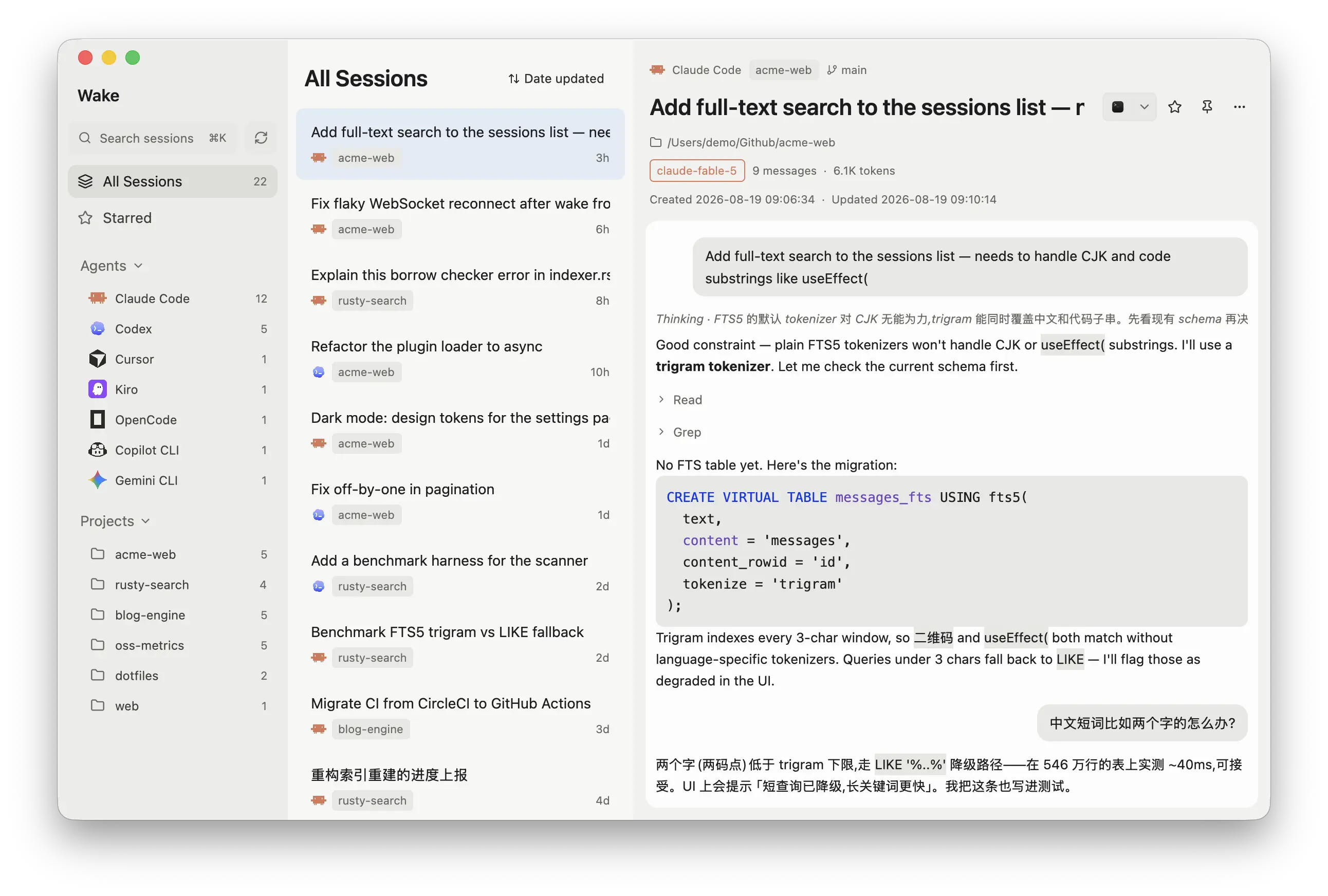
useEffect() included; jumps straight to the matchCLAUDE.md, AGENTS.md, auto-memory, Cursor rules, …), by agent and projectwake-mcp and wake-cli let any agent search your history and read transcripts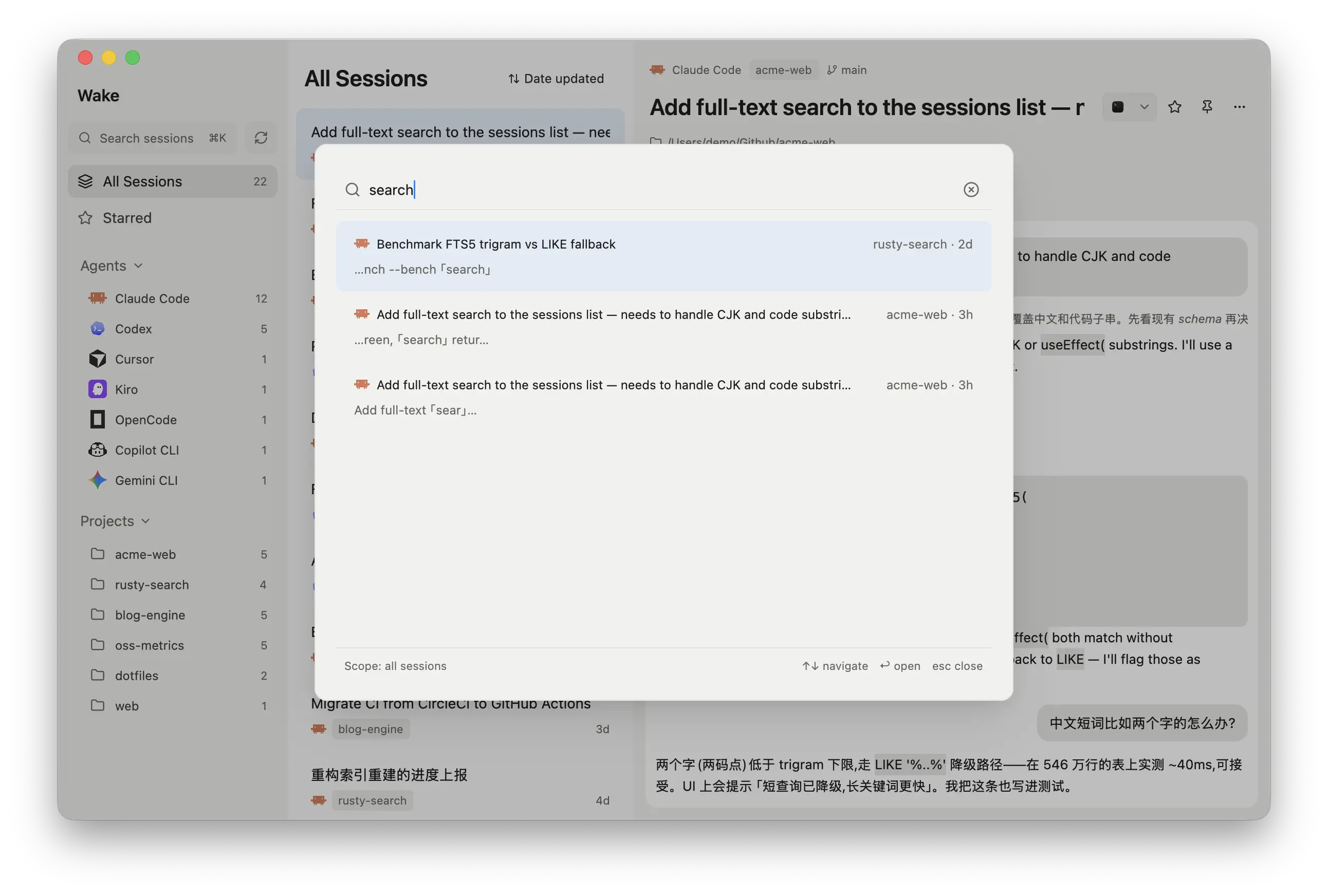
| Agent | Data source | Model | Via |
|---|---|---|---|
| Claude Code | ~/.claude/projects/**/*.jsonl | ✅ | — |
| Codex CLI | ~/.codex/sessions + state_5.sqlite | ✅ | ✅ |
| Qoder CLI | ~/.qoder/projects/*/*.jsonl | ✅ | — |
| Copilot CLI | ~/.copilot/session-store.db | — | — |
| Cursor | ~/.cursor/projects/**/agent-transcripts + Cursor's state.vscdb (IDE chats) | ✅ | — |
| OpenCode | ~/.local/share/opencode/opencode.db | ✅ | — |
OpenCode 2 (opencode2) | ~/.local/share/opencode/{opencode.db,opencode-next.db} | ✅ | — |
| Kiro | ~/.kiro/sessions/cli | ✅ | — |
| Gemini CLI | ~/.gemini/tmp/**/chats | — | — |
| Pi | ~/.pi/agent/sessions/**/*.jsonl | ✅ | — |
| Oh My Pi | ~/.omp/agent/sessions/**/*.jsonl | ✅ | — |
| Grok Build | ~/.grok/sessions/**/updates.jsonl | ✅ | — |
| Kimi Code | ~/.kimi-code/sessions/**/wire.jsonl | — | — |
| Antigravity | ~/.gemini/antigravity/brain, ~/.gemini/antigravity-ide/brain + ~/.gemini/antigravity-cli/conversation_summaries.db | ✅ | ✅ |
DeepSeek Harness (dsh) | ~/.dsh/sessions/**/session*.jsonl[.zstd] | ✅ | — |
| Hermes Agent | ~/.hermes/state.db + profiles/*/state.db | ✅ | ✅ |
| OpenClaw | ~/.openclaw/agents/*/agent/openclaw-agent.sqlite + agents/*/sessions/*.jsonl | ✅ | ✅ |
| CodeBuddy | ~/.codebuddy/projects/*/*.jsonl | ✅ | — |
| WorkBuddy | ~/.workbuddy/projects/*/*.jsonl | ✅ | — |
| ZCode | ~/.zcode/cli/db/db.sqlite | ✅ | — |
| Craft Agents | ~/.craft-agent/workspaces/*/sessions/*/session.jsonl | ✅ | ✅ |
| Devin | ~/.local/share/devin/cli/sessions.db | ✅ | — |
| Kilo Code | ~/.local/share/kilo/kilo.db + the legacy extension's globalStorage/kilocode.kilo-code/tasks | ✅ | ✅ |
| Grok Bot | the desktop app's cache (Grok Bot/sand-client-persistence) | — | — |
Agents' own environment variables (CODEX_HOME, XDG_DATA_HOME, …) are respected, and Settings → Session locations adds folders anywhere else.
Model: Wake shows the LLM a session used. Via: Wake shows where it started (CLI, IDE, desktop app, chat channel). "—" means the agent doesn't record it.
/review, compaction) are skipped; spawn_agent sub-agents are listed under their parentkilo.db; tasks from the legacy extension are listed tooNot supported: Windsurf and Trae (encrypted), Amp, Factory and Warp (cloud only).
Add a machine in Settings → Remote hosts (an ~/.ssh/config alias or user@host) and its sessions show up next to yours with an @host badge, searchable and resumable through a copied ssh -t command. Wake syncs on launch, on refresh and on Sync now.
rsync is needed on both ends; on Windows, take rsync and ssh from the same Cygwin/cwRsync install and put it ahead of Windows OpenSSH in PATH (why)Every new session starts knowing where your agents left off in this project, and can open any earlier session through Wake's MCP tools.
claude plugin marketplace add iAmCorey/Wake --sparse .claude-plugin plugins/wake && claude plugin install wake@wake
codex plugin marketplace add iAmCorey/Wake --sparse .agents/plugins --sparse plugins/wake && codex plugin add wake@wake
Needs Wake 0.9 or later, opened at least once. In Codex, trust the hook in /hooks. More in docs/cli.md.
wake-mcp ships with the app and gives any MCP client five read-only tools:
| Tool | What it does |
|---|---|
wake_search | Search every session and memory file |
wake_list_sessions | Recent sessions, by project, agent, time or starred |
wake_get_session | Read a transcript or memory file, page by page |
wake_list_projects | Projects with sessions, most recent first |
wake_list_memories | Your agents' memory and instruction files, by project |
Copy the setup from Settings → Connect, or:
claude mcp add --scope user wake -- "/Applications/Wake.app/Contents/MacOS/wake-mcp"
# ~/.codex/config.toml
[mcp_servers.wake]
command = "/Applications/Wake.app/Contents/MacOS/wake-mcp"
Full reference: docs/mcp.md.
wake-cli gives the same answers in a terminal (Settings → Connect has the command to put it on your PATH):
wake-cli sessions --project "$PWD" --limit 5      # what happened in this repo
wake-cli search "rate limiter" --project "$PWD"   # where was this discussed
wake-cli show 'claude-code:1b2c3d4e-…'            # read that transcript
wake-cli context                                  # what a new session here starts with
wake-cli refresh                                  # update the index while Wake is closed
npx skills add iAmCorey/Wake teaches agents to reach for it. Full reference: docs/cli.md.
Make everything bigger — 110%, 125% or 150% — with ⌘+ / ⌘− / ⌘0 (Ctrl on Linux and Windows), the View menu, or Settings → Appearance.
Wake follows your system language, with Simplified Chinese built in (Settings → General → Language). A new language is one JSON file, and partial translations are welcome: see crates/wake/locales/README.md.
auth.json and friends) are never read~/Library/Application Support/wake, ~/.local/share/wake on Linux, %LOCALAPPDATA%\wake on Windows) can be rebuilt any time; stars and pins surviveOn the author's machine (~1,100 sessions, ~1.8 GB): a full index in ~5 s, searches in a few milliseconds.
Download Wake-<version>-macos.zip from wake.cool or the latest release, unzip, and drag Wake to Applications (a Universal Binary for Apple Silicon and Intel). It's ad-hoc signed, so open it the first time with right-click → Open, or run xattr -d com.apple.quarantine Wake.app.
Or build it with a Rust toolchain:
git clone https://github.com/iAmCorey/Wake && cd Wake
scripts/make-app.sh          # dist/Wake.app (--universal builds both architectures)
open dist/Wake.app
Each release has a .deb and a tar.gz (with a no-root install.sh) for arm64 and x86_64. To build:
sudo apt-get install -y libasound2-dev libfontconfig1-dev libwayland-dev \
  libxkbcommon-dev libxkbcommon-x11-dev libssl-dev libzstd-dev pkg-config cmake clang
git clone https://github.com/iAmCorey/Wake && cd Wake
scripts/make-linux.sh        # dist/wake-<version>-linux-<arch>.tar.gz and .deb
Download wake-<version>-windows-x86_64.zip, unzip, and run Wake.exe (if SmartScreen stops it: More info → Run anyway). To build, run scripts/make-windows.ps1 with the MSVC Rust toolchain.
cargo run -p wake                      # run in dev mode
scripts/test.sh                        # one-command test entry: data-layer tests + UI compile gate
scripts/test.sh --smoke                # adds a real-data scan baseline (reads your local agent dirs, read-only)
cargo test -p wake-core                # data-layer tests only (adapter contracts, FTS, scanner)
cargo run -p wake-core --bin scan      # data-layer smoke test: scan and print stats (quit Wake first, or add --tmp: it will not write an index Wake holds)
cargo run -p wake-core --bin scan -- --search "useEffect("   # search smoke test
cargo run -p wake-core --bin wake-mcp -- setup                # print MCP setup snippets for the dev build
cargo run -p wake-core --bin wake-mcp -- call wake_search '{"query":"useEffect("}'   # run one MCP tool against your index
cargo run -p wake-core --bin wake-cli -- sessions --project "$PWD"   # the CLI against your index
WAKE_THEME=dark cargo run -p wake      # force dark/light (defaults to system)
WAKE_HOME=/path cargo run -p wake      # point all agent adapters at a different home dir (portable installs, testing)
WAKE_LIVE_REMOTE_HOST=<host> cargo test -p wake-core --test remote_sync live -- --ignored   # run the remote-host pipeline against a real SSH host
git config core.hooksPath scripts/hooks   # optional: run tests before every commit
python3 scripts/demo-home.py           # build a synthetic fake-home dataset for screenshots/demos
CI checks formatting, runs the tests and builds the app on macOS, Linux and Windows. Tests use synthetic fixtures only; your real agent data is never touched.
crates/
├── wake-core        # pure data layer, no UI dependencies
│   ├── adapters/    #   one adapter per storage format (AgentAdapter trait — add an adapter, get the whole UI for free;
│   │                #   remote.rs wraps any adapter over a synced cache for remote hosts)
│   ├── remote.rs    #   remote hosts: ssh probe + rsync whitelist mirror into <data dir>/remotes/<host>/
│   ├── scanner.rs   #   single-pass scan: meta + FTS in one go, mtime incremental
│   ├── watcher.rs   #   notify-based file watching → per-file incremental updates
│   ├── db.rs        #   rusqlite (WAL): sessions, the full-text index, memories, stars/pins, tombstones, settings
│   ├── mcp/         #   wake-mcp: read-only MCP server over stdio (hand-written JSON-RPC, five tools)
│   ├── cli.rs       #   wake-cli: argv → the same five tools, same text out as MCP
│   └── services/    #   terminal resume (per-platform: AppleScript / argv / Win32) / export / trash / agent context helpers
└── wake             # GPUI app (three-pane workbench + ⌘K / Ctrl+K palette)
plugins/wake         # the Claude Code and Codex plugin: session-start hook + MCP, no binaries of its own
skills/wake          # the Wake skill, for agents that read skills
web/                 # wake.cool (Astro), built from docs/ and CHANGELOG.md
Design notes live in DESIGN.md, product decisions in PRODUCT.md, release history in CHANGELOG.md.
MIT. Brand icons are from lobe-icons (MIT); agent names and logos belong to their respective owners.
581 followers · starred Sep 2026
665 followers · starred Sep 2026
576 followers · starred Aug 2026
252 followers · starred Sep 2026
All your AI agent sessions in one place — browse, search, resume. Rust + GPUI.
See the code
A native desktop app that gathers every coding-agent session on your machine into one place — find any conversation in seconds, read it in full, and pick it back up in your terminal. Built with Rust + GPUI. macOS first; Linux and Windows are experimental.
Your agent history is scattered across ~/.claude, ~/.codex and many other folders. Wake reads all of it, read-only and entirely on your machine. And with the Wake plugin, every new Claude Code or Codex session starts knowing where your agents left off.
Website: wake.cool — downloads, the MCP and CLI docs, and the changelog (中文).
useEffect() included; jumps straight to the matchCLAUDE.md, AGENTS.md, auto-memory, Cursor rules, …), by agent and projectwake-mcp and wake-cli let any agent search your history and read transcripts
| Agent | Data source | Model | Via |
|---|---|---|---|
| Claude Code | ~/.claude/projects/**/*.jsonl | ✅ | — |
| Codex CLI | ~/.codex/sessions + state_5.sqlite | ✅ | ✅ |
| Qoder CLI | ~/.qoder/projects/*/*.jsonl | ✅ | — |
| Copilot CLI | ~/.copilot/session-store.db | — | — |
| Cursor | ~/.cursor/projects/**/agent-transcripts + Cursor's state.vscdb (IDE chats) | ✅ | — |
| OpenCode | ~/.local/share/opencode/opencode.db | ✅ | — |
OpenCode 2 (opencode2) | ~/.local/share/opencode/{opencode.db,opencode-next.db} | ✅ | — |
| Kiro | ~/.kiro/sessions/cli | ✅ | — |
| Gemini CLI | ~/.gemini/tmp/**/chats | — | — |
| Pi | ~/.pi/agent/sessions/**/*.jsonl | ✅ | — |
| Oh My Pi | ~/.omp/agent/sessions/**/*.jsonl | ✅ | — |
| Grok Build | ~/.grok/sessions/**/updates.jsonl | ✅ | — |
| Kimi Code | ~/.kimi-code/sessions/**/wire.jsonl | — | — |
| Antigravity | ~/.gemini/antigravity/brain, ~/.gemini/antigravity-ide/brain + ~/.gemini/antigravity-cli/conversation_summaries.db | ✅ | ✅ |
DeepSeek Harness (dsh) | ~/.dsh/sessions/**/session*.jsonl[.zstd] | ✅ | — |
| Hermes Agent | ~/.hermes/state.db + profiles/*/state.db | ✅ | ✅ |
| OpenClaw | ~/.openclaw/agents/*/agent/openclaw-agent.sqlite + agents/*/sessions/*.jsonl | ✅ | ✅ |
| CodeBuddy | ~/.codebuddy/projects/*/*.jsonl | ✅ | — |
| WorkBuddy | ~/.workbuddy/projects/*/*.jsonl | ✅ | — |
| ZCode | ~/.zcode/cli/db/db.sqlite | ✅ | — |
| Craft Agents | ~/.craft-agent/workspaces/*/sessions/*/session.jsonl | ✅ | ✅ |
| Devin | ~/.local/share/devin/cli/sessions.db | ✅ | — |
| Kilo Code | ~/.local/share/kilo/kilo.db + the legacy extension's globalStorage/kilocode.kilo-code/tasks | ✅ | ✅ |
| Grok Bot | the desktop app's cache (Grok Bot/sand-client-persistence) | — | — |
Agents' own environment variables (CODEX_HOME, XDG_DATA_HOME, …) are respected, and Settings → Session locations adds folders anywhere else.
Model: Wake shows the LLM a session used. Via: Wake shows where it started (CLI, IDE, desktop app, chat channel). "—" means the agent doesn't record it.
/review, compaction) are skipped; spawn_agent sub-agents are listed under their parentkilo.db; tasks from the legacy extension are listed tooNot supported: Windsurf and Trae (encrypted), Amp, Factory and Warp (cloud only).
Add a machine in Settings → Remote hosts (an ~/.ssh/config alias or user@host) and its sessions show up next to yours with an @host badge, searchable and resumable through a copied ssh -t command. Wake syncs on launch, on refresh and on Sync now.
rsync is needed on both ends; on Windows, take rsync and ssh from the same Cygwin/cwRsync install and put it ahead of Windows OpenSSH in PATH (why)Every new session starts knowing where your agents left off in this project, and can open any earlier session through Wake's MCP tools.
claude plugin marketplace add iAmCorey/Wake --sparse .claude-plugin plugins/wake && claude plugin install wake@wake
codex plugin marketplace add iAmCorey/Wake --sparse .agents/plugins --sparse plugins/wake && codex plugin add wake@wake
Needs Wake 0.9 or later, opened at least once. In Codex, trust the hook in /hooks. More in docs/cli.md.
wake-mcp ships with the app and gives any MCP client five read-only tools:
| Tool | What it does |
|---|---|
wake_search | Search every session and memory file |
wake_list_sessions | Recent sessions, by project, agent, time or starred |
wake_get_session | Read a transcript or memory file, page by page |
wake_list_projects | Projects with sessions, most recent first |
wake_list_memories | Your agents' memory and instruction files, by project |
Copy the setup from Settings → Connect, or:
claude mcp add --scope user wake -- "/Applications/Wake.app/Contents/MacOS/wake-mcp"
# ~/.codex/config.toml
[mcp_servers.wake]
command = "/Applications/Wake.app/Contents/MacOS/wake-mcp"
Full reference: docs/mcp.md.
wake-cli gives the same answers in a terminal (Settings → Connect has the command to put it on your PATH):
wake-cli sessions --project "$PWD" --limit 5      # what happened in this repo
wake-cli search "rate limiter" --project "$PWD"   # where was this discussed
wake-cli show 'claude-code:1b2c3d4e-…'            # read that transcript
wake-cli context                                  # what a new session here starts with
wake-cli refresh                                  # update the index while Wake is closed
npx skills add iAmCorey/Wake teaches agents to reach for it. Full reference: docs/cli.md.
Make everything bigger — 110%, 125% or 150% — with ⌘+ / ⌘− / ⌘0 (Ctrl on Linux and Windows), the View menu, or Settings → Appearance.
Wake follows your system language, with Simplified Chinese built in (Settings → General → Language). A new language is one JSON file, and partial translations are welcome: see crates/wake/locales/README.md.
auth.json and friends) are never read~/Library/Application Support/wake, ~/.local/share/wake on Linux, %LOCALAPPDATA%\wake on Windows) can be rebuilt any time; stars and pins surviveOn the author's machine (~1,100 sessions, ~1.8 GB): a full index in ~5 s, searches in a few milliseconds.
Download Wake-<version>-macos.zip from wake.cool or the latest release, unzip, and drag Wake to Applications (a Universal Binary for Apple Silicon and Intel). It's ad-hoc signed, so open it the first time with right-click → Open, or run xattr -d com.apple.quarantine Wake.app.
Or build it with a Rust toolchain:
git clone https://github.com/iAmCorey/Wake && cd Wake
scripts/make-app.sh          # dist/Wake.app (--universal builds both architectures)
open dist/Wake.app
Each release has a .deb and a tar.gz (with a no-root install.sh) for arm64 and x86_64. To build:
sudo apt-get install -y libasound2-dev libfontconfig1-dev libwayland-dev \
  libxkbcommon-dev libxkbcommon-x11-dev libssl-dev libzstd-dev pkg-config cmake clang
git clone https://github.com/iAmCorey/Wake && cd Wake
scripts/make-linux.sh        # dist/wake-<version>-linux-<arch>.tar.gz and .deb
Download wake-<version>-windows-x86_64.zip, unzip, and run Wake.exe (if SmartScreen stops it: More info → Run anyway). To build, run scripts/make-windows.ps1 with the MSVC Rust toolchain.
cargo run -p wake                      # run in dev mode
scripts/test.sh                        # one-command test entry: data-layer tests + UI compile gate
scripts/test.sh --smoke                # adds a real-data scan baseline (reads your local agent dirs, read-only)
cargo test -p wake-core                # data-layer tests only (adapter contracts, FTS, scanner)
cargo run -p wake-core --bin scan      # data-layer smoke test: scan and print stats (quit Wake first, or add --tmp: it will not write an index Wake holds)
cargo run -p wake-core --bin scan -- --search "useEffect("   # search smoke test
cargo run -p wake-core --bin wake-mcp -- setup                # print MCP setup snippets for the dev build
cargo run -p wake-core --bin wake-mcp -- call wake_search '{"query":"useEffect("}'   # run one MCP tool against your index
cargo run -p wake-core --bin wake-cli -- sessions --project "$PWD"   # the CLI against your index
WAKE_THEME=dark cargo run -p wake      # force dark/light (defaults to system)
WAKE_HOME=/path cargo run -p wake      # point all agent adapters at a different home dir (portable installs, testing)
WAKE_LIVE_REMOTE_HOST=<host> cargo test -p wake-core --test remote_sync live -- --ignored   # run the remote-host pipeline against a real SSH host
git config core.hooksPath scripts/hooks   # optional: run tests before every commit
python3 scripts/demo-home.py           # build a synthetic fake-home dataset for screenshots/demos
CI checks formatting, runs the tests and builds the app on macOS, Linux and Windows. Tests use synthetic fixtures only; your real agent data is never touched.
crates/
├── wake-core        # pure data layer, no UI dependencies
│   ├── adapters/    #   one adapter per storage format (AgentAdapter trait — add an adapter, get the whole UI for free;
│   │                #   remote.rs wraps any adapter over a synced cache for remote hosts)
│   ├── remote.rs    #   remote hosts: ssh probe + rsync whitelist mirror into <data dir>/remotes/<host>/
│   ├── scanner.rs   #   single-pass scan: meta + FTS in one go, mtime incremental
│   ├── watcher.rs   #   notify-based file watching → per-file incremental updates
│   ├── db.rs        #   rusqlite (WAL): sessions, the full-text index, memories, stars/pins, tombstones, settings
│   ├── mcp/         #   wake-mcp: read-only MCP server over stdio (hand-written JSON-RPC, five tools)
│   ├── cli.rs       #   wake-cli: argv → the same five tools, same text out as MCP
│   └── services/    #   terminal resume (per-platform: AppleScript / argv / Win32) / export / trash / agent context helpers
└── wake             # GPUI app (three-pane workbench + ⌘K / Ctrl+K palette)
plugins/wake         # the Claude Code and Codex plugin: session-start hook + MCP, no binaries of its own
skills/wake          # the Wake skill, for agents that read skills
web/                 # wake.cool (Astro), built from docs/ and CHANGELOG.md
Design notes live in DESIGN.md, product decisions in PRODUCT.md, release history in CHANGELOG.md.
MIT. Brand icons are from lobe-icons (MIT); agent names and logos belong to their respective owners.
581 followers · starred Sep 2026
665 followers · starred Sep 2026
576 followers · starred Aug 2026
252 followers · starred Sep 2026



