
Flipper Zero app for ESL research using IR. All based on https://www.furrtek.org/?a=esl
C
1,910
63 commits
updated Sep 17, 2026
README
TagTinker V2.1
Infrared ESL Research Toolkit for Flipper Zero
Protocol study • Signal analysis • Digital Art




→ Launch the TagTinker Image Prep web app ←
Overview
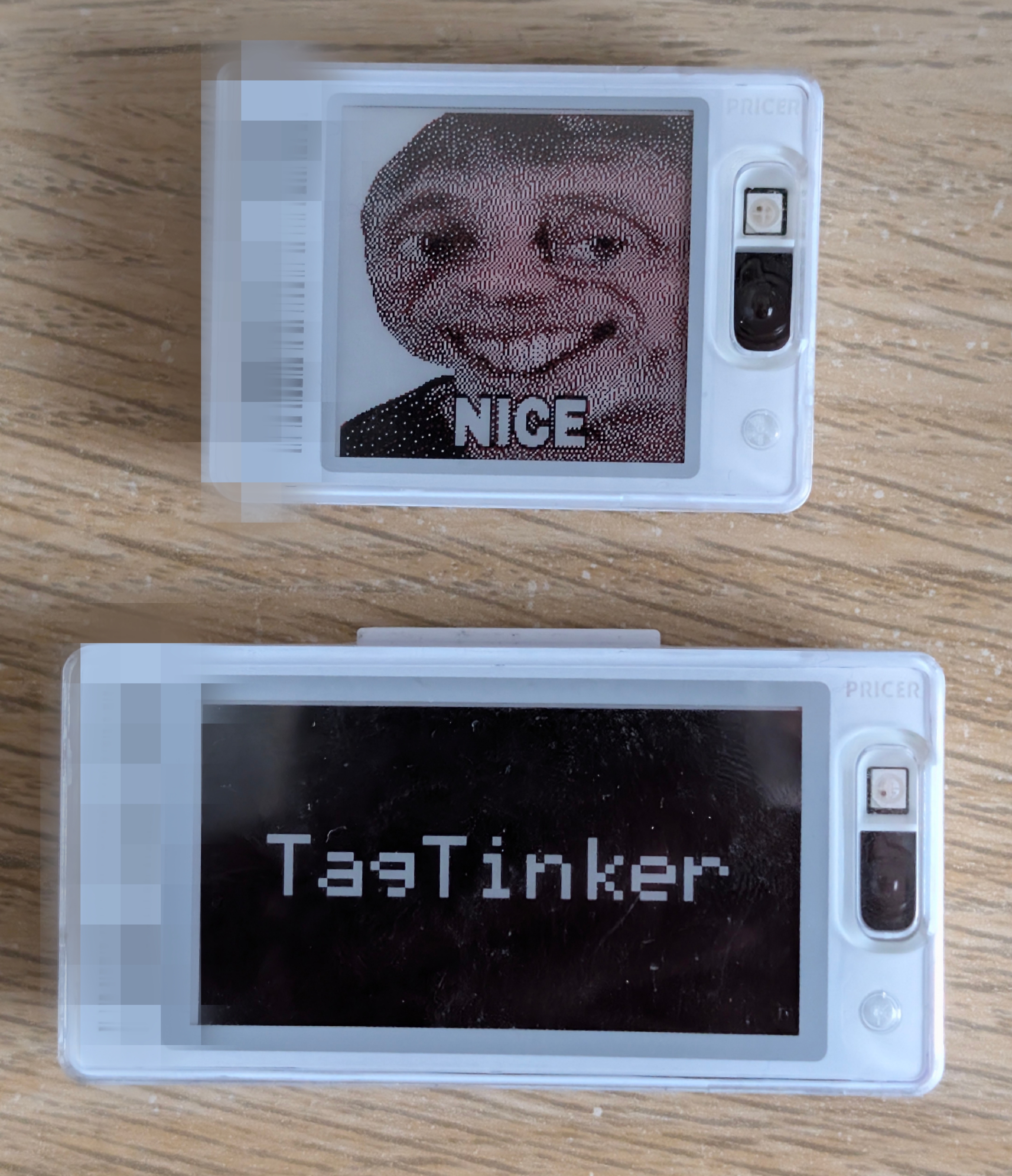
TagTinker is a Flipper Zero app for exploring infrared electronic shelf-label (ESL) protocols. It allows you to transmit custom images and text to supported graphics tags. A companion web image preparer runs entirely in the browser and lets you drop, dither and download Flipper-ready BMPs without any install.
As the Flipper Zero team notes:
"FYI: this is pure infrared signal, same that you use in TV remotes. The whole security was relying on obscurity of protocol."
This tool is built for IoT security curiosity, learning about obscure protocols, and displaying digital art on e-ink hardware.
[!WARNING] Hardware Warning: Many infrared ESL tags store their firmware, address, and display data in volatile RAM to save cost and energy. If you remove the battery or let it fully discharge, the tag will lose all programming and become unresponsive ("dead"). It usually cannot be recovered without the original base station.
Which tags work
TagTinker only transmits infrared, through the Flipper's IR LED. It works with infrared ESLs whose type code is in the app's profile table. The type code is digits 13 to 16 of the 17-character barcode, and the image preparer lists the graphics types.
TagTinker has no way to drive ESLs that are updated over radio, whatever their barcode or NFC tag says. For example:
- SES-imagotag's VUSION access points talk to their labels over a proprietary 2.4 GHz radio, and in 2023 SES-imagotag announced Bluetooth LE support for the platform.
- Hanshow documents labels such as the Stellar Pro-266 and Nebular Pro-346 as RF devices working at 2402 to 2480 MHz.
What + Scan NFC tells you
The scan only reads the tag's NFC data. It cannot sense whether the display listens for infrared or radio.
| Message | What the Flipper found |
|---|---|
| Tag actions open | The NFC link carries an ID TagTinker decodes. Show Tag Info shows the model, or Model: Unknown when the type code is not in the profile table. |
| Likely radio tag | No decodable ID, and the NFC link points to nfc.imagotag.com, the host in the public VUSION label dump. The link alone does not prove the model. |
| Unrecognized tag | The chip was read, but its NFC data holds no ID TagTinker can decode. Everyday NFC cards land here too. For an infrared tag, try + Type Barcode. |
| Unreadable chip | An NFC-A chip answered, but no page could be read. The scan reads only NTAG/Ultralight chips; other chip types give this or "Unrecognized tag", depending on how they answer. If the tag moved during the read, take it away and present it again. |
| Target list full | All 16 target slots are in use. Delete a saved tag first. |
| Nothing happens | No NFC-A chip answered. The tag may have no NFC chip, or one of a type the scan does not look for. |
Only test tags you own or are allowed to test.
Features
-
TagTinker Flipper App: High-performance RLE streaming IR engine.
-
TagTinker Image Prep (web): Single-file, dependency-free HTML page that lists every supported tag profile, runs a full image pipeline (tone, contrast, detail, sharpen, dither, photo-grade Oklab 3-colour quantisation) and exports a Flipper-ready BMP. Hosted at i12bp8.github.io/TagTinker (source:
web-image-prep/). -
Drop-folder image flow: Drop a prepared BMP into
apps_data/tagtinker/dropped/on the Flipper SD card, then openTargeted Payloads → <tag> → Set Imageand pick it. The Flipper rescales the 1-bit and two-plane BMPs that the image preparer exports, so one file can be sent to graphics tags of other sizes and to any page. Type 1626 (SmartTAG Color 2.6) targets only accept files up to 24 KB. -
NFC Tag Scan: Add a target by scanning the tag's NFC chip instead of typing its barcode. This works when the tag's NFC data carries an ID TagTinker can decode; otherwise use
+ Type Barcode. -
WiFi Plugins (optional): Plug a Flipper WiFi Dev Board (ESP32-S2) into the GPIO header to unlock live, network-rendered tag designs — crypto price cards, weather tiles, identicons, and more — auto-discovered by the FAP. New plugins live entirely on the cloud worker; the Flipper firmware never has to be re-flashed to add one. The dev board firmware talks to the worker named by
CONFIG_TT_CLOUD_URL, so you can point it at your own deployment ofcloud-plugins/instead.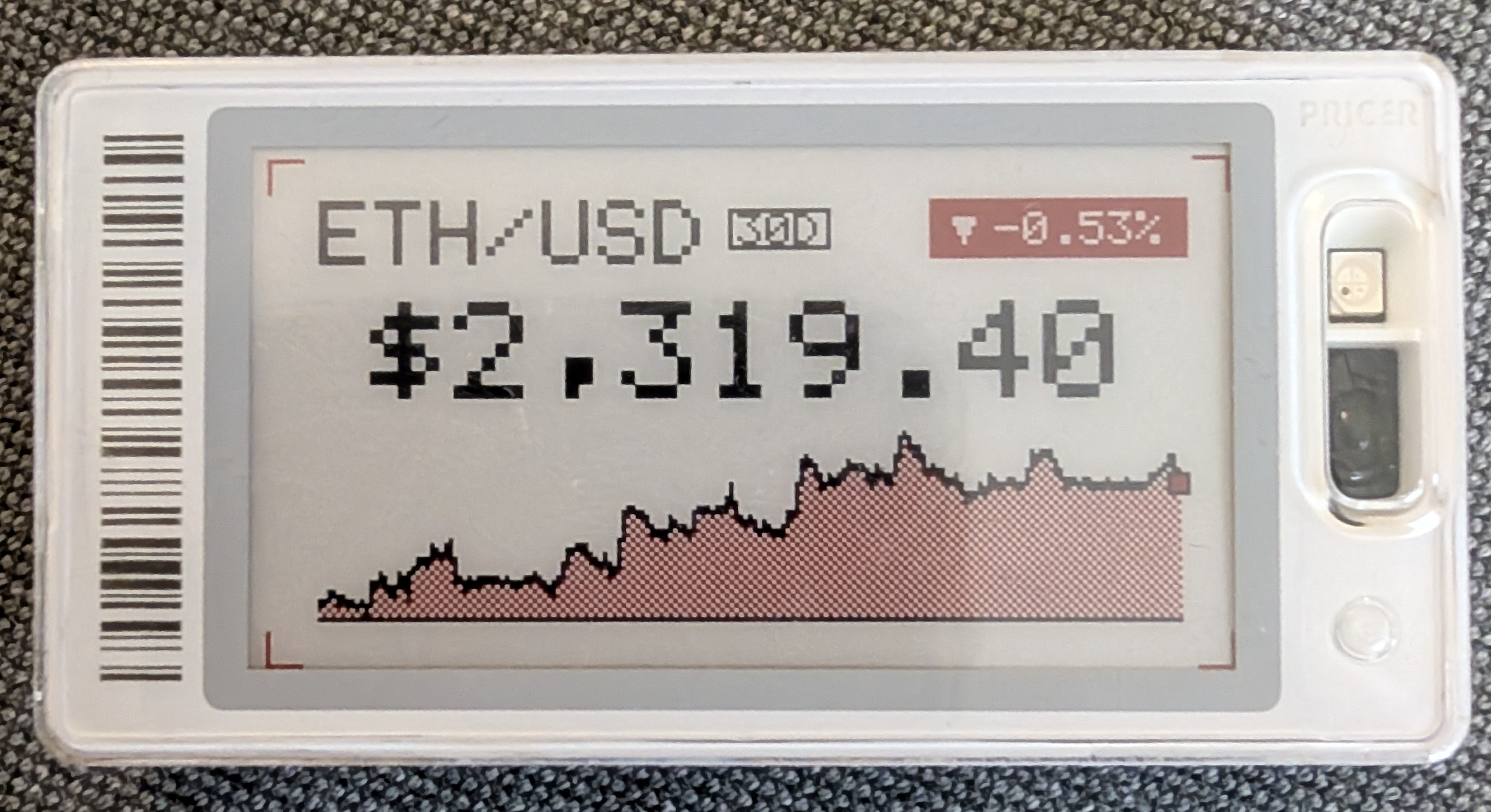
-
Display text and custom images.
-
Support for monochrome and accent-color (red/yellow) graphics tags.
Getting Started
- Build the Flipper app from this repository and install it via
ufbt. The first launch createsapps_data/tagtinker/dropped/on your SD card. - Open i12bp8.github.io/TagTinker in any browser, pick your tag profile, drop an image, tweak, and download the BMP.
- Copy the BMP into
apps_data/tagtinker/dropped/on the SD card (overqFlipper, USB MTP, or whatever you use). - On the Flipper open
Targeted Payloads → <your tag> → Set Image, pick the BMP, choose a page, send.
Development
The repo holds three build products plus the static web tool. A root Makefile wraps every toolchain and works with the stock make on macOS (GNU Make 3.81) as well as GNU Make 4.x. Run make with no arguments to list all targets.
Prerequisites
- Python 3 —
make setupcreates.venv/and installs ufbt into it for the Flipper app. - Node.js 22+ (LTS) — for the Cloudflare worker in
cloud-plugins/. - ESP-IDF v5.2 (optional) — only needed to build or flash the WiFi devboard firmware in
esp32-wifi-fw/. Install it at~/esp/esp-idfor passIDF_PATH=/path/to/esp-idf. ESP-IDF'sexport.shexpects a Python virtualenv matching thepython3on yourPATH; if exactly one~/.espressif/python_env/idf5.2_py*_envexists the Makefile points ESP-IDF at it automatically, otherwise passIDF_PYTHON_ENV_PATH=...yourself.
Make targets
| Target | What it does |
|---|---|
make setup | One-time: create .venv/ with ufbt, download the Flipper SDK, npm ci the worker |
make build-all | Build the FAP, the worker and the ESP32 firmware |
make build-fap | Build the Flipper app → dist/tagtinker.fap |
make launch | Build, install and run the FAP on a USB-connected Flipper (port auto-detected) |
make build-worker | Type-check and bundle the worker → cloud-plugins/dist/index.js |
make build-esp | Build the ESP32-S2 firmware → esp32-wifi-fw/build/tagtinker_wifi.bin |
make flash-esp ESP_PORT=/dev/cu.usbserial-XXXX | Build and flash the devboard (omit ESP_PORT to auto-detect) |
make serve-web | Serve the Image Prep tool at http://localhost:8000/ |
make lint | Advisory ufbt lint; it currently fails on deliberately column-aligned code and is not a CI gate |
make clean | Remove build outputs only (keeps .venv/, node_modules/ and sdkconfig) |
CI (build.yml) builds all three components — FAP, worker and ESP32 firmware — on every pull request and every push to main; the web tool deploys to GitHub Pages from main.
FAQ
Does this require a Flipper Zero?
This app does. The IR protocol itself is simple enough to drive from other cheap microcontroller hardware, such as an ESP32 and an IR LED, but this repository only contains the Flipper implementation. The Flipper Zero just happens to be my favorite security research tool, which is why I built the app for this platform.
Where is the .fap release?
The Flipper app is source-first. Build the .fap yourself from this repository with ufbt so it matches your firmware and local toolchain.
What if it crashes or behaves oddly?
If you are using a custom firmware branch, custom asset packs, or a heavily modified device setup, start by testing from a clean baseline firmware.
Credits & Background
This project is deeply indebted to the incredible public reverse-engineering work by furrtek. To understand the underlying protocol, signal structure, and history, please read his research:
- Furrtek’s ESL research: https://www.furrtek.org/?a=esl
- PrecIR reference implementation: https://github.com/furrtek/PrecIR
NFC tag decoding contributed by 7h30th3r0n3.
Disclaimer
[!CAUTION] STRICTLY PROHIBITED FOR ILLEGAL USE
TagTinker is an independent project intended strictly for educational research, security curiosity, and displaying digital art on hardware that you legally own.
Under no circumstances is this software allowed to be used for illegal activities. You are strictly prohibited from using TagTinker to alter retail displays, modify electronic shelf labels in stores, interfere with third-party infrastructure, or cause any form of vandalism or financial harm.
The creator of TagTinker assumes absolutely no liability for any misuse of this software. By using this software, you agree to take full responsibility for your actions and use it responsibly and legally.
License
Licensed under the GNU General Public License v3.0 (GPL-3.0). See the LICENSE file for details.
Contributors


Similar repos


Languages
C
73.3%
TypeScript
15.8%
HTML
8.8%
Makefile
1.9%
Flipper Zero app for ESL research using IR. All based on https://www.furrtek.org/?a=esl
C
1,910
63 commits
updated Sep 17, 2026
README
TagTinker V2.1
Infrared ESL Research Toolkit for Flipper Zero
Protocol study • Signal analysis • Digital Art
→ Launch the TagTinker Image Prep web app ←
Overview
TagTinker is a Flipper Zero app for exploring infrared electronic shelf-label (ESL) protocols. It allows you to transmit custom images and text to supported graphics tags. A companion web image preparer runs entirely in the browser and lets you drop, dither and download Flipper-ready BMPs without any install.
As the Flipper Zero team notes:
"FYI: this is pure infrared signal, same that you use in TV remotes. The whole security was relying on obscurity of protocol."
This tool is built for IoT security curiosity, learning about obscure protocols, and displaying digital art on e-ink hardware.
[!WARNING] Hardware Warning: Many infrared ESL tags store their firmware, address, and display data in volatile RAM to save cost and energy. If you remove the battery or let it fully discharge, the tag will lose all programming and become unresponsive ("dead"). It usually cannot be recovered without the original base station.
Which tags work
TagTinker only transmits infrared, through the Flipper's IR LED. It works with infrared ESLs whose type code is in the app's profile table. The type code is digits 13 to 16 of the 17-character barcode, and the image preparer lists the graphics types.
TagTinker has no way to drive ESLs that are updated over radio, whatever their barcode or NFC tag says. For example:
- SES-imagotag's VUSION access points talk to their labels over a proprietary 2.4 GHz radio, and in 2023 SES-imagotag announced Bluetooth LE support for the platform.
- Hanshow documents labels such as the Stellar Pro-266 and Nebular Pro-346 as RF devices working at 2402 to 2480 MHz.
What + Scan NFC tells you
The scan only reads the tag's NFC data. It cannot sense whether the display listens for infrared or radio.
| Message | What the Flipper found |
|---|---|
| Tag actions open | The NFC link carries an ID TagTinker decodes. Show Tag Info shows the model, or Model: Unknown when the type code is not in the profile table. |
| Likely radio tag | No decodable ID, and the NFC link points to nfc.imagotag.com, the host in the public VUSION label dump. The link alone does not prove the model. |
| Unrecognized tag | The chip was read, but its NFC data holds no ID TagTinker can decode. Everyday NFC cards land here too. For an infrared tag, try + Type Barcode. |
| Unreadable chip | An NFC-A chip answered, but no page could be read. The scan reads only NTAG/Ultralight chips; other chip types give this or "Unrecognized tag", depending on how they answer. If the tag moved during the read, take it away and present it again. |
| Target list full | All 16 target slots are in use. Delete a saved tag first. |
| Nothing happens | No NFC-A chip answered. The tag may have no NFC chip, or one of a type the scan does not look for. |
Only test tags you own or are allowed to test.
Features
-
TagTinker Flipper App: High-performance RLE streaming IR engine.
-
TagTinker Image Prep (web): Single-file, dependency-free HTML page that lists every supported tag profile, runs a full image pipeline (tone, contrast, detail, sharpen, dither, photo-grade Oklab 3-colour quantisation) and exports a Flipper-ready BMP. Hosted at i12bp8.github.io/TagTinker (source:
web-image-prep/). -
Drop-folder image flow: Drop a prepared BMP into
apps_data/tagtinker/dropped/on the Flipper SD card, then openTargeted Payloads → <tag> → Set Imageand pick it. The Flipper rescales the 1-bit and two-plane BMPs that the image preparer exports, so one file can be sent to graphics tags of other sizes and to any page. Type 1626 (SmartTAG Color 2.6) targets only accept files up to 24 KB. -
NFC Tag Scan: Add a target by scanning the tag's NFC chip instead of typing its barcode. This works when the tag's NFC data carries an ID TagTinker can decode; otherwise use
+ Type Barcode. -
WiFi Plugins (optional): Plug a Flipper WiFi Dev Board (ESP32-S2) into the GPIO header to unlock live, network-rendered tag designs — crypto price cards, weather tiles, identicons, and more — auto-discovered by the FAP. New plugins live entirely on the cloud worker; the Flipper firmware never has to be re-flashed to add one. The dev board firmware talks to the worker named by
CONFIG_TT_CLOUD_URL, so you can point it at your own deployment ofcloud-plugins/instead.
-
Display text and custom images.
-
Support for monochrome and accent-color (red/yellow) graphics tags.
Getting Started
- Build the Flipper app from this repository and install it via
ufbt. The first launch createsapps_data/tagtinker/dropped/on your SD card. - Open i12bp8.github.io/TagTinker in any browser, pick your tag profile, drop an image, tweak, and download the BMP.
- Copy the BMP into
apps_data/tagtinker/dropped/on the SD card (overqFlipper, USB MTP, or whatever you use). - On the Flipper open
Targeted Payloads → <your tag> → Set Image, pick the BMP, choose a page, send.
Development
The repo holds three build products plus the static web tool. A root Makefile wraps every toolchain and works with the stock make on macOS (GNU Make 3.81) as well as GNU Make 4.x. Run make with no arguments to list all targets.
Prerequisites
- Python 3 —
make setupcreates.venv/and installs ufbt into it for the Flipper app. - Node.js 22+ (LTS) — for the Cloudflare worker in
cloud-plugins/. - ESP-IDF v5.2 (optional) — only needed to build or flash the WiFi devboard firmware in
esp32-wifi-fw/. Install it at~/esp/esp-idfor passIDF_PATH=/path/to/esp-idf. ESP-IDF'sexport.shexpects a Python virtualenv matching thepython3on yourPATH; if exactly one~/.espressif/python_env/idf5.2_py*_envexists the Makefile points ESP-IDF at it automatically, otherwise passIDF_PYTHON_ENV_PATH=...yourself.
Make targets
| Target | What it does |
|---|---|
make setup | One-time: create .venv/ with ufbt, download the Flipper SDK, npm ci the worker |
make build-all | Build the FAP, the worker and the ESP32 firmware |
make build-fap | Build the Flipper app → dist/tagtinker.fap |
make launch | Build, install and run the FAP on a USB-connected Flipper (port auto-detected) |
make build-worker | Type-check and bundle the worker → cloud-plugins/dist/index.js |
make build-esp | Build the ESP32-S2 firmware → esp32-wifi-fw/build/tagtinker_wifi.bin |
make flash-esp ESP_PORT=/dev/cu.usbserial-XXXX | Build and flash the devboard (omit ESP_PORT to auto-detect) |
make serve-web | Serve the Image Prep tool at http://localhost:8000/ |
make lint | Advisory ufbt lint; it currently fails on deliberately column-aligned code and is not a CI gate |
make clean | Remove build outputs only (keeps .venv/, node_modules/ and sdkconfig) |
CI (build.yml) builds all three components — FAP, worker and ESP32 firmware — on every pull request and every push to main; the web tool deploys to GitHub Pages from main.
FAQ
Does this require a Flipper Zero?
This app does. The IR protocol itself is simple enough to drive from other cheap microcontroller hardware, such as an ESP32 and an IR LED, but this repository only contains the Flipper implementation. The Flipper Zero just happens to be my favorite security research tool, which is why I built the app for this platform.
Where is the .fap release?
The Flipper app is source-first. Build the .fap yourself from this repository with ufbt so it matches your firmware and local toolchain.
What if it crashes or behaves oddly?
If you are using a custom firmware branch, custom asset packs, or a heavily modified device setup, start by testing from a clean baseline firmware.
Credits & Background
This project is deeply indebted to the incredible public reverse-engineering work by furrtek. To understand the underlying protocol, signal structure, and history, please read his research:
- Furrtek’s ESL research: https://www.furrtek.org/?a=esl
- PrecIR reference implementation: https://github.com/furrtek/PrecIR
NFC tag decoding contributed by 7h30th3r0n3.
Disclaimer
[!CAUTION] STRICTLY PROHIBITED FOR ILLEGAL USE
TagTinker is an independent project intended strictly for educational research, security curiosity, and displaying digital art on hardware that you legally own.
Under no circumstances is this software allowed to be used for illegal activities. You are strictly prohibited from using TagTinker to alter retail displays, modify electronic shelf labels in stores, interfere with third-party infrastructure, or cause any form of vandalism or financial harm.
The creator of TagTinker assumes absolutely no liability for any misuse of this software. By using this software, you agree to take full responsibility for your actions and use it responsibly and legally.
License
Licensed under the GNU General Public License v3.0 (GPL-3.0). See the LICENSE file for details.
Similar repos
Contributors
Languages
C
73.3%
TypeScript
15.8%
HTML
8.8%
Makefile
1.9%