
VS Code extension for mise-en-place (https://mise.jdx.dev/)
See the codeREADME
mise-vscode 🛠️





Visual Studio Code extension for mise (mise-en-place). Documentation
mise is a polyglot tool version manager, environment variables manager, and tasks runner.
- Like asdf (or nvm or pyenv but for any language), it manages dev tools like node, python, cmake, terraform, and hundreds more.
- Like direnv, it manages environment variables for different project directories.
- Like make, it manages tasks used to build and test projects.
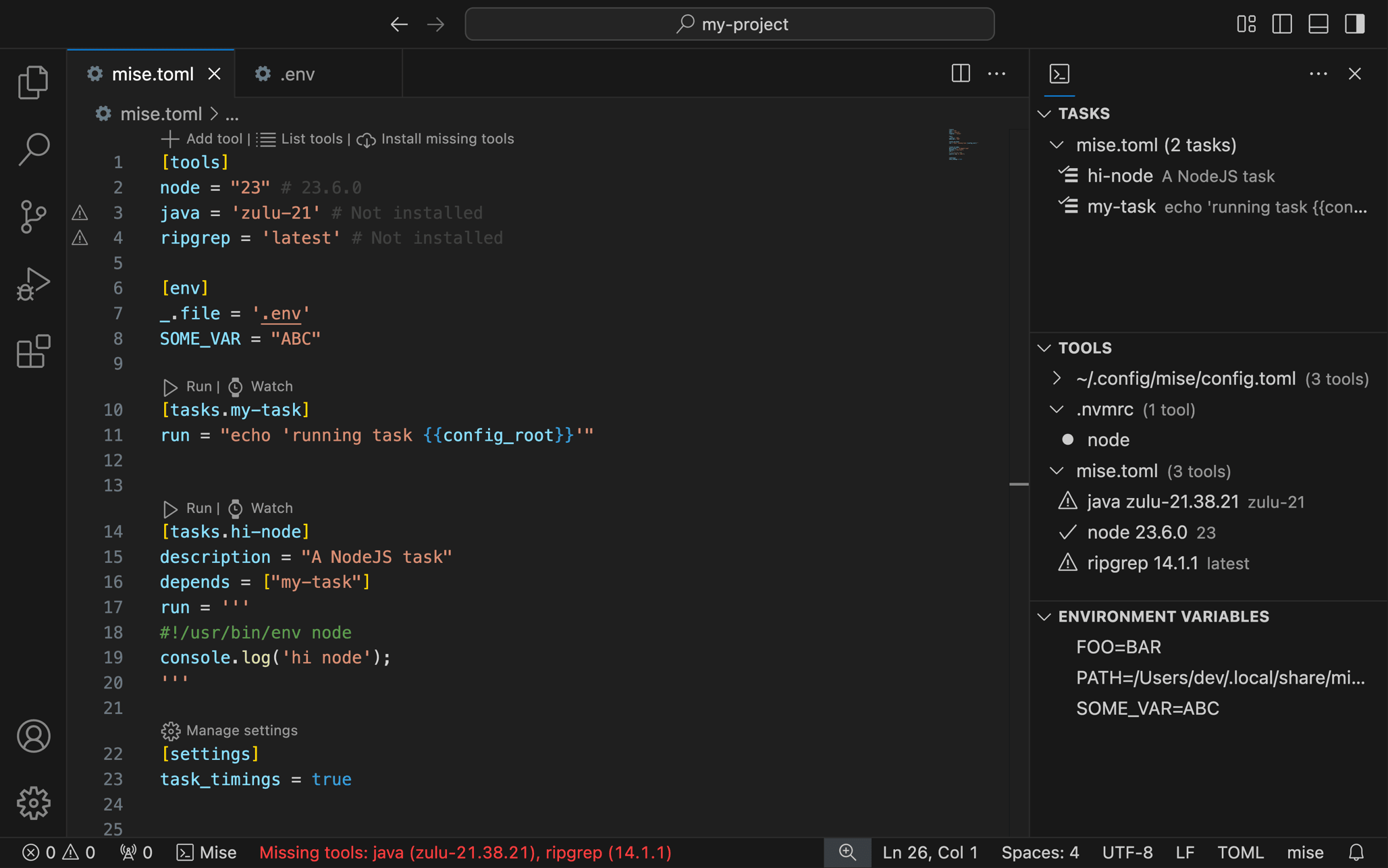
This VSCode extension provides an easy way to manage mise
tasks,
tools, and
environment variables
directly from your editor.
It can automatically
configure other extensions
to use tools provided by mise in your current project, including support for custom extensions.
Installation
This extension provides basic syntax highlighting for mise.toml/mise.lock files.
For the best experience with syntax highlighting and autocompletion in mise.toml files, install one of these TOML extensions:
- Tombi TOML
- Even Better TOML (works well but not actively maintained anymore)
The extension will notify you if neither is installed.
Important Defaults
The extension includes default settings that you might want to change. See the configuration guide to customize your set-up.
For example, you can choose to enable/disable automatic configuration of other extensions or change the path to the mise binary.
You can access the settings by clicking on the mise extension indicator in the status bar.
Enabling/Disabling Auto-Configuration
By default, the extension will not automatically configure other VS Code extensions to use tools provided by mise in your current project.
To enable auto-configuration, set mise.configureExtensionsAutomatically to true. This will automatically configure other VS Code extensions to use tools provided by mise in your current project.
Important: By default, tools from your global mise configuration (~/.config/mise/config.toml) are included when auto-configuring other VS Code extensions (mise.configureExtensionsIncludeGlobalTools is true for backward compatibility). You can set it to false to keep your .vscode/settings.json clean and ensure extensions are only configured for tools actually used in your project.
Features
The mise-vscode extension integrates mise's core functionality into VS Code, helping you manage your development environment directly from the editor. You can handle task running, tool versions, and environment variables through a simple interface. Here's what's available:
mise.toml Language Support
- 📝 Syntax highlighting for
mise.tomlfiles (and tera templates) - 📚 Autocompletion for
mise.tomlfiles - 🧩 Autocompletion & hover for task arguments
(
usagefield,#USAGE/#MISEcomments in file tasks,$usage_*variables) - 🔗 Go to definition, find references for mise tasks
- 🪄 Syntax highlighting for extensionless tool stub files
Task Management
- 🔍 Automatic detection of mise tasks
- ⚡ Run tasks directly from,
mise.tomlfiles, file tasks, the command palette or the activity bar (task arguments are prompted for, with choices and default values from the usage spec) - 📝 View task definitions
- ➕ Create new toml & file tasks
- ⚡ Autocompletion of task dependencies
- 🧬 Autocompletion, hover, go to definition and find references for
task templates (
extends) - 🕸️ View graph of task dependencies
Tool Management
- 🧰 View all mise tools (python, node, jq, etc.) in the sidebar
- 📍 Quick navigation to tool definitions
- 📱 Show tools which are not installed or active
- 📦 Install/Remove/Use tools directly from the sidebar
- 🔧 Configure your other VSCode extensions to use tools provided by
mise(list of supported extensions). See the set-up guide for more information.
Environment Variables
- ⚙️ View mise environment variables
- 📍 Quick navigation to environment variable definitions
- 🔄 Automatically load environment variables from
mise.tomlfiles in VS Code
Snippets
- 📝
mise-tasksnippets to create tasks inmise.tomland task files. They are only suggested in the files mise loads, and only where a task can be inserted. Setmise.enableSnippetstofalseto turn them off.
Integration with VSCode tasks (launch.json)
This extension lets
VSCode tasks use mise
tasks. You can use mise tasks in your launch.json file.
See the VSCode task integration docs section for more information.
Documentation
Reference
- Tools
- Environment variables
- Tasks
- mise.toml language support
- Supported extensions
- Extension Settings
Guides
Setup for Bun, Deno, Flutter, Go, Java, Julia, Node.JS, PHP, Python
Bug Reports / Feature Requests / Contributing
- Found a bug? Please open an issue
- Contributions are welcome! See CONTRIBUTING.md for more information.
Note that this extension is tested against the latest version of mise. If you
encounter an issue, make sure to update mise first with mise self-update or
using your package manager.
Ecosystem
- See intellij-mise if you are looking for a similar plugin for IntelliJ IDEA
- Mise documentation
License
This extension is licensed under the MIT License. See the LICENSE file for details.
Contributors


Similar repos





Languages
TypeScript
96.8%
CSS
1.5%
JavaScript
1.4%
VS Code extension for mise-en-place (https://mise.jdx.dev/)
See the codeREADME
mise-vscode 🛠️
Visual Studio Code extension for mise (mise-en-place). Documentation
mise is a polyglot tool version manager, environment variables manager, and tasks runner.
- Like asdf (or nvm or pyenv but for any language), it manages dev tools like node, python, cmake, terraform, and hundreds more.
- Like direnv, it manages environment variables for different project directories.
- Like make, it manages tasks used to build and test projects.
This VSCode extension provides an easy way to manage mise
tasks,
tools, and
environment variables
directly from your editor.
It can automatically
configure other extensions
to use tools provided by mise in your current project, including support for custom extensions.
Installation
This extension provides basic syntax highlighting for mise.toml/mise.lock files.
For the best experience with syntax highlighting and autocompletion in mise.toml files, install one of these TOML extensions:
- Tombi TOML
- Even Better TOML (works well but not actively maintained anymore)
The extension will notify you if neither is installed.
Important Defaults
The extension includes default settings that you might want to change. See the configuration guide to customize your set-up.
For example, you can choose to enable/disable automatic configuration of other extensions or change the path to the mise binary.
You can access the settings by clicking on the mise extension indicator in the status bar.
Enabling/Disabling Auto-Configuration
By default, the extension will not automatically configure other VS Code extensions to use tools provided by mise in your current project.
To enable auto-configuration, set mise.configureExtensionsAutomatically to true. This will automatically configure other VS Code extensions to use tools provided by mise in your current project.
Important: By default, tools from your global mise configuration (~/.config/mise/config.toml) are included when auto-configuring other VS Code extensions (mise.configureExtensionsIncludeGlobalTools is true for backward compatibility). You can set it to false to keep your .vscode/settings.json clean and ensure extensions are only configured for tools actually used in your project.
Features
The mise-vscode extension integrates mise's core functionality into VS Code, helping you manage your development environment directly from the editor. You can handle task running, tool versions, and environment variables through a simple interface. Here's what's available:
mise.toml Language Support
- 📝 Syntax highlighting for
mise.tomlfiles (and tera templates) - 📚 Autocompletion for
mise.tomlfiles - 🧩 Autocompletion & hover for task arguments
(
usagefield,#USAGE/#MISEcomments in file tasks,$usage_*variables) - 🔗 Go to definition, find references for mise tasks
- 🪄 Syntax highlighting for extensionless tool stub files
Task Management
- 🔍 Automatic detection of mise tasks
- ⚡ Run tasks directly from,
mise.tomlfiles, file tasks, the command palette or the activity bar (task arguments are prompted for, with choices and default values from the usage spec) - 📝 View task definitions
- ➕ Create new toml & file tasks
- ⚡ Autocompletion of task dependencies
- 🧬 Autocompletion, hover, go to definition and find references for
task templates (
extends) - 🕸️ View graph of task dependencies
Tool Management
- 🧰 View all mise tools (python, node, jq, etc.) in the sidebar
- 📍 Quick navigation to tool definitions
- 📱 Show tools which are not installed or active
- 📦 Install/Remove/Use tools directly from the sidebar
- 🔧 Configure your other VSCode extensions to use tools provided by
mise(list of supported extensions). See the set-up guide for more information.
Environment Variables
- ⚙️ View mise environment variables
- 📍 Quick navigation to environment variable definitions
- 🔄 Automatically load environment variables from
mise.tomlfiles in VS Code
Snippets
- 📝
mise-tasksnippets to create tasks inmise.tomland task files. They are only suggested in the files mise loads, and only where a task can be inserted. Setmise.enableSnippetstofalseto turn them off.
Integration with VSCode tasks (launch.json)
This extension lets
VSCode tasks use mise
tasks. You can use mise tasks in your launch.json file.
See the VSCode task integration docs section for more information.
Documentation
Reference
- Tools
- Environment variables
- Tasks
- mise.toml language support
- Supported extensions
- Extension Settings
Guides
Setup for Bun, Deno, Flutter, Go, Java, Julia, Node.JS, PHP, Python
Bug Reports / Feature Requests / Contributing
- Found a bug? Please open an issue
- Contributions are welcome! See CONTRIBUTING.md for more information.
Note that this extension is tested against the latest version of mise. If you
encounter an issue, make sure to update mise first with mise self-update or
using your package manager.
Ecosystem
- See intellij-mise if you are looking for a similar plugin for IntelliJ IDEA
- Mise documentation
License
This extension is licensed under the MIT License. See the LICENSE file for details.
Similar repos
Contributors
Languages
TypeScript
96.8%
CSS
1.5%
JavaScript
1.4%