Terminal UI for AWS (taws) - A terminal-based AWS resource viewer and manager
Rust
2,264
260 commits
updated Oct 11, 2026

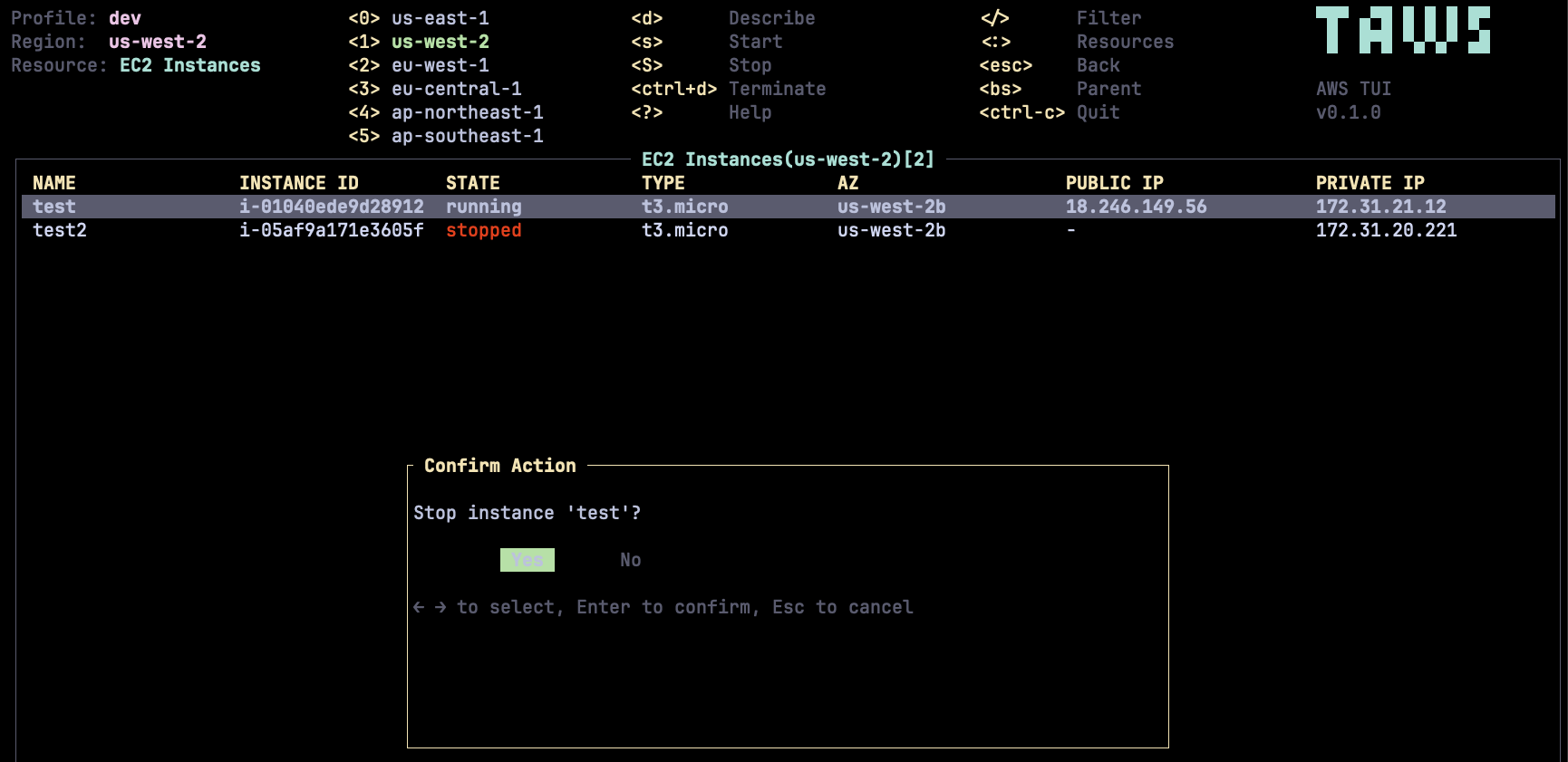
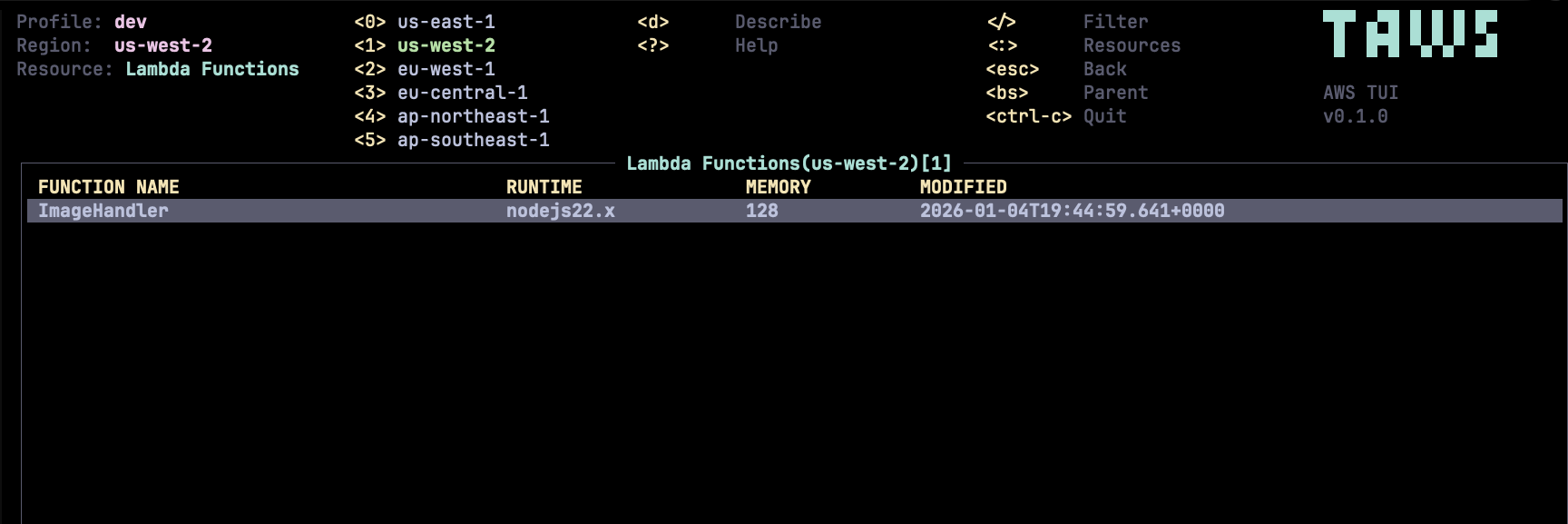
taws provides a terminal UI to interact with your AWS resources. The aim of this project is to make it easier to navigate, observe, and manage your AWS infrastructure in the wild.


] / [ keysbrew install huseyinbabal/tap/taws
scoop bucket add huseyinbabal https://github.com/huseyinbabal/scoop-bucket
scoop install taws
Download the latest release from the Releases page.
| Platform | Architecture | Download |
|---|---|---|
| macOS | Apple Silicon (M1/M2/M3) | taws-aarch64-apple-darwin.tar.gz |
| macOS | Intel | taws-x86_64-apple-darwin.tar.gz |
| Linux | x86_64 (musl) | taws-x86_64-unknown-linux-musl.tar.gz |
| Linux | ARM64 (musl) | taws-aarch64-unknown-linux-musl.tar.gz |
| Windows | x86_64 | taws-x86_64-pc-windows-msvc.zip |
# macOS Apple Silicon
curl -sL https://github.com/huseyinbabal/taws/releases/latest/download/taws-aarch64-apple-darwin.tar.gz | tar xz
sudo mv taws /usr/local/bin/

# macOS Intel
curl -sL https://github.com/huseyinbabal/taws/releases/latest/download/taws-x86_64-apple-darwin.tar.gz | tar xz
sudo mv taws /usr/local/bin/

# Linux x86_64 (musl - works on Alpine, Void, etc.)
curl -sL https://github.com/huseyinbabal/taws/releases/latest/download/taws-x86_64-unknown-linux-musl.tar.gz | tar xz
sudo mv taws /usr/local/bin/

# Linux ARM64 (musl - works on Alpine, Void, etc.)
curl -sL https://github.com/huseyinbabal/taws/releases/latest/download/taws-aarch64-unknown-linux-musl.tar.gz | tar xz
sudo mv taws /usr/local/bin/
taws-x86_64-pc-windows-msvc.zip from the Releases pagetaws.exe to a directory in your PATHcargo install taws
# Run interactively
docker run --rm -it ghcr.io/huseyinbabal/taws

# Launch with a specific profile (mount AWS credentials)
docker run --rm -it \
  -v ~/.aws:/root/.aws:ro \
  ghcr.io/huseyinbabal/taws --profile production

# Launch in a specific region
docker run --rm -it \
  -v ~/.aws:/root/.aws:ro \
  ghcr.io/huseyinbabal/taws --region us-west-2

# Using environment variables
docker run --rm -it \
  -e AWS_ACCESS_KEY_ID=$AWS_ACCESS_KEY_ID \
  -e AWS_SECRET_ACCESS_KEY=$AWS_SECRET_ACCESS_KEY \
  -e AWS_REGION=us-east-1 \
  ghcr.io/huseyinbabal/taws

# Build locally
docker build -t taws .
docker run --rm -it -v ~/.aws:/root/.aws:ro taws
Note: Use
-itflags for interactive terminal support (required for TUI). Mount your~/.awsdirectory as read-only to use your existing AWS credentials.
taws is built with Rust. Make sure you have Rust 1.70+ installed, along with a C compiler and linker.
| Platform | Install Command |
|---|---|
| Amazon Linux / RHEL / Fedora | sudo yum groupinstall "Development Tools" -y |
| Ubuntu / Debian | sudo apt update && sudo apt install build-essential -y |
| macOS | xcode-select --install |
| Windows | Install Visual Studio Build Tools |
# Clone the repository
git clone https://github.com/huseyinbabal/taws.git
cd taws

# Build and run
cargo build --release
./target/release/taws
Describe* and List* permissions.taws uses a credential chain, trying each source in order:
| Priority | Source | Description |
|---|---|---|
| 1 | Environment Variables | AWS_ACCESS_KEY_ID, AWS_SECRET_ACCESS_KEY, AWS_SESSION_TOKEN |
| 2 | AWS SSO | If profile has SSO configured, uses SSO (prompts for login if needed) |
| 3 | AWS Console Login | If profile has login_session configured, prompts for console login |
| 4 | Role Assumption | If profile has role_arn + source_profile, assumes the role |
| 5 | Credentials File | ~/.aws/credentials |
| 6 | Config File | ~/.aws/config |
| 7 | IMDSv2 | EC2 instance metadata |
taws supports AWS SSO. If your profile uses SSO and the token is expired, taws will prompt you to authenticate via browser.
Both SSO config formats are supported:
sso_session reference to [sso-session X] sectionsso_start_url directly in profileIf you already logged in via aws sso login, taws will use the cached token automatically.
taws supports AWS Console Login (aws login). If your profile uses login_session and credentials are expired, taws will prompt you to run aws login in another terminal.
[profile console-profile]
login_session = my-login-session

[login-session my-login-session]
sso_start_url = https://my-portal.awsapps.com/start
sso_region = us-east-1
sso_registration_scopes = sso:account:access
If you already logged in via aws login, taws will use the cached credentials automatically.
taws supports assuming IAM roles using role_arn with either source_profile or credential_source. This is commonly used for:
Reference another named profile for source credentials:
[profile base]
region = us-east-1

[profile production]
role_arn = arn:aws:iam::123456789012:role/ProductionAccess
source_profile = base
region = us-west-2

# Optional: external_id for cross-account trust
[profile partner-account]
role_arn = arn:aws:iam::987654321098:role/PartnerAccess
source_profile = base
external_id = my-external-id
Load source credentials from environment, EC2 metadata, or ECS container:
# For ECS tasks with task IAM roles
[profile ecs-admin]
role_arn = arn:aws:iam::123456789012:role/AdminRole
credential_source = EcsContainer

# For EC2 instances with instance roles
[profile ec2-admin]
role_arn = arn:aws:iam::123456789012:role/AdminRole
credential_source = Ec2InstanceMetadata

# For environments with AWS_ACCESS_KEY_ID/AWS_SECRET_ACCESS_KEY set
[profile env-admin]
role_arn = arn:aws:iam::123456789012:role/AdminRole
credential_source = Environment
Supported credential_source values:
| Value | Description |
|---|---|
Environment | Load from AWS_ACCESS_KEY_ID, AWS_SECRET_ACCESS_KEY, AWS_SESSION_TOKEN |
Ec2InstanceMetadata | Load from EC2 instance metadata (IMDSv2) |
EcsContainer | Load from ECS container credentials endpoint |
Supported options:
| Option | Required | Description |
|---|---|---|
role_arn | Yes | ARN of the IAM role to assume |
source_profile | One of | Profile to use for source credentials |
credential_source | these | Where to load source credentials from |
external_id | No | External ID for cross-account trust policies |
role_session_name | No | Custom session name (default: taws-session) |
duration_seconds | No | Session duration in seconds (default: 3600) |
region | No | Region for STS endpoint |
Notes:
source_profile OR credential_source (not both)AWS_CONTAINER_CREDENTIALS_RELATIVE_URI or AWS_CONTAINER_CREDENTIALS_FULL_URI environment variables (set automatically by ECS)# Launch taws with default profile
taws
# Launch with a specific profile
taws --profile production
# Launch in a specific region
taws --region us-west-2
# Enable debug logging
taws --log-level debug
# Run in read-only mode (blocks all write operations)
taws --readonly
# Use with LocalStack or custom endpoint
taws --endpoint-url http://localhost:4566
# Or via environment variable
AWS_ENDPOINT_URL=http://localhost:4566 taws
| Platform | Path |
|---|---|
| Linux | ~/.config/taws/taws.log |
| macOS | ~/Library/Application Support/taws/taws.log |
| Windows | %APPDATA%\taws\taws.log |
taws supports shell completion for bash, zsh, fish, and PowerShell.
# Bash (add to ~/.bashrc)
eval "$(taws completion bash)"

# Zsh (add to ~/.zshrc)
eval "$(taws completion zsh)"

# Fish (add to ~/.config/fish/config.fish)
taws completion fish | source

# PowerShell (add to $PROFILE)
taws completion powershell | Out-String | Invoke-Expression
After adding the completion script, restart your shell or source the config file.
| Action | Key | Description |
|---|---|---|
| Navigation | ||
| Move up | k / ↑ | Move selection up |
| Move down | j / ↓ | Move selection down |
| Top | gg / Home | Jump to first item |
| Bottom | G / End | Jump to last item |
| Page up | PgUp / Ctrl+b | Scroll up one page |
| Page down | PgDn / Ctrl+f | Scroll down one page |
| Pagination | ||
| Next page | ] | Load next page of results |
| Previous page | [ | Load previous page of results |
| Views | ||
| Resource picker | : | Open resource type selector |
| Describe | Enter / d | View resource details |
| Back | Esc / Backspace | Go back to previous view |
| Help | ? | Show help screen |
| Actions | ||
| Refresh | R | Refresh current view (resets pagination) |
| Filter | / | Filter resources |
| Region shortcuts | 0-5 | Quick switch to common regions |
| Quit | Ctrl-c | Exit taws |
| EC2 Actions | ||
| Connect (SSM) | c | Open SSM shell session to instance |
| Start instance | s | Start selected EC2 instance |
| Stop instance | S | Stop selected EC2 instance |
| Terminate | Ctrl+d | Terminate selected EC2 instance |
Press / to enter filter mode. taws supports two types of filtering:
Type any text to filter resources locally by name, ID, or other visible attributes. Uses fuzzy matching.
/web-server     # Filter by name containing "web-server"
/i-0123         # Filter by instance ID
For supported resources, you can filter using AWS API filters directly. This is more efficient for large resource lists as filtering happens server-side.
How to use:
/ to enter filter modeF and press Tab to autocomplete Filters: Filters: owner=amazon, architecture=arm64Enter to apply the filter (triggers AWS API call)Esc to clear the filterSyntax:
Filters: key=value, key2=value2
Examples by Resource:
| Resource | Example Filters |
|---|---|
| AMIs | Filters: owner=amazon, architecture=arm64, state=available |
| EC2 Instances | Filters: instance-state-name=running, tag:Environment=prod |
| EBS Volumes | Filters: status=available, tag:Name=my-volume |
| EBS Snapshots | Filters: status=completed, owner-id=self |
Common Filter Keys:
| Filter Key | Description | Example Values |
|---|---|---|
owner | AMI owner (AMIs only) | amazon, self, aws-marketplace, <account-id> |
architecture | CPU architecture | arm64, x86_64 |
state / status | Resource state | available, running, stopped |
tag:<key> | Filter by tag | tag:Environment=production |
Note: When you enter filter mode on a supported resource, taws shows available filter keys for that resource in the status bar.
Press : to open the resource picker. Type to filter resources:
:ec2          # EC2 Instances
:volumes      # EBS Volumes
:snapshots    # EBS Snapshots
:amis         # AMIs (Amazon Machine Images)
:lambda       # Lambda Functions
:s3           # S3 Buckets
:rds          # RDS Instances
:iam-users    # IAM Users
:eks          # EKS Clusters
Use Tab to autocomplete and Enter to select.
taws supports 30 AWS services with 51 resource types covering 95%+ of typical AWS usage:
| Category | Service | Resources |
|---|---|---|
| Compute | EC2 | Instances, Volumes, Snapshots, AMIs |
| Lambda | Functions | |
| ECS | Clusters, Services, Tasks | |
| EKS | Clusters | |
| Auto Scaling | Auto Scaling Groups | |
| Storage | S3 | Buckets |
| Database | RDS | Instances, Snapshots |
| DynamoDB | Tables | |
| ElastiCache | Clusters | |
| Networking | VPC | VPCs, Subnets, Security Groups |
| ELBv2 | Load Balancers, Listeners, Rules, Target Groups, Targets | |
| Route 53 | Hosted Zones | |
| CloudFront | Distributions | |
| API Gateway | REST APIs | |
| Security | IAM | Users, Groups, Roles, Policies, Access Keys |
| Secrets Manager | Secrets | |
| KMS | Keys | |
| ACM | Certificates | |
| Cognito | User Pools | |
| Management | CloudFormation | Stacks |
| CloudWatch | Log Groups | |
| CloudTrail | Trails | |
| SSM | Parameters | |
| STS | Caller Identity | |
| Messaging | SQS | Queues |
| SNS | Topics | |
| EventBridge | Event Buses, Rules | |
| Containers | ECR | Repositories |
| DevOps | CodePipeline | Pipelines |
| CodeBuild | Projects | |
| Analytics | Athena | Workgroups |
Missing a service? Start a discussion to propose adding it!
See Authentication for credential setup.
| Variable | Description |
|---|---|
AWS_PROFILE | Default AWS profile to use |
AWS_REGION | Default AWS region |
AWS_DEFAULT_REGION | Fallback region (if AWS_REGION not set) |
AWS_ACCESS_KEY_ID | AWS access key |
AWS_SECRET_ACCESS_KEY | AWS secret key |
AWS_SESSION_TOKEN | AWS session token (for temporary credentials) |
AWS_SHARED_CREDENTIALS_FILE | Custom path to credentials file (default: ~/.aws/credentials) |
AWS_CONFIG_FILE | Custom path to config file (default: ~/.aws/config) |
AWS_ENDPOINT_URL | Custom endpoint URL (for LocalStack, etc.) - also used for STS AssumeRole |
AWS_CA_BUNDLE | Custom CA certificate bundle (PEM format) for corporate SSL inspection |
SSL_CERT_FILE | Alternative to AWS_CA_BUNDLE for custom CA certificates |
If you're behind a corporate proxy with SSL inspection, taws may fail to connect to AWS services because the proxy's CA certificate is not trusted by default.
To fix this, set AWS_CA_BUNDLE or SSL_CERT_FILE to point to your corporate CA certificate bundle:
# Windows
set AWS_CA_BUNDLE=C:\path\to\corporate-ca-bundle.pem
taws

# Linux/macOS
export AWS_CA_BUNDLE=/path/to/corporate-ca-bundle.pem
taws
The PEM file can contain multiple certificates (certificate chain). taws will load all certificates from the bundle and add them to the trusted root certificates.
Note: This is the same environment variable used by AWS CLI, so if AWS CLI works with your CA bundle, taws should work too.
Press c on a running EC2 instance to open an interactive shell session via AWS Systems Manager.
Requirements:
Note: When you exit the shell session (exit), you'll return to taws.
Contributions are welcome! Please see our Contributing Guide for details.
Important: Before adding a new AWS service, please start a discussion first.
This project is licensed under the MIT License - see the LICENSE file for details.
Made with ❤️ for the AWS community
(top 24 of 48)
2,592 followers · starred Jan 2026
2,417 followers · starred Jan 2026
1,744 followers · starred Jan 2026
36 followers · starred Jan 2026
Terminal UI for AWS (taws) - A terminal-based AWS resource viewer and manager
Rust
2,264
260 commits
updated Oct 11, 2026
taws provides a terminal UI to interact with your AWS resources. The aim of this project is to make it easier to navigate, observe, and manage your AWS infrastructure in the wild.
] / [ keysbrew install huseyinbabal/tap/taws
scoop bucket add huseyinbabal https://github.com/huseyinbabal/scoop-bucket
scoop install taws
Download the latest release from the Releases page.
| Platform | Architecture | Download |
|---|---|---|
| macOS | Apple Silicon (M1/M2/M3) | taws-aarch64-apple-darwin.tar.gz |
| macOS | Intel | taws-x86_64-apple-darwin.tar.gz |
| Linux | x86_64 (musl) | taws-x86_64-unknown-linux-musl.tar.gz |
| Linux | ARM64 (musl) | taws-aarch64-unknown-linux-musl.tar.gz |
| Windows | x86_64 | taws-x86_64-pc-windows-msvc.zip |
# macOS Apple Silicon
curl -sL https://github.com/huseyinbabal/taws/releases/latest/download/taws-aarch64-apple-darwin.tar.gz | tar xz
sudo mv taws /usr/local/bin/

# macOS Intel
curl -sL https://github.com/huseyinbabal/taws/releases/latest/download/taws-x86_64-apple-darwin.tar.gz | tar xz
sudo mv taws /usr/local/bin/

# Linux x86_64 (musl - works on Alpine, Void, etc.)
curl -sL https://github.com/huseyinbabal/taws/releases/latest/download/taws-x86_64-unknown-linux-musl.tar.gz | tar xz
sudo mv taws /usr/local/bin/

# Linux ARM64 (musl - works on Alpine, Void, etc.)
curl -sL https://github.com/huseyinbabal/taws/releases/latest/download/taws-aarch64-unknown-linux-musl.tar.gz | tar xz
sudo mv taws /usr/local/bin/
taws-x86_64-pc-windows-msvc.zip from the Releases pagetaws.exe to a directory in your PATHcargo install taws
# Run interactively
docker run --rm -it ghcr.io/huseyinbabal/taws

# Launch with a specific profile (mount AWS credentials)
docker run --rm -it \
  -v ~/.aws:/root/.aws:ro \
  ghcr.io/huseyinbabal/taws --profile production

# Launch in a specific region
docker run --rm -it \
  -v ~/.aws:/root/.aws:ro \
  ghcr.io/huseyinbabal/taws --region us-west-2

# Using environment variables
docker run --rm -it \
  -e AWS_ACCESS_KEY_ID=$AWS_ACCESS_KEY_ID \
  -e AWS_SECRET_ACCESS_KEY=$AWS_SECRET_ACCESS_KEY \
  -e AWS_REGION=us-east-1 \
  ghcr.io/huseyinbabal/taws

# Build locally
docker build -t taws .
docker run --rm -it -v ~/.aws:/root/.aws:ro taws
Note: Use
-itflags for interactive terminal support (required for TUI). Mount your~/.awsdirectory as read-only to use your existing AWS credentials.
taws is built with Rust. Make sure you have Rust 1.70+ installed, along with a C compiler and linker.
| Platform | Install Command |
|---|---|
| Amazon Linux / RHEL / Fedora | sudo yum groupinstall "Development Tools" -y |
| Ubuntu / Debian | sudo apt update && sudo apt install build-essential -y |
| macOS | xcode-select --install |
| Windows | Install Visual Studio Build Tools |
# Clone the repository
git clone https://github.com/huseyinbabal/taws.git
cd taws

# Build and run
cargo build --release
./target/release/taws
Describe* and List* permissions.taws uses a credential chain, trying each source in order:
| Priority | Source | Description |
|---|---|---|
| 1 | Environment Variables | AWS_ACCESS_KEY_ID, AWS_SECRET_ACCESS_KEY, AWS_SESSION_TOKEN |
| 2 | AWS SSO | If profile has SSO configured, uses SSO (prompts for login if needed) |
| 3 | AWS Console Login | If profile has login_session configured, prompts for console login |
| 4 | Role Assumption | If profile has role_arn + source_profile, assumes the role |
| 5 | Credentials File | ~/.aws/credentials |
| 6 | Config File | ~/.aws/config |
| 7 | IMDSv2 | EC2 instance metadata |
taws supports AWS SSO. If your profile uses SSO and the token is expired, taws will prompt you to authenticate via browser.
Both SSO config formats are supported:
sso_session reference to [sso-session X] sectionsso_start_url directly in profileIf you already logged in via aws sso login, taws will use the cached token automatically.
taws supports AWS Console Login (aws login). If your profile uses login_session and credentials are expired, taws will prompt you to run aws login in another terminal.
[profile console-profile]
login_session = my-login-session

[login-session my-login-session]
sso_start_url = https://my-portal.awsapps.com/start
sso_region = us-east-1
sso_registration_scopes = sso:account:access
If you already logged in via aws login, taws will use the cached credentials automatically.
taws supports assuming IAM roles using role_arn with either source_profile or credential_source. This is commonly used for:
Reference another named profile for source credentials:
[profile base]
region = us-east-1

[profile production]
role_arn = arn:aws:iam::123456789012:role/ProductionAccess
source_profile = base
region = us-west-2

# Optional: external_id for cross-account trust
[profile partner-account]
role_arn = arn:aws:iam::987654321098:role/PartnerAccess
source_profile = base
external_id = my-external-id
Load source credentials from environment, EC2 metadata, or ECS container:
# For ECS tasks with task IAM roles
[profile ecs-admin]
role_arn = arn:aws:iam::123456789012:role/AdminRole
credential_source = EcsContainer

# For EC2 instances with instance roles
[profile ec2-admin]
role_arn = arn:aws:iam::123456789012:role/AdminRole
credential_source = Ec2InstanceMetadata

# For environments with AWS_ACCESS_KEY_ID/AWS_SECRET_ACCESS_KEY set
[profile env-admin]
role_arn = arn:aws:iam::123456789012:role/AdminRole
credential_source = Environment
Supported credential_source values:
| Value | Description |
|---|---|
Environment | Load from AWS_ACCESS_KEY_ID, AWS_SECRET_ACCESS_KEY, AWS_SESSION_TOKEN |
Ec2InstanceMetadata | Load from EC2 instance metadata (IMDSv2) |
EcsContainer | Load from ECS container credentials endpoint |
Supported options:
| Option | Required | Description |
|---|---|---|
role_arn | Yes | ARN of the IAM role to assume |
source_profile | One of | Profile to use for source credentials |
credential_source | these | Where to load source credentials from |
external_id | No | External ID for cross-account trust policies |
role_session_name | No | Custom session name (default: taws-session) |
duration_seconds | No | Session duration in seconds (default: 3600) |
region | No | Region for STS endpoint |
Notes:
source_profile OR credential_source (not both)AWS_CONTAINER_CREDENTIALS_RELATIVE_URI or AWS_CONTAINER_CREDENTIALS_FULL_URI environment variables (set automatically by ECS)# Launch taws with default profile
taws
# Launch with a specific profile
taws --profile production
# Launch in a specific region
taws --region us-west-2
# Enable debug logging
taws --log-level debug
# Run in read-only mode (blocks all write operations)
taws --readonly
# Use with LocalStack or custom endpoint
taws --endpoint-url http://localhost:4566
# Or via environment variable
AWS_ENDPOINT_URL=http://localhost:4566 taws
| Platform | Path |
|---|---|
| Linux | ~/.config/taws/taws.log |
| macOS | ~/Library/Application Support/taws/taws.log |
| Windows | %APPDATA%\taws\taws.log |
taws supports shell completion for bash, zsh, fish, and PowerShell.
# Bash (add to ~/.bashrc)
eval "$(taws completion bash)"

# Zsh (add to ~/.zshrc)
eval "$(taws completion zsh)"

# Fish (add to ~/.config/fish/config.fish)
taws completion fish | source

# PowerShell (add to $PROFILE)
taws completion powershell | Out-String | Invoke-Expression
After adding the completion script, restart your shell or source the config file.
| Action | Key | Description |
|---|---|---|
| Navigation | ||
| Move up | k / ↑ | Move selection up |
| Move down | j / ↓ | Move selection down |
| Top | gg / Home | Jump to first item |
| Bottom | G / End | Jump to last item |
| Page up | PgUp / Ctrl+b | Scroll up one page |
| Page down | PgDn / Ctrl+f | Scroll down one page |
| Pagination | ||
| Next page | ] | Load next page of results |
| Previous page | [ | Load previous page of results |
| Views | ||
| Resource picker | : | Open resource type selector |
| Describe | Enter / d | View resource details |
| Back | Esc / Backspace | Go back to previous view |
| Help | ? | Show help screen |
| Actions | ||
| Refresh | R | Refresh current view (resets pagination) |
| Filter | / | Filter resources |
| Region shortcuts | 0-5 | Quick switch to common regions |
| Quit | Ctrl-c | Exit taws |
| EC2 Actions | ||
| Connect (SSM) | c | Open SSM shell session to instance |
| Start instance | s | Start selected EC2 instance |
| Stop instance | S | Stop selected EC2 instance |
| Terminate | Ctrl+d | Terminate selected EC2 instance |
Press / to enter filter mode. taws supports two types of filtering:
Type any text to filter resources locally by name, ID, or other visible attributes. Uses fuzzy matching.
/web-server     # Filter by name containing "web-server"
/i-0123         # Filter by instance ID
For supported resources, you can filter using AWS API filters directly. This is more efficient for large resource lists as filtering happens server-side.
How to use:
/ to enter filter modeF and press Tab to autocomplete Filters: Filters: owner=amazon, architecture=arm64Enter to apply the filter (triggers AWS API call)Esc to clear the filterSyntax:
Filters: key=value, key2=value2
Examples by Resource:
| Resource | Example Filters |
|---|---|
| AMIs | Filters: owner=amazon, architecture=arm64, state=available |
| EC2 Instances | Filters: instance-state-name=running, tag:Environment=prod |
| EBS Volumes | Filters: status=available, tag:Name=my-volume |
| EBS Snapshots | Filters: status=completed, owner-id=self |
Common Filter Keys:
| Filter Key | Description | Example Values |
|---|---|---|
owner | AMI owner (AMIs only) | amazon, self, aws-marketplace, <account-id> |
architecture | CPU architecture | arm64, x86_64 |
state / status | Resource state | available, running, stopped |
tag:<key> | Filter by tag | tag:Environment=production |
Note: When you enter filter mode on a supported resource, taws shows available filter keys for that resource in the status bar.
Press : to open the resource picker. Type to filter resources:
:ec2          # EC2 Instances
:volumes      # EBS Volumes
:snapshots    # EBS Snapshots
:amis         # AMIs (Amazon Machine Images)
:lambda       # Lambda Functions
:s3           # S3 Buckets
:rds          # RDS Instances
:iam-users    # IAM Users
:eks          # EKS Clusters
Use Tab to autocomplete and Enter to select.
taws supports 30 AWS services with 51 resource types covering 95%+ of typical AWS usage:
| Category | Service | Resources |
|---|---|---|
| Compute | EC2 | Instances, Volumes, Snapshots, AMIs |
| Lambda | Functions | |
| ECS | Clusters, Services, Tasks | |
| EKS | Clusters | |
| Auto Scaling | Auto Scaling Groups | |
| Storage | S3 | Buckets |
| Database | RDS | Instances, Snapshots |
| DynamoDB | Tables | |
| ElastiCache | Clusters | |
| Networking | VPC | VPCs, Subnets, Security Groups |
| ELBv2 | Load Balancers, Listeners, Rules, Target Groups, Targets | |
| Route 53 | Hosted Zones | |
| CloudFront | Distributions | |
| API Gateway | REST APIs | |
| Security | IAM | Users, Groups, Roles, Policies, Access Keys |
| Secrets Manager | Secrets | |
| KMS | Keys | |
| ACM | Certificates | |
| Cognito | User Pools | |
| Management | CloudFormation | Stacks |
| CloudWatch | Log Groups | |
| CloudTrail | Trails | |
| SSM | Parameters | |
| STS | Caller Identity | |
| Messaging | SQS | Queues |
| SNS | Topics | |
| EventBridge | Event Buses, Rules | |
| Containers | ECR | Repositories |
| DevOps | CodePipeline | Pipelines |
| CodeBuild | Projects | |
| Analytics | Athena | Workgroups |
Missing a service? Start a discussion to propose adding it!
See Authentication for credential setup.
| Variable | Description |
|---|---|
AWS_PROFILE | Default AWS profile to use |
AWS_REGION | Default AWS region |
AWS_DEFAULT_REGION | Fallback region (if AWS_REGION not set) |
AWS_ACCESS_KEY_ID | AWS access key |
AWS_SECRET_ACCESS_KEY | AWS secret key |
AWS_SESSION_TOKEN | AWS session token (for temporary credentials) |
AWS_SHARED_CREDENTIALS_FILE | Custom path to credentials file (default: ~/.aws/credentials) |
AWS_CONFIG_FILE | Custom path to config file (default: ~/.aws/config) |
AWS_ENDPOINT_URL | Custom endpoint URL (for LocalStack, etc.) - also used for STS AssumeRole |
AWS_CA_BUNDLE | Custom CA certificate bundle (PEM format) for corporate SSL inspection |
SSL_CERT_FILE | Alternative to AWS_CA_BUNDLE for custom CA certificates |
If you're behind a corporate proxy with SSL inspection, taws may fail to connect to AWS services because the proxy's CA certificate is not trusted by default.
To fix this, set AWS_CA_BUNDLE or SSL_CERT_FILE to point to your corporate CA certificate bundle:
# Windows
set AWS_CA_BUNDLE=C:\path\to\corporate-ca-bundle.pem
taws

# Linux/macOS
export AWS_CA_BUNDLE=/path/to/corporate-ca-bundle.pem
taws
The PEM file can contain multiple certificates (certificate chain). taws will load all certificates from the bundle and add them to the trusted root certificates.
Note: This is the same environment variable used by AWS CLI, so if AWS CLI works with your CA bundle, taws should work too.
Press c on a running EC2 instance to open an interactive shell session via AWS Systems Manager.
Requirements:
Note: When you exit the shell session (exit), you'll return to taws.
Contributions are welcome! Please see our Contributing Guide for details.
Important: Before adding a new AWS service, please start a discussion first.
This project is licensed under the MIT License - see the LICENSE file for details.
Made with ❤️ for the AWS community
(top 24 of 48)
2,592 followers · starred Jan 2026
2,417 followers · starred Jan 2026
1,744 followers · starred Jan 2026
36 followers · starred Jan 2026



