Client-side Markdown previewer with live HTML, Mermaid, themes, PWA, and share links
See the code
A fast, client-side Markdown previewer. Paste upload, or open Markdown and see rendered HTML beside it. Everything runs in the browser — no server processing.
Try it: https://dev.ericperret.org/markdown/
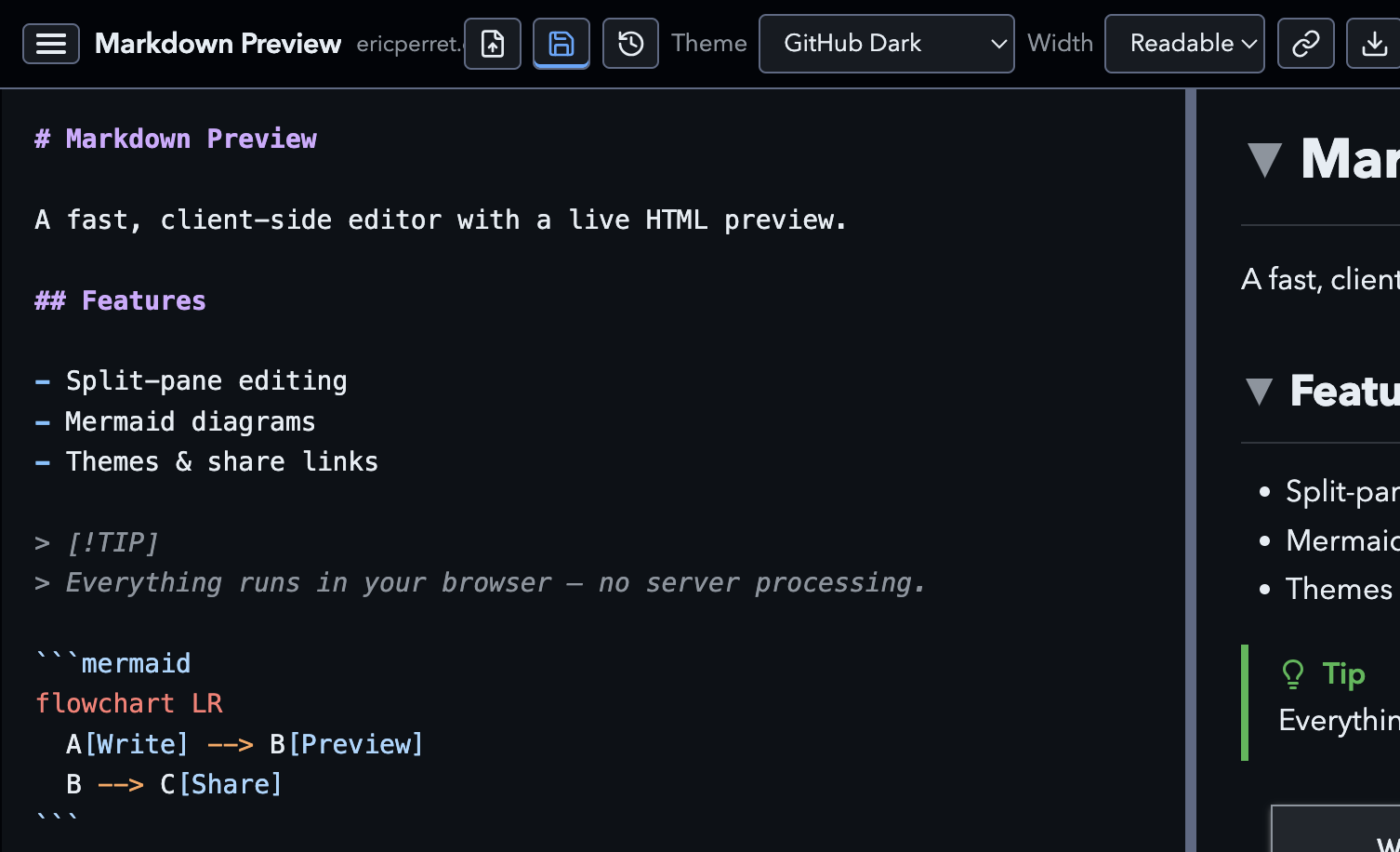
.md, .markdown, or .txt files#mdz= compressed Markdown + theme + view=edit)#md / #mdz). Preview and editor syntax highlighting stay off until Accept.h1/h2 sections (arrow keys / Space):wink:) and emoticons (:-), ;))> [!NOTE], [!TIP], [!IMPORTANT], [!WARNING], [!CAUTION])Term / : definition)mermaid code blocks (ESM build loaded on demand from jsDelivr with SRI on the entry and nested chunks; diagram chunks cached after first use)localStorage).md / .markdown (and related text) files via “Open with” / OS default-app settings (Chromium desktop)src/ Source (edit here)
public/ Apache .htaccess copied into the build
scripts/ Production build script
dist/ Optimized build output (deploy this)
npm install
npm run dev
Open https://127.0.0.1:3456 (self-signed TLS so the server can speak HTTP/2; accept the browser warning once).
npm run dev and npm run preview use a small Node server that applies the same security headers as public/.htaccess (plain static servers like serve or Python’s http.server ignore .htaccess). When HTTP/2 is available it serves over HTTPS with HTTP/1.1 fallback; otherwise plain HTTP/1.1.
npm test            # unit + script checks (node:test)
npm run test:e2e    # Playwright Chromium against the src server
npm run test:build  # production build invariants (opt-in; slower)
npm run test:all    # all of the above
npm install
npm run build
This writes a minified, bundled site to dist/:
app.a1b2c3d4.js, etc.) and rewrites HTML/CSS references for cache bustingnpm run preview) serve brotli first, then gzipunsafe-inline for scripts)When bumping a CDN dependency version (marked, DOMPurify, highlight.js, gemoji, yaml, or Mermaid), regenerate the committed SRI manifest:
npm run update:cdn-sri
That rewrites src/cdn-integrity.json. npm run build / npm run dev inject the hashes into the import map; the app reads the allowlist from that map at runtime.
Preview the build:
npm run preview
Copy everything inside dist/ to your Apache document root (or VirtualHost directory), for example:
rsync -av --delete dist/ /var/www/html/markdown/
Ensure these modules are enabled when possible: mod_mime, mod_deflate, mod_expires, mod_headers. The included .htaccess sets MIME types, compression, and cache headers.
Markdown is compressed with deflate-raw, then encoded as base64url in the hash, along with optional presentation options:
https://example.com/#mdz=<deflate-raw+base64url>&theme=fancy&view=edit
| Param | Values | Notes |
|---|---|---|
mdz | deflate-raw → base64url Markdown | Preferred; used by new share links |
md | base64url Markdown (uncompressed) | Legacy; still decoded for older links |
theme | github-light, github-dark, sepia, terminal, salesforce, fancy | Optional; locks the look of the shared page |
view | edit (share links); also reader, present, slides for local navigation | Share button always writes view=edit |
Query form also works (?mdz=... or legacy ?md=...). On load, URL content takes priority over the saved draft and opens in edit so the recipient can read the source before Accepting. Very long documents can still produce URLs some apps truncate; the share toast warns when a link exceeds ~16KB.
Use the share control to copy a link. After Accept, Present, Print, and Slides are available as usual.
On supported Chrome builds, the toolbar Writing tools menu offers on-device Write, Rewrite, and Proofread (Gemini Nano). Dedicated Writer / Rewriter / Proofreader APIs are used when present; otherwise the Prompt API (LanguageModel, Chrome 148+) powers the same flows. The menu stays hidden when none of these APIs are available.
127.0.0.1)For Prompt API (recommended path on current Chrome):
chrome://flags/#prompt-api-for-gemini-nano (or wait for Chrome 148+ where it ships)Optional dedicated APIs (when still exposed behind flags):
chrome://flags/#writer-apichrome://flags/#rewriter-apichrome://flags/#proofreader-apiAlso enable Optimization Guide On Device Model if prompted, and check chrome://on-device-internals for model download status. Hardware requirements apply (desktop OS, sufficient RAM/storage/GPU or CPU cores).
With Chrome 148+, the Prompt API is available on the open web (no origin trial). Older Writer / Rewriter / Proofreader origin trials have ended; those dedicated APIs are used automatically when Chrome exposes them.
Permissions-Policy allows writer, rewriter, proofreader, and language-model for self.
Client-side Markdown previewer with live HTML, Mermaid, themes, PWA, and share links
See the code
A fast, client-side Markdown previewer. Paste upload, or open Markdown and see rendered HTML beside it. Everything runs in the browser — no server processing.
Try it: https://dev.ericperret.org/markdown/
.md, .markdown, or .txt files#mdz= compressed Markdown + theme + view=edit)#md / #mdz). Preview and editor syntax highlighting stay off until Accept.h1/h2 sections (arrow keys / Space):wink:) and emoticons (:-), ;))> [!NOTE], [!TIP], [!IMPORTANT], [!WARNING], [!CAUTION])Term / : definition)mermaid code blocks (ESM build loaded on demand from jsDelivr with SRI on the entry and nested chunks; diagram chunks cached after first use)localStorage).md / .markdown (and related text) files via “Open with” / OS default-app settings (Chromium desktop)src/ Source (edit here)
public/ Apache .htaccess copied into the build
scripts/ Production build script
dist/ Optimized build output (deploy this)
npm install
npm run dev
Open https://127.0.0.1:3456 (self-signed TLS so the server can speak HTTP/2; accept the browser warning once).
npm run dev and npm run preview use a small Node server that applies the same security headers as public/.htaccess (plain static servers like serve or Python’s http.server ignore .htaccess). When HTTP/2 is available it serves over HTTPS with HTTP/1.1 fallback; otherwise plain HTTP/1.1.
npm test            # unit + script checks (node:test)
npm run test:e2e    # Playwright Chromium against the src server
npm run test:build  # production build invariants (opt-in; slower)
npm run test:all    # all of the above
npm install
npm run build
This writes a minified, bundled site to dist/:
app.a1b2c3d4.js, etc.) and rewrites HTML/CSS references for cache bustingnpm run preview) serve brotli first, then gzipunsafe-inline for scripts)When bumping a CDN dependency version (marked, DOMPurify, highlight.js, gemoji, yaml, or Mermaid), regenerate the committed SRI manifest:
npm run update:cdn-sri
That rewrites src/cdn-integrity.json. npm run build / npm run dev inject the hashes into the import map; the app reads the allowlist from that map at runtime.
Preview the build:
npm run preview
Copy everything inside dist/ to your Apache document root (or VirtualHost directory), for example:
rsync -av --delete dist/ /var/www/html/markdown/
Ensure these modules are enabled when possible: mod_mime, mod_deflate, mod_expires, mod_headers. The included .htaccess sets MIME types, compression, and cache headers.
Markdown is compressed with deflate-raw, then encoded as base64url in the hash, along with optional presentation options:
https://example.com/#mdz=<deflate-raw+base64url>&theme=fancy&view=edit
| Param | Values | Notes |
|---|---|---|
mdz | deflate-raw → base64url Markdown | Preferred; used by new share links |
md | base64url Markdown (uncompressed) | Legacy; still decoded for older links |
theme | github-light, github-dark, sepia, terminal, salesforce, fancy | Optional; locks the look of the shared page |
view | edit (share links); also reader, present, slides for local navigation | Share button always writes view=edit |
Query form also works (?mdz=... or legacy ?md=...). On load, URL content takes priority over the saved draft and opens in edit so the recipient can read the source before Accepting. Very long documents can still produce URLs some apps truncate; the share toast warns when a link exceeds ~16KB.
Use the share control to copy a link. After Accept, Present, Print, and Slides are available as usual.
On supported Chrome builds, the toolbar Writing tools menu offers on-device Write, Rewrite, and Proofread (Gemini Nano). Dedicated Writer / Rewriter / Proofreader APIs are used when present; otherwise the Prompt API (LanguageModel, Chrome 148+) powers the same flows. The menu stays hidden when none of these APIs are available.
127.0.0.1)For Prompt API (recommended path on current Chrome):
chrome://flags/#prompt-api-for-gemini-nano (or wait for Chrome 148+ where it ships)Optional dedicated APIs (when still exposed behind flags):
chrome://flags/#writer-apichrome://flags/#rewriter-apichrome://flags/#proofreader-apiAlso enable Optimization Guide On Device Model if prompted, and check chrome://on-device-internals for model download status. Hardware requirements apply (desktop OS, sufficient RAM/storage/GPU or CPU cores).
With Chrome 148+, the Prompt API is available on the open web (no origin trial). Older Writer / Rewriter / Proofreader origin trials have ended; those dedicated APIs are used automatically when Chrome exposes them.
Permissions-Policy allows writer, rewriter, proofreader, and language-model for self.



