llm.nvim is a plugin for all things LLM. It uses llm-ls as a backend.
This project is influenced by copilot.vim and tabnine-nvim
Formerly hfcc.nvim.
[!NOTE] When using the Inference API, you will probably encounter some limitations. Subscribe to the PRO plan to avoid getting rate limited in the free tier.
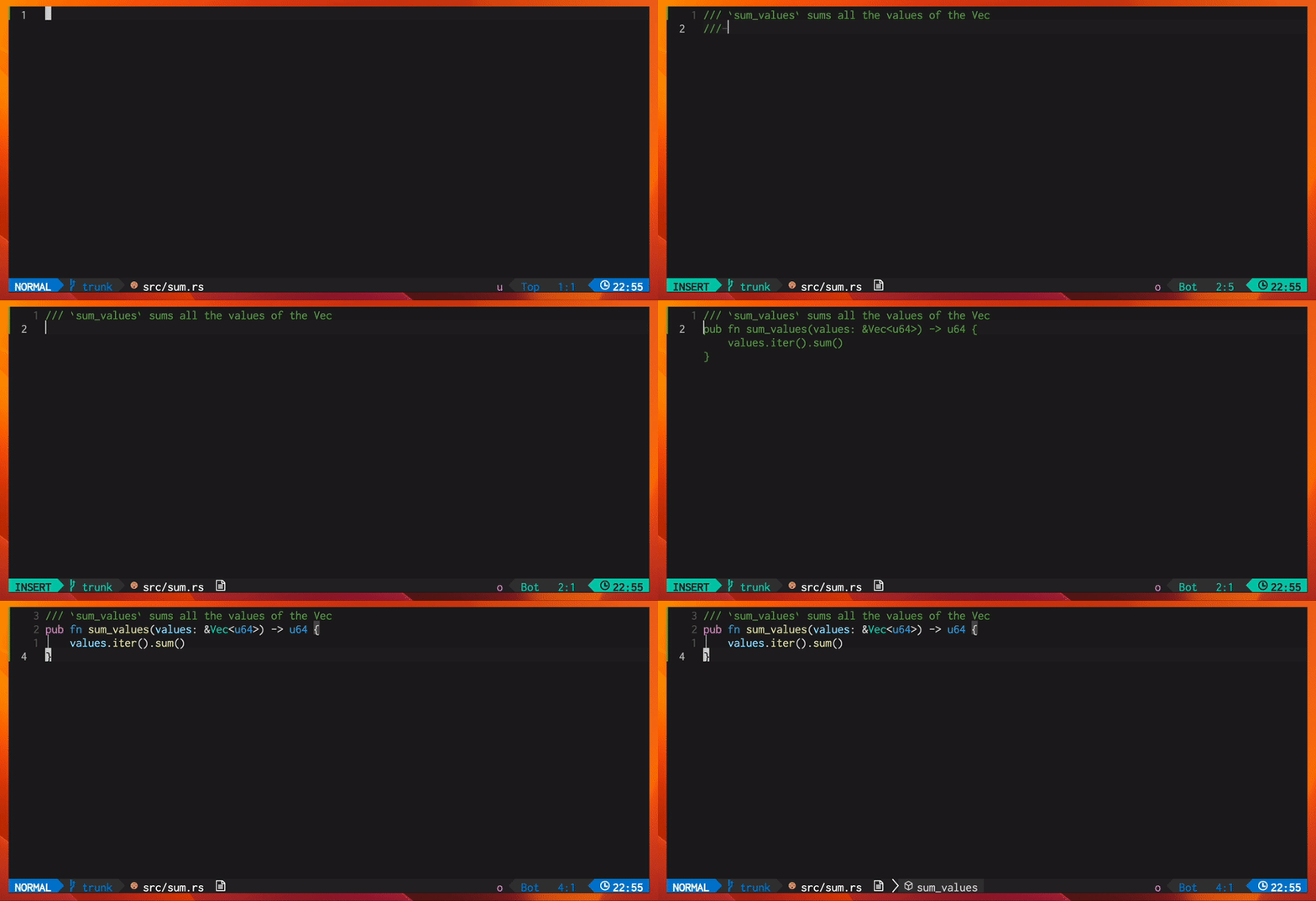
This plugin supports "ghost-text" code completion, à la Copilot.
Requests for code generation are made via an HTTP request.
You can use the Hugging Face Inference API or your own HTTP endpoint, provided it adheres to the APIs listed in backend.
The prompt sent to the model will always be sized to fit within the context window, with the number of tokens determined using tokenizers.
llm.nvim can interface with multiple backends hosting models.
You can override the url of the backend with the LLM_NVIM_URL environment variable. If url is nil, it will default to the Inference API's default url
When api_token is set, it will be passed as a header: Authorization: Bearer <api_token>.
llm-ls will try to add the correct path to the url to get completions if it does not already end with said path. You can disable this behavior by setting disable_url_path_completion to true.
Create and get your API token from here https://huggingface.co/settings/tokens.
Define how the plugin will read your token. For this you have multiple options, in order of precedence:
api_token = <your token> in plugin opts - this is not recommended if you use a versioning tool for your configuration filesLLM_NVIM_HF_API_TOKEN environment variableHF_HOME environment variable and create a file containing your token at $HF_HOME/tokenhuggingface-cli login - this will prompt you to enter your token and set it at the right pathChoose your model on the Hugging Face Hub, and, in order of precedence, you can either:
LLM_NVIM_MODEL environment variablemodel = <model identifier> in plugin optsNote: the model's value will be appended to the url like so : {url}/model/{model} as this is how we route requests to the right model.
Refer to Ollama's documentation on how to run ollama. Here is an example configuration:
{
  model = "codellama:7b",
  url = "http://localhost:11434", -- llm-ls uses "/api/generate"
  -- cf https://github.com/ollama/ollama/blob/main/docs/api.md#parameters
  request_body = {
    -- Modelfile options for the model you use
    options = {
      temperature = 0.2,
      top_p = 0.95,
    }
  }
}
Note: model's value will be added to the request body.
Refer to Ollama's documentation on how to run ollama. Here is an example configuration:
{
  model = "codellama",
  url = "http://localhost:8000", -- llm-ls uses "/v1/completions"
  -- cf https://github.com/abetlen/llama-cpp-python?tab=readme-ov-file#openai-compatible-web-server
  request_body = {
    temperature = 0.2,
    top_p = 0.95,
  }
}
Note: model's value will be added to the request body.
Refer to TGI's documentation on how to run TGI. Here is an example configuration:
{
  model = "bigcode/starcoder",
  url = "http://localhost:8080", -- llm-ls uses "/generate"
  -- cf https://huggingface.github.io/text-generation-inference/#/Text%20Generation%20Inference/generate
  request_body = {
    parameters = {
      temperature = 0.2,
      top_p = 0.95,
    }
  }
}
{
  tokens_to_clear = { "<|endoftext|>" },
  fim = {
    enabled = true,
    prefix = "<fim_prefix>",
    middle = "<fim_middle>",
    suffix = "<fim_suffix>",
  },
  model = "bigcode/starcoder",
  context_window = 8192,
  tokenizer = {
    repository = "bigcode/starcoder",
  }
}
[!NOTE] These are the default config values
{
  tokens_to_clear = { "<EOT>" },
  fim = {
    enabled = true,
    prefix = "<PRE> ",
    middle = " <MID>",
    suffix = " <SUF>",
  },
  model = "codellama/CodeLlama-13b-hf",
  context_window = 4096,
  tokenizer = {
    repository = "codellama/CodeLlama-13b-hf",
  }
}
[!NOTE] Spaces are important here
By default, llm-ls is installed by llm.nvim the first time it is loaded. The binary is downloaded from the release page and stored in:
vim.api.nvim_call_function("stdpath", { "data" }) .. "/llm_nvim/bin"
When developing locally, when using mason or if you built your own binary because your platform is not supported, you can set the lsp.bin_path setting to the path of the binary. You can also start llm-ls via tcp using the --port [PORT] option, which is useful when using a debugger.
lsp.version is used only when llm.nvim downloads llm-ls from the release page.
lsp.cmd_env can be used to set environment variables for the llm-ls process.
You can install llm-ls via mason.nvim. To do so, run the following command:
:MasonInstall llm-ls
Then reference llm-ls's path in your configuration:
{
  -- ...
  lsp = {
    bin_path = vim.api.nvim_call_function("stdpath", { "data" }) .. "/mason/bin/llm-ls",
  },
  -- ...
}
llm-ls uses tokenizers to make sure the prompt fits the context_window.
To configure it, you have a few options:
{
  tokenizer = nil,
}
{
  tokenizer = {
    path = "/path/to/my/tokenizer.json"
  }
}
tokenizer.json at the root of the repository:{
tokenizer = {
repository = "myusername/myrepo"
api_token = nil -- optional, in case the API token used for the backend is not the same
}
}
{
  tokenizer = {
    url = "https://my-endpoint.example.com/mytokenizer.json",
    to = "/download/path/of/mytokenizer.json"
  }
}
You can tune the way the suggestions behave:
enable_suggestions_on_startup lets you choose to enable or disable "suggest-as-you-type" suggestions on neovim startup. You can then toggle auto suggest with LLMToggleAutoSuggest (see Commands)enable_suggestions_on_files lets you enable suggestions only on specific files that match the pattern matching syntax you will provide. It can either be a string or a list of strings, for example:
enable_suggestions_on_files: "*"my_project/: enable_suggestions_on_files: "/path/to/my_project/*"enable_suggestions_on_files: { "*.py", "*.rs" }llm.nvim provides the following commands:
LLMToggleAutoSuggest enables/disables automatic "suggest-as-you-type" suggestionsLLMSuggestion is used to manually request a suggestionrequire("packer").startup(function(use)
use {
'huggingface/llm.nvim',
config = function()
require('llm').setup({
-- cf Setup
})
end
}
end)
require("lazy").setup({
  {
    'huggingface/llm.nvim',
    opts = {
      -- cf Setup
    }
  },
})
Plug 'huggingface/llm.nvim'
require('llm').setup({
  -- cf Setup
})
local llm = require('llm')

llm.setup({
  api_token = nil, -- cf Install paragraph
  model = "bigcode/starcoder2-15b", -- the model ID, behavior depends on backend
  backend = "huggingface", -- backend ID, "huggingface" | "ollama" | "openai" | "tgi"
  url = nil, -- the http url of the backend
  tokens_to_clear = { "<|endoftext|>" }, -- tokens to remove from the model's output
  -- parameters that are added to the request body, values are arbitrary, you can set any field:value pair here it will be passed as is to the backend
  request_body = {
    parameters = {
      max_new_tokens = 60,
      temperature = 0.2,
      top_p = 0.95,
    },
  },
  -- set this if the model supports fill in the middle
  fim = {
    enabled = true,
    prefix = "<fim_prefix>",
    middle = "<fim_middle>",
    suffix = "<fim_suffix>",
  },
  debounce_ms = 150,
  accept_keymap = "<Tab>",
  dismiss_keymap = "<S-Tab>",
  tls_skip_verify_insecure = false,
  -- llm-ls configuration, cf llm-ls section
  lsp = {
    bin_path = nil,
    host = nil,
    port = nil,
    cmd_env = nil, -- or { LLM_LOG_LEVEL = "DEBUG" } to set the log level of llm-ls
    version = "0.5.3",
  },
  tokenizer = nil, -- cf Tokenizer paragraph
  context_window = 1024, -- max number of tokens for the context window
  enable_suggestions_on_startup = true,
  enable_suggestions_on_files = "*", -- pattern matching syntax to enable suggestions on specific files, either a string or a list of strings
  disable_url_path_completion = false, -- cf Backend
})
1,602 followers · starred Aug 2023
903 followers · starred May 2023
195 followers · starred Feb 2026
69 followers · starred Sep 2023
llm.nvim is a plugin for all things LLM. It uses llm-ls as a backend.
This project is influenced by copilot.vim and tabnine-nvim
Formerly hfcc.nvim.
[!NOTE] When using the Inference API, you will probably encounter some limitations. Subscribe to the PRO plan to avoid getting rate limited in the free tier.
This plugin supports "ghost-text" code completion, à la Copilot.
Requests for code generation are made via an HTTP request.
You can use the Hugging Face Inference API or your own HTTP endpoint, provided it adheres to the APIs listed in backend.
The prompt sent to the model will always be sized to fit within the context window, with the number of tokens determined using tokenizers.
llm.nvim can interface with multiple backends hosting models.
You can override the url of the backend with the LLM_NVIM_URL environment variable. If url is nil, it will default to the Inference API's default url
When api_token is set, it will be passed as a header: Authorization: Bearer <api_token>.
llm-ls will try to add the correct path to the url to get completions if it does not already end with said path. You can disable this behavior by setting disable_url_path_completion to true.
Create and get your API token from here https://huggingface.co/settings/tokens.
Define how the plugin will read your token. For this you have multiple options, in order of precedence:
api_token = <your token> in plugin opts - this is not recommended if you use a versioning tool for your configuration filesLLM_NVIM_HF_API_TOKEN environment variableHF_HOME environment variable and create a file containing your token at $HF_HOME/tokenhuggingface-cli login - this will prompt you to enter your token and set it at the right pathChoose your model on the Hugging Face Hub, and, in order of precedence, you can either:
LLM_NVIM_MODEL environment variablemodel = <model identifier> in plugin optsNote: the model's value will be appended to the url like so : {url}/model/{model} as this is how we route requests to the right model.
Refer to Ollama's documentation on how to run ollama. Here is an example configuration:
{
  model = "codellama:7b",
  url = "http://localhost:11434", -- llm-ls uses "/api/generate"
  -- cf https://github.com/ollama/ollama/blob/main/docs/api.md#parameters
  request_body = {
    -- Modelfile options for the model you use
    options = {
      temperature = 0.2,
      top_p = 0.95,
    }
  }
}
Note: model's value will be added to the request body.
Refer to Ollama's documentation on how to run ollama. Here is an example configuration:
{
  model = "codellama",
  url = "http://localhost:8000", -- llm-ls uses "/v1/completions"
  -- cf https://github.com/abetlen/llama-cpp-python?tab=readme-ov-file#openai-compatible-web-server
  request_body = {
    temperature = 0.2,
    top_p = 0.95,
  }
}
Note: model's value will be added to the request body.
Refer to TGI's documentation on how to run TGI. Here is an example configuration:
{
  model = "bigcode/starcoder",
  url = "http://localhost:8080", -- llm-ls uses "/generate"
  -- cf https://huggingface.github.io/text-generation-inference/#/Text%20Generation%20Inference/generate
  request_body = {
    parameters = {
      temperature = 0.2,
      top_p = 0.95,
    }
  }
}
{
  tokens_to_clear = { "<|endoftext|>" },
  fim = {
    enabled = true,
    prefix = "<fim_prefix>",
    middle = "<fim_middle>",
    suffix = "<fim_suffix>",
  },
  model = "bigcode/starcoder",
  context_window = 8192,
  tokenizer = {
    repository = "bigcode/starcoder",
  }
}
[!NOTE] These are the default config values
{
  tokens_to_clear = { "<EOT>" },
  fim = {
    enabled = true,
    prefix = "<PRE> ",
    middle = " <MID>",
    suffix = " <SUF>",
  },
  model = "codellama/CodeLlama-13b-hf",
  context_window = 4096,
  tokenizer = {
    repository = "codellama/CodeLlama-13b-hf",
  }
}
[!NOTE] Spaces are important here
By default, llm-ls is installed by llm.nvim the first time it is loaded. The binary is downloaded from the release page and stored in:
vim.api.nvim_call_function("stdpath", { "data" }) .. "/llm_nvim/bin"
When developing locally, when using mason or if you built your own binary because your platform is not supported, you can set the lsp.bin_path setting to the path of the binary. You can also start llm-ls via tcp using the --port [PORT] option, which is useful when using a debugger.
lsp.version is used only when llm.nvim downloads llm-ls from the release page.
lsp.cmd_env can be used to set environment variables for the llm-ls process.
You can install llm-ls via mason.nvim. To do so, run the following command:
:MasonInstall llm-ls
Then reference llm-ls's path in your configuration:
{
  -- ...
  lsp = {
    bin_path = vim.api.nvim_call_function("stdpath", { "data" }) .. "/mason/bin/llm-ls",
  },
  -- ...
}
llm-ls uses tokenizers to make sure the prompt fits the context_window.
To configure it, you have a few options:
{
  tokenizer = nil,
}
{
  tokenizer = {
    path = "/path/to/my/tokenizer.json"
  }
}
tokenizer.json at the root of the repository:{
tokenizer = {
repository = "myusername/myrepo"
api_token = nil -- optional, in case the API token used for the backend is not the same
}
}
{
  tokenizer = {
    url = "https://my-endpoint.example.com/mytokenizer.json",
    to = "/download/path/of/mytokenizer.json"
  }
}
You can tune the way the suggestions behave:
enable_suggestions_on_startup lets you choose to enable or disable "suggest-as-you-type" suggestions on neovim startup. You can then toggle auto suggest with LLMToggleAutoSuggest (see Commands)enable_suggestions_on_files lets you enable suggestions only on specific files that match the pattern matching syntax you will provide. It can either be a string or a list of strings, for example:
enable_suggestions_on_files: "*"my_project/: enable_suggestions_on_files: "/path/to/my_project/*"enable_suggestions_on_files: { "*.py", "*.rs" }llm.nvim provides the following commands:
LLMToggleAutoSuggest enables/disables automatic "suggest-as-you-type" suggestionsLLMSuggestion is used to manually request a suggestionrequire("packer").startup(function(use)
use {
'huggingface/llm.nvim',
config = function()
require('llm').setup({
-- cf Setup
})
end
}
end)
require("lazy").setup({
  {
    'huggingface/llm.nvim',
    opts = {
      -- cf Setup
    }
  },
})
Plug 'huggingface/llm.nvim'
require('llm').setup({
  -- cf Setup
})
local llm = require('llm')

llm.setup({
  api_token = nil, -- cf Install paragraph
  model = "bigcode/starcoder2-15b", -- the model ID, behavior depends on backend
  backend = "huggingface", -- backend ID, "huggingface" | "ollama" | "openai" | "tgi"
  url = nil, -- the http url of the backend
  tokens_to_clear = { "<|endoftext|>" }, -- tokens to remove from the model's output
  -- parameters that are added to the request body, values are arbitrary, you can set any field:value pair here it will be passed as is to the backend
  request_body = {
    parameters = {
      max_new_tokens = 60,
      temperature = 0.2,
      top_p = 0.95,
    },
  },
  -- set this if the model supports fill in the middle
  fim = {
    enabled = true,
    prefix = "<fim_prefix>",
    middle = "<fim_middle>",
    suffix = "<fim_suffix>",
  },
  debounce_ms = 150,
  accept_keymap = "<Tab>",
  dismiss_keymap = "<S-Tab>",
  tls_skip_verify_insecure = false,
  -- llm-ls configuration, cf llm-ls section
  lsp = {
    bin_path = nil,
    host = nil,
    port = nil,
    cmd_env = nil, -- or { LLM_LOG_LEVEL = "DEBUG" } to set the log level of llm-ls
    version = "0.5.3",
  },
  tokenizer = nil, -- cf Tokenizer paragraph
  context_window = 1024, -- max number of tokens for the context window
  enable_suggestions_on_startup = true,
  enable_suggestions_on_files = "*", -- pattern matching syntax to enable suggestions on specific files, either a string or a list of strings
  disable_url_path_completion = false, -- cf Backend
})
1,602 followers · starred Aug 2023
903 followers · starred May 2023
195 followers · starred Feb 2026
69 followers · starred Sep 2023



