
Turn third-party webhooks into MCP Events for AI agents, with Hookdeck Event Gateway receiving and delivering them. Built-in providers: Resend and GitHub.
TypeScript
0
72 commits
updated Oct 6, 2026
See what people are saying
README
MCP Events bridge
Turn webhooks into MCP Events, so AI agents can act the moment something happens: an email arrives, an issue is opened, a workflow fails. Hookdeck Event Gateway receives, verifies and delivers every event.
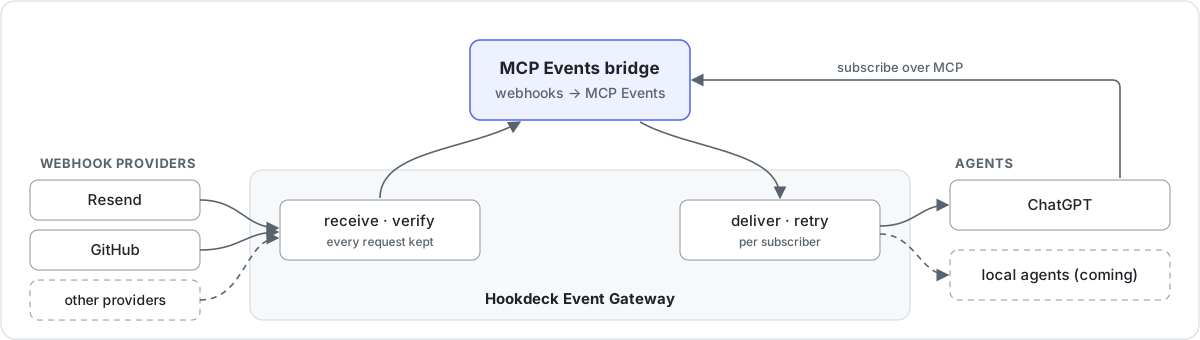
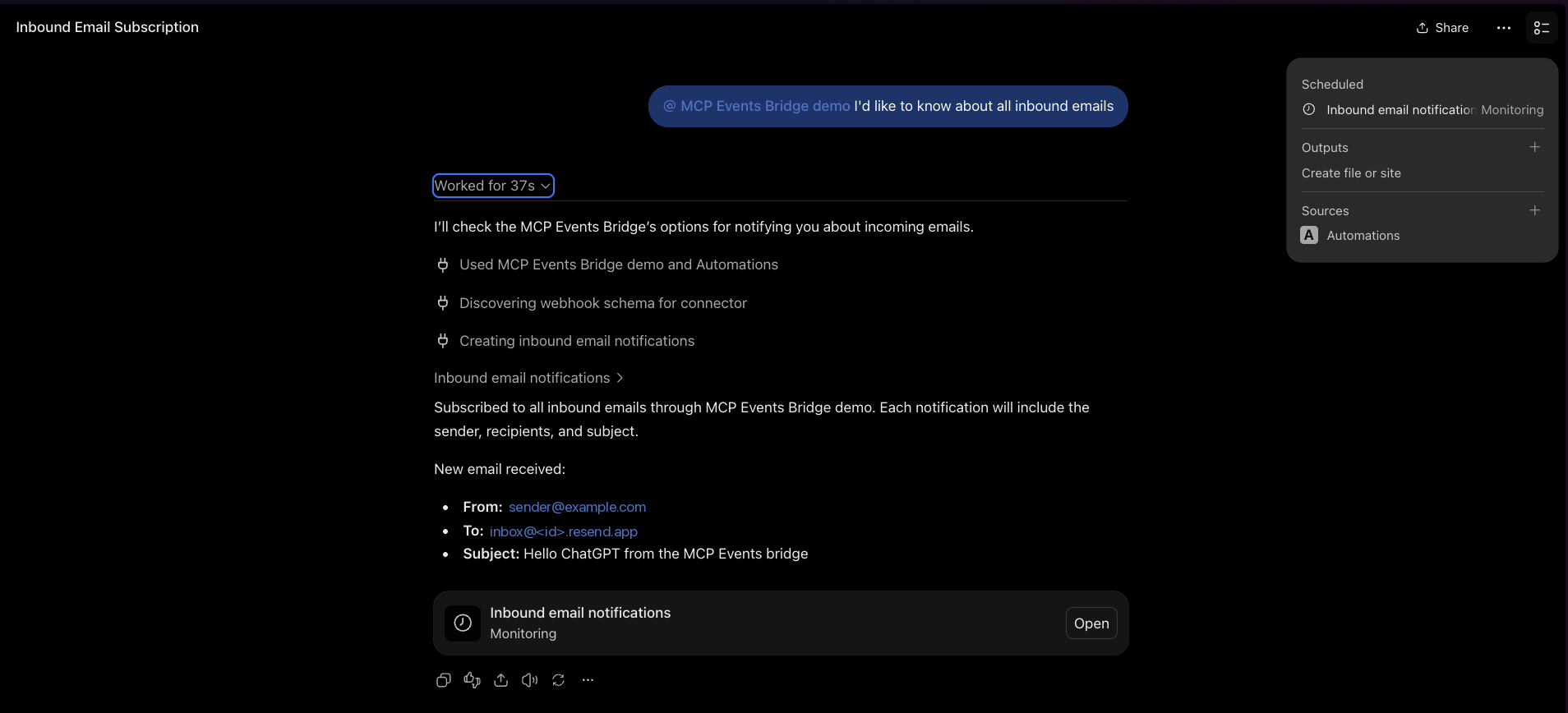
For example, an email arrives at a Resend address, and ChatGPT, subscribed through the bridge, acts on it:
Why
MCP Events is an experimental MCP extension that lets an agent subscribe to events instead of polling for them, and ChatGPT supports it. But an agent can only subscribe to MCP servers that implement it, and almost none do yet, while nearly every service already sends webhooks.
The bridge closes that gap:
- Webhooks become MCP Events. Built-in webhook providers: Resend inbound email and GitHub. Add others with
defineProvider, for any service Event Gateway has a source type for. Generic HMAC-signed webhooks, such as ones from a service you've built, aren't supported yet. - Subscribers choose what wakes them. Events have filters, such as an email's sender, or a GitHub repository and action.
- Every event verified, delivered and recorded. Event Gateway verifies provider signatures, retries failed deliveries, drops duplicates within an hour, and keeps a record of every event and attempt.
- Stateless. Each subscription is an Event Gateway connection, so there's no database.
It's for developers who want agents (ChatGPT today, local agents next) to react to events from the services they already use.
Status: 0.1, a working demo built in stages. MCP Events is experimental, and this package may change with it. See docs/PLAN.md for what's done and what's next.
How it works
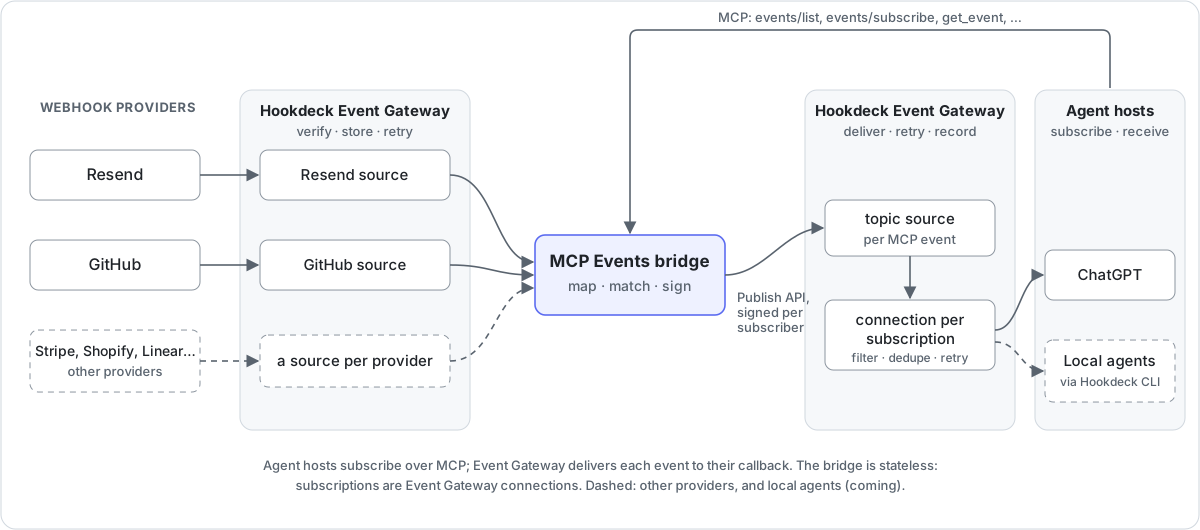
- Event Gateway verifies each provider's webhook signature, keeps every request, and delivers each MCP Event to each subscriber with retries.
- The bridge is the MCP server: it lists the events on offer, handles subscribe (including the spec's endpoint challenge), and turns each provider webhook into an MCP Event signed for each subscriber.
- The Hookdeck CLI forwards provider events to a bridge on your laptop, so local development needs no public URL.
The design, its trade-offs and how it maps to the spec are in docs/ARCHITECTURE.md.
Quick start
You need:
- Node 22.12 or later.
- A Hookdeck account and a project for the bridge. From the project's settings (Secrets): the API key and the signing secret.
- The Hookdeck CLI, for running the bridge locally (and for
npm run e2e). - An account with at least one webhook provider: Resend or GitHub.
-
Create a project and install the bridge:
mkdir my-bridge && cd my-bridge npm init -y && npm pkg set type=module npm install @hookdeck/mcp-events-bridge printf 'node_modules/\n.env\n.hookdeck/\n' > .gitignore # .env and .hookdeck/ hold credentials -
Choose webhook providers in
bridge.config.ts:import { defineConfig, env } from '@hookdeck/mcp-events-bridge'; import { github, resend } from '@hookdeck/mcp-events-bridge/providers'; export default defineConfig({ // Names this deployment's Event Gateway resources, for example `dev` on a laptop and `fly` when deployed. deployment: process.env.BRIDGE_DEPLOYMENT ?? 'dev', providers: [ resend({ apiKey: env('RESEND_API_KEY') }), // Only `setup` uses the token, so it's optional here: a deployed bridge runs without it. github({ token: env('GITHUB_TOKEN', { optional: true }), scope: { repos: ['your-org/your-repo'] } }), ], });Keep only the providers you use. Each one's options are under Webhook providers.
-
Add credentials to
.env:HOOKDECK_API_KEY=... HOOKDECK_SIGNING_SECRET=... RESEND_API_KEY=... # if you use Resend GITHUB_TOKEN=... # if you use GitHub -
Create the Event Gateway resources and the provider webhooks:
npx mcp-events-bridge setupThe first run generates an MCP secret: add it to
.envasBRIDGE_MCP_SECRET. Setup is safe to re-run, and updates the webhooks when you add providers or change events or repositories. Removing a provider or a repository deletes nothing: delete its webhook (and its Event Gateway connection) yourself. -
Run the bridge:
npx mcp-events-bridge serveLocally,
servechecks that setup has run and startshookdeck listenfor every provider, so events reach your laptop through the Hookdeck CLI. Send an email to your Resend address, or open an issue, and the bridge logs it. -
Connect an agent: see Connect ChatGPT. ChatGPT has to reach the bridge's MCP endpoint, so deploy the bridge, or expose your local port with a tunnel such as
cloudflared tunnel --url http://127.0.0.1:8080and usehttps://<tunnel host>/mcp/<BRIDGE_MCP_SECRET>. Events don't need the tunnel: Event Gateway delivers them to ChatGPT directly.
Connect ChatGPT
With Developer mode on (ChatGPT Plus or above), go to Plugins, choose Add > Create MCP App, paste https://<your bridge>/mcp/<BRIDGE_MCP_SECRET>, and choose No Authentication. Then, in a Work chat, ask to be told about new events, for example emails from a particular sender. ChatGPT subscribes and sets up a monitoring task:
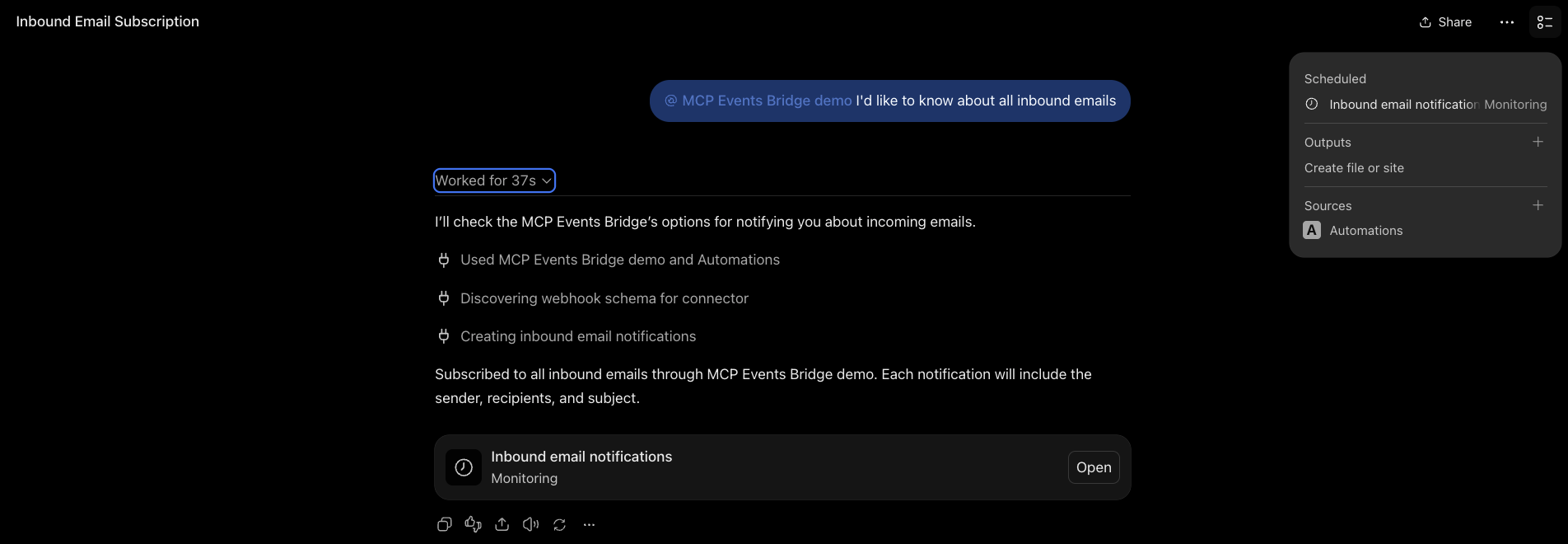
When an event arrives, the task runs with it, as in the screenshot at the top.
The MCP URL is a credential: anyone with it can use the bridge. Keep it private (see Security and limitations).
Webhook providers
Resend
Inbound email. Every Resend account has a receiving domain (<id>.resend.app; Emails > Receiving), so no custom domain is needed.
- Options:
resend({ apiKey }). The API key needs permission to create webhooks. - Event:
email.received, with the sender, recipients, subject and Resend's email id. Read the full email with Resend's own API. - Filters:
from(recommended: it limits who can wake the agent) andto.
GitHub
One MCP event per GitHub webhook type: github.issues, github.pull_request, github.push, and so on (26 types).
- Events: by default issues, issue comments, pull requests, reviews, pushes, releases and workflow runs. Choose with
events: ['github.issues', ...], or['*']for all. - Filters:
repository,actions(for example["opened"]) andsender. - Summary: repository, action, sender, title, number and URL for every type, plus a few fields for the common ones (labels, branches, merged, ref, commit count, workflow conclusion). Payloads aren't passed through; read details with GitHub's own tools.
Two ways to connect repositories:
| Mode | Options | Who adds the webhooks |
|---|---|---|
| Automatic | github({ token, scope: { repos: ['owner/name', ...] } }), or scope: { org: 'name' } for every repository in an organization | setup, with a fine-grained token that has the Webhooks (read and write) permission. For an organization's repositories, the token's resource owner must be the organization. scope: { org } creates one organization webhook, which needs an organization owner and the organization Webhooks permission |
| Manual | github({ webhookSecret }), no token | You: in each repository, Settings > Webhooks > Add webhook, with the Payload URL setup prints, content type application/json, and the same secret |
Adding a webhook provider
A provider is a defineProvider({...}) object: the Event Gateway source type, how to recognize and summarize each event, the subscribe filters, and optionally how to register the webhook. See "Adding a provider" and the built-in Resend and GitHub providers.
Deploy to Fly.io
Any host that runs Node works; Fly.io is the reference. The bridge needs no volume, since Event Gateway is the store.
Add a Dockerfile to your project:
FROM node:22-slim
WORKDIR /app
ENV NODE_ENV=production
COPY package.json package-lock.json ./
RUN npm ci --omit=dev
COPY bridge.config.ts ./
EXPOSE 8080
CMD ["npx", "mcp-events-bridge", "serve"]
Then:
fly launch --no-deploy        # creates fly.toml: set internal_port = 8080, and BRIDGE_DEPLOYMENT = 'fly' under [env]
fly secrets set HOOKDECK_API_KEY=... HOOKDECK_SIGNING_SECRET=... RESEND_API_KEY=... BRIDGE_MCP_SECRET=...
BRIDGE_DEPLOYMENT=fly BRIDGE_INBOUND=http BRIDGE_PUBLIC_URL=https://<app>.fly.dev npx mcp-events-bridge setup
fly deploy
On Fly.io, the bridge receives events over HTTP at its public URL instead of through the Hookdeck CLI, using the fly resources that setup created. Only setup needs GITHUB_TOKEN, so it doesn't have to be a Fly secret; in GitHub's manual mode, set GITHUB_WEBHOOK_SECRET as a Fly secret too. The Dockerfile copies only bridge.config.ts: copy any other files your config imports, such as your own providers.
Use a separate Hookdeck project for each environment you want isolated: deployments in one project share the provider sources and the subscriptions.
What setup creates
In the Event Gateway dashboard, a running bridge looks like this:
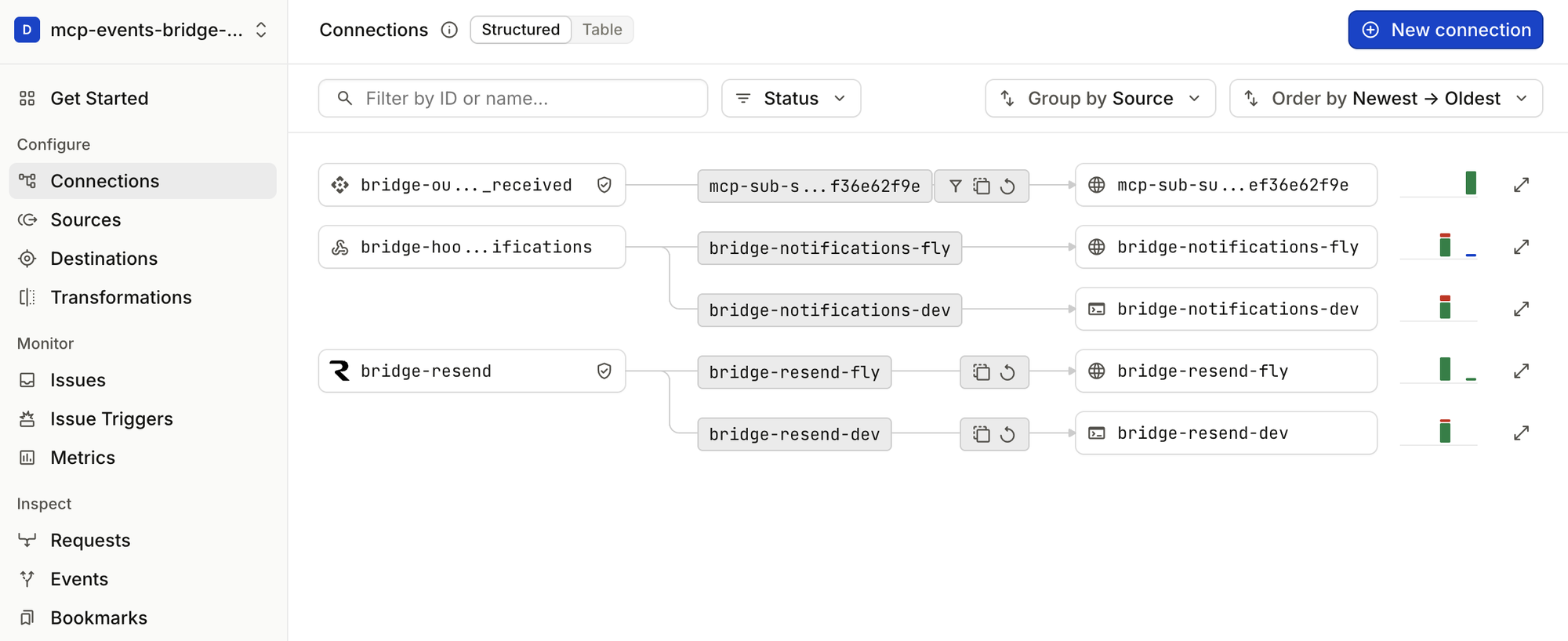
bridge-<provider>(herebridge-resend) is the provider's source. It feeds one inbound connection per deployment:bridge-resend-fly(HTTP, to the bridge on Fly.io) andbridge-resend-dev(CLI, to a bridge on a laptop).bridge-out-<event>is the topic source the bridge publishes each MCP event to. Each subscription is one connection from it,mcp-sub-<id>, with filter, dedupe and retry rules, to a destination at the subscriber's callback.bridge-hookdeck-notificationsreceives Event Gateway's issue notifications and forwards them to each deployment, so the bridge hears about failing callbacks and reports them to subscribers.
Configuration
The bridge
Every deployment needs these, whichever providers it uses.
| Variable | Required | Purpose |
|---|---|---|
HOOKDECK_API_KEY | Yes | Project API key, for the Event Gateway API and the Publish API |
HOOKDECK_SIGNING_SECRET | Yes | Verifies Event Gateway's signature on requests to the bridge |
BRIDGE_MCP_SECRET | To run serve | Secret path segment of the MCP URL; setup generates one |
BRIDGE_INBOUND | No | cli (through hookdeck listen) or http (a public URL). Default: http on Fly.io, cli elsewhere |
BRIDGE_PUBLIC_URL | For http inbound off Fly.io | The bridge's public URL. Default on Fly.io: https://$FLY_APP_NAME.fly.dev |
BRIDGE_PORT | No | Listener port (default: PORT, else 8080) |
BRIDGE_DEPLOYMENT | No | Not read by the bridge itself: the examples above pass it to deployment in bridge.config.ts |
BRIDGE_HOOKDECK_CLI_CONFIG | No | Where serve writes the Hookdeck CLI's config for hookdeck listen (default .hookdeck/config.toml) |
defineConfig also takes inbound, publicUrl, port and hookdeck directly, and subscriptions for subscription lifetimes. Run npx mcp-events-bridge for the commands and flags.
Webhook providers
Set only what the providers in your bridge.config.ts need. The names are the ones the examples pass to env(); use your own if you prefer.
Resend
| Variable | Required | Purpose |
|---|---|---|
RESEND_API_KEY | Yes | API key that can create webhooks. setup registers the webhook with it, and the example config requires it wherever the bridge runs |
GitHub
| Variable | Required | Purpose |
|---|---|---|
GITHUB_TOKEN | In automatic mode | Fine-grained token with the Webhooks (read and write) permission. Only setup uses it |
GITHUB_WEBHOOK_SECRET | In manual mode | The secret on the webhooks you add (at least 16 characters). Needed wherever the bridge runs |
MCP surface
events/list,events/subscribe,events/unsubscribe, with webhook delivery.get_event(eventId)andlist_recent_events(name?, since?, limit?): past events, read from Event Gateway.list_providers(): configured providers and their subscriptions.
Security and limitations
- The MCP URL is a credential. One secret URL authenticates one owner. It's redacted from the bridge's logs and can be rotated by changing
BRIDGE_MCP_SECRET. OAuth is planned. - Inbound requests must be signed. The bridge accepts only requests signed by Event Gateway, which verifies each provider's own signature first.
- Event content is data, not instructions. An email or issue can say anything. Filters narrow what triggers an agent: GitHub's
senderis the authenticated user, but an email'sfromcan be forged, so don't rely on it alone. - Webhook delivery only. Poll delivery is planned, so agents that can't receive webhooks can use the bridge. Push delivery and replay cursors aren't planned.
- Retries reuse the first signature. The spec asks for a fresh signature on each attempt. Retries are kept inside the 5-minute window receivers check, until Event Gateway signs deliveries itself.
Development
git clone https://github.com/hookdeck/mcp-events-bridge && cd mcp-events-bridge
npm install
cp .env.example .env      # fill in; the comments explain each variable
npm test                  # unit and in-process integration tests, with a fake Event Gateway
npm run typecheck
npm run build             # compiles to dist/, as published
npm run bridge -- setup   # the CLI from source; this repo's bridge.config.ts imports from ./src
npm run e2e checks the whole path against real services. It starts a bridge and hookdeck listen, subscribes test subscribers whose callbacks are Event Gateway MCP Events sources (they answer the spec's challenge; hookdeck listen forwards deliveries), sends real email through Resend, and checks delivery, filters, get_event and unsubscribe. E2E_GITHUB=1 adds a real GitHub push; E2E_EXTENDED=1 adds retries, duplicates, a 410 and failing callbacks (about 10 minutes; the status-code subscribers use a cloudflared tunnel, since an MCP Events source acknowledges deliveries itself); E2E_BRIDGE_URL=https://... runs against a deployed bridge.
Issues and pull requests are welcome. AGENTS.md has the project's conventions, for people and coding agents alike.
License
Similar repos


Turn third-party webhooks into MCP Events for AI agents, with Hookdeck Event Gateway receiving and delivering them. Built-in providers: Resend and GitHub.
TypeScript
0
72 commits
updated Oct 6, 2026
See what people are saying
README
MCP Events bridge
Turn webhooks into MCP Events, so AI agents can act the moment something happens: an email arrives, an issue is opened, a workflow fails. Hookdeck Event Gateway receives, verifies and delivers every event.
For example, an email arrives at a Resend address, and ChatGPT, subscribed through the bridge, acts on it:
Why
MCP Events is an experimental MCP extension that lets an agent subscribe to events instead of polling for them, and ChatGPT supports it. But an agent can only subscribe to MCP servers that implement it, and almost none do yet, while nearly every service already sends webhooks.
The bridge closes that gap:
- Webhooks become MCP Events. Built-in webhook providers: Resend inbound email and GitHub. Add others with
defineProvider, for any service Event Gateway has a source type for. Generic HMAC-signed webhooks, such as ones from a service you've built, aren't supported yet. - Subscribers choose what wakes them. Events have filters, such as an email's sender, or a GitHub repository and action.
- Every event verified, delivered and recorded. Event Gateway verifies provider signatures, retries failed deliveries, drops duplicates within an hour, and keeps a record of every event and attempt.
- Stateless. Each subscription is an Event Gateway connection, so there's no database.
It's for developers who want agents (ChatGPT today, local agents next) to react to events from the services they already use.
Status: 0.1, a working demo built in stages. MCP Events is experimental, and this package may change with it. See docs/PLAN.md for what's done and what's next.
How it works
- Event Gateway verifies each provider's webhook signature, keeps every request, and delivers each MCP Event to each subscriber with retries.
- The bridge is the MCP server: it lists the events on offer, handles subscribe (including the spec's endpoint challenge), and turns each provider webhook into an MCP Event signed for each subscriber.
- The Hookdeck CLI forwards provider events to a bridge on your laptop, so local development needs no public URL.
The design, its trade-offs and how it maps to the spec are in docs/ARCHITECTURE.md.
Quick start
You need:
- Node 22.12 or later.
- A Hookdeck account and a project for the bridge. From the project's settings (Secrets): the API key and the signing secret.
- The Hookdeck CLI, for running the bridge locally (and for
npm run e2e). - An account with at least one webhook provider: Resend or GitHub.
-
Create a project and install the bridge:
mkdir my-bridge && cd my-bridge npm init -y && npm pkg set type=module npm install @hookdeck/mcp-events-bridge printf 'node_modules/\n.env\n.hookdeck/\n' > .gitignore # .env and .hookdeck/ hold credentials -
Choose webhook providers in
bridge.config.ts:import { defineConfig, env } from '@hookdeck/mcp-events-bridge'; import { github, resend } from '@hookdeck/mcp-events-bridge/providers'; export default defineConfig({ // Names this deployment's Event Gateway resources, for example `dev` on a laptop and `fly` when deployed. deployment: process.env.BRIDGE_DEPLOYMENT ?? 'dev', providers: [ resend({ apiKey: env('RESEND_API_KEY') }), // Only `setup` uses the token, so it's optional here: a deployed bridge runs without it. github({ token: env('GITHUB_TOKEN', { optional: true }), scope: { repos: ['your-org/your-repo'] } }), ], });Keep only the providers you use. Each one's options are under Webhook providers.
-
Add credentials to
.env:HOOKDECK_API_KEY=... HOOKDECK_SIGNING_SECRET=... RESEND_API_KEY=... # if you use Resend GITHUB_TOKEN=... # if you use GitHub -
Create the Event Gateway resources and the provider webhooks:
npx mcp-events-bridge setupThe first run generates an MCP secret: add it to
.envasBRIDGE_MCP_SECRET. Setup is safe to re-run, and updates the webhooks when you add providers or change events or repositories. Removing a provider or a repository deletes nothing: delete its webhook (and its Event Gateway connection) yourself. -
Run the bridge:
npx mcp-events-bridge serveLocally,
servechecks that setup has run and startshookdeck listenfor every provider, so events reach your laptop through the Hookdeck CLI. Send an email to your Resend address, or open an issue, and the bridge logs it. -
Connect an agent: see Connect ChatGPT. ChatGPT has to reach the bridge's MCP endpoint, so deploy the bridge, or expose your local port with a tunnel such as
cloudflared tunnel --url http://127.0.0.1:8080and usehttps://<tunnel host>/mcp/<BRIDGE_MCP_SECRET>. Events don't need the tunnel: Event Gateway delivers them to ChatGPT directly.
Connect ChatGPT
With Developer mode on (ChatGPT Plus or above), go to Plugins, choose Add > Create MCP App, paste https://<your bridge>/mcp/<BRIDGE_MCP_SECRET>, and choose No Authentication. Then, in a Work chat, ask to be told about new events, for example emails from a particular sender. ChatGPT subscribes and sets up a monitoring task:
When an event arrives, the task runs with it, as in the screenshot at the top.
The MCP URL is a credential: anyone with it can use the bridge. Keep it private (see Security and limitations).
Webhook providers
Resend
Inbound email. Every Resend account has a receiving domain (<id>.resend.app; Emails > Receiving), so no custom domain is needed.
- Options:
resend({ apiKey }). The API key needs permission to create webhooks. - Event:
email.received, with the sender, recipients, subject and Resend's email id. Read the full email with Resend's own API. - Filters:
from(recommended: it limits who can wake the agent) andto.
GitHub
One MCP event per GitHub webhook type: github.issues, github.pull_request, github.push, and so on (26 types).
- Events: by default issues, issue comments, pull requests, reviews, pushes, releases and workflow runs. Choose with
events: ['github.issues', ...], or['*']for all. - Filters:
repository,actions(for example["opened"]) andsender. - Summary: repository, action, sender, title, number and URL for every type, plus a few fields for the common ones (labels, branches, merged, ref, commit count, workflow conclusion). Payloads aren't passed through; read details with GitHub's own tools.
Two ways to connect repositories:
| Mode | Options | Who adds the webhooks |
|---|---|---|
| Automatic | github({ token, scope: { repos: ['owner/name', ...] } }), or scope: { org: 'name' } for every repository in an organization | setup, with a fine-grained token that has the Webhooks (read and write) permission. For an organization's repositories, the token's resource owner must be the organization. scope: { org } creates one organization webhook, which needs an organization owner and the organization Webhooks permission |
| Manual | github({ webhookSecret }), no token | You: in each repository, Settings > Webhooks > Add webhook, with the Payload URL setup prints, content type application/json, and the same secret |
Adding a webhook provider
A provider is a defineProvider({...}) object: the Event Gateway source type, how to recognize and summarize each event, the subscribe filters, and optionally how to register the webhook. See "Adding a provider" and the built-in Resend and GitHub providers.
Deploy to Fly.io
Any host that runs Node works; Fly.io is the reference. The bridge needs no volume, since Event Gateway is the store.
Add a Dockerfile to your project:
FROM node:22-slim
WORKDIR /app
ENV NODE_ENV=production
COPY package.json package-lock.json ./
RUN npm ci --omit=dev
COPY bridge.config.ts ./
EXPOSE 8080
CMD ["npx", "mcp-events-bridge", "serve"]
Then:
fly launch --no-deploy        # creates fly.toml: set internal_port = 8080, and BRIDGE_DEPLOYMENT = 'fly' under [env]
fly secrets set HOOKDECK_API_KEY=... HOOKDECK_SIGNING_SECRET=... RESEND_API_KEY=... BRIDGE_MCP_SECRET=...
BRIDGE_DEPLOYMENT=fly BRIDGE_INBOUND=http BRIDGE_PUBLIC_URL=https://<app>.fly.dev npx mcp-events-bridge setup
fly deploy
On Fly.io, the bridge receives events over HTTP at its public URL instead of through the Hookdeck CLI, using the fly resources that setup created. Only setup needs GITHUB_TOKEN, so it doesn't have to be a Fly secret; in GitHub's manual mode, set GITHUB_WEBHOOK_SECRET as a Fly secret too. The Dockerfile copies only bridge.config.ts: copy any other files your config imports, such as your own providers.
Use a separate Hookdeck project for each environment you want isolated: deployments in one project share the provider sources and the subscriptions.
What setup creates
In the Event Gateway dashboard, a running bridge looks like this:
bridge-<provider>(herebridge-resend) is the provider's source. It feeds one inbound connection per deployment:bridge-resend-fly(HTTP, to the bridge on Fly.io) andbridge-resend-dev(CLI, to a bridge on a laptop).bridge-out-<event>is the topic source the bridge publishes each MCP event to. Each subscription is one connection from it,mcp-sub-<id>, with filter, dedupe and retry rules, to a destination at the subscriber's callback.bridge-hookdeck-notificationsreceives Event Gateway's issue notifications and forwards them to each deployment, so the bridge hears about failing callbacks and reports them to subscribers.
Configuration
The bridge
Every deployment needs these, whichever providers it uses.
| Variable | Required | Purpose |
|---|---|---|
HOOKDECK_API_KEY | Yes | Project API key, for the Event Gateway API and the Publish API |
HOOKDECK_SIGNING_SECRET | Yes | Verifies Event Gateway's signature on requests to the bridge |
BRIDGE_MCP_SECRET | To run serve | Secret path segment of the MCP URL; setup generates one |
BRIDGE_INBOUND | No | cli (through hookdeck listen) or http (a public URL). Default: http on Fly.io, cli elsewhere |
BRIDGE_PUBLIC_URL | For http inbound off Fly.io | The bridge's public URL. Default on Fly.io: https://$FLY_APP_NAME.fly.dev |
BRIDGE_PORT | No | Listener port (default: PORT, else 8080) |
BRIDGE_DEPLOYMENT | No | Not read by the bridge itself: the examples above pass it to deployment in bridge.config.ts |
BRIDGE_HOOKDECK_CLI_CONFIG | No | Where serve writes the Hookdeck CLI's config for hookdeck listen (default .hookdeck/config.toml) |
defineConfig also takes inbound, publicUrl, port and hookdeck directly, and subscriptions for subscription lifetimes. Run npx mcp-events-bridge for the commands and flags.
Webhook providers
Set only what the providers in your bridge.config.ts need. The names are the ones the examples pass to env(); use your own if you prefer.
Resend
| Variable | Required | Purpose |
|---|---|---|
RESEND_API_KEY | Yes | API key that can create webhooks. setup registers the webhook with it, and the example config requires it wherever the bridge runs |
GitHub
| Variable | Required | Purpose |
|---|---|---|
GITHUB_TOKEN | In automatic mode | Fine-grained token with the Webhooks (read and write) permission. Only setup uses it |
GITHUB_WEBHOOK_SECRET | In manual mode | The secret on the webhooks you add (at least 16 characters). Needed wherever the bridge runs |
MCP surface
events/list,events/subscribe,events/unsubscribe, with webhook delivery.get_event(eventId)andlist_recent_events(name?, since?, limit?): past events, read from Event Gateway.list_providers(): configured providers and their subscriptions.
Security and limitations
- The MCP URL is a credential. One secret URL authenticates one owner. It's redacted from the bridge's logs and can be rotated by changing
BRIDGE_MCP_SECRET. OAuth is planned. - Inbound requests must be signed. The bridge accepts only requests signed by Event Gateway, which verifies each provider's own signature first.
- Event content is data, not instructions. An email or issue can say anything. Filters narrow what triggers an agent: GitHub's
senderis the authenticated user, but an email'sfromcan be forged, so don't rely on it alone. - Webhook delivery only. Poll delivery is planned, so agents that can't receive webhooks can use the bridge. Push delivery and replay cursors aren't planned.
- Retries reuse the first signature. The spec asks for a fresh signature on each attempt. Retries are kept inside the 5-minute window receivers check, until Event Gateway signs deliveries itself.
Development
git clone https://github.com/hookdeck/mcp-events-bridge && cd mcp-events-bridge
npm install
cp .env.example .env      # fill in; the comments explain each variable
npm test                  # unit and in-process integration tests, with a fake Event Gateway
npm run typecheck
npm run build             # compiles to dist/, as published
npm run bridge -- setup   # the CLI from source; this repo's bridge.config.ts imports from ./src
npm run e2e checks the whole path against real services. It starts a bridge and hookdeck listen, subscribes test subscribers whose callbacks are Event Gateway MCP Events sources (they answer the spec's challenge; hookdeck listen forwards deliveries), sends real email through Resend, and checks delivery, filters, get_event and unsubscribe. E2E_GITHUB=1 adds a real GitHub push; E2E_EXTENDED=1 adds retries, duplicates, a 410 and failing callbacks (about 10 minutes; the status-code subscribers use a cloudflared tunnel, since an MCP Events source acknowledges deliveries itself); E2E_BRIDGE_URL=https://... runs against a deployed bridge.
Issues and pull requests are welcome. AGENTS.md has the project's conventions, for people and coding agents alike.