
Infinite scroll terminal multiplexer and agent orchestrator for macOS
See the codeSee what people are saying
README
gwae

Lightweight, Lightspeed


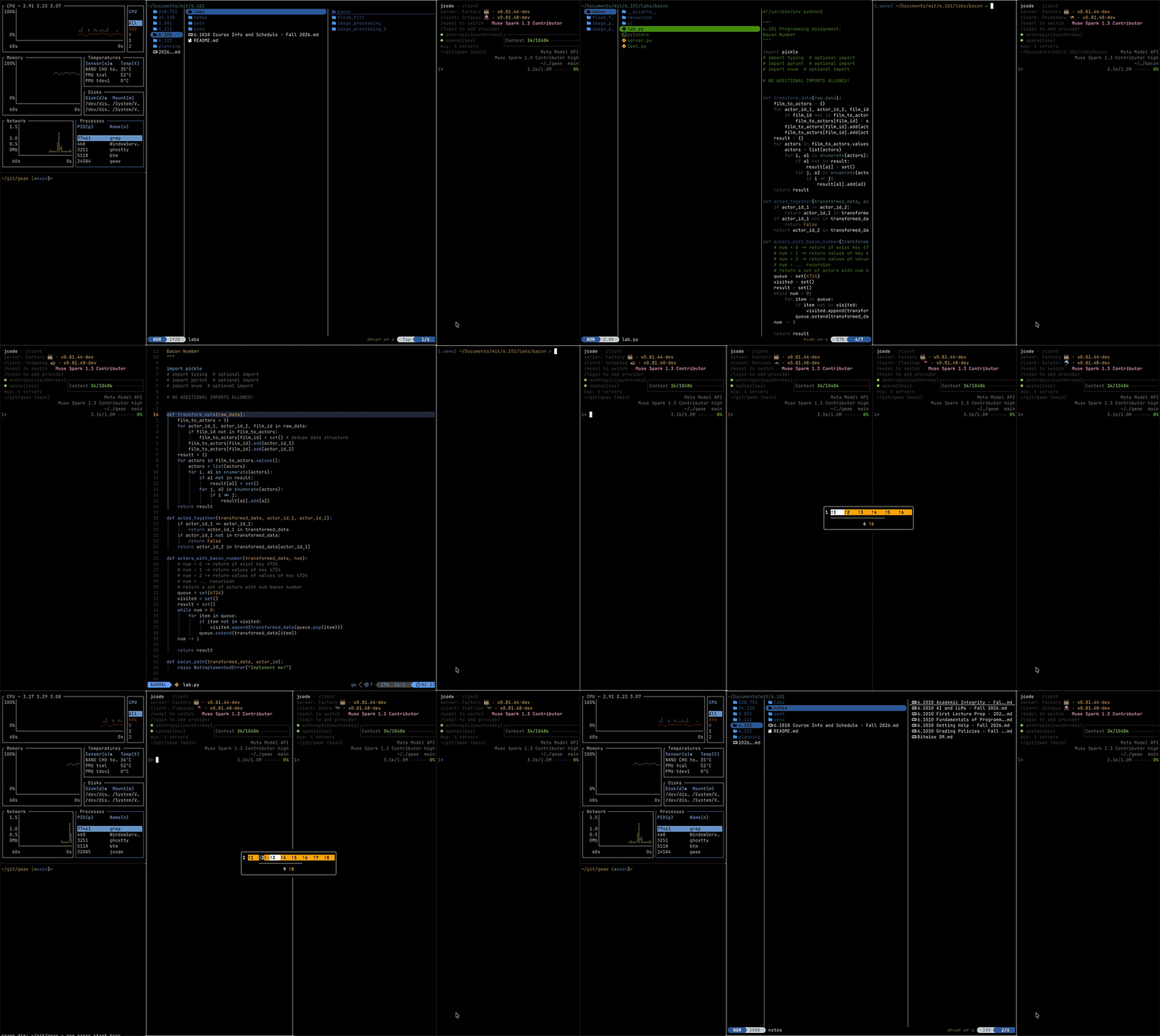
Tested with Ghostty and Jcode on MacBook Pro M4
Install
Developed and tested on macOS only. Contributions for Windows are welcome.
Linux users: I recommend niri, the scrolling window manager that inspired gwae.
curl -fsSL https://hongnoul.github.io/gwae/install.sh | bash
or with Homebrew:
brew install hongnoul/tap/gwae
Cool features
Official docs are still WIP.
| Feature | Default | What it does |
|---|---|---|
| Heads-up display | hold ⌥ | Live agent status minimap over standard OSC 133 with Running, Idle, and Failed states |
| Smart jump | ⌥+g | Cycles through Idle panes with Failed states ranked first |
| Hatchery | ⌥+d | Opens the spawn-directory picker to choose where the next pane process starts |
| Agent selector | ⌥+Shift+; | Opens the harness picker to spawn a specific agent instead of your default choice |
| Drag to copy | drag | Left-drag selects and copies on release via pbcopy with OSC 52 fallback for remote sessions |
| Caffeinate | ⌥+w | Toggles the macOS caffeinate assertion so a long-running job never sleeps mid-task |
When to use gwae (and how it compares vs tmux and herdr): running several CLI coding agents at once, tmux panes shrinking into slivers, or wanting niri's scrolling layout in the terminal.
Interactive tutorial
⌥ + / opens the cheat sheet.
Vim-style movement, like a tiling WM: ⌥ + h left · ⌥ + j down · ⌥ + k up · ⌥ + l right
Paste this into an agent pane:
You are teaching me gwae, a scrolling terminal multiplexer. I am inside a
gwae pane talking to you. I am a beginner: assume I know nothing beyond
typing in a terminal. Walk me through each step below one at a time. For
each step, tell me exactly what to press, what I should see, and how to
confirm it worked. Wait for my confirmation before moving on. If something
does not work, stop and help me fix it before continuing. Do not skip
ahead and do not dump all steps at once.

0. Fix the modifier key first. Nothing below works without this. Have me
press ⌥+/ . If the cheat sheet opens, it works; press Esc to close it.
If a special character types instead, tell me to set Option to act as
Meta in my terminal (Terminal.app: Preferences, Profiles, Keyboard, Use
Option as Meta Key; iTerm2, Ghostty, WezTerm have the equivalent), then
retry. Do not proceed until ⌥+/ opens the cheat sheet.
1. Open a pane: have me press ⌥+Enter once. Confirm a new shell pane
appears to the right.
2. Move: have me press ⌥+h and ⌥+l to move between the two panes.
Confirm the focus ring follows. Then have me press ⌥+k and ⌥+j.
Mention click-to-focus only after these work.
3. Open more: have me press ⌥+Enter until there are 6 panes. If I get
lost, remind me ⌥+h/l moves between panes. Point out the viewport
scrolling right while every pane keeps its width.
4. Reshape: have me press ⌥+r to cycle the focused column's width, then
⌥+b to split below. Mention ⌥+f
(full width) and ⌥+Shift+h/j/k/l (move pane in all four directions)
only after these work.
5. Agents: have me press ⌥+; to spawn an agent (first press offers what
is installed and remembers it). Confirm Cmd+V pastes text into the pane
(native terminal paste). Mention ⌥+Shift+; (picker), ⌥+d (spawn
directory), and gwae run "claude" (CLI start) after.
6. History: have me press ⌥ plus the up and down arrows to scroll the
focused pane's history (add Shift for a bigger jump). Then have me
press ⌃+⇧+K and ⌃+⇧+J for the three-line transcript scroll, noting it
goes to the agent itself inside agent panes. Left and right arrows
always type into the pane, never scroll. Confirm history moves without
moving focus.
7. Stuck panes: have me hold ⌥ for the dashboard (» working, ! needs
input, ✗ failed), then ⌥+g to jump to the neediest pane. Mention
clicking a tile focuses it.
8. Help and quit: show ⌥+/ (cheat sheet), ⌥+q (close pane),
⌥+Shift+q (quit; last pane exiting quits gwae). Mention ⌥+w
(keep-awake) last.
9. Health: only now, have me type exit in panes until one shell is left,
then run gwae doctor in it and confirm exit 0. If anything fails, run
gwae init. Mention ~/.config/gwae/gwae.toml (all keys optional,
live-reloads) only here, at the end.
Development
git clone https://github.com/hongnoul/gwae
cd gwae
cargo build
cargo test --workspace
Benchmark
| Metric | Method | gwae | herdr 0.9.1 | tmux 3.7c |
|---|---|---|---|---|
| Echo p50 | Keystroke to visible echo in a real PTY harness, median | 0.34 ms | 0.48–0.50 ms | 0.36–0.37 ms |
| Echo p90 | Keystroke to visible echo in a real PTY harness, 90th pct | 0.36–0.38 ms | 0.54 ms | 0.42–0.43 ms |
| Spawn p50 | New pane request to first painted frame, median | 0.48–0.52 ms | 0.63–0.70 ms | 4.1–4.7 ms |
Agent instructions
if you are an ai agent driving gwae, read docs/agents.md before spawning panes.
Contributors

689 commits

1 commits
Similar repos


Languages
Rust
97.7%
Infinite scroll terminal multiplexer and agent orchestrator for macOS
See the codeSee what people are saying
README
gwae
Lightweight, Lightspeed
Tested with Ghostty and Jcode on MacBook Pro M4
Install
Developed and tested on macOS only. Contributions for Windows are welcome.
Linux users: I recommend niri, the scrolling window manager that inspired gwae.
curl -fsSL https://hongnoul.github.io/gwae/install.sh | bash
or with Homebrew:
brew install hongnoul/tap/gwae
Cool features
Official docs are still WIP.
| Feature | Default | What it does |
|---|---|---|
| Heads-up display | hold ⌥ | Live agent status minimap over standard OSC 133 with Running, Idle, and Failed states |
| Smart jump | ⌥+g | Cycles through Idle panes with Failed states ranked first |
| Hatchery | ⌥+d | Opens the spawn-directory picker to choose where the next pane process starts |
| Agent selector | ⌥+Shift+; | Opens the harness picker to spawn a specific agent instead of your default choice |
| Drag to copy | drag | Left-drag selects and copies on release via pbcopy with OSC 52 fallback for remote sessions |
| Caffeinate | ⌥+w | Toggles the macOS caffeinate assertion so a long-running job never sleeps mid-task |
When to use gwae (and how it compares vs tmux and herdr): running several CLI coding agents at once, tmux panes shrinking into slivers, or wanting niri's scrolling layout in the terminal.
Interactive tutorial
⌥ + / opens the cheat sheet.
Vim-style movement, like a tiling WM: ⌥ + h left · ⌥ + j down · ⌥ + k up · ⌥ + l right
Paste this into an agent pane:
You are teaching me gwae, a scrolling terminal multiplexer. I am inside a
gwae pane talking to you. I am a beginner: assume I know nothing beyond
typing in a terminal. Walk me through each step below one at a time. For
each step, tell me exactly what to press, what I should see, and how to
confirm it worked. Wait for my confirmation before moving on. If something
does not work, stop and help me fix it before continuing. Do not skip
ahead and do not dump all steps at once.

0. Fix the modifier key first. Nothing below works without this. Have me
press ⌥+/ . If the cheat sheet opens, it works; press Esc to close it.
If a special character types instead, tell me to set Option to act as
Meta in my terminal (Terminal.app: Preferences, Profiles, Keyboard, Use
Option as Meta Key; iTerm2, Ghostty, WezTerm have the equivalent), then
retry. Do not proceed until ⌥+/ opens the cheat sheet.
1. Open a pane: have me press ⌥+Enter once. Confirm a new shell pane
appears to the right.
2. Move: have me press ⌥+h and ⌥+l to move between the two panes.
Confirm the focus ring follows. Then have me press ⌥+k and ⌥+j.
Mention click-to-focus only after these work.
3. Open more: have me press ⌥+Enter until there are 6 panes. If I get
lost, remind me ⌥+h/l moves between panes. Point out the viewport
scrolling right while every pane keeps its width.
4. Reshape: have me press ⌥+r to cycle the focused column's width, then
⌥+b to split below. Mention ⌥+f
(full width) and ⌥+Shift+h/j/k/l (move pane in all four directions)
only after these work.
5. Agents: have me press ⌥+; to spawn an agent (first press offers what
is installed and remembers it). Confirm Cmd+V pastes text into the pane
(native terminal paste). Mention ⌥+Shift+; (picker), ⌥+d (spawn
directory), and gwae run "claude" (CLI start) after.
6. History: have me press ⌥ plus the up and down arrows to scroll the
focused pane's history (add Shift for a bigger jump). Then have me
press ⌃+⇧+K and ⌃+⇧+J for the three-line transcript scroll, noting it
goes to the agent itself inside agent panes. Left and right arrows
always type into the pane, never scroll. Confirm history moves without
moving focus.
7. Stuck panes: have me hold ⌥ for the dashboard (» working, ! needs
input, ✗ failed), then ⌥+g to jump to the neediest pane. Mention
clicking a tile focuses it.
8. Help and quit: show ⌥+/ (cheat sheet), ⌥+q (close pane),
⌥+Shift+q (quit; last pane exiting quits gwae). Mention ⌥+w
(keep-awake) last.
9. Health: only now, have me type exit in panes until one shell is left,
then run gwae doctor in it and confirm exit 0. If anything fails, run
gwae init. Mention ~/.config/gwae/gwae.toml (all keys optional,
live-reloads) only here, at the end.
Development
git clone https://github.com/hongnoul/gwae
cd gwae
cargo build
cargo test --workspace
Benchmark
| Metric | Method | gwae | herdr 0.9.1 | tmux 3.7c |
|---|---|---|---|---|
| Echo p50 | Keystroke to visible echo in a real PTY harness, median | 0.34 ms | 0.48–0.50 ms | 0.36–0.37 ms |
| Echo p90 | Keystroke to visible echo in a real PTY harness, 90th pct | 0.36–0.38 ms | 0.54 ms | 0.42–0.43 ms |
| Spawn p50 | New pane request to first painted frame, median | 0.48–0.52 ms | 0.63–0.70 ms | 4.1–4.7 ms |
Agent instructions
if you are an ai agent driving gwae, read docs/agents.md before spawning panes.
Similar repos
Contributors
689 commits
1 commits
Languages
Rust
97.7%