Homebridge Docker. HomeKit support for the impatient using Docker on x86_64, Raspberry Pi (ARM64). Includes ffmpeg + libfdk-aac.
See the code

Official Docker image for Homebridge - Emulate the iOS HomeKit API on your network
We have migrated the official Homebridge Docker image from oznu/homebridge to homebridge/homebridge.
Please update your configurations to use the new image location for the latest updates and features.
⚠️ Compatibility Note: This image does not work with Docker Desktop for Mac or Windows due to networking limitations (details).
This is a multi-architecture image supporting x86_64, ARM32v7 (Raspberry Pi), and ARM64v8 platforms. Images are available with Ubuntu 24.04 (default) and Ubuntu 22.04 (for Synology compatibility) base images.
| Image Tag | Architectures | Base Image | Release Type | Description |
|---|---|---|---|---|
latest, ubuntu | amd64, arm32v7, arm64v8 | Ubuntu 24.04 | Stable | Production-ready with latest stable releases |
legacy | amd64, arm32v7, arm64v8 | Ubuntu 24.04 | Legacy | Production-ready with Homebridge 1.x stable releases |
synology | amd64, arm32v7, arm64v8 | Ubuntu 22.04 | Stable | Production-ready with latest stable releases |
beta | amd64, arm32v7, arm64v8 | Ubuntu 24.04 | Beta | Pre-release with beta versions for testing |
alpha | amd64, arm32v7, arm64v8 | Ubuntu 24.04 | Alpha | Early access with alpha versions for development |
Create a docker-compose.yml file:
services:
  homebridge:
    image: homebridge/homebridge:latest
    restart: always
    network_mode: host
    hostname: docker-desktop  # Optional: Set container hostname
    volumes:
      - ./volumes/homebridge:/homebridge
    environment:
      - TZ=America/Toronto  # Optional: Set your timezone
      - ENABLE_AVAHI=1      # Optional: Enable/disable Avahi (1=enabled, 0=disabled)
    logging:
      driver: json-file
      options:
        max-size: '10m'
        max-file: '1'
    healthcheck:
      test: ["CMD-SHELL", "curl --fail http://localhost:8581 || exit 1"]
      interval: 60s
      retries: 5
      start_period: 300s
      timeout: 2s
Start the container:
docker compose up -d
docker run \
  --net=host \
  --name=homebridge \
  -e TZ=America/Toronto \
  -v $(pwd)/homebridge:/homebridge \
  homebridge/homebridge:latest
| Parameter | Docker Compose | Docker CLI | Description |
|---|---|---|---|
| Network Mode | network_mode: host | --net=host | Required - Enables host networking for HomeKit discovery |
| Volume Mount | volumes: | -v /path:/homebridge | Required - Persistent storage for config and plugins |
| Parameter | Docker Compose | Docker CLI | Default | Description |
|---|---|---|---|---|
| Hostname | hostname: homebridge | --hostname=homebridge | Container ID | Set custom hostname for the container |
| Timezone | environment:- TZ=America/Toronto | -e TZ=America/Toronto | UTC | Set timezone (list) |
| Avahi mDNS | environment:- ENABLE_AVAHI=1 | -e ENABLE_AVAHI=1 | 1 | Set to 0 to disable Avahi mDNS service |
Note: When running with
ENABLE_AVAHI=0, you can mount the host's mDNS service to enable mDNS usage in the container:volumes: - ./volumes/homebridge:/homebridge - /var/run/dbus:/var/run/dbus # Mount host D-Bus socket - /var/run/avahi-daemon/socket:/var/run/avahi-daemon/socket # Mount host Avahi socket
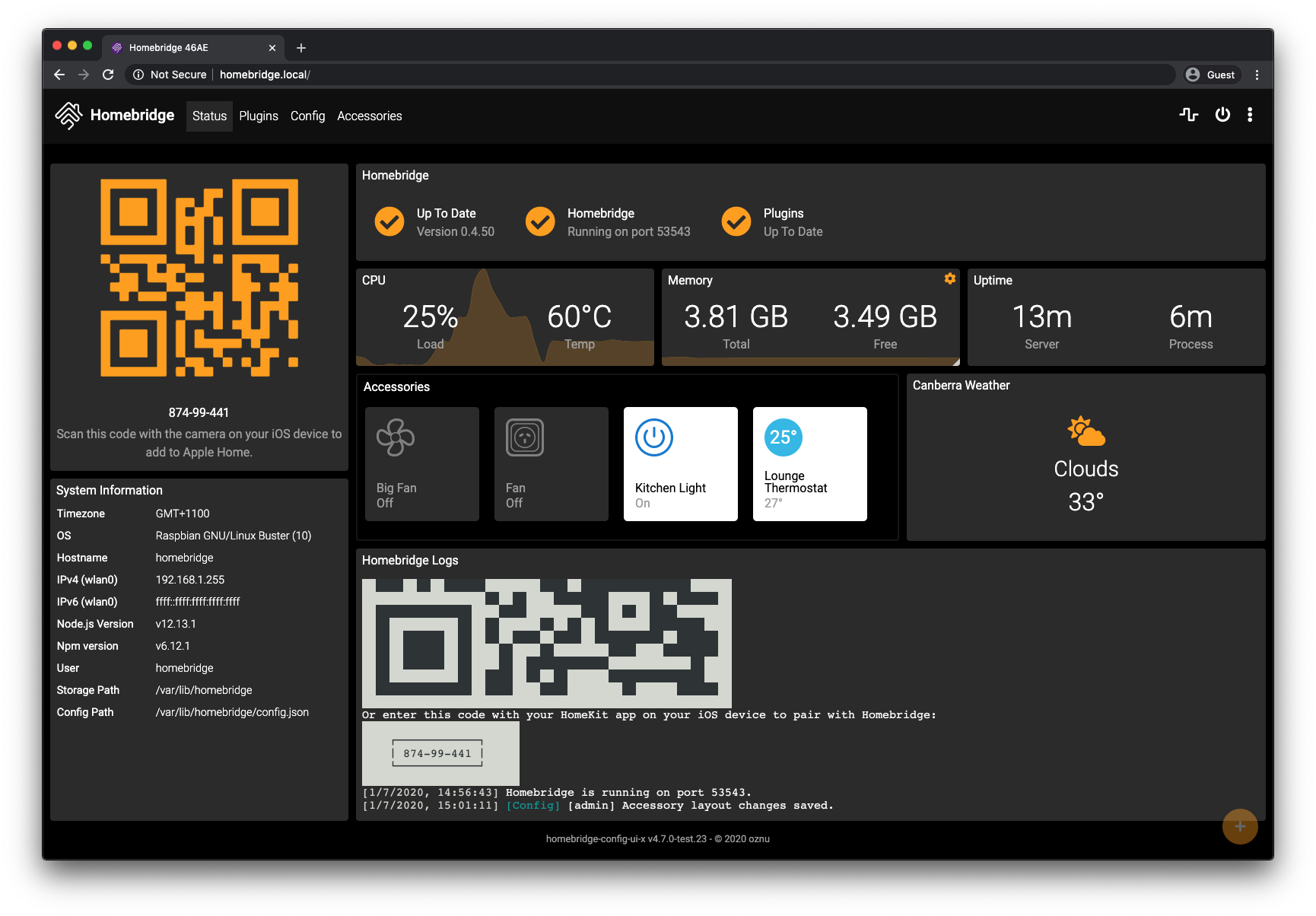
Access the Homebridge UI at http://<your-server-ip>:8581
The UI allows you to:
For advanced customization, use the Startup Script feature in the UI (Settings → Startup & Environment).

The startup.sh script:
Example:
#!/bin/sh

# Install custom Node.js packages
npm install -g some-custom-package

# Install Python dependencies
pip3 install some-python-library

# Copy configuration from host
cp /homebridge/custom-config.json /etc/custom-config.json

Pull the latest image and recreate your container:
docker compose pull
docker compose up -d
⚠️ Not Recommended: Automated updates using tools like Watchtower are strongly discouraged and done at your own risk
Since the 2025-06-25 release, updates to
will be overwritten if the container is updated.
This image includes FFmpeg with libfdk-aac audio support for camera streaming and video processing.
This repository includes automated validation to ensure container builds work correctly.
To validate a specific release:
latest - Stable releasebeta - Beta pre-releasealpha - Alpha early releaseThe validation workflow will:
FFmpeg with libfdk-aac audio support is included in this image. No additional installation required.
If you see errors like:
Node.js[445]: ../src/util.cc:188:double node::GetCurrentTimeInMicroseconds(): Assertion `(0) == (uv_gettimeofday(&tv))' failed.
s6-svscan: warning: unable to iopause: Operation not permitted
Your host OS needs to be updated. See #434 and #441 for solutions.
Join the Official Homebridge Discord and ask in the #docker channel.
Copyright (C) 2024 homebridge
Copyright (C) 2017-2022 oznu
This program is free software: you can redistribute it and/or modify it under the terms of the GNU General Public License as published by the Free Software Foundation, either version 3 of the License, or (at your option) any later version.
This program is distributed in the hope that it will be useful, but WITHOUT ANY WARRANTY; without even the implied warranty of MERCHANTABILITY or FITNESS FOR A PARTICULAR PURPOSE. See the GNU General Public License for more details.
Made with ❤️ by the Homebridge community
1,573 followers · starred Jan 2019
175 followers · starred Jan 2024
840 followers · starred Sep 2020
15 followers · starred Dec 2020
Homebridge Docker. HomeKit support for the impatient using Docker on x86_64, Raspberry Pi (ARM64). Includes ffmpeg + libfdk-aac.
See the code
Official Docker image for Homebridge - Emulate the iOS HomeKit API on your network
We have migrated the official Homebridge Docker image from oznu/homebridge to homebridge/homebridge.
Please update your configurations to use the new image location for the latest updates and features.
⚠️ Compatibility Note: This image does not work with Docker Desktop for Mac or Windows due to networking limitations (details).
This is a multi-architecture image supporting x86_64, ARM32v7 (Raspberry Pi), and ARM64v8 platforms. Images are available with Ubuntu 24.04 (default) and Ubuntu 22.04 (for Synology compatibility) base images.
| Image Tag | Architectures | Base Image | Release Type | Description |
|---|---|---|---|---|
latest, ubuntu | amd64, arm32v7, arm64v8 | Ubuntu 24.04 | Stable | Production-ready with latest stable releases |
legacy | amd64, arm32v7, arm64v8 | Ubuntu 24.04 | Legacy | Production-ready with Homebridge 1.x stable releases |
synology | amd64, arm32v7, arm64v8 | Ubuntu 22.04 | Stable | Production-ready with latest stable releases |
beta | amd64, arm32v7, arm64v8 | Ubuntu 24.04 | Beta | Pre-release with beta versions for testing |
alpha | amd64, arm32v7, arm64v8 | Ubuntu 24.04 | Alpha | Early access with alpha versions for development |
Create a docker-compose.yml file:
services:
  homebridge:
    image: homebridge/homebridge:latest
    restart: always
    network_mode: host
    hostname: docker-desktop  # Optional: Set container hostname
    volumes:
      - ./volumes/homebridge:/homebridge
    environment:
      - TZ=America/Toronto  # Optional: Set your timezone
      - ENABLE_AVAHI=1      # Optional: Enable/disable Avahi (1=enabled, 0=disabled)
    logging:
      driver: json-file
      options:
        max-size: '10m'
        max-file: '1'
    healthcheck:
      test: ["CMD-SHELL", "curl --fail http://localhost:8581 || exit 1"]
      interval: 60s
      retries: 5
      start_period: 300s
      timeout: 2s
Start the container:
docker compose up -d
docker run \
  --net=host \
  --name=homebridge \
  -e TZ=America/Toronto \
  -v $(pwd)/homebridge:/homebridge \
  homebridge/homebridge:latest
| Parameter | Docker Compose | Docker CLI | Description |
|---|---|---|---|
| Network Mode | network_mode: host | --net=host | Required - Enables host networking for HomeKit discovery |
| Volume Mount | volumes: | -v /path:/homebridge | Required - Persistent storage for config and plugins |
| Parameter | Docker Compose | Docker CLI | Default | Description |
|---|---|---|---|---|
| Hostname | hostname: homebridge | --hostname=homebridge | Container ID | Set custom hostname for the container |
| Timezone | environment:- TZ=America/Toronto | -e TZ=America/Toronto | UTC | Set timezone (list) |
| Avahi mDNS | environment:- ENABLE_AVAHI=1 | -e ENABLE_AVAHI=1 | 1 | Set to 0 to disable Avahi mDNS service |
Note: When running with
ENABLE_AVAHI=0, you can mount the host's mDNS service to enable mDNS usage in the container:volumes: - ./volumes/homebridge:/homebridge - /var/run/dbus:/var/run/dbus # Mount host D-Bus socket - /var/run/avahi-daemon/socket:/var/run/avahi-daemon/socket # Mount host Avahi socket
Access the Homebridge UI at http://<your-server-ip>:8581
The UI allows you to:
For advanced customization, use the Startup Script feature in the UI (Settings → Startup & Environment).
The startup.sh script:
Example:
#!/bin/sh

# Install custom Node.js packages
npm install -g some-custom-package

# Install Python dependencies
pip3 install some-python-library

# Copy configuration from host
cp /homebridge/custom-config.json /etc/custom-config.json
Pull the latest image and recreate your container:
docker compose pull
docker compose up -d
⚠️ Not Recommended: Automated updates using tools like Watchtower are strongly discouraged and done at your own risk
Since the 2025-06-25 release, updates to
will be overwritten if the container is updated.
This image includes FFmpeg with libfdk-aac audio support for camera streaming and video processing.
This repository includes automated validation to ensure container builds work correctly.
To validate a specific release:
latest - Stable releasebeta - Beta pre-releasealpha - Alpha early releaseThe validation workflow will:
FFmpeg with libfdk-aac audio support is included in this image. No additional installation required.
If you see errors like:
Node.js[445]: ../src/util.cc:188:double node::GetCurrentTimeInMicroseconds(): Assertion `(0) == (uv_gettimeofday(&tv))' failed.
s6-svscan: warning: unable to iopause: Operation not permitted
Your host OS needs to be updated. See #434 and #441 for solutions.
Join the Official Homebridge Discord and ask in the #docker channel.
Copyright (C) 2024 homebridge
Copyright (C) 2017-2022 oznu
This program is free software: you can redistribute it and/or modify it under the terms of the GNU General Public License as published by the Free Software Foundation, either version 3 of the License, or (at your option) any later version.
This program is distributed in the hope that it will be useful, but WITHOUT ANY WARRANTY; without even the implied warranty of MERCHANTABILITY or FITNESS FOR A PARTICULAR PURPOSE. See the GNU General Public License for more details.
Made with ❤️ by the Homebridge community
1,573 followers · starred Jan 2019
175 followers · starred Jan 2024
840 followers · starred Sep 2020
15 followers · starred Dec 2020





