
If only certain buffers could be so grossly incandescent.
Emacs Lisp
366
162 commits
updated Aug 30, 2026
README




Solaire mode
If only certain buffers could be so grossly incandescent.

solaire-mode is an aesthetic plugin designed to visually distinguish "real"
buffers (i.e. file-visiting code buffers where you do most of your work) from
"unreal" buffers (like popups, sidebars, log buffers, terminals, etc) by giving
the latter a slightly different -- often darker -- background:

This plugin accomplishes this by doing two things when activated:
-
solaire-modebuffer-locally remaps all the faces insolaire-mode-remap-alist. e.g.default->solaire-default-face, andmode-line->solaire-mode-line-face -
solaire-global-modewill globally swap faces insolaire-mode-swap-alistIF your active theme is insolaire-mode-themes-to-face-swap. Use this if you think your theme has its designated solaire-*-face colors the wrong way around. This must be set before you activate your theme withload-theme!
Praise the sun.
[!IMPORTANT] It is the responsibility of your active theme to style this package's faces to look good. By default,
solaire-modewill disable itself if a theme doesn't appear to support it. See the "Configuration" section below covers how to add support to a theme that lacks it.
Install
solaire-mode is available on MELPA:
-
package.el users:
M-x package-install RET solaire-mode -
straight.el users:
(straight-use-package 'solaire-mode) -
Doom Emacs users: Enable the
:ui doommodule (no additional configuration needed).
Simply activate solaire-global-mode:
(solaire-global-mode +1)
Settings
solaire-mode-real-buffer-fn(default:solaire-mode-real-buffer-p): The predicate function used to determine if a buffer is "real" or not. It takes no arguments and must return truthy for buffers wheresolaire-modeshould not be activated in.solaire-mode-remap-alist: An alist mapping original faces to replacement faces, which will be buffer-locally remapped in any buffersolaire-modeis enabled in.solaire-mode-swap-alist: An alist mapping original faces to replacement faces, which will be swapped globally ifsolaire-global-modeis used and the current theme is insolaire-mode-themes-to-face-swap.solaire-mode-themes-to-face-swap(default:()): A list of themes to swap faces insolaire-mode-swap-alistfor. Can be symbols, regexps, or functions. This must be set before you activate your theme withload-theme!solaire-mode-supported-themes(default:()): Themes to forcibly enablesolaire-modefor, ignoring whether they support it or not. Can be:all(all themes) or a list of symbols, regexps, or functions. This must be set before you activate your theme withload-theme!
Jolly cooperation with other plugins
-
By default,
solaire-moderemaps the mode-line faces. This interferes with certain mode-line packages like telephone-line or powerline, but works fine for doom-modeline. To disable this behavior use:(dolist (face '(mode-line mode-line-inactive)) (setf (alist-get face solaire-mode-remap-modeline) nil)) -
It is up to themes to decide whether unreal buffers (i.e. non-file-visiting) are lighter or darker than real buffers. If you don't like their arrangement, add that theme to
solaire-mode-themes-to-face-swap:(add-to-list 'solaire-mode-themes-to-face-swap 'doom-vibrant)Then solaire-mode will swap all the faces in
solaire-mode-swap-alist(for example, swapping thedefaultface withsolaire-default-face).solaire-mode-themes-to-face-swapsupports regexps and functions for more granular control, e.g.(add-to-list 'solaire-mode-themes-to-face-swap "^doom-") ;; or (add-to-list 'solaire-mode-themes-to-face-swap (lambda (theme) (memq theme '(doom-one doom-vibrant doom-city-lights)))) -
This package uses
face-remap.elto achieve its effect. Any packages that utilize this can override it or be overridden by solaire-mode. Take care when using multiple packages that use this machanism.
Theme support for solaire-mode
For the sake of performance, solaire-mode will disable itself if the active
theme doesn't support it. "Support" means a theme must, at least, change
solaire-default-face's :background. My recommendation is that it be
slightly darker than default's background.
For example doom-one (seen in the screenshot above) prefers
solaire-default-face be darker than default:
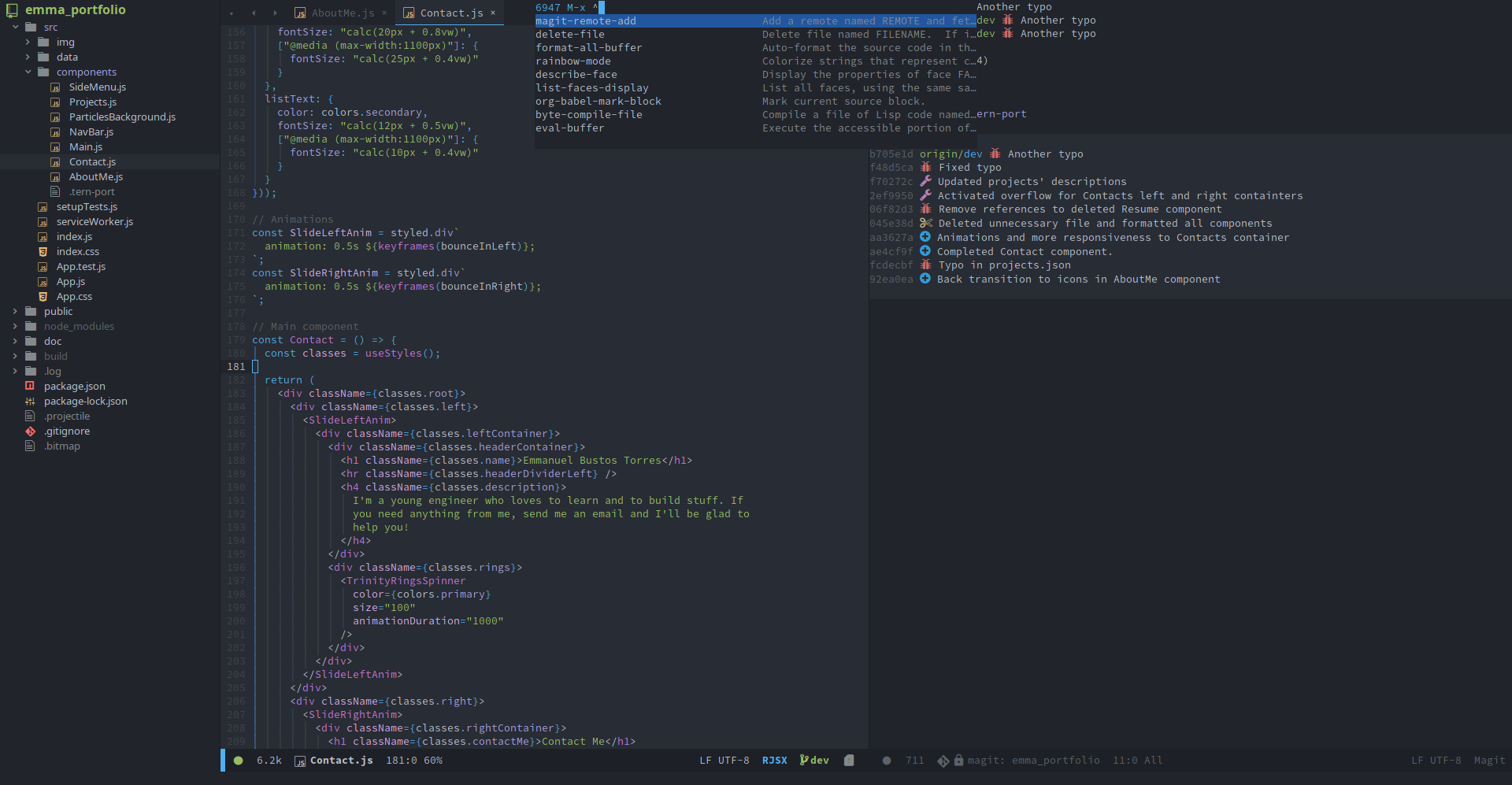
Others, like doom-vibrant prefer the opposite:
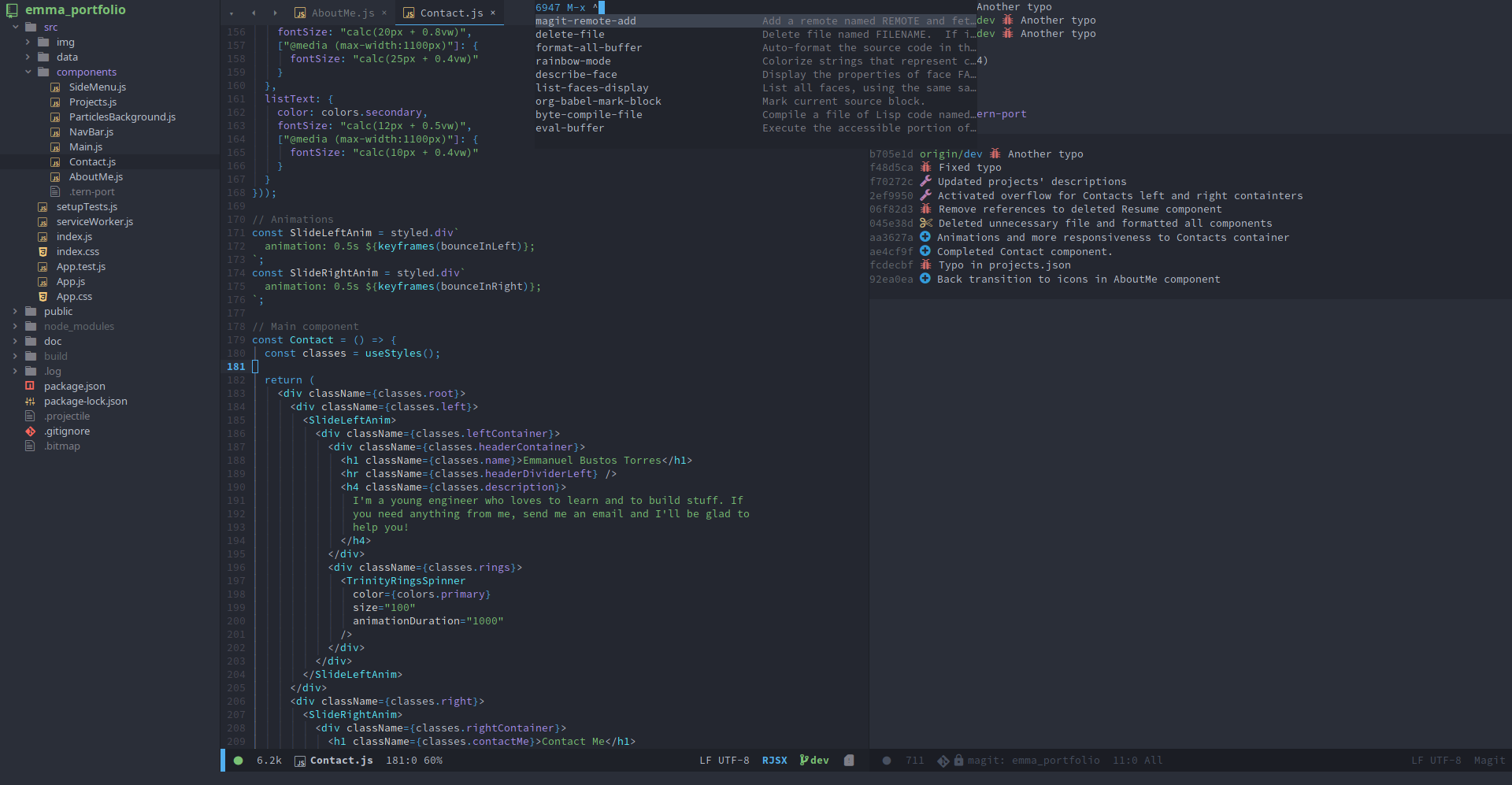
For full support, themes can customize the following faces:
| Face | Remapped face |
|---|---|
| solaire-default-face | default |
| solaire-fringe-face | fringe |
| solaire-line-number-face | line-number |
| solaire-hl-line-face | hl-line |
| solaire-org-hide-face | org-hide, org-indent |
| solaire-mode-line-face | mode-line |
| solaire-mode-line-inactive-face | mode-line-inactive |
| solaire-header-line-face | header-line |
Known supported themes
A list of known supported (and unsupported) themes can be found on this repo's wiki. Open an issue if you'd like to suggest changes.
Unsupported themes
If your theme doesn't support solaire-mode, here's what you should try before opening an issue:
-
Request your theme's author add support for it (by, at least, styling
solaire-default-face's:background). Here are all the faces this package remaps and what do:Original face Replacement face default solaire-default-face hl-line solaire-hl-line-face region solaire-region-face org-hide solaire-org-hide-face org-indent solaire-org-hide-face linum solaire-line-number-face line-number solaire-line-number-face header-line solaire-header-line-face mode-line solaire-mode-line-face mode-line-active solaire-mode-line-active-face mode-line-inactive solaire-mode-line-inactive-face highlight-indentation-face solaire-hl-line-face fringe solaire-fringe-face -
Use
custom-theme-set-facesto add it yourself:;;; after loading your theme (custom-theme-set-faces 'theme-that-doesnt-support-solaire-mode '(solaire-default-face ((t (:background "black")))))solaire-mode will detect this and recognize that the theme supports it.
-
If
custom-set-facesis used instead, solaire-mode won't detect your change, in which case modifysolaire-mode-supported-themesto forcibly keep solaire-mode enabled:;;; after loading your theme and solaire-mode ;; Unconditionally activate for all themes: (setq solaire-mode-supported-themes :all) ;; OR unconditionally activate for one theme: (add-to-list 'solaire-mode-supported-themes 'theme-that-doesnt-support-solaire-mode) ;; OR unconditionally activate for all themes matching an arbitrary rule (regexp ;; or function): (add-to-list 'solaire-mode-supported-themes "^modus-") (add-to-list 'solaire-mode-supported-themes (lambda (theme) (eq (plist-get (get theme 'theme-properties) :background-mode) 'dark)))



Similar repos


Languages
Emacs Lisp
98.6%
Makefile
1.4%
If only certain buffers could be so grossly incandescent.
Emacs Lisp
366
162 commits
updated Aug 30, 2026
README
Solaire mode
If only certain buffers could be so grossly incandescent.
solaire-mode is an aesthetic plugin designed to visually distinguish "real"
buffers (i.e. file-visiting code buffers where you do most of your work) from
"unreal" buffers (like popups, sidebars, log buffers, terminals, etc) by giving
the latter a slightly different -- often darker -- background:
This plugin accomplishes this by doing two things when activated:
-
solaire-modebuffer-locally remaps all the faces insolaire-mode-remap-alist. e.g.default->solaire-default-face, andmode-line->solaire-mode-line-face -
solaire-global-modewill globally swap faces insolaire-mode-swap-alistIF your active theme is insolaire-mode-themes-to-face-swap. Use this if you think your theme has its designated solaire-*-face colors the wrong way around. This must be set before you activate your theme withload-theme!
Praise the sun.
[!IMPORTANT] It is the responsibility of your active theme to style this package's faces to look good. By default,
solaire-modewill disable itself if a theme doesn't appear to support it. See the "Configuration" section below covers how to add support to a theme that lacks it.
Install
solaire-mode is available on MELPA:
-
package.el users:
M-x package-install RET solaire-mode -
straight.el users:
(straight-use-package 'solaire-mode) -
Doom Emacs users: Enable the
:ui doommodule (no additional configuration needed).
Simply activate solaire-global-mode:
(solaire-global-mode +1)
Settings
solaire-mode-real-buffer-fn(default:solaire-mode-real-buffer-p): The predicate function used to determine if a buffer is "real" or not. It takes no arguments and must return truthy for buffers wheresolaire-modeshould not be activated in.solaire-mode-remap-alist: An alist mapping original faces to replacement faces, which will be buffer-locally remapped in any buffersolaire-modeis enabled in.solaire-mode-swap-alist: An alist mapping original faces to replacement faces, which will be swapped globally ifsolaire-global-modeis used and the current theme is insolaire-mode-themes-to-face-swap.solaire-mode-themes-to-face-swap(default:()): A list of themes to swap faces insolaire-mode-swap-alistfor. Can be symbols, regexps, or functions. This must be set before you activate your theme withload-theme!solaire-mode-supported-themes(default:()): Themes to forcibly enablesolaire-modefor, ignoring whether they support it or not. Can be:all(all themes) or a list of symbols, regexps, or functions. This must be set before you activate your theme withload-theme!
Jolly cooperation with other plugins
-
By default,
solaire-moderemaps the mode-line faces. This interferes with certain mode-line packages like telephone-line or powerline, but works fine for doom-modeline. To disable this behavior use:(dolist (face '(mode-line mode-line-inactive)) (setf (alist-get face solaire-mode-remap-modeline) nil)) -
It is up to themes to decide whether unreal buffers (i.e. non-file-visiting) are lighter or darker than real buffers. If you don't like their arrangement, add that theme to
solaire-mode-themes-to-face-swap:(add-to-list 'solaire-mode-themes-to-face-swap 'doom-vibrant)Then solaire-mode will swap all the faces in
solaire-mode-swap-alist(for example, swapping thedefaultface withsolaire-default-face).solaire-mode-themes-to-face-swapsupports regexps and functions for more granular control, e.g.(add-to-list 'solaire-mode-themes-to-face-swap "^doom-") ;; or (add-to-list 'solaire-mode-themes-to-face-swap (lambda (theme) (memq theme '(doom-one doom-vibrant doom-city-lights)))) -
This package uses
face-remap.elto achieve its effect. Any packages that utilize this can override it or be overridden by solaire-mode. Take care when using multiple packages that use this machanism.
Theme support for solaire-mode
For the sake of performance, solaire-mode will disable itself if the active
theme doesn't support it. "Support" means a theme must, at least, change
solaire-default-face's :background. My recommendation is that it be
slightly darker than default's background.
For example doom-one (seen in the screenshot above) prefers
solaire-default-face be darker than default:
Others, like doom-vibrant prefer the opposite:
For full support, themes can customize the following faces:
| Face | Remapped face |
|---|---|
| solaire-default-face | default |
| solaire-fringe-face | fringe |
| solaire-line-number-face | line-number |
| solaire-hl-line-face | hl-line |
| solaire-org-hide-face | org-hide, org-indent |
| solaire-mode-line-face | mode-line |
| solaire-mode-line-inactive-face | mode-line-inactive |
| solaire-header-line-face | header-line |
Known supported themes
A list of known supported (and unsupported) themes can be found on this repo's wiki. Open an issue if you'd like to suggest changes.
Unsupported themes
If your theme doesn't support solaire-mode, here's what you should try before opening an issue:
-
Request your theme's author add support for it (by, at least, styling
solaire-default-face's:background). Here are all the faces this package remaps and what do:Original face Replacement face default solaire-default-face hl-line solaire-hl-line-face region solaire-region-face org-hide solaire-org-hide-face org-indent solaire-org-hide-face linum solaire-line-number-face line-number solaire-line-number-face header-line solaire-header-line-face mode-line solaire-mode-line-face mode-line-active solaire-mode-line-active-face mode-line-inactive solaire-mode-line-inactive-face highlight-indentation-face solaire-hl-line-face fringe solaire-fringe-face -
Use
custom-theme-set-facesto add it yourself:;;; after loading your theme (custom-theme-set-faces 'theme-that-doesnt-support-solaire-mode '(solaire-default-face ((t (:background "black")))))solaire-mode will detect this and recognize that the theme supports it.
-
If
custom-set-facesis used instead, solaire-mode won't detect your change, in which case modifysolaire-mode-supported-themesto forcibly keep solaire-mode enabled:;;; after loading your theme and solaire-mode ;; Unconditionally activate for all themes: (setq solaire-mode-supported-themes :all) ;; OR unconditionally activate for one theme: (add-to-list 'solaire-mode-supported-themes 'theme-that-doesnt-support-solaire-mode) ;; OR unconditionally activate for all themes matching an arbitrary rule (regexp ;; or function): (add-to-list 'solaire-mode-supported-themes "^modus-") (add-to-list 'solaire-mode-supported-themes (lambda (theme) (eq (plist-get (get theme 'theme-properties) :background-mode) 'dark)))
Similar repos
Languages
Emacs Lisp
98.6%
Makefile
1.4%