Desktop notification for your console Logs
See the code
Ever wondered why you have to open the console every time you want to want to log a variable?
Notification Logger helps provide desktop notification for your console messages.
During development, You have to check the browser's inspector periodically to see what your console.log()'s are saying.
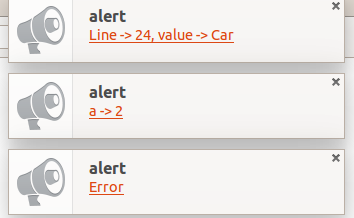
With notification-logger, you can develop and debug web apps and see console messages as Desktop Notifications.
And it only adds ~50 lines to your project.
Initial repo forked from chinchang's project screenlog.js. Check out his awesomeness over here
npm or git clone to download the module.
npm install notification-loggergit clone https://github.com/hkirat/notification-logger.gitnotification-logger.js or notification-logger.min.jslogger.init()logger.init - Initialises the loggerlogger.log - Logs the message via a Desktop Notification onlyconsole.log - Logs the message via a Desktop Notification and in the browser consolelogger.destroy - Reverts console.log to original functionalityWorks best on latest versions of Google Chrome, Firefox and Safari.
Overall
Maintained
Code review
Latest release
Releases this year
427 followers · starred Oct 2016
693 followers · starred Oct 2016
253 followers · starred Oct 2016
2,000 followers · starred Oct 2016
Desktop notification for your console Logs
See the codeEver wondered why you have to open the console every time you want to want to log a variable?
Notification Logger helps provide desktop notification for your console messages.
During development, You have to check the browser's inspector periodically to see what your console.log()'s are saying.
With notification-logger, you can develop and debug web apps and see console messages as Desktop Notifications.
And it only adds ~50 lines to your project.
Initial repo forked from chinchang's project screenlog.js. Check out his awesomeness over here
npm or git clone to download the module.
npm install notification-loggergit clone https://github.com/hkirat/notification-logger.gitnotification-logger.js or notification-logger.min.jslogger.init()logger.init - Initialises the loggerlogger.log - Logs the message via a Desktop Notification onlyconsole.log - Logs the message via a Desktop Notification and in the browser consolelogger.destroy - Reverts console.log to original functionalityWorks best on latest versions of Google Chrome, Firefox and Safari.
Overall
Maintained
Code review
Latest release
Releases this year
427 followers · starred Oct 2016
693 followers · starred Oct 2016
253 followers · starred Oct 2016
2,000 followers · starred Oct 2016