
Fine-tuning ChatGLM-6B with PEFT | 基于 PEFT 的高效 ChatGLM 微调
Python
3,712
286 commits
updated Oct 12, 2023
README
ChatGLM Efficient Tuning





Fine-tuning 🤖ChatGLM-6B model with 🤗PEFT.
👋 Join our WeChat.
[ English | 中文 ]
If you have any questions, please refer to our Wiki📄.
Notice
This repo will not be maintained in the future. Please follow LLaMA-Factory for fine-tuning the language models (including ChatGLM2-6B).
Changelog
[23/07/15] Now we develop an all-in-one Web UI for training, evaluation and inference. Try train_web.py to fine-tune ChatGLM-6B model in your Web browser. Thank @KanadeSiina and @codemayq for their efforts in the development.
[23/07/09] Now we release FastEdit⚡🩹, an easy-to-use package for editing the factual knowledge of large language models efficiently. Please follow FastEdit if you are interested.
[23/06/25] Now we align the demo API with the OpenAI's format where you can insert the fine-tuned model in arbitrary ChatGPT-based applications.
[23/06/25] Now we support fine-tuning the ChatGLM2-6B model with our framework!
[23/06/05] Now we support 4-bit LoRA training (aka QLoRA). Try --quantization_bit 4 argument to work with 4-bit quantized model. (experimental feature)
[23/06/01] We implemented a framework supporting the efficient tuning of LLaMA and BLOOM models. Please follow LLaMA-Efficient-Tuning if you are interested.
[23/05/19] Now we support using the development set to evaluate the model while training. Try --dev_ratio argument to specify the size of development set.
[23/04/29] Now we support training ChatGLM with Reinforcement Learning with Human Feedback (RLHF) ! We provide several examples to run RLHF training, please refer to the examples folder for details.
[23/04/20] Our repo achieved 100 stars within 12 days! Congratulations!
[23/04/19] Now we support merging the weights of fine-tuned models trained by LoRA! Try --checkpoint_dir checkpoint1,checkpoint2 argument for continually fine-tuning the models.
[23/04/18] Now we support training the quantized models using three fine-tuning methods! Try quantization_bit argument for training the model in 4/8 bits.
[23/04/12] Now we support training from checkpoints! Use --checkpoint_dir argument to specify the checkpoint model to fine-tune from.
[23/04/11] Now we support training with combined datasets! Try --dataset dataset1,dataset2 argument for training with multiple datasets.
Datasets
- For supervised fine-tuning:
- Stanford Alpaca (en)
- Stanford Alpaca (zh)
- GPT-4 Generated Data (en&zh)
- Open Assistant (multilingual)
- Self-cognition (zh)
- ShareGPT (zh)
- RefGPT (zh)
- Guanaco Dataset (multilingual)
- BELLE 2M (zh)
- BELLE 1M (zh)
- BELLE 0.5M (zh)
- BELLE Dialogue 0.4M (zh)
- BELLE School Math 0.25M (zh)
- BELLE Multiturn Chat 0.8M (zh)
- Firefly 1.1M (zh)
- LIMA (en)
- CodeAlpaca 20k (en)
- Alpaca CoT (multilingual)
- Web QA (zh)
- UltraChat (en)
- WebNovel (zh)
- For reward modelling:
Please refer to data/README.md for details.
Some datasets require confirmation before using them, so we recommend logging in with your Hugging Face account using these commands.
pip install --upgrade huggingface_hub
huggingface-cli login
Fine-Tuning Methods
Our script now supports the following fine-tuning methods:
- LoRA
- Fine-tuning the low-rank adapters of the model.
- P-Tuning V2
- Fine-tuning the prefix encoder of the model.
- Freeze
- Fine-tuning the MLPs in the last n blocks of the model.
- Full Tuning
- Fine-tuning all the parameters of the model.
Requirement
- Python 3.8+ and PyTorch 1.13.1+
- 🤗Transformers, Datasets, Accelerate, PEFT and TRL
- fire, protobuf, cpm-kernels and sentencepiece
- jieba, rouge-chinese and nltk (used at evaluation)
- gradio and matplotlib (used in train_web.py)
- uvicorn, fastapi and sse-starlette (used in api_demo.py)
And powerful GPUs!
Getting Started
Data Preparation (optional)
Please refer to data/example_dataset for checking the details about the format of dataset files. You can either use a single .json file or a dataset loading script with multiple files to create a custom dataset.
Note: please update data/dataset_info.json to use your custom dataset. About the format of this file, please refer to data/README.md.
Dependence Installation (optional)
git lfs install
git clone https://github.com/hiyouga/ChatGLM-Efficient-Tuning.git
conda create -n chatglm_etuning python=3.10
conda activate chatglm_etuning
cd ChatGLM-Efficient-Tuning
pip install -r requirements.txt
If you want to enable the quantized LoRA (QLoRA) on the Windows platform, you will be required to install a pre-built version of bitsandbytes library, which supports CUDA 11.1 to 12.1.
pip install https://github.com/jllllll/bitsandbytes-windows-webui/releases/download/wheels/bitsandbytes-0.39.1-py3-none-win_amd64.whl
All-in-one Web UI
CUDA_VISIBLE_DEVICES=0 python src/train_web.py
Currently the web UI only supports training on a single GPU.
Fine-tuning with a Single GPU
CUDA_VISIBLE_DEVICES=0 python src/train_bash.py \
    --stage sft \
    --model_name_or_path path_to_your_chatglm_model \
    --do_train \
    --dataset alpaca_gpt4_en \
    --finetuning_type lora \
    --output_dir path_to_sft_checkpoint \
    --per_device_train_batch_size 4 \
    --gradient_accumulation_steps 4 \
    --lr_scheduler_type cosine \
    --logging_steps 10 \
    --save_steps 1000 \
    --learning_rate 5e-5 \
    --num_train_epochs 3.0 \
    --plot_loss \
    --fp16
Please refer to our Wiki about the details of the arguments.
Distributed Fine-tuning with Multiple GPUs
accelerate config # configure the environment
accelerate launch src/train_bash.py # arguments (same as above)
Training Reward Model
CUDA_VISIBLE_DEVICES=0 python src/train_bash.py \
    --stage rm \
    --model_name_or_path path_to_your_chatglm_model \
    --do_train \
    --dataset comparison_gpt4_en \
    --finetuning_type lora \
    --resume_lora_training False \
    --checkpoint_dir path_to_sft_checkpoint \
    --output_dir path_to_rm_checkpoint \
    --per_device_train_batch_size 4 \
    --gradient_accumulation_steps 4 \
    --lr_scheduler_type cosine \
    --logging_steps 10 \
    --save_steps 1000 \
    --learning_rate 1e-5 \
    --num_train_epochs 1.0 \
    --plot_loss \
    --fp16
Training with RLHF
CUDA_VISIBLE_DEVICES=0 python src/train_bash.py \
    --stage ppo \
    --model_name_or_path path_to_your_chatglm_model \
    --do_train \
    --dataset alpaca_gpt4_en \
    --finetuning_type lora \
    --resume_lora_training False \
    --checkpoint_dir path_to_sft_checkpoint \
    --reward_model path_to_rm_checkpoint \
    --output_dir path_to_ppo_checkpoint \
    --per_device_train_batch_size 2 \
    --gradient_accumulation_steps 4 \
    --lr_scheduler_type cosine \
    --logging_steps 10 \
    --save_steps 1000 \
    --learning_rate 1e-5 \
    --num_train_epochs 1.0 \
    --plot_loss
Evaluation (BLEU and ROUGE_CHINESE)
CUDA_VISIBLE_DEVICES=0 python src/train_bash.py \
    --stage sft \
    --model_name_or_path path_to_your_chatglm_model \
    --do_eval \
    --dataset alpaca_gpt4_en \
    --finetuning_type lora \
    --checkpoint_dir path_to_checkpoint \
    --output_dir path_to_eval_result \
    --per_device_eval_batch_size 8 \
    --max_samples 50 \
    --predict_with_generate
Predict
CUDA_VISIBLE_DEVICES=0 python src/train_bash.py \
    --stage sft \
    --model_name_or_path path_to_your_chatglm_model \
    --do_predict \
    --dataset alpaca_gpt4_en \
    --finetuning_type lora \
    --checkpoint_dir path_to_checkpoint \
    --output_dir path_to_predict_result \
    --per_device_eval_batch_size 8 \
    --max_samples 100 \
    --predict_with_generate
If you want to predict the samples with empty responses, please kindly fill the response column with dummy tokens to ensure the sample will not be discarded throughout the preprocessing phase.
API Demo
python src/api_demo.py \
    --model_name_or_path path_to_your_chatglm_model \
    --finetuning_type lora \
    --checkpoint_dir path_to_checkpoint
Visit http://localhost:8000/docs for API documentation.
CLI Demo
python src/cli_demo.py \
    --model_name_or_path path_to_your_chatglm_model \
    --finetuning_type lora \
    --checkpoint_dir path_to_checkpoint
Web Demo
python src/web_demo.py \
    --model_name_or_path path_to_your_chatglm_model \
    --finetuning_type lora \
    --checkpoint_dir path_to_checkpoint
Export model
python src/export_model.py \
    --model_name_or_path path_to_your_chatglm_model \
    --finetuning_type lora \
    --checkpoint_dir path_to_checkpoint \
    --output_dir path_to_export
Hardware Requirements
| Fine-tune method | Batch size | Mode | GRAM | Speed |
|---|---|---|---|---|
| LoRA (r=8) | 16 | FP16 | 28GB | 8ex/s |
| LoRA (r=8) | 8 | FP16 | 24GB | 8ex/s |
| LoRA (r=8) | 4 | FP16 | 20GB | 8ex/s |
| LoRA (r=8) | 4 | INT8 | 10GB | 8ex/s |
| LoRA (r=8) | 4 | INT4 | 8GB | 8ex/s |
| P-Tuning (p=16) | 4 | FP16 | 20GB | 8ex/s |
| P-Tuning (p=16) | 4 | INT8 | 16GB | 8ex/s |
| P-Tuning (p=16) | 4 | INT4 | 12GB | 8ex/s |
| Freeze (l=3) | 4 | FP16 | 24GB | 8ex/s |
| RM method | Batch size | Mode | GRAM | Speed |
|---|---|---|---|---|
| LoRA (r=8) + rm | 4 | FP16 | 22GB | - |
| LoRA (r=8) + rm | 1 | INT8 | 11GB | - |
| RLHF method | Batch size | Mode | GRAM | Speed |
|---|---|---|---|---|
| LoRA (r=8) + ppo | 4 | FP16 | 23GB | - |
| LoRA (r=8) + ppo | 1 | INT8 | 12GB | - |
Note:
ris the lora rank,pis the number of prefix tokens,lis the number of trainable layers,ex/sis the examples per second at training. Thegradient_accumulation_stepsis set to1. All are evaluated on a single Tesla V100 (32G) GPU, they are approximated values and may vary in different GPUs.
Fine-tuning ChatGLM: A Case
Training Results
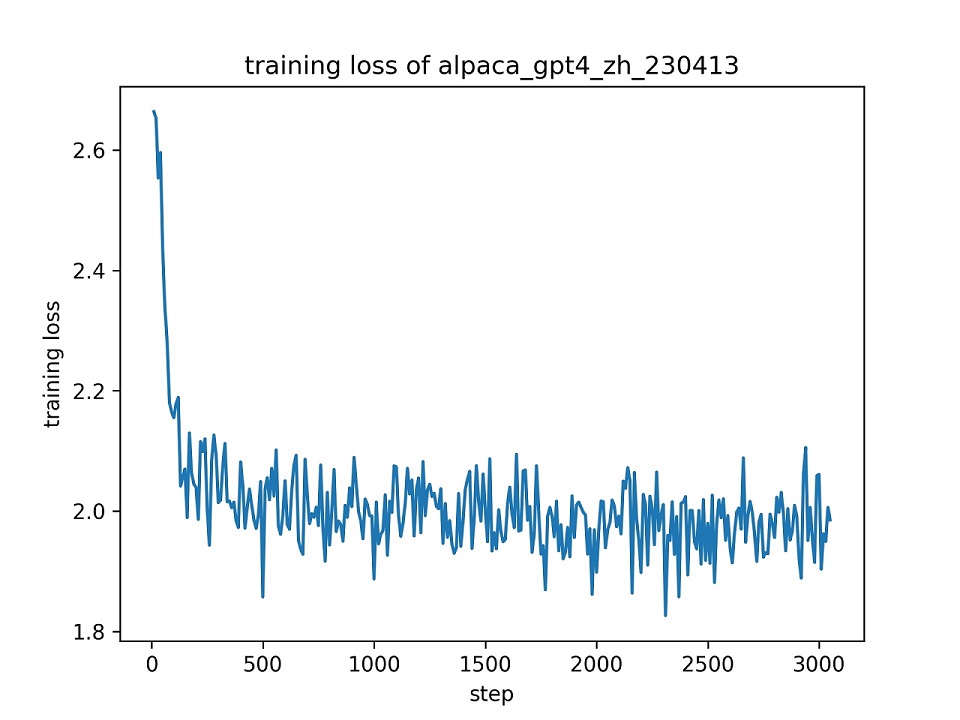
We use the whole alpaca_gpt4_zh dataset to fine-tune the ChatGLM model with LoRA (r=8) for one epoch, using the default hyper-parameters. The loss curve during training is presented below.
Evaluation Results
We select 100 instances in the alpaca_gpt4_zh dataset to evaluate the fine-tuned ChatGLM model and compute the BLEU and ROUGE scores. The results are presented below.
| Score | Original | FZ (l=2) | PT (p=16) | LoRA (r=8) |
|---|---|---|---|---|
| BLEU-4 | 15.75 | 16.85 | 16.06 | 17.01 (+1.26) |
| Rouge-1 | 34.51 | 36.62 | 34.80 | 36.77 (+2.26) |
| Rouge-2 | 15.11 | 17.04 | 15.32 | 16.83 (+1.72) |
| Rouge-l | 26.18 | 28.17 | 26.35 | 28.86 (+2.68) |
| Params (%) | / | 4.35% | 0.06% | 0.06% |
FZ: freeze tuning, PT: P-Tuning V2 (we use
pre_seq_len=16for fair comparison with LoRA), Params: the percentange of trainable parameters.
Projects
- SupritYoung/RLHF-Label-Tool: A tool for ranking the responses of LLMs to generate annotated samples used in RLHF training.
Compared with Existing Implementations
- THUDM/ChatGLM-6B
- Official implementation of fine-tuning ChatGLM with P-Tuning v2 on the ADGEN dataset.
- Our fine-tuning script is largely depend on it. We further implement the LoRA tuning method. Additionally, we dynamically pad the inputs to the longest sequence in the batch instead of the maximum length, to accelerate the fine-tuning.
- mymusise/ChatGLM-Tuning
- An unoffical implementation of fine-tuning ChatGLM with LoRA on the Stanford Alpaca dataset.
- We borrowed some ideas from it. Our fine-tuning script integrates the data pre-processing part into the training procedure, so we need not generate a pre-processed dataset before training.
- ssbuild/chatglm_finetuning
- An unofficial implementation of fine-tuning ChatGLM with several PEFT methods on the Stanford Alpaca dataset.
- Our fine-tuning script is implemented purely with Hugging Face transformers and is independent of the deep_training framework.
- lich99/ChatGLM-finetune-LoRA
- An unofficial implementation of fine-tuning ChatGLM with LoRA on the Stanford Alpaca dataset.
- We use the Hugging Face PEFT to provide the state-of-the-art PEFT methods.
- liucongg/ChatGLM-Finetuning
- An unofficial implementation of fine-tuning ChatGLM with several methods including Freeze, LoRA and P-Tuning on the industrial dataset.
- We are aim to incorporate more instruction-following datasets for fine-tuning the ChatGLM model.
- yanqiangmiffy/InstructGLM
- An unofficial implementation of fine-tuning ChatGLM that explores the ChatGLM's ability on the instruction-following datasets.
- Our fine-tuning script integrates the data pre-processing part in to the training procedure.
TODO
- Employing LangChain to easily build applications that are capable of leveraging external knowledge upon fine-tuned ChatGLM models.
- Implementing the alignment algorithms to align human preferrences.
- Incorporating Chinese datasets into the training sets.
- Incorporating ChatGPT & GPT-4 self-chat data into the training sets.
- Implementing the Freeze-Tuning and P-Tuning method.
- Supporting Multi-GPUs fine-tuning.
- Adding script for evaluation.
- Loading from checkpoint.
- Fine-tuning the quantized model.
- Writing a guidebook about how to fine-tune ChatGLM with this framework.
- Combining with state-of-the-art model editing algorithms. (e.g. MEND)
- Incorporating the OpenAssistant Conversations Dataset for SFT and alignment.
- Incorporating the high quality Chinese instruction dataset COIG.
License
This repository is licensed under the Apache-2.0 License. Please follow the Model License to use ChatGLM-6B model.
Citation
If this work is helpful, please cite as:
@Misc{chatglm-efficient-tuning,
  title = {ChatGLM Efficient Tuning},
  author = {hiyouga},
  howpublished = {\url{https://github.com/hiyouga/ChatGLM-Efficient-Tuning}},
  year = {2023}
}
Acknowledgement
This repo benefits from ChatGLM-6B, ChatGLM-Tuning and yuanzhoulvpi2017/zero_nlp. Thanks for their wonderful works.
Star History
Significant stargazers

897 followers · starred May 2023

24 followers · starred Jul 2023
Similar repos


Languages
Python
100.0%
Fine-tuning ChatGLM-6B with PEFT | 基于 PEFT 的高效 ChatGLM 微调
Python
3,712
286 commits
updated Oct 12, 2023
README
ChatGLM Efficient Tuning
Fine-tuning 🤖ChatGLM-6B model with 🤗PEFT.
👋 Join our WeChat.
[ English | 中文 ]
If you have any questions, please refer to our Wiki📄.
Notice
This repo will not be maintained in the future. Please follow LLaMA-Factory for fine-tuning the language models (including ChatGLM2-6B).
Changelog
[23/07/15] Now we develop an all-in-one Web UI for training, evaluation and inference. Try train_web.py to fine-tune ChatGLM-6B model in your Web browser. Thank @KanadeSiina and @codemayq for their efforts in the development.
[23/07/09] Now we release FastEdit⚡🩹, an easy-to-use package for editing the factual knowledge of large language models efficiently. Please follow FastEdit if you are interested.
[23/06/25] Now we align the demo API with the OpenAI's format where you can insert the fine-tuned model in arbitrary ChatGPT-based applications.
[23/06/25] Now we support fine-tuning the ChatGLM2-6B model with our framework!
[23/06/05] Now we support 4-bit LoRA training (aka QLoRA). Try --quantization_bit 4 argument to work with 4-bit quantized model. (experimental feature)
[23/06/01] We implemented a framework supporting the efficient tuning of LLaMA and BLOOM models. Please follow LLaMA-Efficient-Tuning if you are interested.
[23/05/19] Now we support using the development set to evaluate the model while training. Try --dev_ratio argument to specify the size of development set.
[23/04/29] Now we support training ChatGLM with Reinforcement Learning with Human Feedback (RLHF) ! We provide several examples to run RLHF training, please refer to the examples folder for details.
[23/04/20] Our repo achieved 100 stars within 12 days! Congratulations!
[23/04/19] Now we support merging the weights of fine-tuned models trained by LoRA! Try --checkpoint_dir checkpoint1,checkpoint2 argument for continually fine-tuning the models.
[23/04/18] Now we support training the quantized models using three fine-tuning methods! Try quantization_bit argument for training the model in 4/8 bits.
[23/04/12] Now we support training from checkpoints! Use --checkpoint_dir argument to specify the checkpoint model to fine-tune from.
[23/04/11] Now we support training with combined datasets! Try --dataset dataset1,dataset2 argument for training with multiple datasets.
Datasets
- For supervised fine-tuning:
- Stanford Alpaca (en)
- Stanford Alpaca (zh)
- GPT-4 Generated Data (en&zh)
- Open Assistant (multilingual)
- Self-cognition (zh)
- ShareGPT (zh)
- RefGPT (zh)
- Guanaco Dataset (multilingual)
- BELLE 2M (zh)
- BELLE 1M (zh)
- BELLE 0.5M (zh)
- BELLE Dialogue 0.4M (zh)
- BELLE School Math 0.25M (zh)
- BELLE Multiturn Chat 0.8M (zh)
- Firefly 1.1M (zh)
- LIMA (en)
- CodeAlpaca 20k (en)
- Alpaca CoT (multilingual)
- Web QA (zh)
- UltraChat (en)
- WebNovel (zh)
- For reward modelling:
Please refer to data/README.md for details.
Some datasets require confirmation before using them, so we recommend logging in with your Hugging Face account using these commands.
pip install --upgrade huggingface_hub
huggingface-cli login
Fine-Tuning Methods
Our script now supports the following fine-tuning methods:
- LoRA
- Fine-tuning the low-rank adapters of the model.
- P-Tuning V2
- Fine-tuning the prefix encoder of the model.
- Freeze
- Fine-tuning the MLPs in the last n blocks of the model.
- Full Tuning
- Fine-tuning all the parameters of the model.
Requirement
- Python 3.8+ and PyTorch 1.13.1+
- 🤗Transformers, Datasets, Accelerate, PEFT and TRL
- fire, protobuf, cpm-kernels and sentencepiece
- jieba, rouge-chinese and nltk (used at evaluation)
- gradio and matplotlib (used in train_web.py)
- uvicorn, fastapi and sse-starlette (used in api_demo.py)
And powerful GPUs!
Getting Started
Data Preparation (optional)
Please refer to data/example_dataset for checking the details about the format of dataset files. You can either use a single .json file or a dataset loading script with multiple files to create a custom dataset.
Note: please update data/dataset_info.json to use your custom dataset. About the format of this file, please refer to data/README.md.
Dependence Installation (optional)
git lfs install
git clone https://github.com/hiyouga/ChatGLM-Efficient-Tuning.git
conda create -n chatglm_etuning python=3.10
conda activate chatglm_etuning
cd ChatGLM-Efficient-Tuning
pip install -r requirements.txt
If you want to enable the quantized LoRA (QLoRA) on the Windows platform, you will be required to install a pre-built version of bitsandbytes library, which supports CUDA 11.1 to 12.1.
pip install https://github.com/jllllll/bitsandbytes-windows-webui/releases/download/wheels/bitsandbytes-0.39.1-py3-none-win_amd64.whl
All-in-one Web UI
CUDA_VISIBLE_DEVICES=0 python src/train_web.py
Currently the web UI only supports training on a single GPU.
Fine-tuning with a Single GPU
CUDA_VISIBLE_DEVICES=0 python src/train_bash.py \
    --stage sft \
    --model_name_or_path path_to_your_chatglm_model \
    --do_train \
    --dataset alpaca_gpt4_en \
    --finetuning_type lora \
    --output_dir path_to_sft_checkpoint \
    --per_device_train_batch_size 4 \
    --gradient_accumulation_steps 4 \
    --lr_scheduler_type cosine \
    --logging_steps 10 \
    --save_steps 1000 \
    --learning_rate 5e-5 \
    --num_train_epochs 3.0 \
    --plot_loss \
    --fp16
Please refer to our Wiki about the details of the arguments.
Distributed Fine-tuning with Multiple GPUs
accelerate config # configure the environment
accelerate launch src/train_bash.py # arguments (same as above)
Training Reward Model
CUDA_VISIBLE_DEVICES=0 python src/train_bash.py \
    --stage rm \
    --model_name_or_path path_to_your_chatglm_model \
    --do_train \
    --dataset comparison_gpt4_en \
    --finetuning_type lora \
    --resume_lora_training False \
    --checkpoint_dir path_to_sft_checkpoint \
    --output_dir path_to_rm_checkpoint \
    --per_device_train_batch_size 4 \
    --gradient_accumulation_steps 4 \
    --lr_scheduler_type cosine \
    --logging_steps 10 \
    --save_steps 1000 \
    --learning_rate 1e-5 \
    --num_train_epochs 1.0 \
    --plot_loss \
    --fp16
Training with RLHF
CUDA_VISIBLE_DEVICES=0 python src/train_bash.py \
    --stage ppo \
    --model_name_or_path path_to_your_chatglm_model \
    --do_train \
    --dataset alpaca_gpt4_en \
    --finetuning_type lora \
    --resume_lora_training False \
    --checkpoint_dir path_to_sft_checkpoint \
    --reward_model path_to_rm_checkpoint \
    --output_dir path_to_ppo_checkpoint \
    --per_device_train_batch_size 2 \
    --gradient_accumulation_steps 4 \
    --lr_scheduler_type cosine \
    --logging_steps 10 \
    --save_steps 1000 \
    --learning_rate 1e-5 \
    --num_train_epochs 1.0 \
    --plot_loss
Evaluation (BLEU and ROUGE_CHINESE)
CUDA_VISIBLE_DEVICES=0 python src/train_bash.py \
    --stage sft \
    --model_name_or_path path_to_your_chatglm_model \
    --do_eval \
    --dataset alpaca_gpt4_en \
    --finetuning_type lora \
    --checkpoint_dir path_to_checkpoint \
    --output_dir path_to_eval_result \
    --per_device_eval_batch_size 8 \
    --max_samples 50 \
    --predict_with_generate
Predict
CUDA_VISIBLE_DEVICES=0 python src/train_bash.py \
    --stage sft \
    --model_name_or_path path_to_your_chatglm_model \
    --do_predict \
    --dataset alpaca_gpt4_en \
    --finetuning_type lora \
    --checkpoint_dir path_to_checkpoint \
    --output_dir path_to_predict_result \
    --per_device_eval_batch_size 8 \
    --max_samples 100 \
    --predict_with_generate
If you want to predict the samples with empty responses, please kindly fill the response column with dummy tokens to ensure the sample will not be discarded throughout the preprocessing phase.
API Demo
python src/api_demo.py \
    --model_name_or_path path_to_your_chatglm_model \
    --finetuning_type lora \
    --checkpoint_dir path_to_checkpoint
Visit http://localhost:8000/docs for API documentation.
CLI Demo
python src/cli_demo.py \
    --model_name_or_path path_to_your_chatglm_model \
    --finetuning_type lora \
    --checkpoint_dir path_to_checkpoint
Web Demo
python src/web_demo.py \
    --model_name_or_path path_to_your_chatglm_model \
    --finetuning_type lora \
    --checkpoint_dir path_to_checkpoint
Export model
python src/export_model.py \
    --model_name_or_path path_to_your_chatglm_model \
    --finetuning_type lora \
    --checkpoint_dir path_to_checkpoint \
    --output_dir path_to_export
Hardware Requirements
| Fine-tune method | Batch size | Mode | GRAM | Speed |
|---|---|---|---|---|
| LoRA (r=8) | 16 | FP16 | 28GB | 8ex/s |
| LoRA (r=8) | 8 | FP16 | 24GB | 8ex/s |
| LoRA (r=8) | 4 | FP16 | 20GB | 8ex/s |
| LoRA (r=8) | 4 | INT8 | 10GB | 8ex/s |
| LoRA (r=8) | 4 | INT4 | 8GB | 8ex/s |
| P-Tuning (p=16) | 4 | FP16 | 20GB | 8ex/s |
| P-Tuning (p=16) | 4 | INT8 | 16GB | 8ex/s |
| P-Tuning (p=16) | 4 | INT4 | 12GB | 8ex/s |
| Freeze (l=3) | 4 | FP16 | 24GB | 8ex/s |
| RM method | Batch size | Mode | GRAM | Speed |
|---|---|---|---|---|
| LoRA (r=8) + rm | 4 | FP16 | 22GB | - |
| LoRA (r=8) + rm | 1 | INT8 | 11GB | - |
| RLHF method | Batch size | Mode | GRAM | Speed |
|---|---|---|---|---|
| LoRA (r=8) + ppo | 4 | FP16 | 23GB | - |
| LoRA (r=8) + ppo | 1 | INT8 | 12GB | - |
Note:
ris the lora rank,pis the number of prefix tokens,lis the number of trainable layers,ex/sis the examples per second at training. Thegradient_accumulation_stepsis set to1. All are evaluated on a single Tesla V100 (32G) GPU, they are approximated values and may vary in different GPUs.
Fine-tuning ChatGLM: A Case
Training Results
We use the whole alpaca_gpt4_zh dataset to fine-tune the ChatGLM model with LoRA (r=8) for one epoch, using the default hyper-parameters. The loss curve during training is presented below.
Evaluation Results
We select 100 instances in the alpaca_gpt4_zh dataset to evaluate the fine-tuned ChatGLM model and compute the BLEU and ROUGE scores. The results are presented below.
| Score | Original | FZ (l=2) | PT (p=16) | LoRA (r=8) |
|---|---|---|---|---|
| BLEU-4 | 15.75 | 16.85 | 16.06 | 17.01 (+1.26) |
| Rouge-1 | 34.51 | 36.62 | 34.80 | 36.77 (+2.26) |
| Rouge-2 | 15.11 | 17.04 | 15.32 | 16.83 (+1.72) |
| Rouge-l | 26.18 | 28.17 | 26.35 | 28.86 (+2.68) |
| Params (%) | / | 4.35% | 0.06% | 0.06% |
FZ: freeze tuning, PT: P-Tuning V2 (we use
pre_seq_len=16for fair comparison with LoRA), Params: the percentange of trainable parameters.
Projects
- SupritYoung/RLHF-Label-Tool: A tool for ranking the responses of LLMs to generate annotated samples used in RLHF training.
Compared with Existing Implementations
- THUDM/ChatGLM-6B
- Official implementation of fine-tuning ChatGLM with P-Tuning v2 on the ADGEN dataset.
- Our fine-tuning script is largely depend on it. We further implement the LoRA tuning method. Additionally, we dynamically pad the inputs to the longest sequence in the batch instead of the maximum length, to accelerate the fine-tuning.
- mymusise/ChatGLM-Tuning
- An unoffical implementation of fine-tuning ChatGLM with LoRA on the Stanford Alpaca dataset.
- We borrowed some ideas from it. Our fine-tuning script integrates the data pre-processing part into the training procedure, so we need not generate a pre-processed dataset before training.
- ssbuild/chatglm_finetuning
- An unofficial implementation of fine-tuning ChatGLM with several PEFT methods on the Stanford Alpaca dataset.
- Our fine-tuning script is implemented purely with Hugging Face transformers and is independent of the deep_training framework.
- lich99/ChatGLM-finetune-LoRA
- An unofficial implementation of fine-tuning ChatGLM with LoRA on the Stanford Alpaca dataset.
- We use the Hugging Face PEFT to provide the state-of-the-art PEFT methods.
- liucongg/ChatGLM-Finetuning
- An unofficial implementation of fine-tuning ChatGLM with several methods including Freeze, LoRA and P-Tuning on the industrial dataset.
- We are aim to incorporate more instruction-following datasets for fine-tuning the ChatGLM model.
- yanqiangmiffy/InstructGLM
- An unofficial implementation of fine-tuning ChatGLM that explores the ChatGLM's ability on the instruction-following datasets.
- Our fine-tuning script integrates the data pre-processing part in to the training procedure.
TODO
- Employing LangChain to easily build applications that are capable of leveraging external knowledge upon fine-tuned ChatGLM models.
- Implementing the alignment algorithms to align human preferrences.
- Incorporating Chinese datasets into the training sets.
- Incorporating ChatGPT & GPT-4 self-chat data into the training sets.
- Implementing the Freeze-Tuning and P-Tuning method.
- Supporting Multi-GPUs fine-tuning.
- Adding script for evaluation.
- Loading from checkpoint.
- Fine-tuning the quantized model.
- Writing a guidebook about how to fine-tune ChatGLM with this framework.
- Combining with state-of-the-art model editing algorithms. (e.g. MEND)
- Incorporating the OpenAssistant Conversations Dataset for SFT and alignment.
- Incorporating the high quality Chinese instruction dataset COIG.
License
This repository is licensed under the Apache-2.0 License. Please follow the Model License to use ChatGLM-6B model.
Citation
If this work is helpful, please cite as:
@Misc{chatglm-efficient-tuning,
  title = {ChatGLM Efficient Tuning},
  author = {hiyouga},
  howpublished = {\url{https://github.com/hiyouga/ChatGLM-Efficient-Tuning}},
  year = {2023}
}
Acknowledgement
This repo benefits from ChatGLM-6B, ChatGLM-Tuning and yuanzhoulvpi2017/zero_nlp. Thanks for their wonderful works.
Star History
Similar repos
Significant stargazers
897 followers · starred May 2023
24 followers · starred Jul 2023
Languages
Python
100.0%