
Multi-Agent Coding Harness with pluggable AI-SDLC: switch sessions across claude, codex, gemini, export/share coding sessions, save tokens, multi-frontend (TUI · web · Telegram).
8
stars
318
commits
TypeScript
primary language
Sep 15, 2026
updated
README
Codeoid







Multi-agent harness for AI coding agents — multi-session, multi-frontend, with cross-session memory.
Run N parallel coding-agent sessions across repos — Claude Code by default, with Codex, Gemini, OpenAI, and pi as drop-in backends. Switch between them from a terminal cockpit, a web UI, or Telegram. Memory persists across sessions, so each agent inherits what the last one learned. Every action is auditable, and with ZeroID every agent and sub-agent carries a cryptographic identity.
bun install -g @highflame/codeoid
codeoid start --local          # no account, no login, no config — running in seconds
That's the whole first run. Add real identities whenever you're ready.
Terminal client lives in its own repo. The recommended cockpit is codeoid-tui — a native Rust/Ratatui client that speaks the daemon's WebSocket protocol. A built-in
codeoid tui(Ink/React) ships in this repo as a zero-install fallback. See Terminal client.
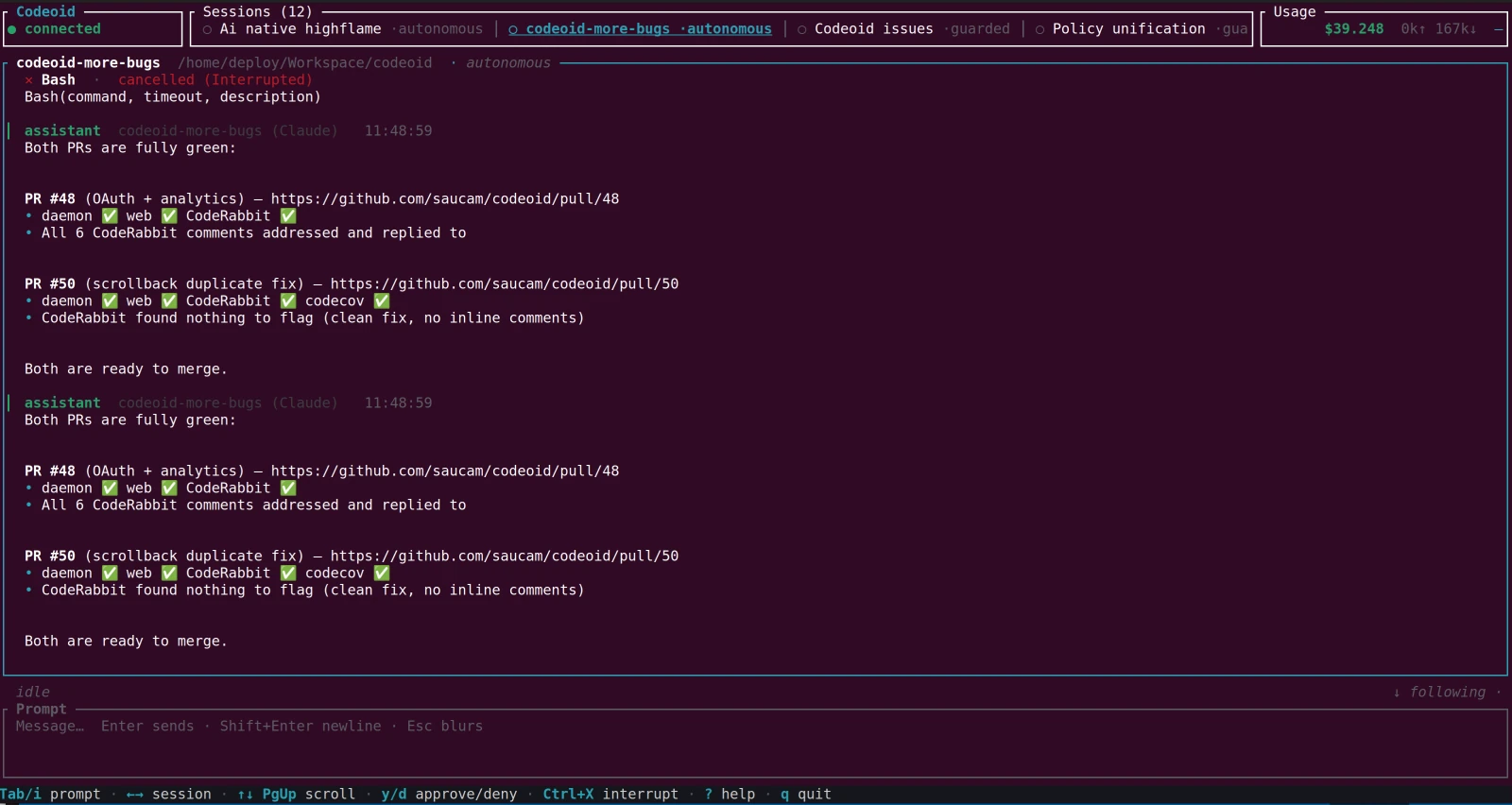
codeoid-tui, the native Rust cockpit, tracking 12 parallel sessions at once. The same sessions open in a browser and on Telegram — one daemon, one source of truth.
Contents
- Quick start
- Why Codeoid
- How Codeoid compares
- Backends
- Architecture
- Features
- Configuration
- CLI reference
- Development
- Contributing & security
Quick start
1. Prerequisites
- Bun v1.0+
- An agent backend. Claude is the default: either
claude login(uses your Claude/Anthropic plan) orANTHROPIC_API_KEYin the environment. Every other backend is optional — see Backends.
That's it for the local path. No account, no identity provider, nothing to sign up for.
2. Install
Pick one path.
This guide writes every command as codeoid <cmd> (the global install); from a source checkout, run bun src/cli.ts <cmd> instead — they're interchangeable.
Don't mix the two.
A. From npm — recommended, to just use it.
Codeoid runs on Bun, so install it with Bun (npm also works, as long as Bun is on your PATH — it's the runtime):
bun install -g @highflame/codeoid   # or: npm install -g @highflame/codeoid
codeoid --help                      # confirm it's on your PATH
If codeoid isn't found afterward, your global-bin directory isn't on PATH — add Bun's (~/.bun/bin) to it, or use path B.
Renamed. codeoid used to publish as the unscoped
codeoidpackage. It now ships from the Highflame org as@highflame/codeoid; the old package is frozen at0.3.4and gets no further releases. The command is stillcodeoid. npm cannot move a package between scopes, so this is a new package rather than a transfer —bun updatewill not carry you across, and neither will anything still depending on the old name.
B. From source — to hack on it.
Clone, then run bun install before anything else:
git clone https://github.com/highflame-ai/codeoid.git
cd codeoid
bun install                   # REQUIRED first — pulls commander and the rest
⚠️ Skipping
bun installand runningbun src/cli.ts …straight from a fresh clone fails witherror: ENOENT while resolving package 'commander'. Runbun installonce in the checkout and it's fixed.
3. Choose an auth posture
Codeoid has exactly two, and you pick at startup. Start with local; graduate when you need identity.
Local — codeoid start --local | ZeroID — codeoid start | |
|---|---|---|
| Setup | none | codeoid login with a key |
| Best for | trying it, solo work on your own machine, demos | real work, teams, anything audited or shared |
| Identity per agent + sub-agent | ❌ self-asserted operator | ✅ cryptographic (SPIFFE/WIMSE) |
| Delegation, scope attenuation, revocation | ❌ | ✅ |
| Audit attribution | records every action; principal self-asserted | cryptographically attributable |
| Reachable from other machines | loopback only | ✅ |
| Telegram frontend | ❌ | ✅ |
| Memory, every backend, fork, conductor, telemetry, TUI + web | ✅ | ✅ |
Everything that isn't about identity works identically in both. Scope enforcement is the same code path in both — local mode changes the issuer, not the mechanism.
Path A — Local: no account, no login
codeoid start --local
The daemon mints a one-off token, prints it, publishes it to ~/.codeoid/local-token-<port> (mode 0600), and binds 127.0.0.1 only.
Then, from another terminal:
codeoid tui # the cockpit — token picked up automatically
or drive it one command at a time:
codeoid new demo .                           # a session in the current directory
codeoid send demo "what does this repo do?"
codeoid ls
or open http://localhost:7400/ui/ — already signed in, because the daemon hands the page its token.
What --local is and isn't. It is not "auth off": the daemon runs agents with shell and file-write access, so a token-less port would be an RCE surface for any local process. The minted token, the 0600 file, and the loopback bind are the Jupyter model — and none of them cost you a setup step. A non-loopback --host is refused unless you explicitly pass --local-allow-remote.
Two things to know before you invest work in it:
- No verified identity. No per-agent ZeroID identity, no delegated sub-agent tokens, no scope attenuation, no revocation, and audit attribution is self-asserted (
anonymous:operator). Every surface says so — a startup banner, alocal modebadge in the web UI, and a warning in the identity drawer. - Local sessions live in a reserved
local/localtenant, so they won't be listed after a latercodeoid login. That's correct isolation, but it reads like data loss if you aren't expecting it.
→ Full local-mode reference — trust model, the tenant boundary, how clients find the token, and the design invariant.
Path B — ZeroID: identities for real work
You need a ZeroID key. Two ways to get one.
Option 1 — Highflame SaaS (recommended, no infra)
-
Sign up at highflame.ai and open Studio → Code Agents.
-
Create a code agent and mint its key — you'll get a
zid_sk_..., shown once, so copy it now.- The agent's credential policy must allow the
api-keygrant type, or the key won't verify. If minting or registration fails with a grant-type error, switch the agent to a policy that permitsapi-keygrants.
- The agent's credential policy must allow the
-
Log in — Codeoid ships pointing at the Highflame SaaS issuer, so there's nothing else to configure:
codeoid login # prompts for the key (hidden), verifies it, saves to ~/.codeoid/config.json
Option 2 — Self-hosted ZeroID (local, ~2 min)
ZeroID is open source. Bring it up with Docker, mint a key, then point Codeoid at it.
First, in a directory outside your Codeoid checkout, run ZeroID:
git clone https://github.com/highflame-ai/zeroid
cd zeroid
make setup-keys              # generate the ECDSA/RSA signing keys
docker compose up -d         # starts Postgres + ZeroID on :8899
curl http://localhost:8899/health     # → {"status":"healthy",...}
# Then register an agent to mint a key (zid_sk_…, shown once) — use the
# ZeroID SDK / API from its quickstart, e.g.
#   client.agents.register(name="codeoid", created_by="you@example.com")
Then, back in Codeoid, log in against your local issuer with that key:
codeoid login --zeroid local                       # localhost:8899
# ...or any deployment:
codeoid login --zeroid https://zeroid.mycorp.com
--zeroid accepts a preset (highflame, highflame-dev, local) or any URL.
The issuer is pinned to whatever you log in against — a token minted by any other issuer is rejected.
login exchanges the key on the spot and prints the subject + granted scopes so you know it works before the daemon ever starts.
The daemon fetches the issuer's JWKS to verify tokens, so wherever ZeroID runs must be reachable from the daemon.
Then start it:
codeoid start # no --local
Each client authenticates itself — not just the daemon.
codeoid loginauthorizes the daemon (saved to~/.codeoid/config.json). A browser or Telegram client is a separate client under the same zero-trust model, so the web UI's first-run splash asks for a credential too — paste the samezid_sk_...key (or a scoped share token) once; the browser remembers it and exchanges it for a short-lived JWT to talk to the daemon. Logging in on the CLI does not carry over to the browser. (In local mode this step disappears: the daemon hands the browser its token directly.)
4. Connect a client
Any of these, against either posture:
# Recommended: the native Rust cockpit (separate repo).
#   git clone https://github.com/highflame-ai/codeoid-ui && cd codeoid-ui
#   cargo run -p codeoid-tui --release
#
# Or the built-in fallback TUI (Ink/React, no extra install):
codeoid tui
Or browse to http://localhost:7400/ui/ for the web UI.
Telegram is available on the ZeroID path — set TELEGRAM_BOT_TOKEN + TELEGRAM_ALLOWED_USER_IDS in ~/.codeoid/.env.
5. First things worth trying
codeoid new feat-a . --worktree feat-a     # a session in its own git worktree
codeoid new feat-b . --worktree feat-b     # a second one, in parallel — same workspace memory
Then, in a session: ask it something, and in the next session ask what did we learn about X yesterday? — recall returns the real bytes, not a summary.
/who prints the identity chain (rich on the ZeroID path, honest about being self-asserted on the local one).
Why Codeoid
You're orchestrating AI coding agents. Codeoid solves the things Claude Code's single-terminal experience can't:
- Parallel sessions, shared workspace memory — Two sessions on two git worktrees building feature A and feature B. Both inherit the same workspace's history. Session B can
recall()what Session A learned yesterday, no re-read. - Never-lose-detail memory — Every tool call, result, and reasoning block persists as a retrievable episode. No lossy compaction. Recall returns the real bytes.
- Three-layer context reduction — Pre-entry compression of CLI output + auto-rotation of the backing context + verbatim recall. Turns that would have cost $0.30 drop to pennies; peak occupancy stays below compaction.
- Mid-turn streaming input (VSCode parity) — Send a follow-up message while Claude is already responding. Priority semantics (
now/next/later) let you interrupt-and-re-integrate or gracefully queue for the next turn. - Production-grade token instrumentation — Per-turn input/output/cache/cost persisted to SQLite. Live StatusBar shows cumulative + Δ this-turn + cache hit rate + current context occupancy + queue depth + rotation count.
- Autonomous runs with a budget — Flip a session to autonomous mode; it auto-approves safe operations until a write/exec budget is spent, then hands control back.
- Device handoff — Start a session on your laptop, attach from your phone. Scrollback replays. Same conversation.
- Identity-grade audit — Every tool call stamped with the SPIFFE URI of the agent that made it. Sub-agents get their own attenuated identities. Delegation chain traceable top to bottom.
- Multi-frontend — same session accessible from terminal TUI, browser, or Telegram bot. Share read-only tokens with a teammate.
How Codeoid compares
Codeoid isn't a general-purpose IDE assistant. It's built for long-horizon, multi-session agent work, where context continuity and token economics matter more than inline code actions — so it optimizes for what the tools you already use don't: verbatim cross-session memory, parallel sessions on one control plane, a cryptographic identity per agent and sub-agent, and per-turn token economics.
Its closest peer is Omnigent, another multi-harness meta-harness — both run Claude, Codex, Gemini, OpenAI, and pi. They optimize for different things. Omnigent leans on breadth and isolation: the widest harness set (incl. Cursor, OpenCode, Hermes), an OS-level sandbox, and credential brokering. Codeoid leans on memory and identity: workspace-scoped verbatim recall, a cryptographic identity per agent and sub-agent (ZeroID), and per-turn token economics — reachable from a terminal, a browser, or your phone. Rule of thumb: reach for Omnigent when you need OS-level isolation and the broadest harness set; reach for Codeoid when you want persistent cross-session memory and per-agent audit for long-horizon work.
📊 Full capability matrix → — feature by feature against Claude Code CLI, the VSCode extension, Cursor, Aider, and Omnigent.
Backends
Claude is the default and always available. Every other backend is opt-in and auto-detected:
- CLI backends (
codex,gemini-cli,pi) run their own agent CLI. Codex and pi authenticate with their own login (your existing Codex / pi subscription);gemini-cliuses a Gemini API key or Vertex.gemini-cliandpiship bundled with Codeoid (no separate install);codexyou install yourself. - In-daemon API backends (
openai,gemini) register only when their API key is set in~/.codeoid/.env. These bill against the key, not a subscription.
Pick a backend per session with codeoid new <name> --provider <id>, or switch a live session with /provider <id>.
Set keys from the Settings screen (⚙ / /settings) or by editing ~/.codeoid/.env — see Configuration for every variable.
Gemini needs an API key (or Vertex) — a consumer Google (AI Pro/Ultra) subscription can't be used with Codeoid. Both Gemini backends authenticate with
GEMINI_API_KEY/GOOGLE_API_KEY(from AI Studio) or Vertex. The difference is capability:gemini-cliruns the full Gemini CLI over ACP (streaming + its own tools/MCP), whilegeminiis a lightweight in-daemon API client.
Claude — default, always on (Anthropic)
Nothing to install — it runs in-process via the Claude Agent SDK. Just authenticate one of two ways:
- Subscription:
claude login(uses your Claude/Anthropic plan), or - API key: put
ANTHROPIC_API_KEY=sk-ant-…in~/.codeoid/.env. - Amazon Bedrock: set
CLAUDE_CODE_USE_BEDROCK=1. AWS credentials aren't forwarded to the backend by default — allow them through withCODEOID_AGENT_ENV_ALLOW=AWS_ACCESS_KEY_ID,AWS_SECRET_ACCESS_KEY,AWS_SESSION_TOKEN.
Models: the aliases opus / sonnet / haiku, or any full claude-* id (codeoid new work --provider claude, then /model opus).
Gemini CLI (gemini-cli) — the richer Gemini backend (API key / Vertex)
Runs the full Gemini CLI over ACP — streaming plus its own tools/MCP — so it's a fuller Gemini experience than the lightweight in-daemon gemini backend.
- Auth: set
GEMINI_API_KEY(from AI Studio) in~/.codeoid/.env, or configure Vertex (GOOGLE_*+ a GCP project). A consumer Google subscription is not supported. - No install needed — Codeoid bundles the Gemini CLI; at runtime it uses
geminifrom yourPATHif present, otherwise its bundled copy.
Override the binary with providers.geminiCli.command, or disable it with providers.geminiCli.enabled: false in config.json. Driven over ACP (gemini --acp).
Codex (codex) — OpenAI Codex CLI
- Install the OpenAI Codex CLI (
npm i -g @openai/codex) — unlike gemini-cli/pi it is not bundled, socodexmust be on yourPATH(or pointproviders.codex.commandat it). - Authenticate with
codex login(stored in~/.codex/auth.json) — uses your OpenAI/Codex plan — or provideOPENAI_API_KEYin the environment. - Codeoid auto-detects
codex(yourPATHplus common Node bin dirs) and drives it overcodex app-server.
Override with providers.codex.command, disable with providers.codex.enabled: false. Codex's native approval/sandbox default is derived from the session mode; pin it with CODEX_APPROVAL_POLICY (untrusted / on-request / never) and CODEX_SANDBOX_POLICY (read-only / workspace-write / danger-full-access).
pi (pi) — the pi coding agent
- Log in once with the pi CLI so it stores credentials in
~/.pi/agent/auth.json. - That's it — Codeoid bundles pi, so at runtime it uses
pifrom yourPATHif present, otherwise its bundled copy, driven overpi --mode rpc.
Override with providers.pi.command, disable with providers.pi.enabled: false. PI_CONFIG_DIR relocates pi's config/credential directory.
OpenAI (openai) — API key
An in-daemon backend that talks to the OpenAI API. Set OPENAI_API_KEY=sk-… in ~/.codeoid/.env (or via the Settings screen). The backend registers only when the key is present. Billed against the key.
Gemini (gemini) — API key
A lightweight in-daemon backend that talks to the Gemini API. Set GOOGLE_API_KEY=… (or GEMINI_API_KEY) in ~/.codeoid/.env; it registers only when the key is present. For a fuller agent (streaming + tools) on the same key, use gemini-cli above.
Architecture
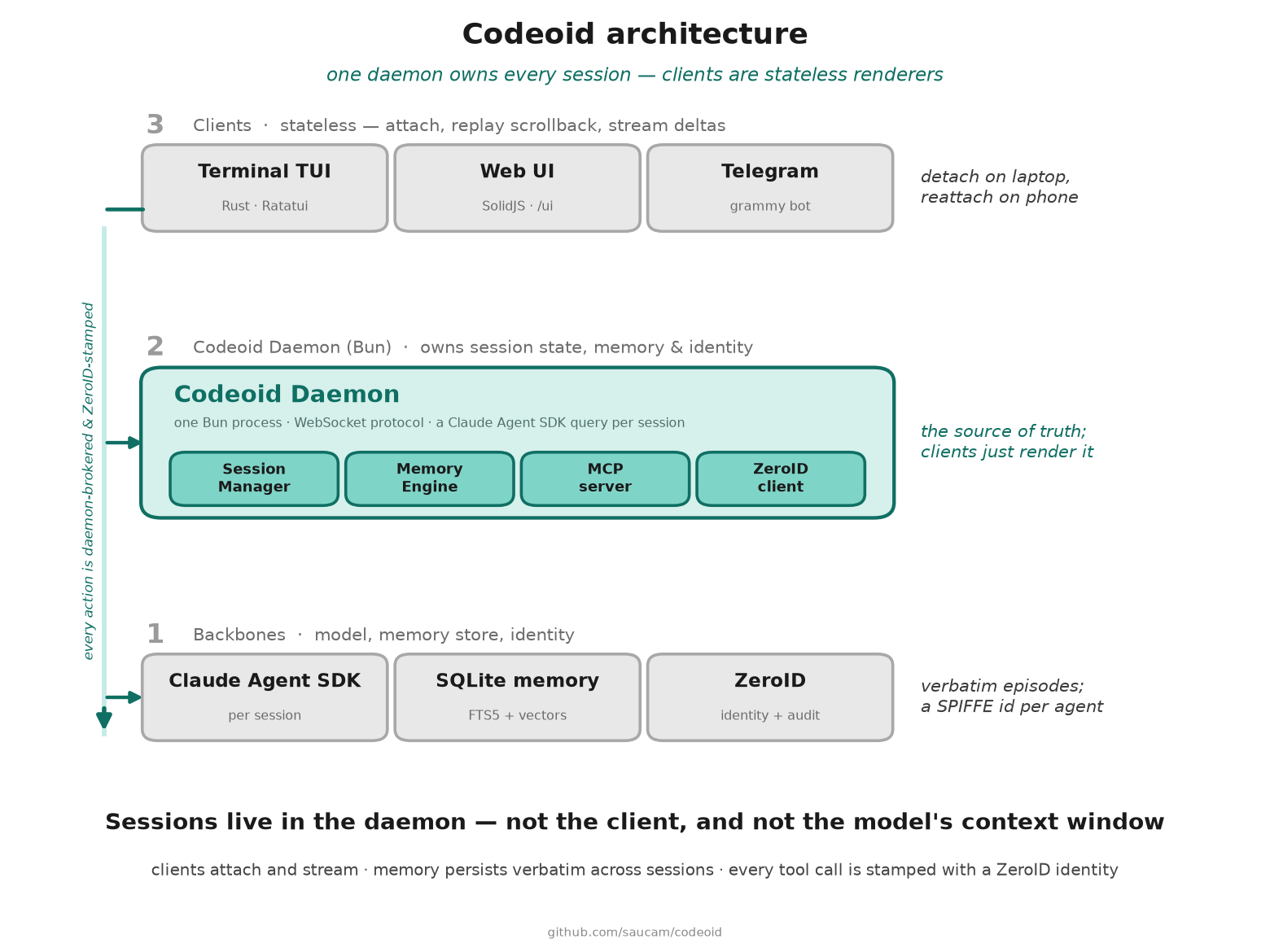
Claude is the default backend; Codex, Gemini, OpenAI, pi, and the Gemini CLI plug into the same session interface.
In one Bun process the daemon brokers everything between your clients and Claude, and owns three subsystems:
- Session Manager — per-session mode + write/exec budget, pinned files, the sub-agent tree, scrollback, and a JSONL transcript for crash-safe resume.
- Memory Engine — a chunker turns every tool call into a verbatim episode; a hybrid ranker (vectors + FTS5 BM25 + recency + path overlap) serves it back. Backed by SQLite (FTS5 + embeddings + file-read cache) and exposed to Claude as an in-process MCP server —
recall(),recall_file(),timeline(). - ZeroID client — registers the session's SPIFFE identity and mints attenuated tokens for each sub-agent. (Not initialized in local mode — that's the one subsystem the degraded posture turns off.)
Each session drives its own provider backend — the Claude Agent SDK by default, or Codex, Gemini, OpenAI, pi, or the Gemini CLI, all behind one SessionProvider interface (adding a backend is one factory + one register()).
The diagram above shows how the pieces fit.
Auth is a single seam: one TokenVerifier converts a bearer token into an AuthContext, and every enforcement site downstream reads that data without knowing which issuer produced it.
That's what lets local mode be a second implementation rather than a bypass — see the design invariant.
Sessions are daemon-owned. Clients are stateless; they attach, receive scrollback replay, and stream live deltas. Detach and re-attach from anywhere.
Features
Full detail — keybindings, slash commands, ranking weights, rotation thresholds — lives in docs/FEATURES.md. The highlights:
Memory & context
- Cross-session memory — every tool call, result, and reasoning block is stored verbatim as a retrievable episode, served back by a hybrid ranker (vectors + FTS5 + recency + path overlap). Claude gets
recall(),recall_file(), andtimeline(). - Workspace memory index — a compact hot-files + topic-clusters + recent-sessions block auto-injected into every system prompt, so a fresh session starts already oriented.
- Three-layer context reduction — pre-entry CLI-output compression, backing-context auto-rotation, and verbatim recall. All lossless: recall returns the original bytes.
Sessions & control
- Multiple harnesses — Claude Code by default; Codex, Gemini, OpenAI, pi, and the Gemini CLI drop in behind one provider interface. Fork a session onto a different backend and it resumes with the full conversation.
- Parallel sessions + git worktrees — run features side by side; branches share one workspace memory, anchored on
git-common-dir. - Execution modes —
guarded/interactive/autonomous, the last with a write-action budget that reverts to guarded when spent. - Mid-turn streaming input — send a follow-up while Claude is still responding;
now/next/laterpriority. - Attachments —
@filementions, one-shot/context, and persistent/pin; drag-drop in the web UI.
Identity & resilience
- Cryptographic identity per agent + sub-agent — ZeroID SPIFFE/WIMSE URIs stamped on every tool call;
/whoprints the full delegation chain, and revoking the parent kills it. (ZeroID posture only — local mode trades this away by design.) - Production resilience — retry-with-fallback, graceful shutdown, transcript-based resume, rate limiting, keep-warm interrupt, and never-lose-message persistence.
Interfaces
One daemon, one source of truth, three ways in: the terminal cockpit (shown at the top), a browser, and Telegram. Device handoff lets you start on one and pick the session up on another — scrollback replays.
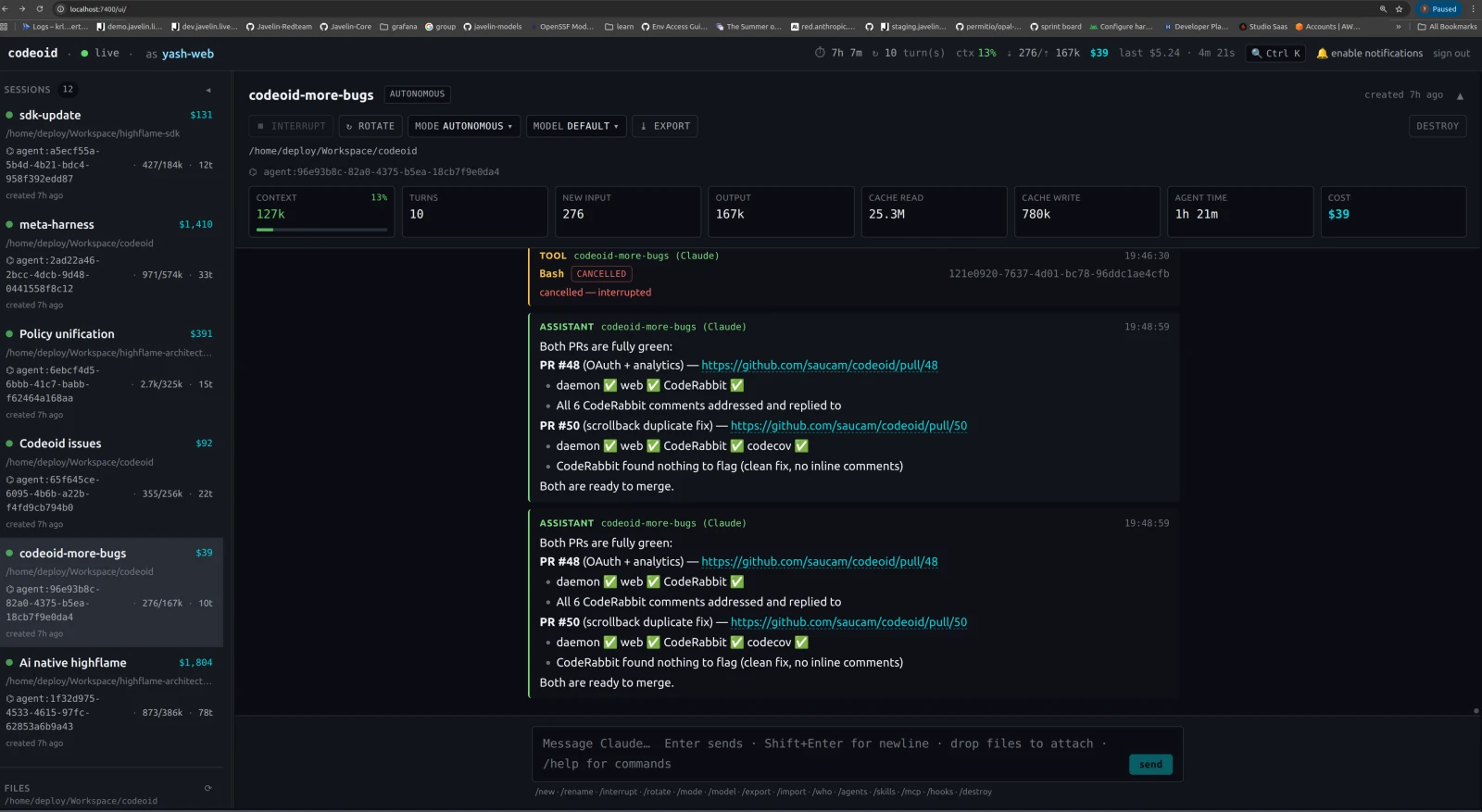
The SolidJS web UI at localhost:7400/ui — session list on the left, live log in the center, a metrics strip on top (turns, tokens, cache reads, cumulative cost).
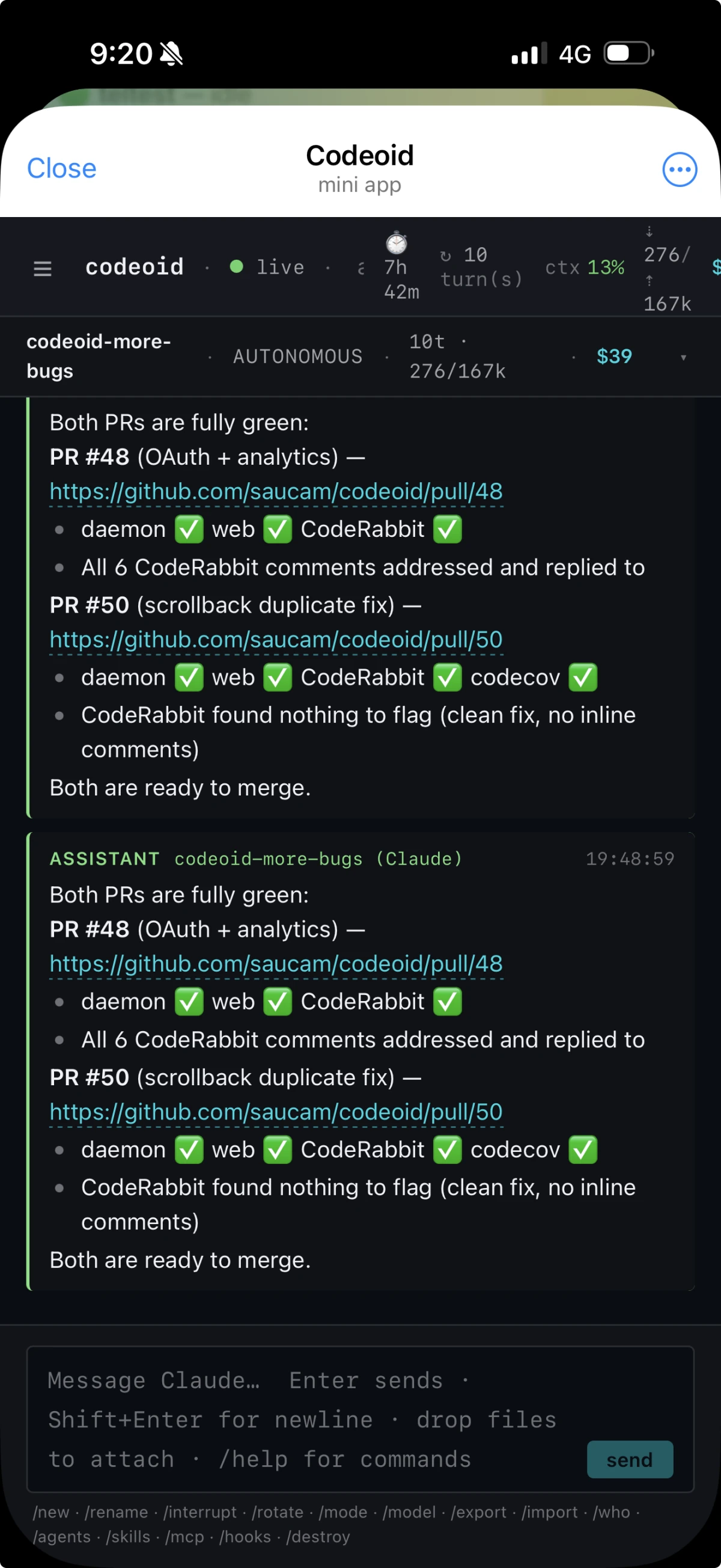
The same session on a phone, in the Telegram mini app — identical scrollback, a live header, served by the bot over the same WebSocket.
Full keybindings, slash commands, and the Telegram command set → docs/FEATURES.md.
Configuration
Codeoid reads ~/.codeoid/config.json and environment variables; env-only secrets (like the Telegram bot token) live in ~/.codeoid/.env so they survive daemon restarts.
Every client action is gated by a permission scope — identically in both auth postures — and on the ZeroID path scopes attenuate into revocable read-only share tokens for teammates.
→ Configuration & permission scopes — every environment variable, the config.json schema, the ~/.codeoid/.env file, and the full scope list.
→ Local mode — the no-ZeroID posture in full.
CLI reference
Commands below use the global install (codeoid). From a source checkout, replace codeoid with bun src/cli.ts.
codeoid start [--port 7400] [--host 127.0.0.1] [--no-telegram] [--no-web]
  --local                                            #   no ZeroID: mint a token, loopback only, no login
  --local-allow-remote                               #   allow --local on a non-loopback bind (unsafe)

codeoid login [key] [--zeroid <preset|url>]          # save + verify a ZeroID key
codeoid tui                                          # Launch the cockpit TUI
codeoid ls                                           # List sessions
codeoid new <name> [workdir]                         # Create session
  --worktree <branch>                                #   auto-spawn a git worktree
  --repo <path>                                      #   worktree source (default: cwd)
  --worktree-dir <path>                              #   override target dir
  --provider <id>                                    #   pick a backend for this session
codeoid attach <session>                             # Readline streaming attach
codeoid send <session> <message...>                  # One-shot send
codeoid interrupt <session>                          # Interrupt
codeoid approve <session> [--deny]                   # Approve / deny pending tool
codeoid destroy <session>                            # Destroy
Development
bun install              # install deps
bun run dev              # run daemon with --watch
bun run build            # build to dist/
bun run typecheck        # type check
bun run lint             # lint with biome
bun test                 # run unit tests (memory, attachments, etc.)
Key files
| Area | File |
|---|---|
| CLI + command routing | src/cli.ts |
| Daemon HTTP + WebSocket | src/daemon/server.ts |
| Auth seam (verifier interface) | src/daemon/verifier.ts |
| ZeroID verification | src/daemon/auth.ts |
| Local mode (no-ZeroID posture) | src/daemon/local-auth.ts |
| Session orchestration | src/daemon/session-manager.ts, src/daemon/session.ts |
| Memory engine | src/daemon/memory/ |
| Attachments + limits | src/daemon/attachments.ts |
| Git worktree helper | src/worktree.ts |
Web UI server (serves web/dist at /ui) | src/frontends/web-ui/index.ts |
| Web UI app (SolidJS) | web/ |
| Telegram bot | src/frontends/telegram/index.ts |
| Built-in TUI (Ink, legacy fallback) | src/tui/ |
| Native TUI (Rust, recommended) | highflame-ai/codeoid-ui |
| Protocol types | packages/protocol/src/types.ts |
Contributing & security
PRs welcome — see CONTRIBUTING.md. For vulnerabilities, see SECURITY.md (please don't open public issues for security).
License
MIT © Codeoid
Powered by ZeroID with pluggable agent backends (default Claude Agent SDK). Terminal cockpit: codeoid-tui.
Contributors


See what people are saying
Similar repos


Languages
TypeScript
99.6%
Multi-Agent Coding Harness with pluggable AI-SDLC: switch sessions across claude, codex, gemini, export/share coding sessions, save tokens, multi-frontend (TUI · web · Telegram).
8
stars
318
commits
TypeScript
primary language
Sep 15, 2026
updated
README
Codeoid
Multi-agent harness for AI coding agents — multi-session, multi-frontend, with cross-session memory.
Run N parallel coding-agent sessions across repos — Claude Code by default, with Codex, Gemini, OpenAI, and pi as drop-in backends. Switch between them from a terminal cockpit, a web UI, or Telegram. Memory persists across sessions, so each agent inherits what the last one learned. Every action is auditable, and with ZeroID every agent and sub-agent carries a cryptographic identity.
bun install -g @highflame/codeoid
codeoid start --local          # no account, no login, no config — running in seconds
That's the whole first run. Add real identities whenever you're ready.
Terminal client lives in its own repo. The recommended cockpit is codeoid-tui — a native Rust/Ratatui client that speaks the daemon's WebSocket protocol. A built-in
codeoid tui(Ink/React) ships in this repo as a zero-install fallback. See Terminal client.
codeoid-tui, the native Rust cockpit, tracking 12 parallel sessions at once. The same sessions open in a browser and on Telegram — one daemon, one source of truth.
Contents
- Quick start
- Why Codeoid
- How Codeoid compares
- Backends
- Architecture
- Features
- Configuration
- CLI reference
- Development
- Contributing & security
Quick start
1. Prerequisites
- Bun v1.0+
- An agent backend. Claude is the default: either
claude login(uses your Claude/Anthropic plan) orANTHROPIC_API_KEYin the environment. Every other backend is optional — see Backends.
That's it for the local path. No account, no identity provider, nothing to sign up for.
2. Install
Pick one path.
This guide writes every command as codeoid <cmd> (the global install); from a source checkout, run bun src/cli.ts <cmd> instead — they're interchangeable.
Don't mix the two.
A. From npm — recommended, to just use it.
Codeoid runs on Bun, so install it with Bun (npm also works, as long as Bun is on your PATH — it's the runtime):
bun install -g @highflame/codeoid   # or: npm install -g @highflame/codeoid
codeoid --help                      # confirm it's on your PATH
If codeoid isn't found afterward, your global-bin directory isn't on PATH — add Bun's (~/.bun/bin) to it, or use path B.
Renamed. codeoid used to publish as the unscoped
codeoidpackage. It now ships from the Highflame org as@highflame/codeoid; the old package is frozen at0.3.4and gets no further releases. The command is stillcodeoid. npm cannot move a package between scopes, so this is a new package rather than a transfer —bun updatewill not carry you across, and neither will anything still depending on the old name.
B. From source — to hack on it.
Clone, then run bun install before anything else:
git clone https://github.com/highflame-ai/codeoid.git
cd codeoid
bun install                   # REQUIRED first — pulls commander and the rest
⚠️ Skipping
bun installand runningbun src/cli.ts …straight from a fresh clone fails witherror: ENOENT while resolving package 'commander'. Runbun installonce in the checkout and it's fixed.
3. Choose an auth posture
Codeoid has exactly two, and you pick at startup. Start with local; graduate when you need identity.
Local — codeoid start --local | ZeroID — codeoid start | |
|---|---|---|
| Setup | none | codeoid login with a key |
| Best for | trying it, solo work on your own machine, demos | real work, teams, anything audited or shared |
| Identity per agent + sub-agent | ❌ self-asserted operator | ✅ cryptographic (SPIFFE/WIMSE) |
| Delegation, scope attenuation, revocation | ❌ | ✅ |
| Audit attribution | records every action; principal self-asserted | cryptographically attributable |
| Reachable from other machines | loopback only | ✅ |
| Telegram frontend | ❌ | ✅ |
| Memory, every backend, fork, conductor, telemetry, TUI + web | ✅ | ✅ |
Everything that isn't about identity works identically in both. Scope enforcement is the same code path in both — local mode changes the issuer, not the mechanism.
Path A — Local: no account, no login
codeoid start --local
The daemon mints a one-off token, prints it, publishes it to ~/.codeoid/local-token-<port> (mode 0600), and binds 127.0.0.1 only.
Then, from another terminal:
codeoid tui # the cockpit — token picked up automatically
or drive it one command at a time:
codeoid new demo .                           # a session in the current directory
codeoid send demo "what does this repo do?"
codeoid ls
or open http://localhost:7400/ui/ — already signed in, because the daemon hands the page its token.
What --local is and isn't. It is not "auth off": the daemon runs agents with shell and file-write access, so a token-less port would be an RCE surface for any local process. The minted token, the 0600 file, and the loopback bind are the Jupyter model — and none of them cost you a setup step. A non-loopback --host is refused unless you explicitly pass --local-allow-remote.
Two things to know before you invest work in it:
- No verified identity. No per-agent ZeroID identity, no delegated sub-agent tokens, no scope attenuation, no revocation, and audit attribution is self-asserted (
anonymous:operator). Every surface says so — a startup banner, alocal modebadge in the web UI, and a warning in the identity drawer. - Local sessions live in a reserved
local/localtenant, so they won't be listed after a latercodeoid login. That's correct isolation, but it reads like data loss if you aren't expecting it.
→ Full local-mode reference — trust model, the tenant boundary, how clients find the token, and the design invariant.
Path B — ZeroID: identities for real work
You need a ZeroID key. Two ways to get one.
Option 1 — Highflame SaaS (recommended, no infra)
-
Sign up at highflame.ai and open Studio → Code Agents.
-
Create a code agent and mint its key — you'll get a
zid_sk_..., shown once, so copy it now.- The agent's credential policy must allow the
api-keygrant type, or the key won't verify. If minting or registration fails with a grant-type error, switch the agent to a policy that permitsapi-keygrants.
- The agent's credential policy must allow the
-
Log in — Codeoid ships pointing at the Highflame SaaS issuer, so there's nothing else to configure:
codeoid login # prompts for the key (hidden), verifies it, saves to ~/.codeoid/config.json
Option 2 — Self-hosted ZeroID (local, ~2 min)
ZeroID is open source. Bring it up with Docker, mint a key, then point Codeoid at it.
First, in a directory outside your Codeoid checkout, run ZeroID:
git clone https://github.com/highflame-ai/zeroid
cd zeroid
make setup-keys              # generate the ECDSA/RSA signing keys
docker compose up -d         # starts Postgres + ZeroID on :8899
curl http://localhost:8899/health     # → {"status":"healthy",...}
# Then register an agent to mint a key (zid_sk_…, shown once) — use the
# ZeroID SDK / API from its quickstart, e.g.
#   client.agents.register(name="codeoid", created_by="you@example.com")
Then, back in Codeoid, log in against your local issuer with that key:
codeoid login --zeroid local                       # localhost:8899
# ...or any deployment:
codeoid login --zeroid https://zeroid.mycorp.com
--zeroid accepts a preset (highflame, highflame-dev, local) or any URL.
The issuer is pinned to whatever you log in against — a token minted by any other issuer is rejected.
login exchanges the key on the spot and prints the subject + granted scopes so you know it works before the daemon ever starts.
The daemon fetches the issuer's JWKS to verify tokens, so wherever ZeroID runs must be reachable from the daemon.
Then start it:
codeoid start # no --local
Each client authenticates itself — not just the daemon.
codeoid loginauthorizes the daemon (saved to~/.codeoid/config.json). A browser or Telegram client is a separate client under the same zero-trust model, so the web UI's first-run splash asks for a credential too — paste the samezid_sk_...key (or a scoped share token) once; the browser remembers it and exchanges it for a short-lived JWT to talk to the daemon. Logging in on the CLI does not carry over to the browser. (In local mode this step disappears: the daemon hands the browser its token directly.)
4. Connect a client
Any of these, against either posture:
# Recommended: the native Rust cockpit (separate repo).
#   git clone https://github.com/highflame-ai/codeoid-ui && cd codeoid-ui
#   cargo run -p codeoid-tui --release
#
# Or the built-in fallback TUI (Ink/React, no extra install):
codeoid tui
Or browse to http://localhost:7400/ui/ for the web UI.
Telegram is available on the ZeroID path — set TELEGRAM_BOT_TOKEN + TELEGRAM_ALLOWED_USER_IDS in ~/.codeoid/.env.
5. First things worth trying
codeoid new feat-a . --worktree feat-a     # a session in its own git worktree
codeoid new feat-b . --worktree feat-b     # a second one, in parallel — same workspace memory
Then, in a session: ask it something, and in the next session ask what did we learn about X yesterday? — recall returns the real bytes, not a summary.
/who prints the identity chain (rich on the ZeroID path, honest about being self-asserted on the local one).
Why Codeoid
You're orchestrating AI coding agents. Codeoid solves the things Claude Code's single-terminal experience can't:
- Parallel sessions, shared workspace memory — Two sessions on two git worktrees building feature A and feature B. Both inherit the same workspace's history. Session B can
recall()what Session A learned yesterday, no re-read. - Never-lose-detail memory — Every tool call, result, and reasoning block persists as a retrievable episode. No lossy compaction. Recall returns the real bytes.
- Three-layer context reduction — Pre-entry compression of CLI output + auto-rotation of the backing context + verbatim recall. Turns that would have cost $0.30 drop to pennies; peak occupancy stays below compaction.
- Mid-turn streaming input (VSCode parity) — Send a follow-up message while Claude is already responding. Priority semantics (
now/next/later) let you interrupt-and-re-integrate or gracefully queue for the next turn. - Production-grade token instrumentation — Per-turn input/output/cache/cost persisted to SQLite. Live StatusBar shows cumulative + Δ this-turn + cache hit rate + current context occupancy + queue depth + rotation count.
- Autonomous runs with a budget — Flip a session to autonomous mode; it auto-approves safe operations until a write/exec budget is spent, then hands control back.
- Device handoff — Start a session on your laptop, attach from your phone. Scrollback replays. Same conversation.
- Identity-grade audit — Every tool call stamped with the SPIFFE URI of the agent that made it. Sub-agents get their own attenuated identities. Delegation chain traceable top to bottom.
- Multi-frontend — same session accessible from terminal TUI, browser, or Telegram bot. Share read-only tokens with a teammate.
How Codeoid compares
Codeoid isn't a general-purpose IDE assistant. It's built for long-horizon, multi-session agent work, where context continuity and token economics matter more than inline code actions — so it optimizes for what the tools you already use don't: verbatim cross-session memory, parallel sessions on one control plane, a cryptographic identity per agent and sub-agent, and per-turn token economics.
Its closest peer is Omnigent, another multi-harness meta-harness — both run Claude, Codex, Gemini, OpenAI, and pi. They optimize for different things. Omnigent leans on breadth and isolation: the widest harness set (incl. Cursor, OpenCode, Hermes), an OS-level sandbox, and credential brokering. Codeoid leans on memory and identity: workspace-scoped verbatim recall, a cryptographic identity per agent and sub-agent (ZeroID), and per-turn token economics — reachable from a terminal, a browser, or your phone. Rule of thumb: reach for Omnigent when you need OS-level isolation and the broadest harness set; reach for Codeoid when you want persistent cross-session memory and per-agent audit for long-horizon work.
📊 Full capability matrix → — feature by feature against Claude Code CLI, the VSCode extension, Cursor, Aider, and Omnigent.
Backends
Claude is the default and always available. Every other backend is opt-in and auto-detected:
- CLI backends (
codex,gemini-cli,pi) run their own agent CLI. Codex and pi authenticate with their own login (your existing Codex / pi subscription);gemini-cliuses a Gemini API key or Vertex.gemini-cliandpiship bundled with Codeoid (no separate install);codexyou install yourself. - In-daemon API backends (
openai,gemini) register only when their API key is set in~/.codeoid/.env. These bill against the key, not a subscription.
Pick a backend per session with codeoid new <name> --provider <id>, or switch a live session with /provider <id>.
Set keys from the Settings screen (⚙ / /settings) or by editing ~/.codeoid/.env — see Configuration for every variable.
Gemini needs an API key (or Vertex) — a consumer Google (AI Pro/Ultra) subscription can't be used with Codeoid. Both Gemini backends authenticate with
GEMINI_API_KEY/GOOGLE_API_KEY(from AI Studio) or Vertex. The difference is capability:gemini-cliruns the full Gemini CLI over ACP (streaming + its own tools/MCP), whilegeminiis a lightweight in-daemon API client.
Claude — default, always on (Anthropic)
Nothing to install — it runs in-process via the Claude Agent SDK. Just authenticate one of two ways:
- Subscription:
claude login(uses your Claude/Anthropic plan), or - API key: put
ANTHROPIC_API_KEY=sk-ant-…in~/.codeoid/.env. - Amazon Bedrock: set
CLAUDE_CODE_USE_BEDROCK=1. AWS credentials aren't forwarded to the backend by default — allow them through withCODEOID_AGENT_ENV_ALLOW=AWS_ACCESS_KEY_ID,AWS_SECRET_ACCESS_KEY,AWS_SESSION_TOKEN.
Models: the aliases opus / sonnet / haiku, or any full claude-* id (codeoid new work --provider claude, then /model opus).
Gemini CLI (gemini-cli) — the richer Gemini backend (API key / Vertex)
Runs the full Gemini CLI over ACP — streaming plus its own tools/MCP — so it's a fuller Gemini experience than the lightweight in-daemon gemini backend.
- Auth: set
GEMINI_API_KEY(from AI Studio) in~/.codeoid/.env, or configure Vertex (GOOGLE_*+ a GCP project). A consumer Google subscription is not supported. - No install needed — Codeoid bundles the Gemini CLI; at runtime it uses
geminifrom yourPATHif present, otherwise its bundled copy.
Override the binary with providers.geminiCli.command, or disable it with providers.geminiCli.enabled: false in config.json. Driven over ACP (gemini --acp).
Codex (codex) — OpenAI Codex CLI
- Install the OpenAI Codex CLI (
npm i -g @openai/codex) — unlike gemini-cli/pi it is not bundled, socodexmust be on yourPATH(or pointproviders.codex.commandat it). - Authenticate with
codex login(stored in~/.codex/auth.json) — uses your OpenAI/Codex plan — or provideOPENAI_API_KEYin the environment. - Codeoid auto-detects
codex(yourPATHplus common Node bin dirs) and drives it overcodex app-server.
Override with providers.codex.command, disable with providers.codex.enabled: false. Codex's native approval/sandbox default is derived from the session mode; pin it with CODEX_APPROVAL_POLICY (untrusted / on-request / never) and CODEX_SANDBOX_POLICY (read-only / workspace-write / danger-full-access).
pi (pi) — the pi coding agent
- Log in once with the pi CLI so it stores credentials in
~/.pi/agent/auth.json. - That's it — Codeoid bundles pi, so at runtime it uses
pifrom yourPATHif present, otherwise its bundled copy, driven overpi --mode rpc.
Override with providers.pi.command, disable with providers.pi.enabled: false. PI_CONFIG_DIR relocates pi's config/credential directory.
OpenAI (openai) — API key
An in-daemon backend that talks to the OpenAI API. Set OPENAI_API_KEY=sk-… in ~/.codeoid/.env (or via the Settings screen). The backend registers only when the key is present. Billed against the key.
Gemini (gemini) — API key
A lightweight in-daemon backend that talks to the Gemini API. Set GOOGLE_API_KEY=… (or GEMINI_API_KEY) in ~/.codeoid/.env; it registers only when the key is present. For a fuller agent (streaming + tools) on the same key, use gemini-cli above.
Architecture
Claude is the default backend; Codex, Gemini, OpenAI, pi, and the Gemini CLI plug into the same session interface.
In one Bun process the daemon brokers everything between your clients and Claude, and owns three subsystems:
- Session Manager — per-session mode + write/exec budget, pinned files, the sub-agent tree, scrollback, and a JSONL transcript for crash-safe resume.
- Memory Engine — a chunker turns every tool call into a verbatim episode; a hybrid ranker (vectors + FTS5 BM25 + recency + path overlap) serves it back. Backed by SQLite (FTS5 + embeddings + file-read cache) and exposed to Claude as an in-process MCP server —
recall(),recall_file(),timeline(). - ZeroID client — registers the session's SPIFFE identity and mints attenuated tokens for each sub-agent. (Not initialized in local mode — that's the one subsystem the degraded posture turns off.)
Each session drives its own provider backend — the Claude Agent SDK by default, or Codex, Gemini, OpenAI, pi, or the Gemini CLI, all behind one SessionProvider interface (adding a backend is one factory + one register()).
The diagram above shows how the pieces fit.
Auth is a single seam: one TokenVerifier converts a bearer token into an AuthContext, and every enforcement site downstream reads that data without knowing which issuer produced it.
That's what lets local mode be a second implementation rather than a bypass — see the design invariant.
Sessions are daemon-owned. Clients are stateless; they attach, receive scrollback replay, and stream live deltas. Detach and re-attach from anywhere.
Features
Full detail — keybindings, slash commands, ranking weights, rotation thresholds — lives in docs/FEATURES.md. The highlights:
Memory & context
- Cross-session memory — every tool call, result, and reasoning block is stored verbatim as a retrievable episode, served back by a hybrid ranker (vectors + FTS5 + recency + path overlap). Claude gets
recall(),recall_file(), andtimeline(). - Workspace memory index — a compact hot-files + topic-clusters + recent-sessions block auto-injected into every system prompt, so a fresh session starts already oriented.
- Three-layer context reduction — pre-entry CLI-output compression, backing-context auto-rotation, and verbatim recall. All lossless: recall returns the original bytes.
Sessions & control
- Multiple harnesses — Claude Code by default; Codex, Gemini, OpenAI, pi, and the Gemini CLI drop in behind one provider interface. Fork a session onto a different backend and it resumes with the full conversation.
- Parallel sessions + git worktrees — run features side by side; branches share one workspace memory, anchored on
git-common-dir. - Execution modes —
guarded/interactive/autonomous, the last with a write-action budget that reverts to guarded when spent. - Mid-turn streaming input — send a follow-up while Claude is still responding;
now/next/laterpriority. - Attachments —
@filementions, one-shot/context, and persistent/pin; drag-drop in the web UI.
Identity & resilience
- Cryptographic identity per agent + sub-agent — ZeroID SPIFFE/WIMSE URIs stamped on every tool call;
/whoprints the full delegation chain, and revoking the parent kills it. (ZeroID posture only — local mode trades this away by design.) - Production resilience — retry-with-fallback, graceful shutdown, transcript-based resume, rate limiting, keep-warm interrupt, and never-lose-message persistence.
Interfaces
One daemon, one source of truth, three ways in: the terminal cockpit (shown at the top), a browser, and Telegram. Device handoff lets you start on one and pick the session up on another — scrollback replays.
The SolidJS web UI at localhost:7400/ui — session list on the left, live log in the center, a metrics strip on top (turns, tokens, cache reads, cumulative cost).
The same session on a phone, in the Telegram mini app — identical scrollback, a live header, served by the bot over the same WebSocket.
Full keybindings, slash commands, and the Telegram command set → docs/FEATURES.md.
Configuration
Codeoid reads ~/.codeoid/config.json and environment variables; env-only secrets (like the Telegram bot token) live in ~/.codeoid/.env so they survive daemon restarts.
Every client action is gated by a permission scope — identically in both auth postures — and on the ZeroID path scopes attenuate into revocable read-only share tokens for teammates.
→ Configuration & permission scopes — every environment variable, the config.json schema, the ~/.codeoid/.env file, and the full scope list.
→ Local mode — the no-ZeroID posture in full.
CLI reference
Commands below use the global install (codeoid). From a source checkout, replace codeoid with bun src/cli.ts.
codeoid start [--port 7400] [--host 127.0.0.1] [--no-telegram] [--no-web]
  --local                                            #   no ZeroID: mint a token, loopback only, no login
  --local-allow-remote                               #   allow --local on a non-loopback bind (unsafe)

codeoid login [key] [--zeroid <preset|url>]          # save + verify a ZeroID key
codeoid tui                                          # Launch the cockpit TUI
codeoid ls                                           # List sessions
codeoid new <name> [workdir]                         # Create session
  --worktree <branch>                                #   auto-spawn a git worktree
  --repo <path>                                      #   worktree source (default: cwd)
  --worktree-dir <path>                              #   override target dir
  --provider <id>                                    #   pick a backend for this session
codeoid attach <session>                             # Readline streaming attach
codeoid send <session> <message...>                  # One-shot send
codeoid interrupt <session>                          # Interrupt
codeoid approve <session> [--deny]                   # Approve / deny pending tool
codeoid destroy <session>                            # Destroy
Development
bun install              # install deps
bun run dev              # run daemon with --watch
bun run build            # build to dist/
bun run typecheck        # type check
bun run lint             # lint with biome
bun test                 # run unit tests (memory, attachments, etc.)
Key files
| Area | File |
|---|---|
| CLI + command routing | src/cli.ts |
| Daemon HTTP + WebSocket | src/daemon/server.ts |
| Auth seam (verifier interface) | src/daemon/verifier.ts |
| ZeroID verification | src/daemon/auth.ts |
| Local mode (no-ZeroID posture) | src/daemon/local-auth.ts |
| Session orchestration | src/daemon/session-manager.ts, src/daemon/session.ts |
| Memory engine | src/daemon/memory/ |
| Attachments + limits | src/daemon/attachments.ts |
| Git worktree helper | src/worktree.ts |
Web UI server (serves web/dist at /ui) | src/frontends/web-ui/index.ts |
| Web UI app (SolidJS) | web/ |
| Telegram bot | src/frontends/telegram/index.ts |
| Built-in TUI (Ink, legacy fallback) | src/tui/ |
| Native TUI (Rust, recommended) | highflame-ai/codeoid-ui |
| Protocol types | packages/protocol/src/types.ts |
Contributing & security
PRs welcome — see CONTRIBUTING.md. For vulnerabilities, see SECURITY.md (please don't open public issues for security).
License
MIT © Codeoid
Powered by ZeroID with pluggable agent backends (default Claude Agent SDK). Terminal cockpit: codeoid-tui.
See what people are saying
Similar repos
Contributors
Languages
TypeScript
99.6%