
README
Higgsfield CLI



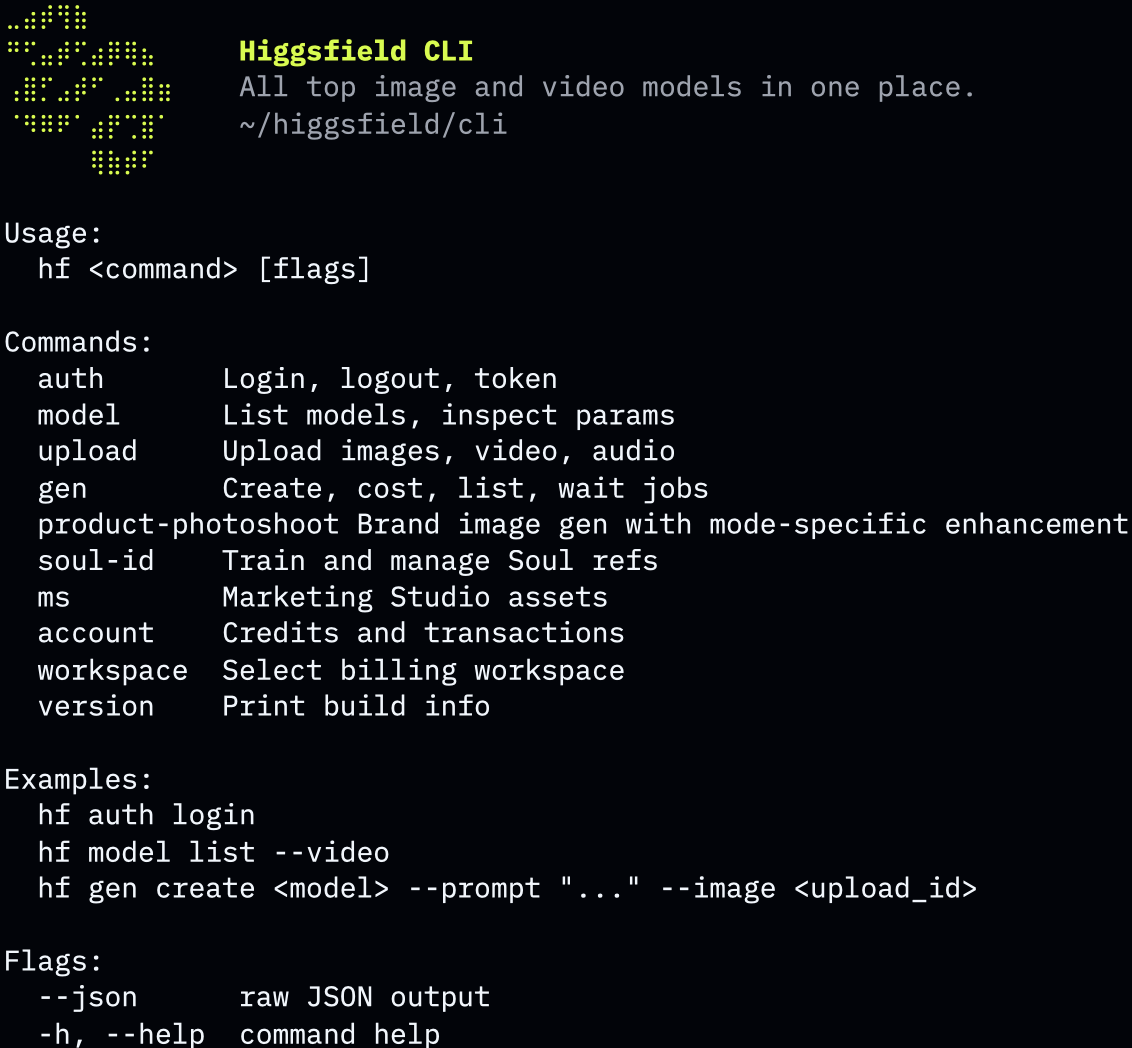
Generate images, videos, 3D assets, audio, and finished-video analysis from the terminal using 40+ Higgsfield AI models — Nano Banana Pro, Nano Banana 2 Lite, Gemini Omni Flash, FLUX.2, Soul V2, Veo 3.1, Kling v3.0, Seedance 2.5, Marketing Studio, Virality Predictor, and more. Train face-faithful Soul characters and produce branded marketing assets without leaving your shell.
Contents
- Install
- Quickstart
- Examples
- Models
- Workflows
- Video Explainer
- Games
- Websites
- Commands
- Flags
- Updating
- Uninstall
- Troubleshooting
- Support
- License
Install
macOS / Linux — curl
curl -fsSL https://raw.githubusercontent.com/higgsfield-ai/cli/main/install.sh | sh
macOS / Linux — Homebrew
brew install higgsfield-ai/tap/higgsfield
Cross-platform (incl. Windows) — npm
npm install -g @higgsfield/cli
Manual
Download an archive matching your OS and architecture from Releases, extract, and place the binary in your $PATH.
Quickstart
Authenticate:
higgsfield auth login
Generate an image and wait for the result URL:
higgsfield generate create nano_banana_2 --prompt "a quiet beach at sunrise" --wait
Examples
Nano Banana Pro
higgsfield generate create nano_banana_2 \
  --prompt "modern architecture, glass facade, golden hour light" \
  --aspect_ratio 16:9 \
  --resolution 2k \
  --wait
GPT Image 2.5
Recommended default for image generation, design, and on-image text.
higgsfield generate create gpt_image_2_5 \
  --prompt "clean infographic showing global energy mix, flat icons, muted palette" \
  --aspect_ratio 3:4 \
  --quality high --resolution 2k \
  --wait
Kling v3.0
higgsfield generate create kling3_0 \
  --prompt "slow camera push through a forest clearing at dawn" \
  --start-image ./first.png \
  --duration 5 --mode pro --sound off \
  --wait
Seedance 2.5
SOTA default for general video generation.
higgsfield generate create seedance_2_5 \
  --prompt "drone shot over a mountain valley at sunrise" \
  --aspect_ratio 16:9 --duration 5 \
  --resolution 1080p --mode t2v --bitrate_mode high \
  --wait
Virality Predictor
brain_activity is the technical job set type for Virality Predictor. It
analyzes a finished video for hook strength, attention, retention, and viral
potential, then prints scores plus an Open report link.
higgsfield generate create brain_activity --video ./ad.mp4 --wait
higgsfield generate get <job_id>
higgsfield generate wait <job_id>
Draw To Video
Edit a video from a source clip plus an edited sketch frame:
higgsfield generate workflow draw_to_video \
  --video ./source.mp4 \
  --sketch ./frame.png \
  --timestamp 3.2 \
  --prompt "make the jacket red" \
  --wait
Reframe
Reframe a source video for a new aspect ratio:
higgsfield generate workflow reframe \
  --video ./source.mp4 \
  --aspect-ratio 9:16 \
  --resolution 720p \
  --wait
Voice Change
Replace the voice on a source video with a chosen voice:
higgsfield generate workflow voice-change \
  --video ./source.mp4 \
  --voice_type preset \
  --voice_id <voice_id> \
  --wait
Dubbing
Dub a source video into another language (--target_language is an ISO-639-3 code,
e.g. eng, spa, fra, deu, jpn; run higgsfield workflow get dubbing for the full list):
higgsfield generate workflow dubbing \
  --video ./source.mp4 \
  --target_language spa \
  --wait
Voices
List available voices (presets + your custom voices) to get a voice_id for
text2speech_v2 and voice-change. Use a voice's id as --voice_id and its
type (preset/element) as --voice_type:
higgsfield voices list
higgsfield voices get <voice_id> --json
Video Explainer
The explainer skill builds matched 10-second blocks: resolve a style, generate
all narration with Seed Audio first, generate the corresponding Gemini Omni
clips second, then assemble the ordered pairs with explainer_video:
higgsfield preset list video-explainer --json
higgsfield preset resolve video-explainer <preset_id> --json
higgsfield voices list --json

higgsfield generate create seed_audio \
  --prompt "<Block 1 narration>" \
  --voice_type preset --voice_id <voice_id> --wait --json

higgsfield generate create gemini_omni \
  --prompt "<Block 1 visual prompt>" \
  --image <resolved_style_media_id> \
  --duration 10 --resolution 720p --aspect_ratio 16:9 --wait --json

higgsfield generate create explainer_video \
  --items @blocks.json --width 1280 --height 720 --wait --json
Repeat the audio/video calls once per block. blocks.json maps every clip job to
its matching audio job in playback order. See
MODELS.md for the assembler schema and
optional subtitle fonts.
Games
Deploy a browser-game ZIP whose root contains index.html and either logic.js
or server.js:
higgsfield game deploy ./game.zip \
  --title "Space Runner" \
  --description "Fast arcade survival game" \
  --thumbnail https://cdn.example/cover.png \
  --favicon https://cdn.example/icon.png \
  --json
Update the same game with --game-id <game_id>. Marketplace publication is a
separate action:
higgsfield game publish <game_id> --name "Space Runner" --json
Browse the rigged 3D animation catalog before choosing an
animation_action_id:
higgsfield preset list animation-action --query walk
higgsfield preset list animation-action --group Fighting --category Punching --json
Soul ID
Train a Soul ID once:
higgsfield soul-id create --name me --soul-2 \
  --image ./me1.jpg --image ./me2.jpg --image ./me3.jpg
higgsfield soul-id wait <soul_id>
Reuse it in any compatible image model:
higgsfield generate create text2image_soul_v2 \
  --prompt "professional portrait, neutral background, soft daylight" \
  --soul-id <soul_id> \
  --wait
Models
40+ image, video, 3D, and audio models. Per-model parameters, defaults, and enums: MODELS.md. Live catalog: higgsfield model list.
Image (23)
| job_set_type | name |
|---|---|
nano_banana_2 | Nano Banana Pro |
nano_banana_2_lite | Nano Banana 2 Lite |
nano_banana_flash | Nano Banana 2 |
nano_banana | Nano Banana |
flux_2 | FLUX.2 |
flux_kontext | Flux Kontext |
gpt_image_2 | GPT Image 2 |
gpt_image_2_5 | GPT Image 2.5 |
text2image_soul_v2 | Higgsfield Soul V2 |
seedream_v4_5 | Seedream 4.5 |
seedream_v5_lite | Seedream V5 Lite |
grok_image | Grok Image |
openai_hazel | OpenAI Hazel |
outpaint | Outpaint |
recraft_v4_1 | Recraft V4.1 |
image_auto | Image Auto |
image_background_remover | Image Background Remover |
z_image | Z Image |
kling_omni_image | Kling O1 Image |
cinematic_studio_2_5 | Cinematic Studio 2.5 |
soul_cinematic | Soul Cinematic |
soul_location | Soul Location |
soul_cast | Soul Cast |
marketing_studio_image | Marketing Studio Image |
Video (22)
| job_set_type | name |
|---|---|
brain_activity | Virality Predictor |
gemini_omni | Gemini Omni Flash |
veo3_1 | Google Veo 3.1 |
veo3_1_lite | Google Veo 3.1 Lite |
veo3 | Google Veo 3 |
kling3_0 | Kling v3.0 |
kling3_0_turbo | Kling 3.0 Turbo |
kling2_6 | Kling 2.6 Video |
seedance_2_5 | Seedance 2.5 |
seedance_2_0 | Seedance 2.0 |
seedance_2_0_mini | Seedance 2.0 Mini |
seedance1_5 | Seedance 1.5 Pro |
wan2_7 | Wan 2.7 |
wan2_6 | Wan 2.6 Video |
minimax_hailuo | Minimax Hailuo |
grok_video | Grok Video |
grok_video_v15 | Grok Video 1.5 |
cinematic_studio_3_0 | Cinematic Studio 3.0 |
cinematic_studio_video | Cinematic Studio Video |
cinematic_studio_video_3_5 | Cinematic Studio Video 3.5 |
cinematic_studio_video_v2 | Cinematic Studio Video V2 |
marketing_studio_video | Marketing Studio Video |
video_background_remover | Video Background Remover |
3D (5)
| job_set_type | name |
|---|---|
multi_image_to_3d | Multi-Image to 3D |
image_to_3d | Image to 3D |
tripo_3d | Text to 3D |
sam_3_3d | 3D Objects |
3d_rigging | 3D Rigging |
Audio (5)
| job_set_type | name |
|---|---|
seed_audio | Seed Audio 1.0 |
sonilo_music | Sonilo Music |
mirelo_text_to_audio | Mirelo Text to Audio |
text2speech_v2 | Text to Speech |
inworld_text_to_speech | Inworld Text to Speech |
text2speech_v2 turns text into speech with a chosen voice. Pick the engine with
--variant (elevenlabs, minimax, seed_speech, vibe_voice, cozy_voice) and the
voice with --voice_type (preset or element) + --voice_id. Discover voices with
higgsfield voices list.
higgsfield generate create text2speech_v2 \
  --prompt "Hello from Higgsfield" \
  --variant elevenlabs \
  --voice_type preset \
  --voice_id <voice_id> \
  --wait
Workflows
Workflows are higher-level generation flows with their own parameter schemas.
Use workflow list to discover available workflows and workflow get to
inspect the parameters before creating a job.
higgsfield workflow list
higgsfield workflow get draw_to_video
higgsfield workflow get reframe --json
higgsfield workflow get voice-change
higgsfield workflow get dubbing
Create workflow jobs through generate workflow:
higgsfield generate workflow draw_to_video \
  --video ./source.mp4 \
  --sketch ./frame.png \
  --timestamp 3.2 \
  --prompt "make the jacket red" \
  --wait

higgsfield generate workflow reframe \
  --video ./source.mp4 \
  --aspect-ratio 9:16 \
  --resolution 720p \
  --wait

higgsfield generate workflow voice-change \
  --video ./source.mp4 \
  --voice_type preset \
  --voice_id <voice_id> \
  --wait

higgsfield generate workflow dubbing \
  --video ./source.mp4 \
  --target_language spa \
  --wait
Estimate workflow cost through generate cost workflow:
higgsfield generate cost workflow draw_to_video --duration 8.2 --resolution 720p
higgsfield generate cost workflow reframe --duration 7.1 --resolution 1080p
voice-change and dubbing do not support cost estimation.
Fetch or wait for workflow jobs with the same job commands used by model generations:
higgsfield generate get <job_id>
higgsfield generate wait <job_id>
Websites
Build and deploy full-stack websites from the terminal. Each site is a React 19 +
TanStack Start app, server-rendered as a single Cloudflare Worker, with D1, R2, KV,
Durable Objects, and Containers available. higgsfield website create provisions the
site and a git repo; you clone it, edit the code under app/, push, and deploy to
its live URL. The build runs on the Higgsfield platform from the pushed
branch.
create requires --type — what kind of product you're building:
website— a standalone site with no Higgsfield integration (no "Sign in with Higgsfield", no requests to Higgsfield). Landing pages, portfolios, general tools.app— a product tightly integrated with Higgsfield: its users sign in with Higgsfield and generate images/videos through the Higgsfield SDK.
create also requires --category — the content category the site is filed
under on the marketplace. It's a slug from a curated taxonomy (e.g.
cinematic, ads-marketing, ugc-social, other); run
higgsfield website categories to see the full list, then pass the closest one
(use other when nothing fits). The taxonomy can grow over time, so the server
validates the slug and rejects an unknown one.
--type app also requires --template. The flag has exactly four choices:
| Template | Pick when |
|---|---|
app-detail | a single tool's public landing page, with a generator hero and how-it-works flow |
preset | pick-a-style generation, preset galleries, wizards, or upload/configure/iterate workflows |
studio | a full creative workspace with projects, prompt dock, settings, and a generations feed |
custom | a bare scaffold with no shipped layout; use only when the user explicitly requests a custom/bare scaffold |
Pick the closest of app-detail, preset, and studio. Agents must never
choose custom by default.
For every non-custom app template, the starter repo ships real code at
app/src/layouts/<template>.tsx, already wired as the home page. Adapt that
layout in place and thread real data through it; do not rebuild it, replace it,
or swap it for another layout. The shipped UI includes demo placeholders, so
it still needs the product's real business logic. After cloning, read both
app/src/layouts/AGENTS.md and app/src/components/AGENTS.md before editing.
Template validation happens locally: a missing or invalid app template fails
before authentication or any backend call. --type website does not require a
template. If --template is supplied for a standalone website, the CLI ignores
it and omits it from both the backend request and the create result.
Pass --subdomain to choose the site's subdomain — it becomes the slug, so the
live URL is <subdomain>.<host>. Always set one derived from the site's name
(lowercase, DNS-safe: letters, digits, single hyphens); omit it only if you want
a random subdomain. Reserved labels (e.g. api, www) and already-taken
subdomains are rejected — pick another.
Create a standalone website or an app using the closest starter template:
higgsfield website create --type website --category other

higgsfield website create \
  --type app \
  --category product-ecommerce \
  --template app-detail

higgsfield website create \
  --type app \
  --category ads-marketing \
  --template preset \
  --subdomain my-app

higgsfield website create \
  --type app \
  --category cinematic \
  --template studio
App create results preserve the selected template. Human-readable table output
includes Category and Template columns (alongside Website ID, Type,
Slug, Name, Preview URL, and Production URL), and non-custom apps also print the
shipped layout path. JSON output includes "template" for apps:
{
  "website_id": "<website_id>",
  "type": "app",
  "template": "studio"
}
Standalone website results omit template, including when an ignored
--template was supplied; table output leaves the Template cell empty, while
JSON has no template field.
Continue with the returned website_id:
# 1. Create the site + its git repo using one of the commands above.
#    Prefer a DNS-safe --subdomain derived from the site's name.

# 2. Get the clone URL, branch, and a scoped git token
higgsfield website repo-access <website_id>

# 3. Clone with the token, edit under app/, commit, and push
git -c http.extraHeader="Authorization: token <token>" clone <repo_url> <slug>
cd <slug>
# The scaffolded clone has no git identity — set one or the first commit fails:
git config user.email "agent@higgsfield.ai" && git config user.name "Higgsfield Agent"
# ...edit files under app/ (bun-only repo: bun install / bun add / bunx /
#    bun run typecheck|build — never npm/npx/yarn; app/src/routeTree.gen.ts
#    is generated, never hand-edit it) ...
git add -A && git commit -m "initial build"
git -c http.extraHeader="Authorization: token <token>" push origin <branch>

# 4. Deploy — ships the live site (run it again after every change)
higgsfield website deploy <website_id>

# Publish — list the site on the Higgsfield community feed ("show in feed")
# where others can discover and remix it. Publish does NOT deploy: it lists
# whatever `deploy` last shipped, so deploy first (and again after any change).
# Prints the community-feed listing URL.
higgsfield website publish <website_id>

# Enter the $100k Higgsfield app contest (type: app). The entry PUBLISHES the
# app for you — no separate `publish` needed; it just needs a live deploy and
# filled page metadata. Pass one or more public social links (Instagram /
# TikTok / YouTube / X) promoting it. Re-running overwrites the links.
higgsfield website contest <website_id> --url https://x.com/<user>/status/...

# Check deploy status and the live URL any time
higgsfield website status <website_id>
Rename a site's subdomain (the slug in its public URL). The site is re-deployed under the new subdomain and the old subdomain stops working — share the new URL afterwards. Storage (database, files, config) and the git repo are kept. Blocking like deploy (a couple of minutes); reserved or taken subdomains are rejected — pick another:
higgsfield website rename <website_id> --subdomain my-new-name
Inspect the site's database (read-only) and manage secrets (staged until the next deploy):
higgsfield website db tables <website_id>
higgsfield website db rows <website_id> --table users --limit 20
higgsfield website db query <website_id> --sql "SELECT count(*) FROM users"

higgsfield website secrets set <website_id> --name STRIPE_SECRET_KEY --value sk_live_...
higgsfield website secrets list <website_id>
List the sites you own:
higgsfield website list
List the content categories a site can be filed under (the --category slugs
for create), each with its slug, label, and description:
higgsfield website categories
Add --json to any command for machine-readable output.
Commands
| Command | Purpose |
|---|---|
higgsfield auth | login / logout / inspect token |
higgsfield account | credits balance, transactions |
higgsfield workspace | list / select / unset billing workspace |
higgsfield model | list models, inspect parameter schema |
higgsfield generate | create / cost / wait / get / list jobs |
higgsfield workflow | list workflows, inspect workflow parameter schema |
higgsfield preset | list server-managed styles/actions and resolve explainer style inputs |
higgsfield game | deploy browser-game ZIPs and explicitly publish marketplace listings |
higgsfield voices | list voices / inspect a voice for text2speech & voice-change |
higgsfield upload | upload an image / video / audio file |
higgsfield soul-id | train and manage Soul characters |
higgsfield marketing-studio | branded ads (avatars, products, ad references, brand kits, ad formats, DTC Ads Engine) |
higgsfield product-photoshoot | brand image generation with mode-specific enhancement |
higgsfield website | create (--type website|app, --category <slug>; apps require --template app-detail|preset|studio|custom, with custom only by explicit request) / list categories / edit (via git repo access) / deploy / rename the subdomain / publish to the community feed / enter the app contest (auto-publishes) / inspect DB / manage secrets for full-stack websites |
higgsfield version | print build info |
Run higgsfield <command> --help for flags and examples (also higgsfield generate create --help, higgsfield soul-id create --help, etc.).
Flags
Flags work across all commands.
| Flag | Purpose |
|---|---|
--wait | block until the job finishes; print the result URL |
--wait-timeout | max wait duration (default 10m) |
--wait-interval | poll interval (default 3s) |
--json | machine-readable JSON output |
--no-color | disable color output |
Example pipeline:
higgsfield generate list --json | jq -r '.[] | select(.status=="completed") | .result_url'
Updating
# curl
curl -fsSL https://raw.githubusercontent.com/higgsfield-ai/cli/main/install.sh | sh

# brew
brew update && brew upgrade higgsfield

# npm
npm install -g @higgsfield/cli@latest
Pin to a specific release:
curl -fsSL https://raw.githubusercontent.com/higgsfield-ai/cli/main/install.sh | sh -s -- --tag v1.1.2
# or
npm install -g @higgsfield/cli@1.1.2
Uninstall
# curl install (default prefix /usr/local)
sudo rm /usr/local/bin/higgsfield

# brew
brew uninstall higgsfield

# npm
npm uninstall -g @higgsfield/cli
Troubleshooting
Session expired / Not authenticated — tokens are short-lived. Re-run higgsfield auth login.
Unknown model "<name>" — run higgsfield model list for the current catalog.
Support
Bugs and feature requests: github.com/higgsfield-ai/cli/issues. Please include higgsfield version output and the exact command that failed.
License
Contributors


Similar repos


Languages
Shell
100.0%
README
Higgsfield CLI
Generate images, videos, 3D assets, audio, and finished-video analysis from the terminal using 40+ Higgsfield AI models — Nano Banana Pro, Nano Banana 2 Lite, Gemini Omni Flash, FLUX.2, Soul V2, Veo 3.1, Kling v3.0, Seedance 2.5, Marketing Studio, Virality Predictor, and more. Train face-faithful Soul characters and produce branded marketing assets without leaving your shell.
Contents
- Install
- Quickstart
- Examples
- Models
- Workflows
- Video Explainer
- Games
- Websites
- Commands
- Flags
- Updating
- Uninstall
- Troubleshooting
- Support
- License
Install
macOS / Linux — curl
curl -fsSL https://raw.githubusercontent.com/higgsfield-ai/cli/main/install.sh | sh
macOS / Linux — Homebrew
brew install higgsfield-ai/tap/higgsfield
Cross-platform (incl. Windows) — npm
npm install -g @higgsfield/cli
Manual
Download an archive matching your OS and architecture from Releases, extract, and place the binary in your $PATH.
Quickstart
Authenticate:
higgsfield auth login
Generate an image and wait for the result URL:
higgsfield generate create nano_banana_2 --prompt "a quiet beach at sunrise" --wait
Examples
Nano Banana Pro
higgsfield generate create nano_banana_2 \
  --prompt "modern architecture, glass facade, golden hour light" \
  --aspect_ratio 16:9 \
  --resolution 2k \
  --wait
GPT Image 2.5
Recommended default for image generation, design, and on-image text.
higgsfield generate create gpt_image_2_5 \
  --prompt "clean infographic showing global energy mix, flat icons, muted palette" \
  --aspect_ratio 3:4 \
  --quality high --resolution 2k \
  --wait
Kling v3.0
higgsfield generate create kling3_0 \
  --prompt "slow camera push through a forest clearing at dawn" \
  --start-image ./first.png \
  --duration 5 --mode pro --sound off \
  --wait
Seedance 2.5
SOTA default for general video generation.
higgsfield generate create seedance_2_5 \
  --prompt "drone shot over a mountain valley at sunrise" \
  --aspect_ratio 16:9 --duration 5 \
  --resolution 1080p --mode t2v --bitrate_mode high \
  --wait
Virality Predictor
brain_activity is the technical job set type for Virality Predictor. It
analyzes a finished video for hook strength, attention, retention, and viral
potential, then prints scores plus an Open report link.
higgsfield generate create brain_activity --video ./ad.mp4 --wait
higgsfield generate get <job_id>
higgsfield generate wait <job_id>
Draw To Video
Edit a video from a source clip plus an edited sketch frame:
higgsfield generate workflow draw_to_video \
  --video ./source.mp4 \
  --sketch ./frame.png \
  --timestamp 3.2 \
  --prompt "make the jacket red" \
  --wait
Reframe
Reframe a source video for a new aspect ratio:
higgsfield generate workflow reframe \
  --video ./source.mp4 \
  --aspect-ratio 9:16 \
  --resolution 720p \
  --wait
Voice Change
Replace the voice on a source video with a chosen voice:
higgsfield generate workflow voice-change \
  --video ./source.mp4 \
  --voice_type preset \
  --voice_id <voice_id> \
  --wait
Dubbing
Dub a source video into another language (--target_language is an ISO-639-3 code,
e.g. eng, spa, fra, deu, jpn; run higgsfield workflow get dubbing for the full list):
higgsfield generate workflow dubbing \
  --video ./source.mp4 \
  --target_language spa \
  --wait
Voices
List available voices (presets + your custom voices) to get a voice_id for
text2speech_v2 and voice-change. Use a voice's id as --voice_id and its
type (preset/element) as --voice_type:
higgsfield voices list
higgsfield voices get <voice_id> --json
Video Explainer
The explainer skill builds matched 10-second blocks: resolve a style, generate
all narration with Seed Audio first, generate the corresponding Gemini Omni
clips second, then assemble the ordered pairs with explainer_video:
higgsfield preset list video-explainer --json
higgsfield preset resolve video-explainer <preset_id> --json
higgsfield voices list --json

higgsfield generate create seed_audio \
  --prompt "<Block 1 narration>" \
  --voice_type preset --voice_id <voice_id> --wait --json

higgsfield generate create gemini_omni \
  --prompt "<Block 1 visual prompt>" \
  --image <resolved_style_media_id> \
  --duration 10 --resolution 720p --aspect_ratio 16:9 --wait --json

higgsfield generate create explainer_video \
  --items @blocks.json --width 1280 --height 720 --wait --json
Repeat the audio/video calls once per block. blocks.json maps every clip job to
its matching audio job in playback order. See
MODELS.md for the assembler schema and
optional subtitle fonts.
Games
Deploy a browser-game ZIP whose root contains index.html and either logic.js
or server.js:
higgsfield game deploy ./game.zip \
  --title "Space Runner" \
  --description "Fast arcade survival game" \
  --thumbnail https://cdn.example/cover.png \
  --favicon https://cdn.example/icon.png \
  --json
Update the same game with --game-id <game_id>. Marketplace publication is a
separate action:
higgsfield game publish <game_id> --name "Space Runner" --json
Browse the rigged 3D animation catalog before choosing an
animation_action_id:
higgsfield preset list animation-action --query walk
higgsfield preset list animation-action --group Fighting --category Punching --json
Soul ID
Train a Soul ID once:
higgsfield soul-id create --name me --soul-2 \
  --image ./me1.jpg --image ./me2.jpg --image ./me3.jpg
higgsfield soul-id wait <soul_id>
Reuse it in any compatible image model:
higgsfield generate create text2image_soul_v2 \
  --prompt "professional portrait, neutral background, soft daylight" \
  --soul-id <soul_id> \
  --wait
Models
40+ image, video, 3D, and audio models. Per-model parameters, defaults, and enums: MODELS.md. Live catalog: higgsfield model list.
Image (23)
| job_set_type | name |
|---|---|
nano_banana_2 | Nano Banana Pro |
nano_banana_2_lite | Nano Banana 2 Lite |
nano_banana_flash | Nano Banana 2 |
nano_banana | Nano Banana |
flux_2 | FLUX.2 |
flux_kontext | Flux Kontext |
gpt_image_2 | GPT Image 2 |
gpt_image_2_5 | GPT Image 2.5 |
text2image_soul_v2 | Higgsfield Soul V2 |
seedream_v4_5 | Seedream 4.5 |
seedream_v5_lite | Seedream V5 Lite |
grok_image | Grok Image |
openai_hazel | OpenAI Hazel |
outpaint | Outpaint |
recraft_v4_1 | Recraft V4.1 |
image_auto | Image Auto |
image_background_remover | Image Background Remover |
z_image | Z Image |
kling_omni_image | Kling O1 Image |
cinematic_studio_2_5 | Cinematic Studio 2.5 |
soul_cinematic | Soul Cinematic |
soul_location | Soul Location |
soul_cast | Soul Cast |
marketing_studio_image | Marketing Studio Image |
Video (22)
| job_set_type | name |
|---|---|
brain_activity | Virality Predictor |
gemini_omni | Gemini Omni Flash |
veo3_1 | Google Veo 3.1 |
veo3_1_lite | Google Veo 3.1 Lite |
veo3 | Google Veo 3 |
kling3_0 | Kling v3.0 |
kling3_0_turbo | Kling 3.0 Turbo |
kling2_6 | Kling 2.6 Video |
seedance_2_5 | Seedance 2.5 |
seedance_2_0 | Seedance 2.0 |
seedance_2_0_mini | Seedance 2.0 Mini |
seedance1_5 | Seedance 1.5 Pro |
wan2_7 | Wan 2.7 |
wan2_6 | Wan 2.6 Video |
minimax_hailuo | Minimax Hailuo |
grok_video | Grok Video |
grok_video_v15 | Grok Video 1.5 |
cinematic_studio_3_0 | Cinematic Studio 3.0 |
cinematic_studio_video | Cinematic Studio Video |
cinematic_studio_video_3_5 | Cinematic Studio Video 3.5 |
cinematic_studio_video_v2 | Cinematic Studio Video V2 |
marketing_studio_video | Marketing Studio Video |
video_background_remover | Video Background Remover |
3D (5)
| job_set_type | name |
|---|---|
multi_image_to_3d | Multi-Image to 3D |
image_to_3d | Image to 3D |
tripo_3d | Text to 3D |
sam_3_3d | 3D Objects |
3d_rigging | 3D Rigging |
Audio (5)
| job_set_type | name |
|---|---|
seed_audio | Seed Audio 1.0 |
sonilo_music | Sonilo Music |
mirelo_text_to_audio | Mirelo Text to Audio |
text2speech_v2 | Text to Speech |
inworld_text_to_speech | Inworld Text to Speech |
text2speech_v2 turns text into speech with a chosen voice. Pick the engine with
--variant (elevenlabs, minimax, seed_speech, vibe_voice, cozy_voice) and the
voice with --voice_type (preset or element) + --voice_id. Discover voices with
higgsfield voices list.
higgsfield generate create text2speech_v2 \
  --prompt "Hello from Higgsfield" \
  --variant elevenlabs \
  --voice_type preset \
  --voice_id <voice_id> \
  --wait
Workflows
Workflows are higher-level generation flows with their own parameter schemas.
Use workflow list to discover available workflows and workflow get to
inspect the parameters before creating a job.
higgsfield workflow list
higgsfield workflow get draw_to_video
higgsfield workflow get reframe --json
higgsfield workflow get voice-change
higgsfield workflow get dubbing
Create workflow jobs through generate workflow:
higgsfield generate workflow draw_to_video \
  --video ./source.mp4 \
  --sketch ./frame.png \
  --timestamp 3.2 \
  --prompt "make the jacket red" \
  --wait

higgsfield generate workflow reframe \
  --video ./source.mp4 \
  --aspect-ratio 9:16 \
  --resolution 720p \
  --wait

higgsfield generate workflow voice-change \
  --video ./source.mp4 \
  --voice_type preset \
  --voice_id <voice_id> \
  --wait

higgsfield generate workflow dubbing \
  --video ./source.mp4 \
  --target_language spa \
  --wait
Estimate workflow cost through generate cost workflow:
higgsfield generate cost workflow draw_to_video --duration 8.2 --resolution 720p
higgsfield generate cost workflow reframe --duration 7.1 --resolution 1080p
voice-change and dubbing do not support cost estimation.
Fetch or wait for workflow jobs with the same job commands used by model generations:
higgsfield generate get <job_id>
higgsfield generate wait <job_id>
Websites
Build and deploy full-stack websites from the terminal. Each site is a React 19 +
TanStack Start app, server-rendered as a single Cloudflare Worker, with D1, R2, KV,
Durable Objects, and Containers available. higgsfield website create provisions the
site and a git repo; you clone it, edit the code under app/, push, and deploy to
its live URL. The build runs on the Higgsfield platform from the pushed
branch.
create requires --type — what kind of product you're building:
website— a standalone site with no Higgsfield integration (no "Sign in with Higgsfield", no requests to Higgsfield). Landing pages, portfolios, general tools.app— a product tightly integrated with Higgsfield: its users sign in with Higgsfield and generate images/videos through the Higgsfield SDK.
create also requires --category — the content category the site is filed
under on the marketplace. It's a slug from a curated taxonomy (e.g.
cinematic, ads-marketing, ugc-social, other); run
higgsfield website categories to see the full list, then pass the closest one
(use other when nothing fits). The taxonomy can grow over time, so the server
validates the slug and rejects an unknown one.
--type app also requires --template. The flag has exactly four choices:
| Template | Pick when |
|---|---|
app-detail | a single tool's public landing page, with a generator hero and how-it-works flow |
preset | pick-a-style generation, preset galleries, wizards, or upload/configure/iterate workflows |
studio | a full creative workspace with projects, prompt dock, settings, and a generations feed |
custom | a bare scaffold with no shipped layout; use only when the user explicitly requests a custom/bare scaffold |
Pick the closest of app-detail, preset, and studio. Agents must never
choose custom by default.
For every non-custom app template, the starter repo ships real code at
app/src/layouts/<template>.tsx, already wired as the home page. Adapt that
layout in place and thread real data through it; do not rebuild it, replace it,
or swap it for another layout. The shipped UI includes demo placeholders, so
it still needs the product's real business logic. After cloning, read both
app/src/layouts/AGENTS.md and app/src/components/AGENTS.md before editing.
Template validation happens locally: a missing or invalid app template fails
before authentication or any backend call. --type website does not require a
template. If --template is supplied for a standalone website, the CLI ignores
it and omits it from both the backend request and the create result.
Pass --subdomain to choose the site's subdomain — it becomes the slug, so the
live URL is <subdomain>.<host>. Always set one derived from the site's name
(lowercase, DNS-safe: letters, digits, single hyphens); omit it only if you want
a random subdomain. Reserved labels (e.g. api, www) and already-taken
subdomains are rejected — pick another.
Create a standalone website or an app using the closest starter template:
higgsfield website create --type website --category other

higgsfield website create \
  --type app \
  --category product-ecommerce \
  --template app-detail

higgsfield website create \
  --type app \
  --category ads-marketing \
  --template preset \
  --subdomain my-app

higgsfield website create \
  --type app \
  --category cinematic \
  --template studio
App create results preserve the selected template. Human-readable table output
includes Category and Template columns (alongside Website ID, Type,
Slug, Name, Preview URL, and Production URL), and non-custom apps also print the
shipped layout path. JSON output includes "template" for apps:
{
  "website_id": "<website_id>",
  "type": "app",
  "template": "studio"
}
Standalone website results omit template, including when an ignored
--template was supplied; table output leaves the Template cell empty, while
JSON has no template field.
Continue with the returned website_id:
# 1. Create the site + its git repo using one of the commands above.
#    Prefer a DNS-safe --subdomain derived from the site's name.

# 2. Get the clone URL, branch, and a scoped git token
higgsfield website repo-access <website_id>

# 3. Clone with the token, edit under app/, commit, and push
git -c http.extraHeader="Authorization: token <token>" clone <repo_url> <slug>
cd <slug>
# The scaffolded clone has no git identity — set one or the first commit fails:
git config user.email "agent@higgsfield.ai" && git config user.name "Higgsfield Agent"
# ...edit files under app/ (bun-only repo: bun install / bun add / bunx /
#    bun run typecheck|build — never npm/npx/yarn; app/src/routeTree.gen.ts
#    is generated, never hand-edit it) ...
git add -A && git commit -m "initial build"
git -c http.extraHeader="Authorization: token <token>" push origin <branch>

# 4. Deploy — ships the live site (run it again after every change)
higgsfield website deploy <website_id>

# Publish — list the site on the Higgsfield community feed ("show in feed")
# where others can discover and remix it. Publish does NOT deploy: it lists
# whatever `deploy` last shipped, so deploy first (and again after any change).
# Prints the community-feed listing URL.
higgsfield website publish <website_id>

# Enter the $100k Higgsfield app contest (type: app). The entry PUBLISHES the
# app for you — no separate `publish` needed; it just needs a live deploy and
# filled page metadata. Pass one or more public social links (Instagram /
# TikTok / YouTube / X) promoting it. Re-running overwrites the links.
higgsfield website contest <website_id> --url https://x.com/<user>/status/...

# Check deploy status and the live URL any time
higgsfield website status <website_id>
Rename a site's subdomain (the slug in its public URL). The site is re-deployed under the new subdomain and the old subdomain stops working — share the new URL afterwards. Storage (database, files, config) and the git repo are kept. Blocking like deploy (a couple of minutes); reserved or taken subdomains are rejected — pick another:
higgsfield website rename <website_id> --subdomain my-new-name
Inspect the site's database (read-only) and manage secrets (staged until the next deploy):
higgsfield website db tables <website_id>
higgsfield website db rows <website_id> --table users --limit 20
higgsfield website db query <website_id> --sql "SELECT count(*) FROM users"

higgsfield website secrets set <website_id> --name STRIPE_SECRET_KEY --value sk_live_...
higgsfield website secrets list <website_id>
List the sites you own:
higgsfield website list
List the content categories a site can be filed under (the --category slugs
for create), each with its slug, label, and description:
higgsfield website categories
Add --json to any command for machine-readable output.
Commands
| Command | Purpose |
|---|---|
higgsfield auth | login / logout / inspect token |
higgsfield account | credits balance, transactions |
higgsfield workspace | list / select / unset billing workspace |
higgsfield model | list models, inspect parameter schema |
higgsfield generate | create / cost / wait / get / list jobs |
higgsfield workflow | list workflows, inspect workflow parameter schema |
higgsfield preset | list server-managed styles/actions and resolve explainer style inputs |
higgsfield game | deploy browser-game ZIPs and explicitly publish marketplace listings |
higgsfield voices | list voices / inspect a voice for text2speech & voice-change |
higgsfield upload | upload an image / video / audio file |
higgsfield soul-id | train and manage Soul characters |
higgsfield marketing-studio | branded ads (avatars, products, ad references, brand kits, ad formats, DTC Ads Engine) |
higgsfield product-photoshoot | brand image generation with mode-specific enhancement |
higgsfield website | create (--type website|app, --category <slug>; apps require --template app-detail|preset|studio|custom, with custom only by explicit request) / list categories / edit (via git repo access) / deploy / rename the subdomain / publish to the community feed / enter the app contest (auto-publishes) / inspect DB / manage secrets for full-stack websites |
higgsfield version | print build info |
Run higgsfield <command> --help for flags and examples (also higgsfield generate create --help, higgsfield soul-id create --help, etc.).
Flags
Flags work across all commands.
| Flag | Purpose |
|---|---|
--wait | block until the job finishes; print the result URL |
--wait-timeout | max wait duration (default 10m) |
--wait-interval | poll interval (default 3s) |
--json | machine-readable JSON output |
--no-color | disable color output |
Example pipeline:
higgsfield generate list --json | jq -r '.[] | select(.status=="completed") | .result_url'
Updating
# curl
curl -fsSL https://raw.githubusercontent.com/higgsfield-ai/cli/main/install.sh | sh

# brew
brew update && brew upgrade higgsfield

# npm
npm install -g @higgsfield/cli@latest
Pin to a specific release:
curl -fsSL https://raw.githubusercontent.com/higgsfield-ai/cli/main/install.sh | sh -s -- --tag v1.1.2
# or
npm install -g @higgsfield/cli@1.1.2
Uninstall
# curl install (default prefix /usr/local)
sudo rm /usr/local/bin/higgsfield

# brew
brew uninstall higgsfield

# npm
npm uninstall -g @higgsfield/cli
Troubleshooting
Session expired / Not authenticated — tokens are short-lived. Re-run higgsfield auth login.
Unknown model "<name>" — run higgsfield model list for the current catalog.
Support
Bugs and feature requests: github.com/higgsfield-ai/cli/issues. Please include higgsfield version output and the exact command that failed.
License
Similar repos
Contributors
Languages
Shell
100.0%