A Slack Export archive viewer that allows you to easily view and share your Slack team's export
See the code

A Slack Export archive viewer that allows you to easily view and share your Slack team's export (instead of having to dive into hundreds of JSON files).
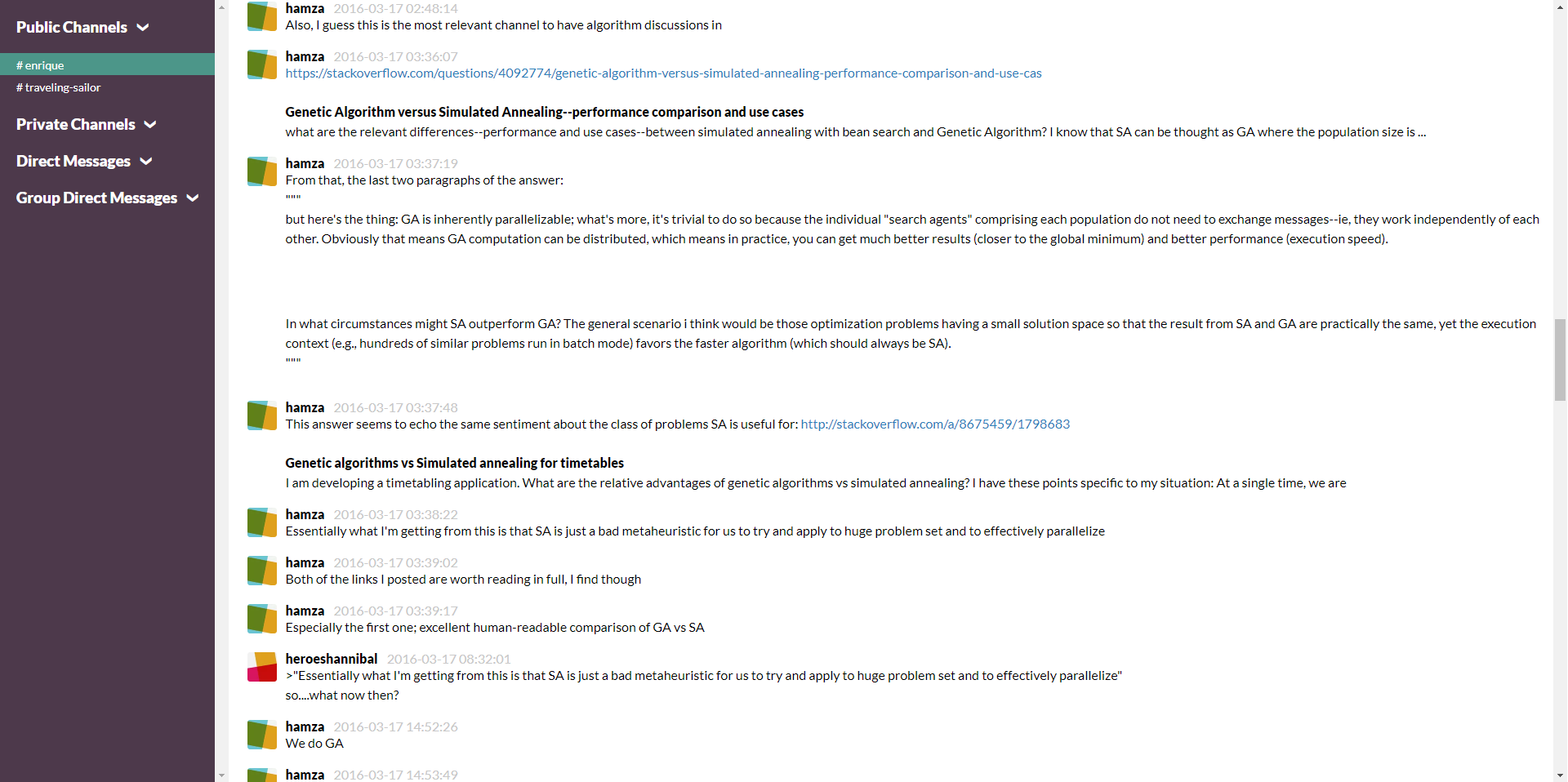
slack-export-viewer is useful for small teams on a free Slack plan (limited to 10,000 messages) who overrun their budget and ocassionally need a nice interface to refer back to previous messages. You get a web interface to easily scroll through all channels in the export without having to look at individual JSON files per channel per day.
slack-export-viewer can be used locally on one machine for yourself to explore an export, it can be run on a headless server (as it is a Flask web app) if you also want to serve the content to the rest of your team, or it can output HTML for deploying a static website.
I recommend pipx for a nice
isolated install.
pipx install slack-export-viewer
Or just feel free to use pip as you like.
pip install slack-export-viewer
slack-export-viewer will be installed as an entry-point; run from anywhere.
$ slack-export-viewer --help
Usage: slack-export-viewer [OPTIONS]

Options:
  -p, --port INTEGER              Host port to serve your content on
                                  Environment var: SEV_PORT (default: 5000)
  -z, --archive PATH              Path to your Slack export archive (.zip file or directory)
                                  Environment var: SEV_ARCHIVE  [required]
  -I, --ip TEXT                   Host IP to serve your content on
                                  Environment var: SEV_IP (default: localhost)
  --no-browser                    If you do not want a browser to open automatically, set this.
                                  Environment var: SEV_NO_BROWSER (default: false)
  --channels TEXT                 A comma separated list of channels to parse.
                                  Environment var: SEV_CHANNELS (default: None)
  --no-sidebar                    Removes the sidebar.
                                  Environment var: SEV_NO_SIDEBAR (default: false)
  --no-external-references        Removes all references to external
                                  css/js/images. Environment var:
                                  SEV_NO_EXTERNAL_REFERENCES (default: false)
  --test                          Runs in 'test' mode, i.e., this will do an archive extract, but will not start the server, and immediately quit.
                                            Environment var: SEV_TEST (default: false
  --debug                         Enable debug mode
                                  Environment var: FLASK_DEBUG (default: false)
  -o, --output-dir PATH           Output directory for static HTML files.
                                  Environment var: SEV_OUTPUT_DIR (default: html_output)
  --html-only                     If you want static HTML only, set this.
                                  Environment var: SEV_HTML_ONLY (default: false)
  --since [%Y-%m-%d]              Only show messages since this date.
                                  Environment var: SEV_SINCE (default: None)
  --show-dms / --no-show-dms      Show/Hide direct messages
                                  Environment var: SEV_SHOW_DMS (default: false)
  --thread-note / --no-thread-note
                                  Add/don't add 'Thread Reply' to thread messages.
                                  Environment var: SEV_THREAD_NOTE (default: true)
  --skip-channel-member-change    Hide channel join/leave messages
                                  Environment var: SEV_SKIP_CHANNEL_MEMBER_CHANGE (default: false)
  --hide-channels TEXT            Comma separated list of channels to hide.
                                  Environment var: SEV_HIDE_CHANNELS (default: None)
  --help                          Show this message and exit.
slack-export-viewer can also use the director without zip file.slack-export-viewer to itPoint slack-export-viewer to the .zip file and let it do its magic
slack-export-viewer -z /path/to/export/zip
If everything went well, your archive will have been extracted and processed, and a browser window will have opened showing your #general channel from the export. Or, if the html-only flag was set, HTML files will be available in the html-output directory (or a different directory if specified).
There is now a CLI included as well. Currently the one command you can use is clearing the cache from slack-export-viewer from your %TEMP% directory; see usage:
$ slack-export-viewer-cli --help
Usage: cli.py [OPTIONS] COMMAND [ARGS]...

Options:
  --help  Show this message and exit.

Commands:
  clean   Cleans up any temporary files (including cached output by...
  export  Generates a single-file printable export for an archive file or...
Export:
$ slack-export-viewer-cli export --help
Usage: cli.py export [OPTIONS] ARCHIVE_DIR

  Generates a single-file printable export for an archive file or directory

Options:
  --debug                         Enable debug mode
                                  Environment var: SEV_DEBUG (default: false)
  --show-dms / --no-show-dms      Show/Hide direct messages"
                                  Environment var: SEV_SHOW_DMS (default: false)
  --thread-note / --no-thread-note
                                  Add/don't add 'Thread Reply' to thread messages.
                                  Environment var: SEV_THREAD_NOTE (default: true)
  --since [%Y-%m-%d]              Only show messages since the given date
                                  Environment var: SEV_SINCE (default: None)
  --skip-channel-member-change    Hide channel join/leave messages
                                  Environment var: SEV_SKIP_CHANNEL_MEMBER_CHANGE (default: false)
  --template FILENAME             Custom single file export template
                                  Environment var: SEV_TEMPLATE (default: "export_single.html")
  --hide-channels TEXT            Comma separated list of channels to hide.
                                  Environment var: SEV_HIDE_CHANNELS (default: None)
  --filter-user TEXT              Filter messages by user attribute.
                                  Format: <attribute:value>
                                  Available attributes: id, name, real_name, email, display_name
                                  Environment var: SEV_FILTER_USER (default: None)
  --help                          Show this message and exit.
An example template can be found in the repositories slackviewer/templates/example_template_single_export.html file
Clean
$ slack-export-viewer-cli clean --help
Usage: cli.py clean [OPTIONS]

  Cleans up any temporary files (including cached output by slack-export-
  viewer)

Options:
  -w, --wet  Actually performs file deletion
             Environment var: SEV_CLEAN_WET (default: false)
  --help     Show this message and exit.
Clean:
$ slack-export-viewer-cli clean
Run with -w to remove C:\Users\hamza\AppData\Local\Temp\_slackviewer
$ slack-export-viewer-cli clean -w
Removing C:\Users\hamza\AppData\Local\Temp\_slackviewer...
Export:
$ slack-export-viewer-cli export \
    --since $(date -d "2 days ago" '+%Y-%m-%d') \
    --template /tmp/example_template_single_export.html \
    --show-dms \
    --skip-channel-member-change \
    --no-thread-note \
    --hide-channels "random,alerts" \
    /tmp/slack-export
Archive already extracted. Viewing from /tmp/slack-export...
Exported to slack-export.html
After installing the requirements in requirements.txt and dev-requirements.txt,
define FLASK_APP as main and select any channels desired from an export:
export FLASK_APP=main && export SEV_CHANNELS=general
Start a development server by running app.py in the root directory:
python3 app.py -z /Absolute/path/to/archive.zip --debug
Credit to Pieter Levels whose blog post and PHP script I used as a jumping off point for this.
slack-export-viewer is similar in core functionality but adds several things on top to make it nicer to use:
Overall
Maintained
Code review
Latest release
Releases this year
3,457 followers · starred Aug 2024
253 followers · starred Jan 2026
327 followers · starred Sep 2023
138 followers · starred Jun 2024
A Slack Export archive viewer that allows you to easily view and share your Slack team's export
See the code
A Slack Export archive viewer that allows you to easily view and share your Slack team's export (instead of having to dive into hundreds of JSON files).
slack-export-viewer is useful for small teams on a free Slack plan (limited to 10,000 messages) who overrun their budget and ocassionally need a nice interface to refer back to previous messages. You get a web interface to easily scroll through all channels in the export without having to look at individual JSON files per channel per day.
slack-export-viewer can be used locally on one machine for yourself to explore an export, it can be run on a headless server (as it is a Flask web app) if you also want to serve the content to the rest of your team, or it can output HTML for deploying a static website.
I recommend pipx for a nice
isolated install.
pipx install slack-export-viewer
Or just feel free to use pip as you like.
pip install slack-export-viewer
slack-export-viewer will be installed as an entry-point; run from anywhere.
$ slack-export-viewer --help
Usage: slack-export-viewer [OPTIONS]

Options:
  -p, --port INTEGER              Host port to serve your content on
                                  Environment var: SEV_PORT (default: 5000)
  -z, --archive PATH              Path to your Slack export archive (.zip file or directory)
                                  Environment var: SEV_ARCHIVE  [required]
  -I, --ip TEXT                   Host IP to serve your content on
                                  Environment var: SEV_IP (default: localhost)
  --no-browser                    If you do not want a browser to open automatically, set this.
                                  Environment var: SEV_NO_BROWSER (default: false)
  --channels TEXT                 A comma separated list of channels to parse.
                                  Environment var: SEV_CHANNELS (default: None)
  --no-sidebar                    Removes the sidebar.
                                  Environment var: SEV_NO_SIDEBAR (default: false)
  --no-external-references        Removes all references to external
                                  css/js/images. Environment var:
                                  SEV_NO_EXTERNAL_REFERENCES (default: false)
  --test                          Runs in 'test' mode, i.e., this will do an archive extract, but will not start the server, and immediately quit.
                                            Environment var: SEV_TEST (default: false
  --debug                         Enable debug mode
                                  Environment var: FLASK_DEBUG (default: false)
  -o, --output-dir PATH           Output directory for static HTML files.
                                  Environment var: SEV_OUTPUT_DIR (default: html_output)
  --html-only                     If you want static HTML only, set this.
                                  Environment var: SEV_HTML_ONLY (default: false)
  --since [%Y-%m-%d]              Only show messages since this date.
                                  Environment var: SEV_SINCE (default: None)
  --show-dms / --no-show-dms      Show/Hide direct messages
                                  Environment var: SEV_SHOW_DMS (default: false)
  --thread-note / --no-thread-note
                                  Add/don't add 'Thread Reply' to thread messages.
                                  Environment var: SEV_THREAD_NOTE (default: true)
  --skip-channel-member-change    Hide channel join/leave messages
                                  Environment var: SEV_SKIP_CHANNEL_MEMBER_CHANGE (default: false)
  --hide-channels TEXT            Comma separated list of channels to hide.
                                  Environment var: SEV_HIDE_CHANNELS (default: None)
  --help                          Show this message and exit.
slack-export-viewer can also use the director without zip file.slack-export-viewer to itPoint slack-export-viewer to the .zip file and let it do its magic
slack-export-viewer -z /path/to/export/zip
If everything went well, your archive will have been extracted and processed, and a browser window will have opened showing your #general channel from the export. Or, if the html-only flag was set, HTML files will be available in the html-output directory (or a different directory if specified).
There is now a CLI included as well. Currently the one command you can use is clearing the cache from slack-export-viewer from your %TEMP% directory; see usage:
$ slack-export-viewer-cli --help
Usage: cli.py [OPTIONS] COMMAND [ARGS]...

Options:
  --help  Show this message and exit.

Commands:
  clean   Cleans up any temporary files (including cached output by...
  export  Generates a single-file printable export for an archive file or...
Export:
$ slack-export-viewer-cli export --help
Usage: cli.py export [OPTIONS] ARCHIVE_DIR

  Generates a single-file printable export for an archive file or directory

Options:
  --debug                         Enable debug mode
                                  Environment var: SEV_DEBUG (default: false)
  --show-dms / --no-show-dms      Show/Hide direct messages"
                                  Environment var: SEV_SHOW_DMS (default: false)
  --thread-note / --no-thread-note
                                  Add/don't add 'Thread Reply' to thread messages.
                                  Environment var: SEV_THREAD_NOTE (default: true)
  --since [%Y-%m-%d]              Only show messages since the given date
                                  Environment var: SEV_SINCE (default: None)
  --skip-channel-member-change    Hide channel join/leave messages
                                  Environment var: SEV_SKIP_CHANNEL_MEMBER_CHANGE (default: false)
  --template FILENAME             Custom single file export template
                                  Environment var: SEV_TEMPLATE (default: "export_single.html")
  --hide-channels TEXT            Comma separated list of channels to hide.
                                  Environment var: SEV_HIDE_CHANNELS (default: None)
  --filter-user TEXT              Filter messages by user attribute.
                                  Format: <attribute:value>
                                  Available attributes: id, name, real_name, email, display_name
                                  Environment var: SEV_FILTER_USER (default: None)
  --help                          Show this message and exit.
An example template can be found in the repositories slackviewer/templates/example_template_single_export.html file
Clean
$ slack-export-viewer-cli clean --help
Usage: cli.py clean [OPTIONS]

  Cleans up any temporary files (including cached output by slack-export-
  viewer)

Options:
  -w, --wet  Actually performs file deletion
             Environment var: SEV_CLEAN_WET (default: false)
  --help     Show this message and exit.
Clean:
$ slack-export-viewer-cli clean
Run with -w to remove C:\Users\hamza\AppData\Local\Temp\_slackviewer
$ slack-export-viewer-cli clean -w
Removing C:\Users\hamza\AppData\Local\Temp\_slackviewer...
Export:
$ slack-export-viewer-cli export \
    --since $(date -d "2 days ago" '+%Y-%m-%d') \
    --template /tmp/example_template_single_export.html \
    --show-dms \
    --skip-channel-member-change \
    --no-thread-note \
    --hide-channels "random,alerts" \
    /tmp/slack-export
Archive already extracted. Viewing from /tmp/slack-export...
Exported to slack-export.html
After installing the requirements in requirements.txt and dev-requirements.txt,
define FLASK_APP as main and select any channels desired from an export:
export FLASK_APP=main && export SEV_CHANNELS=general
Start a development server by running app.py in the root directory:
python3 app.py -z /Absolute/path/to/archive.zip --debug
Credit to Pieter Levels whose blog post and PHP script I used as a jumping off point for this.
slack-export-viewer is similar in core functionality but adds several things on top to make it nicer to use:
Overall
Maintained
Code review
Latest release
Releases this year
3,457 followers · starred Aug 2024
253 followers · starred Jan 2026
327 followers · starred Sep 2023
138 followers · starred Jun 2024



