
README
InstructBLIP model
InstructBLIP model using Vicuna-13b as language model. InstructBLIP was introduced in the paper InstructBLIP: Towards General-purpose Vision-Language Models with Instruction Tuning by Dai et al.
Disclaimer: The team releasing InstructBLIP did not write a model card for this model so this model card has been written by the Hugging Face team.
Model description
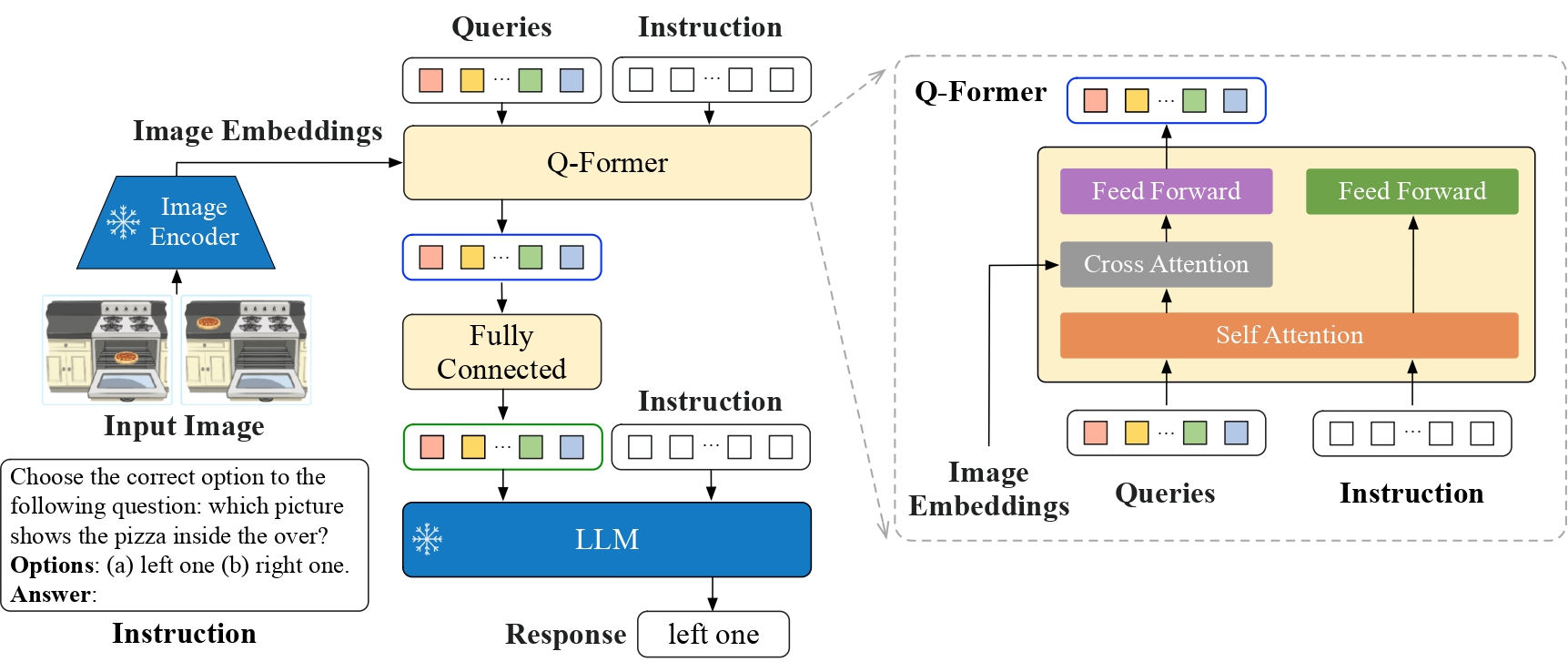
InstructBLIP is a visual instruction tuned version of BLIP-2. Refer to the paper for details.
Intended uses & limitations
Usage is as follows:
from transformers import InstructBlipProcessor, InstructBlipForConditionalGeneration
import torch
from PIL import Image
import requests

model = InstructBlipForConditionalGeneration.from_pretrained("Salesforce/instructblip-vicuna-13b")
processor = InstructBlipProcessor.from_pretrained("Salesforce/instructblip-vicuna-13b")

device = "cuda" if torch.cuda.is_available() else "cpu"
model.to(device)

url = "https://raw.githubusercontent.com/salesforce/LAVIS/main/docs/_static/Confusing-Pictures.jpg"
image = Image.open(requests.get(url, stream=True).raw).convert("RGB")
prompt = "What is unusual about this image?"
inputs = processor(images=image, text=prompt, return_tensors="pt").to(device)

outputs = model.generate(
        **inputs,
        do_sample=False,
        num_beams=5,
        max_length=256,
        min_length=1,
        top_p=0.9,
        repetition_penalty=1.5,
        length_penalty=1.0,
        temperature=1,
)
generated_text = processor.batch_decode(outputs, skip_special_tokens=True)[0].strip()
print(generated_text)
How to use
For code examples, we refer to the documentation.
Ethical Considerations
This release is for research purposes only in support of an academic paper. Our models, datasets, and code are not specifically designed or evaluated for all downstream purposes. We strongly recommend users evaluate and address potential concerns related to accuracy, safety, and fairness before deploying this model. We encourage users to consider the common limitations of AI, comply with applicable laws, and leverage best practices when selecting use cases, particularly for high-risk scenarios where errors or misuse could significantly impact people’s lives, rights, or safety. For further guidance on use cases, refer to our AUP and AI AUP.
Similar repos




README
InstructBLIP model
InstructBLIP model using Vicuna-13b as language model. InstructBLIP was introduced in the paper InstructBLIP: Towards General-purpose Vision-Language Models with Instruction Tuning by Dai et al.
Disclaimer: The team releasing InstructBLIP did not write a model card for this model so this model card has been written by the Hugging Face team.
Model description
InstructBLIP is a visual instruction tuned version of BLIP-2. Refer to the paper for details.
Intended uses & limitations
Usage is as follows:
from transformers import InstructBlipProcessor, InstructBlipForConditionalGeneration
import torch
from PIL import Image
import requests

model = InstructBlipForConditionalGeneration.from_pretrained("Salesforce/instructblip-vicuna-13b")
processor = InstructBlipProcessor.from_pretrained("Salesforce/instructblip-vicuna-13b")

device = "cuda" if torch.cuda.is_available() else "cpu"
model.to(device)

url = "https://raw.githubusercontent.com/salesforce/LAVIS/main/docs/_static/Confusing-Pictures.jpg"
image = Image.open(requests.get(url, stream=True).raw).convert("RGB")
prompt = "What is unusual about this image?"
inputs = processor(images=image, text=prompt, return_tensors="pt").to(device)

outputs = model.generate(
        **inputs,
        do_sample=False,
        num_beams=5,
        max_length=256,
        min_length=1,
        top_p=0.9,
        repetition_penalty=1.5,
        length_penalty=1.0,
        temperature=1,
)
generated_text = processor.batch_decode(outputs, skip_special_tokens=True)[0].strip()
print(generated_text)
How to use
For code examples, we refer to the documentation.
Ethical Considerations
This release is for research purposes only in support of an academic paper. Our models, datasets, and code are not specifically designed or evaluated for all downstream purposes. We strongly recommend users evaluate and address potential concerns related to accuracy, safety, and fairness before deploying this model. We encourage users to consider the common limitations of AI, comply with applicable laws, and leverage best practices when selecting use cases, particularly for high-risk scenarios where errors or misuse could significantly impact people’s lives, rights, or safety. For further guidance on use cases, refer to our AUP and AI AUP.